

Inspiration
Pocket Site came from a very ordinary moment: passing a house that was clearly having some kind of sale, but without enough information to know whether it was worth stopping. There was no useful sign, no visible inventory list, and no easy way to tell what was in the mountain of stuff.
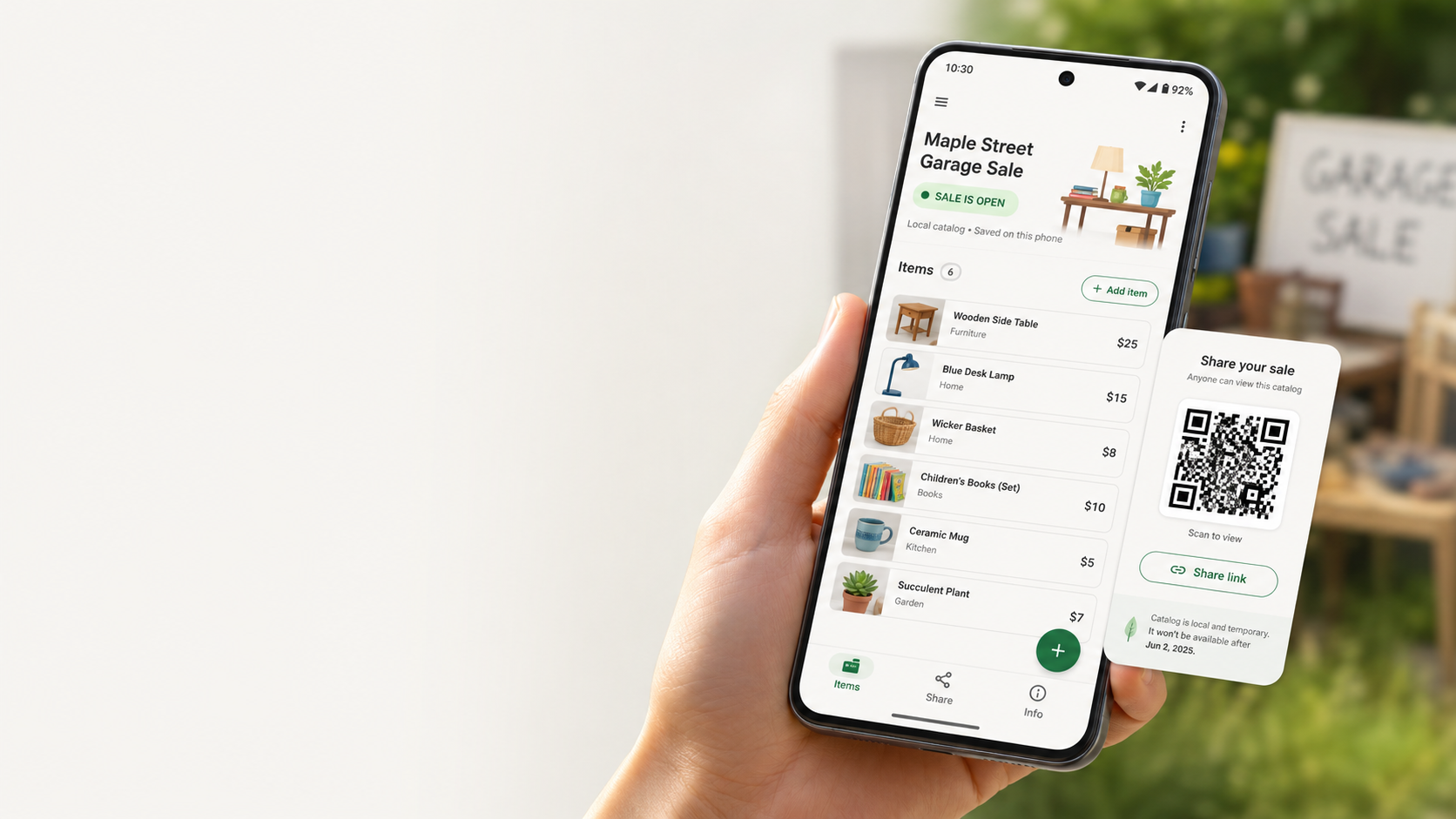
That is the small gap Pocket Site tries to fill. A temporary physical sale should be easy to preview without becoming a marketplace. The host creates a short-lived catalog, puts a QR code on the sign or table, and visitors can quickly decide whether to stop, browse, or move on.
Pocket Site is built around that moment of hesitation: scan the sign, browse the sale, stop when it matters.
What it does
Pocket Site is an Android app for creating a temporary QR-accessible catalog for a physical garage sale.
A host can create or load a sale, add items with categories, prices, descriptions, and availability, then open the sale. When the sale is open, Pocket Site provides QR/share material and PocketWiFiSale instructions so visitors can access a read-only catalog from another device. Visitors can browse the catalog without installing an app, creating an account, making a payment, or joining a marketplace.
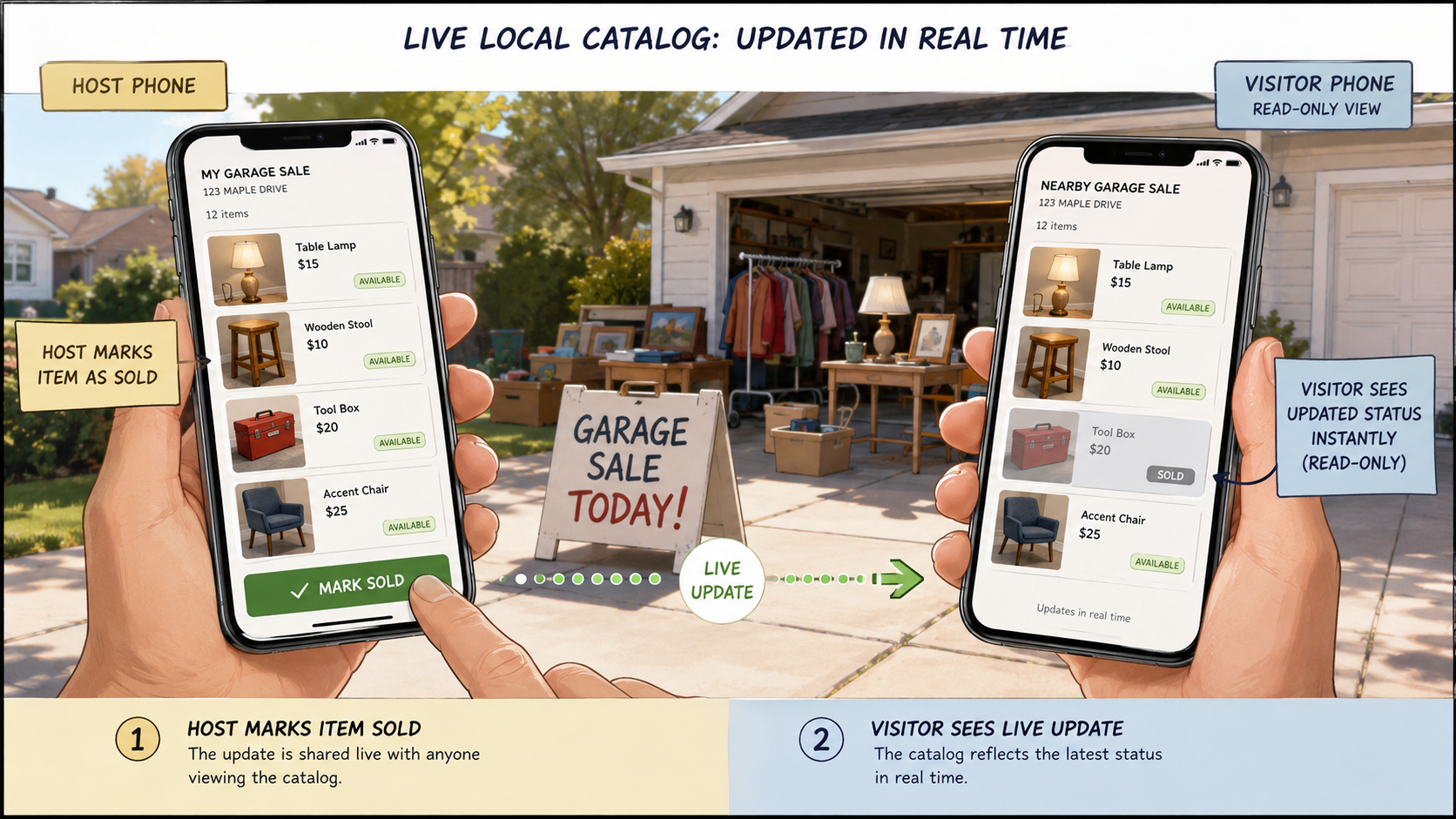
The host can mark items sold, close the sale, and delete all local sale data when the event is over. Pocket Site is intentionally temporary by design.
How we built it
Pocket Site was built as a Kotlin Android app with Jetpack Compose. The project focused on a small working vertical slice rather than a broad marketplace feature set.
Codex and GPT-5.6 were used throughout the build process for project inspection, milestone planning, Kotlin/Compose implementation, Gradle build debugging, QR/share flow work, local catalog behavior, foreground-service investigation, documentation, and submission packaging.
The implementation was built around a few core concepts: sale lifecycle states, local item data, a host editing view, a read-only visitor catalog, QR/share screens, PocketWiFiSale local-access instructions, and a destructive cleanup flow for removing local sale data.
Challenges we ran into
The biggest challenge was keeping the scope small. It would be easy for this idea to become another marketplace with accounts, payments, messages, reservations, maps, public listings, and analytics. We deliberately avoided those features so the app stayed focused on one use case: previewing a temporary physical sale.
The local catalog mode also raised real Android lifecycle questions. If the catalog is served locally from the host phone, it needs to remain available while the sale is open. That led to foreground-service work and clearer product boundaries around PocketWiFiSale local access.
Another challenge was making the QR flow understandable. A QR code pointing directly to a local address only works when visitors are on the right network, so the app needed clear instructions and fallback messaging instead of pretending networking is always invisible.
Accomplishments that we're proud of
We are proud that Pocket Site became a working Android app rather than just a concept.
The app supports a complete demo flow: load a sale, open it, share it, browse a read-only visitor catalog, update item status, close the sale, and delete local sale data. It also keeps a clear product boundary: no buyer accounts, no payments, no in-app messaging, no reservations, no ads, no analytics, and no permanent marketplace identity.
We are especially proud of the core product framing. Pocket Site is not trying to replace marketplace discovery. It helps people browse a temporary physical place.
What we learned
We learned that AI-assisted development works best when the product boundary is explicit. Codex was most useful when each task was framed as a small milestone with clear constraints, acceptance tests, and out-of-scope features.
We also learned that mobile apps are not just screens. Android lifecycle behavior, foreground services, notification permissions, local networking, QR codes, and cleanup flows all matter when a phone is acting as part of a real-world temporary system.
Most importantly, we learned that a useful app does not have to become a platform. Sometimes the right product is small, local, and designed to disappear when its job is done.
What's next for Pocket Site
The next version of Pocket Site would focus on making the visitor experience even easier.
The most important future feature is an optional temporary public preview link for curbside scanning, while keeping PocketWiFiSale as the private/local mode. Public preview would be useful for passersby who want to scan instantly over cellular; PocketWiFiSale would remain useful for private events, school fairs, neighborhood swaps, and local-only setups.
Other possible improvements include printable sign generation, better item photos, smoother refresh behavior, clearer setup checks for local networking, and export options for hosts who want to save a record of the sale.
The long-term direction is still the same: a temporary catalog for a temporary physical place.


Log in or sign up for Devpost to join the conversation.