-
-
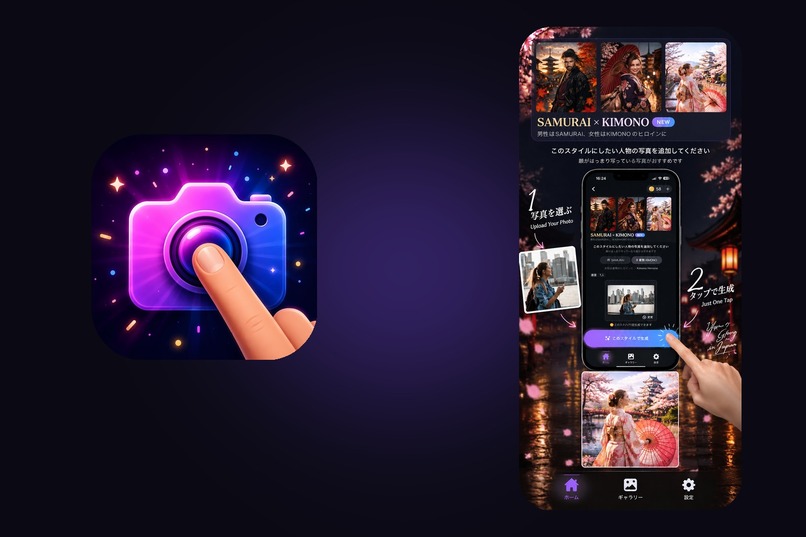
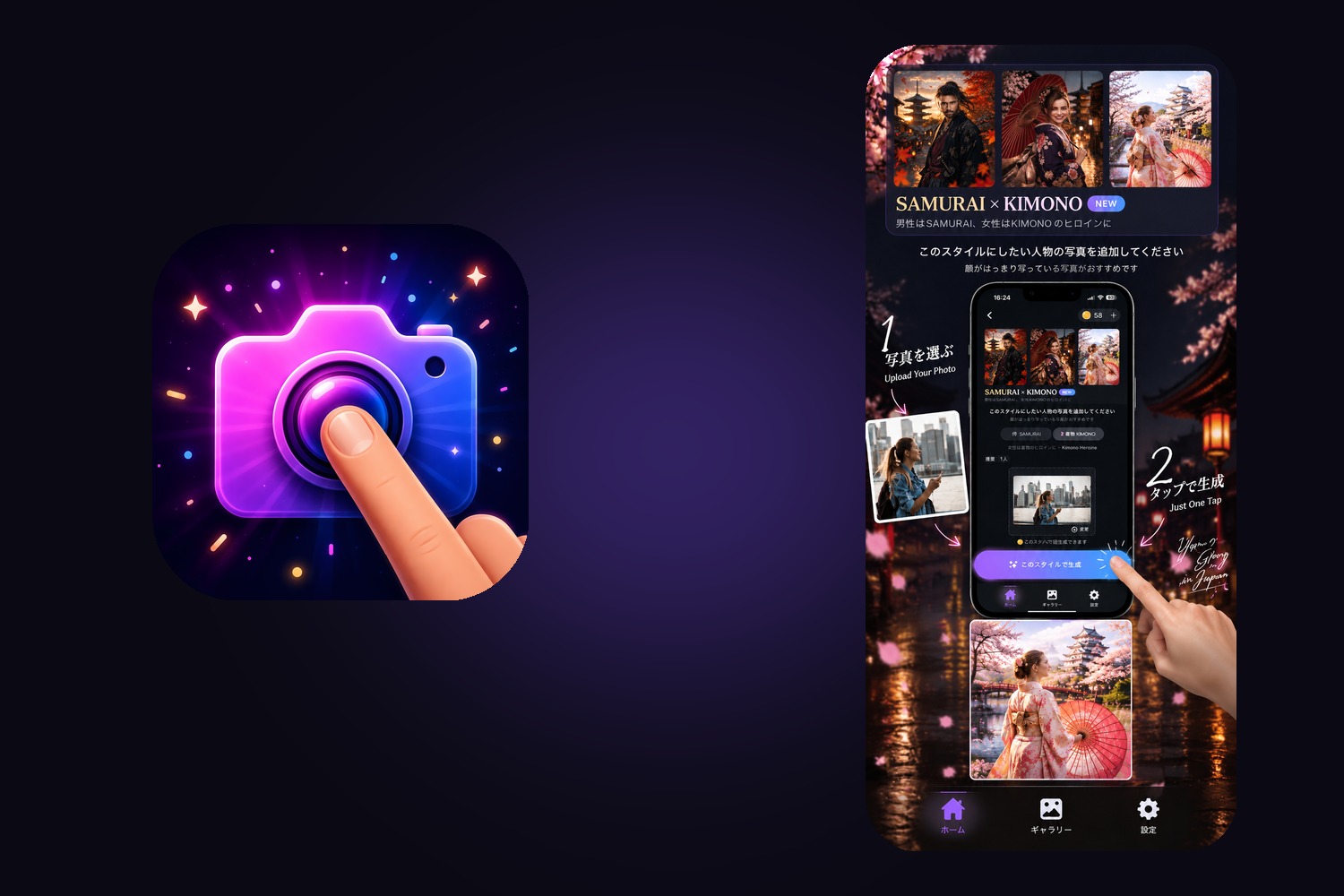
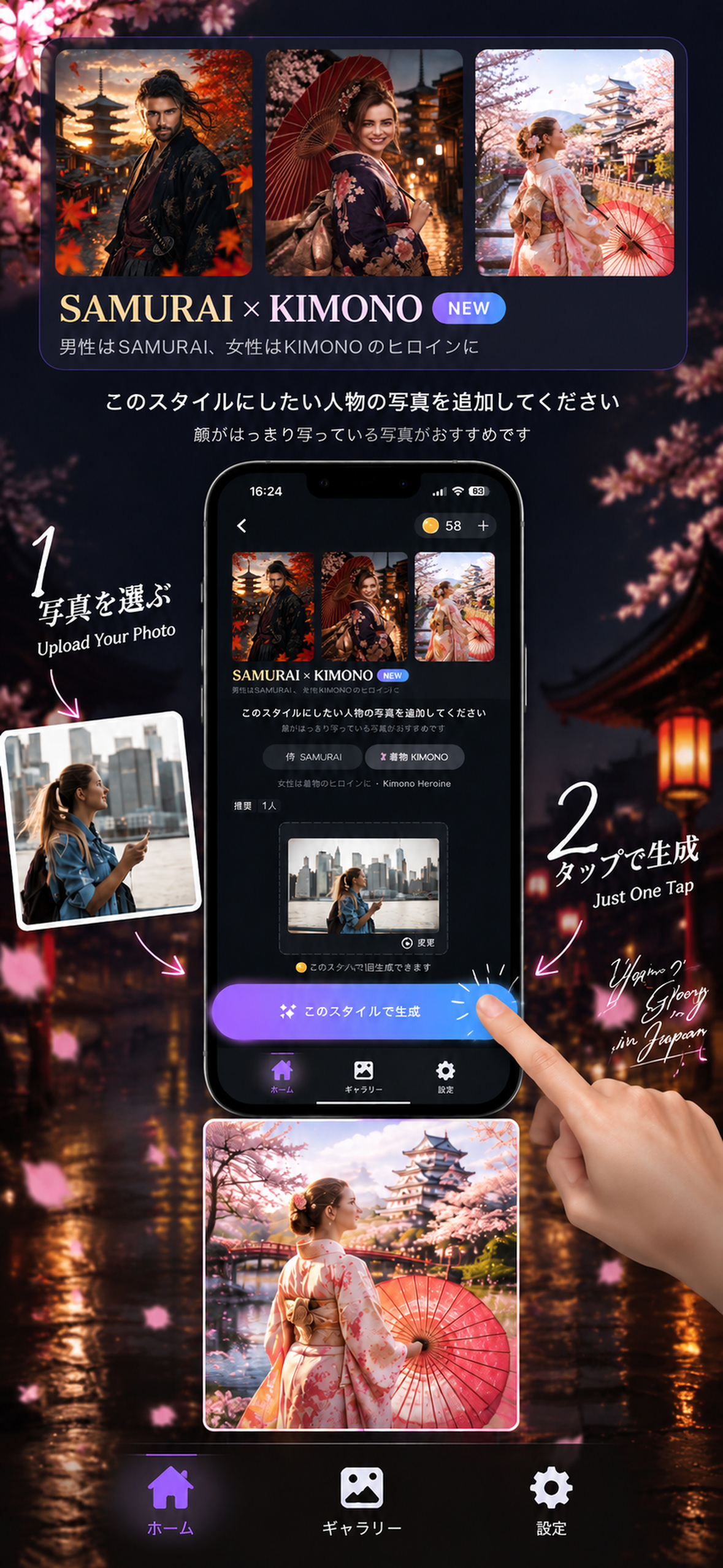
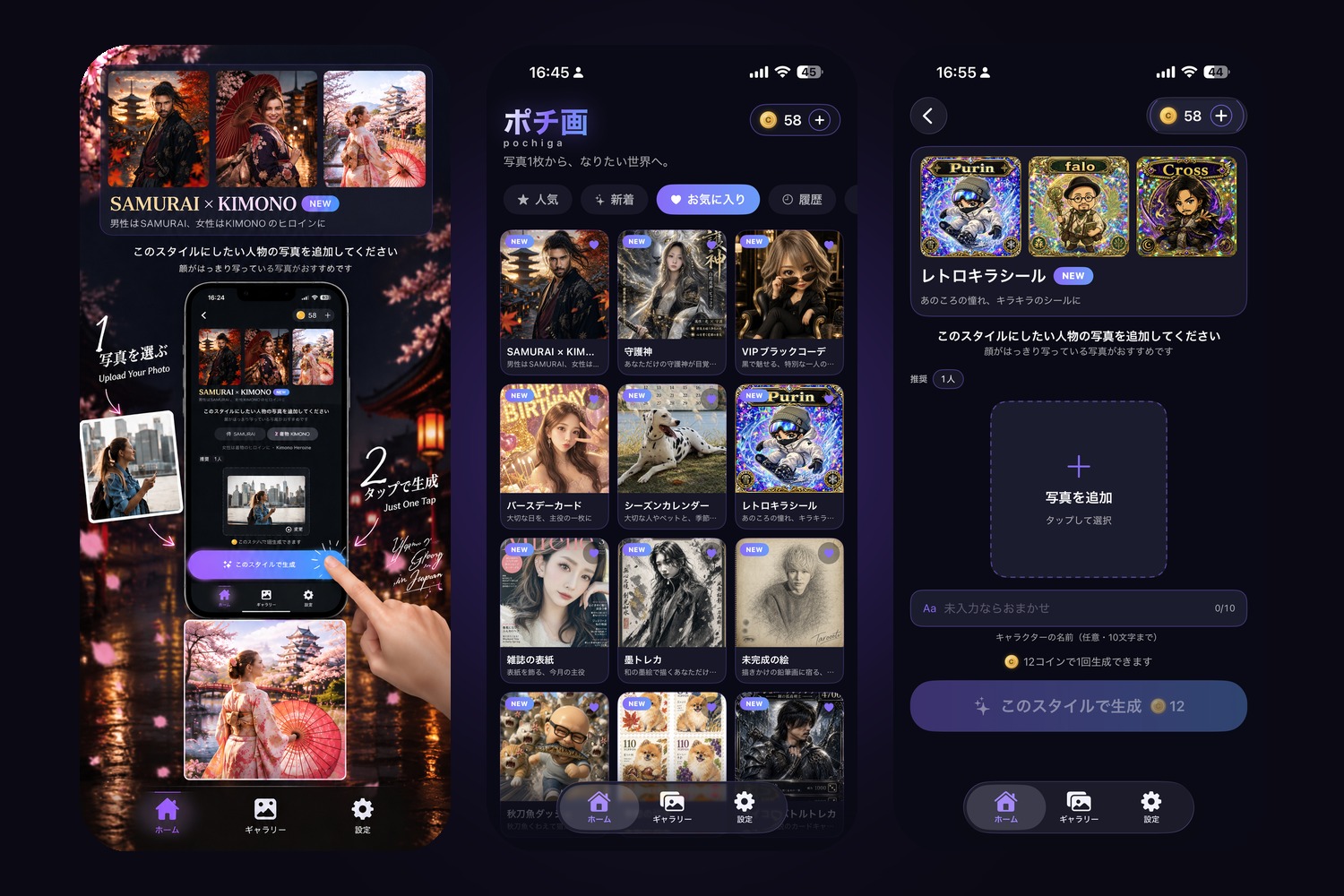
Pochiga — one photo, one tap. SAMURAI × KIMONO is the launch hero style.
-
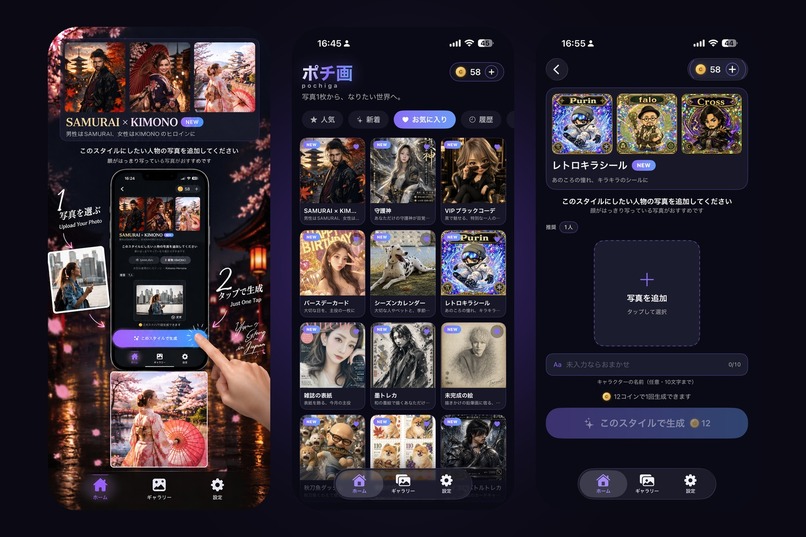
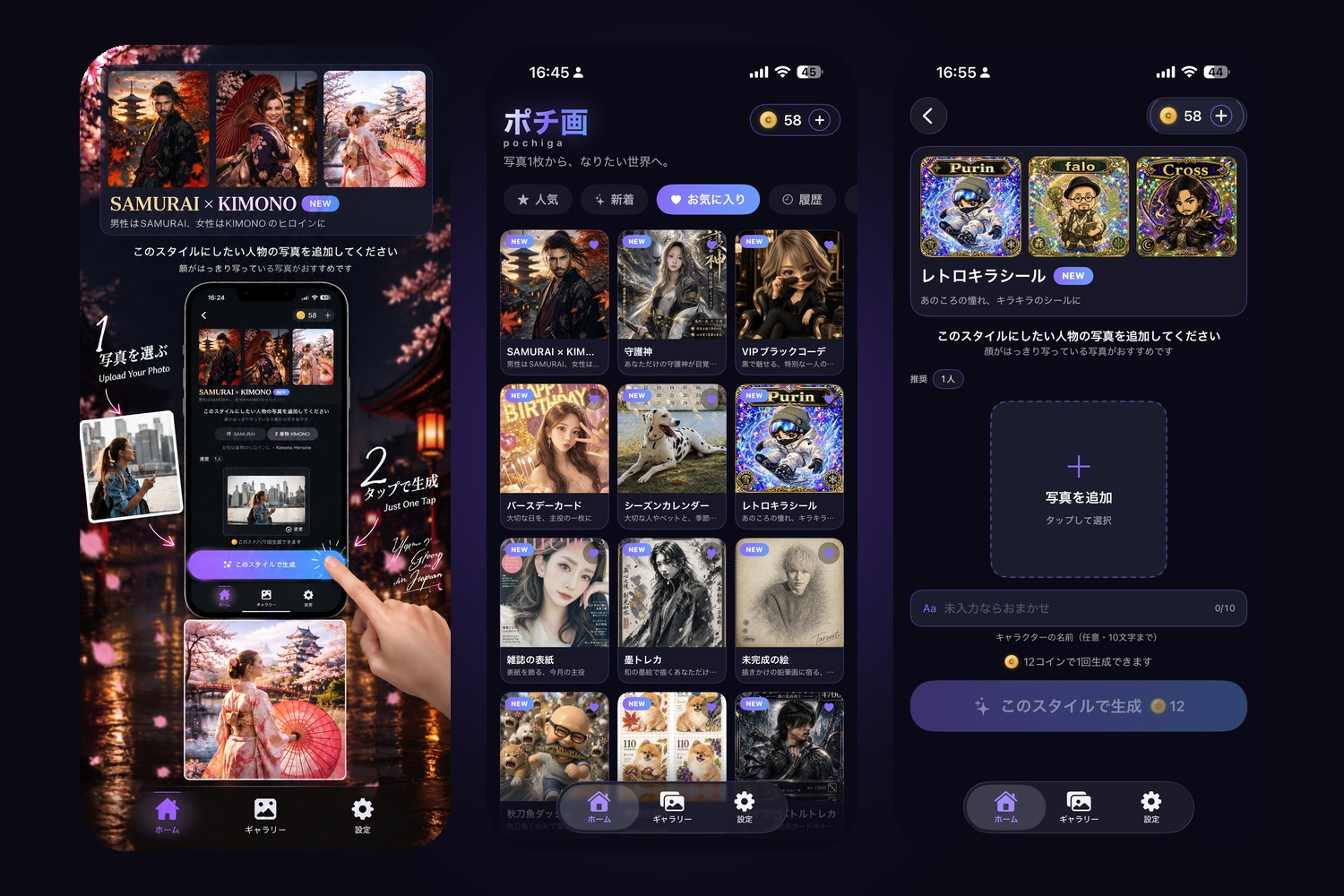
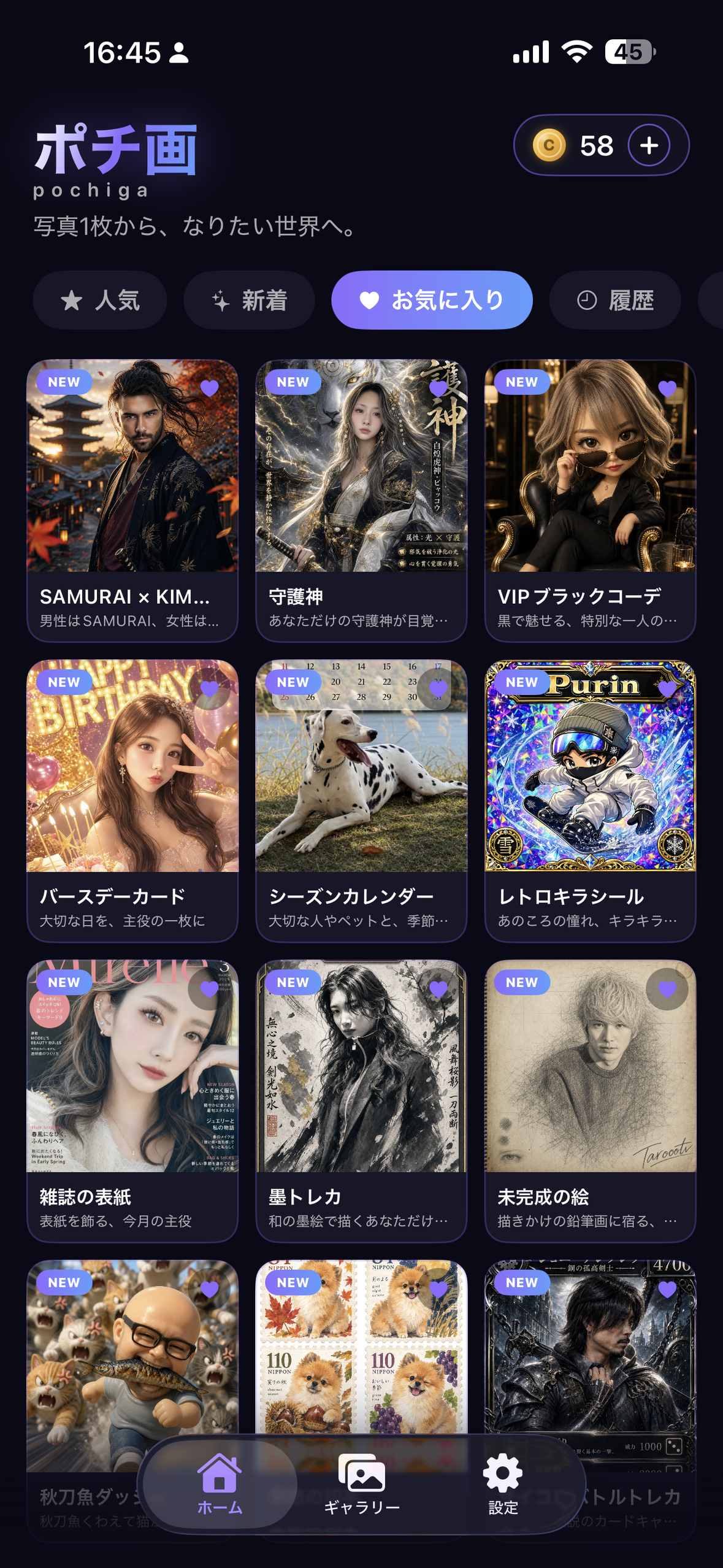
Home: every style shows finished samples first. Style page: add a photo, name it, tap once.
-
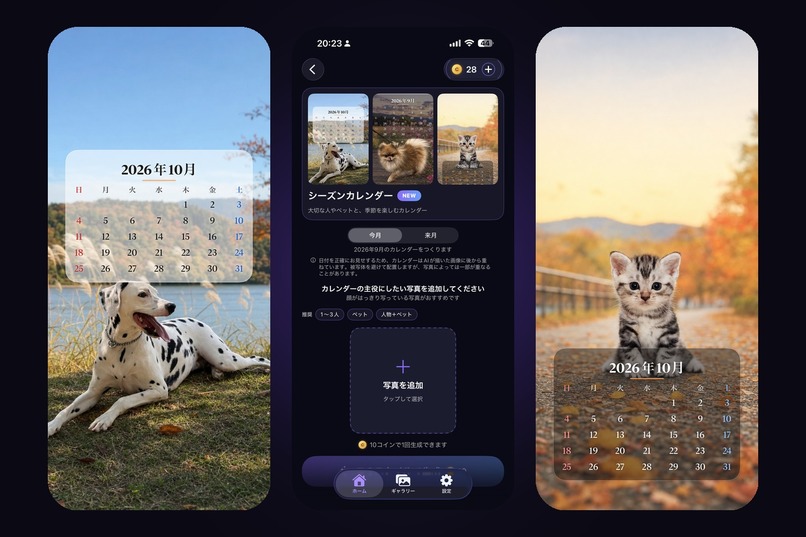
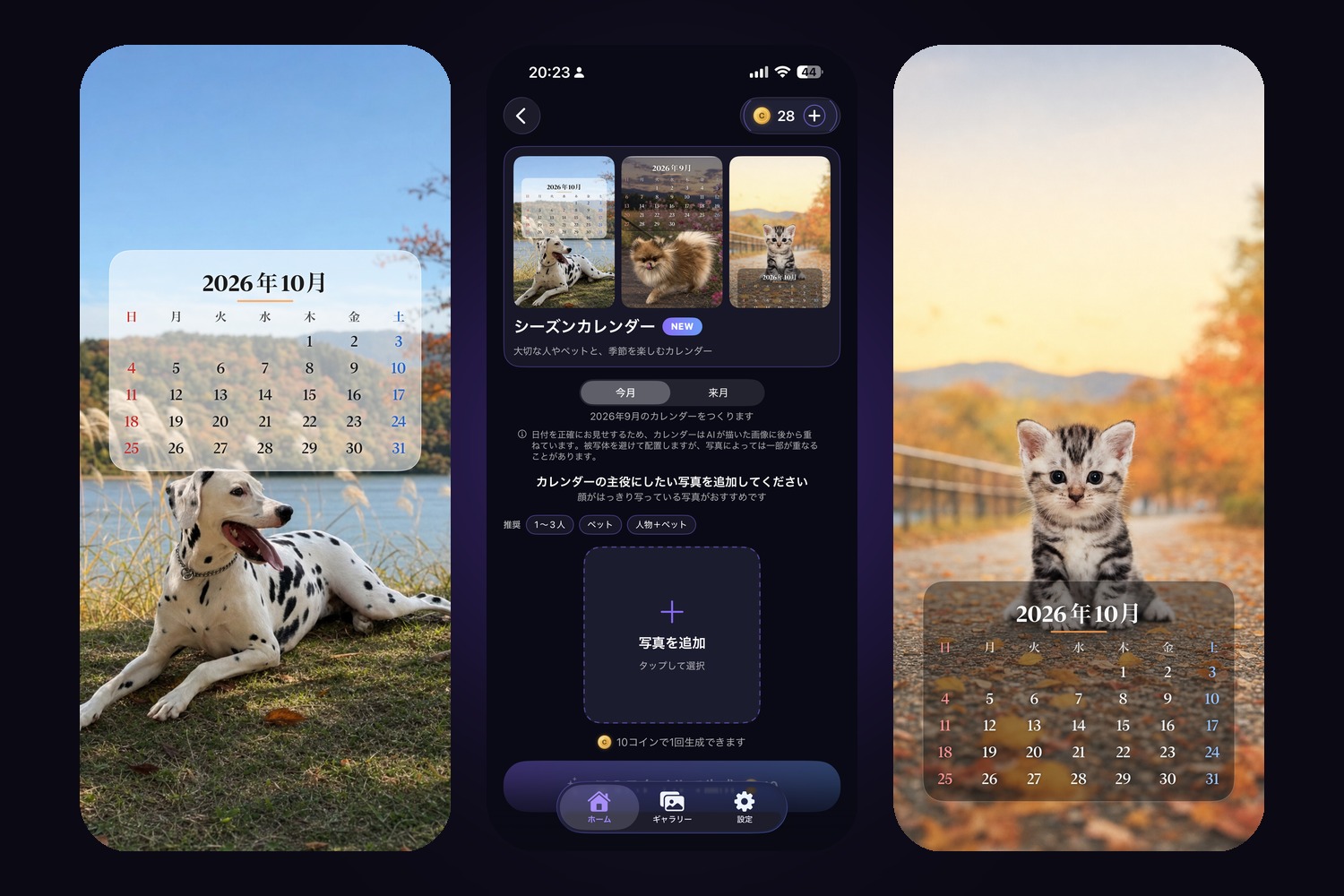
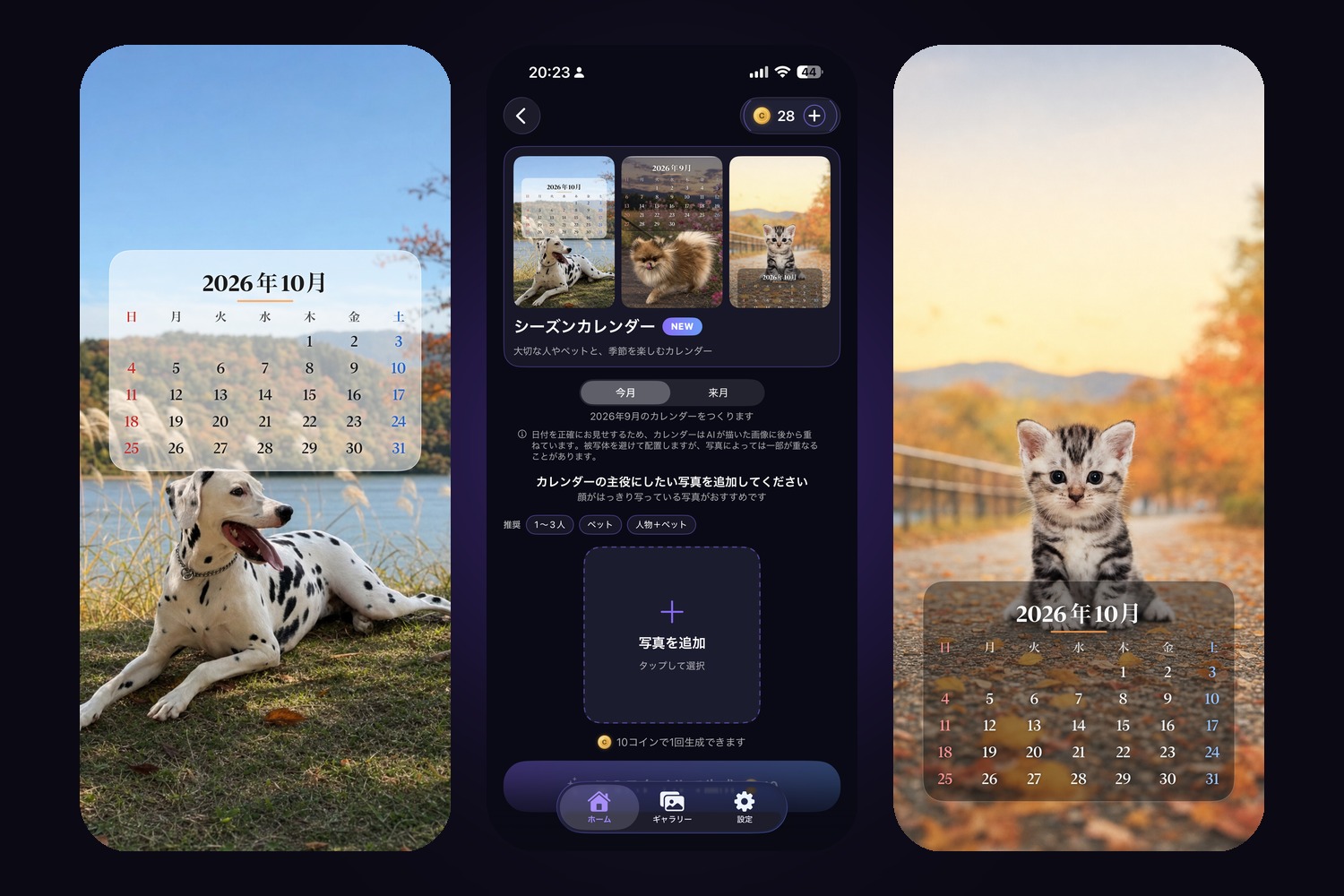
Season Calendar — works for pets too. On-device Vision keeps the calendar off the subject.
-

App icon (1024×1024)
-
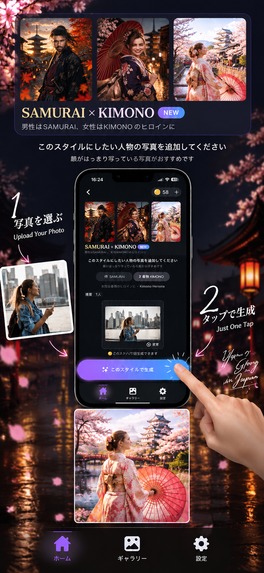
Screenshot — SAMURAI × KIMONO (no device frame)
-
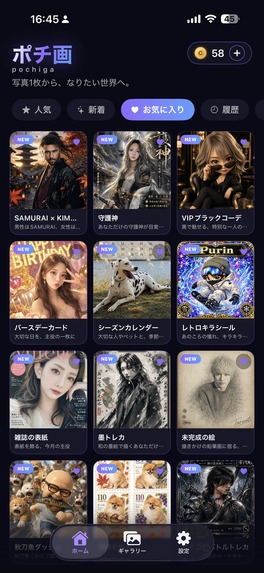
Screenshot — Home (no device frame)
-
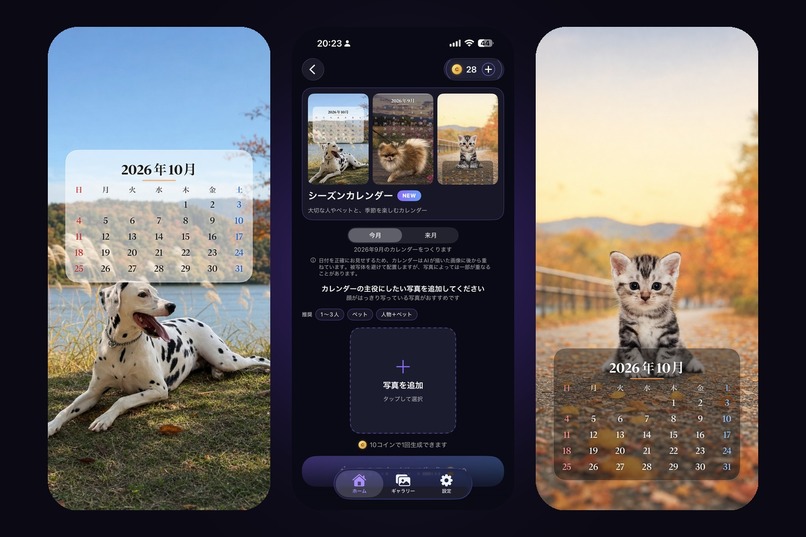
Season Calendar — works for pets too; text never lands on a face
-
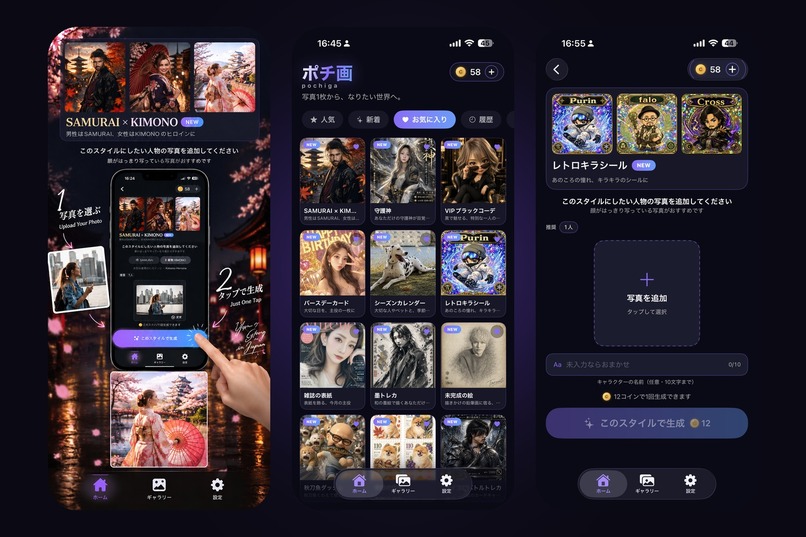
Home — pick a style, see finished samples first

Inspiration
From rock bottom to shipping: a total beginner, three months in, with an AI partner
I'm a solo developer from Japan, and I also run a small bar. I'm in my 40s, and until this year I had never written a line of code, never really used a computer like this, never touched AI.
Last year, for the first time in my life, I truly committed — I chose the person I was going to build a life with. At this age, that decision carries a weight it never had when I was young. And then that trust was broken.
When it happens later in life, it lands differently. When you're young you have the energy to burn it off, and friends who are free to stay up and pass the time with you. In your 40s everyone's settled, married, busy — even reaching out is hard. I hit bottom. I couldn't sleep, and I couldn't eat. For the first time in my life, with no illness behind it, the sheer weight of it made my body give out — I'd try to eat and bring it back up. Not a cold, not a hangover. That had never happened to me. Being unable to eat scared me, and that fear is what pushed me into the gym.
The gym, and AI — those two pulled me back. On those sleepless nights I found Claude Code, and it pulled me in completely. I can't program — but it was like having a partner who could, someone who translated my ideas into something real. Every wall ("how do I even do this?") became a level to clear, and clearing them one by one gave me a reason to keep going. Honestly, I'm grateful I got to meet this. And I wasn't alone — I had friends who stayed by me. I won't forget that.
Then I saw the RevenueCat Shipaton on YouTube and thought: why not. Might as well ship something real.
What it does
Pochiga (ポチ画) — "From one photo, to the world you want to be."
Pick a style, add one photo, tap once. No prompts, no settings, no manual. An AI turns your photo into art — and your face stays yours.
I built it that way on purpose. I was a total beginner, so I know how it feels when technology assumes you're already an expert. I wanted something anyone could use without reading a single instruction. Every style shows finished samples first, so you don't read about the result — you see it.
10 styles at launch, including:
- SAMURAI × KIMONO — men become samurai, women become kimono heroines; one of eight Japanese backdrops (spring day, autumn dusk, moonlit castle town, snow, rain, bamboo grove, sea cliff, mountain mist) is drawn for you.
- Dice Battle Trading Card — rarity, element, HP and skill power are rolled on the device and locked into the image, so the card you get is the card you rolled. Yes, you can actually play with one die.
- Retro Holo Sticker, Magazine Cover (with this month's date and your own title), Season Calendar (works for pets too), Birthday Card, Guardian Spirit, Unfinished Sketch with your signature, and more.
New styles are flagged NEW automatically — the badge always points at the latest batch, so the "New" tab always means something.
How I built it
- SwiftUI app, iPhone-only, portrait. Views / Models / Config / Stores / Services are separated so that adding a style is one entry in a catalog and swapping the generation backend touches zero UI.
- Firebase Cloud Functions (gen 2) in Tokyo with App Check enforced. The API key lives in Secret Manager, never in the app. The app only sends a
styleId; the server decides the model and quality — so a modified app can't force an expensive model, and I can switch models with a deploy instead of an App Store update. - OpenAI image generation server-side, high input fidelity so the person is recognizably themselves.
- RevenueCat for coin packs (consumables). Purchases are the only thing that unlocks generation, and coins are consumed only after a successful generation — a failed run never costs the user.
- Vision framework on-device to find the subject before compositing calendars, so text never lands on someone's face.
- Keychain flag so the 20 welcome coins can't be re-claimed by deleting and reinstalling.
- Legal pages (Terms / Privacy) on GitHub Pages, opened in-app via SFSafariViewController.
All self-taught, with AI as my coding partner: strategy and architecture in chat, implementation in Claude Code, prompts refined in ChatGPT.
Monetization (RevenueCat)
Pochiga uses a coin system — each generation costs 10–15 coins depending on the style's real cost. Two consumable packs (30 and 70 coins) are sold through RevenueCat. New users get 20 free coins, enough to see their own face in one style before deciding.
Coins never expire. The purchase screen shows exactly what you hold, and coins are consumed only after a successful generation. A monthly membership is already built and RevenueCat-configured, but I deliberately hid it for v1.0 — I wanted the first release to be one clean offer that people understand in a second, and to pass App Review in one go. It's one flag away from shipping in v1.1.
Challenges I ran into
- Never trust a "simple" default. The build was silently iPad-capable, so App Review demanded 13-inch iPad screenshots. I hadn't tested iPad at all. Fix: iPhone-only, portrait-only, and no Mac / Vision Pro distribution.
- Subscriptions have their own rules (3.1.2). The purchase screen itself must state price, period, auto-renewal and how to cancel, with links to Terms and Privacy. I rebuilt the card to comply — then hid it anyway for v1.0.
- Keys don't belong in the app. My first version called OpenAI directly from the iPhone. Moving everything behind Cloud Functions + App Check + Secret Manager was the single most important change I made.
- Sandbox purchases on iOS 18 sign in under Settings → Developer → Sandbox Apple Account, not the App Store settings. I lost a day to "Purchase was cancelled" before finding that.
- Generation can be slow. One run took 4 min 50 s during peak hours, ten seconds short of my 5-minute timeouts. That's now on the v1.1 list.
- Prompts that leak numbers. Passing rarity ranges to the model made it pick its own. Rolling everything in Swift and passing only the final values fixed it.
Accomplishments that I'm proud of
- Three months ago I had never written code. Pochiga is live on the App Store (approved September 21, 2026 — after one rejection, fixed and resubmitted the same day).
- The samurai backdrop rotation, the dice-roll card, the calendar that avoids faces — those are my ideas, made real.
- A payments stack (RevenueCat + coin ledger + refund-safe consumption) that I understand end to end.
- The magazine-cover style quietly places the word "Pochiga" in one small sub-headline. Every cover someone shares is a free ad.
What I learned
- Design for the beginner you were. If a screen needs an explanation, it's the screen that's wrong.
- Put the expensive decisions on the server. Cost control, security and iteration speed all improve at once.
- Ship the smallest offer you can explain in one sentence. Everything else can wait for v1.1.
- Read the review guidelines before the build, not after the rejection.
What's next
- Restore the monthly membership (already built) and add server-side coin ledgers.
- More Japanese styles — ukiyo-e is first in line — and a caricature style already in testing on a newer model.
- Longer timeouts and background-safe delivery for slow generations.
- Grow the Epicra family: Pochiga is the first of several small apps I'm building solo, each with a shared "news" panel that cross-promotes the others.
Three months ago, I knew nothing. Pochiga is on the App Store now. Thank you for reading. This app is only the beginning. The ideas won't stop coming, and one day I'll show you all something you won't forget. Remember the name — Yoshiki.

Log in or sign up for Devpost to join the conversation.