-
-
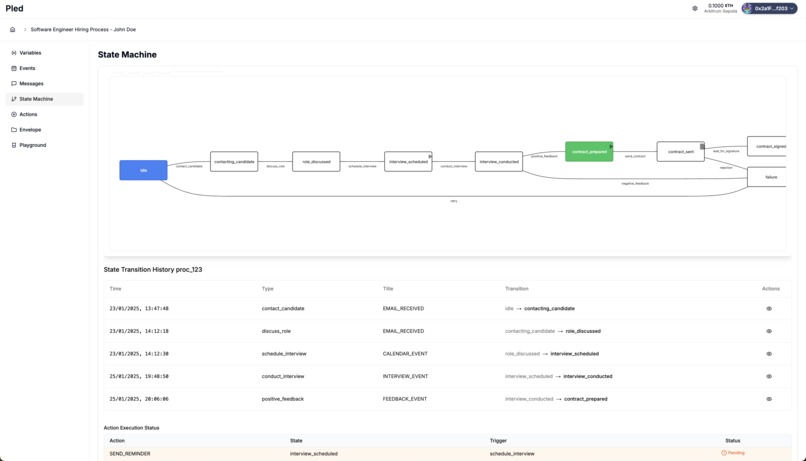
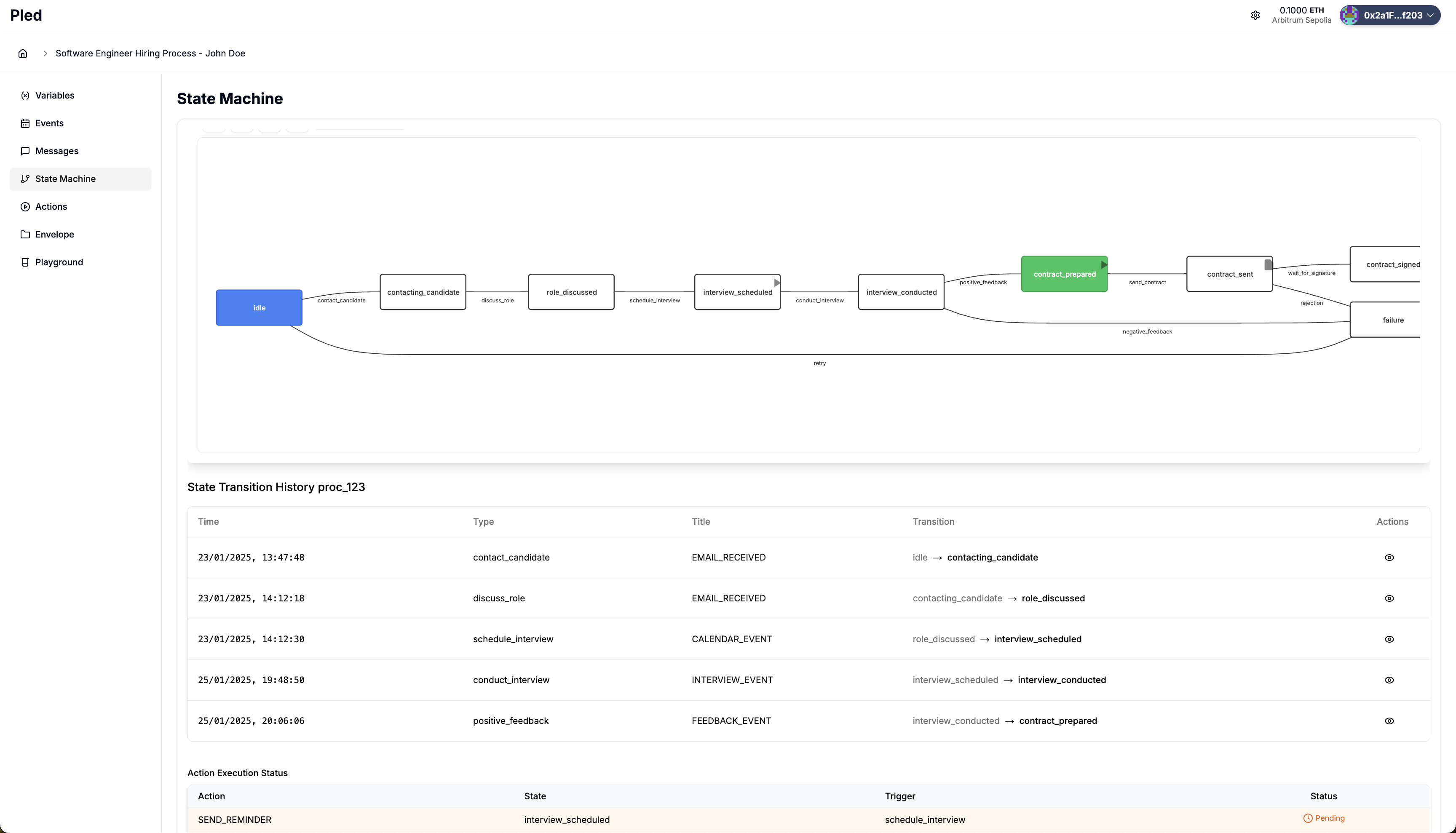
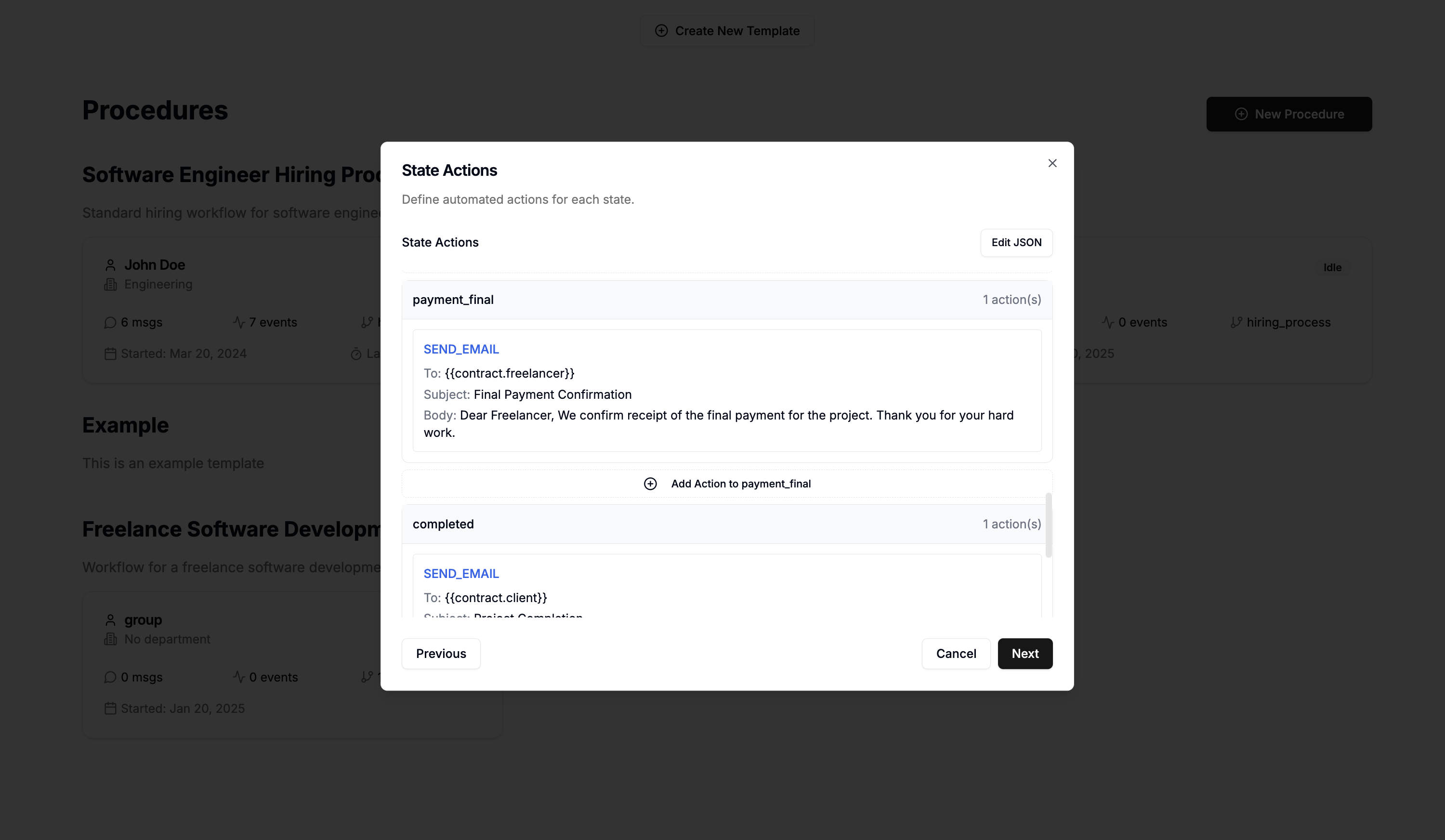
State Machine representation for a Pled procedure
-
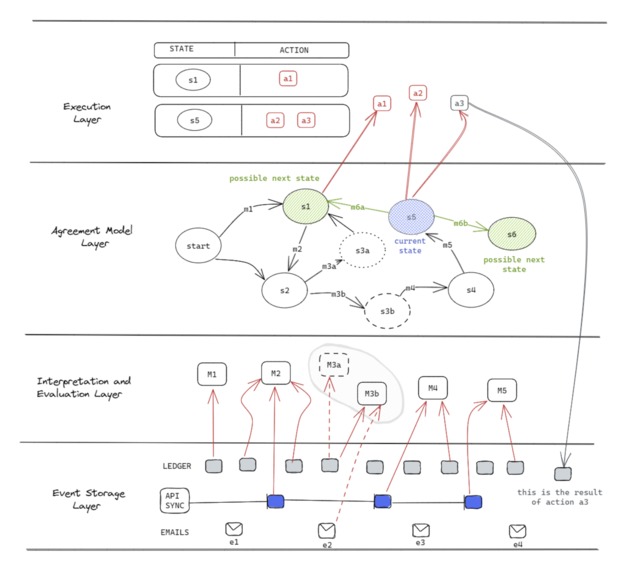
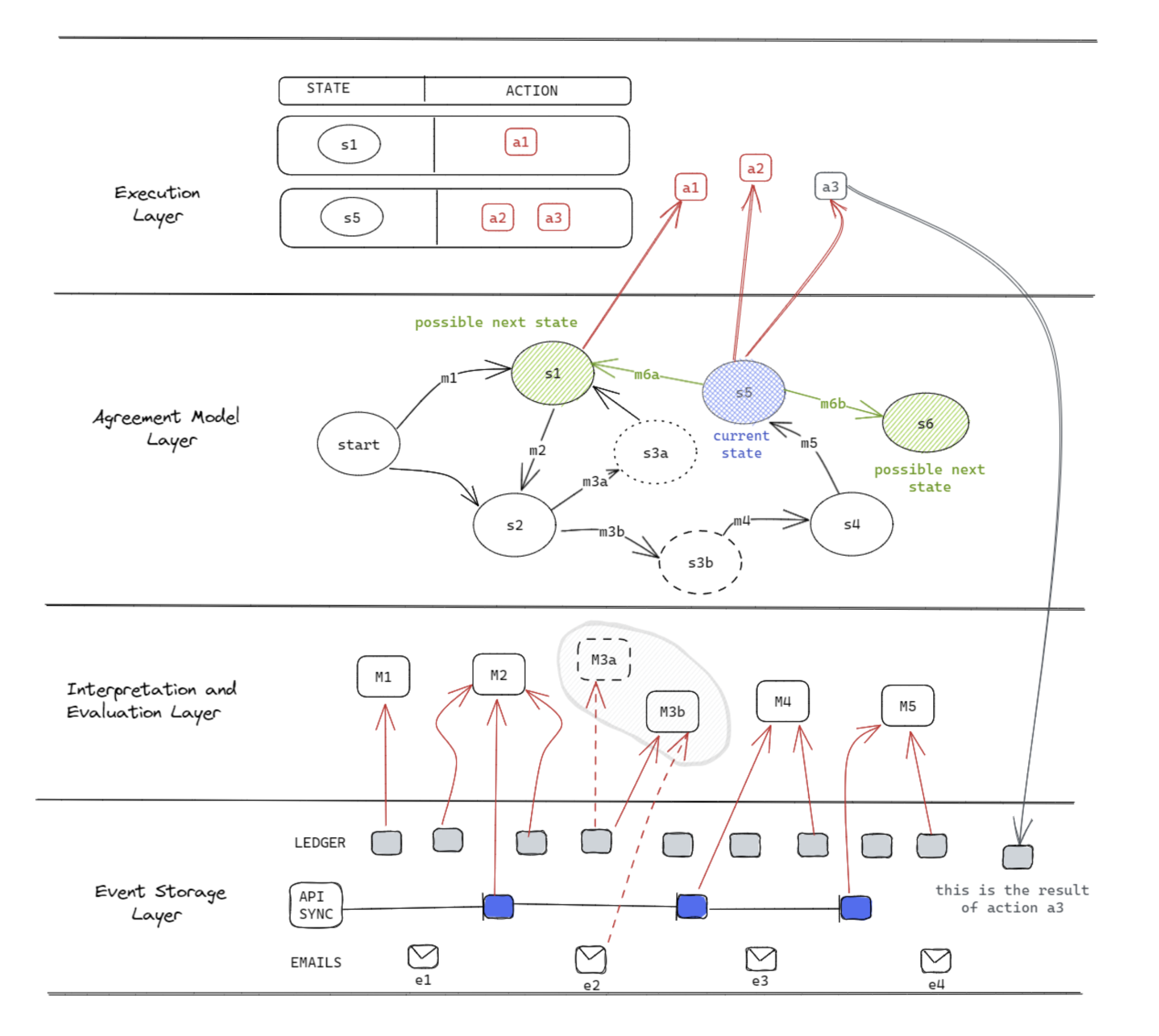
Protocol Architecture diagram
-
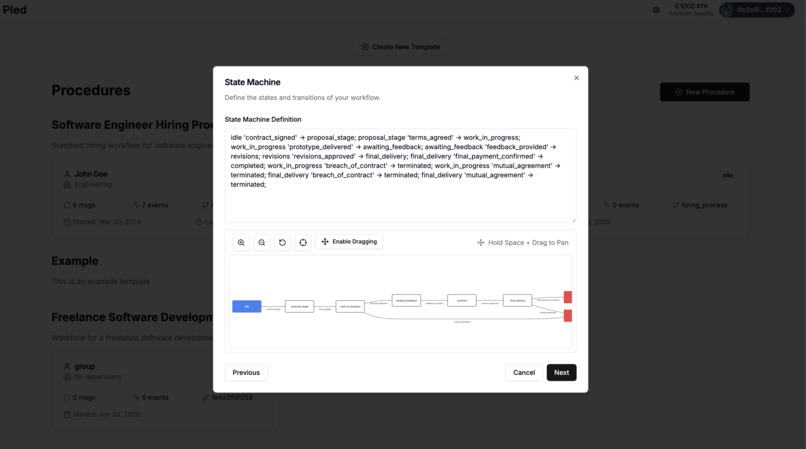
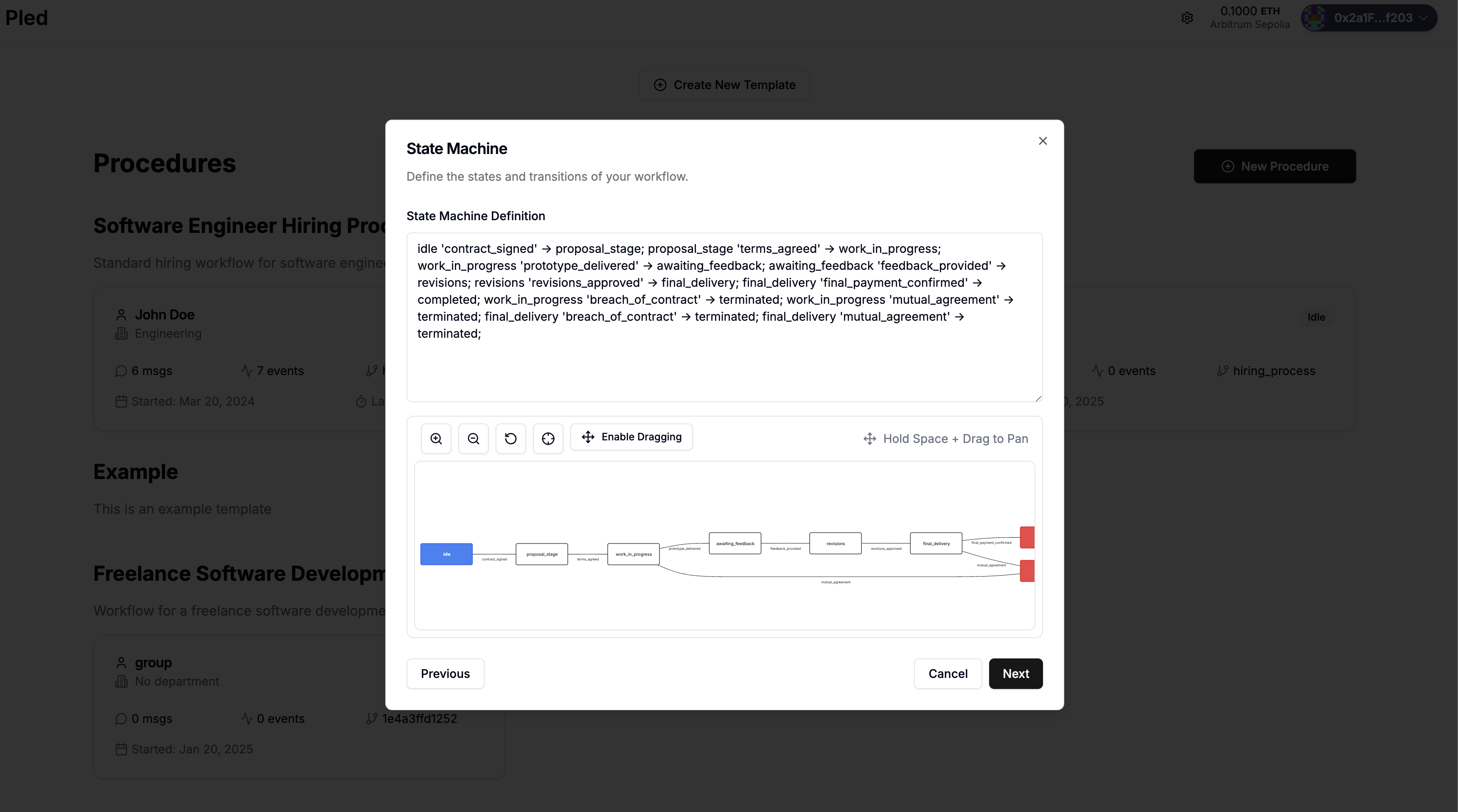
AI wizard modelling a procedure after uploading contracts
-
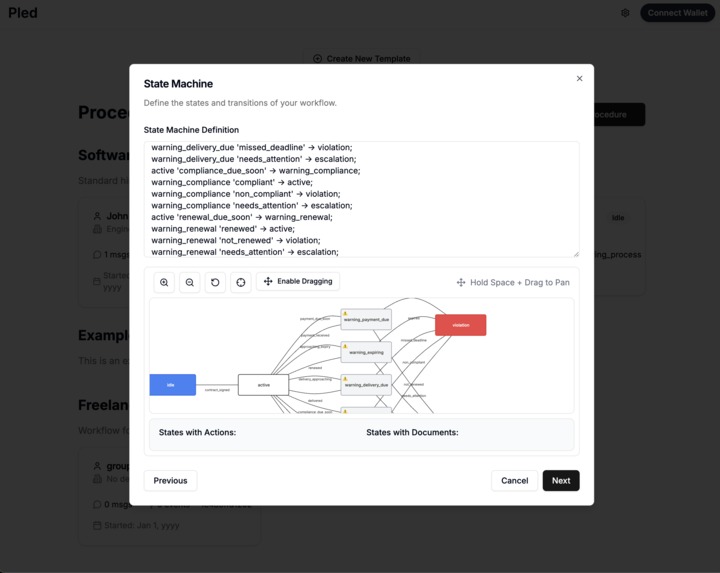
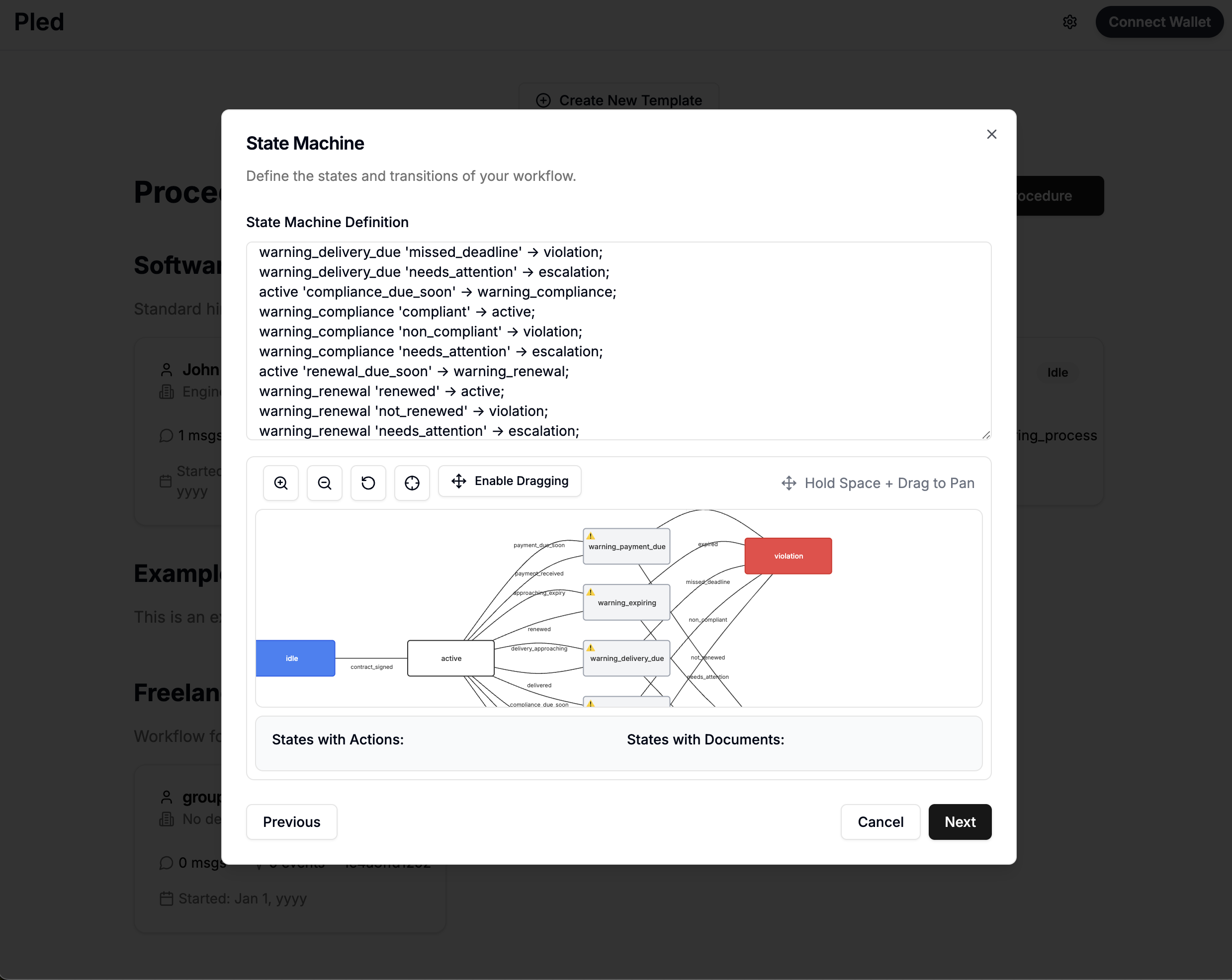
AI wizard modelling a procedure with more details (and state warnings) using Navigator API.
-
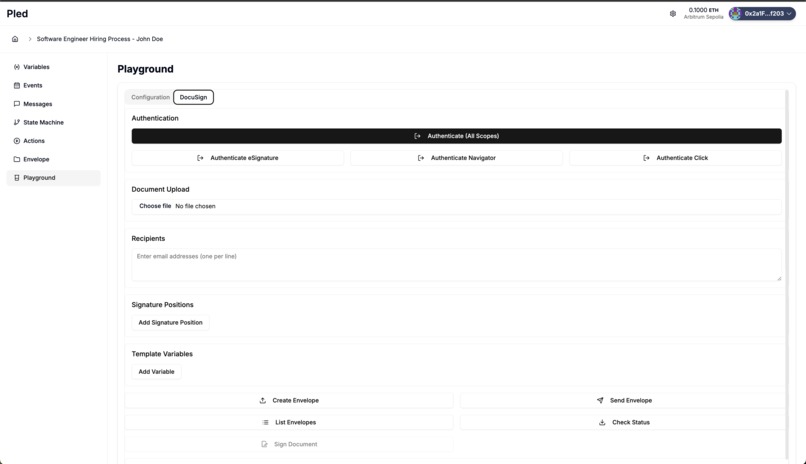
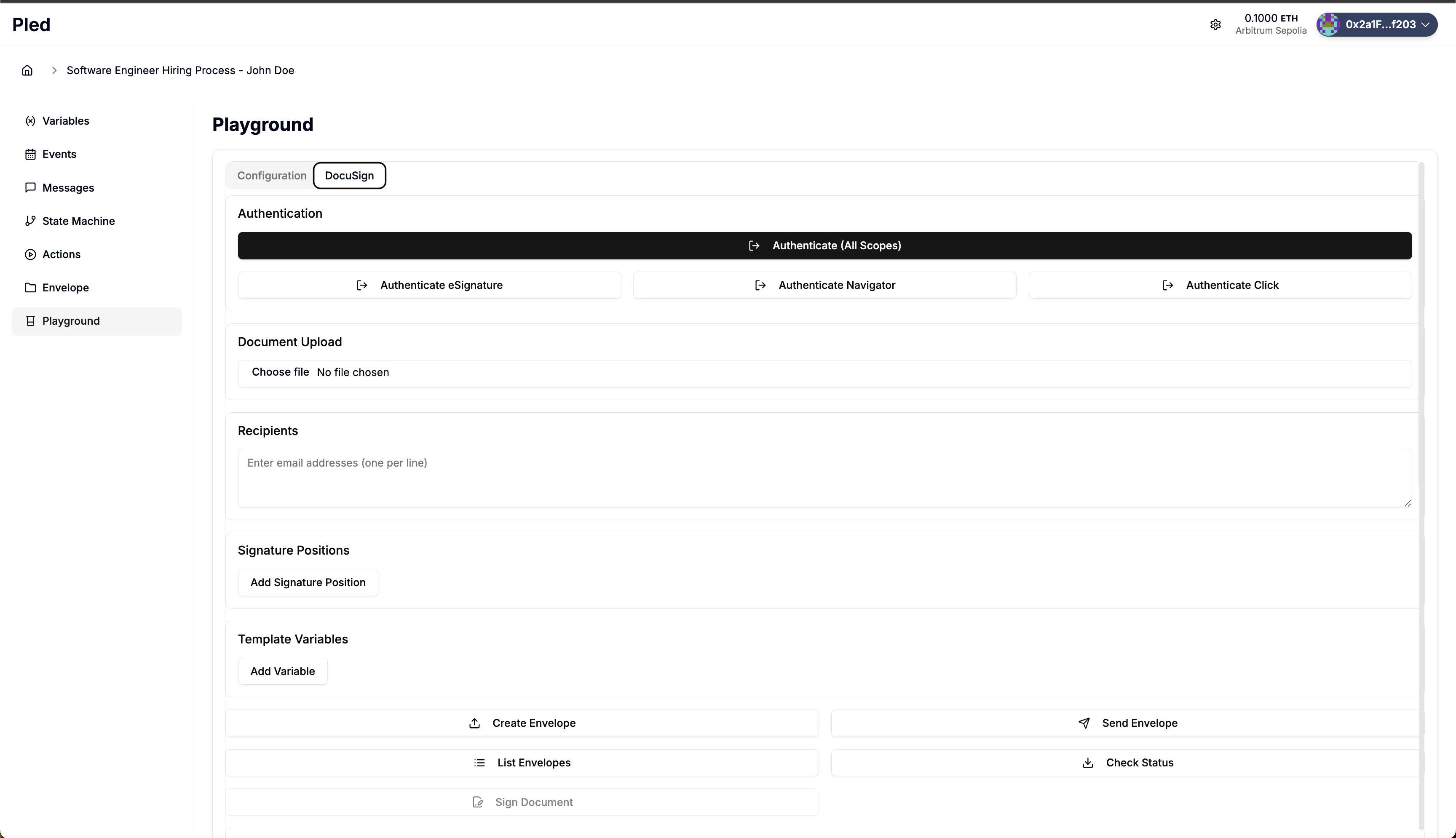
Playground designed to get familiar with Docusign API including Auth, Envelopes, Signing, Click, Navigator
-
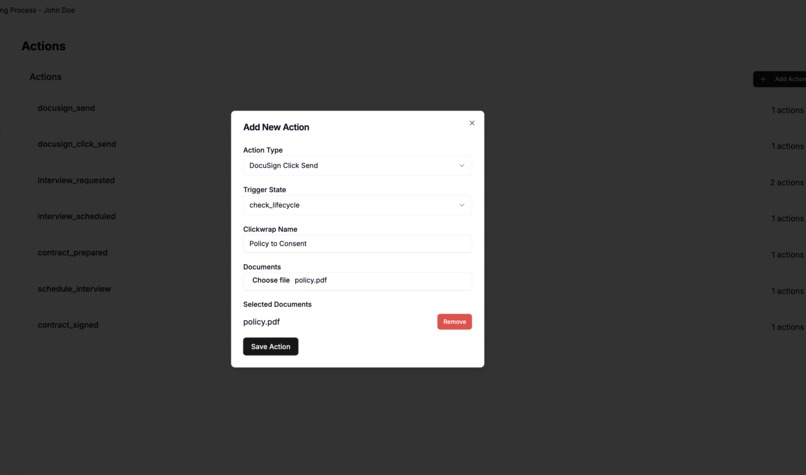
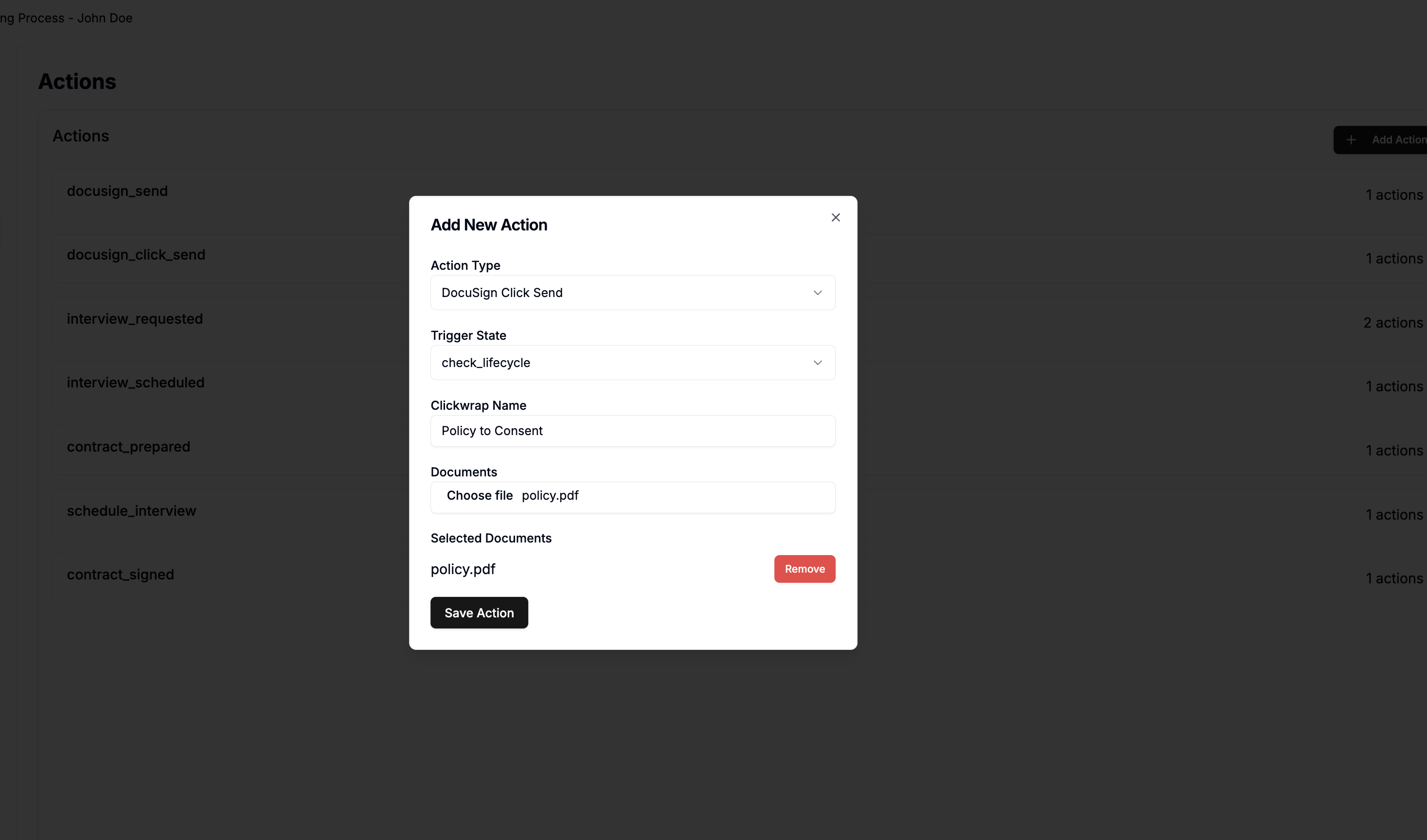
Modal to create a custom action if a specific state is reached. In the example the trigger of a ClidckWrap document to consent
-
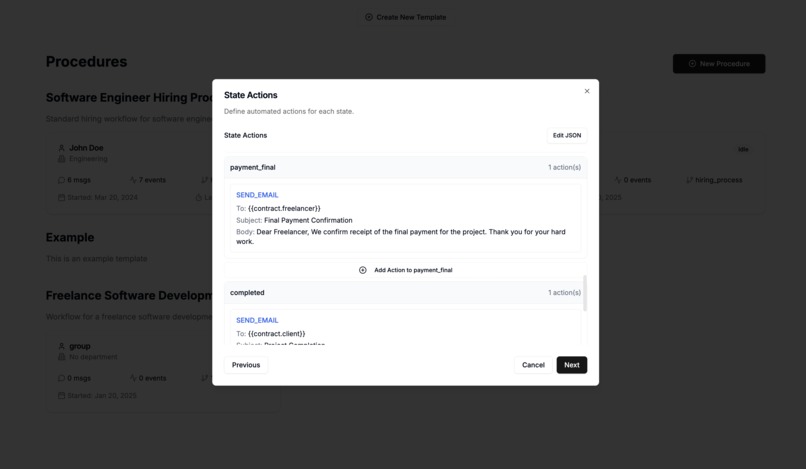
AI wizard suggesting rules to add to the newly created template
-
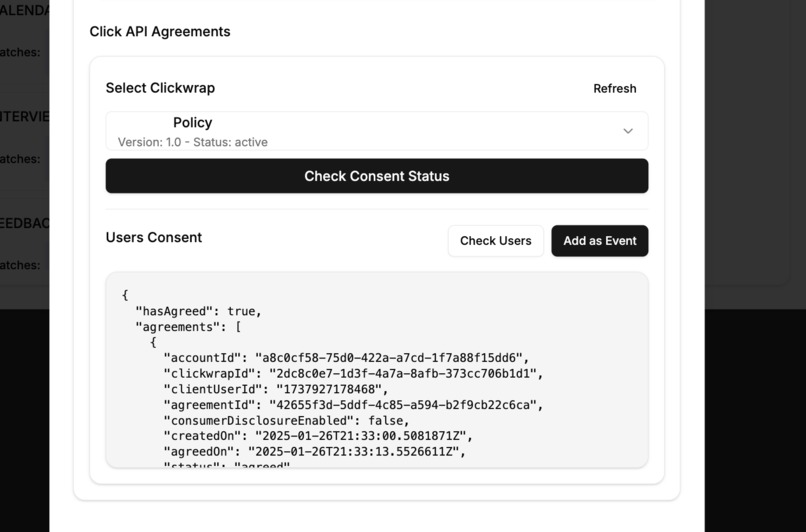
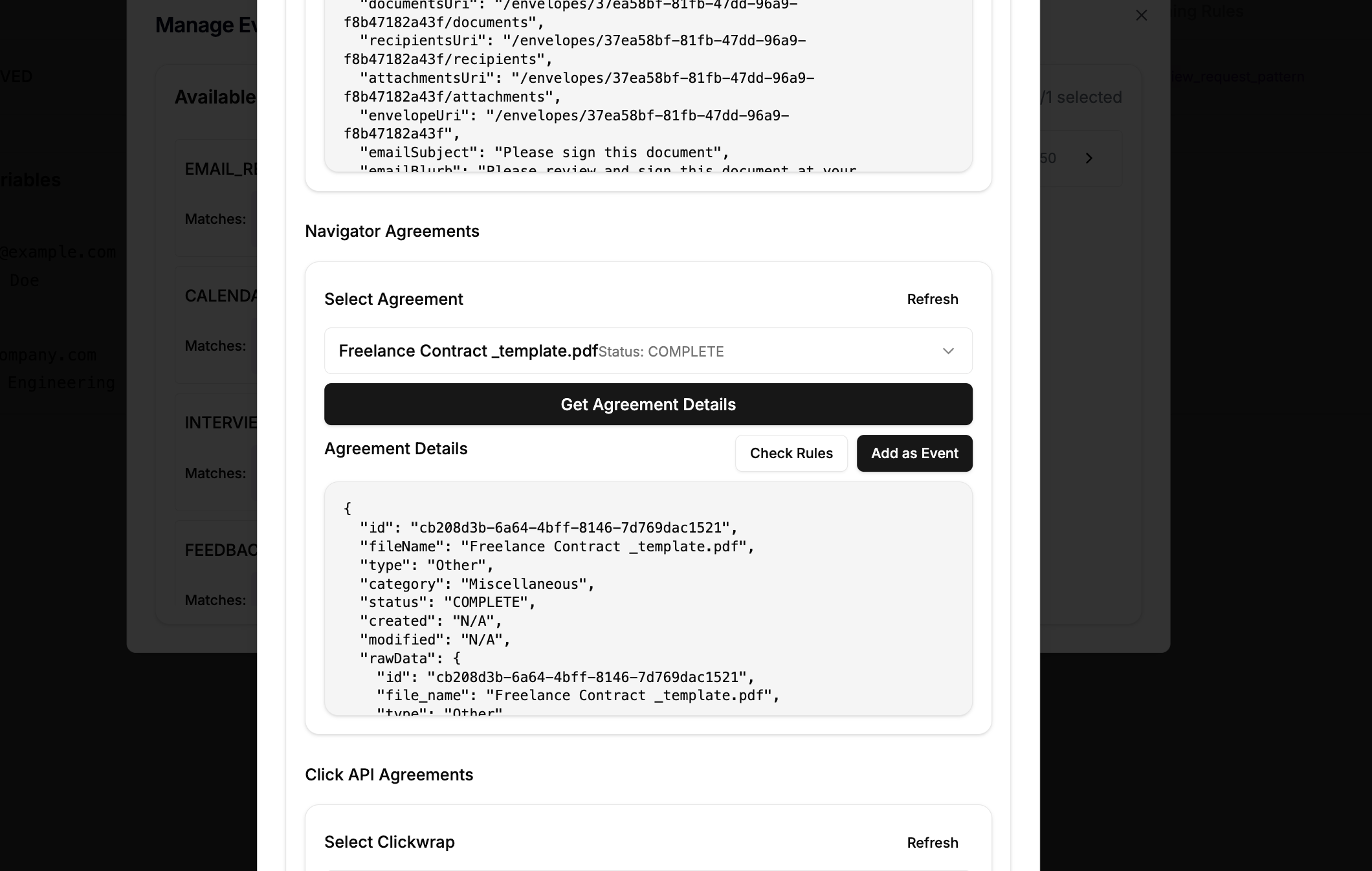
Import new events based on the result of the API that checks an Agreement status
-
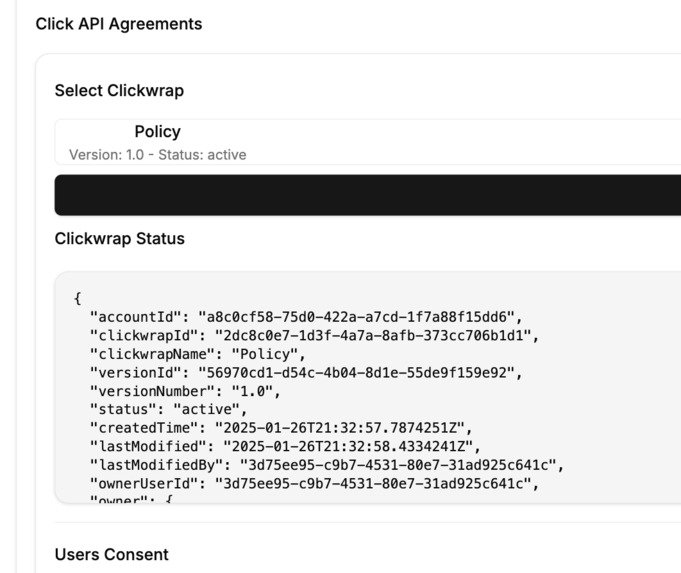
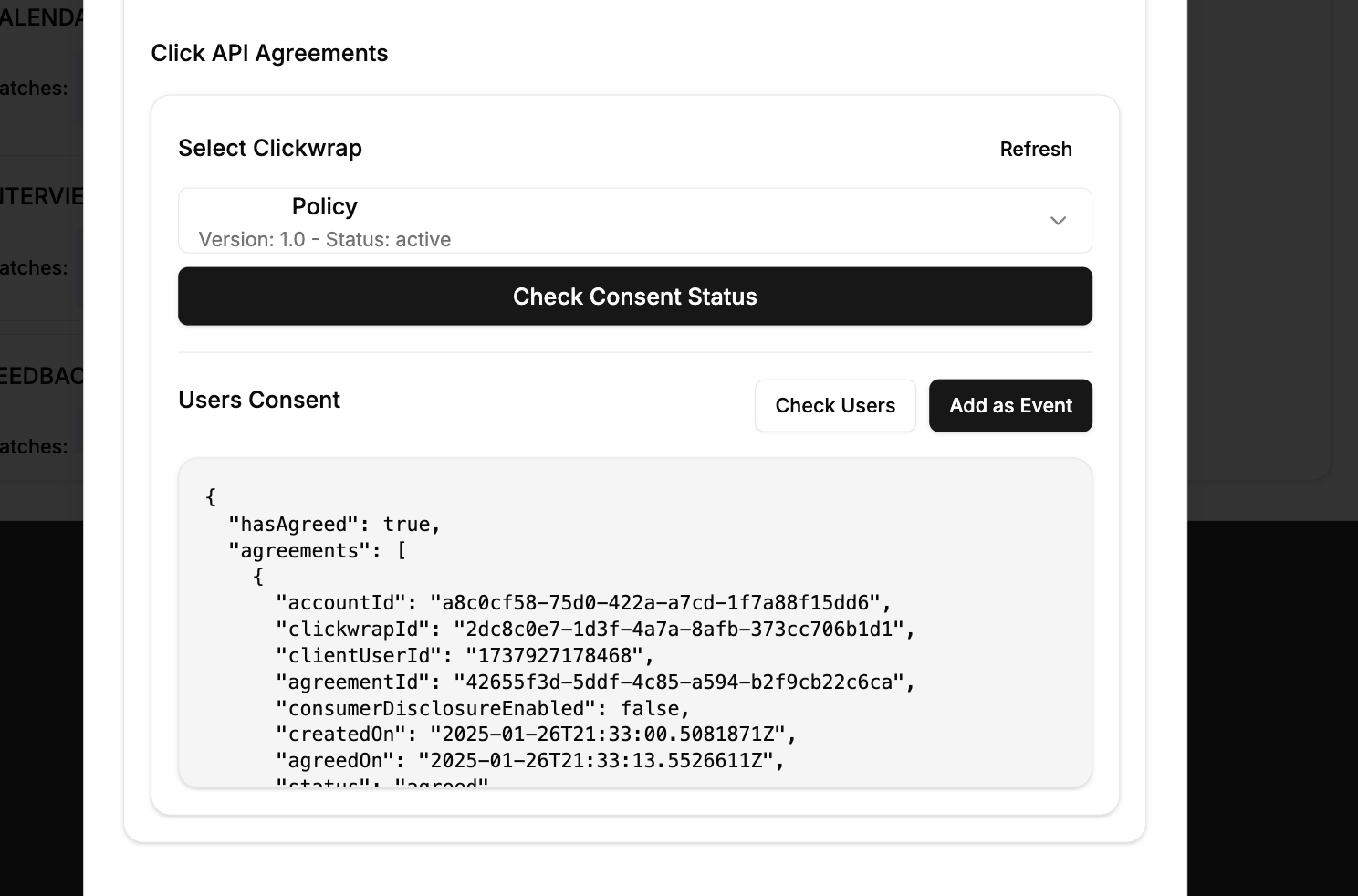
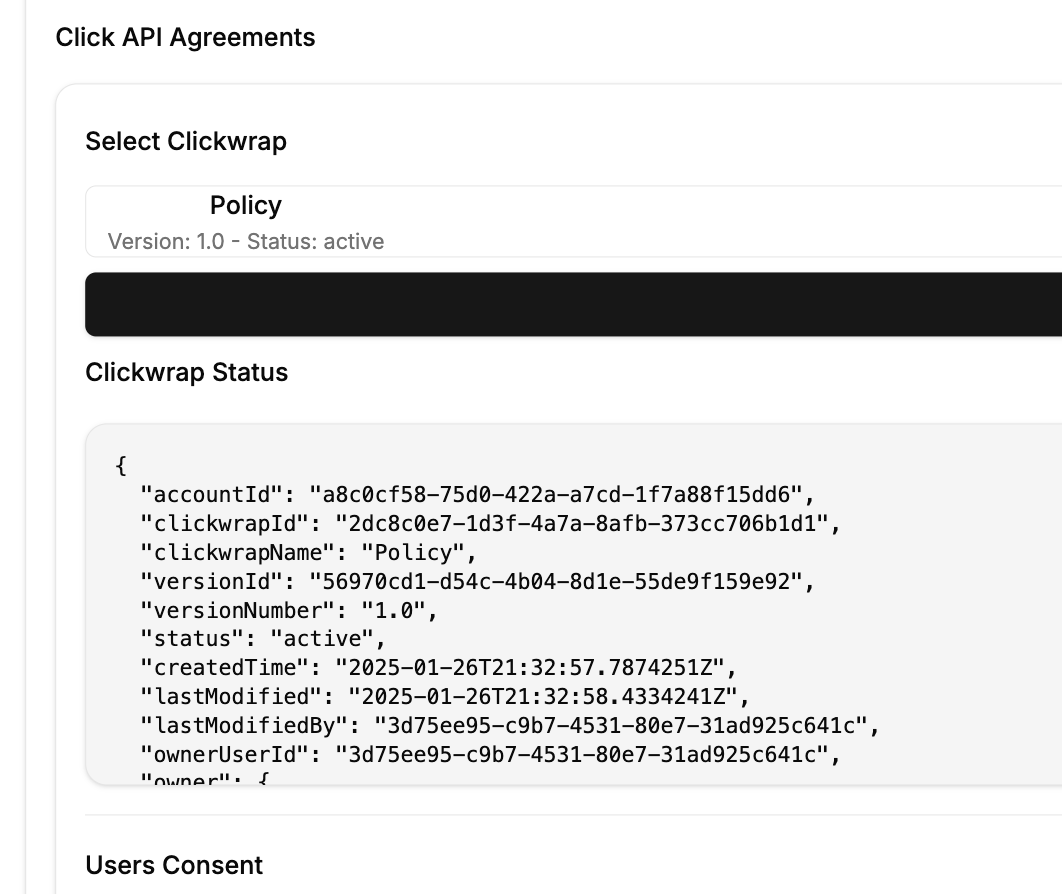
Import new events based on the result of the API that checks a Clickwrap user consent
-
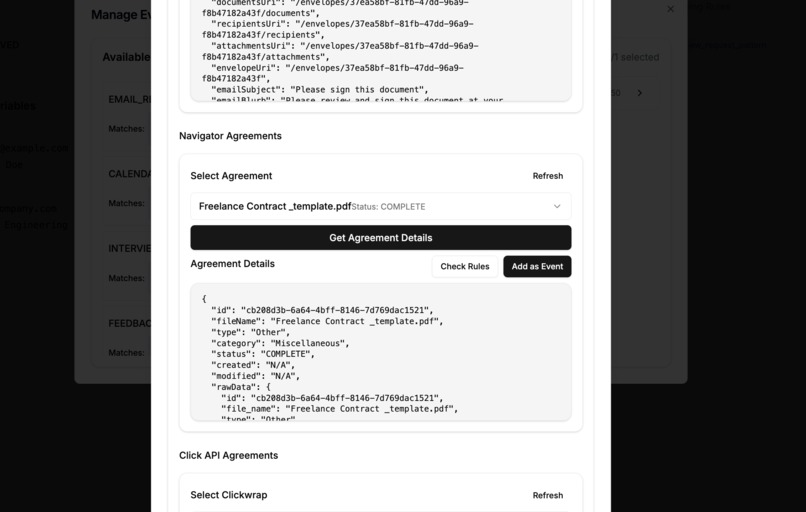
Import new events based on the result of the API that checks the Navigator insights for a pre-uploaded document
-
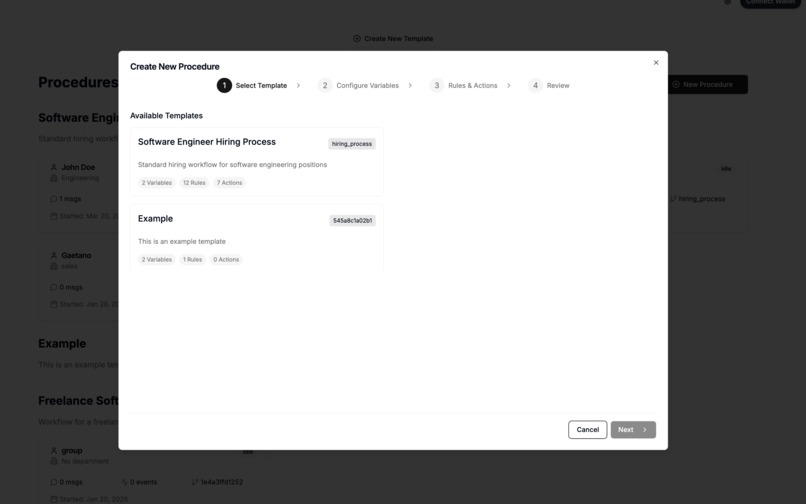
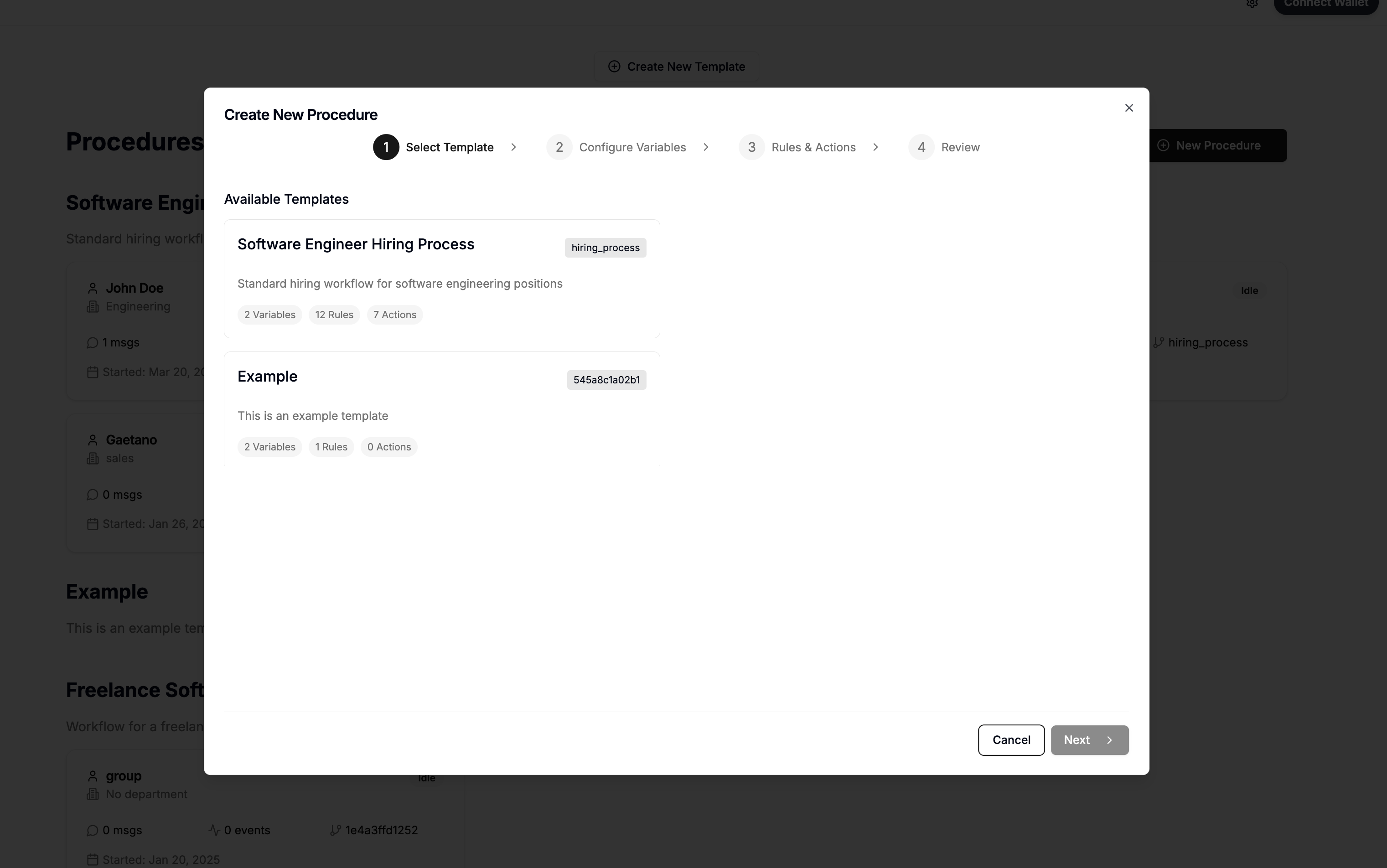
Wizard to create a new procedure for an existing template, requireing to insert the initialization variables
-
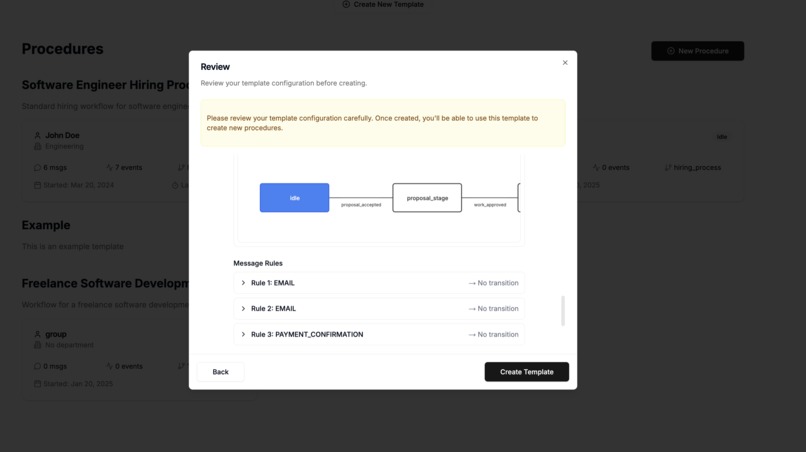
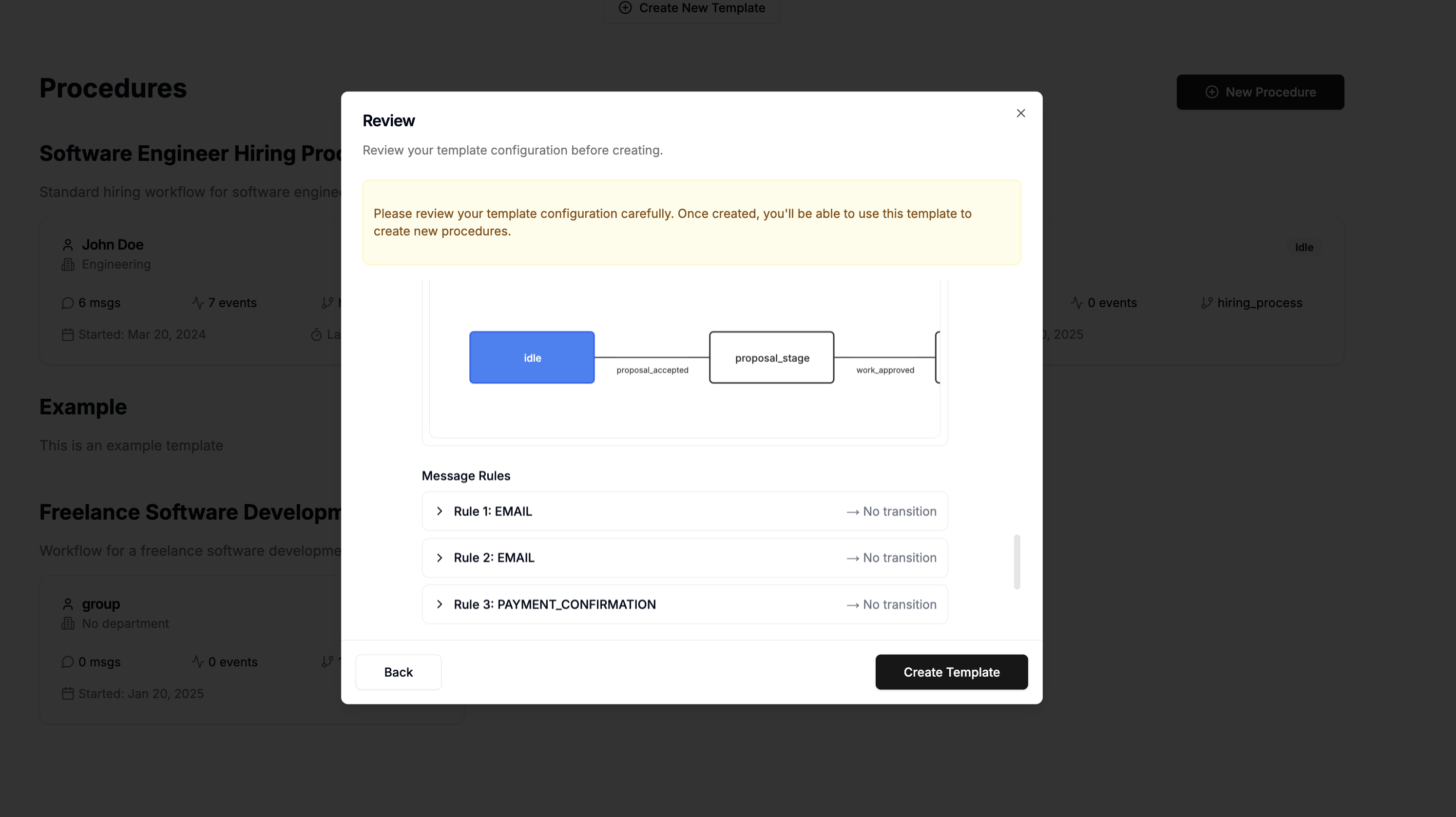
Review at the end of the Create new template wizard with a summary of the new template created
Inspiration
“A set of promises, specified in digital form, including protocols within which the parties perform on these promises." Nick Szabo’s 1997 vision of smart contracts
I've always been intrigued by how smart contracts and legal contracts, while operating in different trust settings, share the same goal of enabling coordination and collaboration. Smart contracts are precise and automated, perfect for enforcing clear rules, but they lack the flexibility to handle complex real-world situations. Legal contracts are flexible and adaptable but rely on interpretation, which can make them less predictable. Nick Szabo's first ideas on smart contracts and Ricardian contracts led me to explore how agreements could become more efficient by balancing automation with flexibility. I came to see that while contracts enable collaboration, they can’t fully manage or automate every scenario on their own. I designed an architecture to bridge this gap. Rather than replacing legal contracts, it tracks, organizes, and supports decisions within contracts and collaborative processes.
This architecture uses events stored on DLTs, much like evidence in a trial. Interpreting these events rebuilds the state of the collaboration, and adding new evidence or reinterpreting with different rules can alter the predicted state.
The name PLED (Practical Ledgers) originates from a Gartner's 2020 Top 10 Strategic Technology Trends article, which highlighted Practical blockchain's potential for practical applications due to its transparency, integrity, and non-repudiability properties.
What It Does
This solution is designed to help track and manage procedures that are often the foundation of collaboration, as defined in contracts, policies, and other documents. The goal is to provide a flexible and useful way to understand the current state of a process and support better decision-making.
Architecture

A PLED instance architecture includes variables, events, messages, a state machine, and actions. Here's how it works:
- Events: Data in any format (e.g., emails, documents, photos, signed data).
- Processed into messages using rules.
- Rules can be deterministic (e.g., field values) or depend on external inputs like API calls or LLM prompts.
- Processed into messages using rules.
- Messages: Meaningful outputs from events.
- Update the state machine.
- Traceable back to their originating events.
- Trustworthiness varies (e.g., signed messages are more reliable than API-based messages).
- Update the state machine.
- State machine: Models procedures like contracts or policies.
- Infers the current state from messages.
- Defines actions to execute based on the state.
- Clear to read, and help ensure safeness and liveness property
- Infers the current state from messages.
- Actions: Executed based on the current state.
- Results are stored as new events.
- Includes a snapshot of the state, events, and rules for auditability. This ensures full auditability of actions.
- Results are stored as new events.
Create reusable procedure template

Users can create templates for similar scenarios and generate instances by providing variables. Templates include event formats, rules to convert events into messages, state machine definitions, and actions to model procedures, which can be complex to set up.
To simplify the process, Pled lets users generate templates from documents that can then be refined. In the template creation wizard, users can either manually complete the required fields or upload related documents for analysis by AI models. The AI can also integrates insights from the DocuSign Navigator API, helping to model states more effectively and providing warnings about deadlines or critical contract details.
See the differences in the state machine generated from the same agreement without and with the Navigator Insight.

Messages in this architecture represent meaningful interactions, such as updating a rent agreement from "Active" to "Notice Given." To remain flexible, the system avoids relying on rigid rules or exact wording. Instead, it uses AI to interpret the intent behind actions, ensuring it feels natural for users who may not follow strict digital formats.
The system is designed to operate with minimal third-party synchronization and integrations. Events such as emails, API responses, or signed documents are passively collected and grouped into messages. These messages represent meaningful interactions, like updating a rent agreement from "Active" to "Notice Given." To stay flexible, the system avoids relying solely on rigid rules. Instead, it uses AI to interpret the intent behind actions.
For instance, in our demo, we created a rule to check if a candidate had requested an interview. If they did, the system generated a message to update the state machine, ensuring the workflow evolved naturally

Messages are generated from one or more events but often have different dates. The event date reflects when the data was received, while the message date usually represents when the interaction occurred. As messages are processed, the system determines the most likely current state of the workflow and takes appropriate actions. These actions might include notifying relevant parties, triggering automated processes like sending reminders, or generating updates. Additionally, certain states can prompt specific actions, ensuring workflows remain dynamic and responsive.

Imagine a user uploading a rent agreement. The AI creates a template that outlines the typical lifecycle of a rent agreement. The admin can then customize it with specific rules and events. Each agreement becomes its own instance, tracking progress individually. For example, if a tenant sends an email saying, "I want to terminate the agreement," the system recognizes this intent, updates the state to "Notice Given," notifies everyone involved, and triggers the next steps automatically. In case of a dispute, the system can share all the evidence and events that led to its determination of the current state, making it easier to reconcile differences among parties.
How we built it
The project was built using Next.js for server-side rendering and quick project setup, combined with React to handle the dynamic and interactive user interface. To keep the design consistent, we used shadcn for the styling framework.
Initially, the plan was to render state machines using xstate and state-viz , but since some of these tools have been archived or close-sourced, we had to pivot. Instead, we used FSL to model the state machines, jssm to evaluate their logic, and D3.js to create custom visualizations of the state transitions. State machine and visualization tools help users design and understand workflows. However, managing larger, more complex workflows manually can be overwhelming. AI enhances this process by analyzing contracts, policies, and workflows to predict rules, suggest actions, and identify triggers, making complex workflows easier to define, visualize, and manage.
In this demo, we use AI models tailored to different needs. Users can choose GPT-3 for quick processing, GPT-4 for reliable analysis, or GPT-4o for high accuracy in handling complex workflows.
The project uses DocuSign APIs, to manage agreements and capture consent for terms and conditions. These APIs act as both event triggers and tools for state machine transitions. For example, when a signed employment contract is received via the eSignature API, the system can automatically notarize it and move to the onboarding phase. Similarly, if a user accepts terms and conditions through the Click API, the system grants them app access. In addition to triggering events, DocuSign APIs support PLED actions. For instance, during negotiations, if terms align with a policy, the system can automatically sign and notarize the contract once all conditions are met. This process is further enhanced by the Navigator API by finding key contract details and sending timely actions or notifications to avoid missing important deadlines, keeping everything on track.
Accomplishments that we're proud of
One of the biggest challenges was combining legal principles, ambiguous policies, and non-linear workflows with technical solutions. Contracts don’t inherently follow strict programmatic rules, so the system needed to balance flexibility with practicality.
The key idea was treating the current machine state as the best guess of a set of agreements’ state, rather than a fixed truth. This design required a system capable of real-time adjustments: adding, removing, or reinterpreting events dynamically. By implementing Event Sourcing (ES) , the system could replay all events, apply messaging rules, and efficiently adjust the predicted state, ensuring flexibility and adaptability.
Challenges we ran into
On a more technical note, create a proper diagram to handle state machine was not the easiest thing. While AI generation tools like Claude Sonet or Copilot are very useful with fast prototyping, they were not very helpful when designing a graph diagram component. To be fair was not even easier describe the problem, sometimes it just did not look right. Diagram were shown with an algorithm that was optisiming their space density allowing to have a compact view however reducing the readability in State machine that are usually shown top to down or left to right. The key insight was recognizing that state machines are structurally similar to Directed Acyclic Graphs (DAGs), except that state machines can have cycles. Despite this difference, representation methods for DAGs proved very effective. I used Dagre.js to achieve a more readable visualization.
When we started using AI to encode procedures into a state-machine architecture, we also ran into some big challenges. At first, we tried using a single prompt to generate templates directly from the document. Even though we clearly provided logical constraints; like ensuring each state transition had at least one rule—these weren’t always satisfied. The state machine often missed contract states, and rules to convert events (like emails) into messages for the state machine were frequently skipped. To fix this, we switched to a technique called chain prompting (expert system). Instead of relying on one big prompt, we broke the process into steps. First, we used a stronger model to deduce the main structure and logic of the state machine from the document. Then, we programmatically extracted transitions to ensure no steps were overlooked. Finally, we ran a simpler, faster model to generate at least one rule for each transition. This approach made the process more reliable and cost-effective while keeping things manageable.
“There are 2 hard problems in computer science: cache invalidation, naming things, and off-by-1 errors" Martin Fowler
In this prototype, we store all events and templates in a Firebase Firestore JSON file. For each procedure, we load these events, apply rules, and convert them into messages, which we then feed into a state machine. This approach works well for the scale of our demo, but scaling will require caching messages and intermediate machine states. A key challenge is providing users with flexibility. Users may need to modify anything from the set of events to the rules or the state machine definition itself. This flexibility is expected in legal contexts, where a state or situation is considered valid until further evidence is provided. If users have new evidence or better ways to interpret it, they must be able to present and apply them. Any such change would require re-triggering the entire state computation. However, depending on the ordering of events and rules, it’s possible that only a subset of the computation needs to be redone. This is where snapshotting becomes relevant. While snapshotting is traditionally applied to streams where the event sequence is immutable, here we must handle dynamic changes. This requires maintaining multiple snapshots and determining the most recent valid one when a change occurs. From there, we can replay only the necessary parts of the process.
Another engineering challenge involves managing actions. In workflows or DAGs, we can enumerate all possible paths between states, allowing us to easily flag executed actions for any given state. In state machines, this becomes more complex, especially with features like self-loops. Managing the history of paths can lead to unbounded growth. During event replay, we must identify actions that have not yet been executed. To address this, we maintain two lists: executedActions (in green in the demo) and toBeExecutedActions (in orange in the demo). If the state machine definition and underlying events remain unchanged, and events have only been appended, the first items in toBeExecutedActions should match executedActions. The remaining items, or pendingActions, are the new actions to be executed. However, if the state machine definition, rules, or underlying events have changed, the process becomes more complex. Pending actions must be reevaluated, and in our prototype, we handle this by replaying all actions.
This complexity is even bigger when actions generate new events, potentially creating feedback loops. Such mechanisms require careful consideration to avoid runaway cycles while ensuring correctness and liveness in event processing
What's next for Pled
This architecture could be a foundation for vetted AI agents, ensuring they act within boundaries and avoid unsafe states. With full traceability of events, rules, and actions, it offers transparency and auditability. It could also enhance DAOs by automating processes while being more flexible than traditional smart contracts, allowing organizations to evolve naturally and integrate better with external systems.
On a more practical note:
Software : The software is currently in prototype mode, with some areas needing improvement. For instance, the database is a single instance in Google Firebase, but other technologies could better suit the use case. Implementing caching for state machine snapshots and using time-series databases would improve the management of instances with many events and allow for handling different orderings between events and messages. It's important to note that the order of messages does not always align with the order of events. Typically, the event timestamp represents when the event was received, whereas the message timestamp indicates when the event actually occurred.
The Protocol : One aspect of the protol that I would also like to translate in code is the possibility to connect procedures in a hierarchical way and the possiiblity to manage multiple state with different probabilities at the same time which plays a crucial role for risk management. The last aspect is particularly intriguing, as it allows for evaluating possible future states and analyzing the costs or paths required to transition between them. Finally the possibility to share events with other parties for reconciliation or to get insights, I imagine third parties with better models and rules that provide insights based on user events.
DLT Protocol: This prototype supports Web3 wallets (e.g., MetaMask, WalletConnect) for easy in-browser message signing using digital signatures (see last tab in the CreateEvent). Blockchains provide a secure way to store machine states, ensuring synchronized views of a PLED instance across multiple parties without revealing the full event history (e.g., using a procedure hash). For more complex scenarios, zk-circuits can verify instance properties while maintaining privacy. Blockchain features are also ideal for storing events generated by actions, including details on why they were executed. Logging instance snapshots within action receipts enhances auditability and helps prevent future tampering.
Navigator API plays a crucial role in guiding the creation of procedure templates. While AI models are powerful, they still have limitations, such as context window constraints and the risk of overlooking critical details (the AI's context "needle in a haystack" issue). Insights from the Navigator API help identify what matters most in a contract. For example, if a user chooses to accept a risky contract, the system can mitigate potential issues by adding notifications to critical transitions or taking preventative actions before a deadline is reached. The best prompt approach for model PLED procedure is indeed expert-mode with
What we learned
The project showed me the value of connecting ideas from different fields; law, technology, math and design to tackle real-world problems. It also highlighted how quickly a prototype can be created by leveraging AI tools, which were instrumental in speeding up the process. My prior experience with DocuSign was limited to signing agreements, but working with its extensive APIs opened my eyes to the vast potential behind it. As a lawtech enthusiast, I’m excited to explore this world further and discover how these tools can drive innovation in legal and technical workflows.

To onboard with DocuSign technology, I created a reusable playground for experimenting with APIs. The "Playground" option, accessible in the left sidebar, stores configurations securely in the backend while allowing users to view active settings. This approach was useful for understanding API steps and confidently transitioning to code. Key takeaways included:
- JWT Authentication: Updating consent for new scopes required revoking and re-requesting consent, as it couldn’t be easily overridden.
- Process Dependencies: For example, ensuring a Clickwrap is active before requesting consent.
- Missing Features: Programmatic uploads for Navigator Insights agreements seem unavailable. This was helpful also to make my main codebase as clean as possible.
Unfortunately, not everything could be covered in the video due to time constraints. However, you can explore further by creating a new template instance, populating it with events using other PLED integrations, experimenting with rules, and even enabling instances to interact with one another here
Integration with DocuSign
- DocuSign API for Pled Events: PLED collects data during processes and keeps track of changes. In this demo, we’ve integrated the ability to ingest events from DocuSign asynchronously via API fetching. Users can also manually load events by navigating to the Create Events section, switching to the DocuSign Tab, selecting one of the available APIs ( here the list of our DocuSign Helper API, see Readme for a more detailed list)
- List all agrements, clickwraps and documents uploaded via the Navigator.
- Checking the status for a specific user agreement,
- Viewing Navigator insights for pre-uploaded documents
- Checking the status for a specific clickwrap agreements
- Checking users' consent for specific clickwrap agreements.


- DocuSign Navigator API to generate better PLED templetes: Procedure types, also known as templates, require time to design as they involve defining variables, event types, rules, messages, state machines, and triggerable actions. Users can simplify this process by reusing existing templates or creating new ones with AI assistance. Contracts, policies, and relevant documents can be used as prompts and ingested by the AI to generate accurate and customized templates. By leveraging the DocuSign Navigator API, we can retrieve improved state definitions, enabling the inclusion of relevant insights in prompts to generate more accurate and functional templates.

- DocuSign API for Automated Actions: PLED procedures can act as agents, automatically triggering actions upon reaching specific states. For this demo, PLED integrates with the DocuSign API to:
- Send Documents for Signature: Automatically send a document, check its status after a few seconds, and post events to update the state machine and trigger progress.
- Activate and Send Clickwrap Agreements: Facilitate clickwrap activation and capture user consent.


Note: In future demo iterations, agents could continuously listen for status updates to ensure agreements and clickwraps reach "status:completed" and "hasAgreed:true" states, respectively, allowing automatic state machine progression. For this demo, events are manually fetched after signatures or consents are completed.
How This Differs from DocuSign Maestro or Salesforce Workflow
Pled is more than just an automation or low-code tool; it’s a protocol designed to track and manage the state of procedures autonomously. Unlike tools like DocuSign Maestro or Salesforce Workflow, which rely on predefined workflows, Pled takes a unique approach. It interprets raw events and transforms them into meaningful messages that drive state changes within interoperable state machines.
What makes Pled unique is its adaptability and focus on transparency. Its architecture supports changes to evidence, rules, or state machine definitions without disrupting the process. This design ensures transparency by keeping a complete history of all changes. This can be a great fit for regulated AI Agents. For example, each automated action in Pled includes a snapshot of the machine definition, events, and message rules at the time of execution; every decision can be fully tracked and audited, meeting the high standards required for transparency and accountability in regulated environments, e.g. EU AI Act. At the same time, Pled’s architecture allows processes to adapt over time while retaining a clear record of its evolution.
This is not about automating tasks; it is about enabling meaningful and transparent collaboration that can be shared with the right level of context, visibility, and control. Insights and workflows often reside in unstructured documents. The ability to standardize and digitize documents flexibly while making information actionable is highly valuable (see last week raise from Instabase ) Coordination doesn’t always start with signed contracts, whether under Common or Civil Law. It begins with intent, communication, and shared understanding. Pled reflects this reality by enabling processes to progress naturally while staying flexible and transparent as they evolve.


Log in or sign up for Devpost to join the conversation.