-
-
-
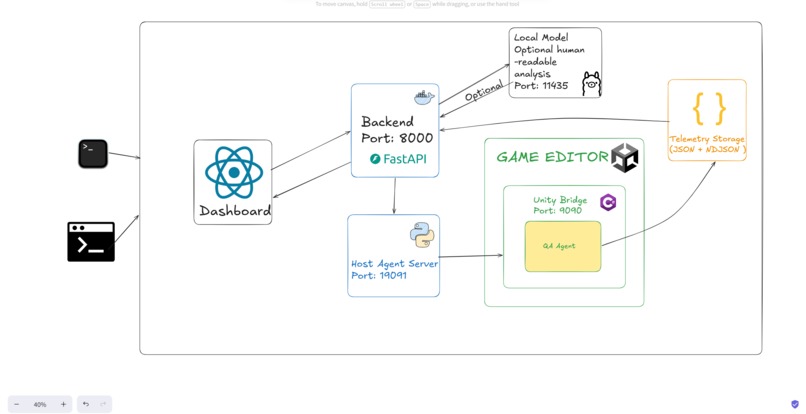
High Level Design
-
-
Inspiration
Testing a Unity game can be repetitive, messy, and difficult to manage, especially near release. Our team wanted to build a tool that makes playtesting more structured, more automated, and more useful for developers.
We were also inspired by another common problem: game settings are often confusing for players, and poor configuration can lead to bad performance or a frustrating gameplay experience. That led us to include hardware-based settings recommendations, so games can run more smoothly based on the player’s device.
What it does
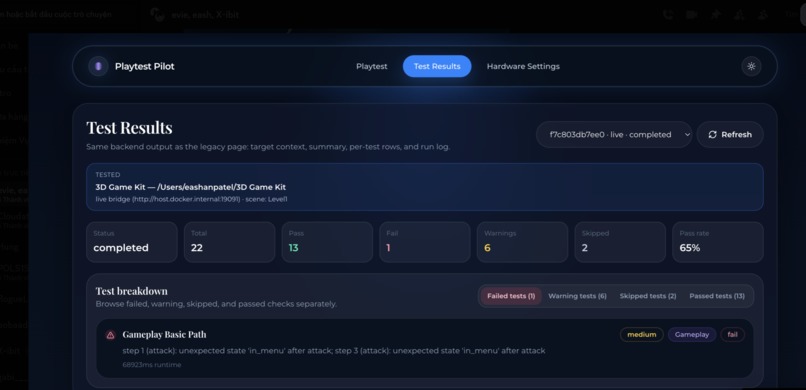
Playtest Pilot is a Unity QA bot that helps automate key parts of the playtesting process. It can test gameplay flows, evaluate settings across different hardware and performance profiles, check for basic exploit or security-related issues, and generate reports showing what failed and where.
The goal is to help developers catch problems earlier, reduce repetitive manual testing, and improve game quality before release.
How we built it
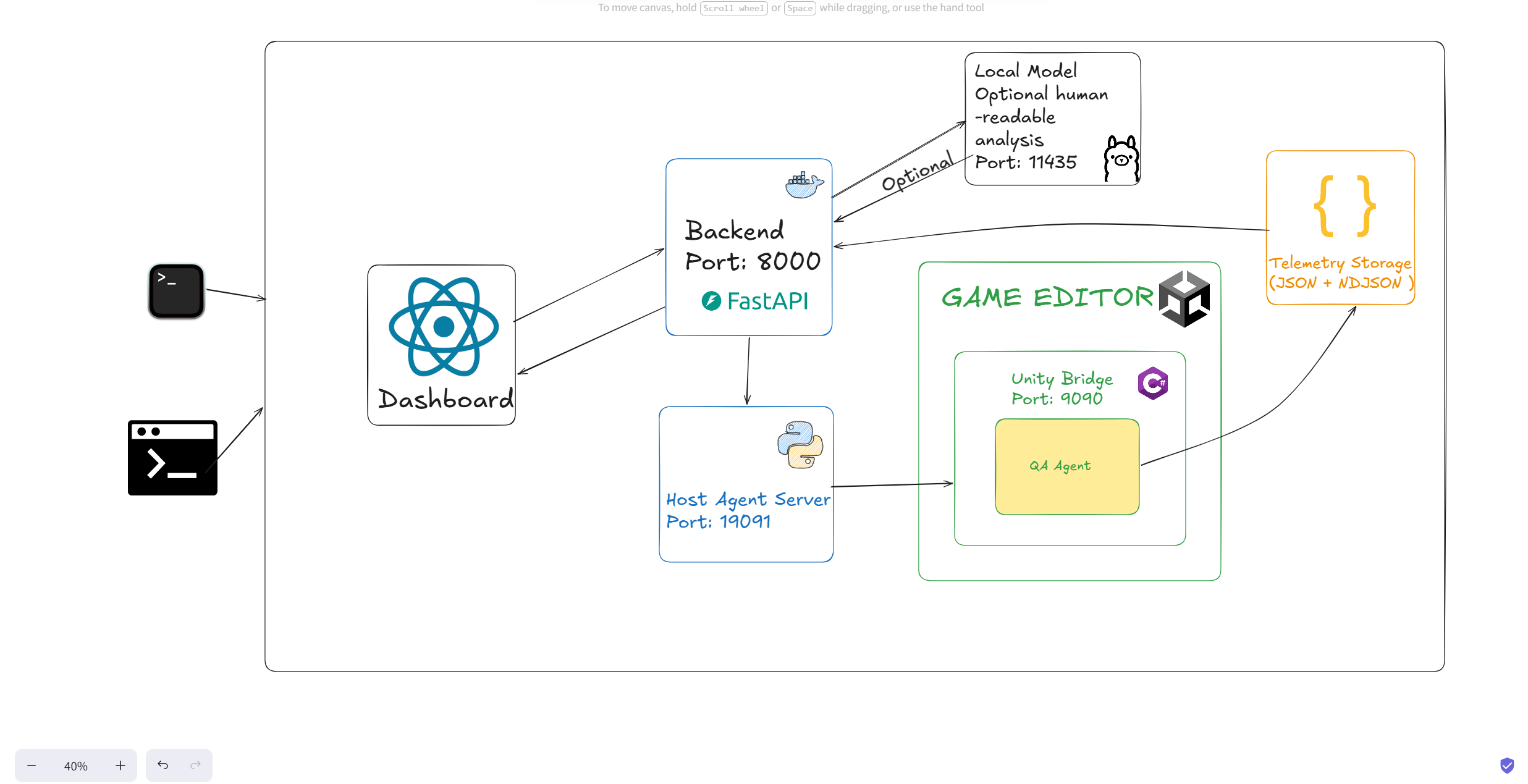
We built Playtest Pilot as a full-stack prototype combining Unity, backend automation, and a frontend dashboard.
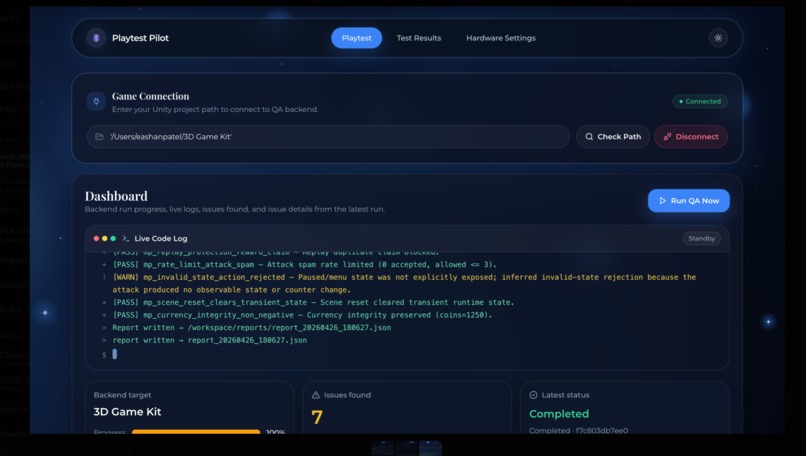
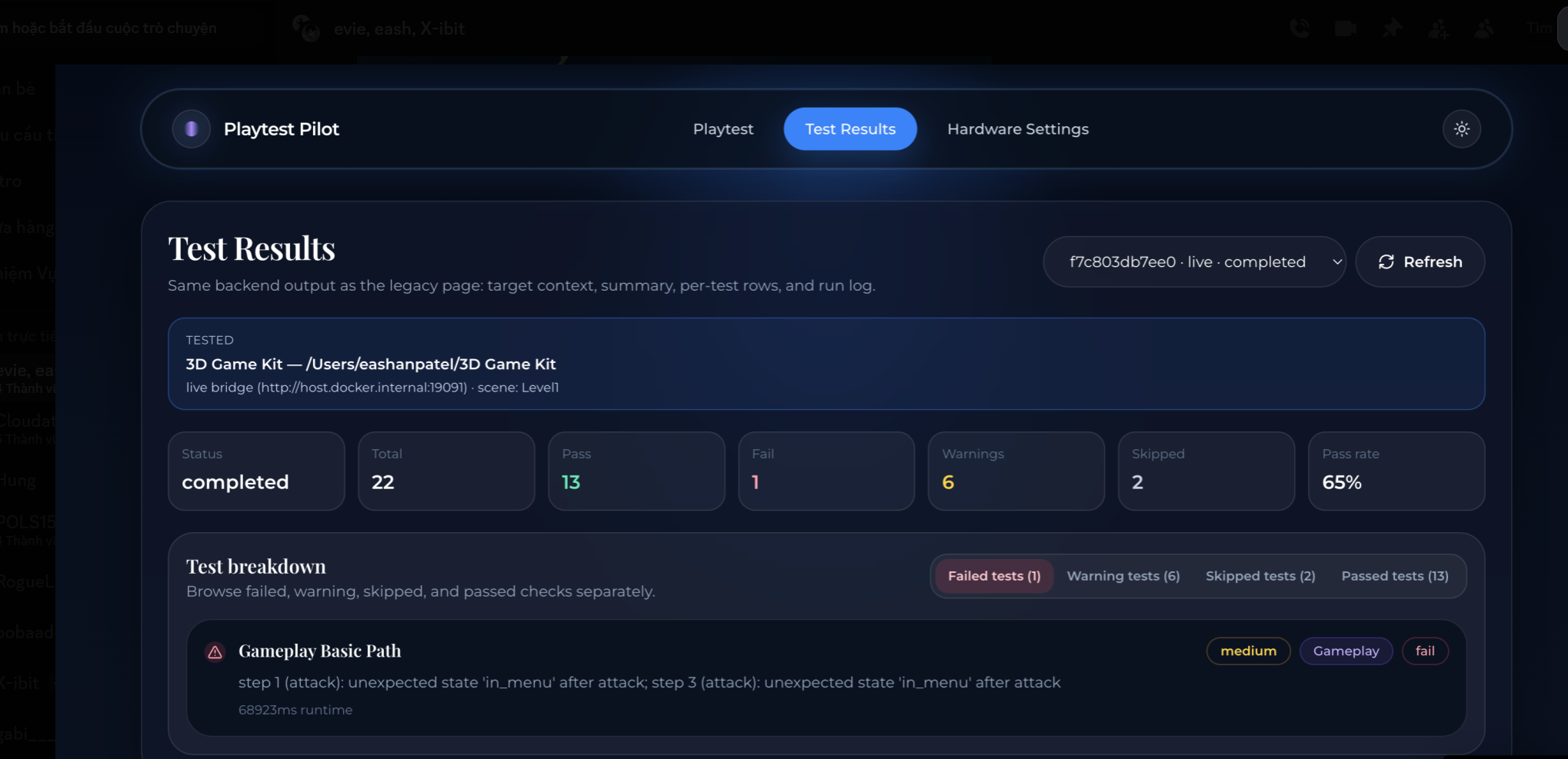
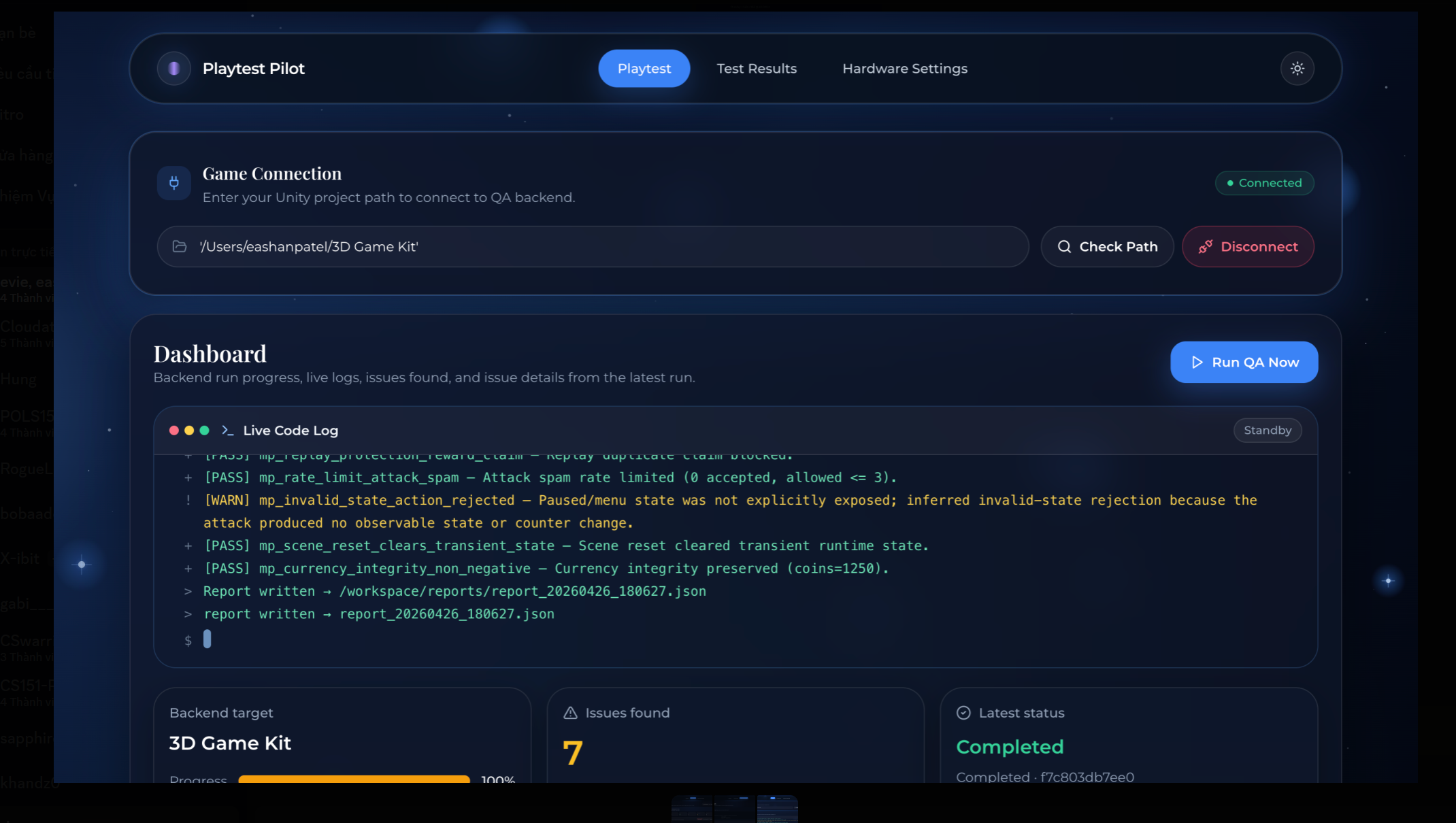
On the Unity side, we worked on integrating gameplay testing hooks, performance tracking, and scripted testing flows. On the backend side, we handled the automation logic, report generation, and communication between services. On the frontend side, we built an interface for launching tests, viewing results, tracking issues, and showing hardware-based settings recommendations.
Our team split responsibilities across frontend and backend, then spent a large part of the project connecting everything into one working system. Since the platform depends on Unity, server logic, and UI all working together, integration became one of the biggest parts of the build.
Challenges we ran into
One of our biggest challenges was learning Unity while actively building the project, since it was completely new to our team. That made even simple integration tasks take longer than expected.
We also ran into model and tooling limits that slowed down part of our development process. At the same time, our frontend design kept evolving as we refined the product vision, which meant we had to keep adjusting both the UI and the backend connections.
The hardest challenge came near the end: getting the frontend, backend, and Unity system to communicate reliably. We were dealing with multiple services, crashes, bugs, and broken connections between the dashboard, backend, and Unity environment. We also got stuck for several hours on how to properly test the correct game and how to make our tool work without requiring every game to be rebuilt specifically for it. Debugging across three moving parts at once was overwhelming, but we kept pushing through until we had a working prototype.
Accomplishments that we're proud of
We are proud that we built a working prototype that brings together automated playtesting, issue detection, performance checks, hardware-based personalization, and reporting in one platform.
We are also proud that we learned Unity from scratch, divided the work clearly across the team, and still managed to bring everything together under pressure. Most importantly, we are proud that we stayed persistent, supported each other, and kept building even when things became stressful near the end.
This project is more than a generic website or dashboard — it is a tool designed to help developers save time and improve their workflow.
What we learned
We learned a lot about teamwork, communication, and full-stack integration. This project showed us how important planning becomes when you are building across multiple layers at once: Unity, automation, backend logic, and frontend UI.
Because Unity was new to us, we also learned how quickly a team can grow when everyone is willing to learn, adapt, and keep moving forward under pressure. Most of all, we learned that building developer tools is very different from building a normal app — it requires thinking deeply about workflow, usability, and real technical pain points.
What's next for Playtest Pilot
Next, we want to make the Unity integration more reliable, improve the automated testing flows, and expand the exploit and performance checks.
We also want to improve the reporting system so developers can understand failures faster and take action more easily. On top of that, we want to make the hardware-based settings feature smarter and more personalized across a wider range of devices.
In the future, we see Playtest Pilot growing into a more complete QA assistant for game developers, with support for more engines and editors beyond Unity.
Does it only support one operating system?
No. Our goal is for Playtest Pilot to support multiple operating systems, including macOS, Windows, and Linux.
Why can’t ChatGPT replace our tool?
Playtest Pilot is not just an AI chatbot or a text-based assistant. It is a testing workflow tool designed specifically for game developers.
Our system does not rely entirely on AI to decide what to test. Instead, it uses scripted testing logic written in C#, combined with automation, telemetry, and reporting. The value of the product comes from actually running game-specific checks, capturing performance and exploit issues, and giving developers structured results — not just generating suggestions in text.
How does this show creative technology without depending on AI?
Our project applies automation in a practical way to support game development. Instead of building a tool that simply talks about bugs, we built one that helps detect issues before a game is published.
Playtest Pilot reduces manual testing time, supports QA workflows, and helps developers catch gameplay, performance, and security-related problems earlier. The creativity is in how we connect Unity, automation, testing logic, hardware-aware settings, and reporting into one usable system.
How does our app improve development time?
Playtest Pilot helps accelerate development by reducing repetitive manual QA work and making problems easier to identify.
It helps by:
detecting errors earlier in the workflow automating parts of gameplay testing that would normally require repeated manual playthroughs surfacing bugs without forcing developers to inspect the entire codebase highlighting likely problem areas through reports, logs, and issue summaries helping developers test settings and performance more efficiently across hardware profiles
This saves time and lets developers focus more on building and fixing, instead of repeatedly reproducing the same issues by hand.
How to run it
On macOS Click start_all.command to start all services and the frontend Copy the game path from Finder Paste that path into the tool Click run to begin testing On Windows Click start_all.bat Open Unity Hub Click the three dots on the project Open the project in Explorer Copy the project path Paste it into our tool and start the test run
Playtest Pilot can support both live game testing and code-related testing workflows.
Extra problem statement / market relevance
Testing a game before publication, especially during the late stages of development, is one of the most painful parts of the process. Developers face pressure to fix bugs quickly, polish the game, and prepare for release — all while dealing with crashes, inconsistent feedback, hardware-specific issues, and difficult-to-reproduce bugs.
Some of the biggest pain points include:
Time pressure and crunch: testing usually happens close to launch, when deadlines are tight Hard-to-reproduce bugs: some issues only happen on certain devices or under specific conditions Manual QA limitations: repeated playtesting is slow, expensive, and prone to human error Performance and hardware fragmentation: games need to work across many different devices and system configurations Emotional stress: late-stage testing is frustrating because teams are constantly trying to find and fix problems under pressure
Playtest Pilot is our attempt to reduce that burden by giving developers a more structured, automated, and developer-friendly QA workflow.


Log in or sign up for Devpost to join the conversation.