-
-
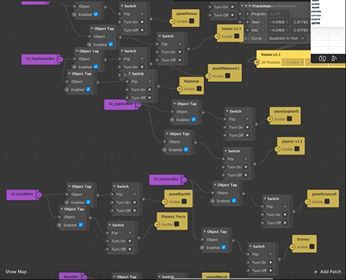
Patch Editor
Inspiration
We knew we wanted to create a filter that educated the user on a certain topic. Our love and curiosity for space inspired us to create this filter to inform the audience on some fun facts about each of the eight planets.
What it does
The Instagram filter has a list of the eight planets in order according to their distance from the sun. The user can select any planet and information about it would pop up on the screen. Then, by clicking on the name again, the information would no longer be visible and the user can continue onto the next planet. By creating this filter, users would learn facts about the eight planets through Instagram.
How we built it
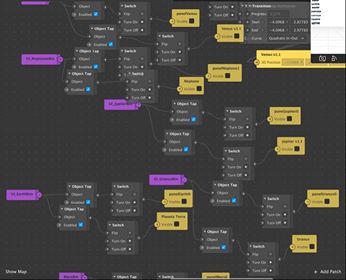
Using the Spark AR tools provided, we were able to import all of the 3D planets into the project from the AR Library. By using the Patch Editor, we connected the names of the planets with an object tap and a switch to have the information box and planet appear after the user taps on the name. When the name is tapped, it signals the object tap to switch the display and make the information become visible to the user.
For the names of the planets, we used Phonto in order to get the font and color that we wanted and have the background of the text be transparent. As for the facts, we researched some properties of each planet such as the distance from the sun and the size of the planets to educate the users. We then used Canva to create the designs that displayed the information.
For formatting, we placed everything into camera space because we wanted the text to be still and directly on the screen for the user to read. We placed the names of the planets on the left side in the order according to their distance from the sun for the user to tap on the one that they want to learn more about. We then put the planet on the bottom part of the screen and the information above for the user to read.
Challenges we ran into
When signing up for the hackathon, neither of us had experience using Spark AR and augmented reality. Thus, we faced many challenges as we explored through the platform and the tools to create an Instagram filter.
First, we faced the problem of figuring out how to use the Native UI Picker to create buttons with the planet names. We watched many online tutorials to learn how to get the planets and information to turn on and off based on the name that is tapped on. We were able to figure it out and connect it together with the Patch Editor.
We also faced formatting issues. Our original idea was to have the planets lined up in world space in a 360 format. This way, when running the Instagram filter, the camera would be at the center and the planets would be floating around. However, after attempting this method, we realized that we were unable to place the 2D text information onto the other side as it was only visible from one side of the screen. We could not figure out how to fix this issue and could not find any resources to help guide us, so we created another plan instead to display the planets in one place.
Accomplishments that we're proud of
We are extremely proud of the outcome of our Instagram filter. From the challenges we faced, we were able to either solve them or think of another plan of execution. Overall, it was a great experience and we are so happy that we learned how to create Instagram filters through Spark AR.
What we learned
From not having any experience in augmented reality, we were able to learn a lot about what it is and how to use it. Through Spark AR, we were able to learn the functions of it and the possibilities of what can be accomplished when creating Instagram filters.
What's next for Planet Explorer
We hope to be able to develop more Instagram filters that educate the users. As for Planet Explorer, it would be nice to use the Native UI Picker as buttons for the users to select planets. Also, we hope that we can solve the issue with world space and create the 360 effect that we originally planned to do. An addition to the filter would be to have the user in a spaceship dressed like an astronaut and launch them into space.
Built With
- augmentedreality
- patcheditor
- sparkar

Log in or sign up for Devpost to join the conversation.