-
-
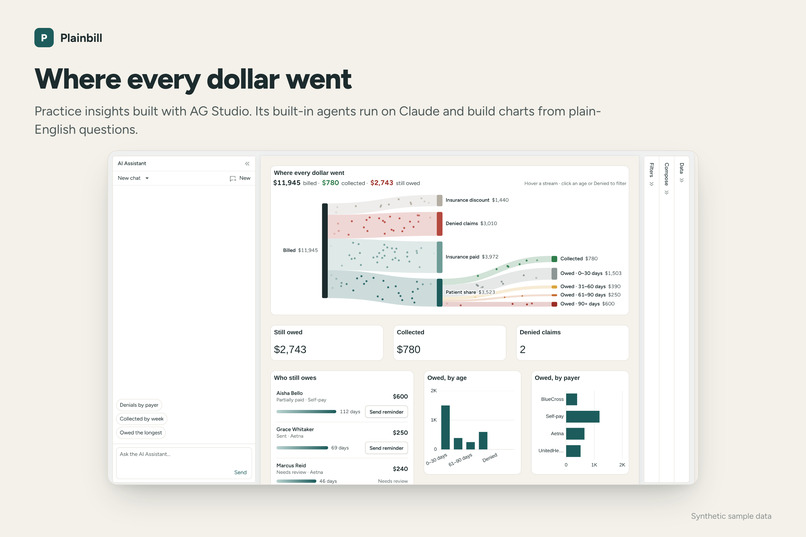
In-depth insights using AI and AG Studio.
-
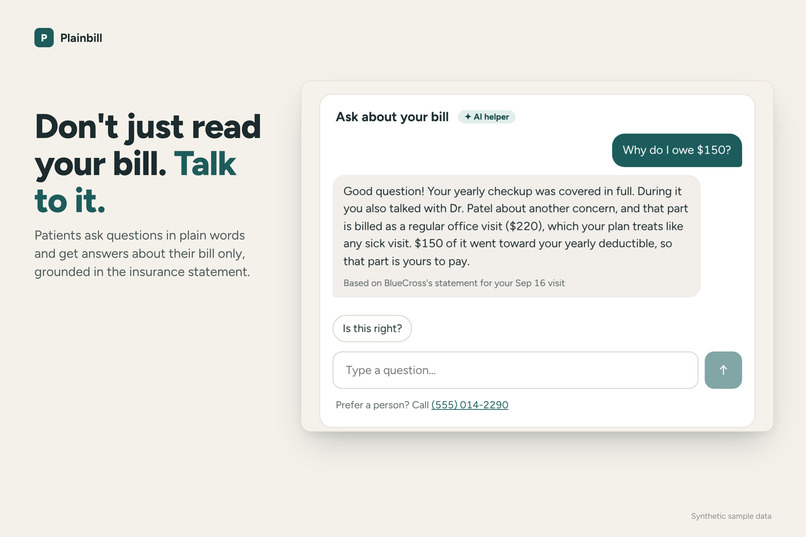
Talk to your bill with AI.
-
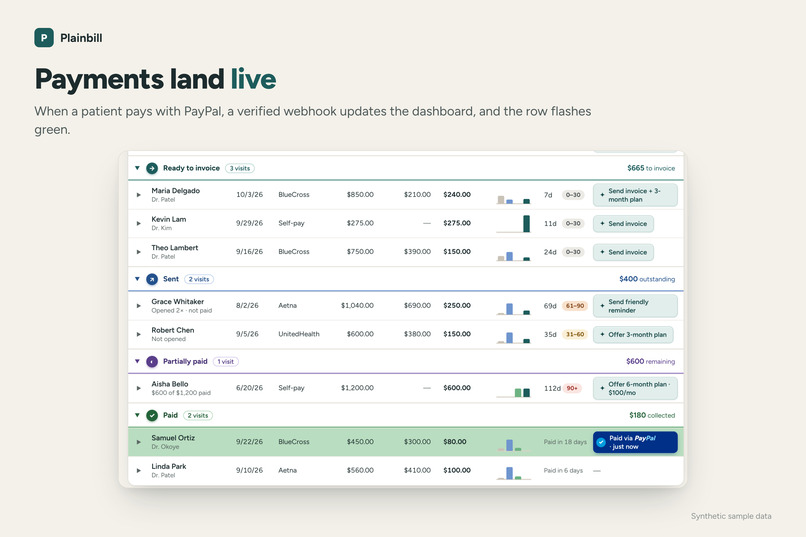
Live webhook from PayPal.
-
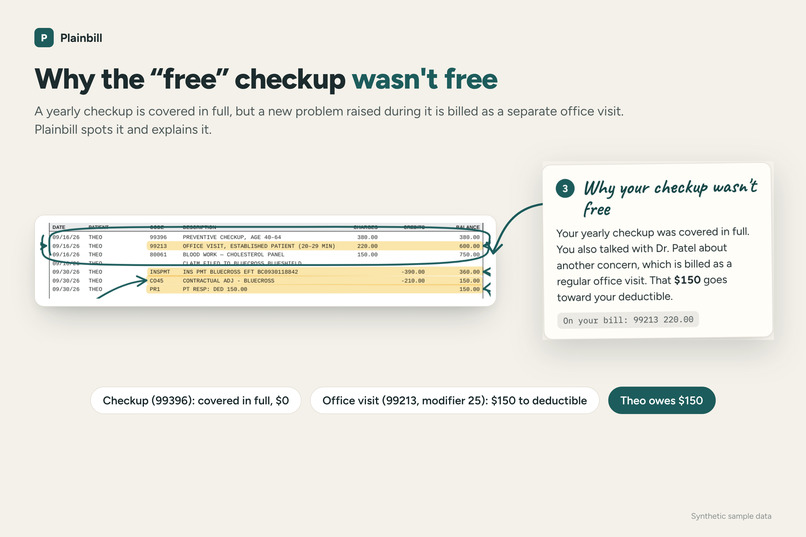
Explains surprise bill.
-
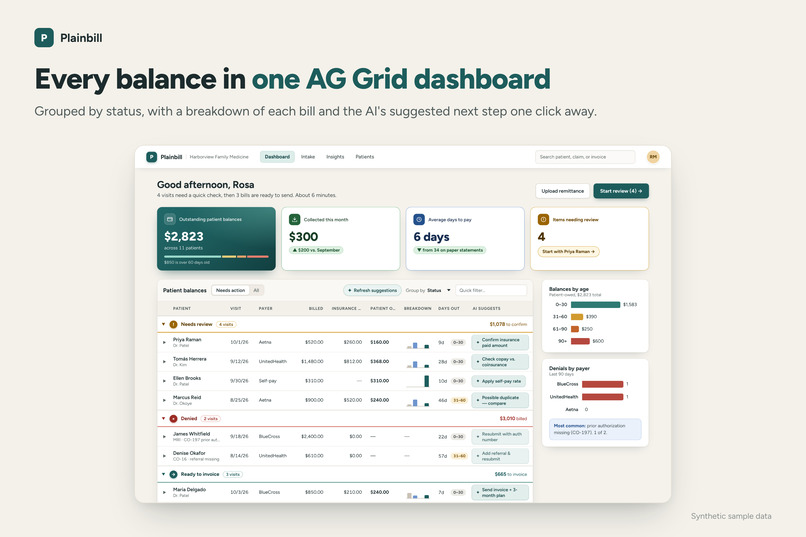
Dashboard created with AG Grid.
-
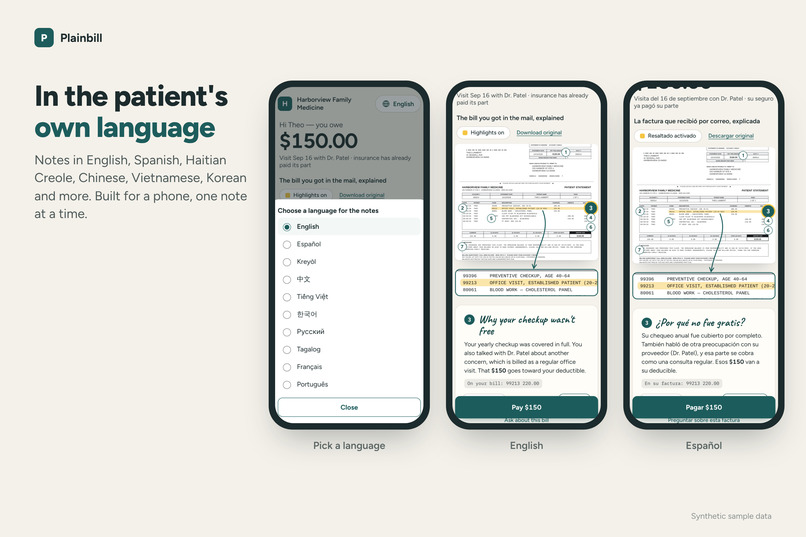
Includes multiple languages.
-
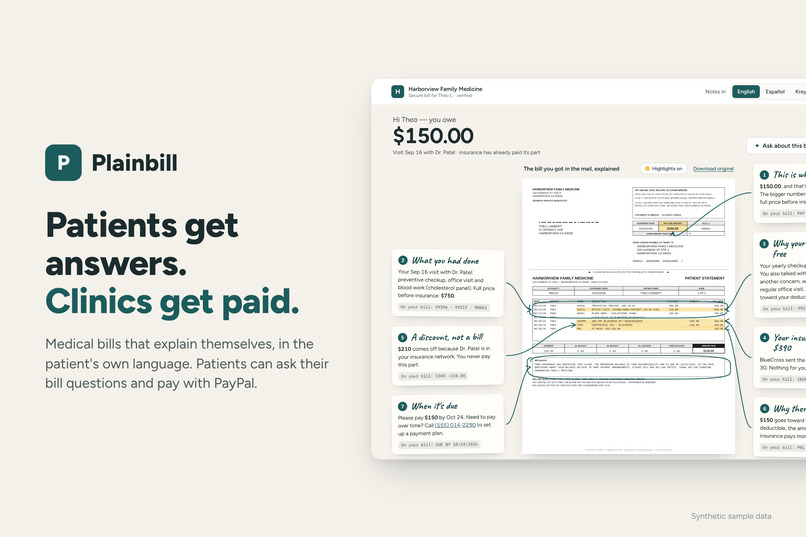
Plainbill cover.
-
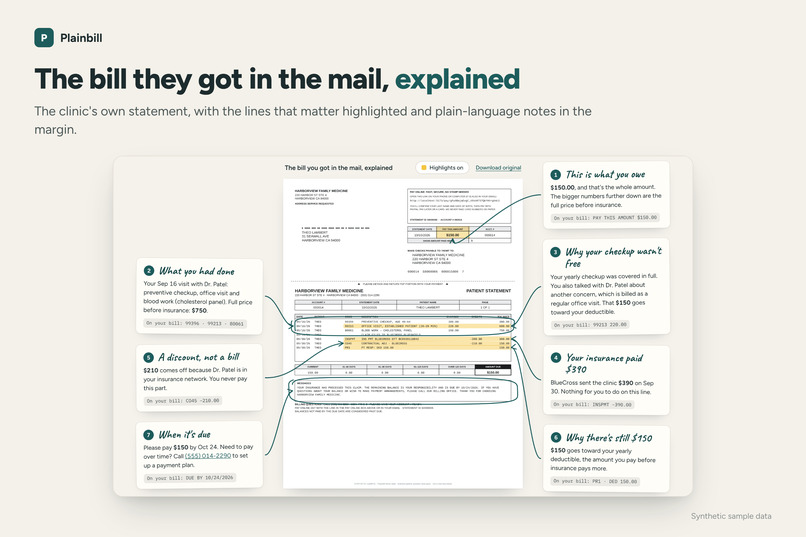
AI interacts with medical bill to explain it.
Inspiration
When my mom gets a medical bill, I'm the one who explains it. The insurance codes mean nothing to her, and English isn't her first language. She has me. Most patients don't, so they call the clinic, or they put the bill aside and never pay it. My mom is far from alone: 38% of Americans say medical bills are confusing, and more than 25 million have limited English.
When I talked the idea over with a primary care physician, another problem came up: surprise bills. A patient comes in for a yearly checkup they expect to be free and mentions a new problem, like a sore knee. Insurance covers the checkup, but the knee is billed as a separate office visit that goes toward the deductible. Weeks later the patient gets a bill they didn't see coming and calls the front desk upset.
Both problems land on small practices. They lose hours answering billing questions, and money on balances that never get paid. I built Plainbill to give every patient what my mom has: someone to explain the bill.
What it does
Plainbill helps small medical practices send bills that explain themselves.
For the patient
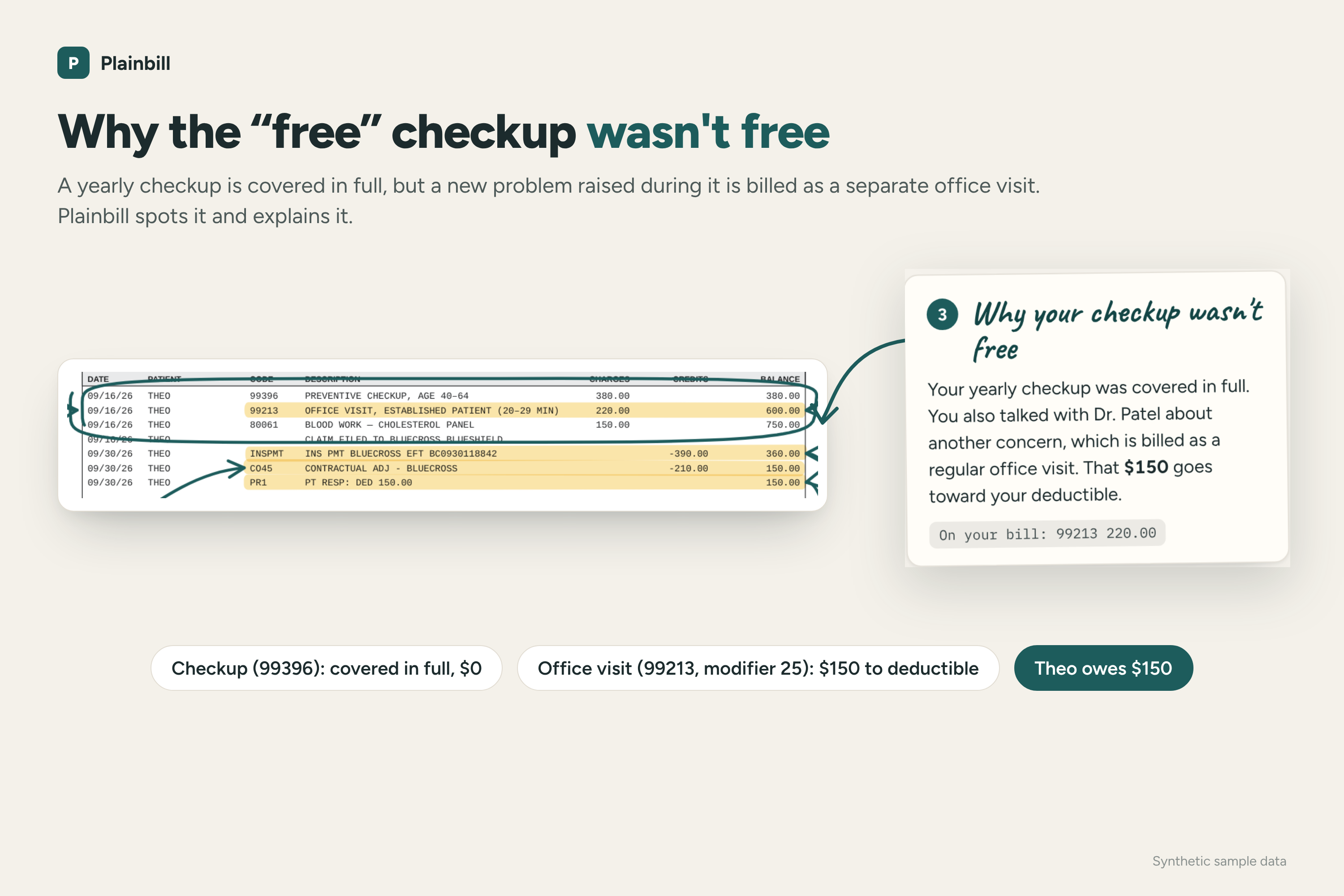
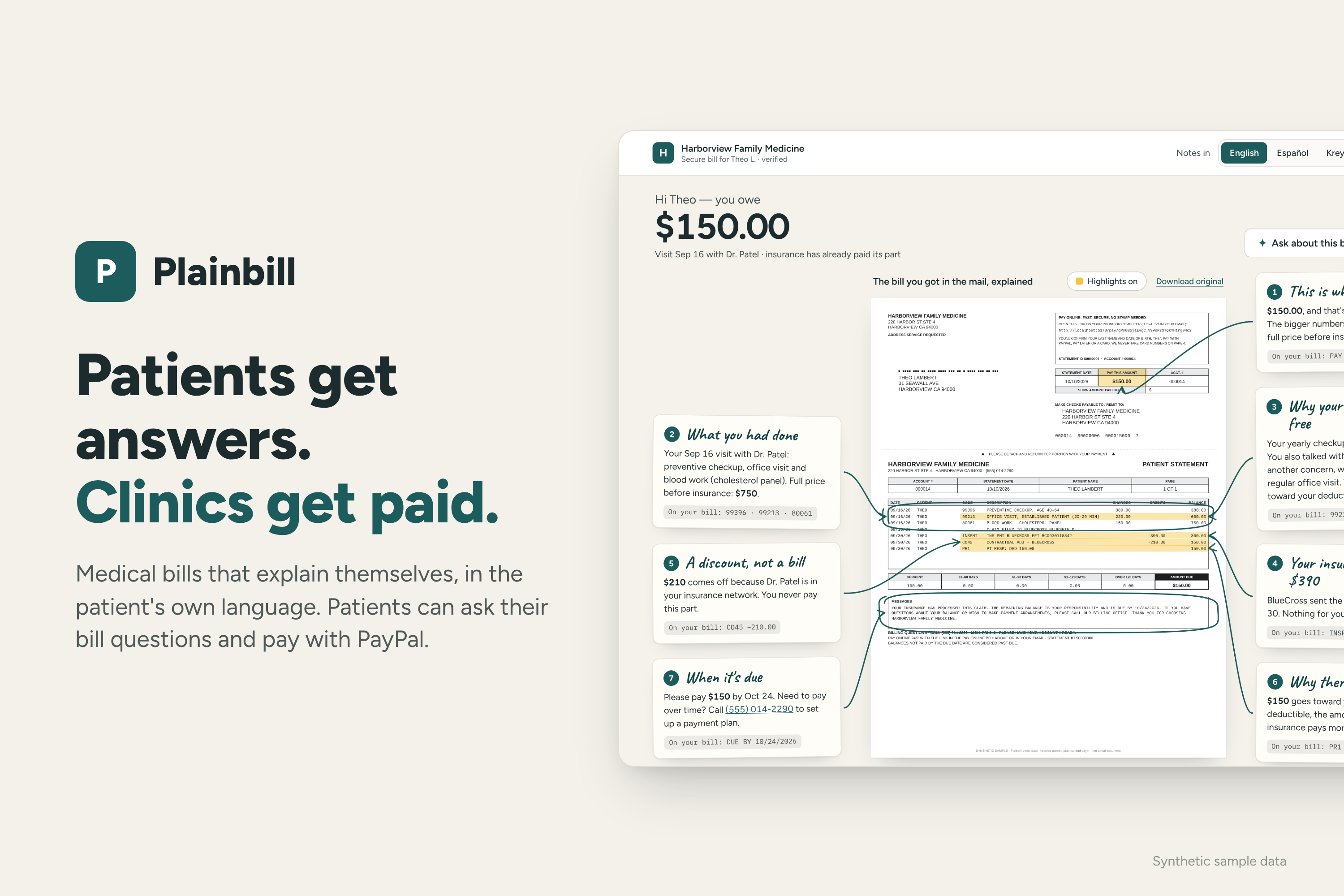
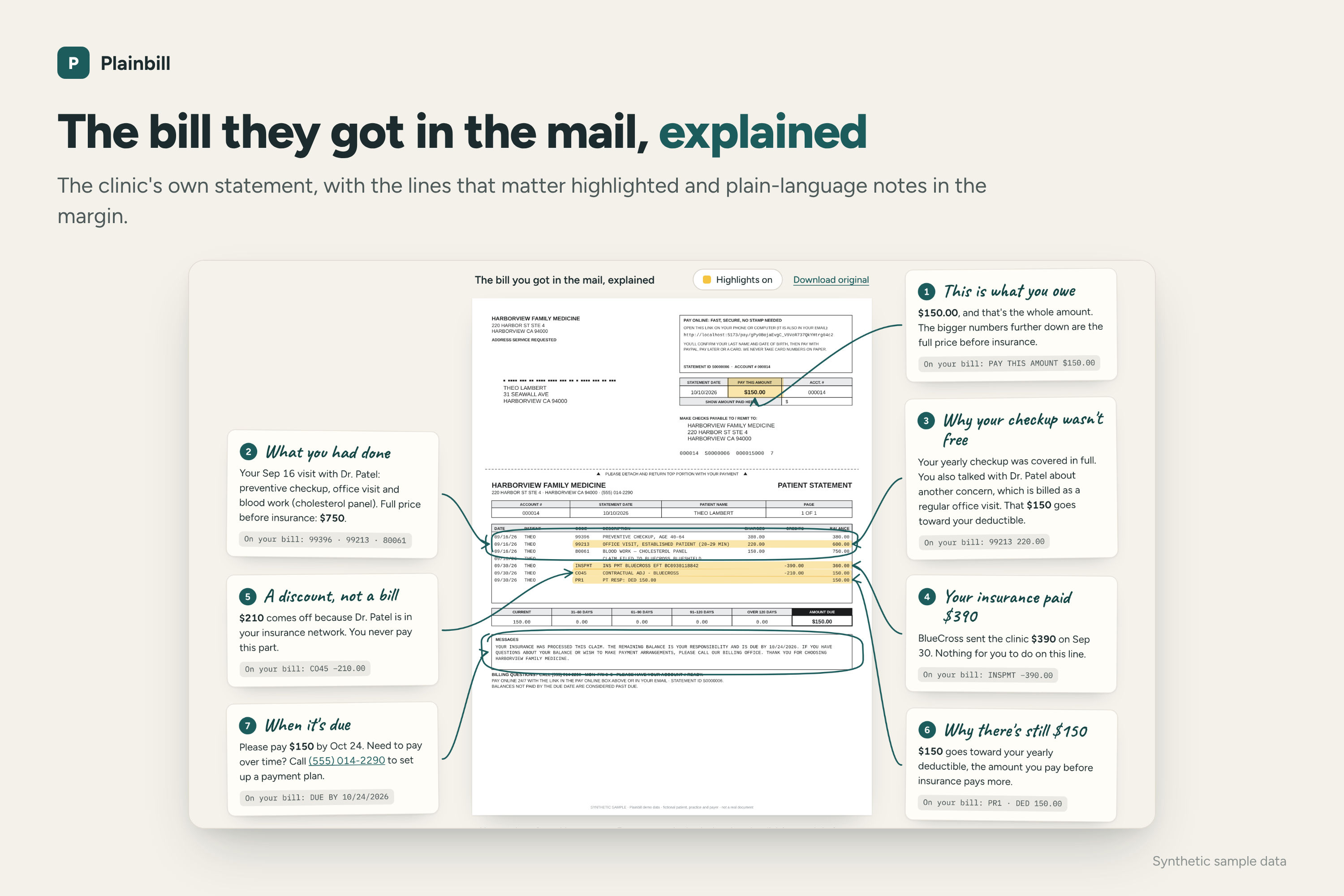
- They see the practice's own statement with the important lines highlighted and short notes in the margin: what they owe, what insurance paid, what was a discount, and why.
- When a "free" checkup came with a bill, Plainbill spots it and explains it in plain words.
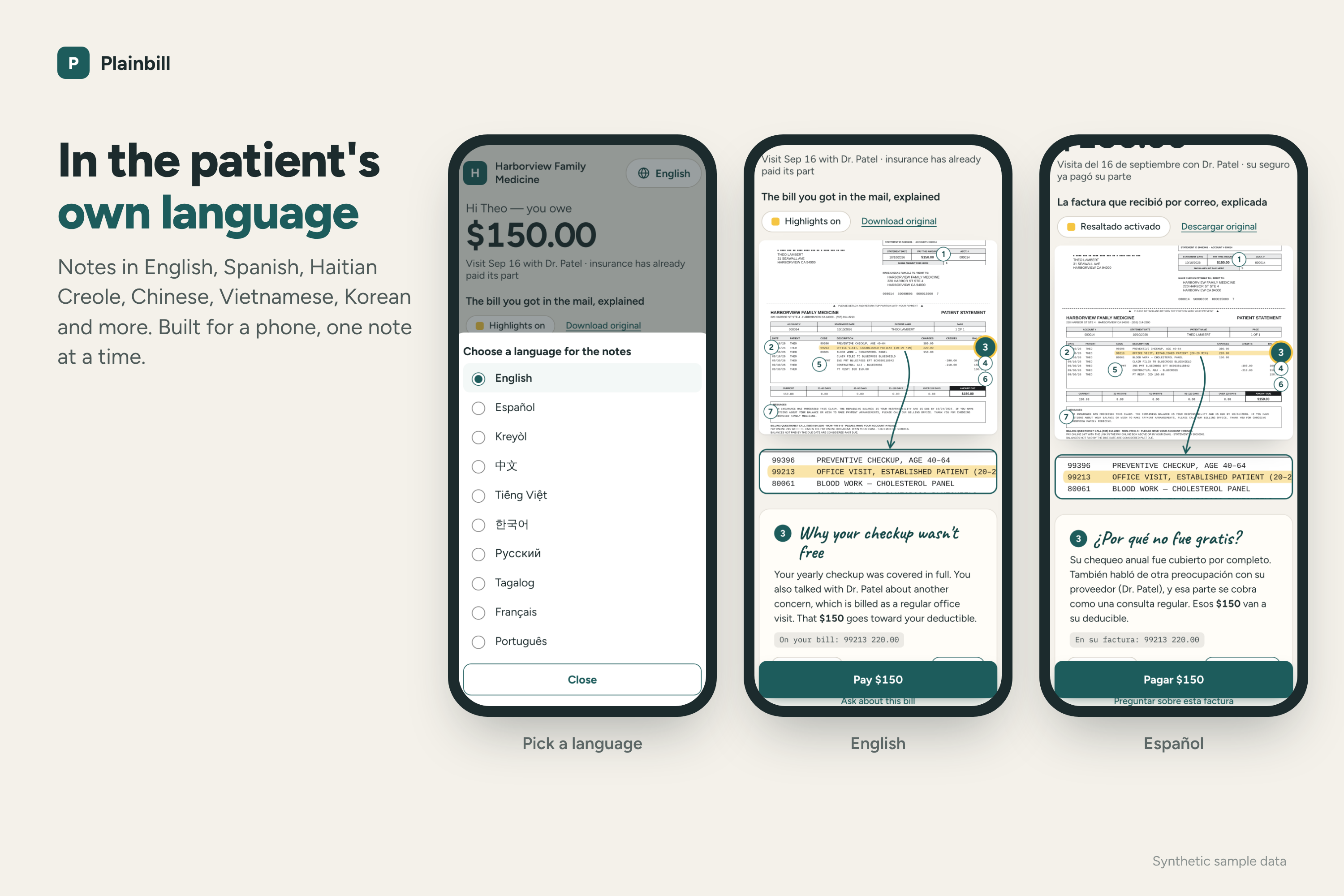
- The notes are available in English, Spanish, Haitian Creole, Chinese and more.
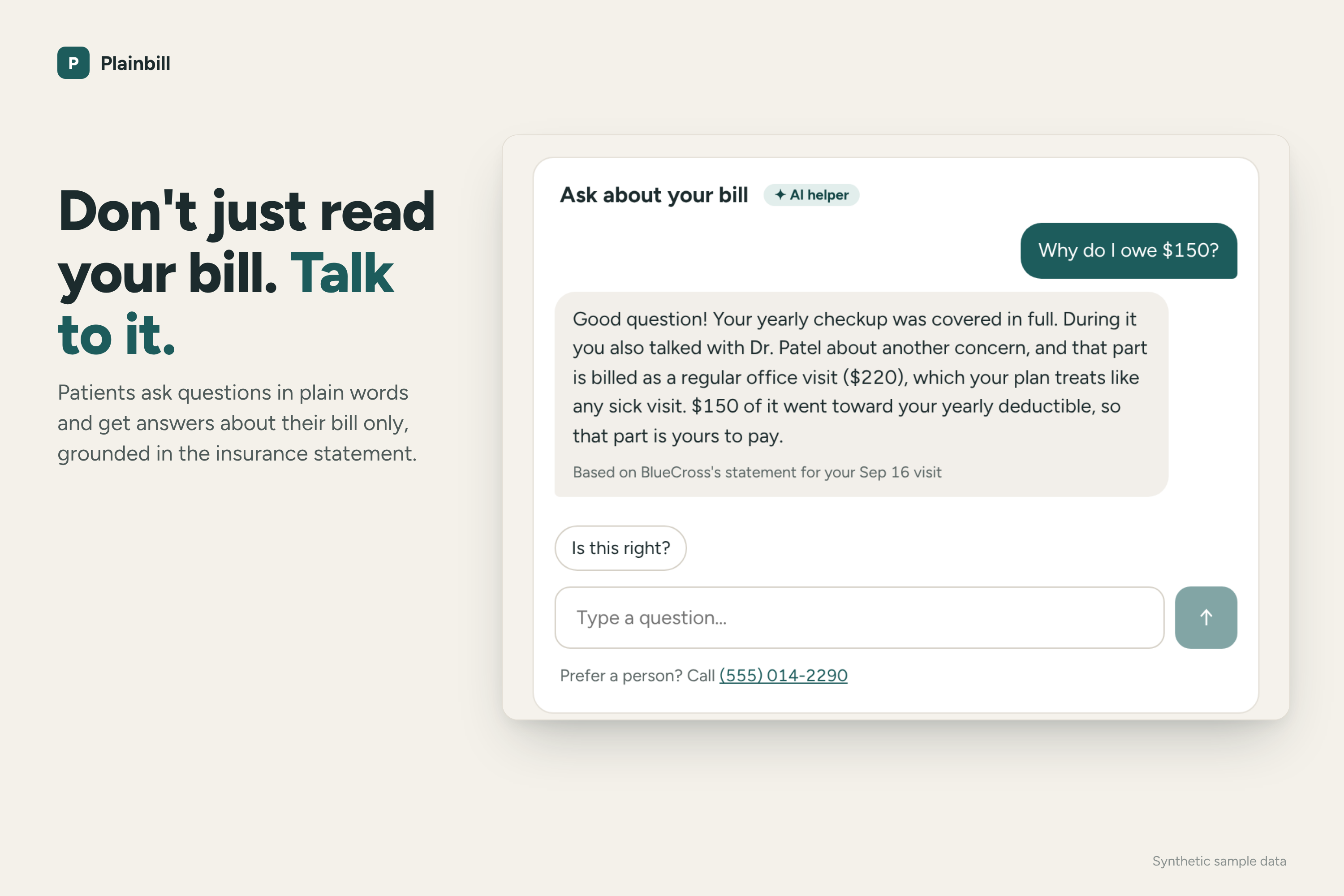
- They can talk to their bill. They can ask "Why do I owe \$150?" or "Can I pay this over time?" and get answers about their bill only.
- They pay with PayPal, Pay Later or a card, or split the bill into 3 or 6 interest-free payments.
For the front desk
- They drop in insurance files (835 remittances and scanned EOBs) or self-pay visits. Plainbill works out what each patient owes and flags anything it isn't sure of.
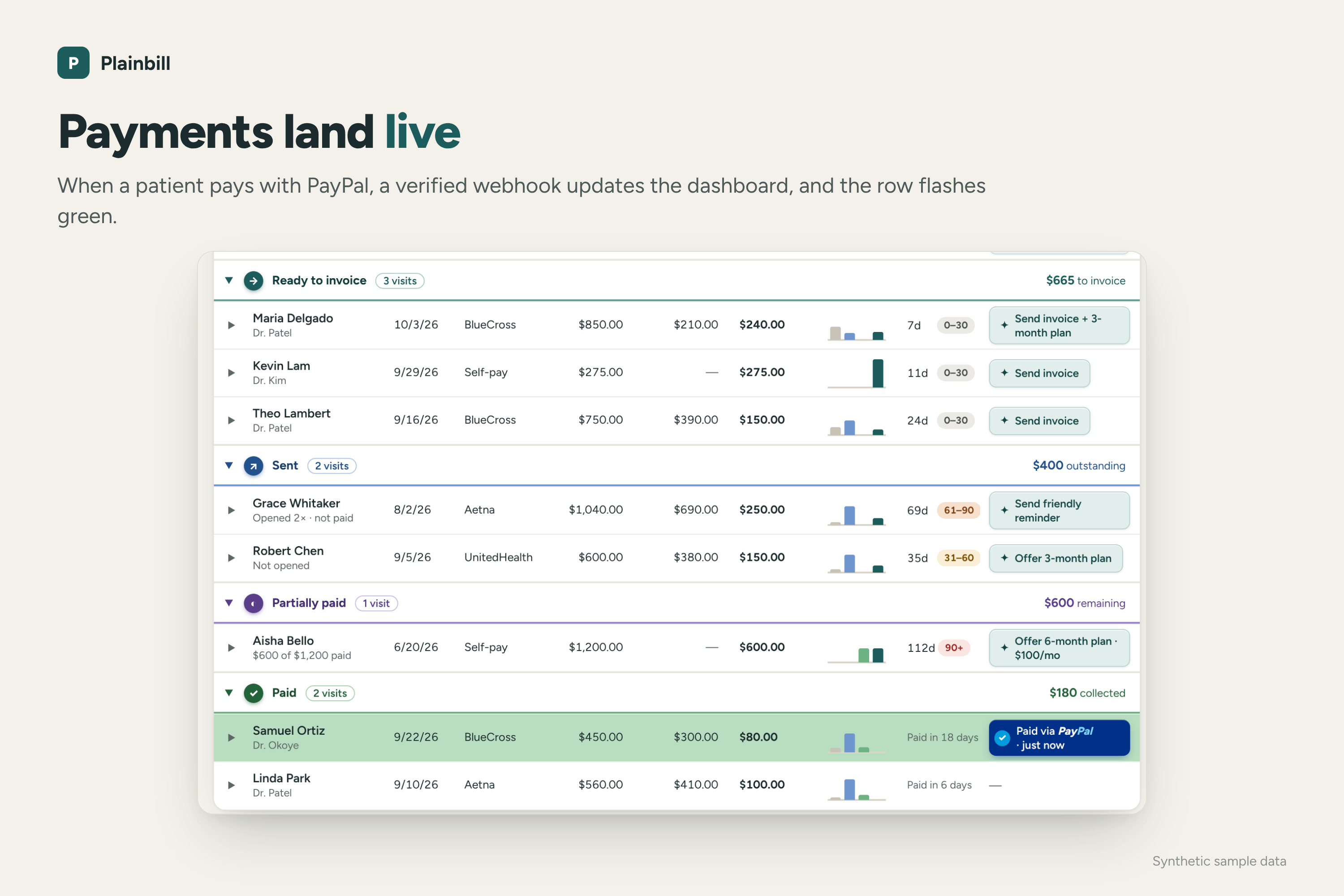
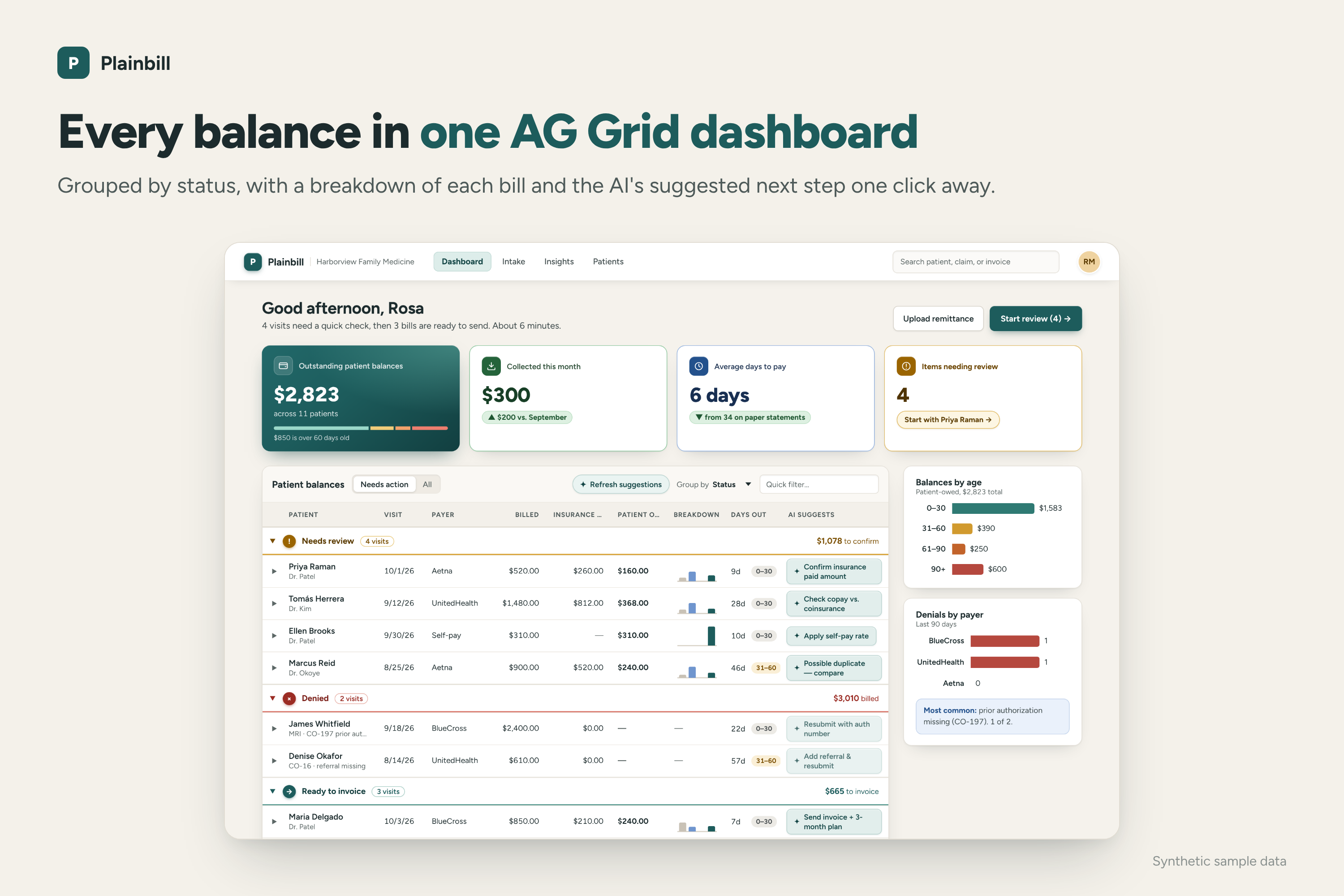
- One AG Grid dashboard shows every balance, grouped by status, with a breakdown of each bill and a suggested next step.
- They send a bill in one click: a PayPal invoice plus a friendly email that links to the explained statement.
- Payments show up on the dashboard live.
For the office manager
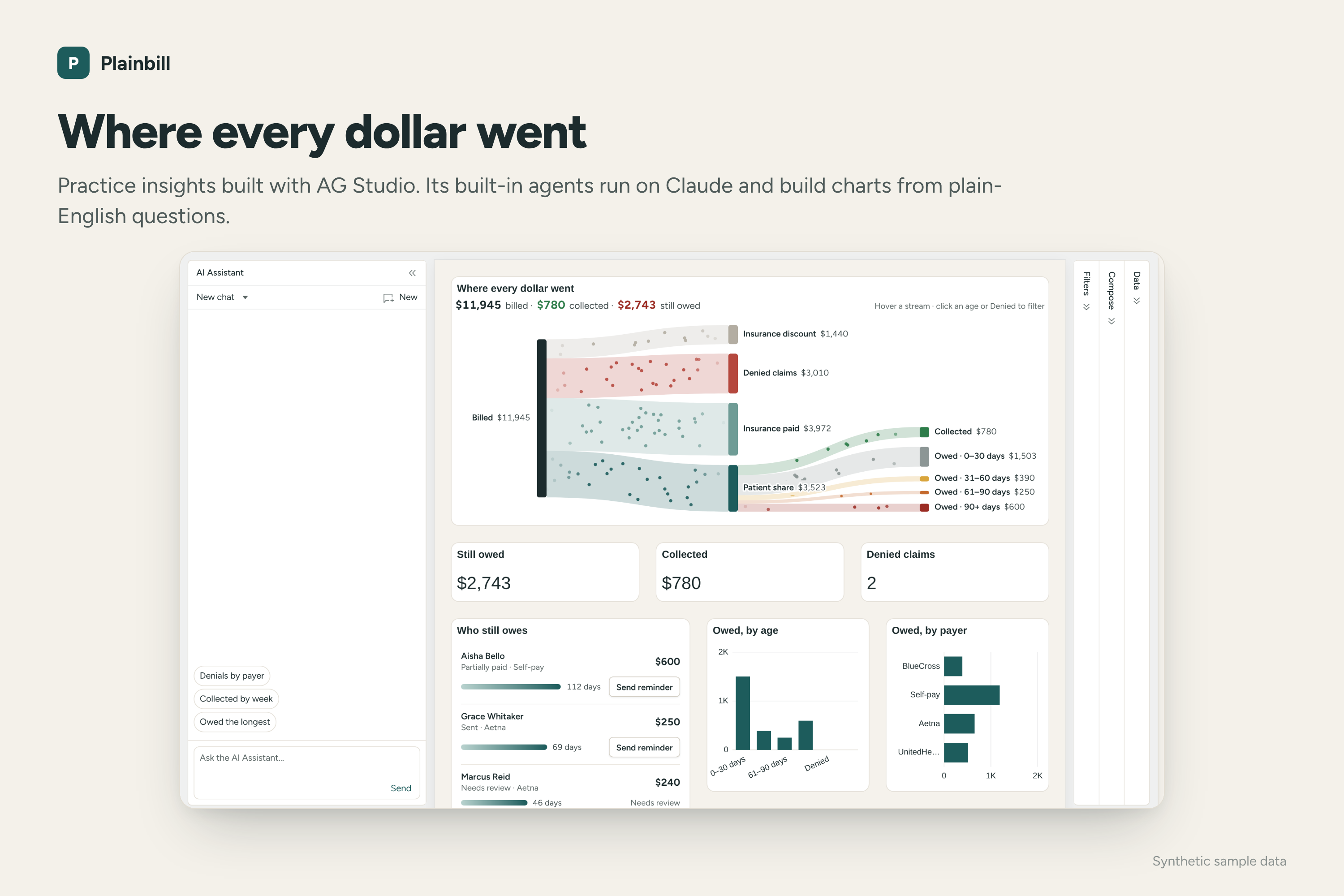
- "Where every dollar went" is an animated view of everything billed, flowing into discounts, denials, insurance payments, money collected and what's still owed.
- They can ask questions in plain English, like "Which payer denied the most?", and AG Studio's agents build the charts to answer.
How I built it
- Claude Opus 5.5 reads scanned EOBs, writes the notes on the statement and the patient emails, answers patient questions and suggests each balance's next step.
- PayPal
- Invoicing creates the bill.
- Orders and the JS SDK power checkout with PayPal, Pay Later or a card.
- Subscriptions handles the payment plans.
- Verified webhooks, plus a background check, catch every payment.
- The Agent Toolkit lets the bill assistant start a payment or a plan, but only after the patient confirms it on a card. Only two of the toolkit's tools are turned on, and the amount always comes from code, not the AI.
- AG Grid Enterprise runs the front-desk dashboard:
- Balances are grouped by status.
- A mini bar chart on each row (an AG Grid sparkline) shows where the bill went: discount, insurance paid, patient paid and still owed.
- An "AI suggests" column does the next step in one click.
- Rows flash green when a PayPal payment lands.
- AG Studio Embedded Analytics runs practice insights. Its five built-in agents (Lead, Planning, Data, Page and Widget) run on Claude through an LLM adapter I wrote.
- Render hosts the live demo as a single web service set up from a Blueprint (
render.yaml). PayPal's webhooks land there, and every fresh instance loads the sample practice, so the demo always starts clean. - TypeScript throughout: React, Fastify, SQLite.
The rule I built around: AI writes the words, code handles the money. Every balance is calculated in code, in whole cents, and has to satisfy one equation:
$$ \text{patient owes} = \text{billed} - \text{insurance discount} - \text{insurance paid} $$
For Theo, one of the sample patients:
$$ \$750 - \$210 - \$390 = \$150 $$
Anything Claude writes is checked against those numbers. A message containing a dollar amount the code didn't calculate never reaches the patient.
Spotting the surprise checkup bill. For each visit line, the insurance file says how much the patient owes for that line. Plainbill flags a split visit only when all of these are true:
- There's exactly one checkup line, and the patient owes nothing on it.
- There's exactly one office-visit line, marked as a separate service (modifier 25).
- The patient owes something on that office-visit line.
For Theo, the checkup cost him \$0 and the office visit put \$150 toward his deductible. That \$150 is the whole bill, and it's what the note explains.
Challenges I ran into
- Keeping the AI honest about money. A wrong number on a medical bill is worse than no explanation. I added a check that blocks any message containing a figure the code didn't calculate.
- Spotting the surprise checkup bill without false alarms. If a visit has two office-visit lines, I can't tell which one the patient is asking about, so Plainbill says nothing. Saying nothing beats explaining the wrong thing.
- Connecting AG Studio's agents to Claude. AG Studio doesn't include a model, so I wrote an adapter that translates between AG Studio's agents and Claude, streaming included. That meant handling the delegations between the Lead and the specialists without breaking Claude's rules about how a conversation can be structured.
- PayPal sandbox details. An invoice with no recipient email still had to be payable. A bill paid on my page couldn't be collectable a second time through the invoice link. Payment plans that don't divide evenly still had to add up exactly. A \$368 balance over 6 months is \$61.333…, so I compute the payment in cents and put the leftover on the first payment:
$$ \begin{aligned} \text{monthly payment} &= \left\lfloor \frac{36800}{6} \right\rfloor = 6133 \text{ cents} \ \text{first payment} &= 36800 - 5 \times 6133 = 6135 \text{ cents} \end{aligned} $$
So the patient pays \$61.35, then five payments of \$61.33, for exactly \$368.00.
- Pinning notes to a paper statement. Getting the highlights and hand-drawn arrows to line up with the right lines, without overlapping, on desktop and on a phone.
Accomplishments that I'm proud of
- A primary care physician told me patients call about surprise checkup bills every week, and Plainbill catches them and explains them.
- A patient can understand their bill, ask it questions and pay it, all on one page and in their own language.
- The full loop works: insurance file in, bill sent, patient pays, and the dashboard row flashes green while a coin drops into "Collected."
- I built it solo, with 542 automated tests, including checks that every balance satisfies the equation above.
What I learned
- Patients aren't confused by the math. They're confused because nobody tells them what the lines mean. Context matters more than a nicer layout.
- Talking to one physician changed the product. The surprise checkup bill became one of its main features.
- Trust has to be designed in. Patients and clinics will only rely on an AI explanation if the numbers are always right and a person approves anything that's sent or charged.
What's next for Plainbill
- Hopefully a pilot with a real practice. That means HIPAA safeguards, agreements with the AI and email providers, and staff logins.
- Warning patients before the visit, not after. At check-in, tell them that a new problem raised during a checkup may be billed separately.
- Pulling insurance files in automatically from the practice's billing system instead of uploading them.
- Texting bills, more languages, and reading the explanation aloud for patients like my mom.
- Making every bill accessible to every patient, meeting WCAG 2.1 AA (the standard used for ADA compliance). That means full screen reader and keyboard support, large-text and high-contrast modes, and descriptions for every chart and highlight, so patients with low vision or other disabilities can understand and pay their bill on their own.
Built With
- ag-charts
- ag-grid
- ag-studio
- anthropic-api
- claude
- fastify
- node.js
- paypal
- paypal-agent-toolkit
- paypal-invoicing-api
- paypal-javascript-sdk
- paypal-orders-api
- paypal-subscriptions-api
- paypal-webhooks
- react
- sqlite
- typescript
- vite

Log in or sign up for Devpost to join the conversation.