The learner
Maya is 13 and in 7th grade (Maya is a fictional persona). She has dyslexia, and she moved to the United States two years ago, so English is her second language. She speaks Spanish at home. She understands science well when a teacher explains it out loud. Her science textbook is the problem: its paragraphs are written at about a college reading level. She reads every sentence twice, loses her place between lines, and gets stuck on words like "subsequently" and "utilized" that are not science words at all. Homework that should take 20 minutes takes her an hour, and she often gives up before she reaches the actual idea.
The barrier
The barrier is the text, not the science. Dense textbook writing (long sentences, passive voice, formal academic words, small and tightly spaced type) blocks learners with dyslexia and English language learners from content they could otherwise learn. Help that exists is often paid, needs an account, needs a fast internet connection, or sends the student's text to a server. Many students have none of those, or are not allowed to use them on a school device.
Before and after
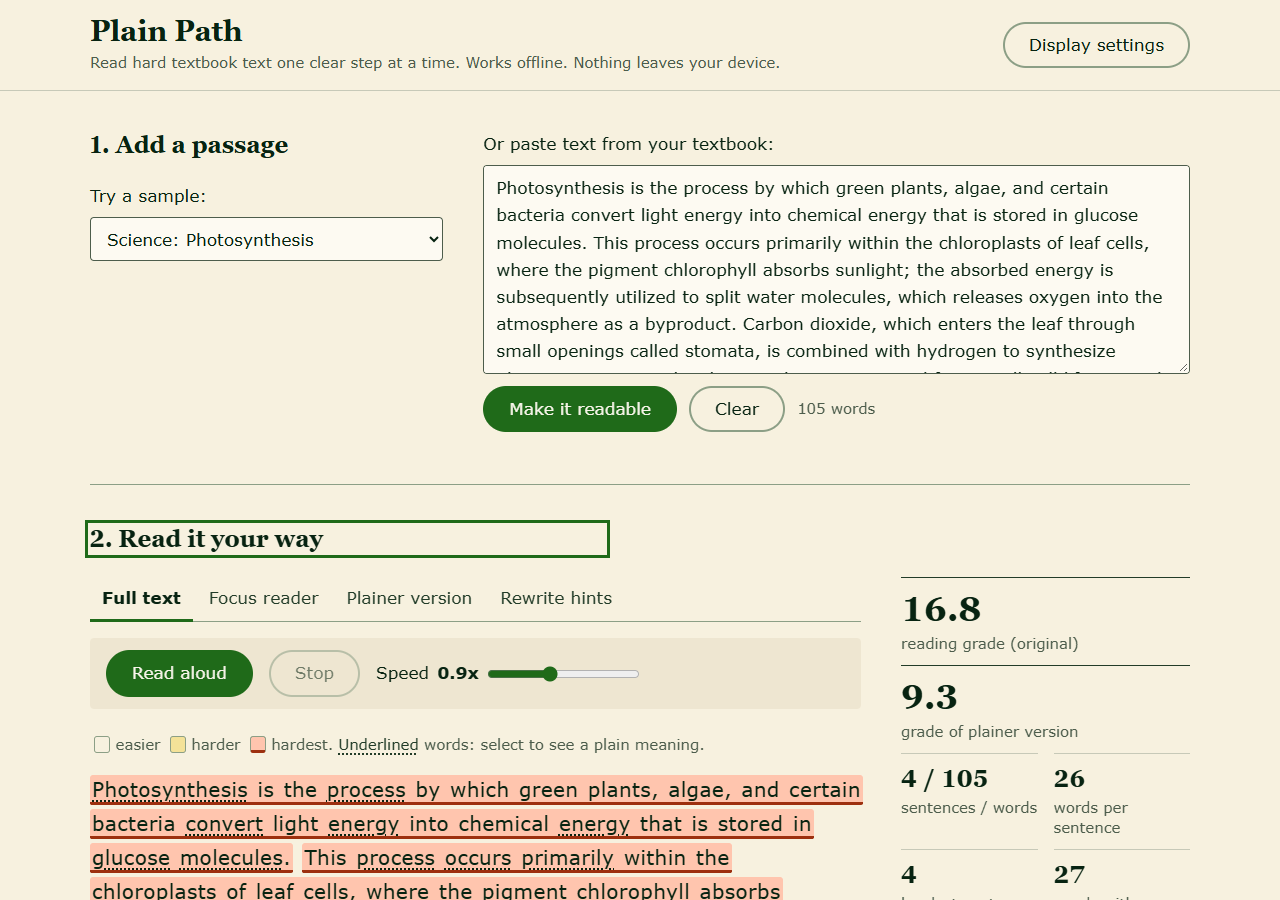
Before (a typical textbook paragraph, sample included in the app). Reading grade 16.8, four sentences, an average of 26 words per sentence:
This process occurs primarily within the chloroplasts of leaf cells, where the pigment chlorophyll absorbs sunlight; the absorbed energy is subsequently utilized to split water molecules, which releases oxygen into the atmosphere as a byproduct.
Maya sees a solid block of small text. She cannot tell which sentence is the hard one, and there are no meanings for the words she doesn't know.
After (Plain Path, same paragraph):
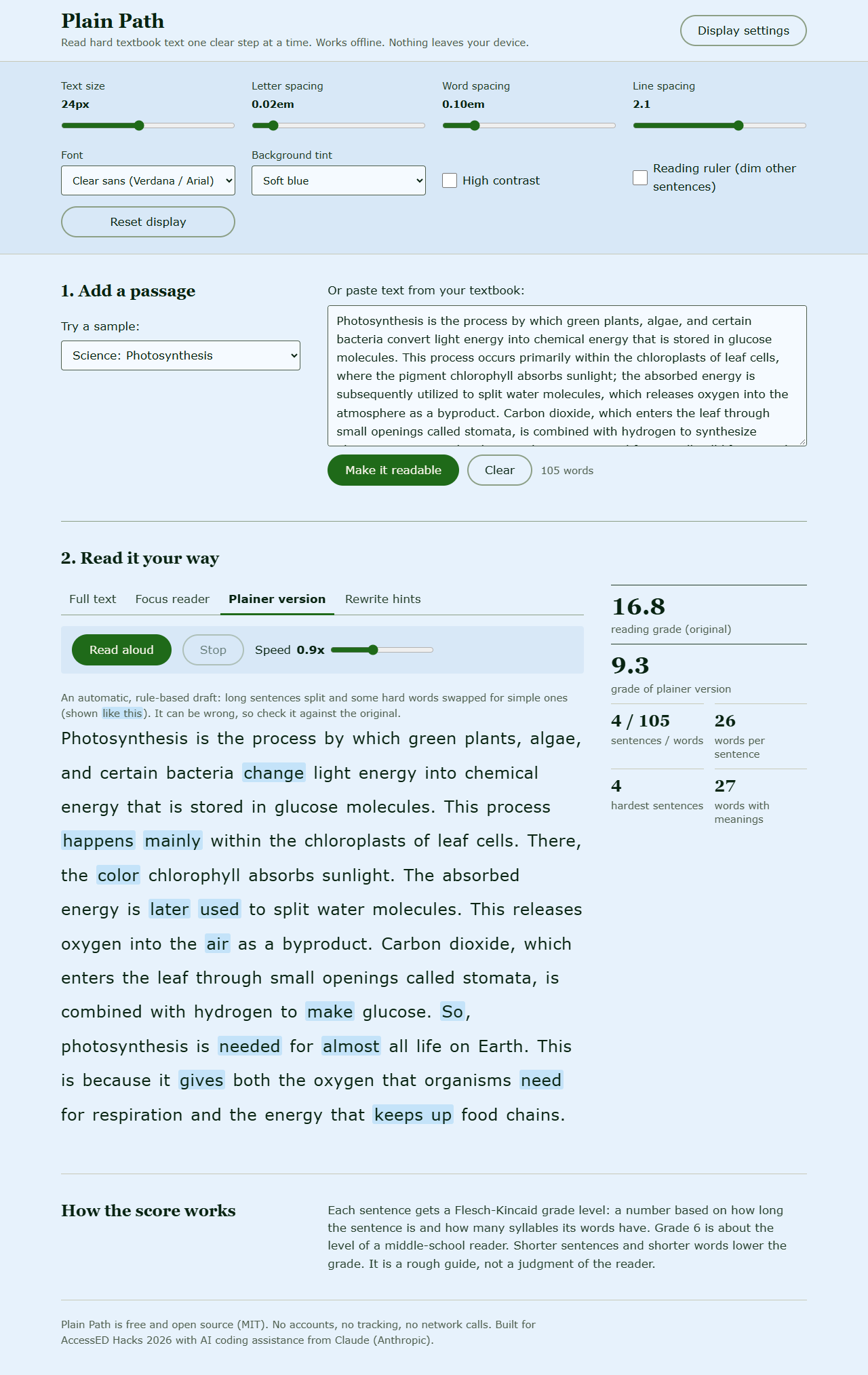
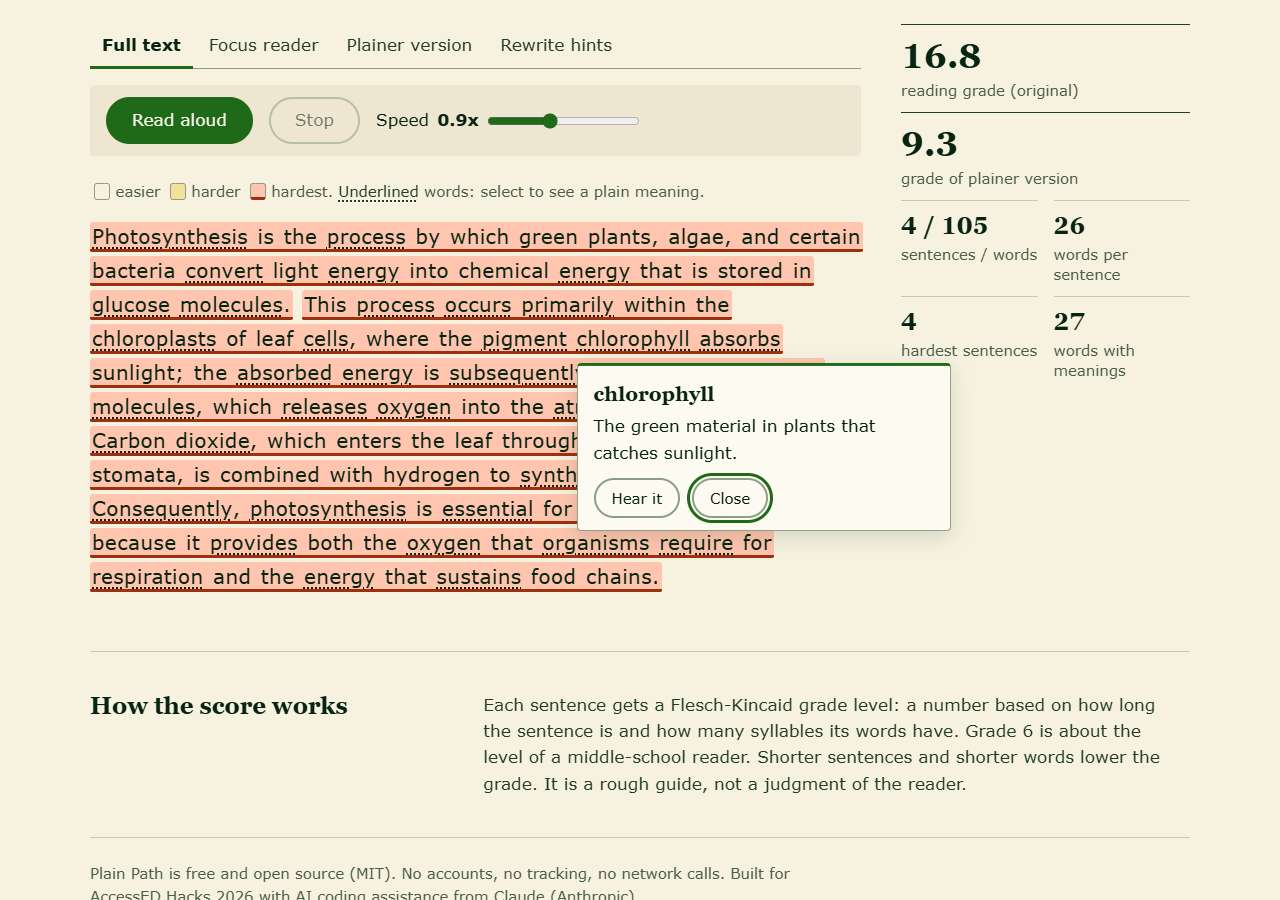
- The paragraph is shown in her chosen layout: 24px text, wider line spacing, a soft blue background. Each sentence is shaded by difficulty, so the three hardest ones stand out.
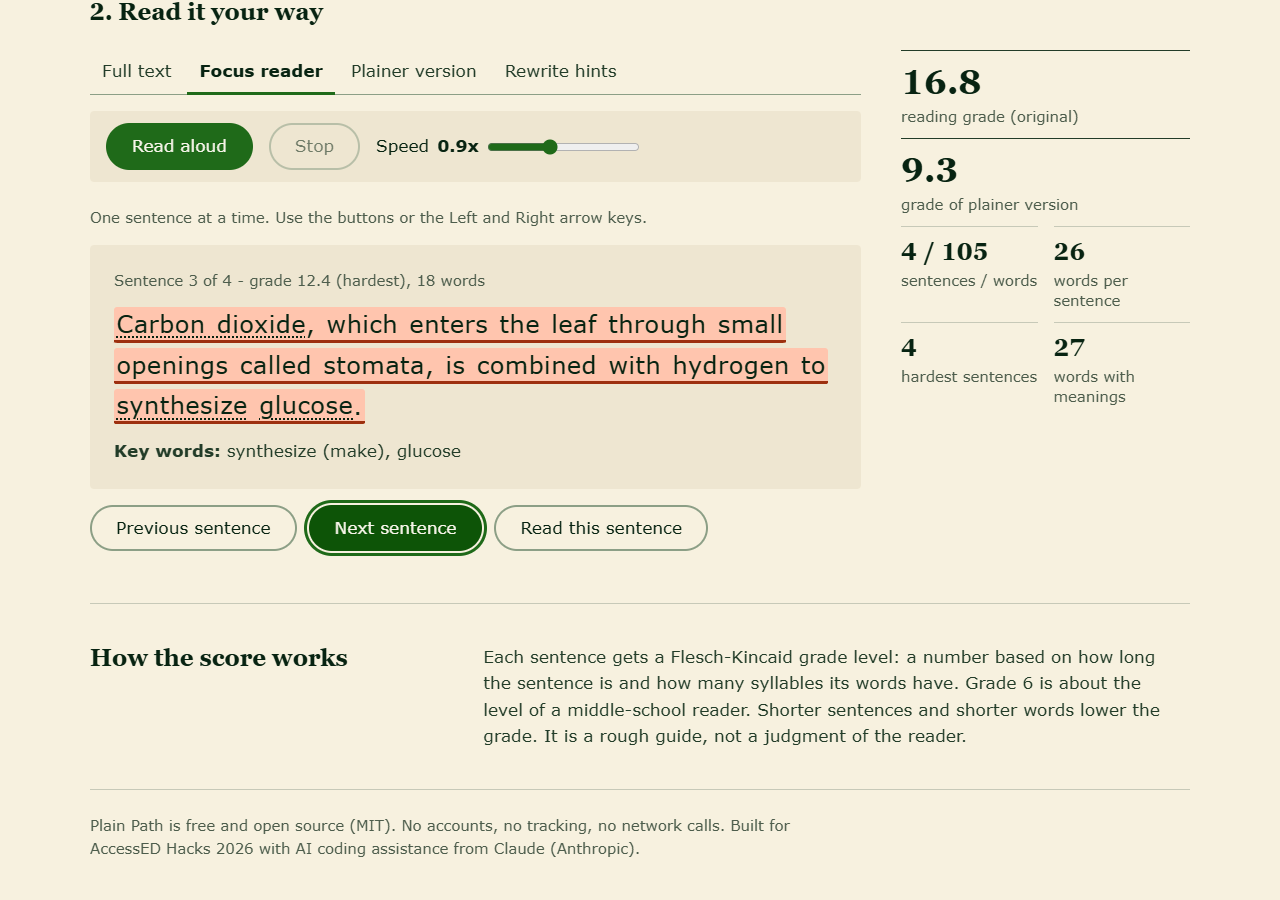
- She opens the Focus reader to see one sentence at a time and steps through with the arrow keys. Read aloud speaks the sentence and highlights each word as it is read, at 0.9x speed.
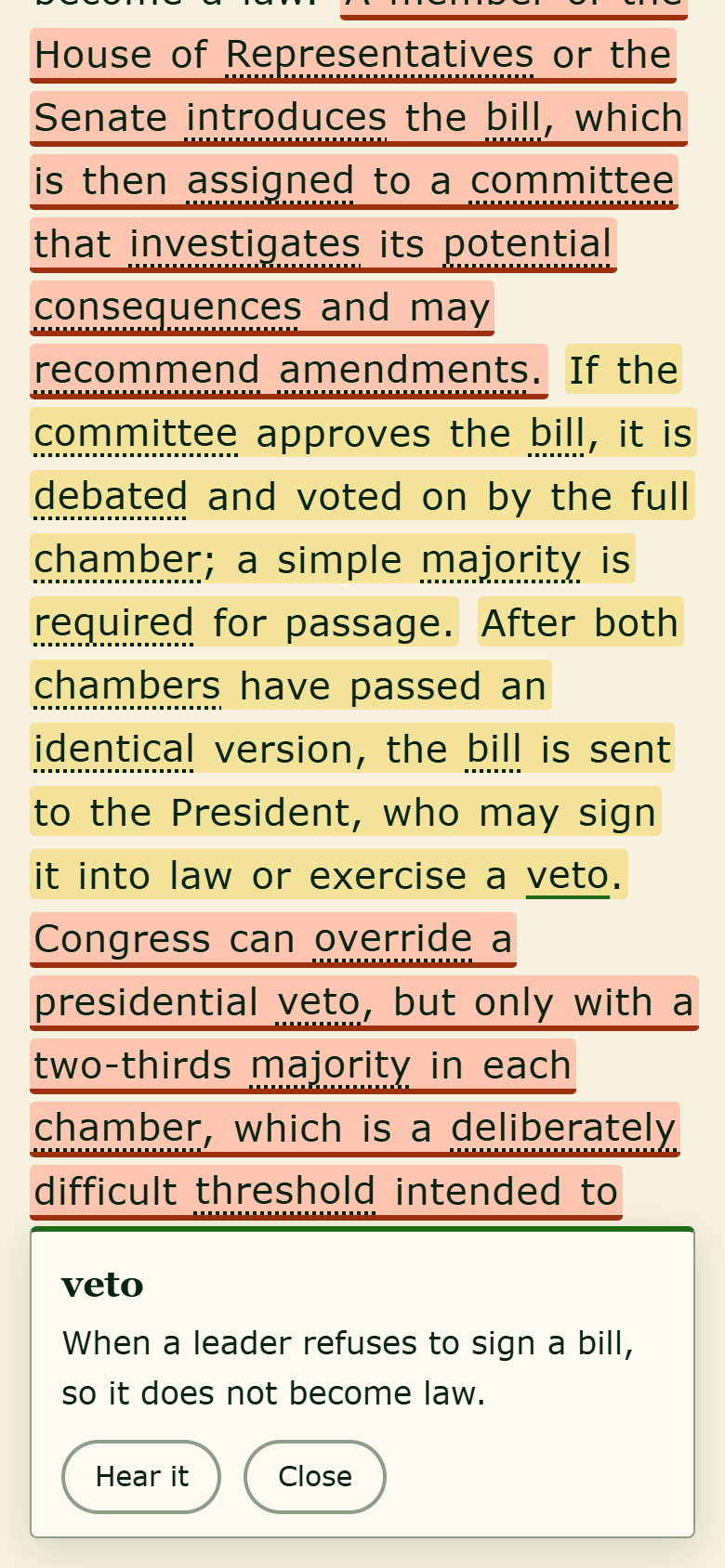
- She taps "chlorophyll" and sees: "The green material in plants that catches sunlight." She taps "subsequently" and sees: "Later; after that."
- The Plainer version tab rewrites the long sentence above into:
This process happens mainly within the chloroplasts of leaf cells. There, the pigment chlorophyll absorbs sunlight. The absorbed energy is later used to split water molecules. This releases oxygen into the air as a byproduct.
The whole paragraph goes from reading grade 16.8 to 9.3. The science words (chloroplast, chlorophyll, glucose) stay, with meanings one tap away, because Maya needs to learn them for her test. The other two samples change the same way: water cycle 13.2 to 8.6, civics 13.5 to 9.2.
What it does
- Readability map. Computes a Flesch-Kincaid grade for the passage and for every sentence, then shades sentences as easier, harder or hardest. Screen readers hear the sentence's grade too.
- Focus reader. Shows one sentence at a time in larger type, with its grade, its word count, a suggestion for splitting it into shorter pieces, and its key words.
- Read aloud with word highlighting. Uses the browser's built-in speech (Web Speech API). Speed runs from 0.5x to 1.5x, with Pause, Resume and Stop.
- Tap-to-define. A bundled glossary of about 370 common academic and school-subject words, each with a short plain definition and, where one fits, a simpler swap word. It recognises simple word forms (plurals, -ed, -ing).
- Plainer version. A rule-based draft that splits long sentences at safe points (semicolons, ", which", ", but", ", because", and so on) and swaps formal words for plain ones. Swapped words are marked. It is labeled clearly as a draft to check against the original.
- Rewrite hints. The hardest sentences come first, each with a flag for long sentences, passive voice, plainer word choices, subject words to teach, and long words. This helps a teacher or tutor adapt materials too.
- Display controls. Text size, letter spacing, word spacing, line spacing, font (sans, serif, monospace), six background tints including dark, high contrast, and a reading ruler that dims the other sentences while one is read aloud. Settings are saved on the device.
How we built it
- Plain HTML, CSS and JavaScript, with no framework, no build step and no dependencies. The app is five small files plus a manifest and a service worker.
- Everything runs in the browser. The readability formula, syllable counter, sentence splitter, passive-voice check and rewrite rules are all hand-written in about 550 lines of JavaScript.
- The glossary and the three sample passages (photosynthesis, the water cycle, how a bill becomes a law) were written for this project.
- A service worker caches the app, so after one visit it works with no internet connection. It also works when opened straight from a file (
file://). - An automated Playwright test opens the app in Chromium at desktop and phone widths and runs the main flows (sample, glossary pop-up by keyboard and by tap, focus reader, plainer version, hints, read-aloud controls, settings saved across a reload,
file://loading). It fails if there is any console error or any outside network request.
Accessibility details
- Every control works from the keyboard: a skip link, a visible focus outline, tabs that use arrow keys, Home and End, arrow keys to move through the focus reader, Escape to close a definition or stop speech, and focus that returns to the word after a definition closes.
- Built with semantic HTML and ARIA: labelled controls, an ARIA tab pattern, a labelled definition dialog, and live regions that announce results ("Reading grade 16.8. Plainer version grade 9.3.").
- Colour is never the only signal. Hardest sentences also get a thick underline, and grades are given as text.
- Text colours were chosen to meet WCAG AA contrast on every background tint, and there is a separate high-contrast mode (light and dark).
- Works at phone width with no sideways scrolling. Touch targets are at least 44px, and on small screens the definition opens as a bottom sheet.
- Respects reduced-motion settings.
- Privacy: no login, no cookies, no analytics, no network calls. Pasted text is kept only in the browser's local storage, so Maya's draft is still there when she comes back.
Limitations
- Flesch-Kincaid only counts sentence length and syllables. It is a rough guide and does not measure meaning or background knowledge.
- The plainer version is rule-based, not AI. It only splits sentences at a few safe patterns and swaps words that have a safe one-to-one replacement. Some sentences stay long, and in rare cases a swap may read oddly. That is why changes are marked and the original is always one tab away.
- The glossary is English-only and limited to about 370 words.
- Read-aloud uses the voices built into the device and browser, so quality varies. Word-by-word highlighting only works with voices that report word boundaries (most built-in voices on Windows, macOS, iOS and Android do; some online voices and some Linux voices do not). Some browsers offer online voices, and those are handled by the browser, not by Plain Path. If speech is not available, the app says so and everything else still works.
- Sentence splitting can be thrown off by unusual abbreviations.
- It has not been tested with real students yet.
What's next
- Definitions in the learner's home language (starting with Spanish), plus a picture for key science words.
- Let teachers add their own glossary words for a unit and share them as a file.
- Test with students and a reading specialist, then change the rules based on what actually helps.
- Better sentence-splitting rules, and an optional syllable-split view (pho-to-syn-the-sis).
- An "export as a printable worksheet" option.
Built With
- css3
- html5
- javascript
- playwright
- service-worker
- web-speech-api

Log in or sign up for Devpost to join the conversation.