-
-
Thumbnail
-
Gallery 1
-
Gallery 2
-
Gallery 3
-
Gallery 4
-
Gallery 5
-
Gallery 6
-
Gallery 7
-
Gallery 8
-
Gallery 9
-
Gallery 10
-
Gallery 11
-
Gallery 12
-
Gallery 13
-
Gallery 14
Pixie: insurance that shows its work
Project overview
Pixie is one inspectable risk engine presented as two products: a commercial underwriting desk and a consumer insurance app. Across both products, AI chooses what to investigate and writes sourced explanations. Typed tools and deterministic code calculate scores, prices, and portfolio totals. Pixie blocks model prose when it contains a number absent from the computed facts.
The commercial desk helps an underwriter move from a queue of incomplete submissions to a reviewable decision. The consumer app helps a customer compare choices, reduce risk, and prepare for recovery. Both products keep confirmed facts, estimates, and missing information separate. Every displayed value names its source.
Project links
- PLEASE WATCH Demo video: watch Pixie on YouTube. Intact starts at 0:00, and Federato starts at 4:45.
- Intact web experience: pixie-underwriting.vercel.app/intact
- Federato underwriting desk: pixie-underwriting.vercel.app
- Expo app: pixie.expo.app
- Source code: github.com/benz16107/pixie-htn2026
Track guide
| Part | Track |
|---|---|
| 1 | Intact |
| 2 | Federato |
| 3 | Expo |
| 4 | Rox |
| 5 | Sentry |
| 6 | Elastic |
Part 1: Intact
Pixie for the Intact track
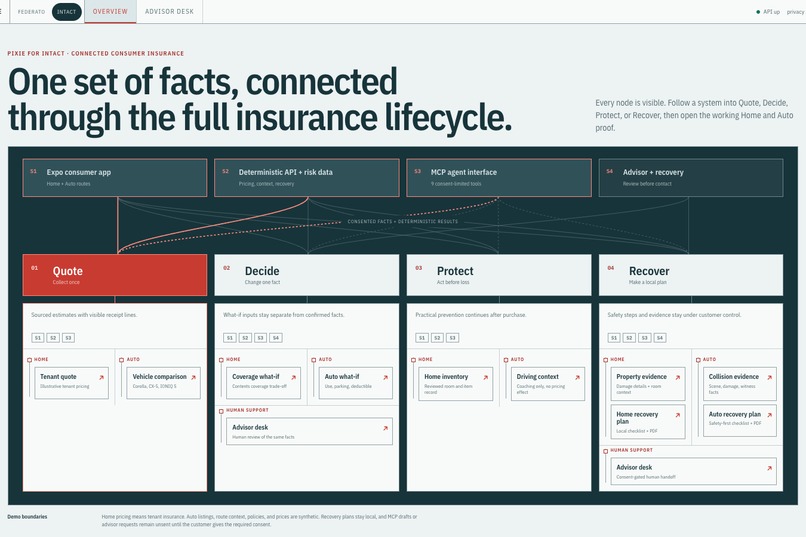
For Intact, Pixie is a consumer insurance app that helps a customer understand what they need, receive an itemized estimate, compare options, reduce risk, and prepare for recovery. Home currently supports a Toronto tenant insurance estimate. Auto compares three illustrative vehicles using the same driver profile and puts the car payment beside an illustrative insurance estimate.
The official Intact challenge asks teams to reimagine how people obtain car or tenant insurance through AI. The prototype must let a customer provide relevant information and receive an estimate, recommendation, or next step. It should also prioritize a clear, accessible experience and explain how AI fits into the journey.
Why we built it
Insurance customers are often asked for a coverage amount before they know how much their belongings would cost to replace. Car shoppers may compare vehicle payments without seeing insurance in the same monthly budget. Once a policy exists, prevention and recovery often move into separate tools.
Pixie connects those decisions. A tenant can build an inventory, use its total as a coverage input, explore the price effect of a choice, and keep an itemized estimate. A driver can compare the combined monthly cost of a car and insurance, then use separate tools for coaching and incident preparation. Each screen states whether a value is a customer input, public-data lookup, calculated estimate, or illustration.
How Pixie meets the Intact criteria
| Intact criterion | What Pixie does | Where to look |
|---|---|---|
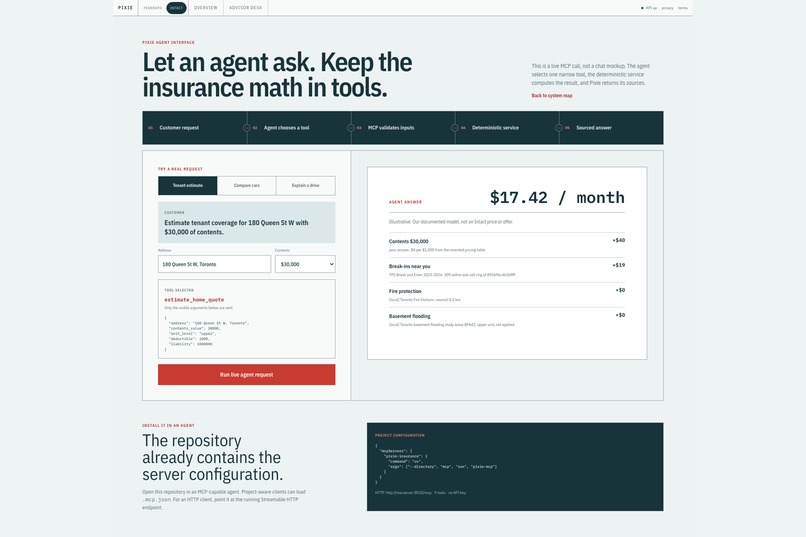
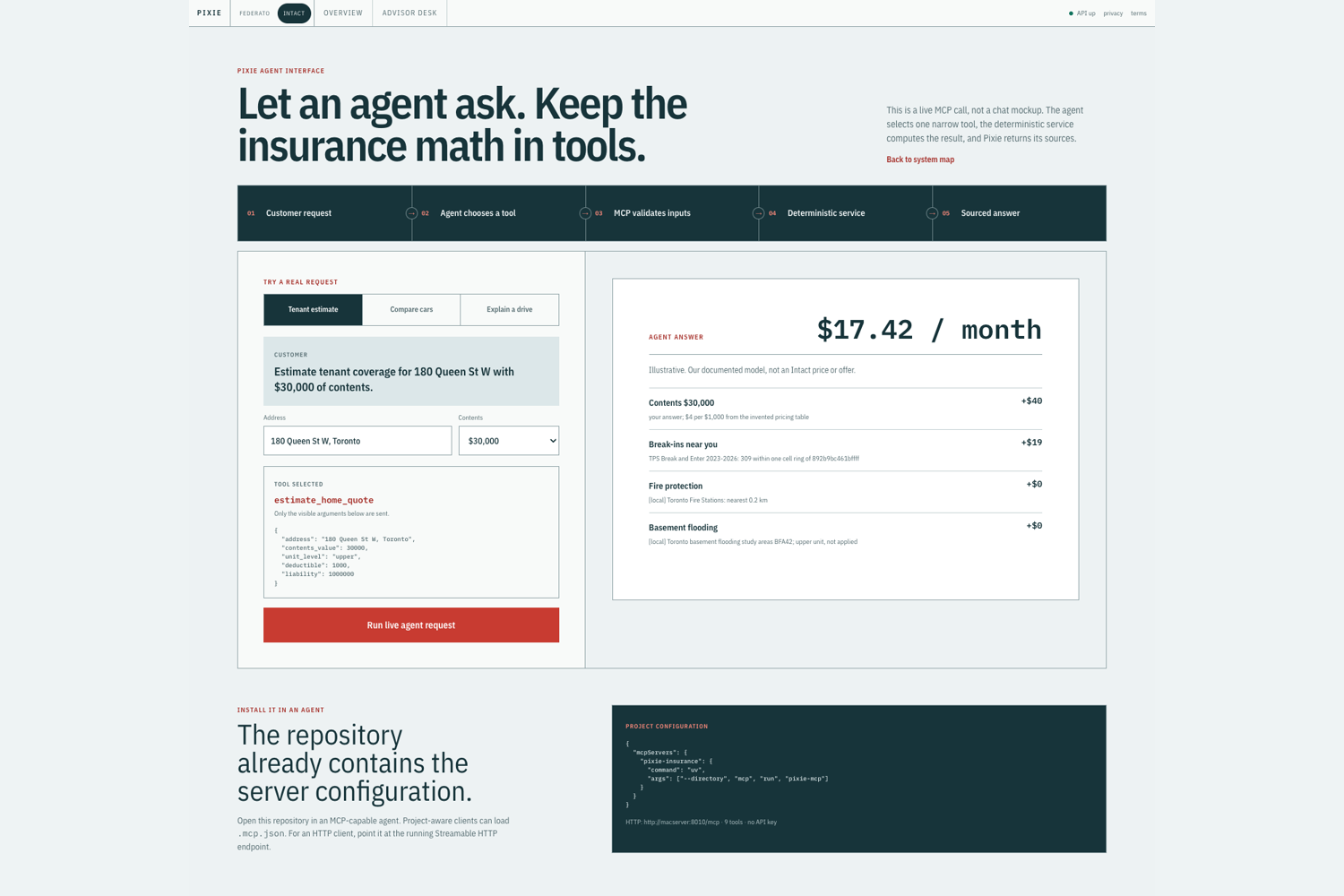
| Reimagine car or tenant insurance through AI | Pixie exposes tenant, Auto, driving, policy, application-draft, and recovery functions as nine narrow MCP tools. An AI agent can choose a tool and explain its sourced result, while typed code validates inputs and calculates every price or score. | Gallery 3 |
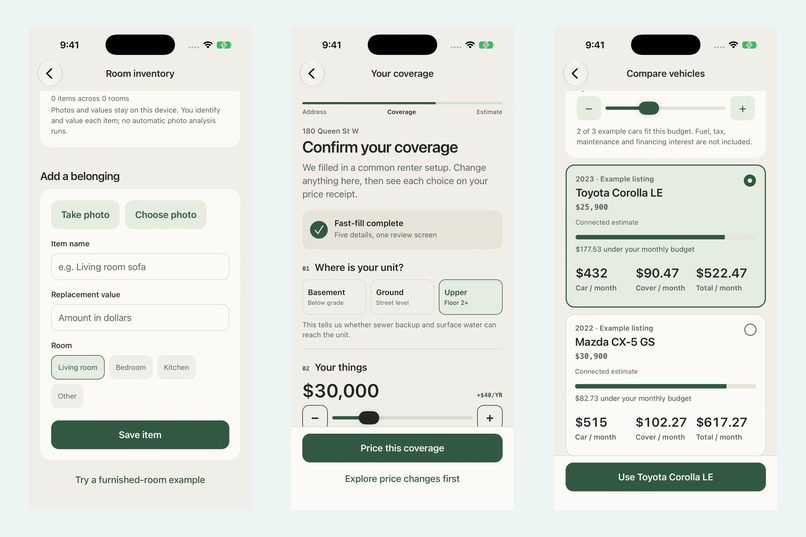
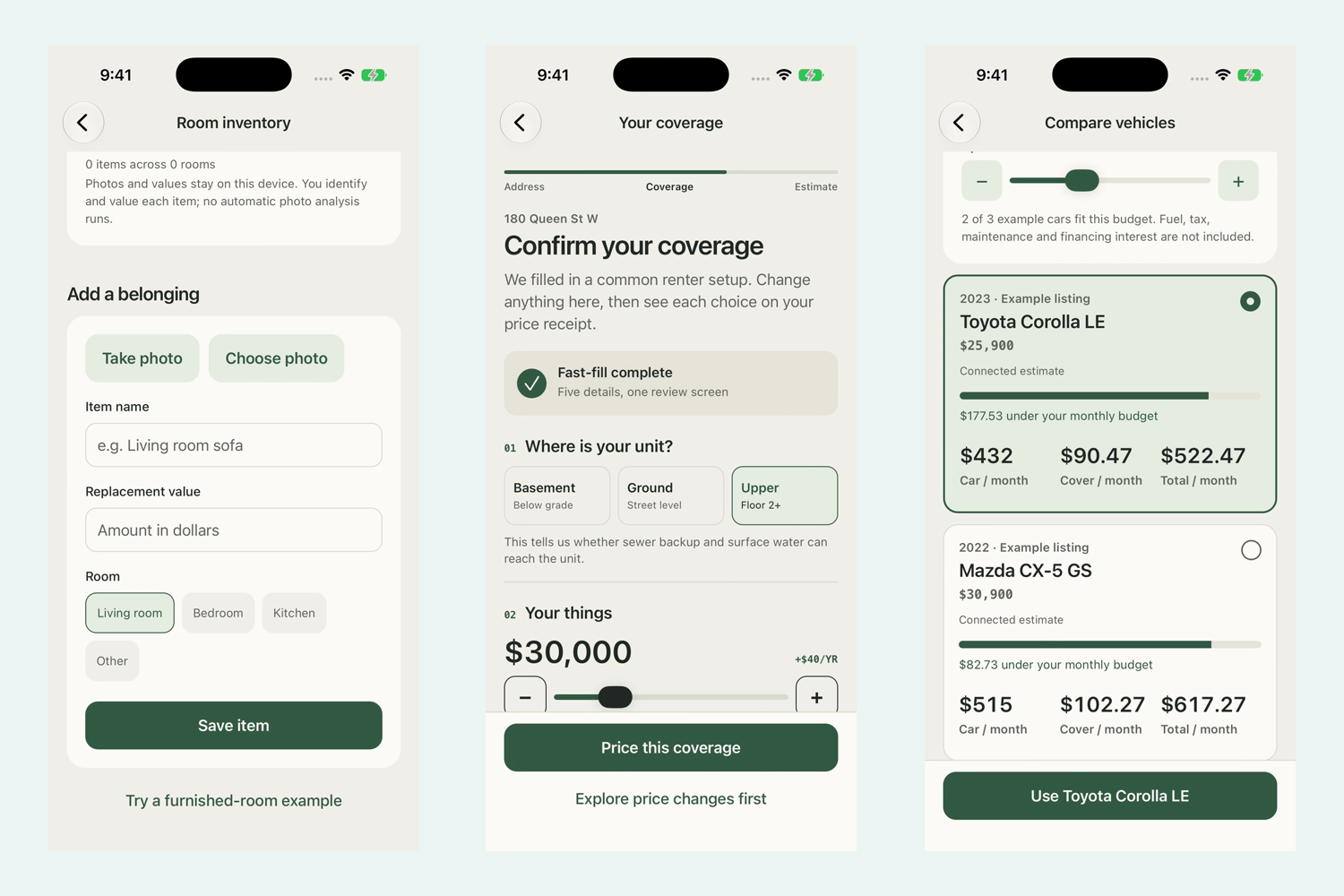
| Build a functional prototype | The Expo app has working Home and Auto journeys across Home, Compare, Insights, and Community. Home includes inventory and tenant pricing. Auto includes vehicle comparison, Drive Score, and recovery tools. | Galleries 1 and 2 |
| Provide a quote experience | A tenant enters an address, contents amount, unit details, claims, deductible, liability, sewer-backup choice, and bundle choice. Pixie returns an itemized annual and monthly estimate, reasons, and either a result or advisor next step. | Galleries 1 and 3 |
| Prioritize user experience | The app organizes work around customer tasks rather than insurance-system terminology. Draft coverage changes stay separate until the customer saves them, and every price shows its assumptions. | Galleries 1 and 2 |
| Prioritize accessibility | Pixie uses labelled tabs and inputs, native font scaling, progress semantics, status announcements, reduced-motion handling, and product controls at least 44 points tall. | Galleries 1 and 2 |
| Explain assumptions and limits | The interface labels estimates and sample data, keeps Drive Score outside pricing, and states when a request needs the live service or an advisor. This section records the current boundaries and future work. | Galleries 1, 2, and 3 |
| Build original work during the hackathon | The team built the prototype, services, design assets, and project documentation during Hack the North 2026. The public repository contains the submission source. | Source code |
The customer journey
The Home journey starts with the customer's belongings. A customer can add a photo, name the item, choose a room, and enter a replacement value. Pixie totals the inventory and can carry that amount into the tenant estimate. The customer can then choose a Toronto address, review the location information, select coverage, and inspect an itemized result. Speech, printing, and sharing reuse the same receipt.
The Auto journey starts with the cost of ownership. Pixie compares three example vehicles under one driver profile and displays the payment, illustrative insurance estimate, and combined monthly cost. A budget control shows which examples fit without presenting the listings or rates as a live marketplace or insurer offer.
After the estimate, Insights contains prevention tasks and an opt-in Drive Score. Community contains safety-first recovery tools and a local recovery-plan document. These features extend the relationship without changing the quoted price.
How AI is used
Pixie keeps AI at the interaction boundary. The MCP server exposes nine typed tools for tenant estimates, Auto estimates and comparisons, scenarios, driving explanations, application drafts, policy summaries, and recovery handoffs. An AI client can choose the relevant tool and turn its structured result into a customer explanation.
The calculation remains deterministic. Code validates the request, calculates the estimate or score, and returns the assumptions and sources. The current web demonstration uses preset tool choices and visible arguments, so it proves a live MCP request rather than autonomous planning. The mobile quote does not ask a model to invent a premium.
A quote that explains the result
The tenant flow returns the monthly and annual estimate as an itemized receipt. It names the base calculation, coverage choices, discounts, location inputs, and source of each value. If the request falls outside the supported path, Pixie returns an advisor-review step instead of forcing a price.
The price explorer lets the customer change one assumption and see the monthly difference before saving it. A separate repair-bill example explains how a deductible could affect what the customer pays toward a covered loss. It does not promise a claim payment.
Prevention, driving, and recovery
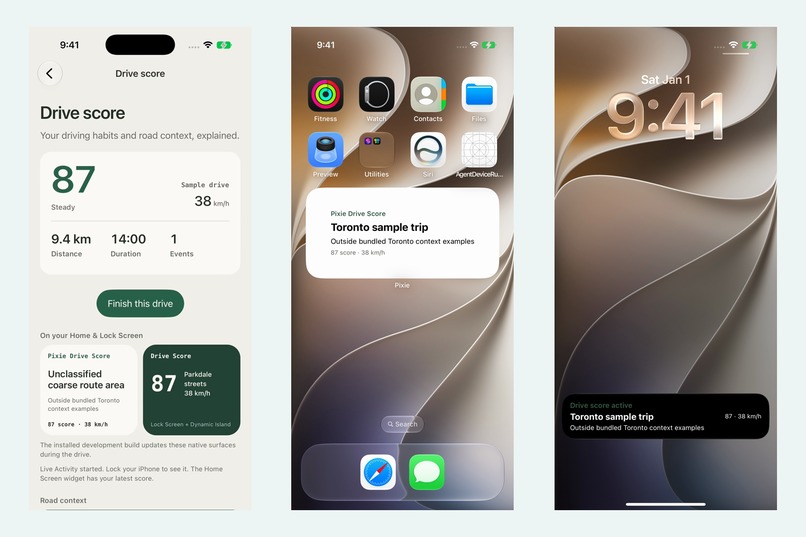
Drive Score begins only after the customer starts a foreground session. It keeps driving behavior separate from road context, rounds coordinates before sending them, caps the sample at 50 points, and stores no route. The result is coaching only. It cannot change the estimate or premium.
The recovery flow begins with safety and builds a record the customer can save or share. The connected incident and witness work is still a demo. Credits are simulated bookkeeping with no cash value or insurer approval, and a file hash does not prove authenticity, fault, or an independent perspective.
Challenges we ran into
We needed enough information without recreating a long insurer form. Pixie groups questions around customer decisions and labels every example, estimate, and route context. Unsupported inputs require the live service or an advisor. Inventory photos and customer-entered values stay local. Pixie does not claim recognition, appraisal, or cloud backup.
What we learned
A quote is easier to trust when the customer can trace each price input and test one change. Prevention data also needs a fixed purpose, so Drive Score provides coaching but never changes the price.
Limits and next steps
Home pricing currently supports tenant insurance, not homeowner insurance. Vehicle listings, Auto prices, and road contexts are illustrative. No displayed price is an Intact rate, quote, tariff, recommendation, or offer. Pixie does not bind coverage, submit an insurance application, file a claim, approve evidence, or make a payment.
Cached tenant examples cannot price arbitrary changed answers, so the price explorer needs the live estimate service. Native camera, local file handling, video playback, and accessibility behavior still need final checks on physical iOS and Android devices.
Next, we would test the question sequence with customers, connect approved carrier rates and identity controls, add authenticated application handoff, and evaluate the AI explanations for accuracy and accessibility. We would keep the calculation service independent from the model and retain the visible source trail.
Part 2: Federato
Pixie for the Federato track
For Federato, Pixie is an AI-assisted commercial underwriting desk. It reads Federato's supplied submission data and discovered schema, evaluates each supported submission against a carrier's appetite guideline, requests more evidence when the record is incomplete, and ranks the queue for review. The interface shows the facts, sources, calculation, agent activity, portfolio context, and recommended next action in one case workspace.
The official Federato challenge asks teams to build an AI agent that ingests insurance submissions, enriches them with real-world risk data, and produces explainable, actionable insights relative to a carrier's appetite guidelines. Pixie implements that full workflow.
Why we built it
An underwriter often receives a submission whose useful facts are spread across submissions, insureds, policies, locations, buildings, and claims. Some fields are confirmed, some can only be estimated, and others are missing. Treating a blank field as zero can make an incomplete risk look safe. Giving every case one confident score can hide the fact that one unanswered question may change the decision.
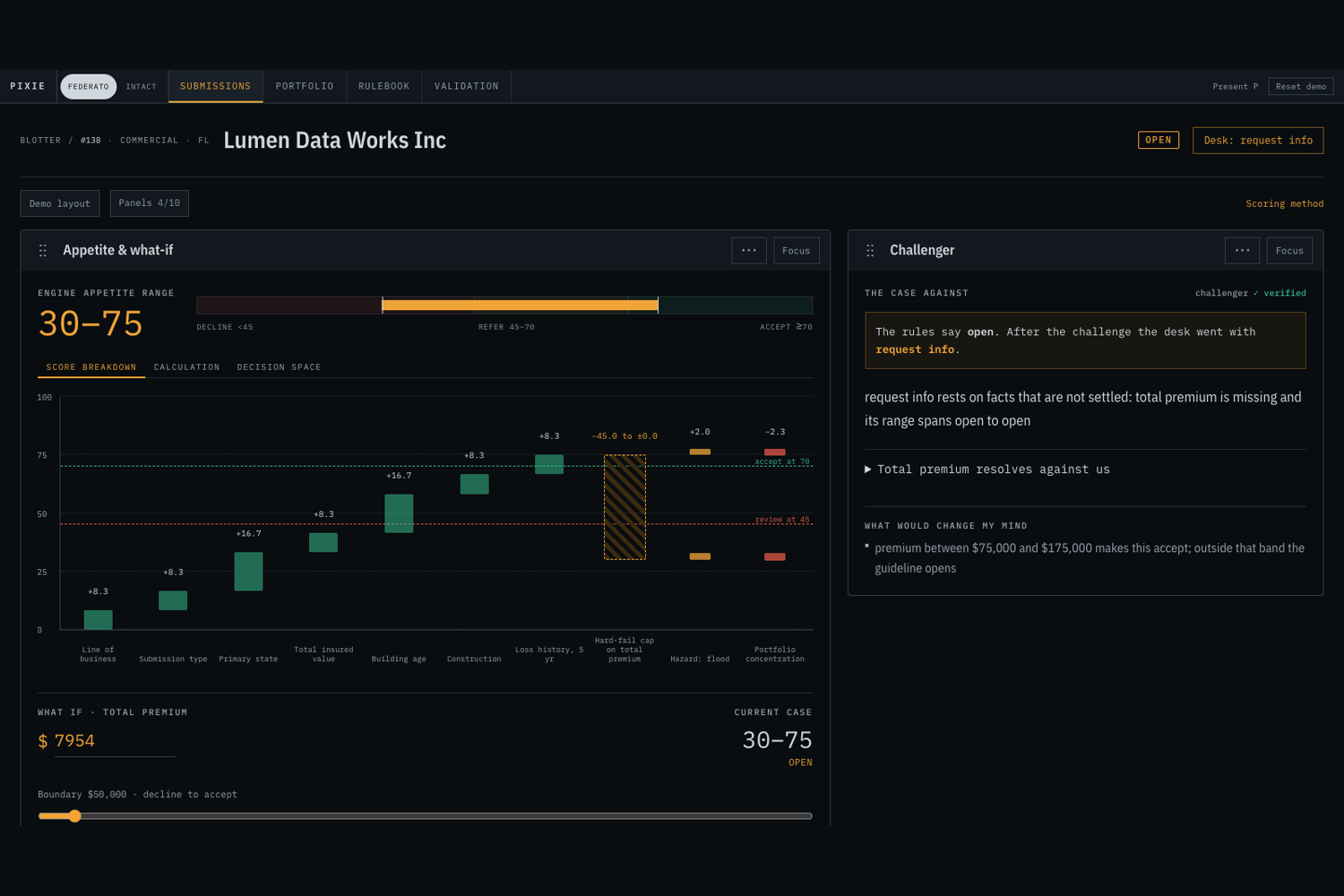
Pixie preserves that uncertainty. It computes the best and worst appetite score supported by the available evidence, then shows which missing fact can move the case across a decision threshold. The underwriter sees what to verify before acting.
How Pixie meets the challenge
| Federato requirement | What Pixie does | Where to look |
|---|---|---|
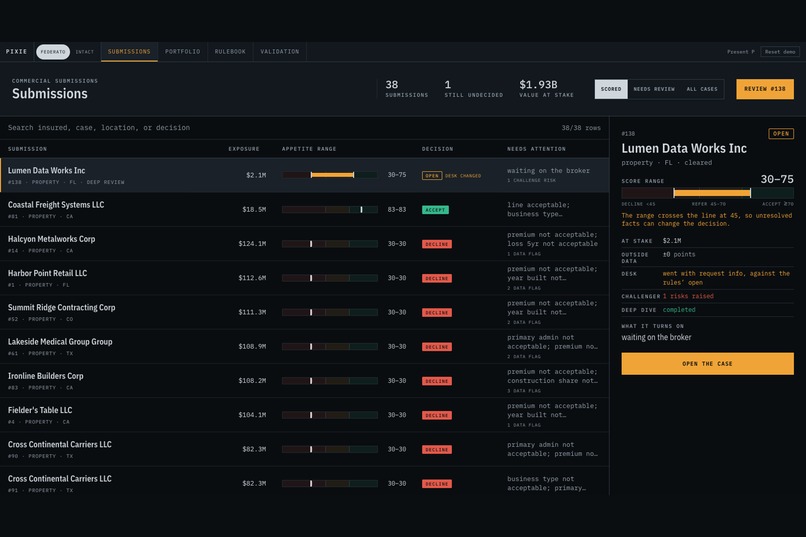
| Ingest submissions | Pixie reads the supplied Federato snapshot and schema. It follows the real relationships among submissions, insureds, policies, locations, buildings, and claims. | Gallery 4 |
| Reason about API queries | The Intake agent receives the discovered schema and checked query tools. Each recorded query includes its purpose, selected fields, expansions, result, and any repair attempt. Deterministic hydration handles the standard paths, so we do not claim that a model invents every query. | Gallery 10 |
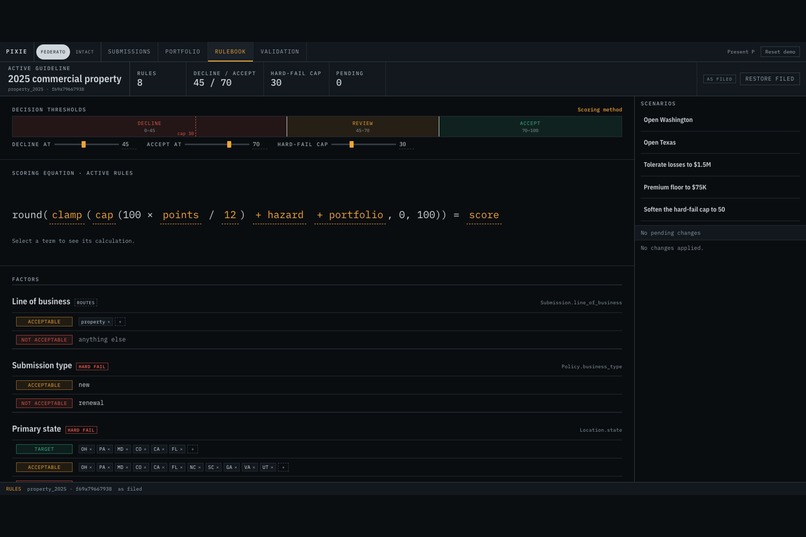
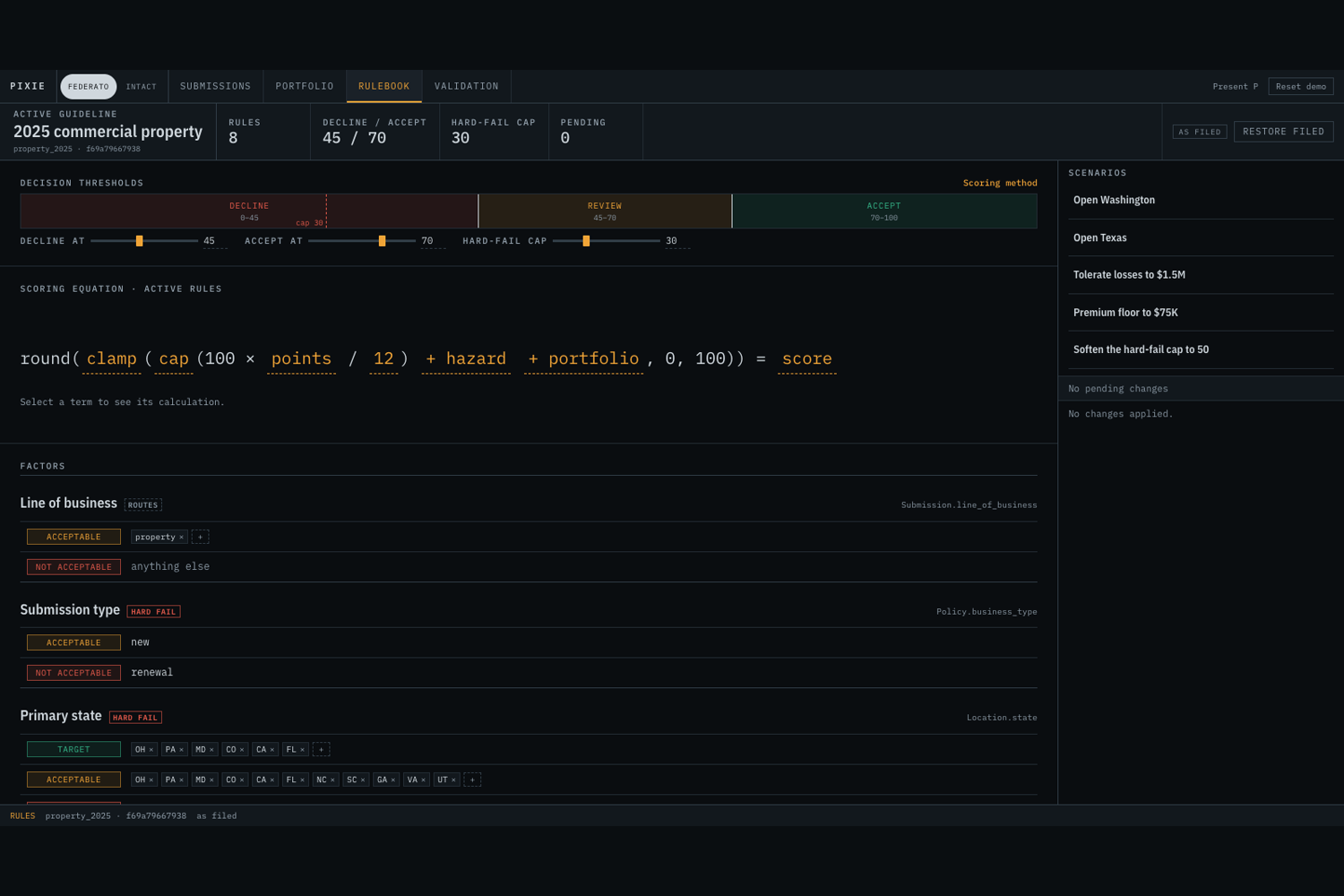
| Apply appetite guidelines | Pixie translates the supplied commercial property criteria into an explicit rulebook. Code calculates the score, hard-failure caps, decision thresholds, and uncertainty range. | Gallery 5 |
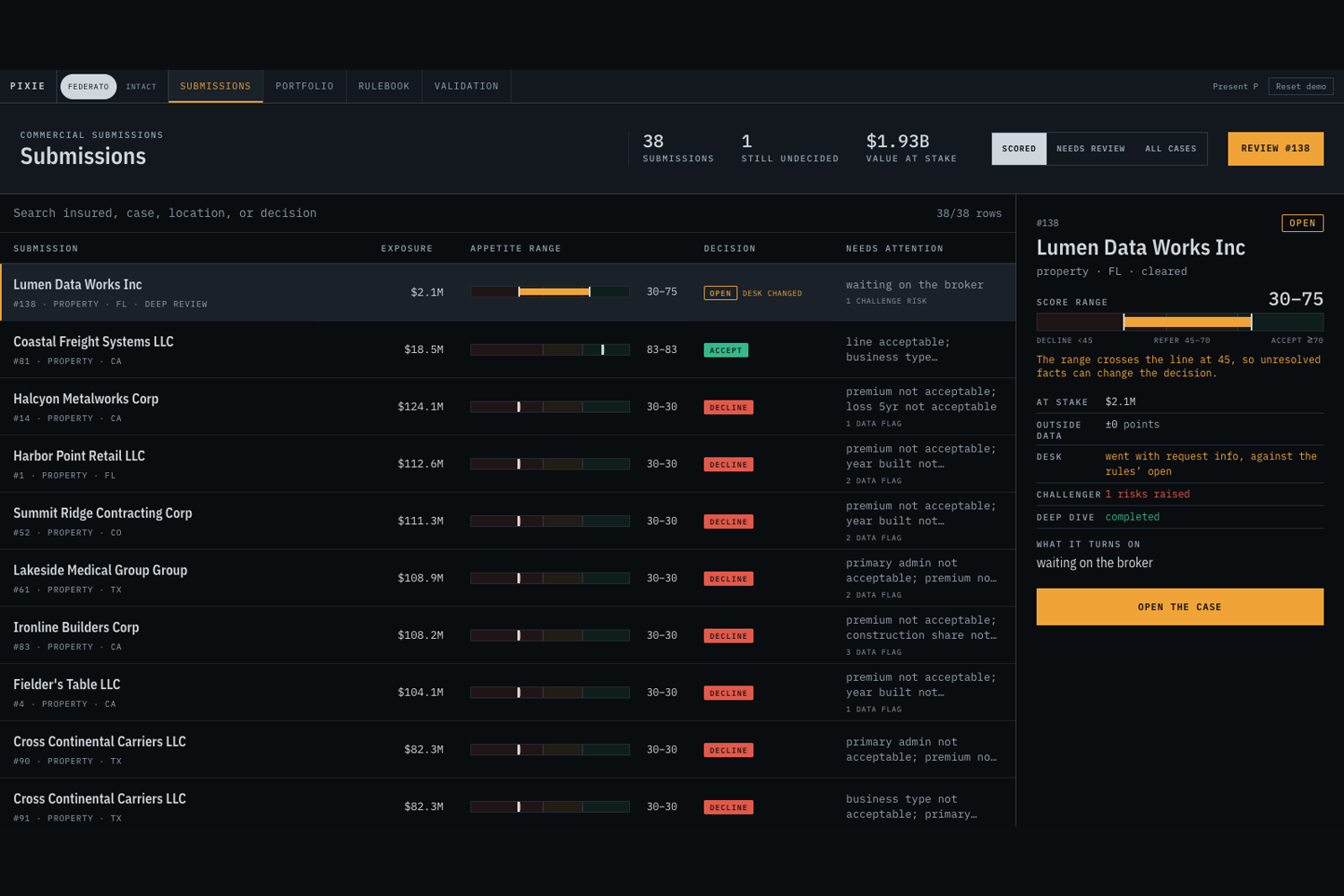
| Rank submissions | Pixie assesses all 158 supplied commercial submissions. It scores the 38 property submissions covered by the supplied guideline and routes the other business lines without pretending that the property rules apply to them. | Gallery 4 |
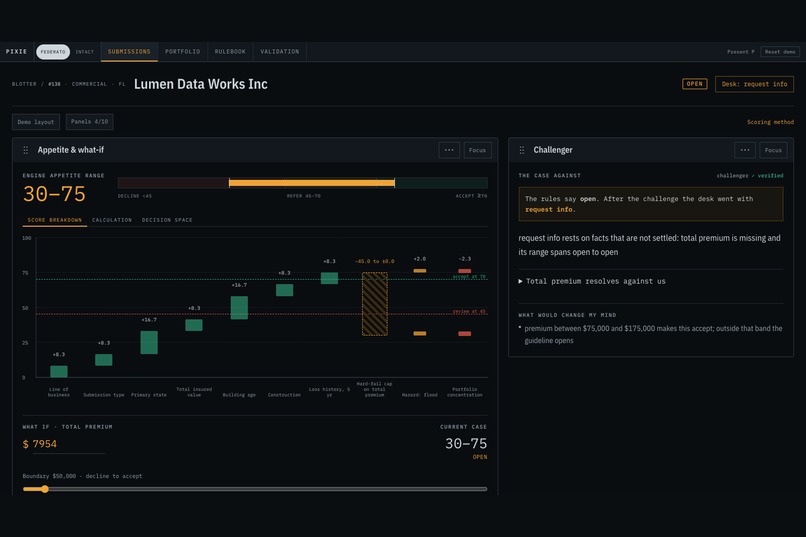
| Explain every decision | Every factor shows its value, provenance, rule band, points, and effect on the result. Agent prose can use only numbers that already appear in computed tool output. | Gallery 6 |
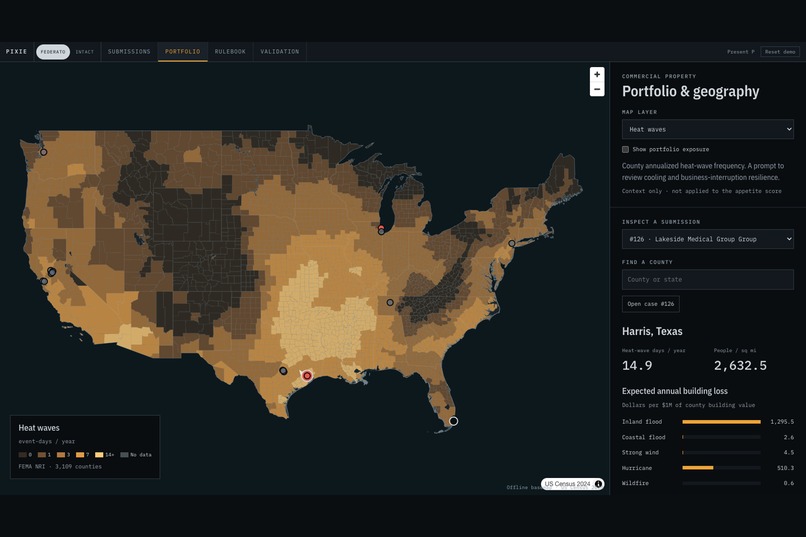
| Enrich with external risk data | Scoring enrichment reads cached FEMA flood, USGS earthquake, USFS wildfire, Open-Meteo, and Nominatim records. The portfolio tool adds the carrier's existing nearby exposure. Newer NASA POWER and county map layers provide cited investigation context but do not change the score. | Gallery 7 |
| Make the result actionable | The desk identifies the fact to request, provides a non-destructive what-if control, records a recommended next action, and allows a small reasoned human adjustment while keeping the original engine result visible. | Gallery 6 |
| Handle edge cases | A missing value widens the rule-based score range. Checked queries expose API errors. Cached enrichment and recorded agent replay keep the demo inspectable when the venue network is unavailable. | Galleries 8 and 10 |
How we used Federato
Federato provided the insurance-shaped data and the language needed to interpret it. We used its schema-discovery response to learn the available resources, fields, types, and references. Our adapter uses that schema to validate queries and hydrate a case from linked records. It keeps source paths such as Submission, Insured.hq, Location, and Building attached to the resulting facts.
The property bands come from Federato's supplied 2025 commercial property criteria. Pixie's point mapping, thresholds, hard-failure caps, and evidence adjustments are implementation choices. The method page exposes that distinction.
The demo uses a local snapshot pulled from Federato's supplied synthetic API. This makes the live presentation repeatable and lets the app run without venue Wi-Fi. Pixie does not claim to connect to a Federato production account. A fresh clone needs valid challenge credentials and a locally pulled snapshot before it can refresh that data.
How the underwriting agent works
- The Intake agent inspects the discovered schema and the submitted record. It can issue a schema-aware Federato query when a linked fact needs verification and revise a rejected query. High-value open cases receive a deeper review under a fixed policy.
- The risk engine applies the carrier guideline to confirmed, estimated, and missing values. It computes a score range instead of asking a language model for a number.
- Hazard and Portfolio agents inspect external context and the carrier's existing concentration around the site.
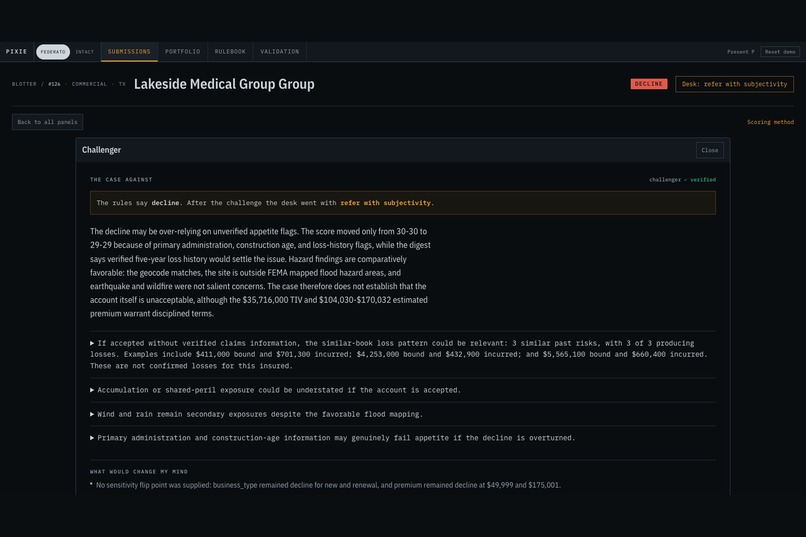
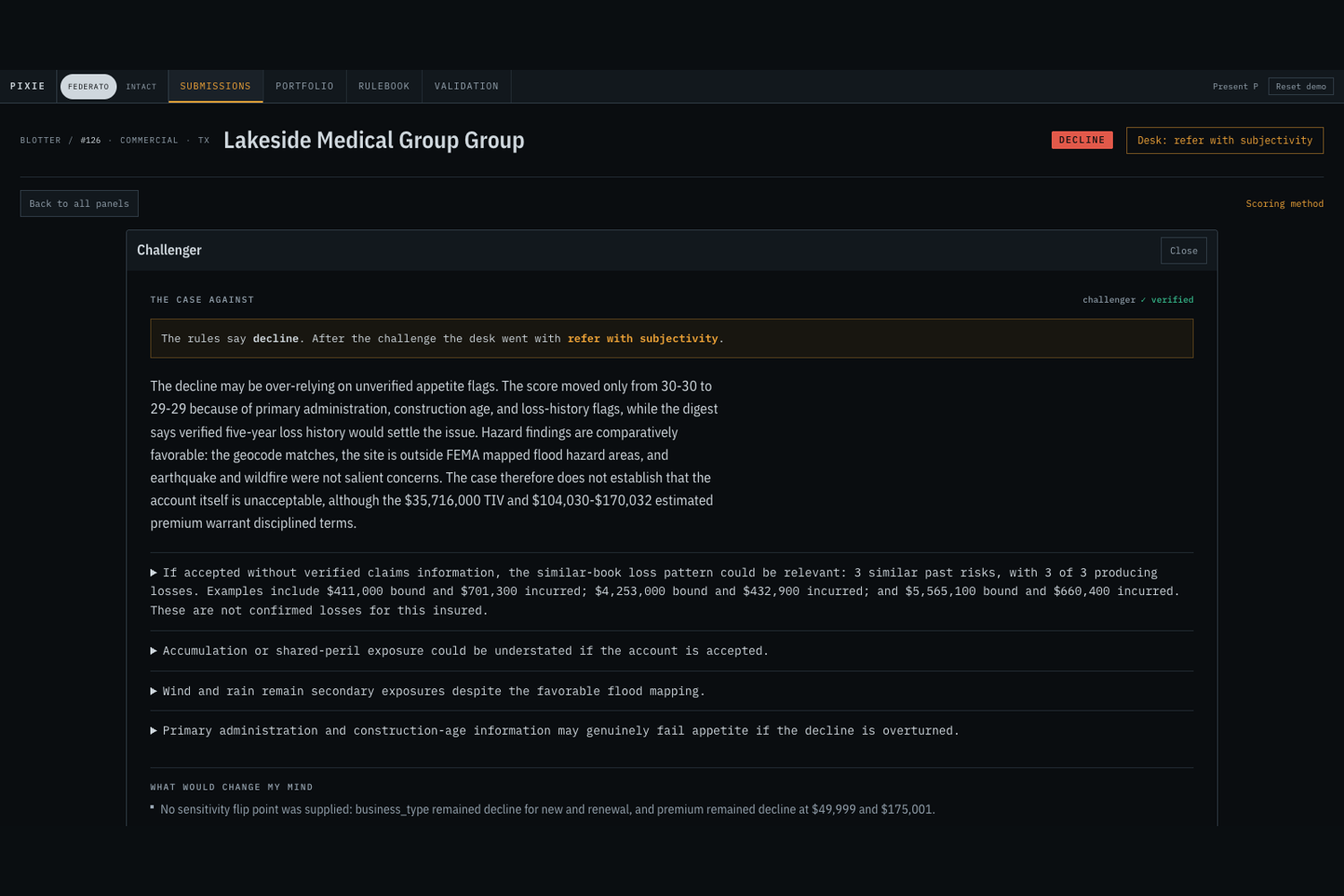
- The Appetite agent explains the deterministic result. A Challenger can question the draft recommendation using the case evidence and computed sensitivity results.
- The Lead agent produces the review recommendation. The underwriter keeps authority and can inspect, adjust, or reject the recommendation.
The six-agent workflow records every agent turn, tool call, tool result, and disagreement. A number-verification guardrail rejects model prose that contains a number absent from the computed facts.
One case from input to action
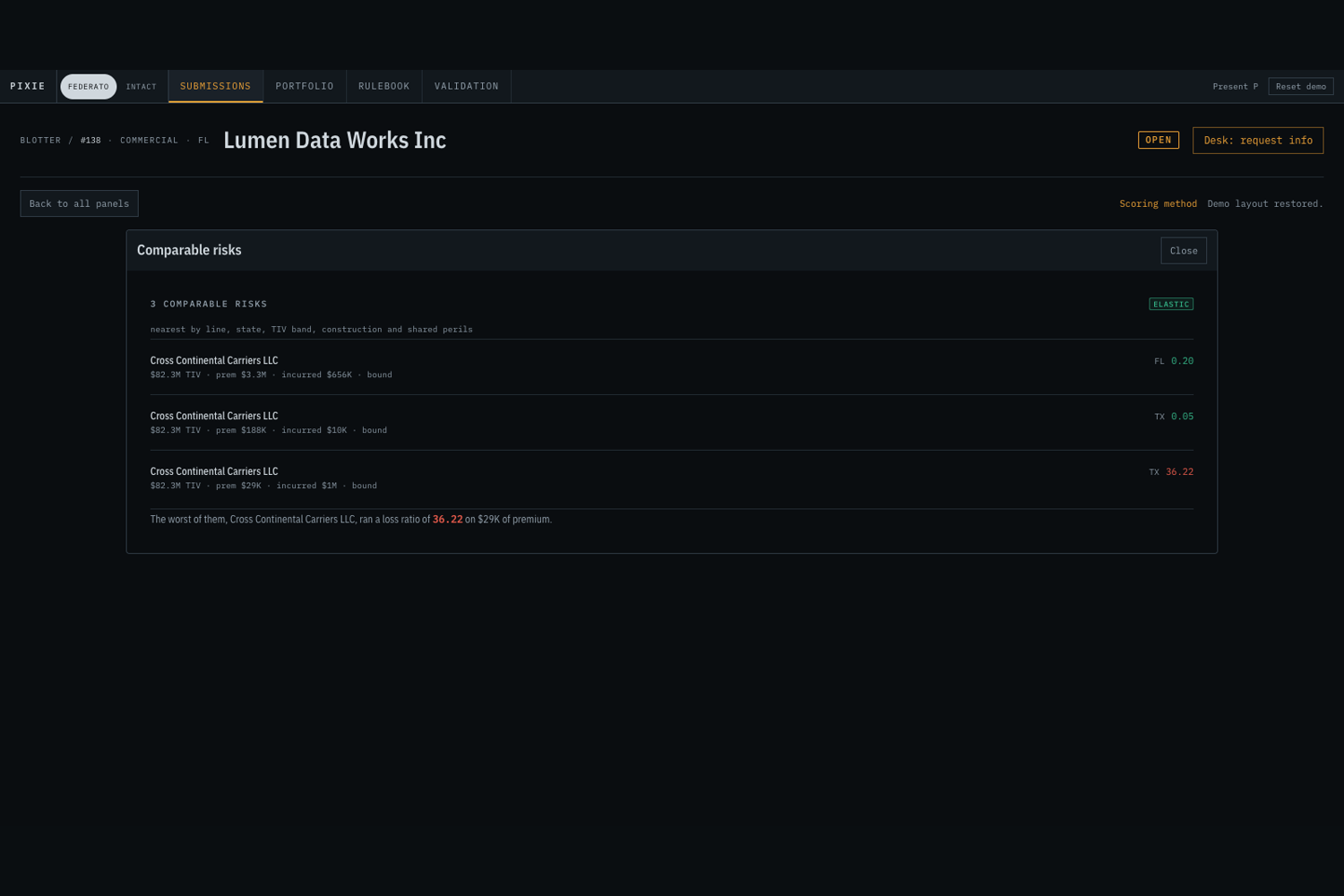
Case 138, Lumen Data Works, shows the full workflow. Pixie follows the insured's headquarters relationship to a building and retrieves $2.073 million in total insured value. The submission does not contain a confirmed premium, so Pixie labels the premium as an estimate from 27 bound property comparisons.
That unresolved premium leaves the case with an appetite range of 30 to 75. The range crosses a decision threshold, so the queue sends the case for review. In the what-if control, a hypothetical confirmed premium of $75,000 recomputes the result as 91 and accept. Resetting the scenario restores the original record. Pixie has now told the underwriter which question matters without changing the filed evidence.
Real-world risk and portfolio context
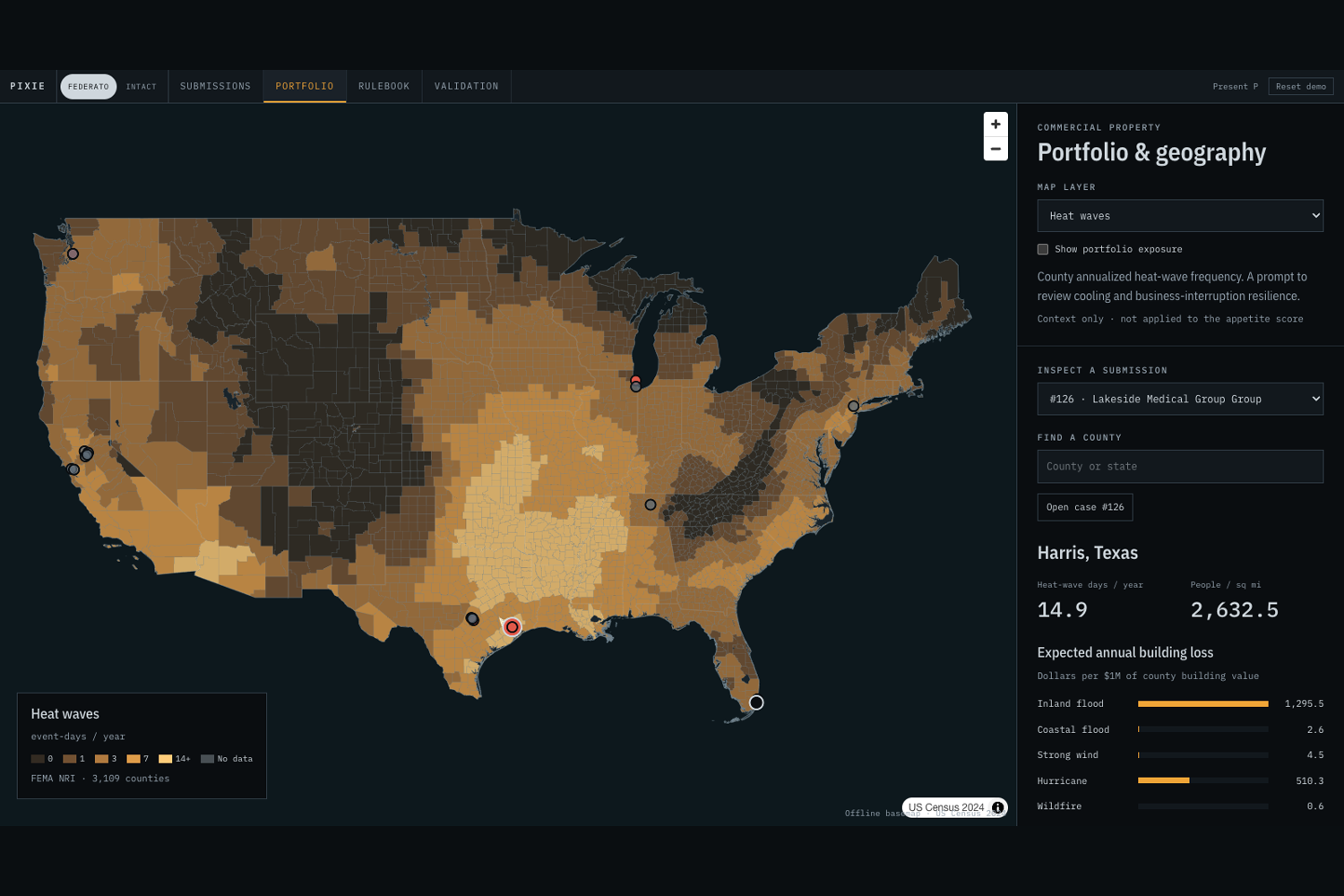
The geographic workspace separates three kinds of evidence. H3 cells show the carrier's active insured-value concentration. FEMA county and flood layers provide hazard context. NASA POWER records provide historical climate observations for plotted sites. Pixie displays each source and unit and marks locations that lack a county match.
Some existing hazard and nearby-exposure factors affect the computed score. Newer climate views support investigation only. They do not silently change the appetite result. In the recorded comparison, enrichment moved all 38 property score intervals and changed the rank of five of the six open submissions. No case changed decision tier because hard appetite failures still controlled those decisions.
Challenges we ran into
The source records do not always contain a direct path from a submission to every fact needed by the guideline. We built schema-aware hydration that can traverse references such as an insured's headquarters and its buildings. We also show the query path so an underwriter can check it.
Missing data created a second problem. A default value made the interface look decisive while changing the meaning of the record. We replaced defaults with explicit known, estimated, and missing states and made the engine calculate every applicable rule band.
Agent explanations introduced a separate trust risk. A fluent explanation could state a number that no tool returned. Pixie now extracts every number from agent prose and checks it against the computed facts before displaying the explanation.
What we are proud of
- The queue explains why a case needs attention, and the what-if control reruns the engine without overwriting evidence.
- The rulebook, case facts, calculation, recommendation, and portfolio context remain connected.
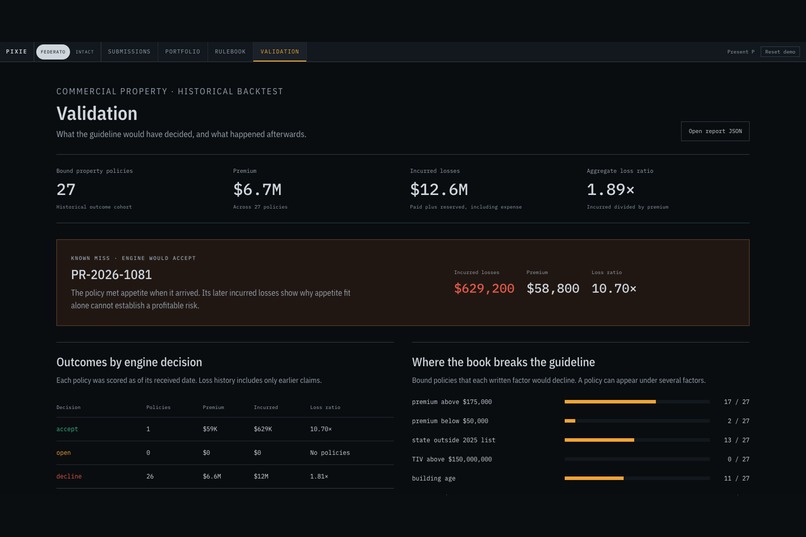
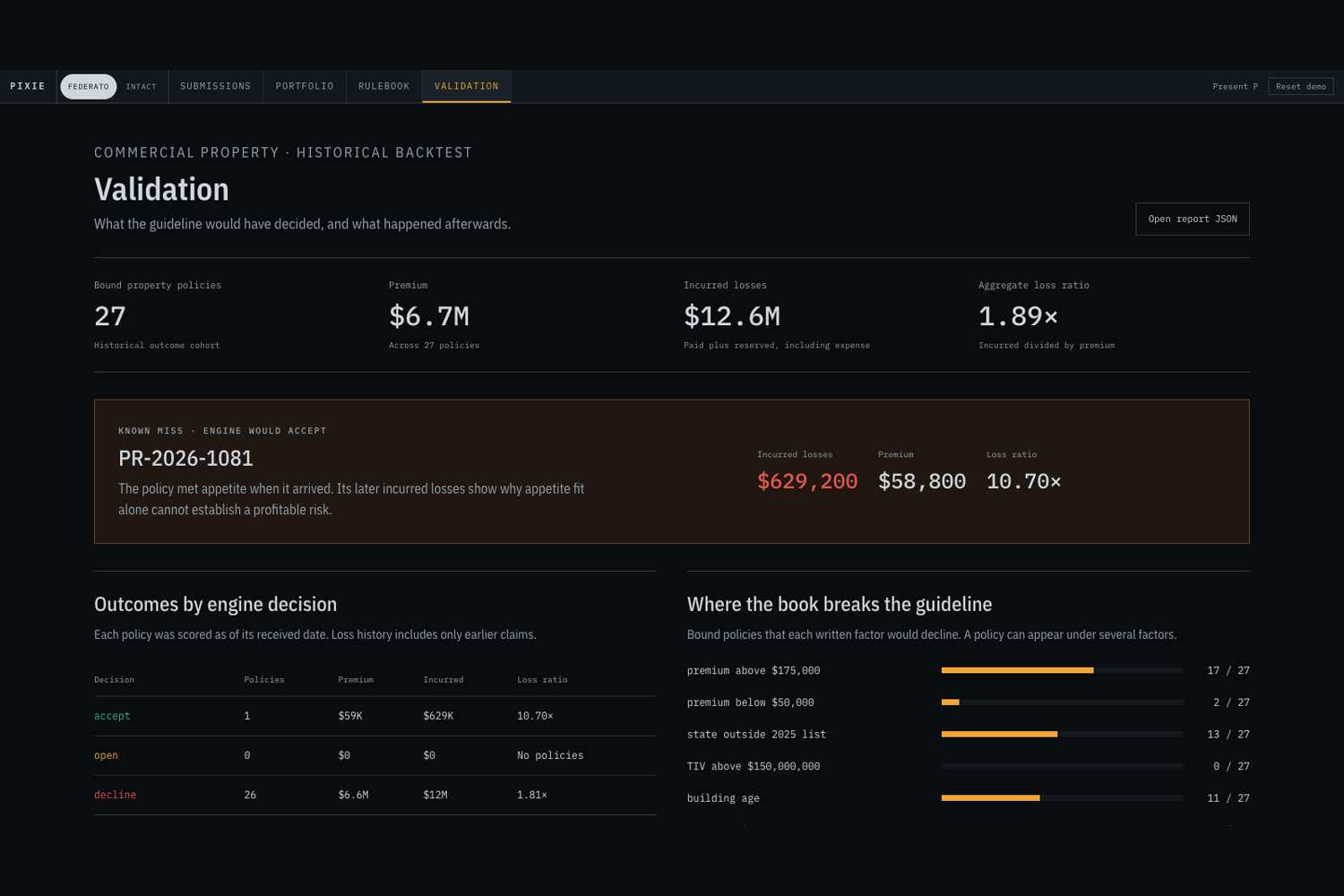
- The validation page keeps a known historical miss visible. One accepted policy later recorded $629,200 in incurred losses, so appetite fit does not imply a profitable risk.
What we learned
Insurance data needs provenance as much as it needs a value. A useful uncertainty range also names the fact that can change the decision. External data belongs only when Pixie states what changed and where coverage is missing.
Limits and next steps
This build uses Federato's supplied synthetic snapshot and our transcription of the supplied commercial property guideline. The score range is a rule-based appetite range, not a confidence interval or probability of loss. The historical backtest is small and does not establish production accuracy or loss prevention.
A production version would need a live authenticated data sync, representative carrier evaluation, calibrated rules, persistent guideline versions, approval workflows, and role-based permissions. Winnability would also need broker-behaviour and quote-conversion data that the supplied snapshot does not contain.
Part 3: Expo
Pixie for the Expo track
For Expo, Pixie is a Home and Auto insurance companion built with Expo SDK 57 and React Native. The phone app covers tenant estimates, belongings inventory, vehicle-cost comparison, prevention, foreground driving feedback, and recovery. Customers move through four labelled tabs: Home, Compare, Insights, and Community.
The official Expo challenge asks teams to build a mobile app with Expo and React Native for iOS and Android. Expo is looking for a strong mobile experience that feels native and is enjoyable to use. Pixie uses Expo Router, Expo UI, device services, and an iOS widget extension to make the insurance tasks fit the phone rather than reproduce the web product on a smaller screen.
Why Expo belongs in the product
The most useful parts of this insurance journey happen near the customer. A phone can photograph a belonging, use location with permission, give haptic feedback, read an estimate aloud, create a document, and keep a driving score visible during an active session. Expo lets those actions share one React Native product while retaining platform-specific controls where they matter.
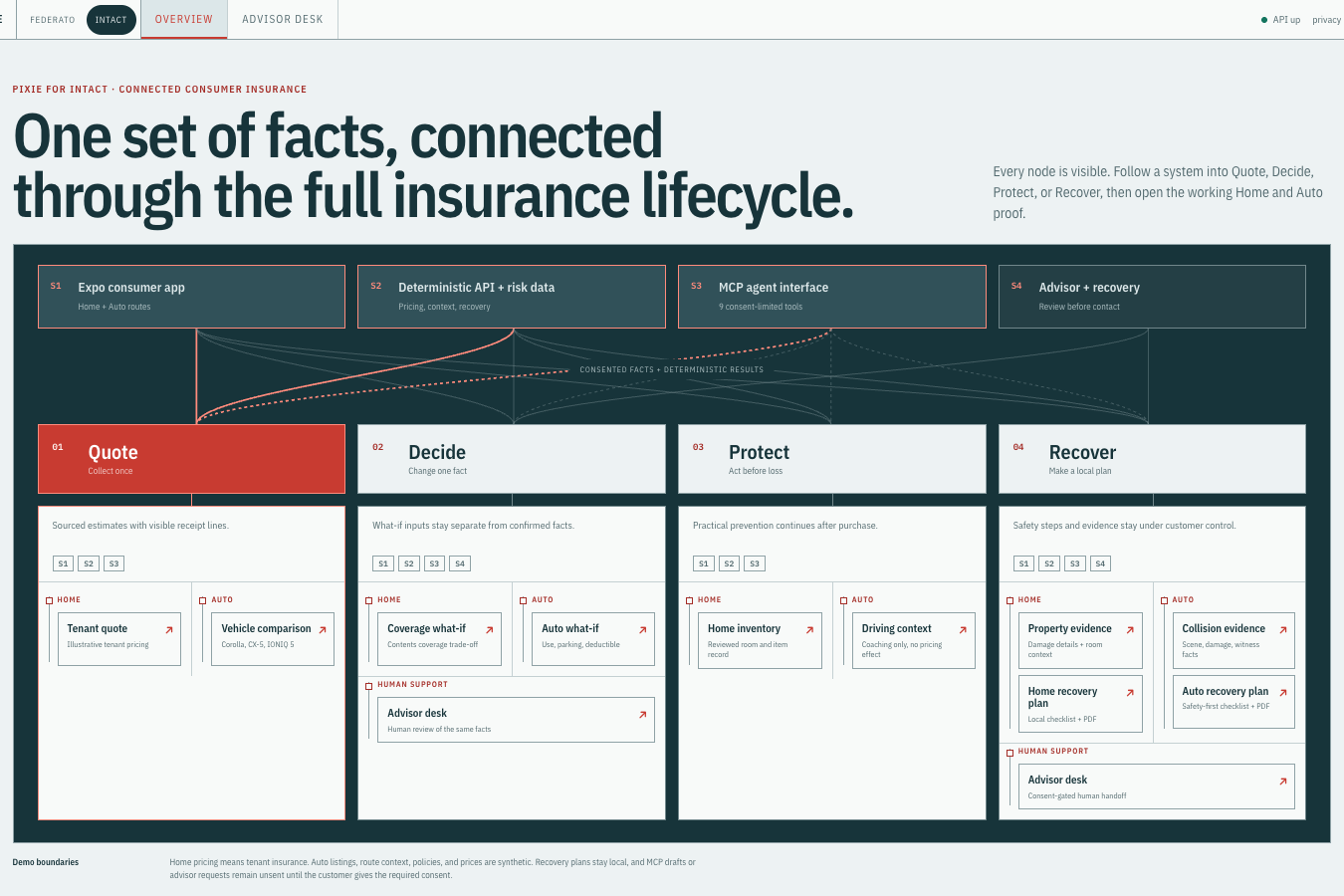
Pixie does not expose its internal Quote, Decide, Protect, and Recover architecture as navigation. The customer sees the task they want to complete. Focused screens handle the details and return the result to the shared Home or Auto context.
How Pixie uses Expo
| Expo capability | Product use | Why it matters | Where to look |
|---|---|---|---|
| Expo Router | Four labelled tabs plus focused estimate, inventory, comparison, driving, and recovery screens | Customers can enter a task, use normal back navigation, and return to the same Home or Auto context. | Galleries 1 and 2 |
| Expo Image Picker and File System | Camera or library input for belongings, followed by local photo and inventory persistence | A customer can build a useful inventory without uploading personal photos to a cloud service. | Gallery 1 |
| Expo Location | Address lookup and an explicit foreground Drive Score session | Location shortens address entry and supports live driving feedback under a visible permission boundary. | Galleries 1 and 2 |
| Expo UI | Platform-specific SwiftUI and Jetpack Compose implementations of the main drive action | A high-attention control can use each platform's own component system. | Gallery 2 |
expo-widgets |
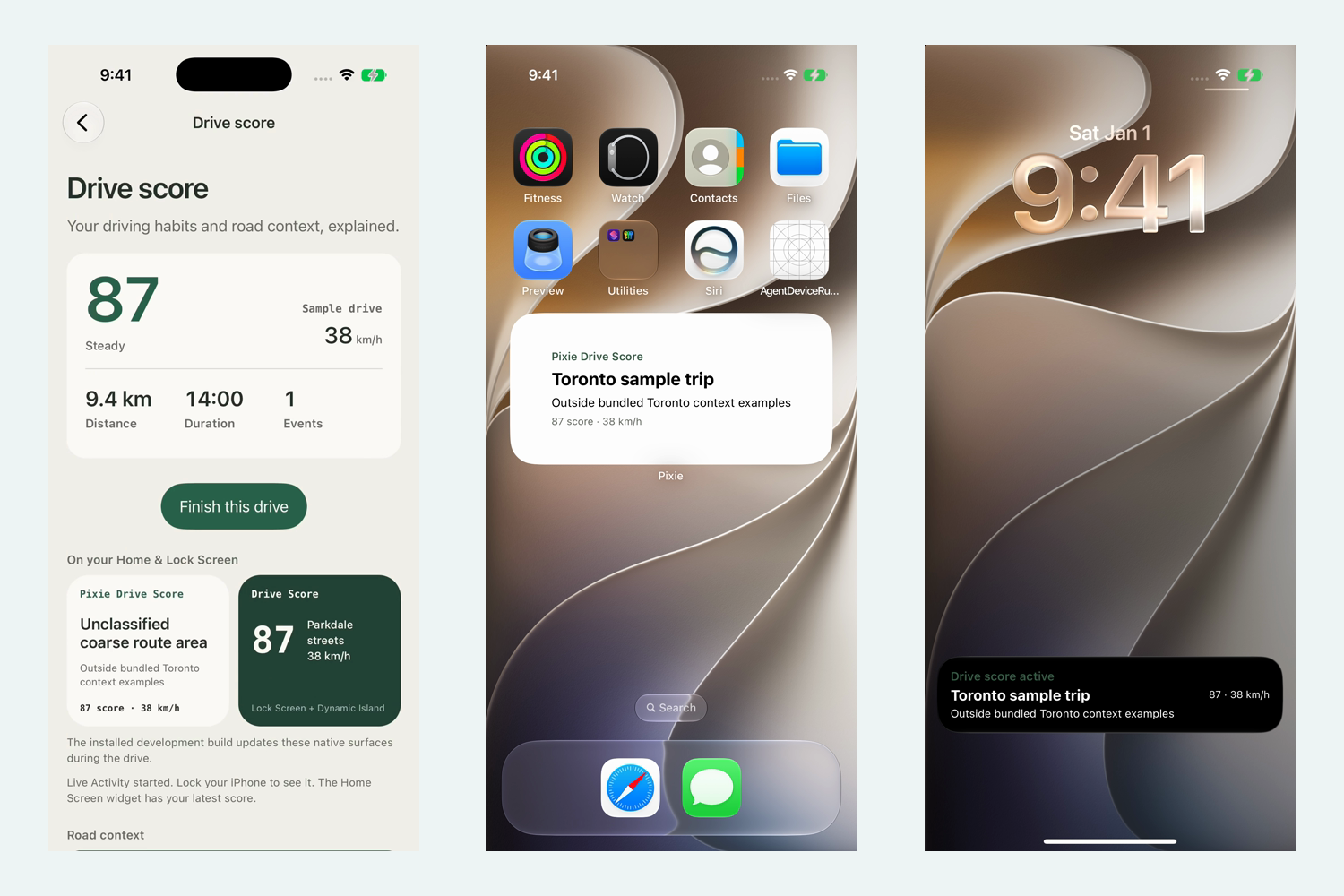
An iOS Home Screen widget and Live Activity for score, speed, area, and road context | Active information can remain visible outside the main app during a drive. | Gallery 2 |
| Haptics | Feedback when the customer changes choices or receives a result | Important actions receive platform feedback without adding another visual message. | Gallery 1 |
| Speech | Spoken summary of the tenant estimate | A customer can review the itemized result without reading every line on screen. | Gallery 1 |
| Print and Sharing | Local PDFs for the estimate and recovery plan | The customer can keep or discuss the same record shown in the app. | Gallery 1 |
| Expo Video | Playback of incident clips in the connected recovery demo | Submitted evidence can be reviewed in context without leaving the app. | Gallery 2 |
| Web Browser | Explicit advisor handoff | The app makes the transition to an external destination visible to the customer. | Gallery 1 |
One mobile journey
Home and Auto share the same navigation but change the available tools. In Home, a customer can build a room-by-room inventory, use the total in a tenant estimate, explore coverage choices, and save the itemized result. In Auto, the customer can compare a car payment with an illustrative insurance estimate, check prevention tools, and begin an opt-in driving session.
The app preserves draft choices until the customer saves them. It uses skeleton states while data loads and keeps the result close to the action that produced it. Advisor handoff, sharing, and location requests remain explicit actions.
Native surfaces outside the app
The Drive Score screen publishes the current score, speed, area, and road context to an iOS Home Screen widget and Live Activity. The Live Activity starts with a drive and ends when the customer finishes it. Gallery 2 shows the foreground screen, installed widget, and Lock Screen activity from the same simulator build.
expo-widgets is unavailable in Expo Go and requires a development build. We captured both native surfaces in the iOS Simulator. This is simulator evidence, not a physical-device or App Store build claim.
Location with a clear boundary
The app requests foreground location only when the customer asks to use the current address or starts a live drive. Drive Score stops tracking when the customer finishes or leaves the screen. Before calling the stateless service, the app rounds coordinates to three decimal places and sends no more than 50 samples. The service returns aggregate behavior and road-context scores and does not store the route.
The stationary Toronto sample exercises the same screen when a real drive is impractical. It is labelled as a preview rather than live sensor data.
Accessibility and platform behavior
Pixie uses platform system fonts, labelled tabs, native font scaling, visible input labels, live status messages, progress semantics, and controls at least 44 points tall. Press feedback respects reduced-motion preferences. The interface has been checked at 320, 390, and 430 pixel browser widths without horizontal overflow.
Those checks support the current layout and code-level accessibility claims. They are not a formal accessibility audit or a substitute for VoiceOver, TalkBack, and physical-device testing.
Challenges we ran into
The shared flow must work in Expo Go and the browser, while widgets and Live Activities require an iOS development build. Optional native surfaces never block a quote or drive. Pixie also limits location to an explicit foreground session, discards fine coordinates at the service boundary, and documents browser and native inventory storage separately.
What we learned
An Expo module earns its place when it shortens a customer task. Image Picker simplifies inventory, Speech and Sharing reuse the estimate, and the widget carries an active drive outside the app. Gallery 2 records the simulator result rather than relying on an in-app preview.
Limits and next steps
We verified the shared Expo flow, public configuration, TypeScript, browser layouts, and focused service tests. Native iOS simulator captures cover inventory, coverage, vehicle comparison, Drive Score, incident exchange, the widget, and the Live Activity. Physical iOS and Android checks remain, along with device captures for camera input, local file persistence, share sheets, and platform-specific Expo UI controls.
expo-widgets is iOS-only. The app uses Expo Router's Tabs, not NativeTabs. Vehicle data and Auto estimates remain illustrative, and Home pricing remains tenant-only.
Next, we would repeat the native-surface checks on a physical iPhone, test VoiceOver and TalkBack, complete the Android walkthrough, and validate the full journey under poor connectivity. We would also test permission explanations with users before collecting device data.
Part 4: Rox
Pixie for the Rox track
For Rox, Pixie is an underwriting agent that works through incomplete and conflicting business records before it recommends an action. It does not clean the data by hiding gaps. It labels each fact as confirmed, estimated, or missing, detects a defined set of cross-record defects, and shows the evidence behind each warning.
The official Rox challenge asks for an LLM-based agent that can operate on messy business data and take meaningful action. Qualifying systems can address incomplete datasets, conflicting sources, or noisy records through validation, source resolution, error handling, and decisions under uncertainty. Pixie focuses on incomplete and conflicting commercial insurance records.
Why data quality belongs in the decision
An insurance submission is assembled from linked accounts, brokers, contacts, locations, buildings, policies, and claims. A valid JSON response can still represent the wrong account, an outdated submission, or a requested limit that conflicts with the insured property value. If the agent compresses those records into a polished paragraph first, the defect becomes harder to see.
Pixie checks record identity and consistency before it explains the case. A blocking issue stays beside the recommendation, and the interface names the source rows that caused it. The agent can request more evidence or escalate the case. It cannot silently repair the source system.
How Pixie meets the Rox criteria
| Rox criterion | What Pixie does | Where to look |
|---|---|---|
| Use LLMs on messy business data | Specialist agents investigate realistic synthetic commercial insurance records that contain missing fields, duplicate accounts, stale submissions, and conflicting values. | Galleries 9 and 11 |
| Handle incomplete datasets | Every rule input is a Known, Estimated, or Missing value. A missing field widens the appetite result instead of receiving a default that can pass a rule. |
Gallery 6 |
| Resolve multiple sources | Pixie follows links across submissions, insureds, policies, locations, buildings, and claims. It keeps the source path attached to each resolved fact. | Gallery 10 |
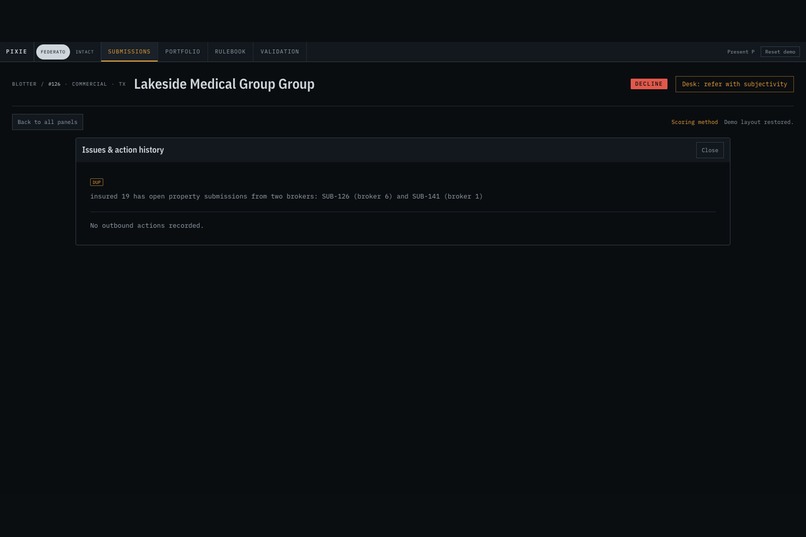
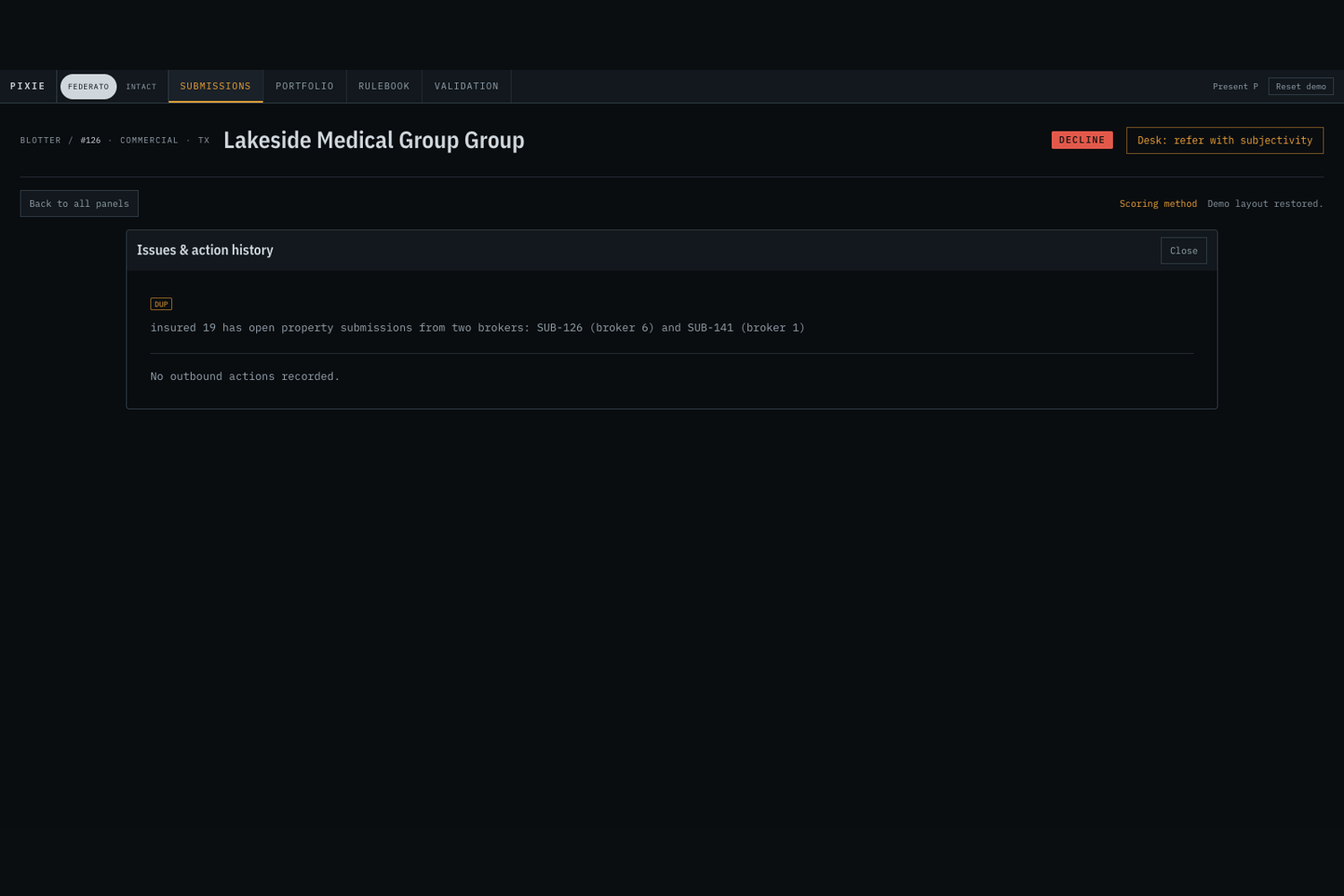
| Validate and detect defects | The case builder detects duplicate accounts, stale submissions, requested-limit and insured-value conflicts, and missing roof years. | Gallery 9 |
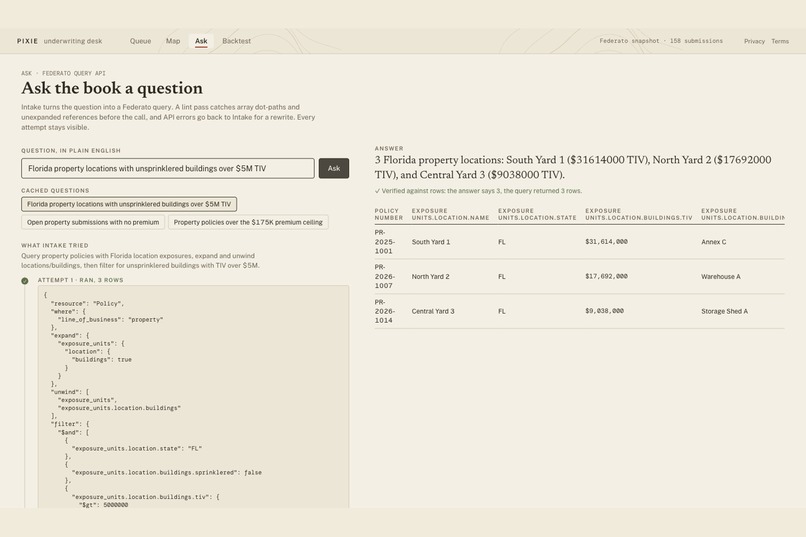
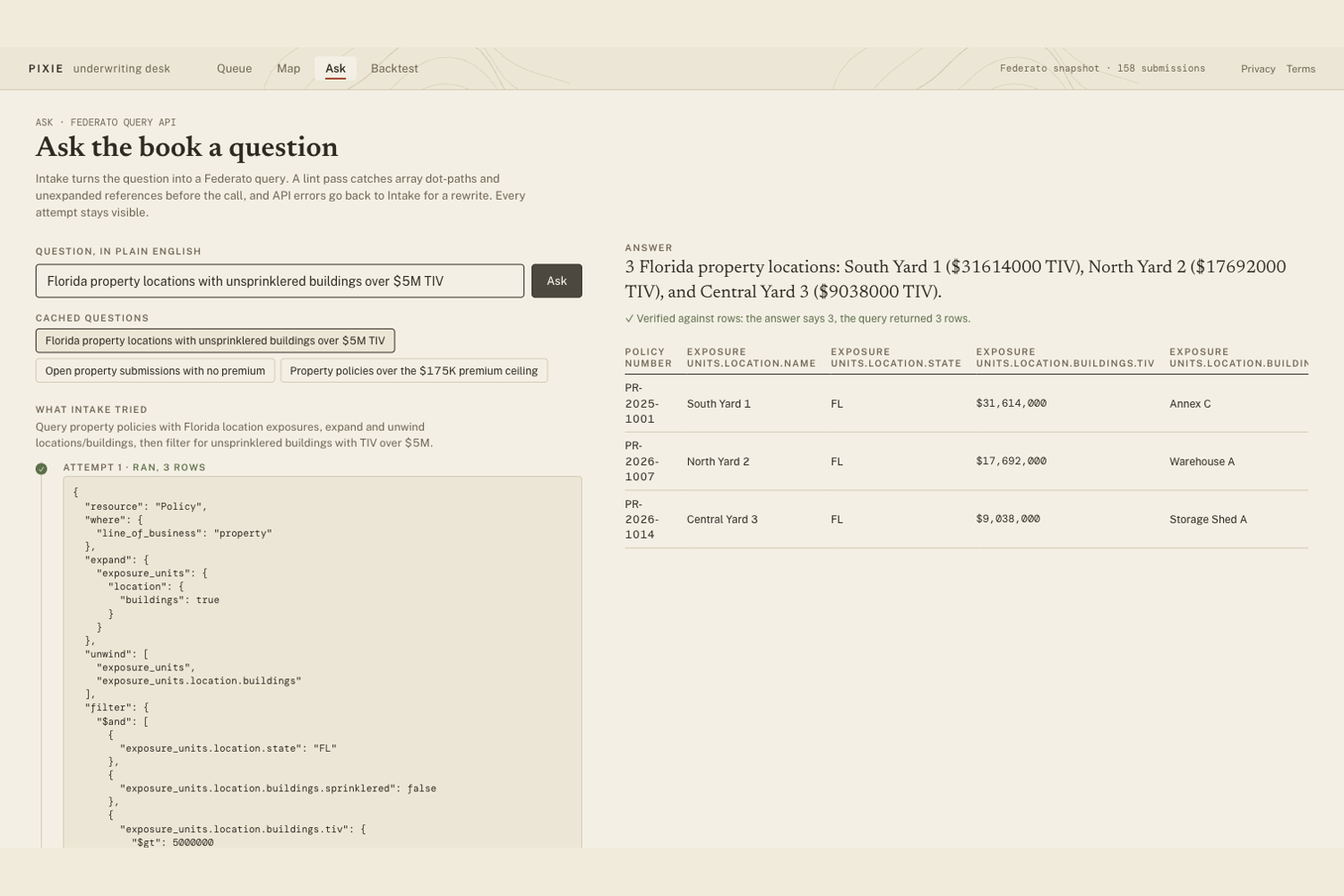
| Handle errors intelligently | The Ask agent validates a proposed query against the discovered schema. It can revise a lint failure, API rejection, or empty result up to three times, and the UI shows every attempt. | Gallery 10 |
| Decide under uncertainty | Deterministic code calculates the possible score range. Agents investigate and explain that range, while unsupported model numbers trigger a safe fallback. | Gallery 11 |
| Take a meaningful action | Pixie prioritizes the case, identifies the evidence to request, records a next action, and supports a reasoned underwriter decision. It does not overwrite upstream records or send an unconfirmed message. | Galleries 9 and 11 |
| Provide practical utility | The queue puts blocking data issues beside value at stake, and the case workspace lets the underwriter inspect the warning without leaving the decision. | Gallery 9 |
The duplicate-account example
Cases 126 and 141 refer to the same insured through two submissions from different brokers. Pixie detects the shared account and places a blocking duplicate_account issue on both cases. The warning identifies both case IDs and preserves the broker evidence so the underwriter can resolve ownership before acting.
The later review can also recall that an earlier case involved the same insured and issue type. That local recall contains identity and issue labels only. It cannot provide a score, a price, or a confirmed fact, and the risk engine never reads it as evidence.
Other checks catch different failure modes. Case 143 cites both dates when it flags a submission received before a later policy was quoted for the same insured. Case 134 warns that a $1 million requested limit sits far below $24.302 million in resolved insured value. A missing roof year remains a gap rather than becoming a favourable value.
Query validation and recovery
The Ask page turns an underwriter's question into a Federato query. Before any request runs, QueryBuilder.lint() checks resource names, fields, array traversal, expansions, and the supported grammar. If the linter or API rejects the request, the next attempt receives the exact error and the previous payload. An empty result can also trigger a revised filter.
The page shows the rationale, every attempted payload, lint findings, provider errors, row counts, and the final source rows. Pixie caches prepared questions for the offline demo. If an uncached question is asked offline, it reports that limitation instead of manufacturing an answer.
Challenges we ran into
The hardest defects were valid records with inconsistent meaning. A duplicate account can exist under two valid submission IDs. A stale submission can contain a valid received date even though a later policy already exists. We had to compare records across resources and cite the facts on both sides.
Memory created another risk. Recalling a previous review is useful, but an old score can contaminate a new decision. We restricted recall to the case identity and issue labels, then excluded recall from the engine's accepted fact list.
Query repair also needed a firm boundary. The model proposes a correction, while code decides whether the payload is valid enough to run. This keeps an agent retry from bypassing the schema checks.
What we learned
In a regulated workflow, preserving a conflict can be safer than choosing one source automatically. An uncertainty label becomes useful when it shows the possible decision range and names who can resolve the missing fact.
Limits and next steps
The commercial dataset is realistic but synthetic. Pixie detects four implemented defect classes, not every data-quality problem an insurer may encounter. It does not write corrections back to Federato, merge customer records, or prove that two similar names refer to the same legal entity. The Rox track does not require a Rox SDK, and Pixie does not use one.
A production version would add configurable validation policies, entity-resolution review, permissioned corrections, and a feedback loop that records whether the underwriter confirmed or rejected each issue. It would also evaluate repair quality against labelled defects from a carrier's own systems.
Part 5: Sentry
Pixie for the Sentry track
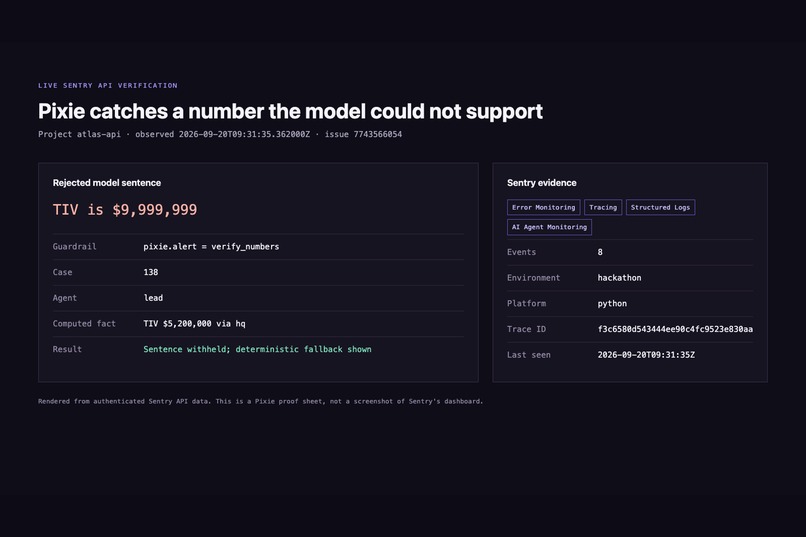
For Sentry, Pixie treats an underwriting decision as one observable workflow. The root trace connects the case to its agent turns, model calls, tool calls, token use, timing, and final recommendation. Structured logs record query failures and conflicts. A custom error event fires when model prose contains a number that no tool computed.
The official Sentry challenge asks for at least two named Sentry products and evidence that observability changed the project. Pixie uses Tracing, Logs, and AI Agent Monitoring, plus Cron check-ins for the backtest. The repository also contains Next.js and Expo instrumentation; current demo limits appear below.
Why ordinary error reporting was not enough
An underwriting run can return HTTP 200 and still be wrong. The model may state an unsupported number, a query may fail and recover, or one specialist may consume most of the run's time and tokens. None of those failures necessarily produces a crash.
Pixie records the decision as a workflow rather than a single request. An operator can start at case 138, open its root span, and inspect the agent or tool span that produced a questionable result. The underwriter receives a safe fallback while the engineering team receives the rejected sentence and its supporting fact list.
How Pixie uses Sentry
| Sentry product | What Pixie records | Why it matters | Where to look |
|---|---|---|---|
| Tracing | Each underwriting case creates a pixie.underwrite_case root span with the case ID, review depth, models, decision, score interval, model-call count, token totals, cost, elapsed time, and fallback status. |
One trace connects the user-visible recommendation to the work that produced it. | Gallery 12 |
| AI Agent Monitoring | Sentry's OpenAI Agents integration adds child spans for agent turns and tool executions when the SDK supplies them. | The team can compare model and tool behavior inside the same case workflow. | Gallery 12 |
| Logs | Structured events cover Federato queries, lint or API rejection, agent conflicts, actions, and number-guardrail failures. Each case-related log carries case_id. |
Operators can filter the event stream by case and stage without reconstructing the run from console text. | Gallery 12 |
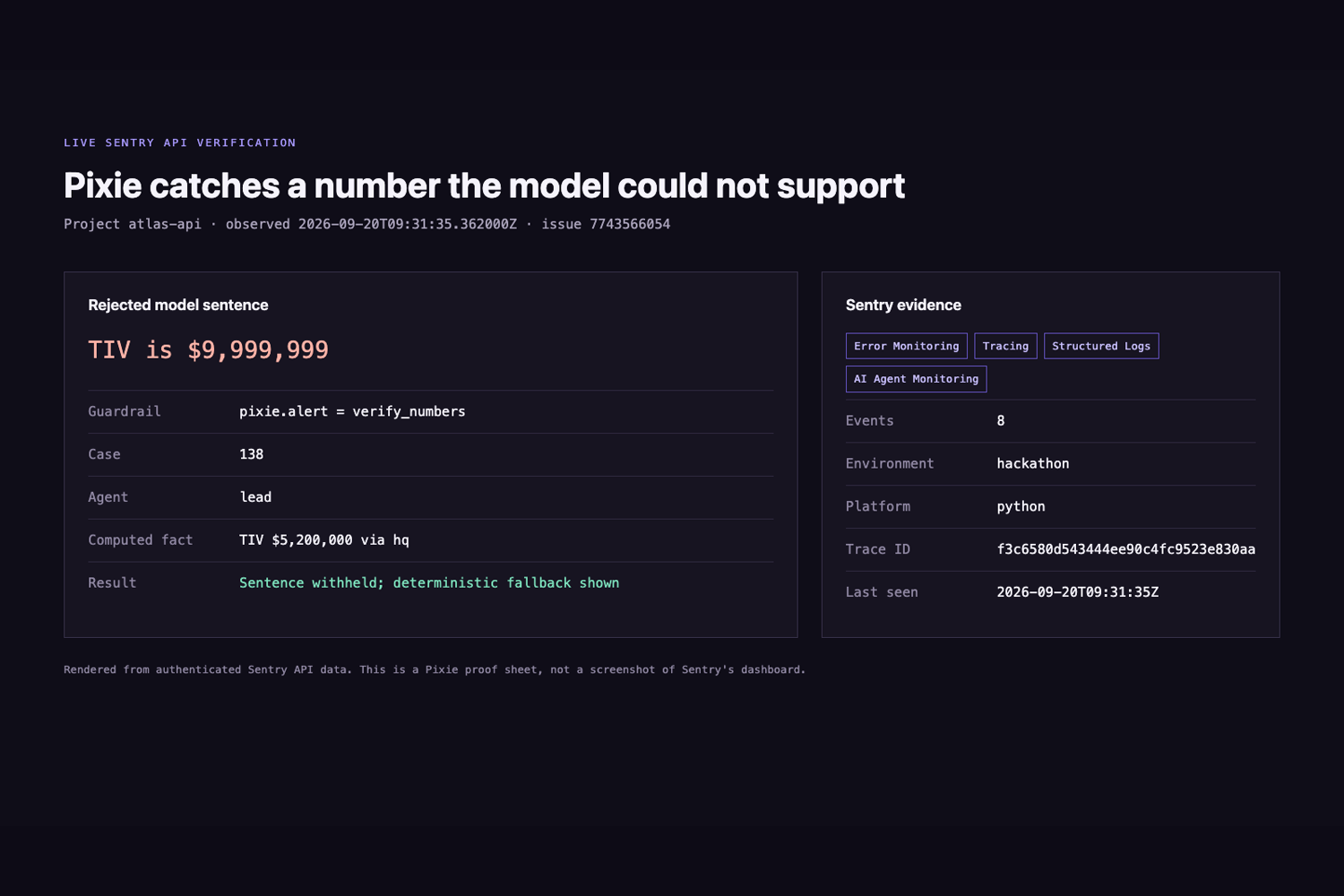
| Custom error event and alert workflow | verify_numbers_alert() sends an error tagged pixie.alert=verify_numbers with the agent, rejected sentence, unsupported tokens, and checked facts. |
A semantic failure becomes searchable and alertable even when the application recovered. | Gallery 12 |
| Cron Monitoring | The backtest job wraps its write step in the pixie-backtest monitor. Sentry receives an in-progress and final check-in whenever the script runs. |
A stale validation artifact can become an operational failure instead of a silent old file. | |
| Uptime Monitoring | The setup script can create a five-minute health check for the public API URL. | It separates service availability from decision quality. |
Pixie therefore qualifies through three products beyond basic error capture on the API alone. The main demo relies on Tracing, AI Agent Monitoring, Logs, and the custom semantic error path.
The unsupported-number path
Every model-written explanation passes through verify_numbers(). The checker compares each numeric token with the case facts and tool results. If the explanation introduces an unsupported number, Pixie withholds that sentence and displays a deterministic explanation instead.
The same failure calls verify_numbers_alert(). Sentry receives the case ID, agent name, rejected sentence, unsupported tokens, and the fact list used for the check. A configured issue workflow filters on pixie.alert=verify_numbers. This lets the team investigate a dangerous answer that the customer or underwriter never saw.
How observability changed the build
The first live API verification produced no Sentry data even though the application appeared configured. A Sentry project lookup showed that SENTRY_DSN_API pointed to a project ID that did not exist in the organization. We replaced the stale DSN with the key returned for the atlas-api project and ran the desk again. That verification produced 53 ingested transactions.
This incident changed the setup path. scripts/sentry_setup.py now reads explicit organization and project settings, creates the semantic alert workflow idempotently, and reports setup failures instead of assuming that a DSN is valid. The count of 53 is one recorded verification result, not a promised number for every run.
Sentry also changed how Pixie reports model failures. A rejected explanation is no longer only a local fallback. It becomes a tagged operational event that can be grouped with the trace, the model span, and the tool evidence behind the rejection.
Coverage across the project
The FastAPI service has the complete judged path. It initializes Sentry only when SENTRY_DSN_API is set and disables prompt, completion, and tool-argument collection unless ATLAS_SENTRY_PII=1.
The Next.js app includes server, edge, and browser instrumentation. Its Session Replay configuration masks text and inputs and blocks media. The current checkout has no public browser DSN in the web build, so browser replay is unavailable in this demo and does not count as proof for the track.
The Expo app initializes the React Native SDK and uploads source maps in a native build. Expo Go can exercise JavaScript errors and tracing, but it cannot prove native crash capture or mobile replay. We keep those claims out of the judged demo.
Challenges we ran into
Observability configuration can fail without breaking the product. The stale DSN left the desk working while every event went to the wrong destination. We now treat provider setup as something to verify with an observed event, not something proven by an environment variable.
AI traces also carry sensitive material by default if a team is careless. Pixie keeps prompts, completions, and tool arguments out of Sentry unless the explicit PII flag is enabled. The judged story depends on case IDs, timings, token counts, tool names, and safe metadata.
The final challenge was separating configuration from delivery. A created alert workflow, uptime check, or cron definition does not prove that an email arrived or that a scheduler runs nightly. The section below states those limits directly.
What we learned
An AI failure is not always an exception. One unsupported number deserves operational attention, and one case trace can connect the model, tools, fallback, and user-visible result without recording the full insurance record.
Limits and next steps
The alert workflow exists, but this draft does not claim verified email delivery. The cron monitor receives check-ins only when someone or an external scheduler runs the backtest script. The repository does not install that nightly schedule. An uptime monitor tied to a temporary tunnel must also be updated when the tunnel URL changes.
A production version would add a stable deployment URL, tested notification delivery, saved trace-to-incident links, browser replay with the public DSN, a native Expo build, and retention rules reviewed against carrier privacy requirements.
Part 6: Elastic
Pixie for the Elastic track
For Elastic, Pixie uses Elasticsearch as the context layer for underwriting and location risk. The underwriting agent retrieves similar past decisions, checks the carrier's nearby active exposure, compares a case with the bound book, and finds terms that occur disproportionately in declined or loss-making records. The consumer risk service uses separate geospatial indices for Toronto flood-study areas and fire stations.
The official Elastic challenge asks for agentic uses of real-world data. Pixie implements hybrid BM25 and vector retrieval, reranking, aggregations, geospatial queries, and Agent Builder tools. It does not claim an Elastic Workflow that has not been built.
Why search is part of the decision
An agent should not invent a comparable case or add a portfolio total in prose. Those answers must come from indexed records and reproducible queries. Pixie asks Elasticsearch two practical questions before an underwriter writes another risk: what happened on similar cases, and how much active insured value already sits near this location?
Elastic returns the evidence and performs the aggregation. Pixie's deterministic engine consumes the labelled portfolio result, and the interface states whether Elasticsearch or the local fallback answered.
How Pixie meets the Elastic criteria
| Elastic capability | What Pixie does | Where to look |
|---|---|---|
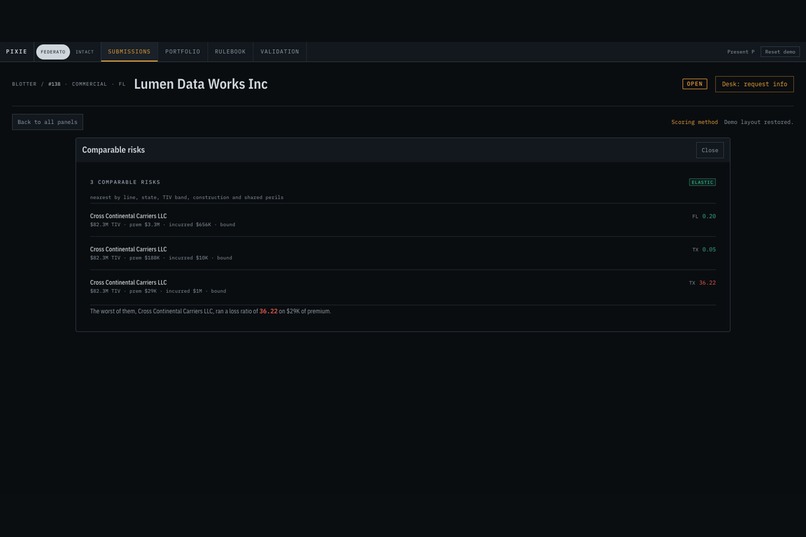
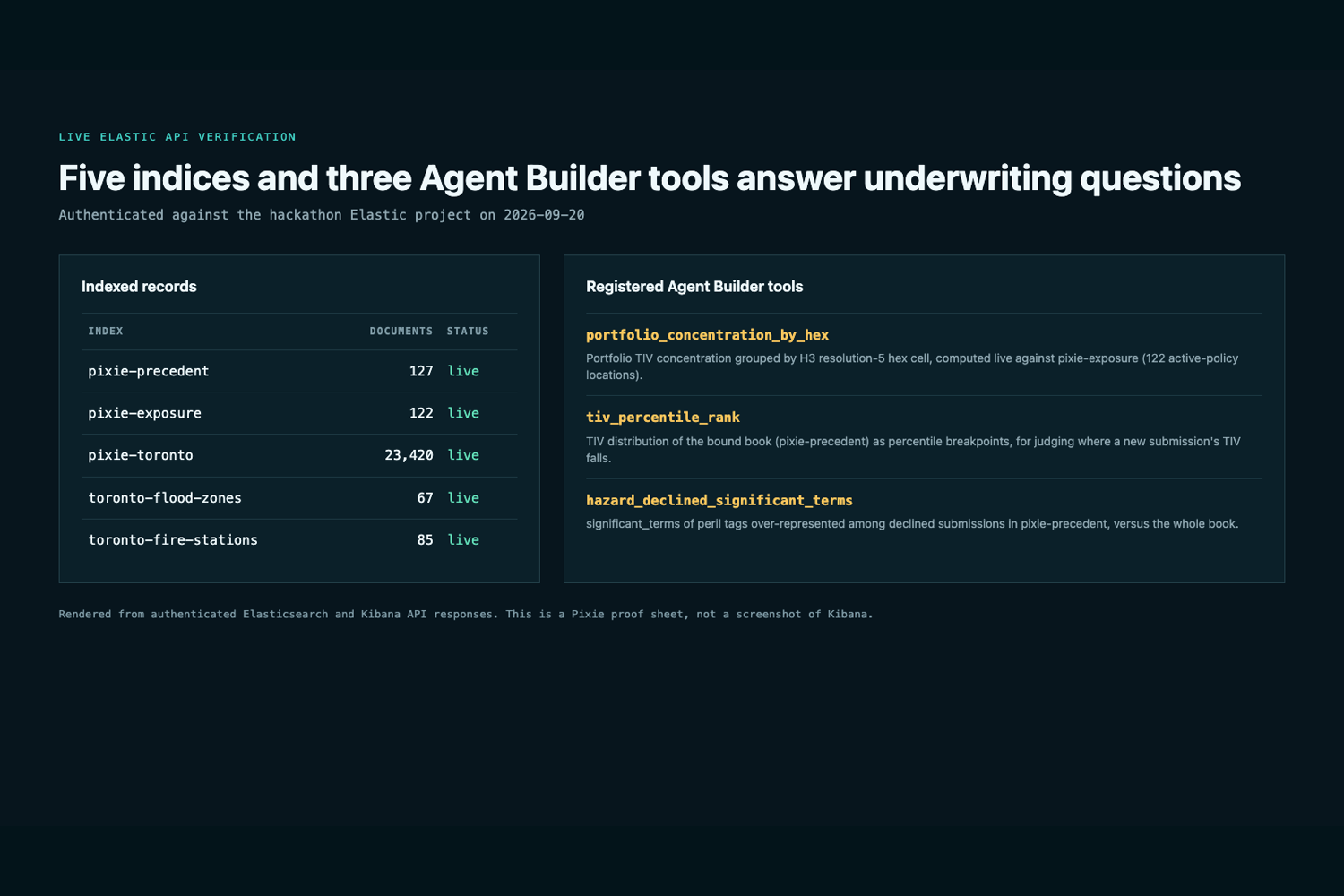
| Elasticsearch as an agent context layer | The Hazard agent can call hybrid precedent search, while the Portfolio agent can request nearby active exposure. Tool results enter the case as sourced findings. | Galleries 13 and 14 |
| Hybrid lexical and semantic retrieval | pixie-precedent combines BM25 and semantic_text retrieval through reciprocal rank fusion. |
Gallery 14 |
| Dense vectors and reranking | Elastic generates Jina v5 embeddings for the semantic_text field. A Jina v3 text-similarity reranker orders the fused candidates. |
Gallery 14 |
| Aggregations beyond retrieval | significant_terms compares declined and loss-making cohorts with the whole book. percentile_ranks places a case's insured value and premium within the bound book. |
Gallery 13 |
| Geospatial queries | geo_distance sums nearby active property exposure. ES |
QL ST_INTERSECTS and ST_DISTANCE query Toronto flood polygons and fire stations at the exact quote point. |
| ES | QL | Portfolio concentration uses STATS, SUM, grouping, and sorting over the exposure index. The Toronto pack uses ES |
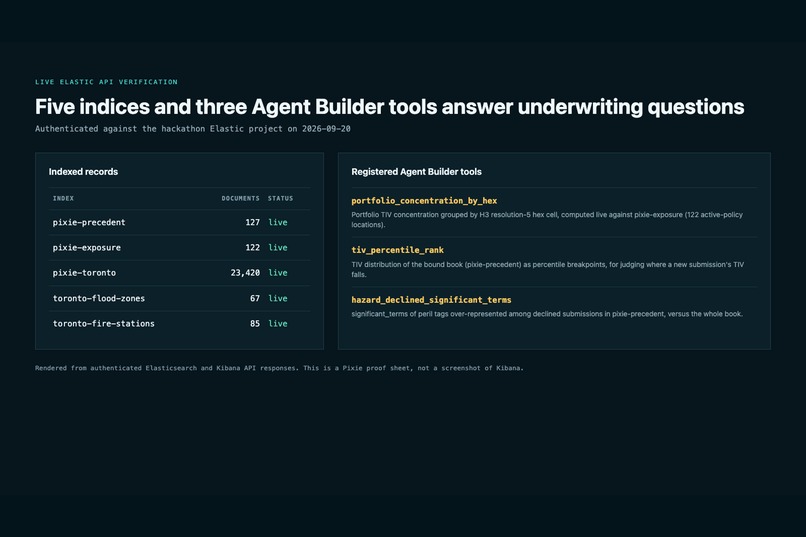
| Agent Builder | Three registered tools expose portfolio concentration, declined-peril counts, and insured-value percentile breakpoints in Kibana. | Gallery 13 |
| Actionable output | Nearby concentration can change a computed underwriting score. Precedent outcomes, percentile context, and significant terms support the agent's recommendation and the underwriter's review. | Galleries 7 and 14 |
| Reliable fallback | Each Elastic-backed path returns a backend label. If Elasticsearch is unavailable, Pixie uses a deterministic local implementation with the same response shape and says memory or local. |
Gallery 14 |
The five indices
| Index | Contents | Product use |
|---|---|---|
pixie-precedent |
Bound policies and declined submissions with searchable narrative summaries, facets, and outcomes | Hybrid precedent retrieval, significant terms, and percentile ranks |
pixie-exposure |
Active property locations, insured value, peril tags, and H3 cells | Nearby exposure and the portfolio concentration map |
pixie-toronto |
Toronto break-and-enter events grouped into location-risk cells | Consumer location context |
toronto-flood-zones |
Basement-flooding study-area polygons | Exact-point ST_INTERSECTS queries |
toronto-fire-stations |
Fire-station points | Nearest-station ST_DISTANCE queries |
The live project verification recorded 127 precedent documents, 122 exposure documents, 23,420 Toronto event documents, 67 flood-zone polygons, and 85 fire stations. These counts describe the loaded hackathon indices on September 19, 2026. The loaders use deterministic document IDs, so rerunning them updates records instead of creating duplicates.
Hybrid precedent retrieval
Each precedent document contains the line of business, state, construction, insured value, premium, peril tags, broker, decision, and known outcome. Pixie also builds a narrative summary from those source facts and indexes it as semantic_text.
When the agent requests precedent, one Elasticsearch retriever runs BM25 over the summary and another runs semantic search over the same field. Reciprocal rank fusion combines the two lists. The Jina reranker then scores the fused candidates against the case query. Pixie returns the top cases with their actual outcomes and a deterministic explanation of shared line, state, size band, construction, or peril.
The agent does not generate the premium, incurred loss, or loss ratio shown in a precedent. Those numbers come from the indexed document and pass into the number guardrail as tool facts.
Portfolio and geospatial context
The exposure index stores active property locations and insured values. A geo_distance filter finds active property exposure within 30 kilometres of the case and excludes the current insured. An H3 aggregation groups the wider book into map cells. Tower height on the 3D map represents the summed active insured value in each cell.
On the consumer side, Pixie queries Toronto flood polygons and fire-station points at the exact quote coordinates. ST_INTERSECTS checks the flood-study area, and ST_DISTANCE finds the nearest station. These queries replace the local pack's coarser H3-cell-centre approximation when Elasticsearch is available.
What the book teaches
A frequency count can overstate a common characteristic. Pixie uses significant_terms to compare a selected cohort with the full precedent book. The result identifies peril tags, states, construction types, or brokers that occur more often in declined or loss-making records than their background rate would suggest.
The result is descriptive, not causal. A term with a high score does not prove that the characteristic caused a decline or loss. The UI keeps the cohort size, background count, score, and active backend visible.
The case percentile endpoint uses Elasticsearch's percentile_ranks aggregation against bound policies. The server returns where the case's insured value and confirmed premium sit within the book. A model does not estimate that percentile.
Agent Builder tools
The Elastic project has three registered ES|QL tools that a judge can run in Kibana:
portfolio_concentration_by_hexsums insured value by H3 cell.hazard_declined_significant_termsreturns declined peril counts for exploration. The production insight endpoint uses the actualsignificant_termsaggregation for foreground and background comparison.tiv_percentile_rankreturns insured-value percentile breakpoints for the bound book. The case endpoint uses the DSLpercentile_ranksaggregation for one case value.
The tool names and descriptions state those differences so a frequency count is not presented as a significance score and a set of breakpoints is not presented as one case's percentile rank.
Challenges we ran into
BM25 preserved exact insurance terms, while semantic search found related cases. Reciprocal rank fusion and reranking combine both signals. We also separated term frequency, significance, percentile breakpoints, and percentile rank because they answer different questions. The offline fallback keeps the response shape and backend label but does not claim to reproduce Elastic's rankings.
What we learned
Search results need evidence and limits. Pixie returns matched facts, outcomes, the backend, and the comparison basis. Elasticsearch retrieves records and computes statistics, while Pixie's engine applies approved scoring rules.
Limits and next steps
The commercial policy records are synthetic, and the Toronto indices contain public data rather than customer records. The precedent summaries are generated from structured source facts, so we do not present them as raw broker documents. Similarity and significant terms do not establish causal insurance risk.
The Elastic project has no implemented Workflow. A production next step would create a reviewed workflow for new high-concentration submissions, write an alert record, and require an underwriter acknowledgment. We would also evaluate hybrid retrieval against labelled relevance judgments and monitor index freshness.
If a result badge says memory or local, that request did not use Elasticsearch. The demo can continue offline, but the presenter must show a saved live query or switch back to a verified Elastic result for this track.
Built With
- elastic
- expo.io
- fastapi
- federato
- javascript
- next.js
- openai
- python
- react
- router
- sentry
- typescript
- widgets


Log in or sign up for Devpost to join the conversation.