
Inspiration
In my first year of college, I built a basic inventory manager in Python that ran entirely in the terminal. It worked, but it was bare-bones — type a number, get a print statement, repeat. It did the job, but it never felt like something a real person would actually want to open and use. When the chance came up to take on a new project, I didn't want to start from zero. I wanted to go back to that first attempt and ask: what would it take to turn this into something that actually feels like a real application? That question became PixelStock — the same core idea, rebuilt from the ground up with a proper interface, so it looks and feels like a tool you'd hand to an actual shop owner, not a script you'd run for a grade.
What it does
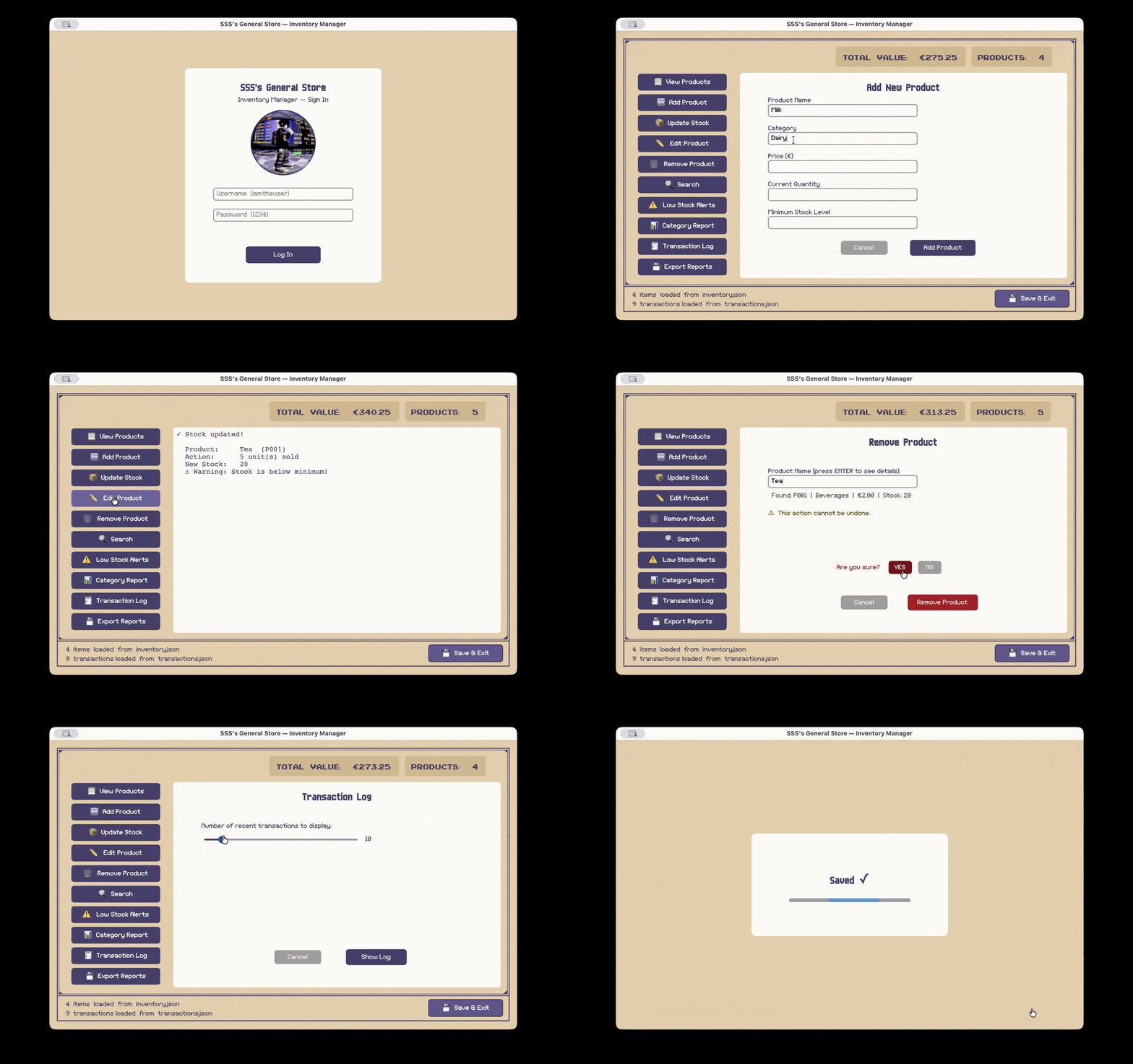
PixelStock is an inventory management system built for small, one-person operations — the kind of sole trader who needs to track stock without needing an enterprise-grade platform to do it. It handles the essentials: adding and removing products, logging sales and deliveries, searching and filtering by name or category, flagging items that are running low, and generating category-level breakdowns of stock value. Everything a shop owner does day to day is covered, and reports can be exported as CSV or formatted text files for record-keeping.
The goal was to sit in that sweet spot between "too simple to be useful" and "too complex to bother with." A sole trader shouldn't need training to use their own inventory software, and PixelStock is built around that idea — simple enough to pick up in minutes, capable enough to actually rely on.
How I built it
I started with the functions I'd already written for the original terminal version — the logic for adding products, calculating stock value, validating input, and so on — and treated them as a foundation rather than a finished product. Reusing that logic meant I didn't have to reinvent the core of the system, but almost everything still had to change in some way, because the assumptions baked into "print this to the terminal" don't carry over cleanly to "display this inside a GUI."
I chose customtkinter as the library to build the interface, since it gave me a modern look on top of Python's standard Tkinter without needing to learn an entirely separate framework. From there, I designed the layout around an old, slightly retro aesthetic — a beige and dark-purple colour scheme, pixel-style fonts, and a central "screen" area that mimics an old terminal display, with forms sliding in over it when input is needed. On top of porting the existing logic, I built new functionality that only makes sense in a GUI context: a login screen, real-time stock and value totals at a glance, inline form validation with on-screen error messages instead of terminal prompts, and a "Saving..." confirmation screen so the user always knows their data was written to disk before the program closes.
Challenges we ran into
The biggest challenge was conceptual before it was technical: figuring out what actually needed to change when moving from a terminal-based flow to a UI-based one. In the old version, a function could just call input() and print() wherever it needed to, and the program would pause and wait. In a GUI, none of that works the same way — every "ask the user something" moment has to become a form, every "show the user something" moment has to become a screen update, and the program can't just block and wait for input like a terminal script can. Rethinking each function's role, rather than just rewriting its syntax, took far more time than I expected.
On the technical side, I'd never built a GUI application before, so I spent a lot of time reading through customtkinter's documentation to understand how widgets are placed, sized, and layered on top of each other — especially once I started building overlay screens that needed to appear and disappear over the same space. I also used LLMs like Claude and Gemini as a way to break down unfamiliar concepts faster, particularly when I hit GUI-specific quirks that wouldn't have shown up in a terminal program at all.
Accomplishments that we're proud of
This is the first GUI application I've ever built, and the thing I'm most proud of is that it doesn't just run — it works seamlessly, feels intuitive to navigate, and actually persists data to disk between sessions, the same way a real piece of software should. It was also by far the largest project I've taken on, both in lines of code and number of files, and getting all of those pieces to work together cleanly, without the whole thing collapsing under its own complexity, was its own achievement. Beyond the code itself, I'm glad to have picked up a real working knowledge of customtkinter as a framework — something I can now carry forward into future projects with a much smaller learning curve.
What we learned
The technical skill I walked away with is a solid grasp of building interfaces with customtkinter — widget placement, state management across screens, and handling user input without a terminal to lean on. But just as valuable was learning how differently you have to think about a program once it has a UI. A terminal program can be linear and step-by-step; a GUI has to react to whatever the user does next, in whatever order they choose to do it. Designing around that shift in mindset was its own kind of learning, separate from just learning the library itself.
What's next for PixelStock
There's a clear path forward from here, and a few directions I'd like to take it:
- Polish the visuals further — finish wiring in the custom button and screen-background images so the retro aesthetic is fully realised rather than partially placeholder, and refine spacing and typography across every screen.
- Expand functionality for real-world use — add support for multiple users with their own logins, basic sales analytics (e.g. busiest categories, stock turnover over time), and the ability to set custom reorder thresholds per product rather than a single flat rule.
- Make it more forgiving for non-technical users — undo support for accidental deletions, and clearer onboarding for someone opening the app for the very first time.
- Move beyond local storage — explore syncing data to the cloud or a lightweight database, so a sole trader could check their inventory from more than one device.
Each of these pushes PixelStock a little further from "a student project that works" toward "a tool a small shop could genuinely depend on" — which was the whole point of revisiting this project in the first place.

Log in or sign up for Devpost to join the conversation.