





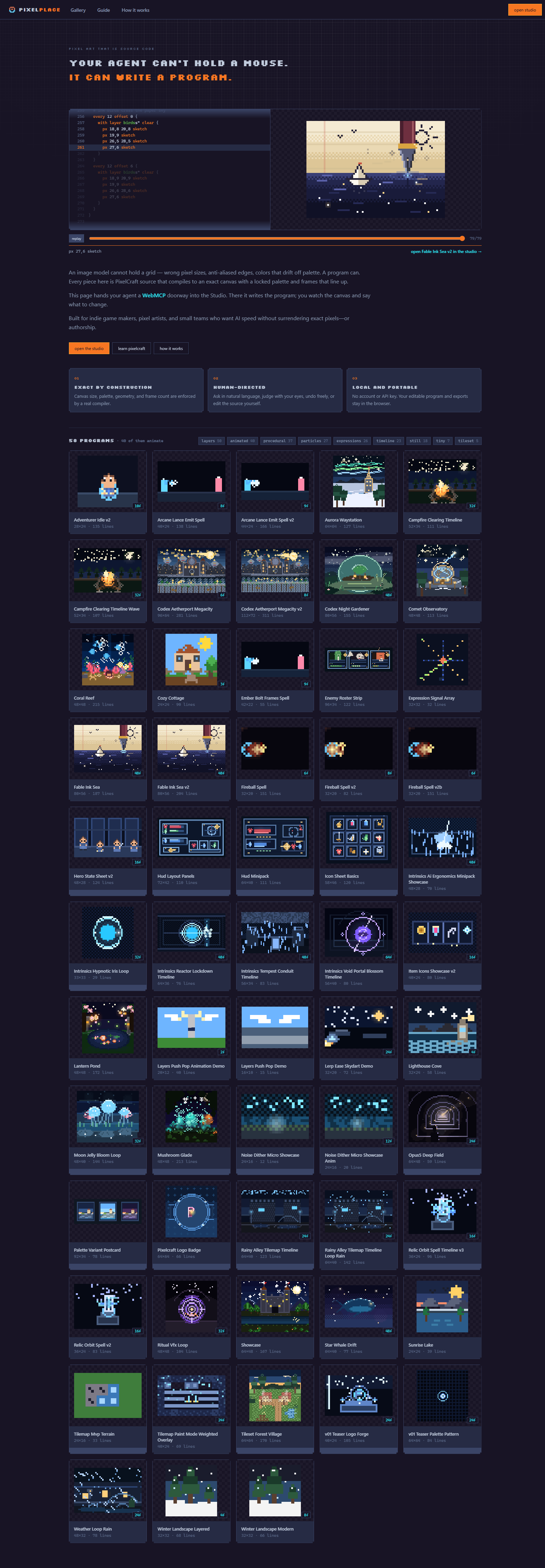
PixelPlace
Pixel art that is source code—built for people and agents to make together.
Inspiration
Generative image models can create beautiful pictures, but they do not guarantee an exact 32×32 grid, a locked palette, hard pixel edges, or animation frames that line up. Those are not optional details for game assets.
A program can guarantee them.
I already had PixelCraft, a small vibecoded language and compiler for describing pixel art as source code. The WebMCP Challenge gave me the reason to turn that engine into something more ambitious: a shared creative surface where an agent handles structure and precision while a person remains the art director.
What PixelPlace does
PixelPlace is a browser-based pixel-art Studio with nine native creation tools, plus a landing-page WebMCP tool that guides first-time agents into the workspace. A typical collaboration is intentionally simple:
- A person asks for a sprite, scene, icon set, tileset, or animation in ordinary language.
- The agent discovers the tools directly from the page and reads a language guide generated from the compiler's own documentation.
- It checks its draft without changing the canvas, then applies only code that compiles.
- The person judges the real artwork and requests changes.
- The agent rereads the live source—including any human edits—and revises the same canvas.
- The result can be exported as PNG, animated GIF, a game-ready sprite sheet, or editable PixelCraft source that can be reopened in the Studio.
During our final test, I asked Codex for a game-ready animated mimic chest. It produced a clean sixteen-frame sprite. I noticed that its lid felt detached and two one-frame effects looked confusing. Codex read the live program, rebuilt the lid around visible hinges, removed the effects, compile-checked the revision, and updated the canvas. That small exchange captures the product: the agent supplied speed and exactness; the person supplied taste.
Why WebMCP
WebMCP lets an agent operate the website’s real creative engine.
The model does not need to be embedded in PixelPlace, and PixelPlace needs no account, API key, quota, database, or backend. The page exposes its capabilities; the user’s agent brings the intelligence. Without WebMCP, the Studio remains a normal local pixel editor. With WebMCP, the agent and person can work on the same visible, undoable document.
Every tool call appears in an activity feed, so the collaboration is observable rather than mysterious.
How we built it
PixelPlace is built with Next.js 15, React 19, and TypeScript and deployed on Vercel. The PixelCraft lexer, parser, compiler, interpreter, renderer, PNG/GIF exporters, documentation, and diagnostics all run client-side.
The Studio registers nine stateful tools through WebMCP’s imperative API, while the homepage registers a discovery tool that opens the Studio. They cover compiler-generated guidance, draft checking, applying and reading programs, coarse canvas inspection, frame control, example discovery, and local exports. Tool schemas and descriptions are designed to encourage a safe check_program → set_program workflow, so a broken draft never replaces working art.
What was new during the challenge
The PixelCraft compiler, renderer, stdio MCP adapter, and 58-program gallery existed before the submission period. That prior work ends at commit 57f6f8b from August 19.
Starting with commit 06124af on August 26, after the submission period opened, me, Codex and Claude built:
- the nine-tool Studio WebMCP surface, browser registration layer, and landing-page discovery tool;
- a fully client-side, stateless architecture replacing the earlier server/API-key flow;
- the shared Studio interface, activity feed, undoable agent workflow, validated .pc import, and PNG/GIF/sprite-sheet export flow;
- browser exports of the compiler documentation and lexer;
- the homepage's live source-code replay and the Challenge-focused product story;
- end-to-end browser fixes discovered only through testing real WebMCP sessions.
Challenges and lessons
WebMCP tool results are JSON, so a tool cannot return the rendered image to the agent.
We created describe_canvas, which returns a coarse text map, palette, painted bounds, and coverage. That is enough for an agent to catch structural mistakes without pretending that text is vision. The person looking at the canvas decides whether the art actually looks good. Structural correctness and artistic judgment remain deliberately separate.
We also learned that page-native tools must be self-explanatory, cheap to validate, and safe to retry. Compiler-derived documentation prevents drift, draft checking avoids destructive iteration, and reading the live document prevents the agent from overwriting human edits with stale state.
Final thoughts
This competition has been a lot of fun, WebMCP has so much potential and I can't wait to come up with more projects and ideas utilizing it! This story was mostly written by Codex, with me editing and changing few things to match my voice and these final thoughts were fully written by me with no AI assistance. I used AI voice for the video as well as my English pronunciation isn't the best. Best regards and thank you for the fun competition. - Roni Lämsä
Built With
- codex
- html5
- next.js
- node.js
- react
- typescript
- vercel
- webmcp

Log in or sign up for Devpost to join the conversation.