Inspiration:
Creating a Pirate Hunt Java program can be inspired by:
- Adventure and Exploration: Channel the excitement of treasure hunting and exploration.
- Game Development: Unleash creativity by crafting an enjoyable pirate-themed game.
- Education**: Teach programming and problem-solving interactively.
- Customization**: Design unique islands, puzzles, and gameplay mechanics.
- Competitions**: Compete in hackathons, pushing boundaries within deadlines.
- Community**: Share and receive feedback from the programming community.
- History and Culture**: Delve into the lore and legends of pirates.
- Problem Solving**: Embrace challenges and creative solutions in game development.
What it does:
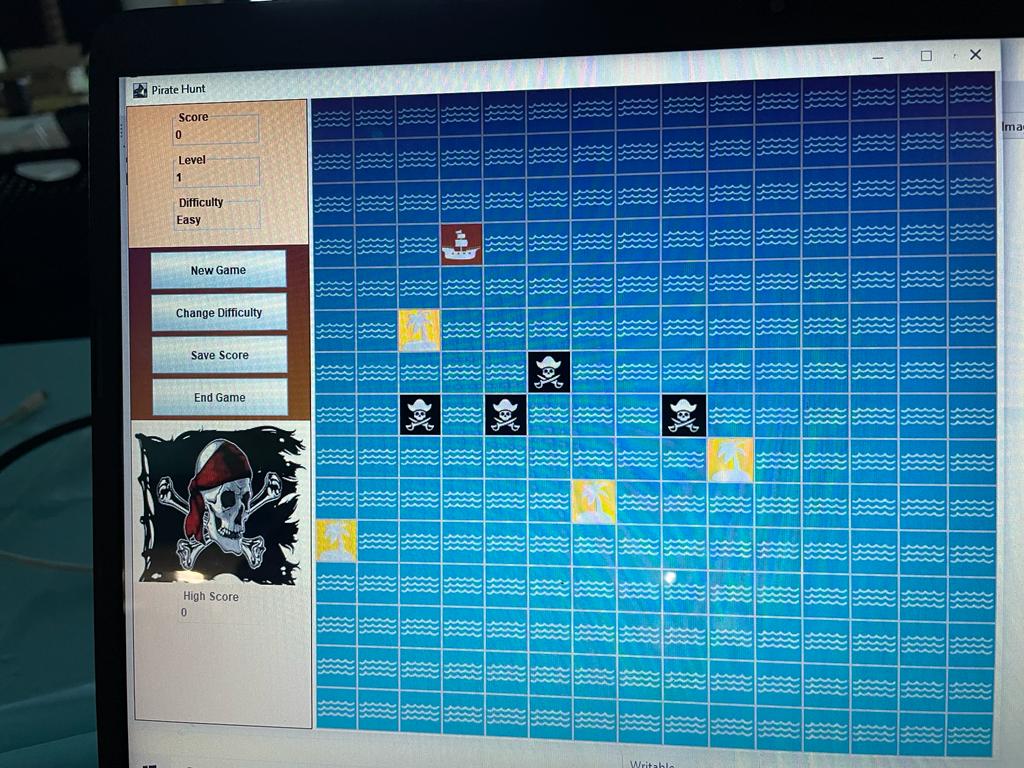
Certainly! In a Java-based pirate treasure hunt game, you create a simple interactive adventure where players search for hidden treasure on a grid. Here's how it works in plain language:
- You have a grid, like a map, where the treasure is hidden.
- You'll randomly place the treasure on the grid.
- The player starts the game and sees the empty grid.
- The player is asked to enter the X and Y coordinates to search for the treasure.
- If the player's coordinates match the treasure's location, they win the game.
- If the coordinates don't match, the game marks that spot with 'O' to show it's been searched.
- The game continues until the player finds the treasure.
It's a simple game where players guess the treasure's location by entering coordinates. You can make it more exciting by adding more features like a limited number of guesses, hints, or obstacles. This code serves as a foundation for your Java-based pirate treasure hunt game.
How we built it: To build a pirate hunt Java program, you can follow these steps. First, define a Pirate class with attributes like name, location, and treasure. Create an ArrayList to store Pirate objects and populate it with pirates. Next, create a game loop that allows the user to input commands like "hunt" or "quit." Implement the hunt logic to randomly move pirates around the map and update their treasures. Use random number generators for this. Display the game state after each turn, including pirate locations and treasures. Keep looping until the user quits or a certain condition is met (e.g., finding a specific treasure amount). This program will simulate a pirate hunt game in Java.
Challenges we ran into:
Creating a pirate hunt game in Java comes with several challenges, including:
- Game Design
- Graphics and Animation
- User Interface (UI)
- Collision Detection
- Game Physics
- Player Input
- Game Logic
- AI and Pathfinding
- Performance Optimization
- Testing and Bug Fixing
- Multiplayer Support
- Sound and Music
- Cross-Platform Compatibility
- Publishing and Distribution
Overcoming these challenges requires careful planning, breaking the project into smaller tasks, and seeking community and online resources for help when needed.
Creating a pirate hunt game in Java comes with several challenges, including:
- Game Design
- Graphics and Animation
- User Interface (UI)
- Collision Detection
- Game Physics
- Player Input
- Game Logic
- AI and Pathfinding
- Performance Optimization
- Testing and Bug Fixing
- Multiplayer Support
- Sound and Music
- Cross-Platform Compatibility
- Publishing and Distribution
Overcoming these challenges requires careful planning, breaking the project into smaller tasks, and seeking community and online resources for help when needed.
What we learned: Certainly! Building a Java Pirate Hunt program can teach you:
Basic Java syntax. Object-oriented programming (OOP) concepts. User input and output handling. Data structures like arrays or lists. Random number generation. Game logic and problem-solving. Error handling and debugging. File input/output (I/O). Optional: Graphics and animation. Optional: Software design patterns. Testing and debugging skills. Optional: Team collaboration and project management if working with others.


Log in or sign up for Devpost to join the conversation.