Inspiration
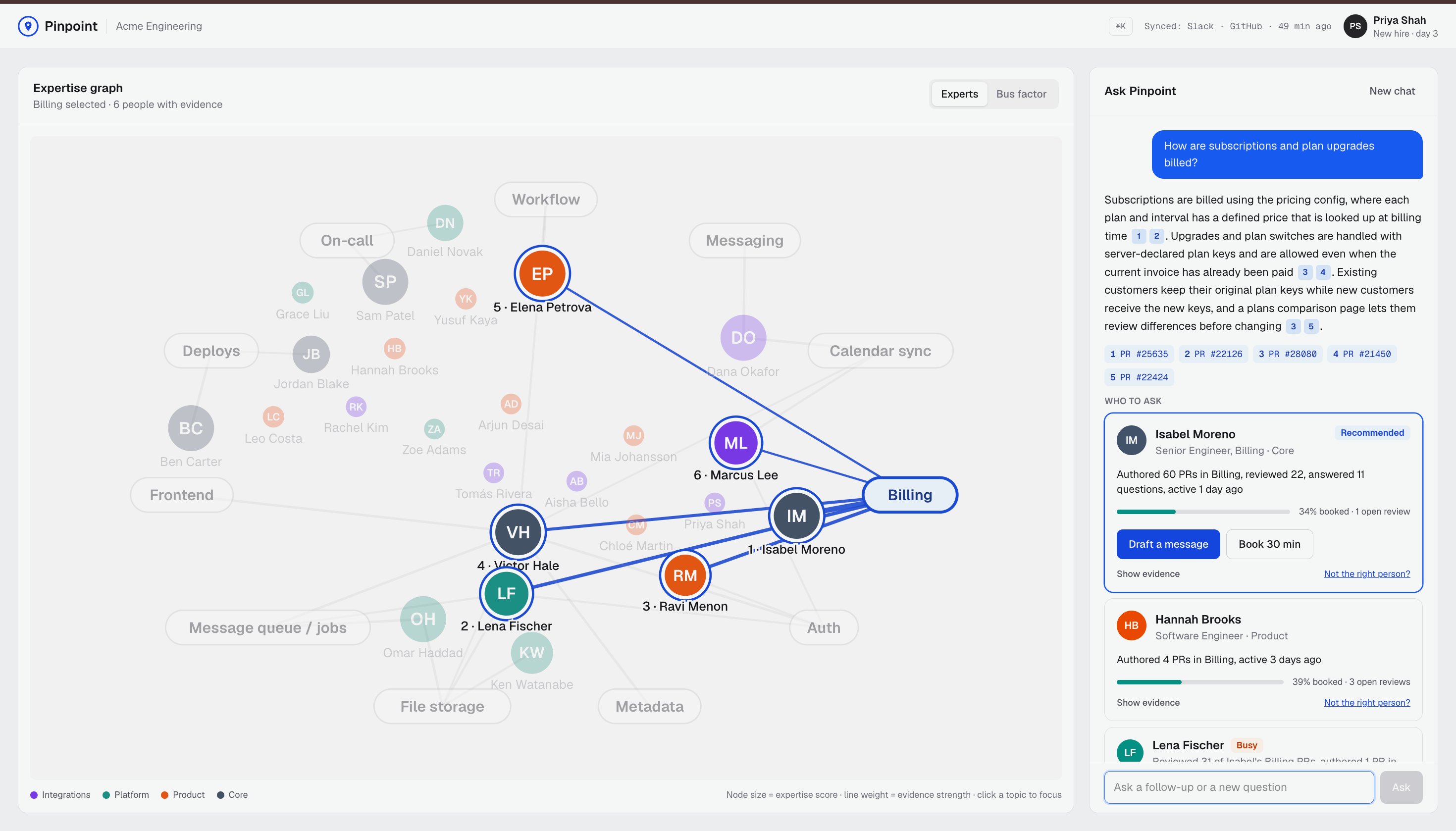
Pinpoint turns your team's Slack and GitHub history into a live map of who knows what, so new hires can find the right person to ask, see if they have time, and reach out in one click.
We've both started somewhere new and spent the first weeks not knowing who to ask. The knowledge is there, scattered across PRs and Slack threads, but the network that points you to it is invisible when you're new. So you either ping the most senior person you've heard of (who is usually swamped) or you stay stuck. That hits hardest for people without a hallway network: remote hires, career switchers, anyone who doesn't already know someone on the team.
Our user is a new engineer three days into a job. Our persona is Priya Shah, a new hire on the Integrations team at a fictional company called Acme.
What it does
Priya asks Pinpoint "How does inbound email sync work?" and the agent takes it from there:
- Answers first, with sources. It searches the team's merged PRs and Slack threads and writes a short answer. Every sentence links to the PR or thread it came from.
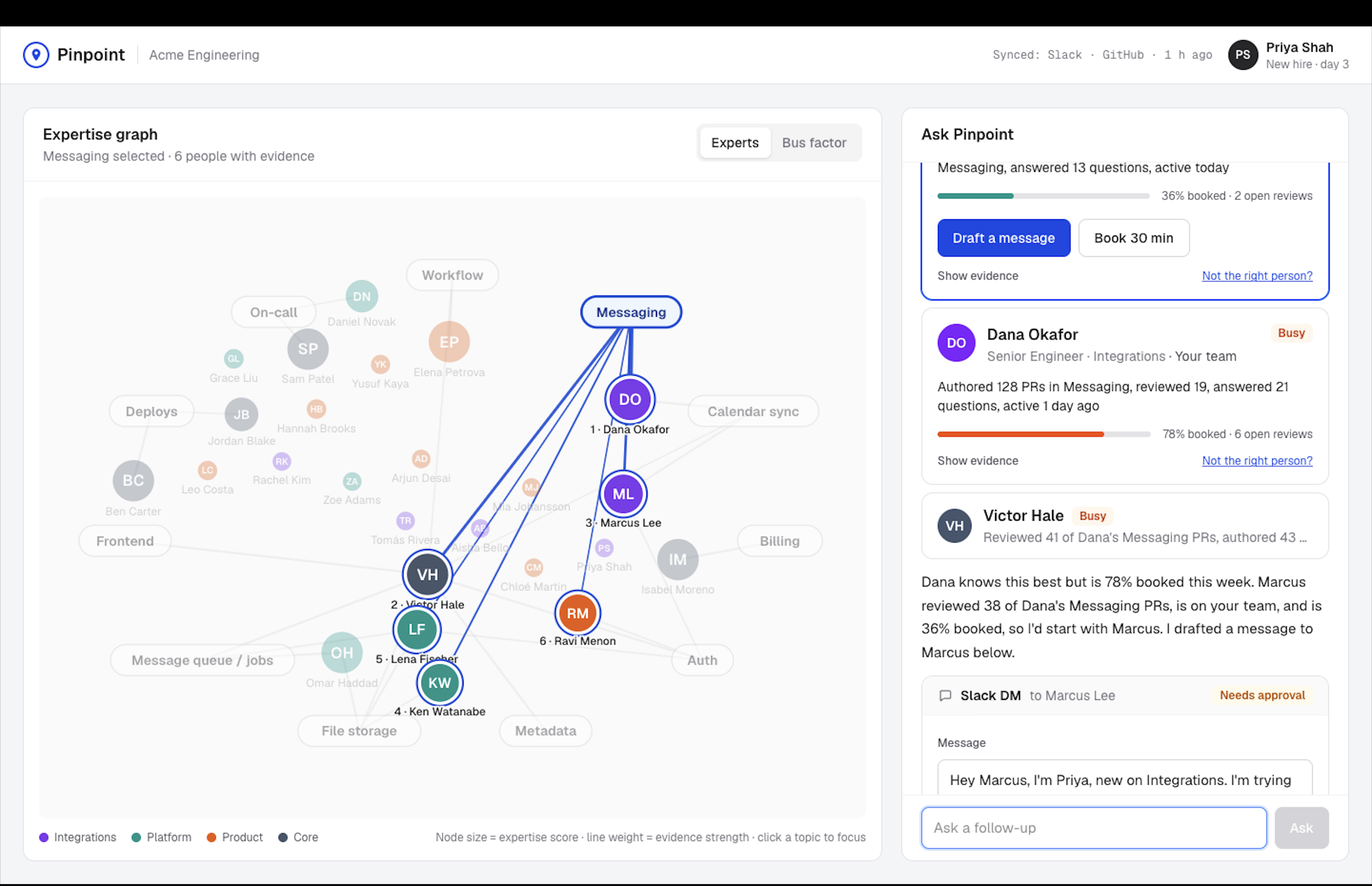
- Finds who knows it, with receipts. Dana wrote most of this code (128 PRs). Marcus reviewed 38 of them. Every recommendation shows the evidence behind it.
- Checks who actually has time. Dana is 78% booked this week, Marcus 35%. Pinpoint recommends Marcus, who is also on Priya's team, and marks Dana as busy.
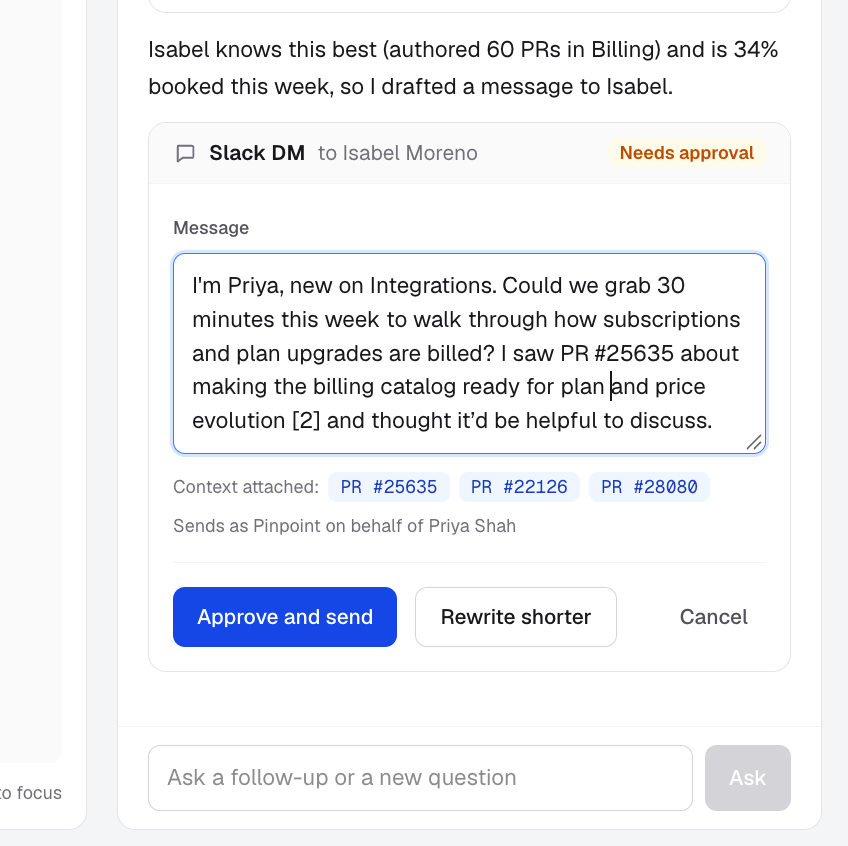
- Drafts the DM. It opens "I'm Priya, new on Integrations" and attaches the sources. Priya edits it or asks for a shorter version, then approves, and it lands in Marcus's Slack.
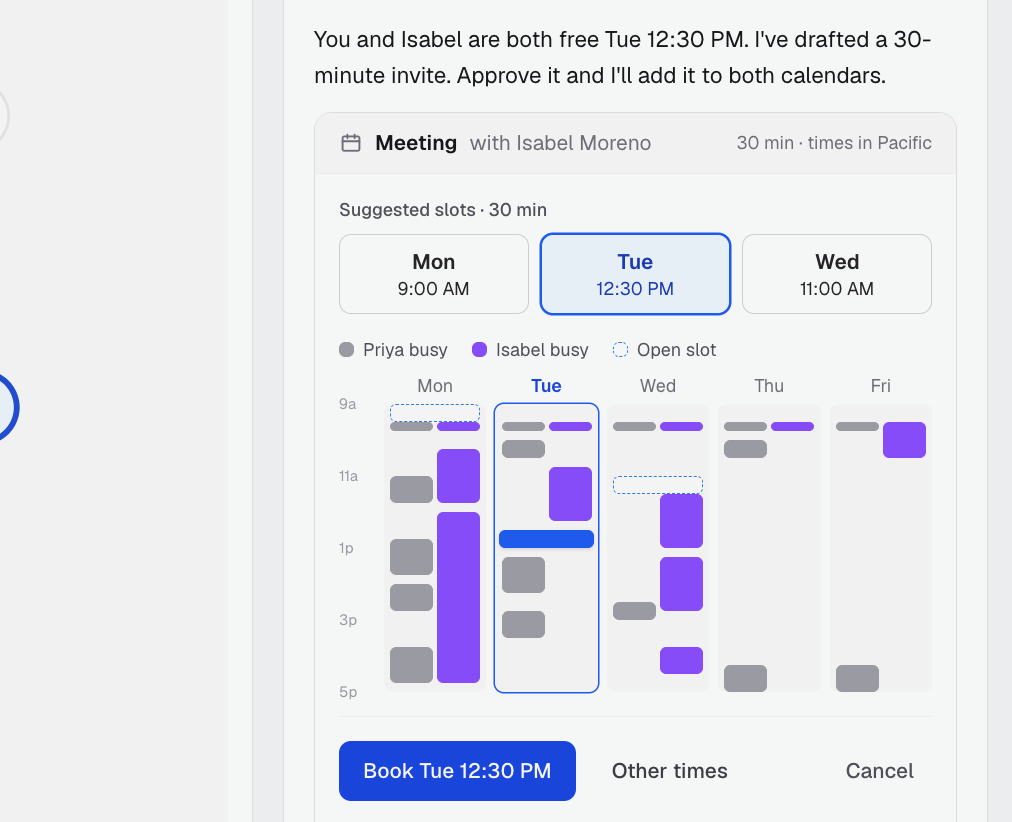
- Books the meeting. "Book time with Marcus Wednesday at 10:30" shows both calendars and the times they're both free. Priya picks one and approves.
From one question to an answer, the right person and a booked meeting in about a minute.
It also shows up where people already work:
- In Slack
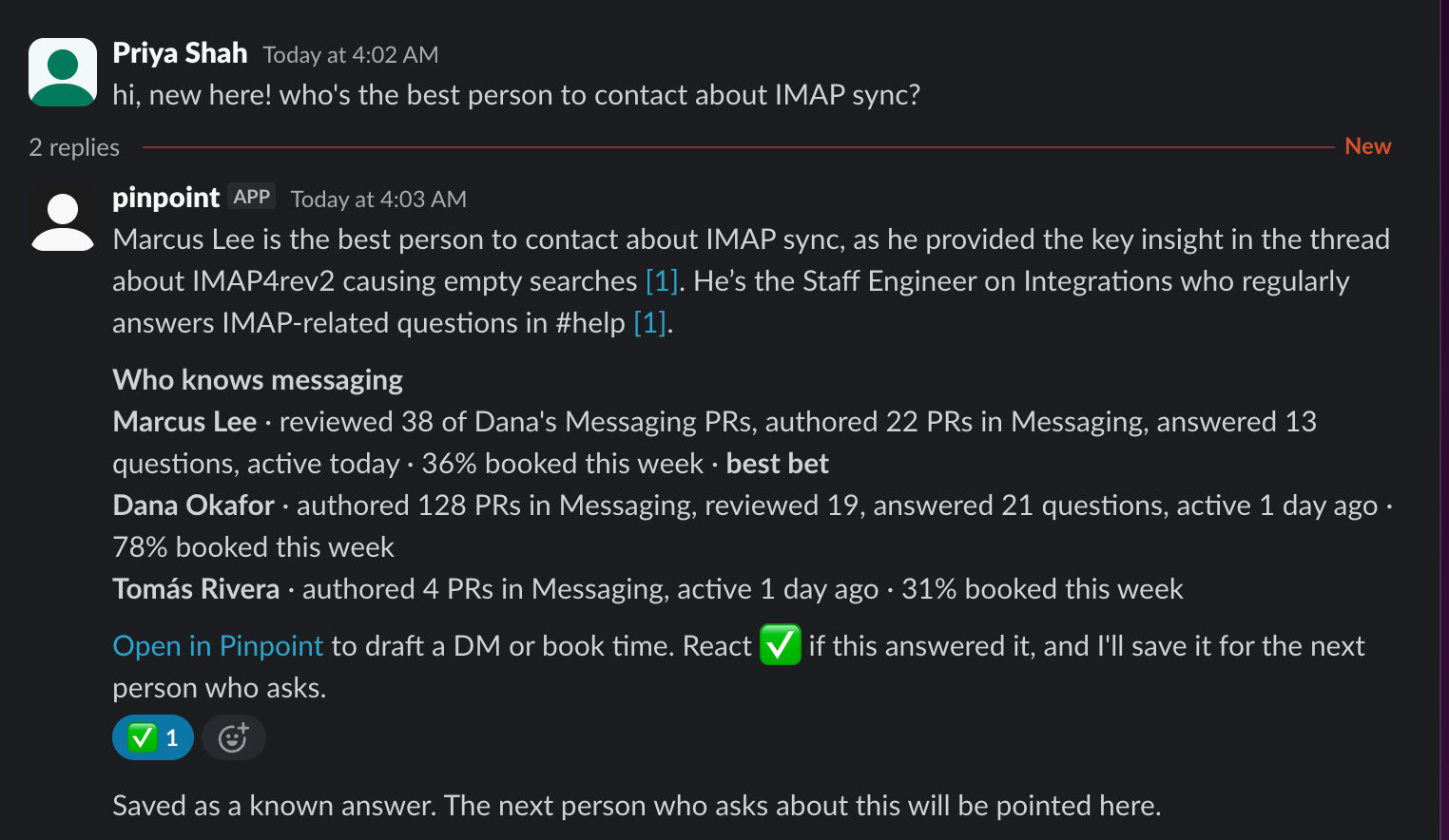
#help, it answers new questions in the thread on its own: a cited answer, who knows the topic and how booked they are. React ✅ and the thread is saved as a known answer for the next new hire. - In the code, a floating bubble shows who knows the file you're reading and answers questions about the lines you select.
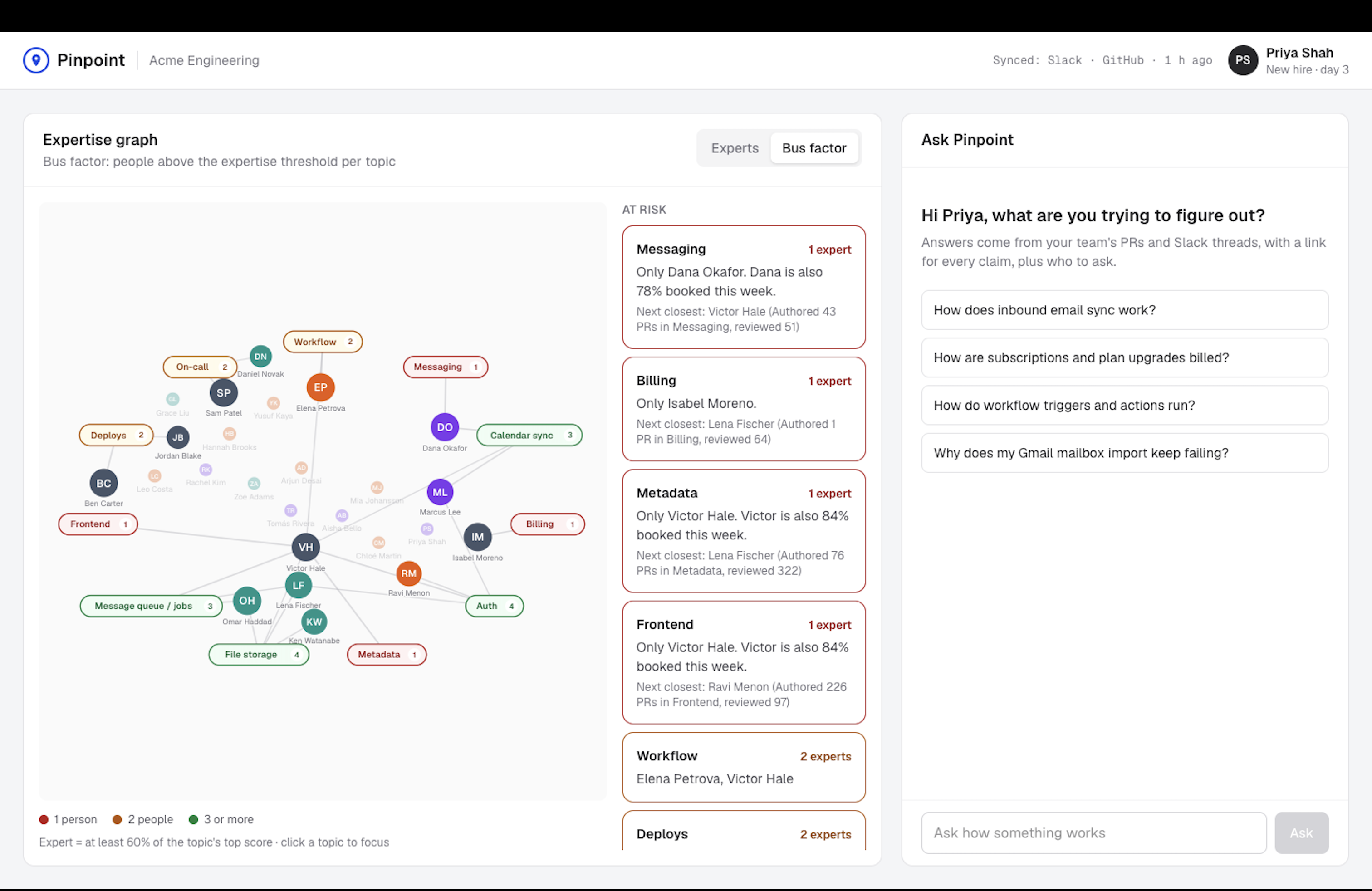
- For managers, a graph of people and topics has a bus factor view that flags knowledge held by one person.
What the agent does on its own: searching, answering, ranking experts, checking availability, drafting messages, finding free times, and answering in #help.
Where the human decides: every action that touches someone else. A DM is never sent and a meeting is never booked until Priya approves it, and she can edit, rewrite, pick a different time or cancel first. If a recommendation is wrong, "Not the right person?" corrects it for everyone.
How we built it
The agent. Code plans and checks; the LLM writes. For each question, code runs the steps in order: search, rank experts, check calendars, then one LLM call writes the answer and the DM draft. Code then enforces the rules:
- The answer may only name people the expert search returned.
- Every sentence must cite a real source, or it's removed.
- Invented PR numbers are stripped.
- Who to recommend, the free times and every action are computed in code, never by the model.
Follow-ups like "book time with Marcus Wednesday" or "message Dana instead" become the next step in the same plan.
Expertise is a formula you can read, not a black box. Each piece of evidence counts by type and fades with age:
score = Σ weight(event) × 0.5 ^ (age in days / 90)
The weights are: authored a PR 1.0, answered in Slack 0.8, reviewed 0.7, asked 0.1. The final ranking is expertise × availability, where availability is this week's meeting load plus open reviews.
The data, and our assumptions. We used no real employee data:
- GitHub: 3,944 merged PRs from six months of twentyhq/twenty, an open-source CRM, with authors, reviewers and changed files. Its 16 most active contributors are mapped to fictional Acme engineers, and real names never appear.
- Slack: about 300 generated Q&A threads. Code chose who asks and who answers from the GitHub data, so both sources agree on who the experts are.
- Calendars: a generated week of meetings.
- Live Slack: our own workspace, public channels only. The two of us play Priya and Marcus, so the DM really arrives.
We assume an expert is someone with recent evidence on a topic, and that topics follow the code's folder structure.
Stack: FastAPI, Postgres with pgvector on Supabase, local embeddings (bge-small via fastembed), a free open-source model (Nemotron 3 Super on OpenRouter), Next.js, and the Slack and GitHub APIs. Each data source is one adapter emitting the same events, so adding a source means writing one file.
Challenges we ran into
Most of our challenges were trust problems, and each one shaped a rule:
- The model invented plausible details. Our generated Slack threads mentioned class and event names that sounded right but don't exist in the code, and the chat model then repeated them as fact, with a citation. Now any generated sentence naming a PR or code identifier the model wasn't given is dropped (7 threads were removed entirely), and every answer sentence needs a real source.
- Citations drifted. The model sometimes cited the wrong source for a PR it mentioned, or wrote markers in odd formats. Code now normalizes every citation and ties each mentioned PR to its own source.
- Rankings were noisy and unfair. Dozens of loosely related PRs outvoted the few threads that actually answered a question, and the most prolific engineer topped almost every topic. We only credit close matches now, and availability spreads questions away from the same few people.
- A free model is slow and unpredictable. Answers took 12 to 38 seconds, and one took 135. We added a 30-second timeout with a plain fallback answer.
Accomplishments that we're proud of
- The demo story came out of real data. We didn't script "Marcus reviewed 38 of Dana's PRs and has time"; the public repo's history produced it, and the approved DM really lands on a phone.
- Trust is enforced in code, not hoped for in a prompt. Every rule above has a test, including 29 "golden" tests that fail if the demo's answers, sources or recommendations drift.
- The reasoning is visible at every step: citations on every claim, evidence and availability on every recommendation, and the full draft before anything is sent.
- It meets people where they are: the app, Slack, and the code they're reading.
What we learned
- An agent isn't a chatbot. What makes Pinpoint useful isn't the answer; it's taking the next step (who, when, what to say) and stopping for approval at the moment it matters.
- Trust comes from constraints. Telling a model "don't make things up" didn't work. Checking every name, number and citation in code did.
- Expertise data has bias built in. Counting visible activity favors people who write a lot in public and under-counts quiet experts and newcomers. So we count reviews and Slack answers, not just code; let evidence fade so tenure doesn't dominate; spread questions by availability; and let anyone correct a recommendation. The scores route questions; they never rate people.
What's next for pinpoint
- Connect it to the systems a company already runs. The org chart, teams and managers would come from the HR system, such as Workday, instead of a hand-written file. Calendars would come from the company calendar, which already sits behind a single function.
- Growth, not just answers. The same evidence shows which areas each person is building expertise in. That could suggest mentors, show a new hire their own ramp-up, and help managers pair near-experts with single owners so knowledge stops depending on one person.
- Consent and control. A per-person opt-out, review for corrections before they apply to everyone, and an approved enterprise model for answers.
- Multi-user and measured impact. Sign-in for everyone on a team, and tracking time-to-first-answer for new hires, so a company can see ramp-up get faster.
Built With
- claude-code
- fastapi
- fastembed
- github-api
- next.js
- openrouter
- pgvector
- playwright
- postgresql
- pytest
- python
- react
- slack-api
- supabase
- tailwindcss
- typescript

Log in or sign up for Devpost to join the conversation.