-
-
App Icon
-
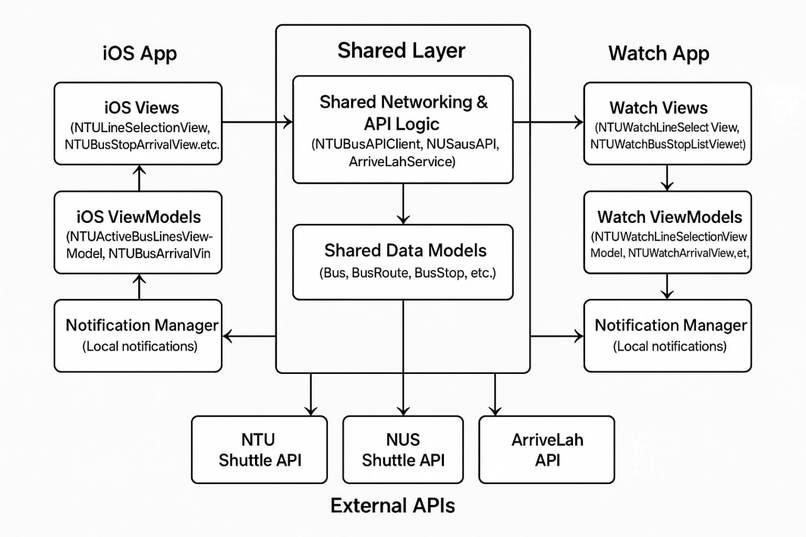
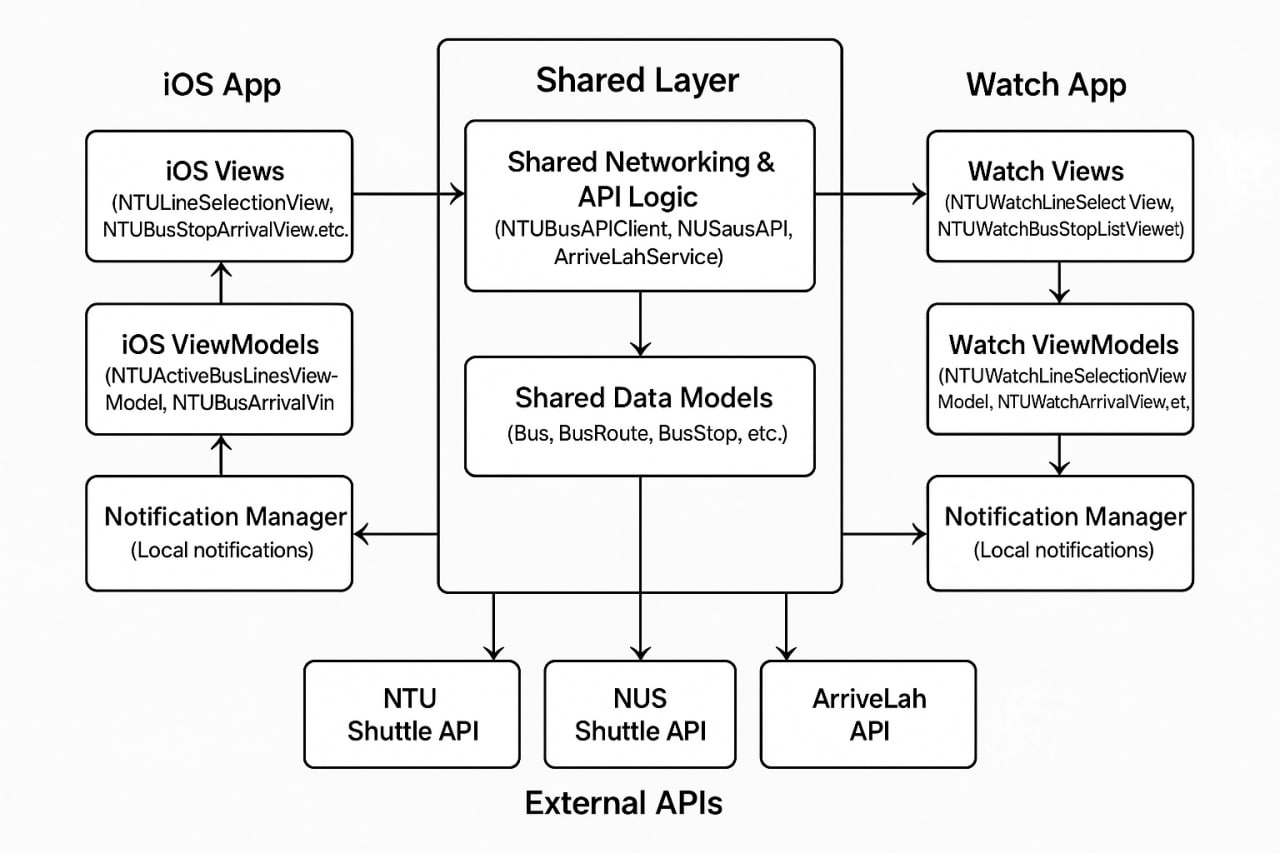
System Architecture Diagram
Inspiration
As students, we often found ourselves frustrated with how inconvenient it was to check campus bus arrival times - whether it was having to search for our devices or switch between apps. We wanted a unified, student-friendly solution that would work across the major universities in Singapore, including SMU, NUS, and NTU.
Our goal was to create something reliable, fast, and accessible — and that's what inspired PingGo. The idea of extending the app to Apple Watch came from wanting an even more convenient, glanceable way to get arrival info while on the move.
What it does
PingGo is a cross-platform iOS and watchOS app that displays real-time internal shuttle and public bus arrival times for SMU, NUS, and NTU. It shows only active routes, offers customizable notifications for upcoming buses, and allows users to navigate from bus lines to stops to detailed arrival info, including bus capacity where available.
The app functions fully on both iPhone and Apple Watch, with independent UIs tailored for each platform while sharing core logic under the hood.
How we built it
We built PingGo in Swift using Xcode, despite being new to both. We followed the MVVM architecture to structure our code modularly and cleanly.
We integrated three external APIs — ArriveLah, NUS NextBus, and NTU Omnibus — through a shared networking layer that both platforms use. Each platform (iOS and watchOS) has its own views and navigation flows, but they share data models and API services. ViewModels manage all the API calls and state logic, fetching arrival times, active lines, stop lists, and additional metadata like bus capacity.
Challenges we ran into
One of our biggest challenges was the tight timeline, paired with an ambitious feature list, especially for a two-person team. On top of that, neither of us had worked with Swift or Xcode before, so we had to quickly get up to speed with an unfamiliar language and toolchain.
Another major challenge was finding usable APIs. Shuttle bus APIs are not always well-documented or publicly accessible, and each API had its own quirks — different data formats, inconsistent naming, and rate limits — which we had to normalize and work around.
Accomplishments that we're proud of
We’re proud to have shipped a fully functional, dual-platform app that integrates multiple APIs and delivers a smooth user experience. Despite being new to iOS development, we:
- Successfully built a modular architecture that supports both iOS and watchOS
- Unified three separate APIs into a shared data model and logic layer
- Created a flexible notification system for custom bus alerts
- Built an app that genuinely improves the daily experience of commuting students
What we learned
Through this project, we learned:
- How to build iOS and watchOS apps using Swift and SwiftUI
- How to implement the MVVM architecture effectively
- How to integrate and manage multiple external APIs
- How to handle local notifications, manage app state, and debug API responses
- The value of clean separation of concerns, especially when working cross-platform
- We also learned a lot about product design: how to prioritize features, plan user flows, and make design choices under pressure.
What's next for PingGo
We have several ideas for improving and expanding PingGo:
- Pull-to-refresh for quick updates of arrival times
- Favourites to quickly access preferred stops
- Dark mode for improved appearance
- Expand to other universities or integrate with more public transport options
- Map-based UI for visual route exploration
We're excited to keep refining PingGo and help even more students stay connected to their campus transport in smarter, simpler ways.
Built With
- amazon-web-services
- arrivelahapi
- javascript
- node.js
- ntuomnibusapi
- nusnextbusapi
- serverless
- swift
- vercel
- xcode
- yarn

Log in or sign up for Devpost to join the conversation.