-
-
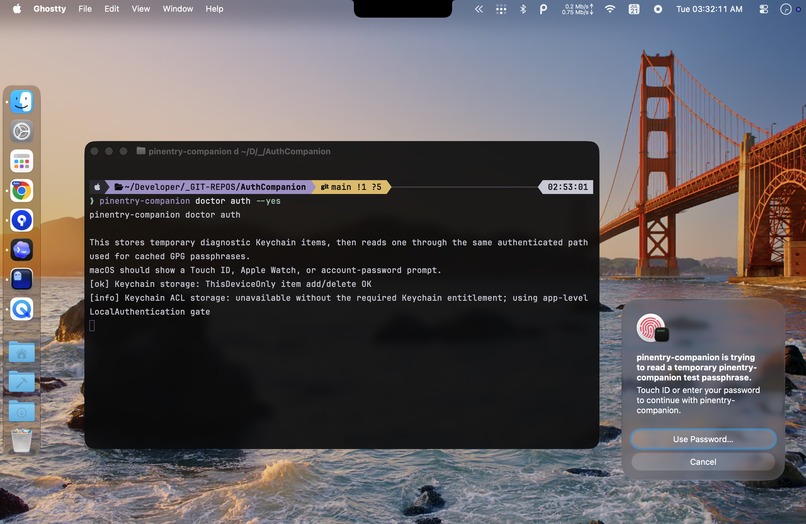
AuthCompanion at work
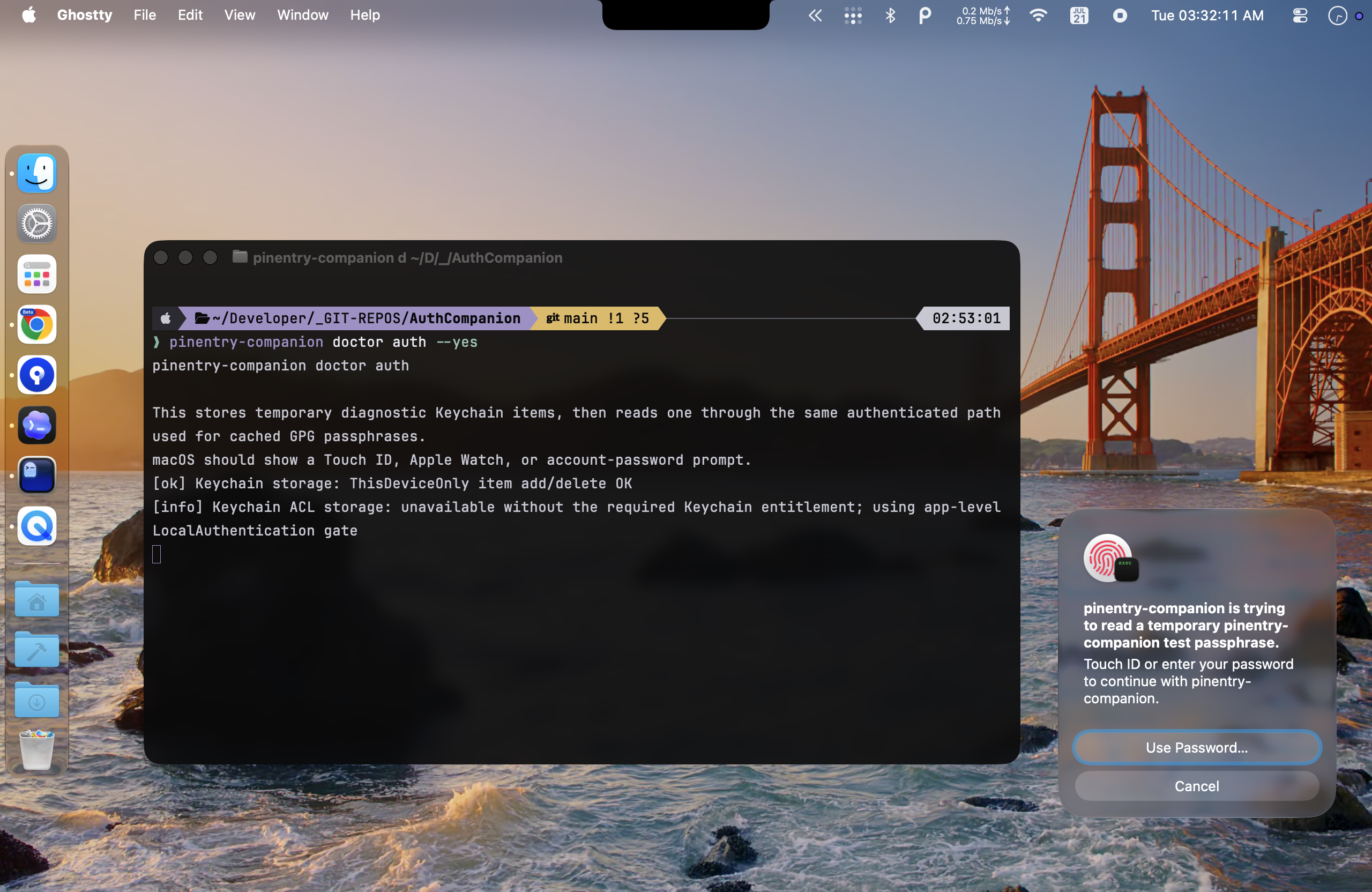
Inspiration
I sign my Git commits and use sudo constantly. On a normal day that means two different secrets and two interruptions, even though my Mac already knows it is me through Touch ID or the Apple Watch on my wrist.
GPG and sudo cannot share one obvious fix. GnuPG talks to a pinentry program; sudo goes through PAM. I wanted both to feel native on a modern Mac, and I did not want installation to be a shell script that edits security-sensitive files and hopes the user can undo it later.
So I fixed it.
What it does
AuthCompanion is three small, independently installable Homebrew products:
- pinentry-companion authenticates GPG signing through Touch ID, Apple Watch, or the macOS account-password fallback. It stores an eligible cached GPG passphrase as a ThisDeviceOnly login Keychain item and asks macOS to authenticate the user before reading it.
- pam-companion safely enables and manages Apple's native
pam_tid.sointegration forsudo, while preserving the normal administrator-password path. - AuthCompanion coordinates setup, health checks, recovery, and exact restoration for both components.
Install:
brew install CasualDeveloper/tap/authcompanion
Review and set up:
authcompanion status
authcompanion plan
sudo -v
authcompanion setup --yes
Before changing anything, authcompanion status and authcompanion plan show what is installed and what setup would do. Those commands are genuinely passive: no sudo, no writes, no Keychain access, and no authentication prompt.
Each component owns its own rollback record. If a configuration file has changed since setup, restore stops instead of overwriting the user's later work. There is no daemon, cloud service, telemetry, privileged helper, or AI model in the shipped product.
How I built it
The project began with pinentry-companion, informed by earlier open-source Touch ID pinentry projects. During Build Week I turned the idea into a complete suite: I productized the GPG tool, rewrote pam-companion as a modern Swift 6 lifecycle CLI around Apple's native pam_tid.so, and built AuthCompanion as the coordinator. All three are real released products, not three parts that only work inside one demo.
I made the consequential product and security decisions: keep the tools independent, stay CLI-first for the first release, use LocalAuthentication where GPG needs it, make rollback state belong to the component that performs the mutation, and ship ad hoc signed releases until I have Apple Developer Program signing.
Codex did a lot of the engineering work. It inspected the existing codebases and current Apple documentation, implemented and refactored Swift, expanded the tests, and walked the packaging and Homebrew releases with me. I used GPT-5.6 Sol to reason through everything at xhigh, especially the frightening cases: like what happens if PAM setup commits and the health check fails, how recovery crosses the user/root boundary, and what evidence actually proves that rollback completed.
Then I tested every Touch ID, Apple Watch, GPG, sudo, setup, failure, and restore path myself on real hardware. GPT-5.6 Sol helped build the product; it does not ship inside it.
Challenges I ran into
The visible biometric prompt was the easy part. GnuPG pinentry is a strict, line-oriented Assuan protocol, while LocalAuthentication completes asynchronously. Cancellation, timeout, late callbacks, fallback, and protocol output all had to remain deterministic.
The sudo side posed a different problem: safely managing the native pam_tid.so integration without taking ownership of authentication itself. A bad PAM edit can break sudo; a careless GPG restore can destroy a user's newer configuration. The components now preflight the live state, record the bytes and metadata they change, verify postconditions, detect drift, and restore only state they can prove they own.
Distribution had one practical constraint: I do not currently have a paid Apple Developer Program membership. The universal release binaries are therefore ad hoc signed with the hardened runtime rather than Developer ID signed and notarized. The Homebrew formula pins each archive digest, and the releases include checksums, packaged-artifact verification, and GitHub build provenance.
Accomplishments that I'm proud of
The result is not a proof of concept. A developer can install only GPG authentication, only PAM authentication, or the complete suite from one tap. Setup can preview its work, cross the privilege boundary only where required, verify the result, recover an interrupted operation, and restore the exact state it recorded.
Most importantly, the before-and-after is wonderfully boring: the same signed commit asks for Touch ID, and the same sudo command asks for the Apple Watch.
What I learned
Authentication UX is mostly about failure behavior. The happy path is one prompt; the product is everything that happens when authentication is cancelled, unavailable, delayed, half-completed, or followed by configuration drift.
Codex was most useful when I kept it grounded in repository evidence, current primary documentation, runtime output, and short verification loops. Real hardware remained the final judge for Touch ID, Apple Watch, Keychain, PAM, GPG, and sudo.
What's next
The first release is intentionally CLI-only. Next I want feedback across more real-world GPG and PAM configurations, Developer ID signing and notarization when available, and possibly a small macOS interface built on the same existing contracts. The trust model and recovery behavior have to stay understandable as the suite grows.
Built With
- assuan
- github-actions
- gnupg
- gpt-5.6-sol
- homebrew
- localauthentication
- macos-keychain
- openai-codex
- pam
- security-framework
- swift
- swift-package-manager


Log in or sign up for Devpost to join the conversation.