-
-
PillPal: A home medication interaction checker that helps users "Snap a Pill, Spot the Risk" easily.
-
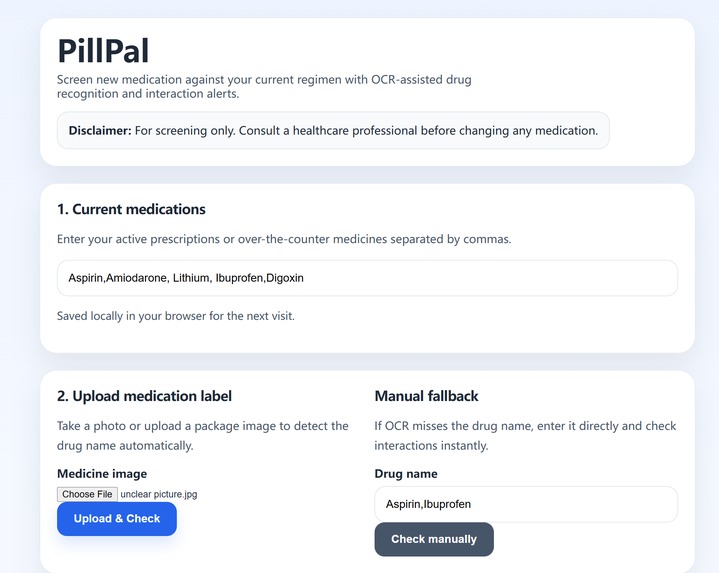
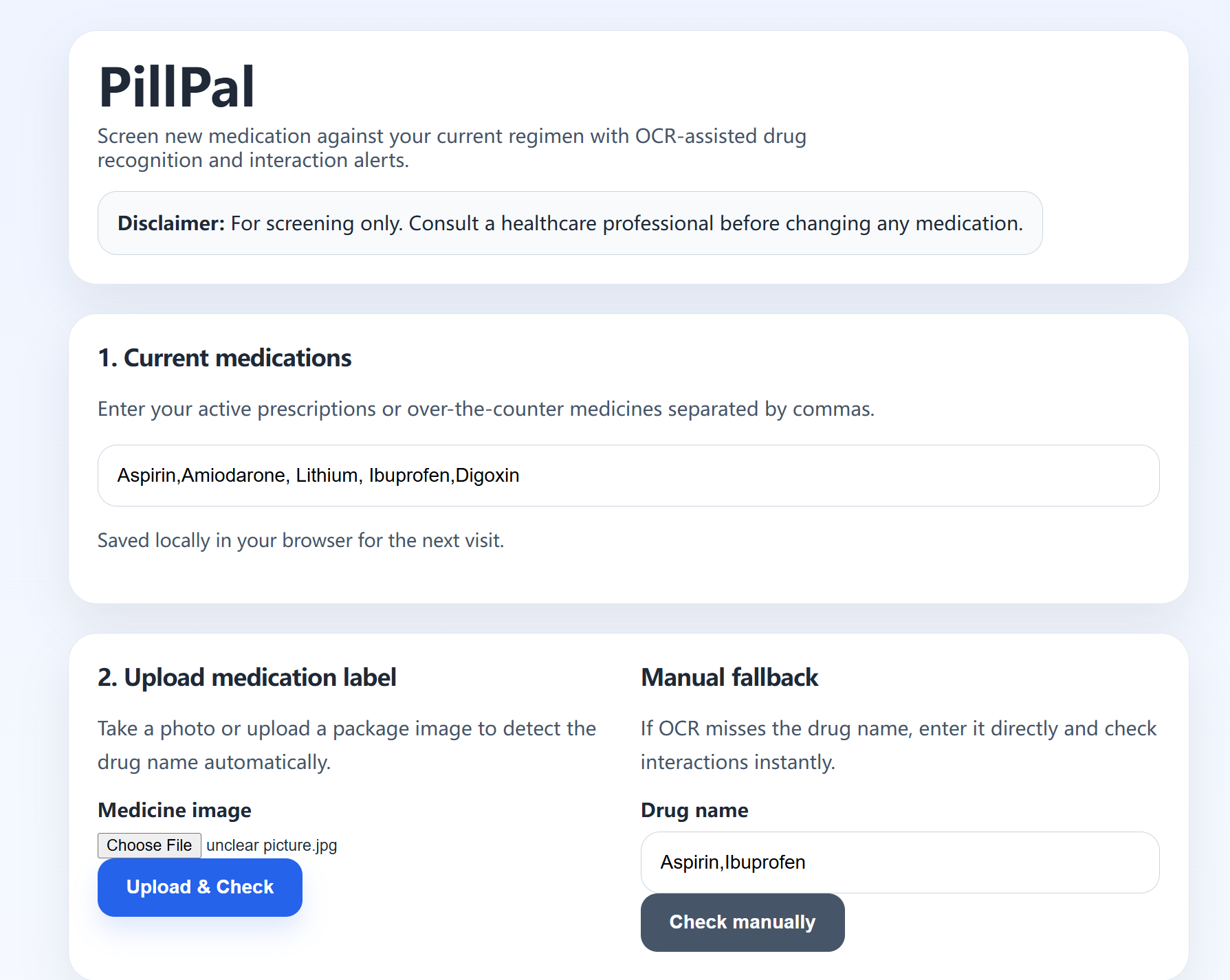
The main workflow of PillPal: Users can input current medications or upload labels for quick interaction risk checks.
-
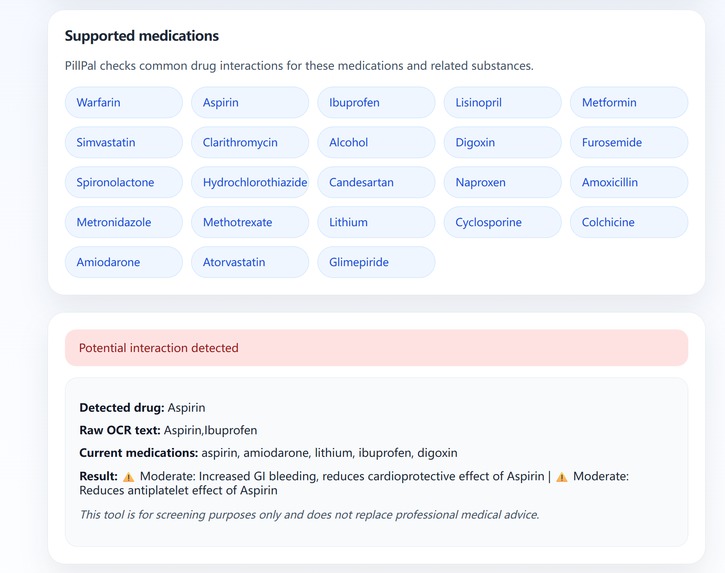
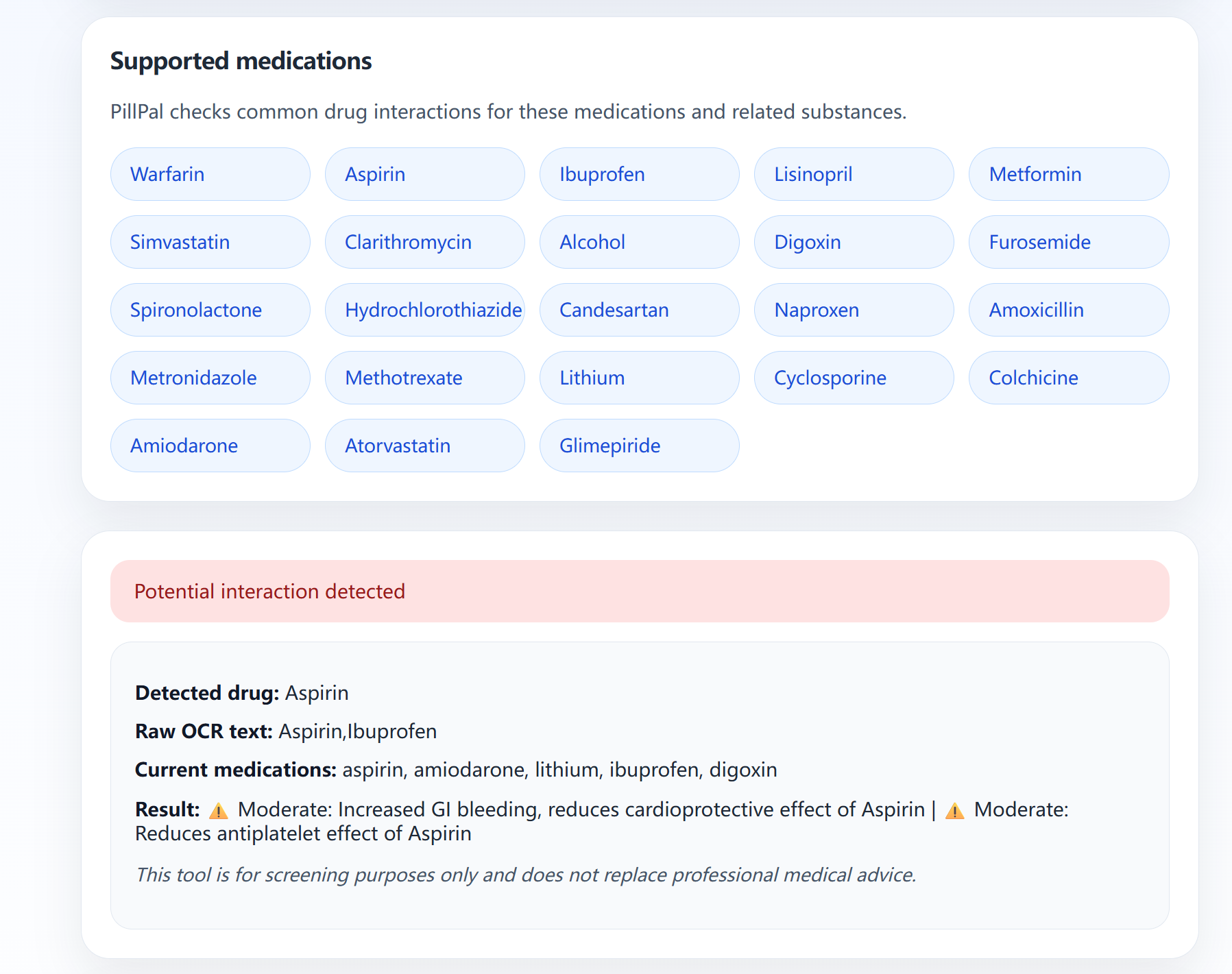
PillPal's supported medication list and example interaction warning, providing clear safety alerts for users.
Inspiration
"Grandma, did you just take two blood pressure pills again?"
That question saved my grandmother from a possible stroke. But it also scared me.
She is one of the millions of older adults taking five or more daily medications. Her pill boxes look the same. Her hands shake. Her eyesight is fading. And she is not alone.
Every year, preventable drug interactions send hundreds of thousands of people to emergency rooms. The sad truth? Most of these ER visits could be avoided with a simple check. But existing tools require users to type long, scary drug names like "Lisinopril" or "Warfarin" — names most seniors cannot pronounce, let alone spell.
I did not build PillPal because I wanted to build an AI project. I built it because I realized:
My grandmother does not need a smarter algorithm. She needs something that works with a shaky hand and a blurry photo.
What it does
PillPal turns a smartphone camera into a medication safety net.
Three steps. Ten seconds.
- Upload a photo of any medicine box
- Enter current medications (saved locally, no sign‑up required)
- Get an instant warning if a dangerous conflict exists
What happens behind the scenes:
- OCR extracts text from the image
- Fuzzy matching corrects typos, glare, and bad angles
- A curated conflict database checks against 20 common chronic medications and 50+ high‑risk interactions
- Each warning includes: severity level (⚠️ moderate / 🔴 severe / 🔴 contraindicated) and a plain‑language risk description
Fallback built with empathy:
If OCR fails (blurry photo, weird font), the user can type the drug name manually. No one gets stuck.
How I built it
Tech Stack: Python · Flask · Tesseract OCR · Pillow · HTML/CSS · LocalStorage
One person, 72 hours.
I chose Flask over Django because it is lightweight — a solo developer can ship in two days. I built a rule‑based conflict engine instead of a machine learning model because explainability matters in healthcare. Users need to know why two drugs conflict, not just a black‑box probability score.
I used fuzzy matching instead of perfect NLP because real‑world pill boxes have glare, curves, and bad lighting. Perfect accuracy is impossible. Graceful degradation wins. And I chose LocalStorage over a database for privacy — no cloud, no login, no tracking. Grandma can use it offline.
The conflict database: I manually curated 50+ drug interaction pairs from FDA labels and clinical guidelines. Each entry includes severity and a specific risk description — not just "interaction detected."
Challenges I ran into
Challenge #1: OCR is fragile
First test: I uploaded a clear photo of a Warfarin box. Tesseract returned "Warfa n" and "Asp nn".
What I learned: Never trust OCR blindly.
Fix: I added fuzzy matching (string containment + edit distance) + a manual fallback. Now it works on most clear photos — and never leaves a user stranded.
Challenge #2: The direction problem
My first conflict database only stored one direction. A user taking Aspirin and adding Warfarin saw no warning.
Fix: I now check both directions — new drug → current list AND current list → new drug.
Challenge #3: Solo scope creep
I wanted mobile apps, 1000 drugs, live FDA APIs. Then I remembered: I am one person with 72 hours.
What I cut: mobile app (save for later), 1000 drugs (20 is enough to demo a real scenario).
What I kept: a complete, deployable, demo‑ready web app with real conflict warnings.
Accomplishments that I'm proud of
✅ First‑time solo hacker — shipped a full‑stack web app with OCR, fuzzy matching, and a clinical database
✅ A conflict database that actually helps — not "interaction: yes/no", but "⚠️ Severe: increased bleeding risk (GI or intracranial)"
✅ Built for real people — tested with my grandmother. She used it without help.
✅ Privacy‑first design — no sign‑up, no cloud storage, no tracking. Medication lists stay in the browser.
✅ Resilient by design — OCR fails gracefully. Manual fallback exists. Errors show plain English.
The moment I knew it worked:
When my grandmother uploaded a photo of her new prescription, saw a red warning, and said: "Oh. I should call my doctor."
That is not a feature. That is impact.
What I learned
Technical:
- OCR needs preprocessing (resize, grayscale, contrast) — or it fails quietly
- Fuzzy matching is a threshold game — 80% works for drug names; 90% is too strict
- LocalStorage is underrated — perfect for personal tools that do not need a backend
Product:
- Start with one person's pain — not "healthcare is broken", but "my grandmother cannot read pill labels"
- Build the fallback first — perfect is the enemy of shipped
- Less is more — 50 curated conflicts with real descriptions beat 10,000 scraped ones
Personal: Solo hacking is lonely. But every time I hit a wall, I remembered whose hands would use this. That kept me going.
What's next for PillPal
Immediate (after the hackathon):
- Voice output (Web Speech API) — for visually impaired users
- Expand to 200+ drug pairs using OpenFDA
- Add herbal medicine interactions (e.g., Warfarin + Ginkgo biloba)
Short‑term (one month):
- Mobile camera shortcut (PWA)
- QR code scanning on pill boxes
Long‑term vision:
- Deploy in community pharmacies and senior centers as a free public health tool
- Open‑source the conflict database so other hackers can build on it
I did not build PillPal to win a hackathon. I built it because my grandmother deserves to take her pills without fear.
Every medicine cabinet should have a safety net. Now, one does.
Built by one person, in 72 hours, for millions who need it.
PillPal – Snap a pill box. Uncover hidden risks.


Log in or sign up for Devpost to join the conversation.