-
-
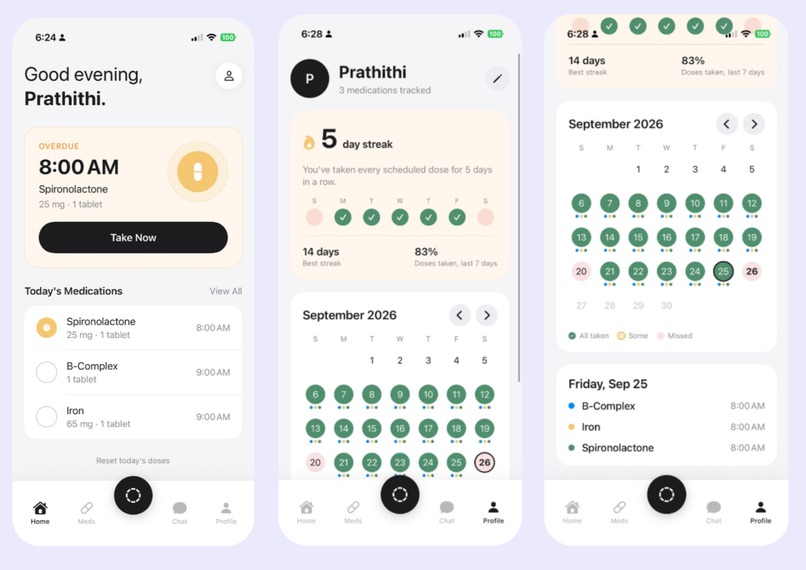
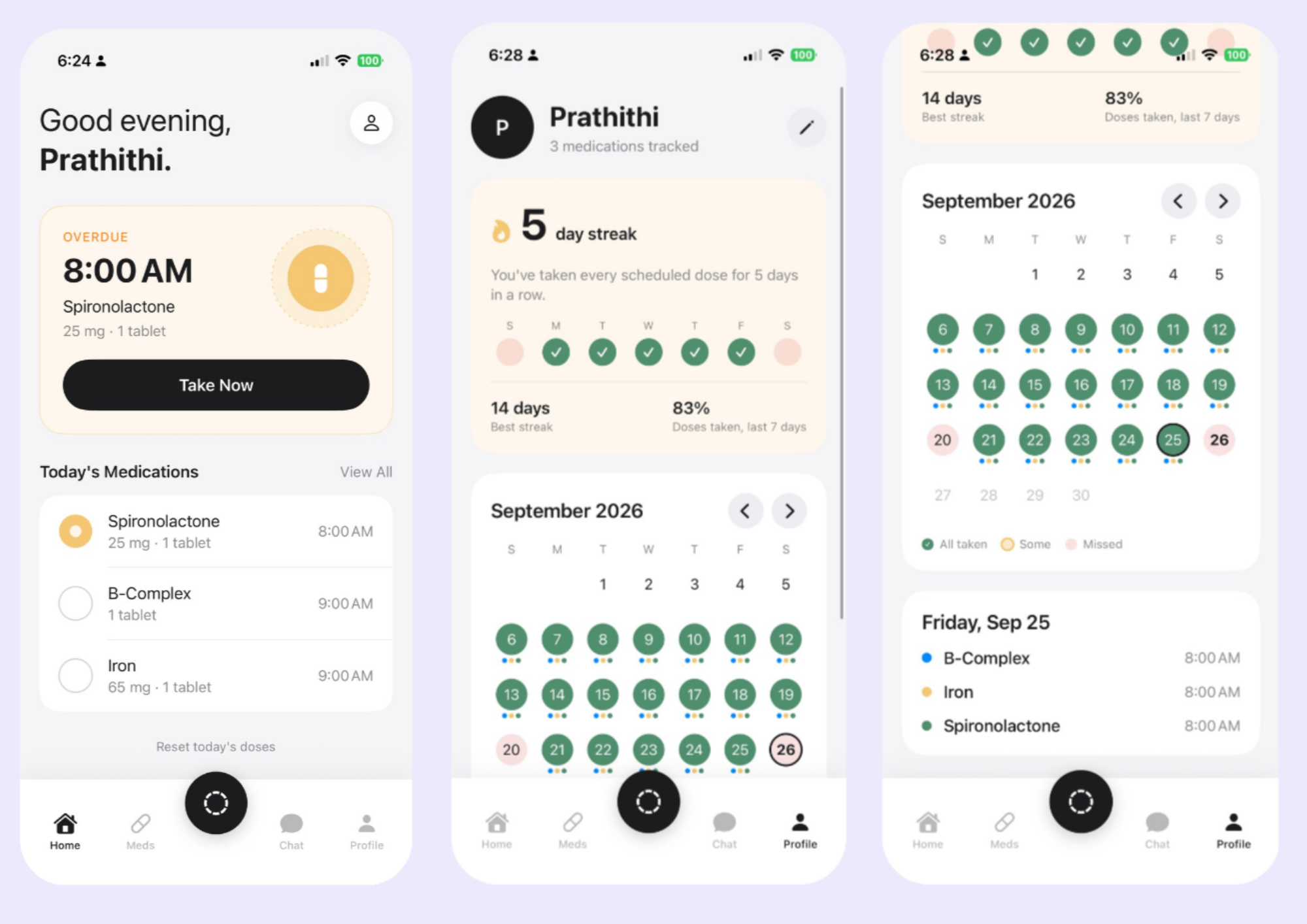
Home Screen + Profile Pages
-
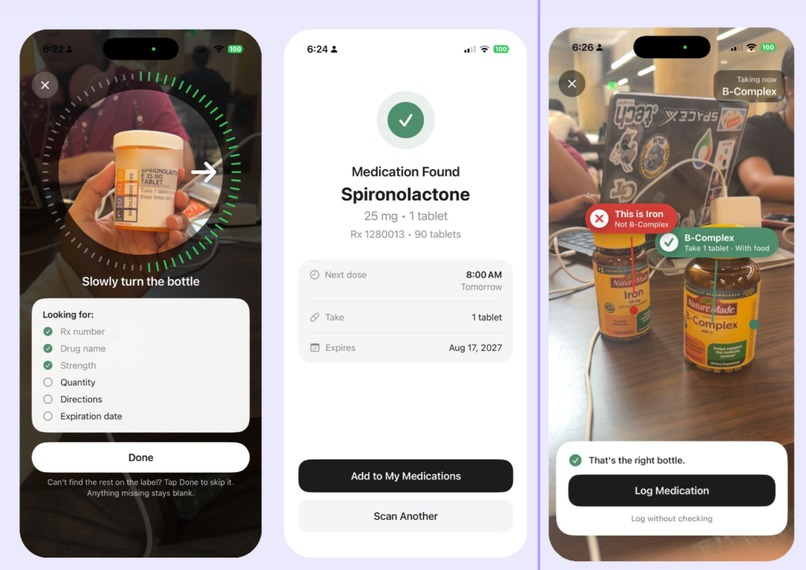
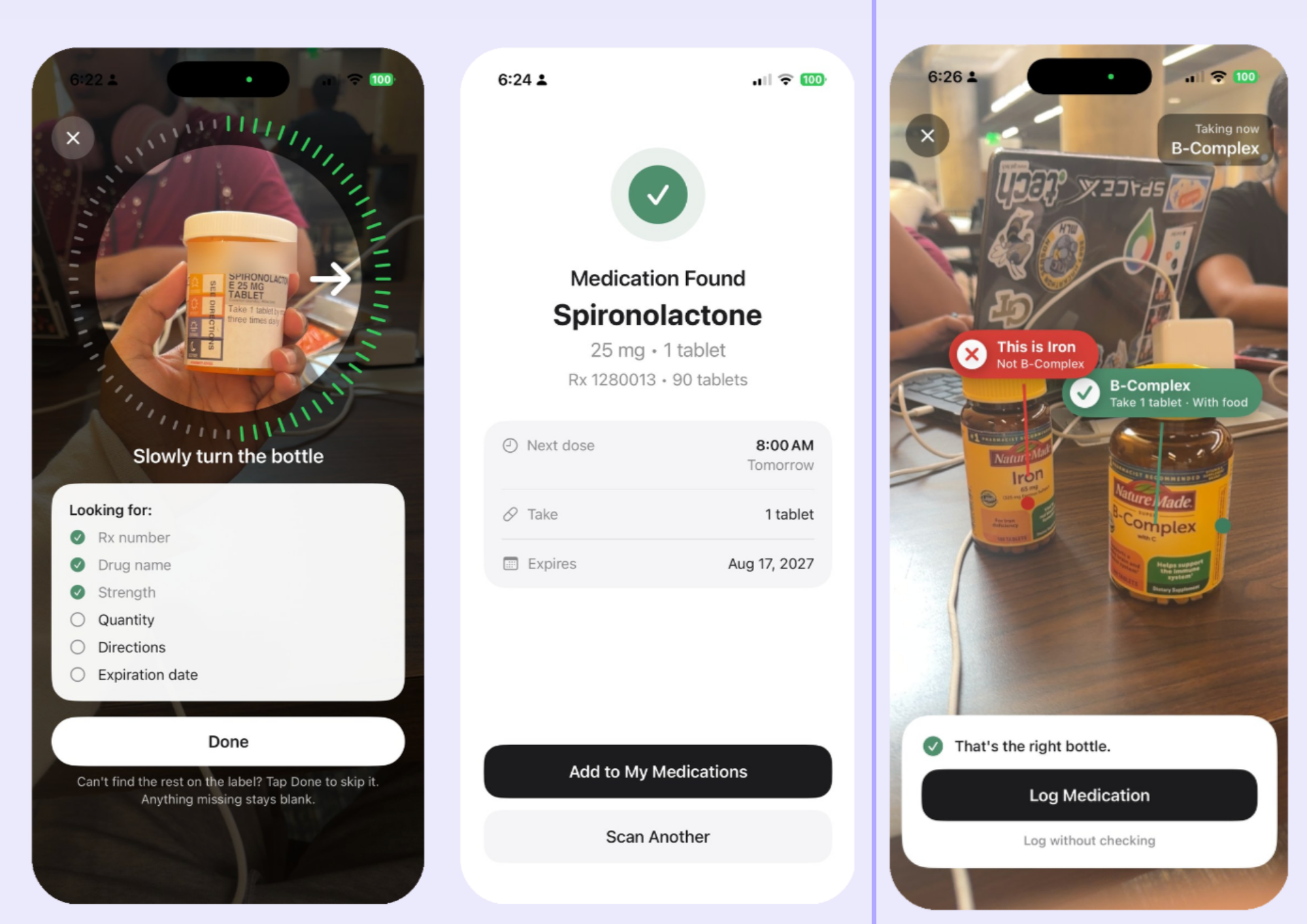
Pill Bottle Logging + AR Categorization
-
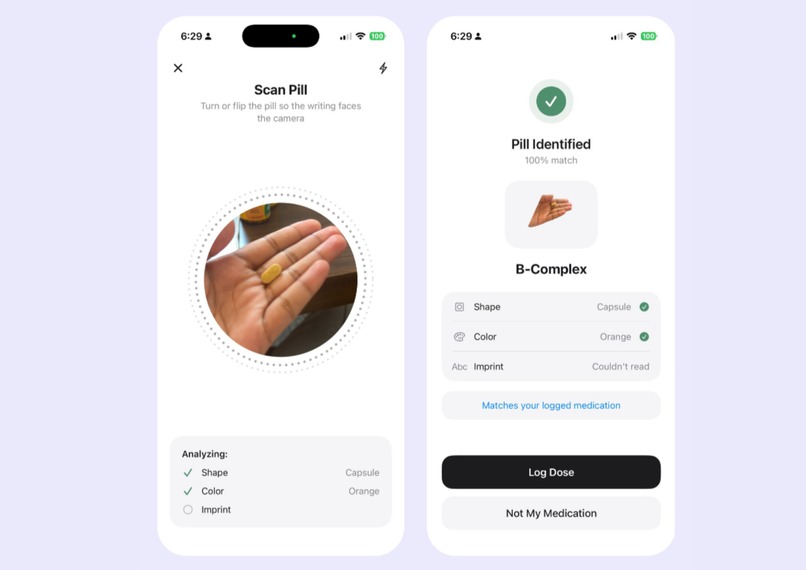
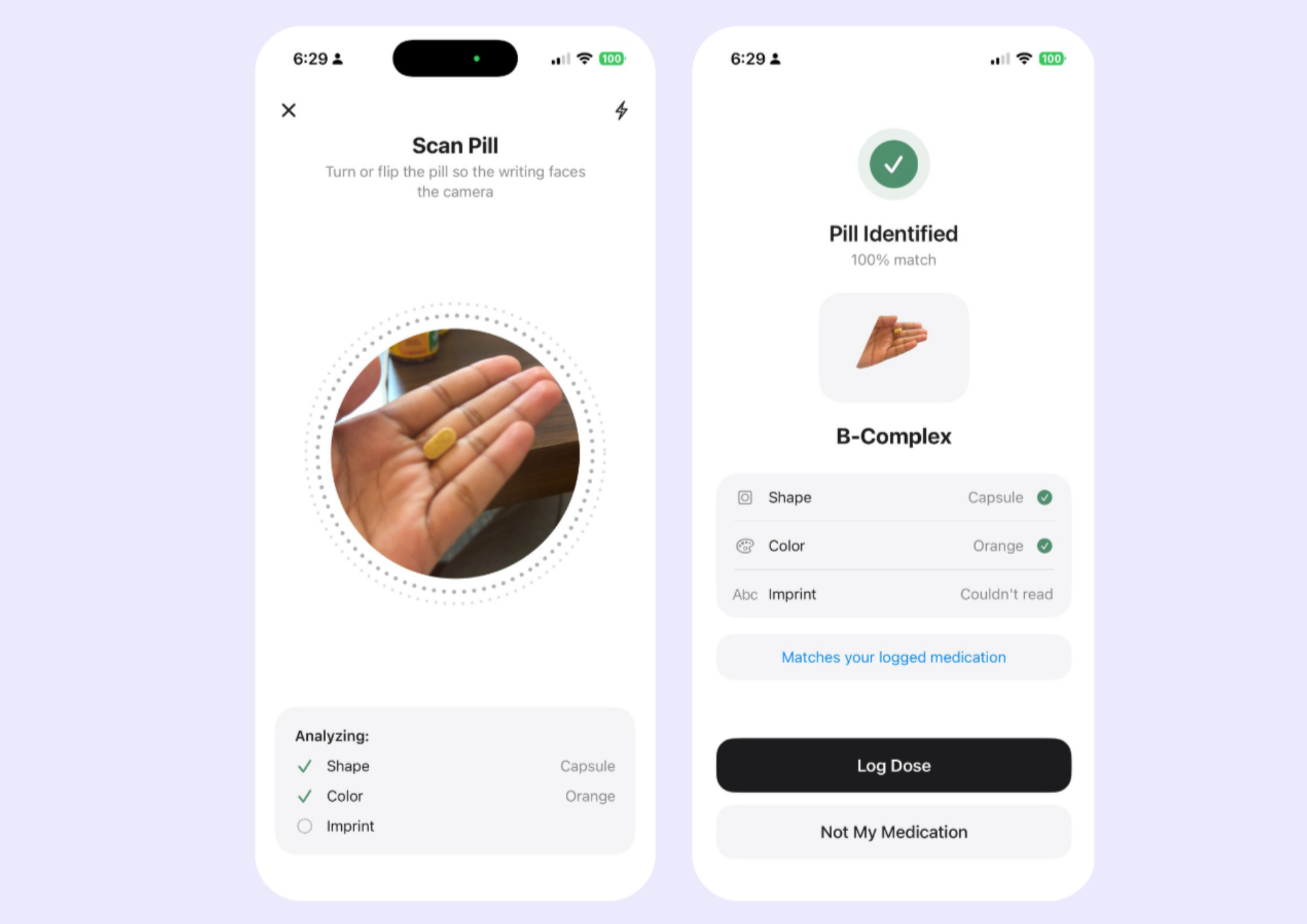
Pill Scanning and Detection
-
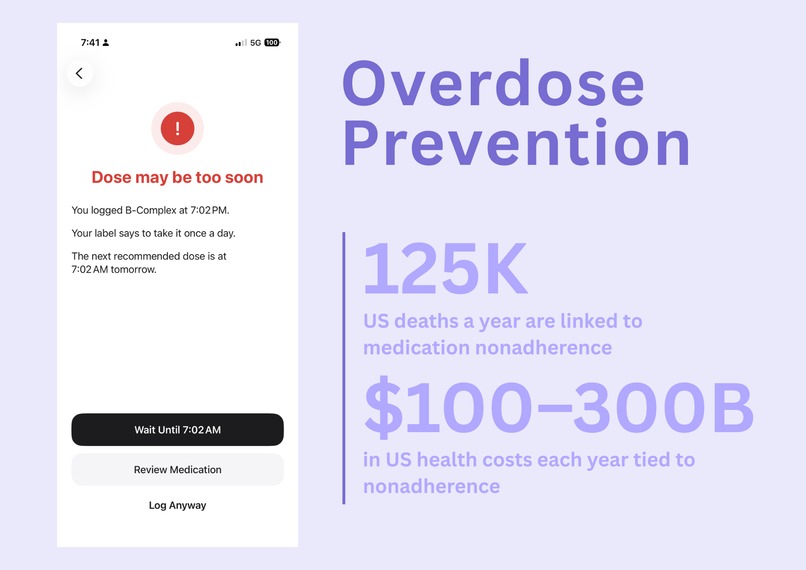
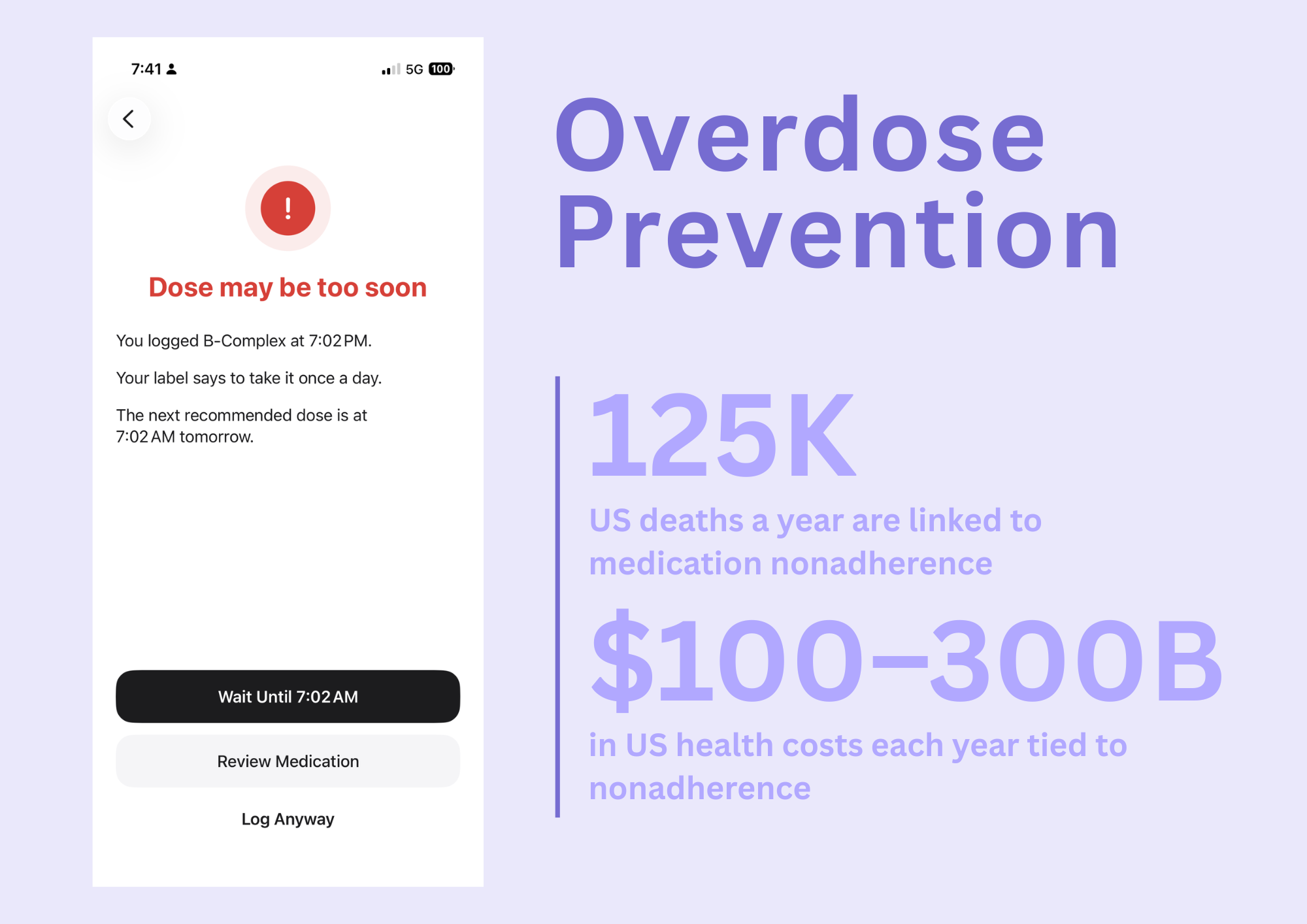
Overdose Prevention
-
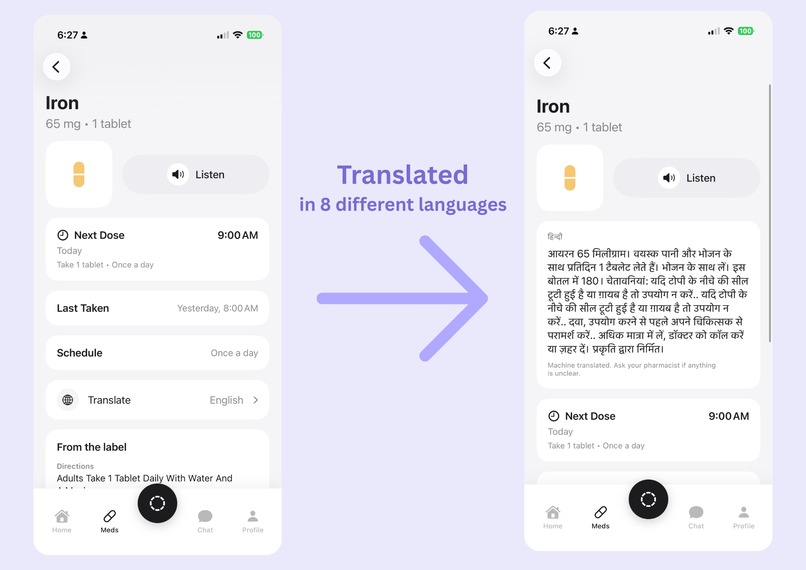
Pill Profile + Translation/Audio
-
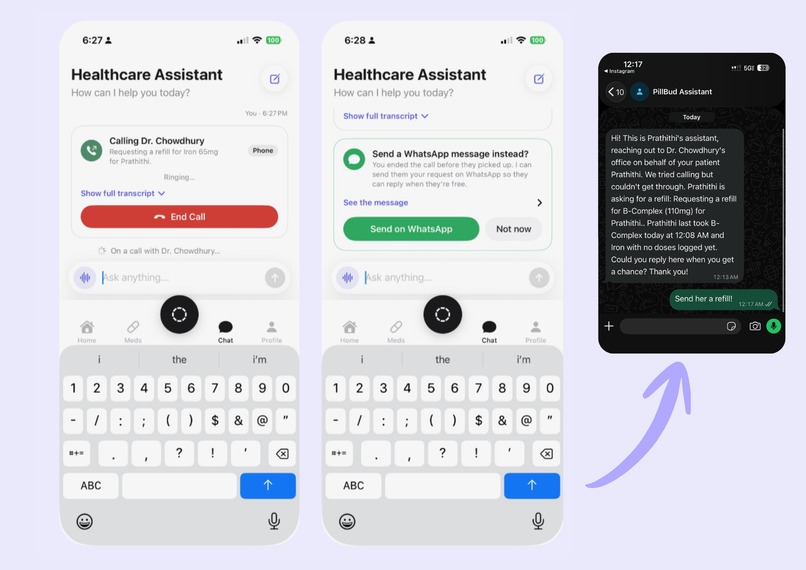
Healthcare Assistant + WhatsApp Messaging
-
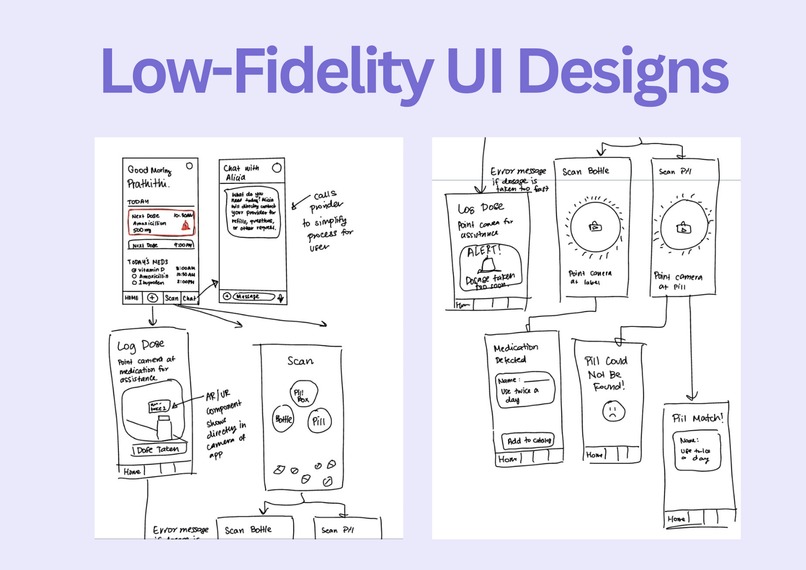
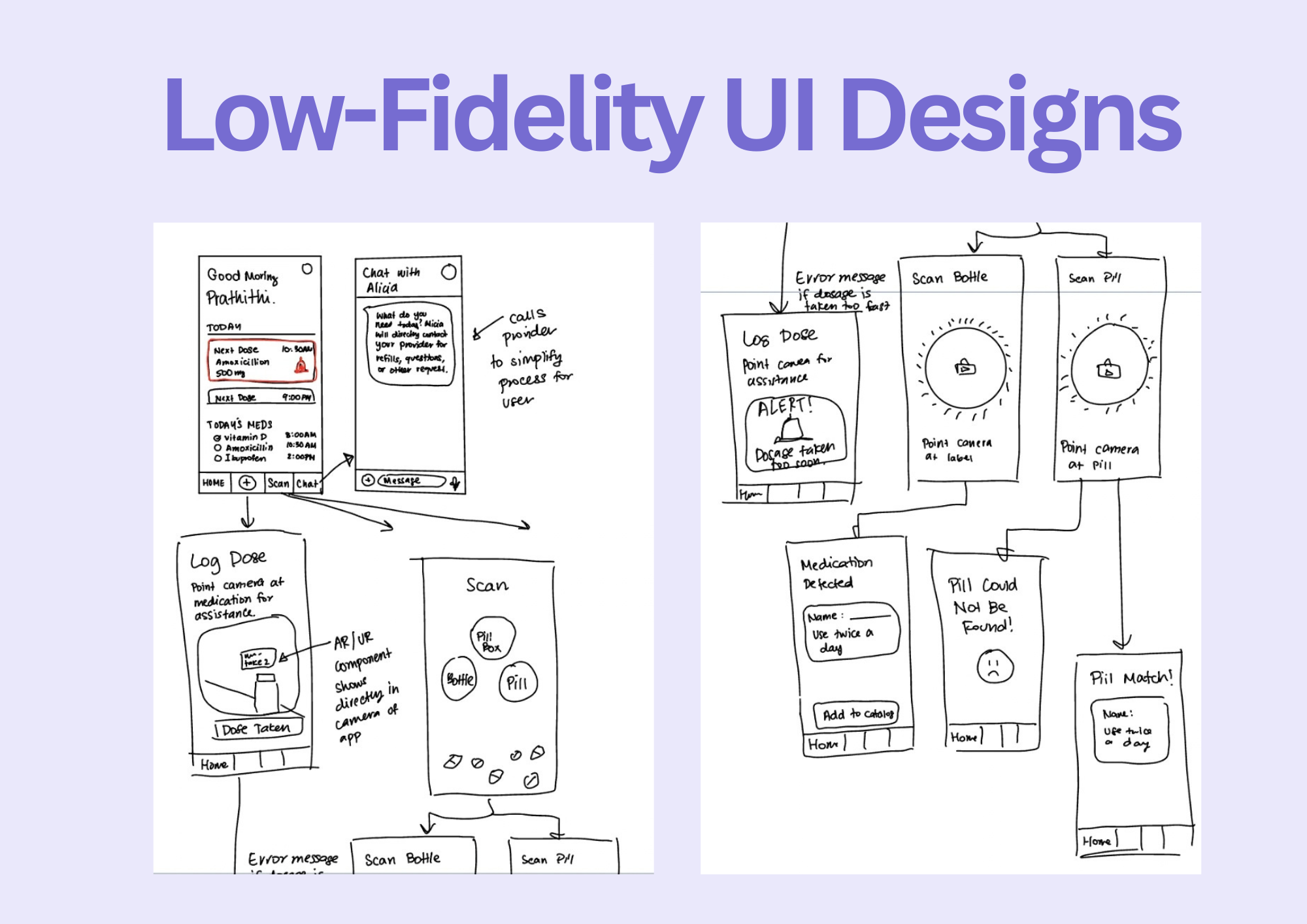
Low-Fi Designs
-
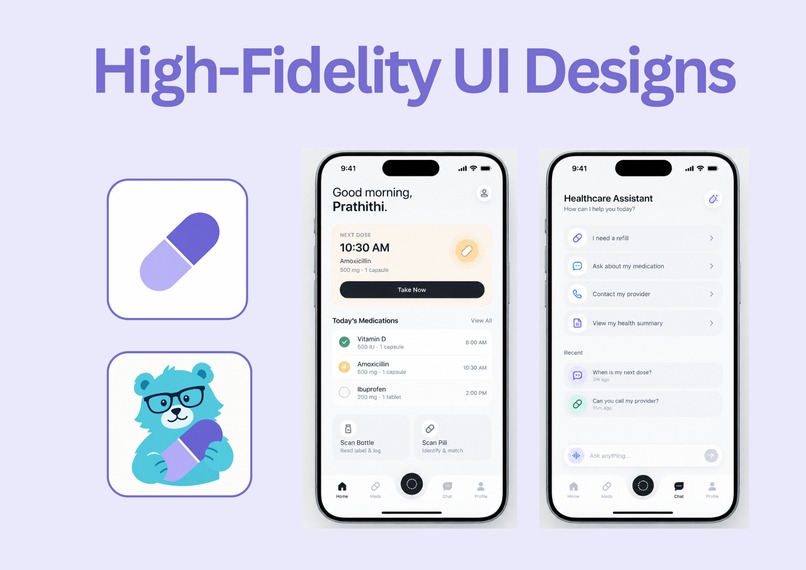
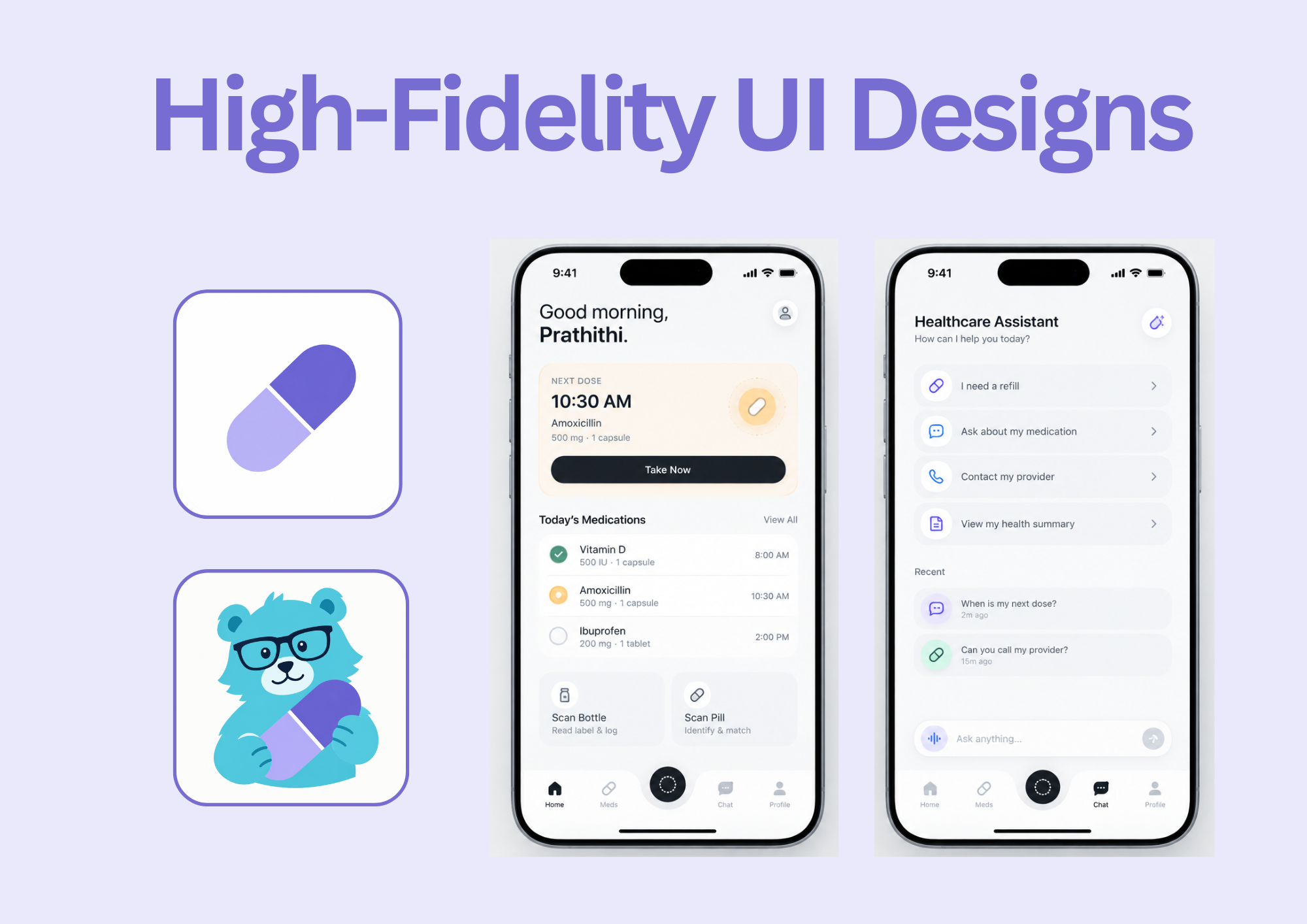
Hi-Fi Designs
Inspiration
My grandfather lives alone and takes about five pills a day. For a long time, I've been the one who reminds him: calling to ask whether he took his morning pills, double-checking which bottle is which, and worrying when I can't reach him. He's independent and wants to manage his own health, but keeping track of five medications, at different times, with tiny print on every label, is a lot to ask of anyone.
While we built PillBuddy, I kept picturing him at his kitchen table. I wanted him to be able to pick up a bottle and hear the label read aloud. I wanted a loose pill to be recognized when he isn't sure what it is, and a warning to appear before he takes a dose twice. Most of all, I wanted him to see for himself what he's taken and what's next, without waiting for my phone call.
PillBuddy is for people like my grandfather, who deserve to stay independent, and for families like mine, who want peace of mind without constant check-ins.
What it does
PillBuddy helps people take the right medication at the right time, without having to guess what a pill is or whether they already took it.
- Scan a pill bottle: point the camera at a prescription label, and PillBuddy reads the medication name, strength, directions, quantity, expiration date, and warnings, then saves it to your medications.
- Log doses, with overdose protection: when you log a dose, PillBuddy checks the instructions on the label. If you took it too recently or already reached the daily limit, it warns you before you accidentally take too much.
- Identify a loose pill: scan a loose pill, and PillBuddy looks at its shape, color, and imprint and compares it against the National Library of Medicine's Pillbox dataset and your saved medications to identify it.
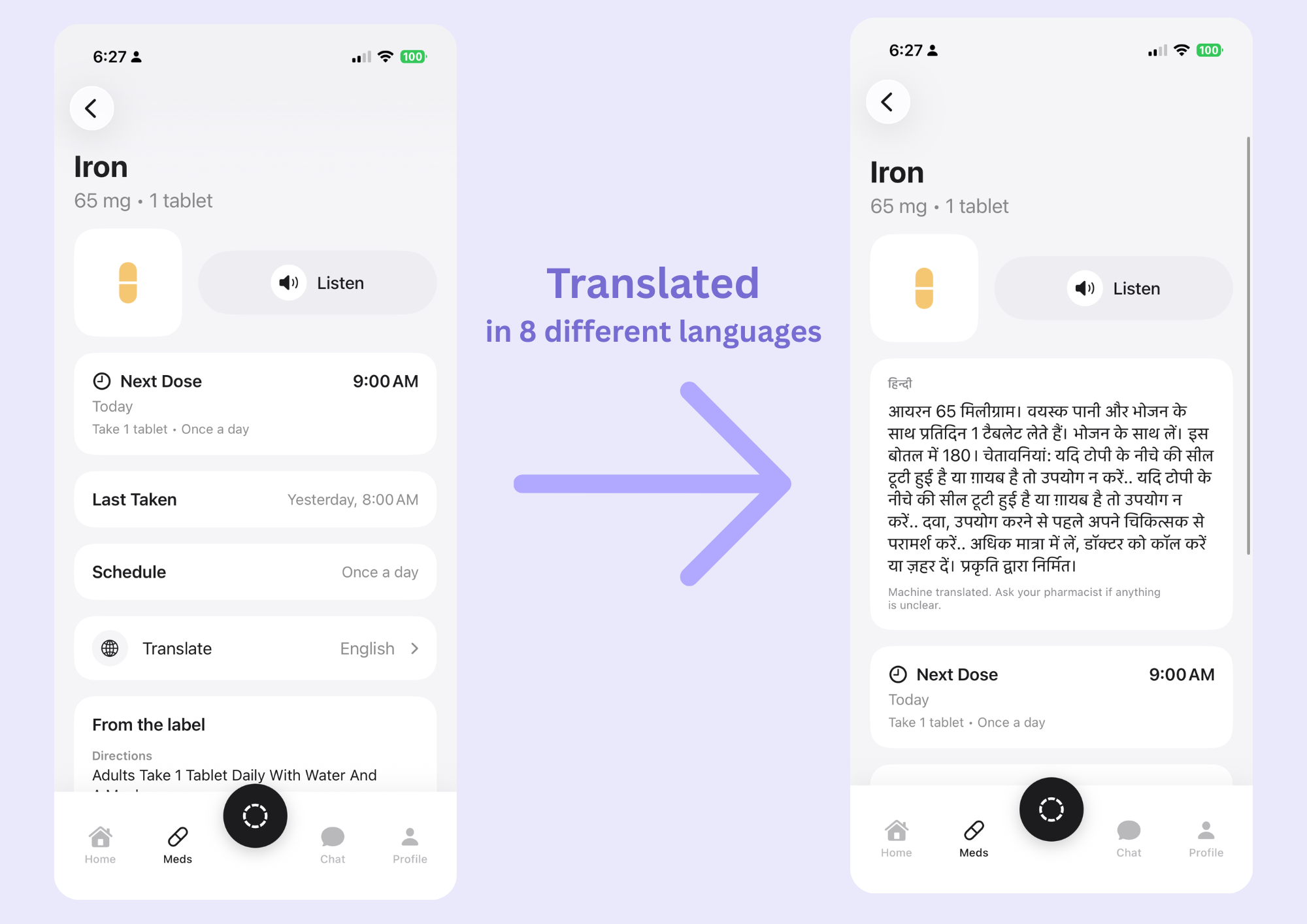
- Read labels aloud in your language: tap Listen to hear the medication details in English, Spanish, Hindi, Chinese, Vietnamese, Korean, French, or Arabic, including when you last took it.
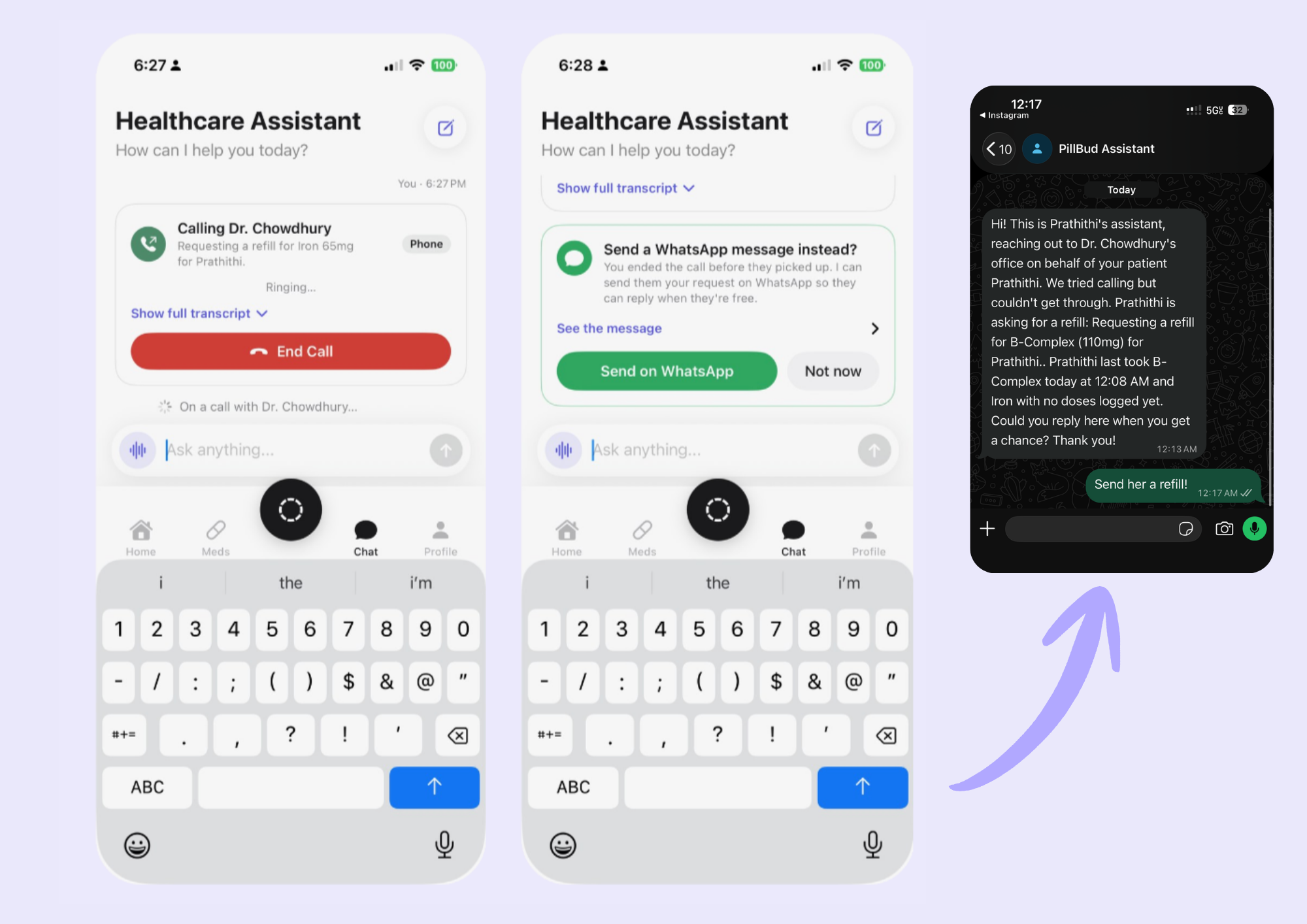
- Call your doctor for you: an AI assistant can answer questions about your medications and place a call to your provider for a refill. It turns the provider's response into text for you, and if they don't answer, it can send the request through WhatsApp.
How we built it
iOS app (Swift, SwiftUI, SwiftData): we use Apple's Vision framework to scan prescription labels. Since pill bottles are curved, one camera frame usually can't capture the entire label. Instead, we check multiple frames and only save a value after seeing the same result at least twice. It works with both CVS prescription labels and Nature Made supplement bottles and automatically detects which type of label it's looking at.
AR bottle check
ARKit, RealityKit, Vision: when you tap Take Now, PillBuddy scans the bottles around you and uses ARKit to place them in 3D. It puts a green check over the correct bottle and red cards over the wrong ones. You can only log the dose once the correct bottle is confirmed. The cards follow the bottles as you move them and disappear when a bottle is moved away.
Pill identification
Vision, Core Image: Vision separates the pill from the background, then we use its outline to determine the shape, Core Image to get its average color, and text recognition to read the imprint. We score possible matches against the user's saved medications using the imprint (60%), color (25%), and shape (15%). Our index combines the NLM Pillbox dataset with our own entries for supplements.
Voice readout and translation
Apple Translation, AVSpeechSynthesizer: every medication page can be read aloud using Apple's built-in voices and translated on-device into Spanish, Chinese, Hindi, French, Korean, or Arabic.
Database (Tiger Cloud / TimescaleDB)
- Prescriptions and saved translations, so we don't have to translate the same label every time.
- A hypertable that stores every logged dose.
- A
daily_dosescontinuous aggregate, refreshed every 15 minutes to keep track of doses taken each day. - SQL functions for the cross-device overdose check (
check_dose) and the 7-day adherence chart on the Profile screen (adherence_summary).
Hosting (Vultr)
Our servers run 24/7 on a Vultr server, with an app password and rate limiting to protect our API credits. The app syncs doses through the server while still being able to work offline.
Provider assistant
Gemini, Twilio, Whisper, WhatsApp: the provider assistant is built with Google's Gemini API and has access to the patient's medication information, including the medication name, dose, schedule, and when it was last taken. The assistant decides when it needs to contact the provider.
- From the iPhone: Twilio calls the provider's office and records the response, OpenAI Whisper transcribes it, and Gemini determines whether the refill was approved. If no one answers, the app can send the request through WhatsApp instead.
- On Mac: the assistant can have a live back-and-forth conversation using an ElevenLabs voice and send a WhatsApp message beforehand to let the provider know a call is coming.
Challenges we ran into
- Curved bottles: one camera frame couldn't capture the whole label, and a single incorrect OCR result could mean saving the wrong medication or dose.
- WhatsApp calling limits: the WhatsApp Business Cloud API is mainly designed for messaging, so we used Twilio for the actual phone call and WhatsApp for sending a heads-up.
- Chaining many APIs into one live loop: the provider call goes through LLM → speech → phone call → transcription → LLM, so there are a lot of places where something can fail. To make the demo reliable, we narrowed it down to a partly scripted flow.
- Deciding what to build vs. mock: with only 36 hours, we had to figure out which features needed to be fully functional and which parts could be simulated without making it seem like something worked when it didn't.
Accomplishments that we're proud of
- Dose instructions read aloud in 8 languages.
- A real overdose warning that catches a potential double dose before it happens.
- Loose-pill identification from a single scan.
- A voice server running 24/7 on Vultr, with Tiger Cloud tracking doses in real time.
- An AI assistant that can actually place a call to a provider.
- Most importantly, an app that my grandfather could use on his own.
What we learned
Pill reminder apps already exist, but we wanted to solve a different problem. What happens when you're holding a loose yellow pill and don't know if it's iron or B-Complex? Or when you can't remember if you already took it this morning? Designing around those situations shaped almost every feature we built. We wanted each feature to give you an answer with just one scan or tap.
We also learned how much of healthcare still happens through phone calls. Building an agent that can actually place a call and understand a spoken response showed us how much time patients spend waiting on hold and how much of that process could be made easier with software.
Designing for accessibility also made the app better for everyone. Features we originally built for low-vision and non-English-speaking users, like spoken labels, translated directions, and large confirmation screens, ended up being some of the features our testers found most useful.
Finally, we learned that machine translation needs extra care when it's being used for healthcare. A translation can look perfectly fine to a machine while still changing the meaning of an instruction in a dangerous way. Medical information needs to be checked and flagged, not just translated.
What's next for PillBuddy
- A dosage timeline in AR: show the full day's medication schedule around the bottle, in the user's preferred language.
- A caregiver dashboard: let family members see missed doses in real time and get alerts without having to constantly call and check in.
- Tap-to-hear bottle tags: use NFC stickers so blind users can identify a bottle by tapping it instead of having to aim a camera.
- Pharmacy integration: detect when a medication is running low and start the refill process before it runs out.
- Pilot testing with real users: test with older adults, low-vision users, and caregivers, while adding HIPAA-compliant data handling before working with real patient records.

Log in or sign up for Devpost to join the conversation.