
Piggy Bong - K-Pop Fan Shopping Companion
Chrome AI Challenge 2025 Submission
Inspiration
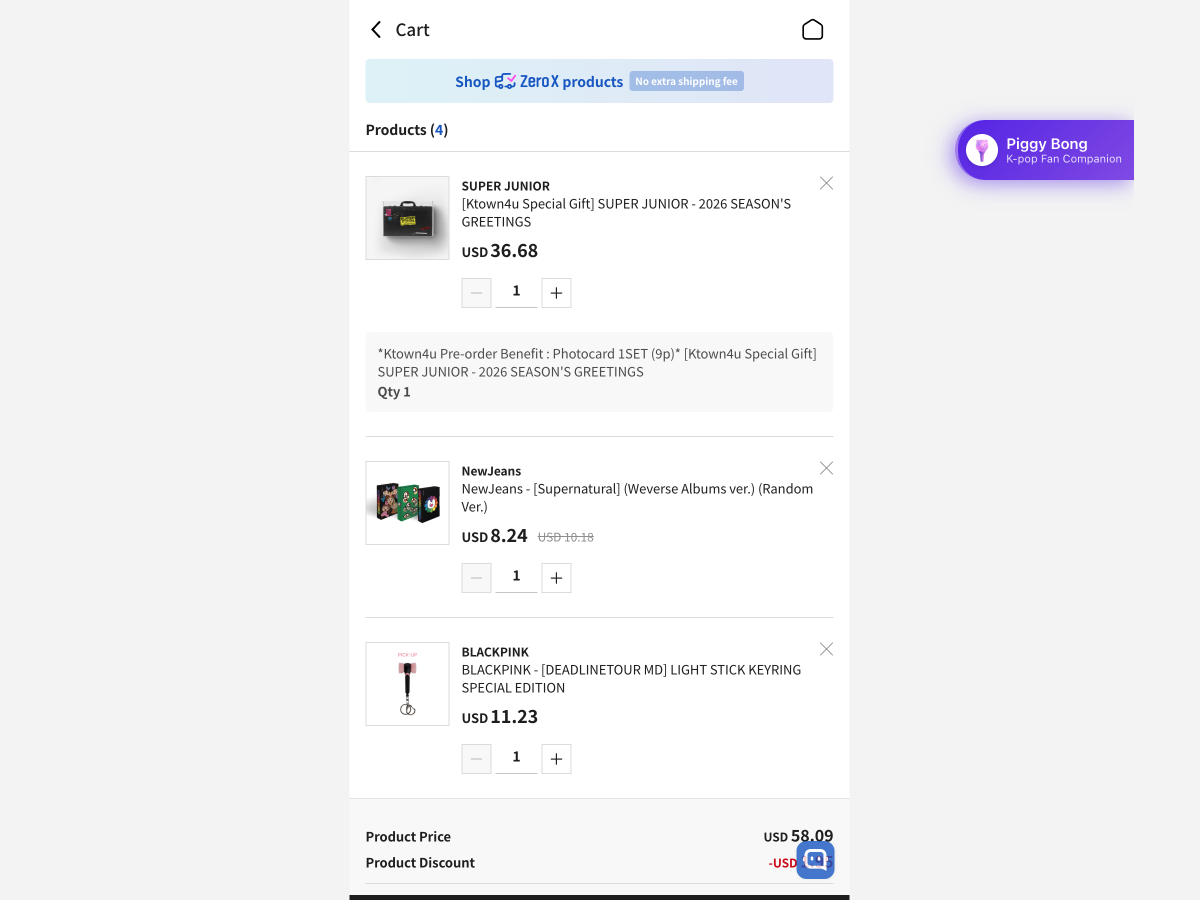
As a K-pop fan myself, I've experienced the universal struggle: you're on a K-pop merchandise site, your cart is overflowing with albums, photocards, and lightsticks from multiple groups, and you're staring at a total that's way over budget. Your heart says "buy it all," but your wallet says "make choices."
What it does
Piggy Bong is a Chrome extension that analyzes your K-pop shopping cart and provides AI-powered insights to help you make informed purchasing decisions. Here's what makes it special
🎯 Core Features
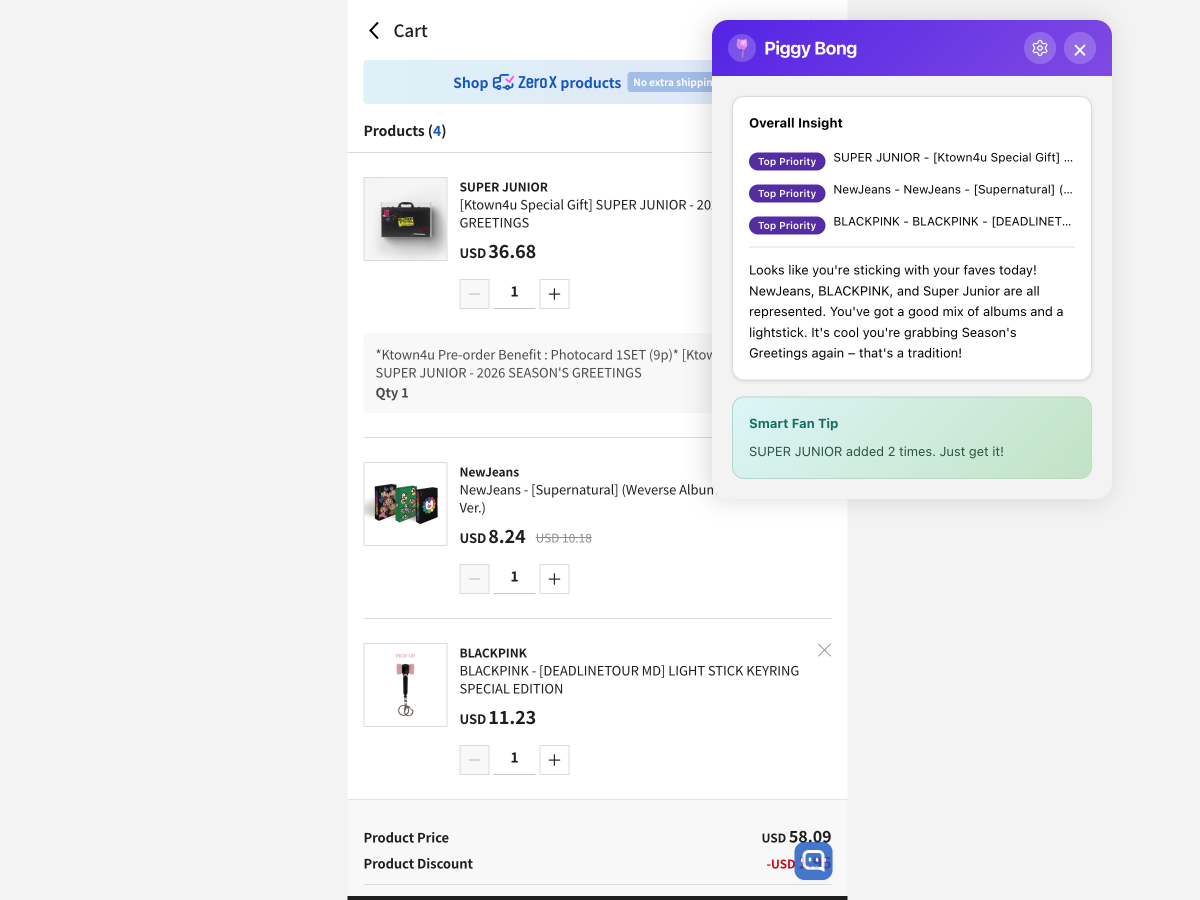
1. Smart Cart Analysis
- Detects K-pop items in your cart (albums, photocards, lightsticks, merch)
- Uses Chrome's Prompt API (Gemini Nano) to analyze items against your preferences
- Identifies which items align with your favorite groups and collection priorities
- Provides personalized recommendations with clear reasoning
2. Visual Priority System
- Color-coded badges (green = Must-have, yellow = Nice-to-have, gray = Can skip)
- WCAG AAA compliant (7:1+ contrast ratios) for accessibility
- Clear visual hierarchy helps you quickly identify priorities
3. Pattern Recognition
- Tracks your cart history over time
- Identifies repeat items you keep adding but never buy
- Suggests when you might be impulse shopping vs. genuinely wanting something
4. Smart Fan Tips
- AI-generated contextual advice based on your cart composition
- Detects if you're buying from non-priority groups
- Gentle nudges about budget allocation
- Celebrates when your cart aligns perfectly with your goals
5. Privacy-First Design
- All AI processing happens on-device using Chrome's built-in Prompt API
- Zero external API calls for analysis
- All data stored locally in your browser
- No tracking, no data collection, no server uploads
🛠️ Technical Highlights
Hybrid AI Architecture:
- JavaScript handles facts: Item parsing, price calculations, pattern detection
- AI handles creativity: Personalized insights, tone, cultural context
- Result: Fast, reliable, and genuinely helpful recommendations
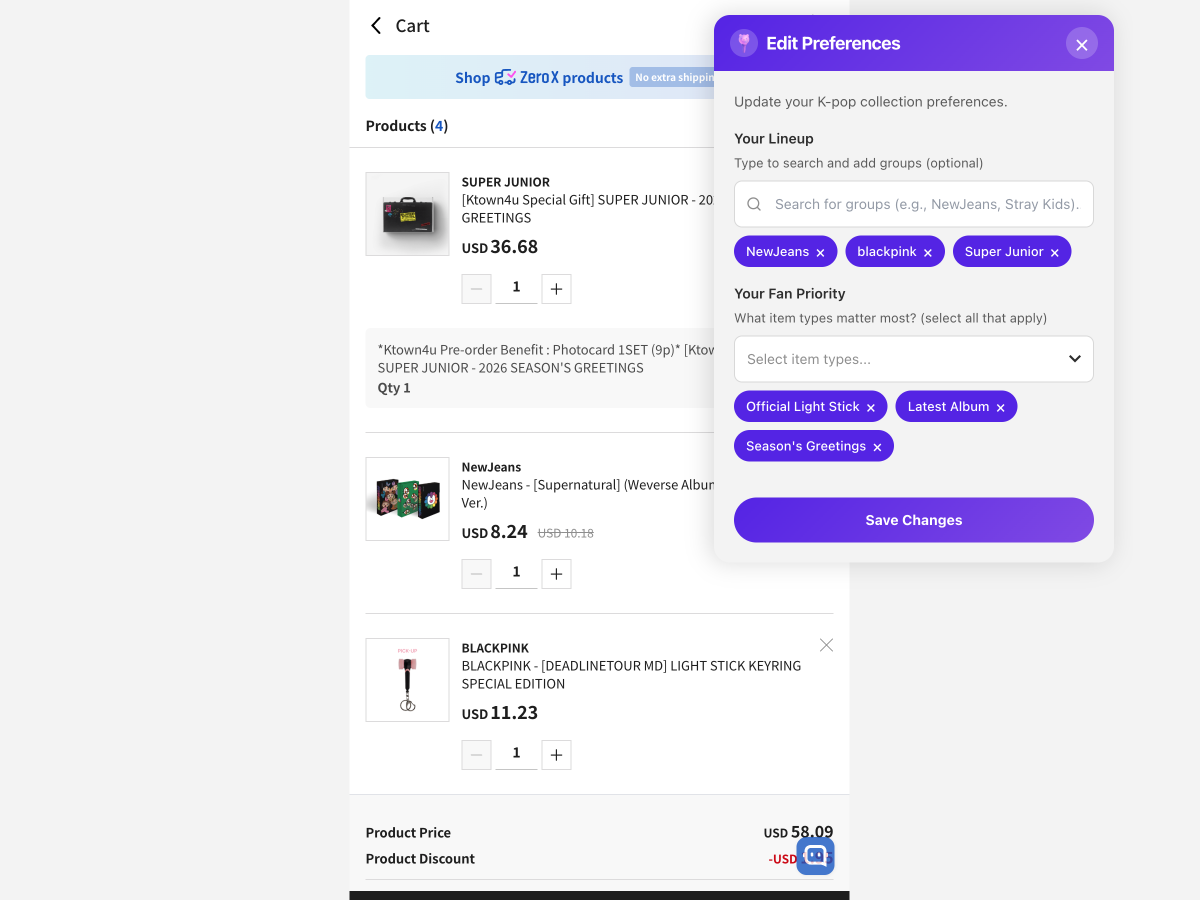
Just-in-Time Onboarding:
- Button appears on all K-pop shopping sites
- Only asks for preferences when you're ready to analyze your cart
- Industry best practice for higher user engagement
Cultural Sensitivity:
- Uses authentic K-pop terminology (bias, photocard, lineup, multi-stan)
- Supportive tone that never judges your fandom choices
- Celebrates your passion while being realistic about budgets
How we built it
Technology Stack
Chrome Extension (Manifest V3)
- Content scripts for cart detection and UI injection
- Service worker for background processing
- Modern modular architecture
AI Integration
- Chrome Prompt API (Gemini Nano) for on-device analysis
- Graceful fallback to simulated analysis if API unavailable
- Hybrid approach: JavaScript for facts, AI for insights
Frontend
- Vanilla JavaScript (no frameworks) for speed
- CSS3 with drag-and-drop floating button
- WCAG AAA accessibility compliance
Build System
- esbuild for module bundling
- Clean component architecture
- Development and production builds
Challenges we ran into
1. Chrome Prompt API Limitations
Challenge: The Prompt API is experimental and not available on all Chrome versions/systems.
Solution: Built a graceful fallback system that simulates AI analysis using rule-based logic. Users get value even if the AI API isn't available, and we detect/notify when the full AI experience is ready.
Accomplishments that we're proud of
🏆 1. Successfully Integrated Chrome's Experimental Prompt API
This is cutting-edge technology! We're among the first to build a real-world shopping assistant using on-device AI. The hybrid approach (JavaScript + AI) works beautifully and serves as a model for future privacy-first AI applications.
🎨 2. WCAG AAA Accessibility Compliance
Our badge system isn't just pretty—it's 7:1+ contrast ratio compliant, making it accessible to users with visual impairments. We proved you can have beautiful design AND meet the highest accessibility standards.
🔒 3. Privacy-First Architecture
In an era of data breaches and privacy concerns, we built something that never sends your shopping data anywhere. Everything stays on your device. This is what ethical AI looks like.
🌏 4. Cultural Authenticity
We didn't just slap "K-pop" on a generic shopping tool. We:
- Use authentic terminology (bias, photocard, lineup, multi-stan)
- Understand fan culture (album versions, photocard collecting)
- Maintain a supportive, non-judgmental tone
- Celebrate fandom passion while being realistic about budgets
⚡ 5. Pattern Recognition Without Machine Learning
Our cart history tracking identifies repeat items you never buy using pure JavaScript logic—no complex ML models needed. Sometimes the simplest solution is the most effective.
🎯 6. Just-in-Time Onboarding That Actually Works
Following industry best practices from Honey and Rakuten, we only ask for preferences when users need them. Result: Higher engagement, less friction, better UX.
🚀 7. Clean, Modular Architecture
Despite being a solo project, we maintained professional coding standards:
- Separation of concerns (UI, AI, utilities)
- esbuild for production bundling
- No external dependencies beyond Chrome APIs
- Easy to extend and maintain
What we learned
💡 1. Chrome's Built-in AI is Production-Ready (With Caveats)
The Good:
- Gemini Nano is surprisingly capable for personalized recommendations
- On-device processing is fast (no network latency)
- Privacy benefits are huge
The Challenges:
- Still experimental (availability varies by Chrome version/system)
- Need robust fallbacks for reliability
- Prompt engineering is critical to avoid hallucinations
Key Insight: Hybrid approaches (AI + traditional logic) give you the best of both worlds.
🎨 2. Accessibility Shouldn't Be an Afterthought
We designed badges with WCAG AAA compliance from day one. It wasn't harder—it just required using proper color contrast tools. Lesson: Accessibility is easier when you build it in from the start, not bolt it on later.
🌍 3. Cultural Context Makes or Breaks Niche Products
Generic shopping assistants fail K-pop fans because they don't understand:
- Why someone would buy 4 versions of the same album
- The emotional significance of bias merchandise
- The multi-stan budgeting struggle
Lesson: Deep cultural understanding creates genuine value. You can't fake authenticity.
🔮 Future Enhancements
- User Feedback System: Thumbs up/down feedback with optional comments to track AI insight helpfulness and improve recommendations
- Wishlist Tracking: Compare purchases against saved collection goals
- Spending Insights: Monthly collection priority trends (local storage)
- Smart Reminders: "Still want this after 24 hours?" prompts
View Demo Video
Built With
- claude
- css
- figma
- gemini
- html
- javascript
- vscode

Log in or sign up for Devpost to join the conversation.