-
-
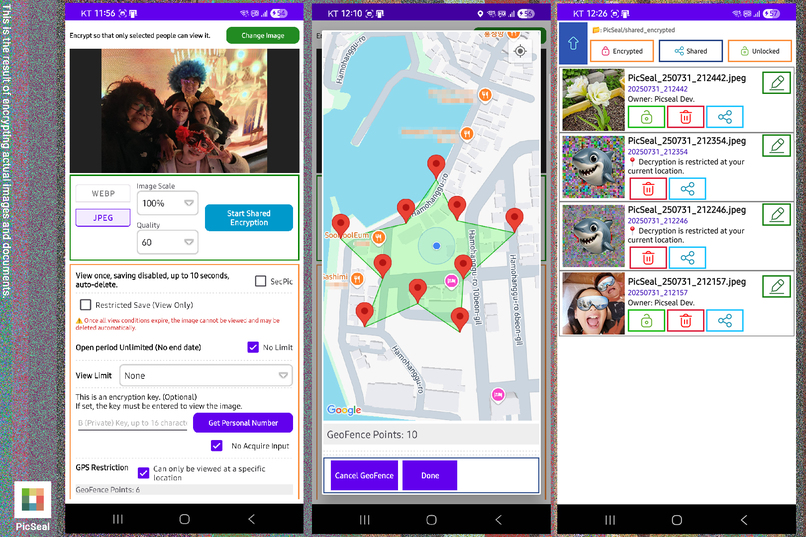
Shared encryption with location restrictions (geofence).
PicSeal: Where Privacy Meets Precision
Inspiration
I wasn’t a cryptography expert. I just had one stubborn question:
“Can a normal photo stay a normal photo, yet open only for the right person, at the right time, in the right place?”
Existing tools often altered file formats, added fragile metadata, or degraded image quality. I wanted something intuitive, secure, and compatible—something that felt like a digital treasure map.
What PicSeal Is
PicSeal is an Android app that lets users encrypt photos with access rules based on:
- Where it can open (via Google Maps: point–radius or polygon geofence)
- When it can open (start and end time)
- How many times it can be viewed
- An optional short key the user defines
The photo remains a standard JPEG or WebP file. Once unlocked, it behaves like any normal image—no special viewer required.
Google Maps Platform Integration
PicSeal deeply integrates Google Maps Platform to power its core functionality:
Location-based unlocking Uses: Maps SDK for Android, Geocoding API
Polygon geofence drawing Uses: Maps SDK with custom UI overlays
Coordinate validation Uses: Native GPS via Android Location Services (validated in native C++)
Visual map interface Uses: Embedded Google Maps for an intuitive UX
Users interact directly with Google Maps to define access zones—by tapping a point and setting a radius or by drawing a custom polygon. These coordinates become part of the access rules used to unlock the image.
Technical Execution
- Native C++ engine via Android NDK for performance and security
- Format-aware encryption for JPEG (DCT domain) and WebP (pixel domain)
- No EXIF or removable metadata—only minimal, format-safe embedded data
- MetaSeal: a visual stamp that acts as part of the decryption key
- On-device decryption only: no keys or plaintext leave the phone
All access checks—location, time, view count, and key validation—are performed entirely in native C++ code. This ensures:
- System-level control over GPS and time data
- Resistance to Java/Kotlin-level tampering or instrumentation
- Reduced attack surface by avoiding higher-level abstractions
To prevent unauthorized access or data leakage:
- No decryption keys or plaintext images ever leave the device
- No EXIF or removable metadata is stored, eliminating common steganographic attack vectors
- Failure messages are deliberately generic (“Access denied”) to avoid hint leakage
Even if the encrypted image file is copied or reverse-engineered, it remains inaccessible unless all conditions are met on the authorized device, in the correct place, at the correct time.
Security Note
PicSeal stores only format-safe encrypted data inside the image file itself—without altering the JPEG or WebP structure. This keeps the file compatible with standard viewers and platforms.
When viewed outside the PicSeal app (e.g., in a gallery), the file remains a valid photo file, but:
- The main image content is encrypted and appears as unintelligible patterns.
- A small, non-encrypted MetaSeal is visibly embedded as a cue and as a cryptographic component.
Result: the file stays standard-compatible, while real content is revealed only in PicSeal when the correct location, time, and key conditions are met.
Steganography: A Layer of Security
According to recent security reports, groups like APT37 have used JPEG steganography to conceal malware. It was reported that this technique is not only extremely difficult to detect, but even if detected, it is nearly impossible to interpret or reverse without the exact decryption method. PicSeal’s JPEG encryption uses a structurally similar embedding concept—but further reinforces it with additional, multi-layered encryption methods. As a result, it has been demonstrated that PicSeal’s encrypted images are not only as difficult to detect as those used by advanced threat actors, but also significantly more difficult to decrypt, even if obtained by an attacker.
MetaSeal — A Visual Key and Ownership Stamp
In many cultures, seals and stamps signify authenticity and ownership. MetaSeal brings this idea into the picture itself: it is always visible, makes the image feel personal, and also participates in the decryption process. Without the correct MetaSeal, the image does not unlock—even if other conditions are met.
Creative Use Cases
PicSeal isn’t just about privacy—it’s a platform for playful and meaningful experiences:
- A photo that unlocks only when you return to a childhood home
- A scavenger hunt where each clue is a location-locked image
- A storytelling experience where each chapter is tied to a place
When my daughter saw it, she said, “It looks like a treasure map.” That moment revealed PicSeal’s potential beyond security—into education, tourism, and gamified storytelling.
User Experience & Visualization
- Intuitive map interface for setting access zones
- Clean, minimal UI focused on clarity and control
- MetaSeal adds a personal, visual touch to encrypted images
- No error hints: “Access denied” is deliberately generic to prevent reverse engineering
The map experience is central—not just decorative. Users feel like they’re sealing memories to real-world places.
Developer Perspective
PicSeal uses Google Maps Platform not just for display,
but as a core component of its encryption logic.
By treating coordinates and geofences as access conditions,
it introduces a new approach to location-based security.
What’s Next
- Google Photos & Drive Integration – plan to enable encrypted image storage in Google Photos and Drive.
- Cross-platform SaaS – It will offer a simple, affordable encrypted media management service, available on the Web, Android, and iOS. > PicSeal is evolving from an app to a developer-friendly platform, providing secure, creative, and location-aware media for individuals and small teams, as well as enterprise users.
Why It Matters
People want privacy that is simple and intuitive. PicSeal secures your photos and memories to specific places and times, unlocking only by your rules and on your device—yet it remains easy to use. PicSeal transforms Google Maps from a simple navigation tool into a personalized key for security.
PicSeal Test Account
Login email: picseal@picseal.com
Password: Picseal2452
Valid through: Aug 30, 2025 (KST)
Payments/Top-ups: Disabled (judges only account)
- This account is for judges only and will be deactivated after the validity date.
- No personal data or billing is linked to this account.
How to Test (Map Key)
- Open the app and sign in via Manage with the judges-only account.
- Return to the main menu and select Shared With (this is where the map-based key is set).
- Choose the image to encrypt, then tap GPS Restriction at the bottom of the screen.
- Select the desired location.
- Either pick a radius, or tap GeoFence and click on the map to draw an area. When finished, tap Confirm.
- Tap the light-blue Start Shared Encryption button.
- When encryption completes, open Gallery to verify the image encrypted in “Shared” mode.
Built With
- amazon-web-services
- android
- aws-lambda
- c++
- elevation-api
- google-maps-platform
- javascript
- kotlin
- libjpeg
- libwebp
- opencv
- places-api
- postman

Log in or sign up for Devpost to join the conversation.