Inspiration
I needed an app that would help me with learning the piano, while I had seen similar apps and videos that attempted to assist with the learning the piano, they were often not fully free to use or had ads or limited music pieces available, I needed an app that was free and would give me full control over the music pieces I would be learning, and allow me to upload my own MIDIs to learn, and directly edit the notes to be played.
What it does
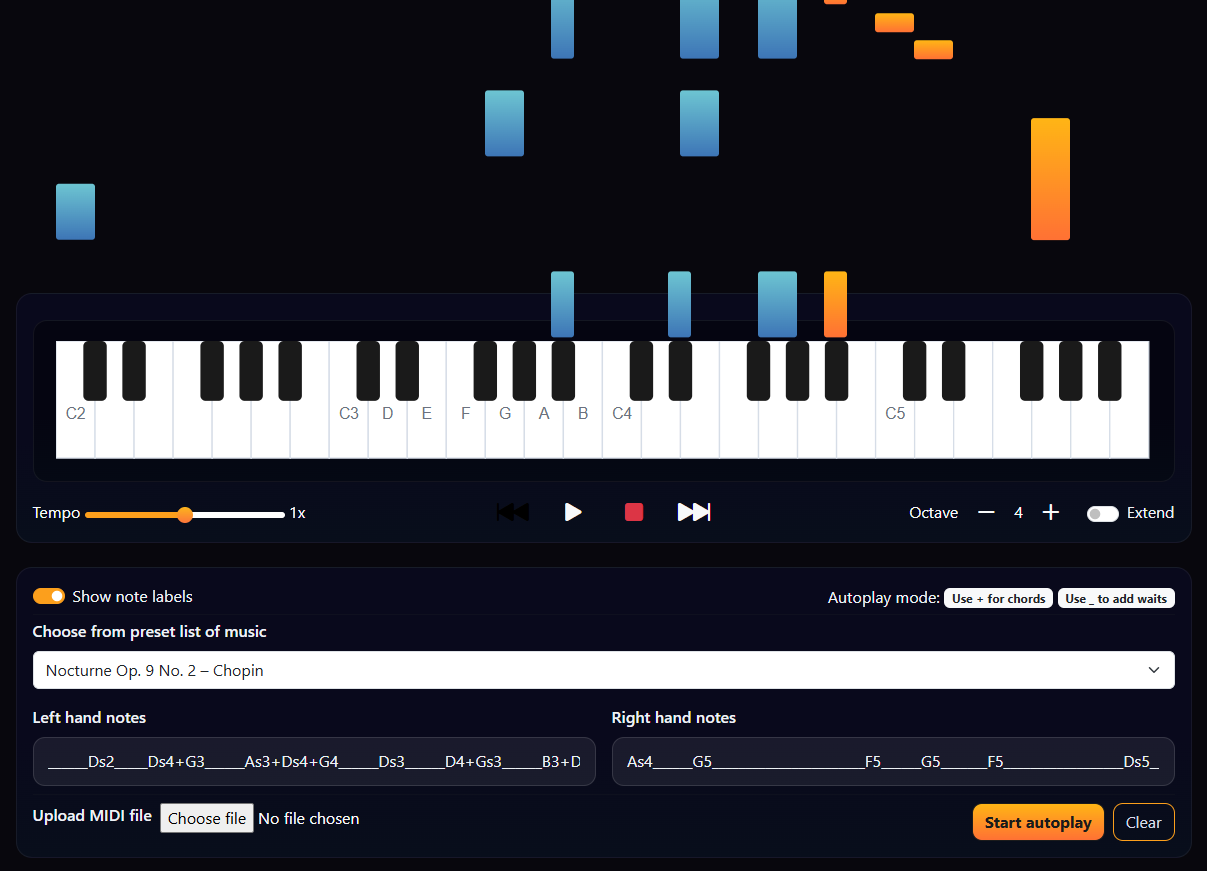
It allows the user to visualise sheet music, by seeing bars collide with the piano at where and when keys should be played on the piano for a specific music piece. It also gives full control over the music as it is playing with features like pausing rewinding, fast forwarding, changing tempo, changing size of the piano, etc. It has a pre-set list of built-in music pieces from the classical era, such as those by Chopin, Mozart, etc. While a music piece has started and not finished the screen will not go to sleep automatically meaning you can pause midway through the music and look at the notes and copy them on the piano without the screen turning off due to a lack of touch like you would see when pausing a video on YouTube.
How I built it
Using HTML, CSS and JavaScript, they were chosen as I had always intended for the app to be played on the web, making it easy to use on any device such as phones, tablets and laptops. I had found free to use piano note files that I could use and researched similar apps and code which helped me get an idea on how to create a basic piano where clicking on the keys played the expected note. This allowed me to then build on it to be able to play music pieces automatically. For features such as MIDI uploads where I had little knowledge on how MIDI files worked I was able to use Microsoft Co-pilot to get a working template that I could then edit and use for uploading/converting MIDIs to be used in my app.
Challenges I ran into
The main challenge for this application was performance, music pieces with lots of notes would originally struggle to play well due to the amount of CSS animation that was being used at once, I managed to decrease unnecessary CSS animation and therefore decrease the performance problem but I would think that performance is still going to be an issue on older devices (such as around 10 years old or more), especially mobile devices.
Accomplishments that I'm proud of
The app is very useful in its current state and I have been using it myself to learn to play the piano better and it is has turned out better than expected.
What I learned
I had been unsure if an app like this could be made using only HTML, CSS and JavaScript, it is still technically a static website and has no backend, so I've learned just how much is actually possible with just JavaScript.
What's next for Piano Teacher
There will likely be further updates and features to the app to make it even more useful in the future. One planned feature is the ability to sort notes entered from MIDI files if they are not already sorted, allowing the notes to be assigned to what the correct hand should be for playing that note.

Log in or sign up for Devpost to join the conversation.