Inspiration
I often take several photos to make sure I capture the right smile, gesture, or expression. The photos are different enough to keep, but similar enough that storing each one independently repeats much of the same visual information.
Because I did not have enough storage to keep them all, I would spend far too long comparing nearly identical photos and deciding which memories to delete.
PhotoFold began with a simple question: can I keep every version of a moment without paying the full storage cost for every frame?
What it does
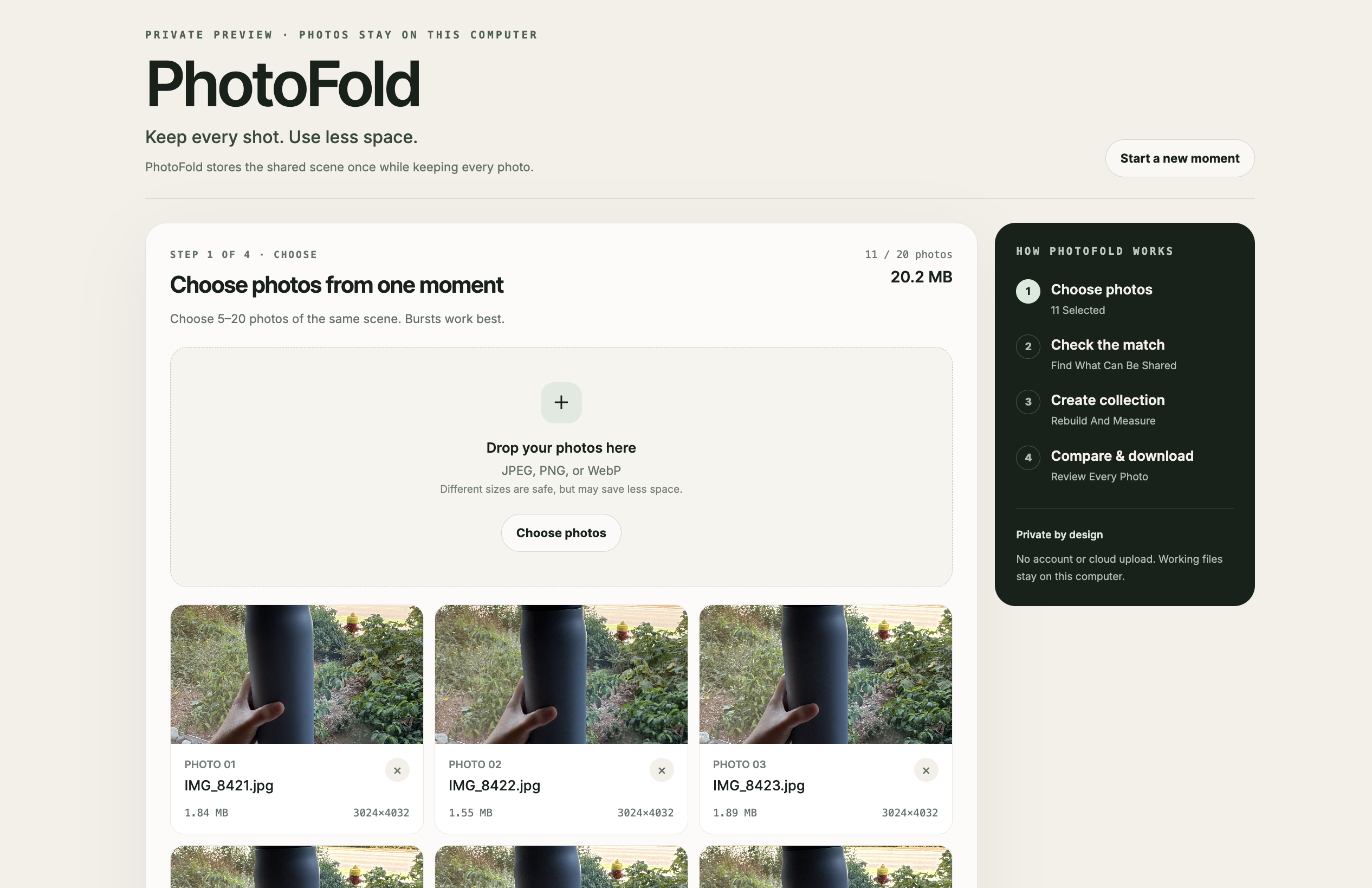
PhotoFold turns 5–20 similar photos into one compact, reconstructable .photofold collection.
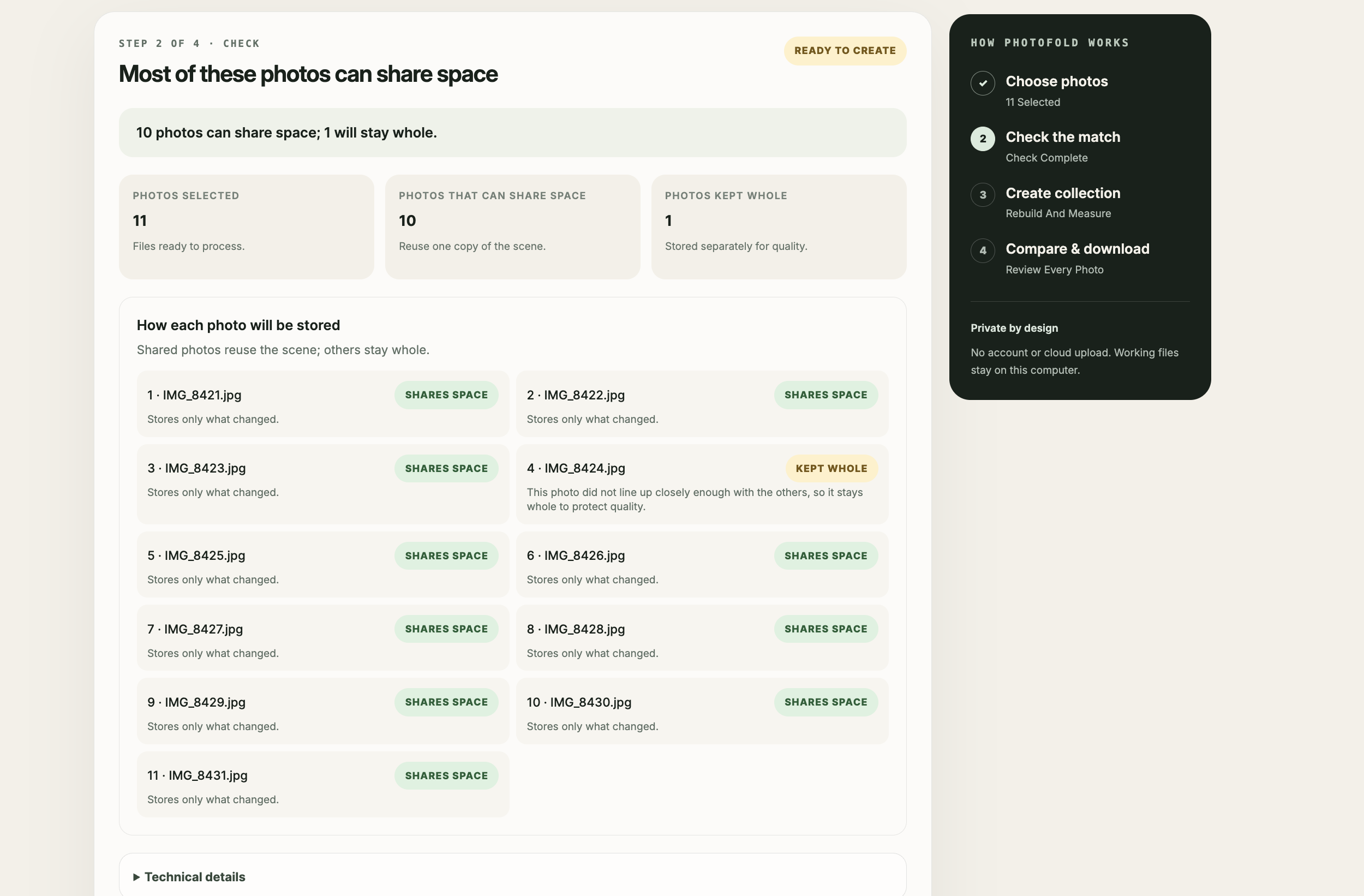
It identifies what the photos share, preserves what makes each frame unique, and keeps uncertain frames whole when they are not safe to combine. Every photo remains individually viewable and exportable.
The user flow is simple:
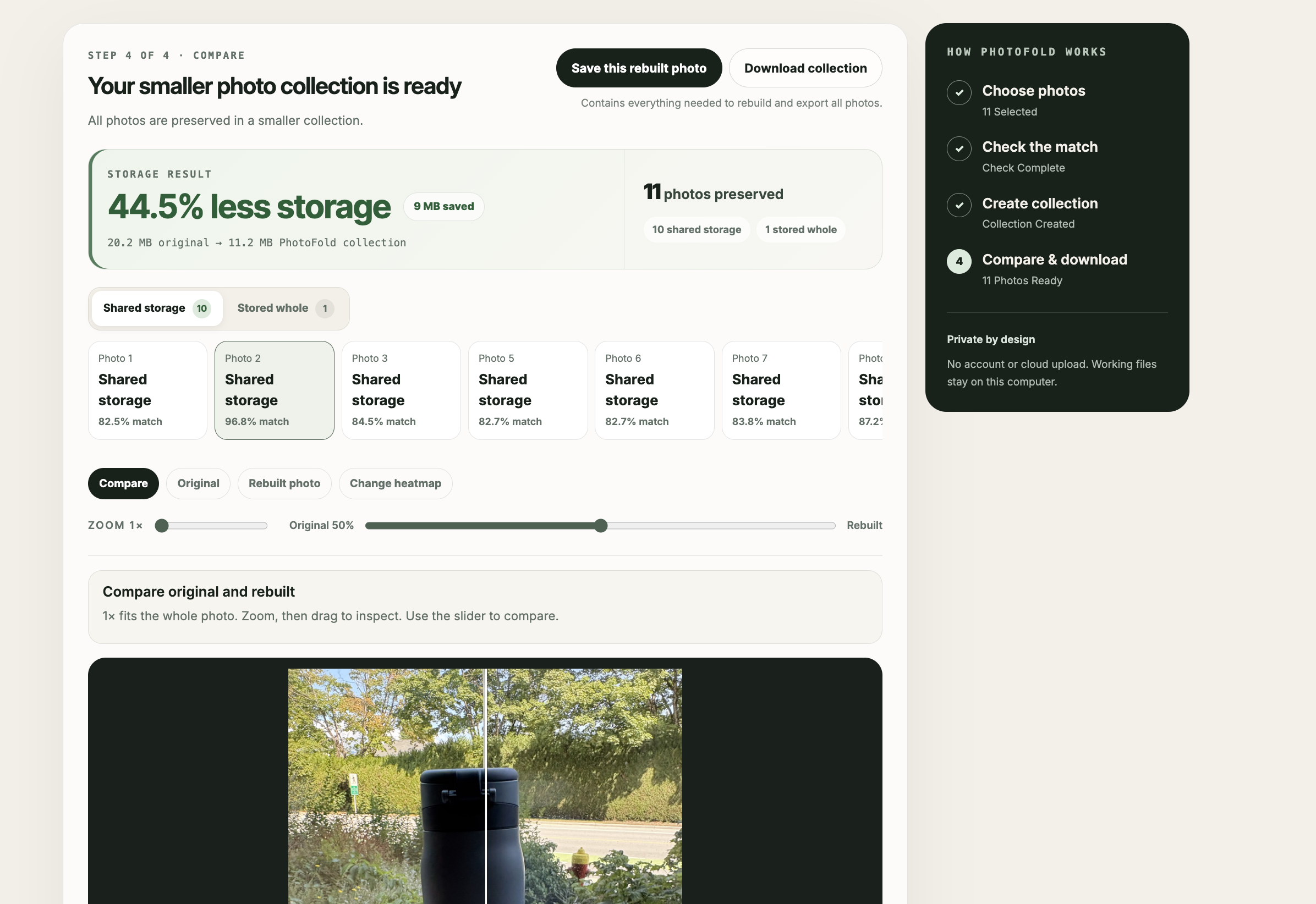
choose photos → check the set → create the collection → compare and export
Users can compare original and rebuilt photos, inspect visual differences, see the real size of the finished collection, export any photo, and download the complete archive.
Why it is different
Traditional image formats compress every photo independently. Photo cleaners find similar images so users can delete them. PhotoFold takes a different approach: it represents a related group as one reversible collection, reusing visual information where beneficial while preserving the information required to recover every frame.
Users keep every photo. PhotoFold optimizes compatible frames together, preserves uncertain frames independently, and reports what happened instead of hiding weak results.
How we built it
PhotoFold uses computer vision to select a reference scene, align compatible photos, and identify the regions that change from frame to frame. It stores that shared scene with the information needed to recover each photo, while keeping unsuitable frames independently inside the same collection.
Every archive contains all required reconstruction assets and a versioned manifest. PhotoFold validates the archive’s contents, checksums, dimensions, and quality measurements before rebuilding every frame without accessing the original uploads.
The processor uses Python, OpenCV, Pillow/WebP, NumPy, scikit-image, and Pydantic. The product experience uses Next.js, React, TypeScript, Tailwind CSS, Vitest, and Playwright.
How we used Codex and GPT-5.6
We began with a simple hypothesis and used Codex with GPT-5.6 to turn it into a working system with measurable success and failure conditions. Codex accelerated implementation across the Python processing pipeline, Next.js interface, archive encoder and decoder, typed contracts, and automated tests.
GPT-5.6 helped challenge assumptions and shape the most important decisions: define clear success and failure conditions, compare PhotoFold against independently compressed photos at matched quality, measure the complete finished archive, reconstruct without the original uploads, preserve uncertain frames independently, and explain quality failures clearly.
Our development loop was:
hypothesis → implementation → test → failure analysis → revised design → measured evidence
PhotoFold’s codec and decoder remain deterministic and local-first by design. Full-resolution personal photos stay on the user’s computer, and complete collections remain reconstructable without a network dependency. GPT-5.6 shaped the engineering, evaluation, and product-development process rather than becoming a fragile dependency in reconstruction.
Challenges
The first challenge was creating a fair comparison. Comparing PhotoFold only with the original JPEG uploads would mix two benefits: modern image compression and PhotoFold’s shared-scene approach. We therefore built a matched-quality benchmark that compresses every photo independently and compares those files with the complete PhotoFold archive. This isolates the value created by storing the relationship between photos.
The second challenge was reliability across real moments. Camera movement, lighting changes, moving subjects, and partially visible regions can make photos look related while still being unsafe to combine. PhotoFold uses conservative checks: compatible photos share storage, while low-confidence frames stay whole inside the same archive.
Accomplishments
- Reconstructs every frame from the closed archive alone.
- Measures the complete finished archive, including every reconstruction asset.
- Reports real storage and per-photo quality results.
- Compares against independently compressed WebP at matched average and minimum quality.
- Preserves low-confidence frames instead of dropping or forcing them.
- Delivers a complete choose → check → create → compare → export experience.
- Keeps personal photos and reconstruction local-first.
What we learned
Trustworthy compression needs more than a smaller number. Measuring the complete package, matching quality against an independent baseline, and checking every rebuilt photo made the result understandable and verifiable.
We also learned that conservative fallback improves the product. PhotoFold shares storage when alignment and quality checks pass, and keeps the full frame when they do not.
What’s next
Next steps are faster processing, broader phone-burst validation, mobile support, and stronger preservation around faces and fine details.
Our long-term goal is for PhotoFold to become a native storage layer inside Apple Photos, Google Photos, and other galleries, where an "Optimize Storage" option could fold suitable photo bursts while keeping every frame visible, shareable, and reconstructable.
Built With
- codex
- fastapi
- gpt-5.6
- next.js
- numpy
- opencv
- pillow
- playwright
- pydantic
- python
- react
- scikit-image
- tailwind-css
- typescript
- vitest
- webp

Log in or sign up for Devpost to join the conversation.