Inspiration
What it does
How we built it
Challenges we ran into
Accomplishments that we're proud of
What we learned
What's next for phishshield-ai-devpost
About Real-time AI-powered detection system for deepfake videos and voice cloning attacks. Protects users from AI-generated fraud in video calls and online communications. Includes live detection dashboard, alert history, and demo mode for testing
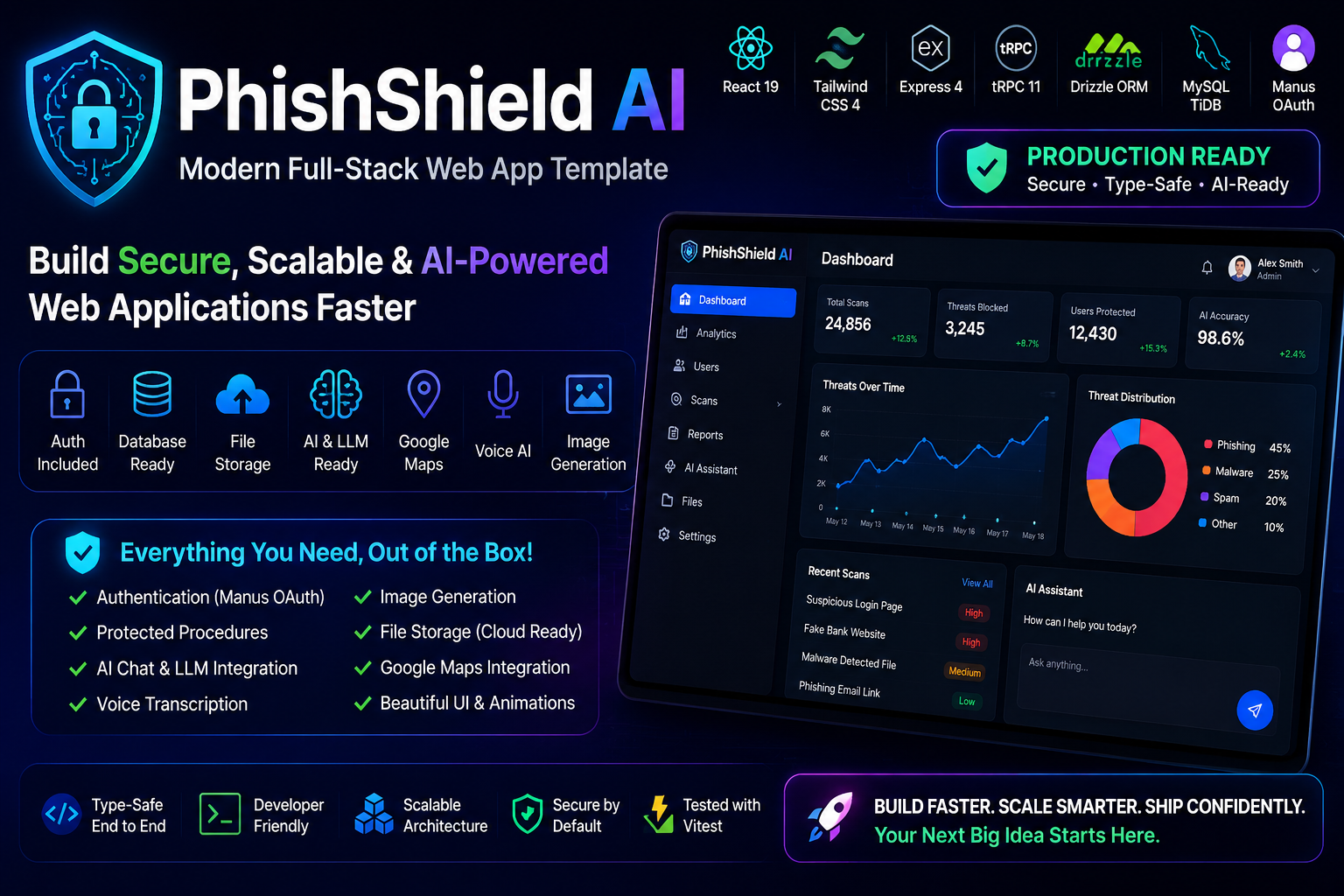
PhishShield AI — Modern Full-Stack Web App Template Production-ready full-stack starter powered by React 19 + Tailwind CSS 4 + Express + tRPC + Drizzle ORM + Manus OAuth.
Build scalable, secure, AI-ready web applications faster with authentication, database integration, file storage, voice AI, image generation, maps, and beautiful frontend workflows already configured.
🌐 Live Demo Website: https://phishai-5a778b5d.manus.space
✨ Features ⚡ Full Type-Safe Stack React 19 + Vite Tailwind CSS 4 Express 4 Backend tRPC 11 APIs Drizzle ORM MySQL / TiDB Database Manus OAuth Authentication Zod Validation React Query Framer Motion Animations Vitest Testing 🔐 Authentication Included Manus OAuth fully configured Secure session cookies protectedProcedure support Automatic ctx.user injection Admin/User role support Logout handling included 🧠 AI & LLM Ready Built-in integrations for:
AI Chat Structured JSON Output Markdown Streaming Voice Transcription Image Generation Notifications No external API setup required.
☁️ File Storage Ready Secure cloud uploads /manus-storage/ support Optimized production workflow Fast file serving Media-safe deployment structure 🗺️ Google Maps Integration Supports:
Places API Directions API Drawing Tools Street View Heatmaps Geocoding Full Google Maps SDK Features No API key setup needed.
🏗️ Tech Stack Technology Purpose React 19 Frontend UI Tailwind CSS 4 Styling Express 4 Backend tRPC 11 Type-safe APIs Drizzle ORM Database ORM MySQL / TiDB Database Manus OAuth Authentication React Query Data Fetching Zod Validation Framer Motion Animations Vitest Testing 📁 Project Structure client/ src/ pages/ components/ hooks/ contexts/ lib/ App.tsx
server/ db.ts routers.ts _core/
drizzle/ schema.ts
shared/ storage/ ⚙️ Quick Start 1️⃣ Install Dependencies pnpm install 2️⃣ Start Development Server pnpm dev 3️⃣ Push Database Schema pnpm db:push 4️⃣ Run Tests pnpm test 🔥 Development Workflow Step 1 — Update Database Schema Edit:
drizzle/schema.ts Then run:
pnpm db:push Step 2 — Add Database Helpers Edit:
server/db.ts Step 3 — Create tRPC Procedures Edit:
server/routers.ts Example:
todo: router({ list: protectedProcedure.query(({ ctx }) => { return db.getUserTodos(ctx.user.id); }), }), Step 4 — Connect Frontend Use:
trpc.feature.useQuery() trpc.feature.useMutation() Step 5 — Write Tests Create tests inside:
server/*.test.ts Run:
pnpm test 🎨 Frontend Guidelines Design Principles Modern UI Responsive layouts Mobile-first approach Accessible design Smooth animations Reusable components Recommended Components import { Button } from "@/components/ui/button" import { Card } from "@/components/ui/card" Navigation Strategy Use DashboardLayout For: ✅ Admin Panels ✅ Analytics Dashboards ✅ Productivity Apps
Avoid DashboardLayout For: ❌ Blogs ❌ E-commerce Stores ❌ Public Landing Pages
🔐 Authentication Flow
User Login
↓
Manus OAuth
↓
Session Cookie
↓
ctx.user Available
↓
Protected Procedures
☁️ File Upload Workflow
Upload File
manus-upload-file --webdev image.png
Use In Frontend
 🧠 AI Integration Example
import { invokeLLM } from "./server/_core/llm";
🧠 AI Integration Example
import { invokeLLM } from "./server/_core/llm";
const response = await invokeLLM({ messages: [ { role: "user", content: "Hello AI" } ] }); 🎤 Voice Transcription Example import { transcribeAudio } from "./server/_core/voiceTranscription";
const result = await transcribeAudio({ audioUrl: "audio.mp3" }); 🖼️ Image Generation Example import { generateImage } from "./server/_core/imageGeneration";
const image = await generateImage({ prompt: "Cyber security dashboard" }); 🧪 Testing Example test:
server/auth.logout.test.ts Run tests:
pnpm test 📦 Production Build Build App pnpm build Start Production pnpm start ⚠️ Common Mistakes ❌ Infinite Query Loops Bad:
useQuery({ date: new Date() }) Good:
const [date] = useState(() => new Date()) ❌ Storing File Bytes In Database Never store files directly in database columns.
Use cloud storage and save only:
File URL Storage Key Metadata ❌ Nested Anchor Tags Bad:
Link Good:
Link 🌟 Best Practices ✅ Use optimistic updates ✅ Show loading states ✅ Use semantic Tailwind colors ✅ Keep routers modular ✅ Use reusable components ✅ Add smooth micro-interactions
🛡️ Security Features OAuth Authentication Secure Cookies Role-based Access Control Protected Backend Procedures Environment Variable Isolation 📚 Built-In Features Authentication Database ORM AI APIs File Storage Voice AI Image Generation Maps Integration Notification System Dashboard Layouts Theme Support Testing Framework 👨💻 Recommended Workflow Schema → DB Helper → tRPC Router → Frontend → Testing 📄 Environment Variables Preconfigured system environment variables:
DATABASE_URL JWT_SECRET VITE_APP_ID OAUTH_SERVER_URL BUILT_IN_FORGE_API_KEY No manual .env setup required.
🚀 Why This Template? ✅ Production-ready architecture ✅ Full-stack type safety ✅ AI-ready infrastructure ✅ Fast development workflow ✅ Secure authentication system ✅ Beautiful scalable UI architecture
❤️ Built For Developers Perfect for building:
SaaS Platforms AI Apps Admin Panels Productivity Tools Internal Dashboards Secure Web Applications 📜 License MIT License
⭐ Final Note PhishShield AI is more than a starter template — it is a complete modern full-stack foundation designed for rapid development, scalability, security, and exceptional user experiences.
Build faster. Scale smarter. Ship confidently. 🚀
Built With
- 1.6%
- 5.5%
- 92.7%
- css
- html
- javascript
- typescript


Log in or sign up for Devpost to join the conversation.