-
-

phisherman icon
-
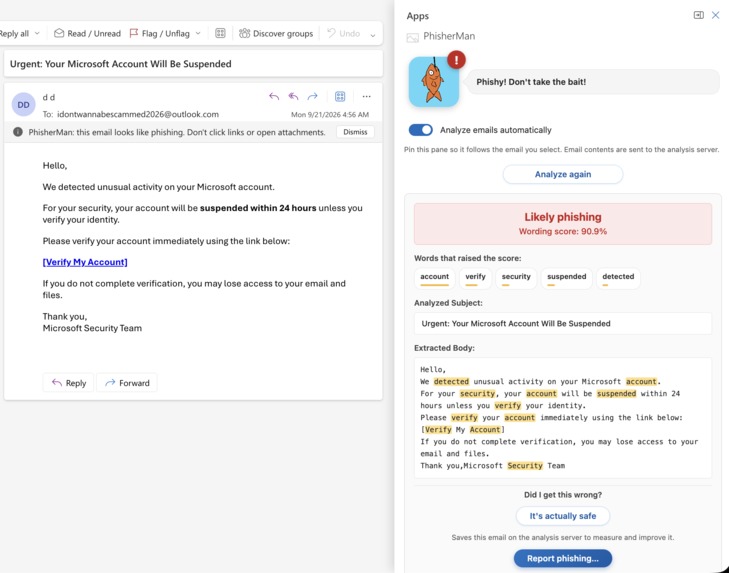
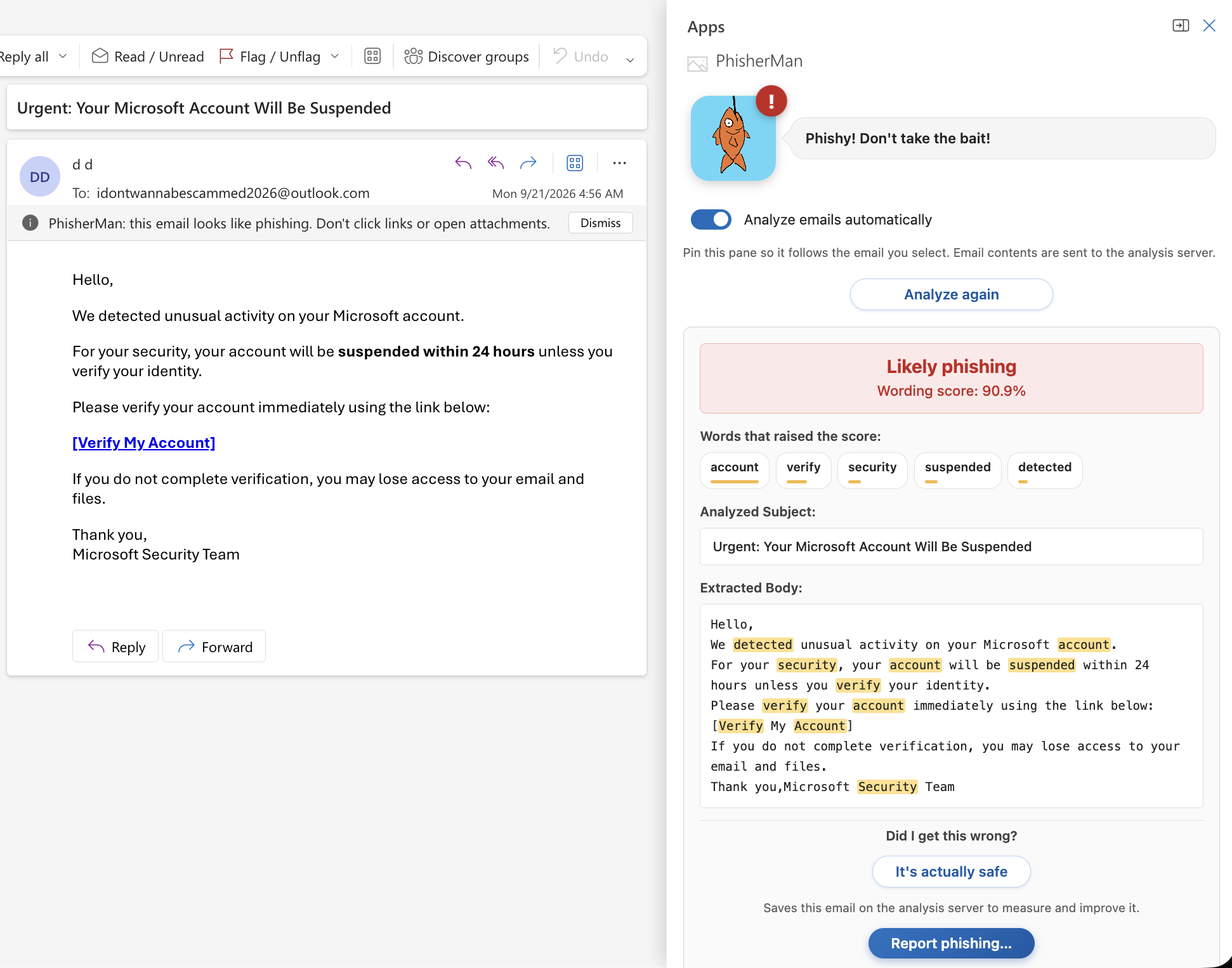
Phisherman in action

Inspiration
Employees and corporate spaces are told to stay vigilant against phishing, but vigilance doesn't scale. People are busy, attackers are getting more convincing, and one wrong click can compromise a company. We wanted to make that vigilance easier by putting a second set of eyes directly in the inbox people already use.
What it does
Phisher Man is an Outlook add-in that checks emails for phishing using machine learning. Open an email and a persistent taskpane reads its text, scores it, and shows a clear verdict. The pane stays open as you click through your inbox, so every message gets checked with no extra steps and no new tool to learn.
How we built it
- Data: The Kaggle Phishing and Legitimate Emails dataset, plus about 3,000 AI-generated emails we added for more variety in style and topic.
- Model: A scikit-learn pipeline that combines TF-IDF features (single words and word pairs) with logistic regression. Bundling both steps means the exact same preprocessing runs at prediction time. The trained pipeline is saved with joblib.
- Backend: A FastAPI service that loads the model and exposes a prediction endpoint, containerized with Docker and deployed to the cloud.
- Client: An Office Add-in built with React and TypeScript. It uses Office.js to pull the text of the currently opened email and send it to the API.
Challenges we ran into
- Data leakage: Our first dataset had giveaways. Every legit email started with "Subject:" and every phishing email had a "Keywords:" line, so a model could score 100% without learning anything about phishing. We caught it, stripped those markers, and split train/test by email template so near-duplicates couldn't land on both sides.
- Templated data: Real inboxes look nothing like synthetic templates. Testing on hand-written emails (receipts, shipping notices, appointment reminders) showed the model falsely flagging normal mail, which pushed us to add more varied AI-generated emails and weighted hand-written examples.
- Going from no model-training experience to a working classifier in 36 hours.
- Keeping the taskpane persistent while users switch between emails, and sideloading the add-in for testing (Outlook on macOS doesn't auto-sideload, so we used Outlook on the web).
- Keeping the scikit-learn version identical between training and the Docker container so the saved model loads.
Accomplishments that we're proud of
- A working end-to-end product in 36 hours: model, API, and add-in all connected.
- Catching our own data leakage instead of shipping a suspiciously perfect 100%, and validating on unseen, hand-written emails rather than trusting the test score alone.
- A team of three with no prior model-training experience shipping a real ML product.
- [Your reality-check score, e.g. "correctly classified X of 12 unseen real-world-style emails"] and [test-set precision/recall for phishing].
What we learned
- Data quality matters more than model complexity. A great test score means little if the data is too easy or leaky.
- How to evaluate honestly: split by group, inspect what the model learned, and test on emails it has never seen.
- How Office Add-ins work: manifests, taskpanes, and the Office.js mail APIs.
- How to package a model behind an API with Docker so it runs the same everywhere.
What's next for Phisher Man
- Real-world data: Train on more real corpora, like SpamAssassin and the Nazario phishing set, mixed with our synthetic data.
- Outlook-specific signals: SPF/DKIM/DMARC results, From vs Reply-To mismatches, links whose visible text doesn't match the real URL, and risky attachments. Office.js exposes these live, and a plain text classifier can't see them.
- Explainability: Show why an email was flagged, not just a score.
- Tuned threshold: Raise the decision threshold to reduce false alarms, since users stop trusting a tool that cries wolf.
- One-click "report to security team" and continuous retraining on reported samples.

Log in or sign up for Devpost to join the conversation.