-
-
banner
-
onboard
-
preferences
-
preferences
-
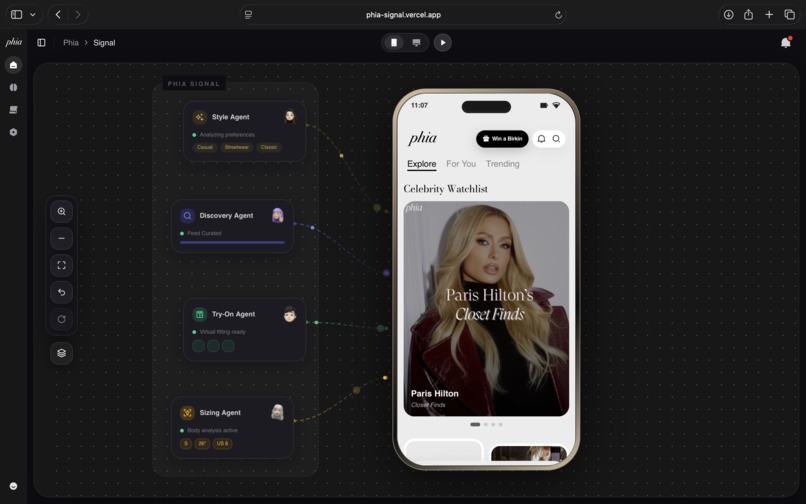
home
-
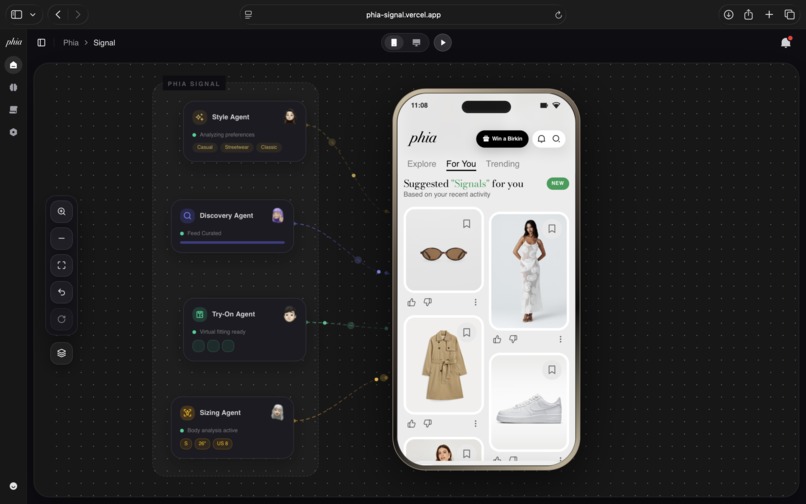
feed
-
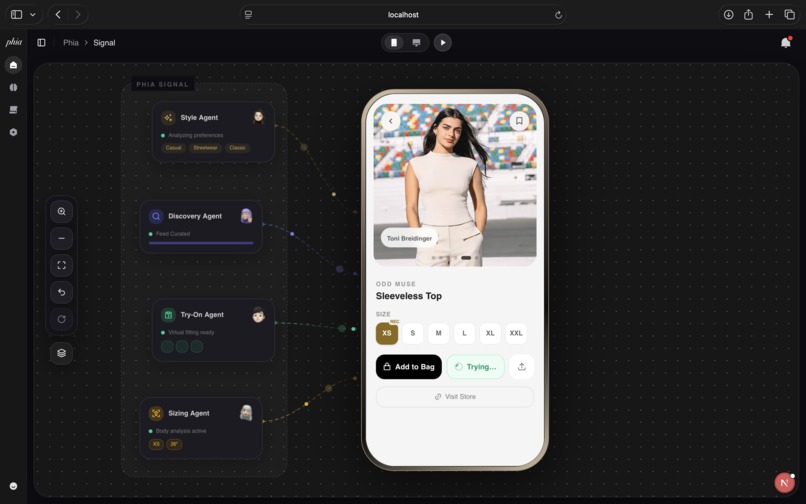
try-on
-
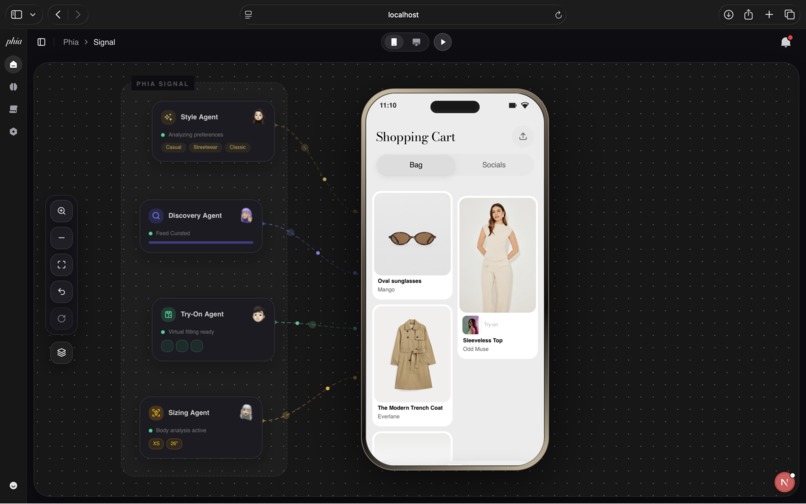
cart
-
social
Phia Signal: AI-Powered Style Intelligence Platform
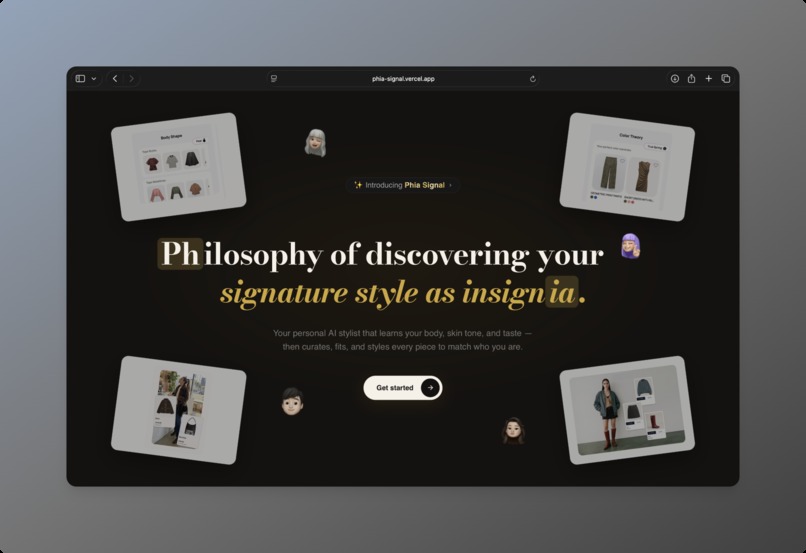
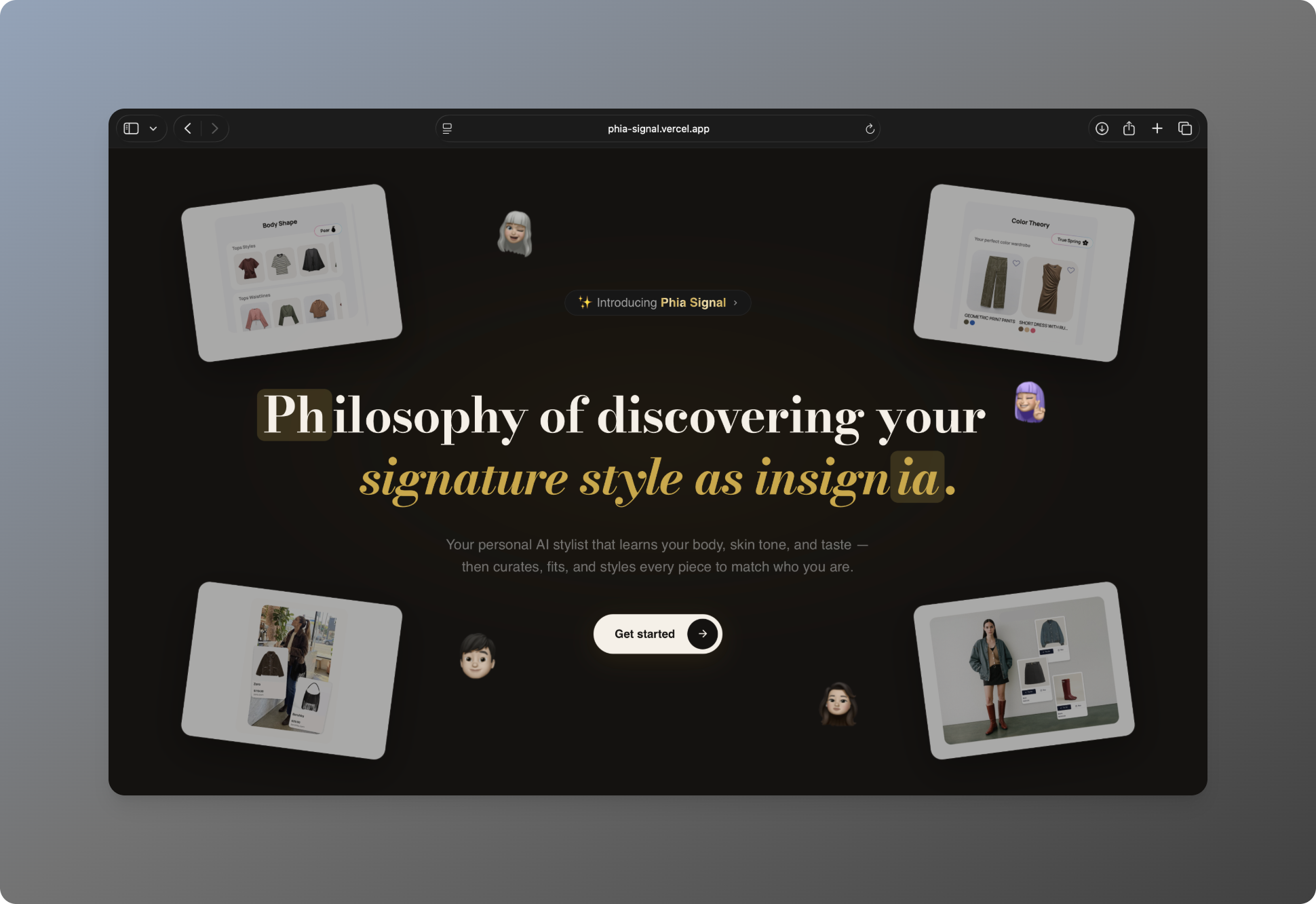
Philosophy of discovering your signature style as insignia.
Overview
Phia Signal is an AI-powered style intelligence platform that learns your body, skin tone, and taste — then curates, fits, and styles every piece to match who you are.
At its core, Phia Signal deploys an Agent Orchestrator — a system of specialized AI agents (Style, Sizing, Discovery, Try-On, and Feedback) that work in parallel to generate personalized fashion signals. Every interaction feeds back into a learning loop, continuously refining the user's style profile and product recommendations.
Built with Next.js 16, React 19, and powered by Anthropic Claude, Google Vertex AI, ElevenLabs Conversational AI, and MediaPipe — Phia Signal combines computer vision, voice AI, virtual try-on, and social commerce into a unified fashion experience.
Technology Stack
- Frontend: Next.js 16.2, React 19, TypeScript, Tailwind CSS 4
- State Management: Zustand with localStorage persistence
- AI — Vision Analysis: Anthropic Claude Opus (skin tone detection, body size estimation, outfit style analysis)
- AI — Voice Agents: ElevenLabs Conversational AI (onboarding welcome, sizing agent, style agent)
- AI — Virtual Try-On: Google Vertex AI (
virtual-try-on-001model) - AI — Image Generation: Google Gemini 2.5 Flash (aesthetic background generation)
- Face Analysis: MediaPipe Tasks Vision (
FaceLandmarkerfor face/hair mesh with color sampling) - Storage: Supabase (photo uploads and public URL generation)
- Animations: GSAP ScrollTrigger (landing page image convergence), Framer Motion (swipe gestures, transitions)
- Canvas Visualization: Custom SVG agent orchestrator with animated particle flows
- UI Components: shadcn/ui, Radix Primitives, Remixicon, Lucide React
- Fonts: Bodoni Moda (serif headlines), Inter/SF Pro (UI)
Core Functionality
1. Landing Page
The landing page features a dark, editorial aesthetic with the tagline rendered in Bodoni Moda serif. Four fashion images are positioned at the corners and converge toward the center on scroll using GSAP ScrollTrigger with scrub-linked animations. An animated shiny text badge introduces "Phia Signal" with a gold shimmer gradient.
2. Onboarding — AI-Powered Style Profiling
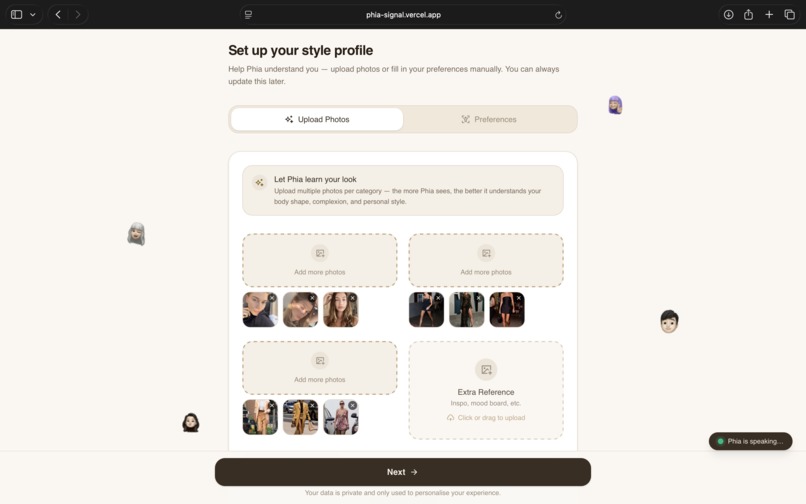
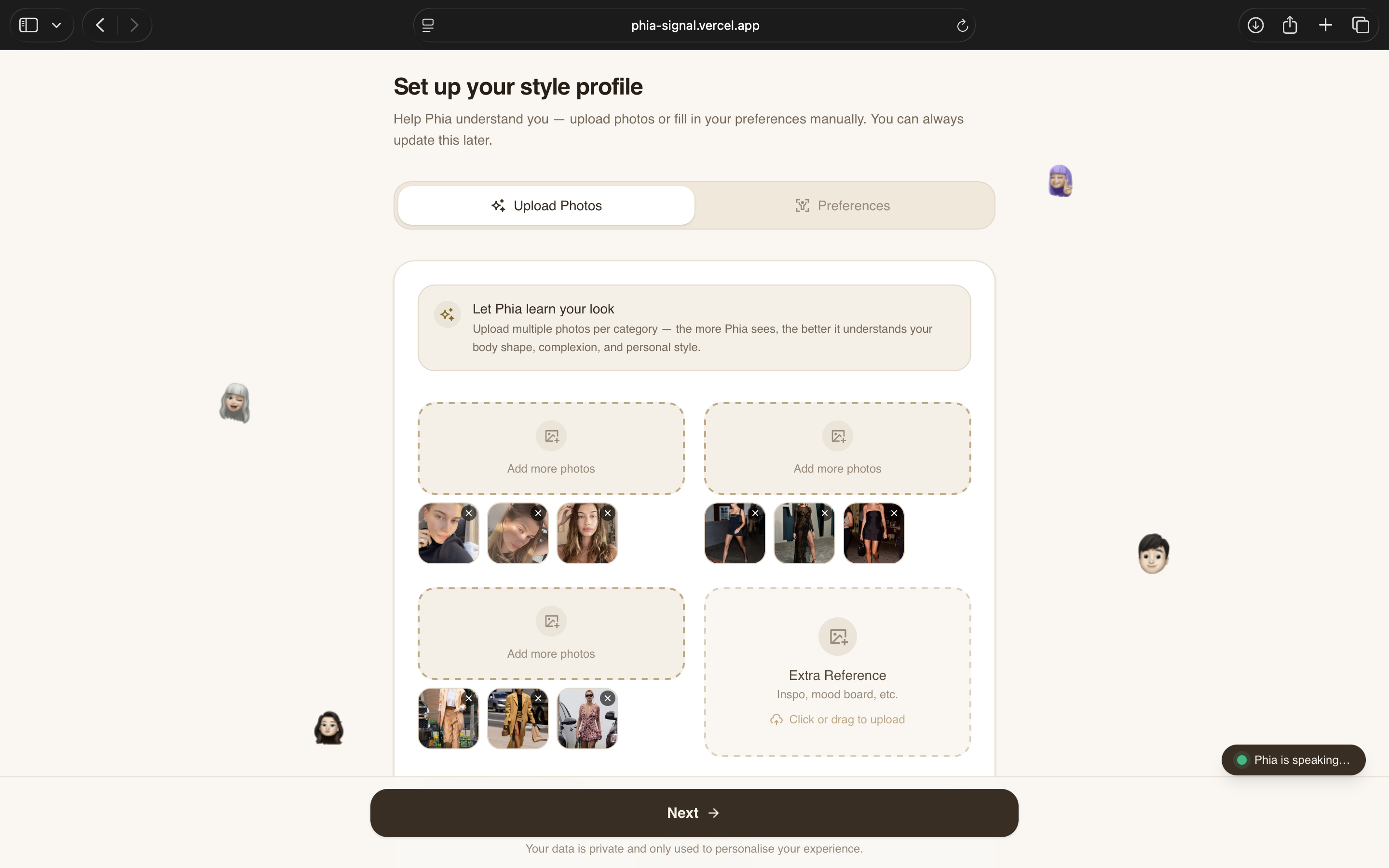
When users arrive at /onboarding, an ElevenLabs voice agent welcomes them via WebSocket (wss://api.elevenlabs.io/v1/convai/conversation) and guides them through the setup. The onboarding has two tabs:
Upload Photos
- Four upload categories: Face/Selfie, Full Body, Outfit You Love, Extra Reference
- Smart distribution: uploading 9+ photos to the selfie slot auto-distributes them (first 3 → selfie, next 3 → full body, next 3 → outfit)
- Drag-and-drop with real-time upload progress to Supabase Storage
- Instagram import option with username field
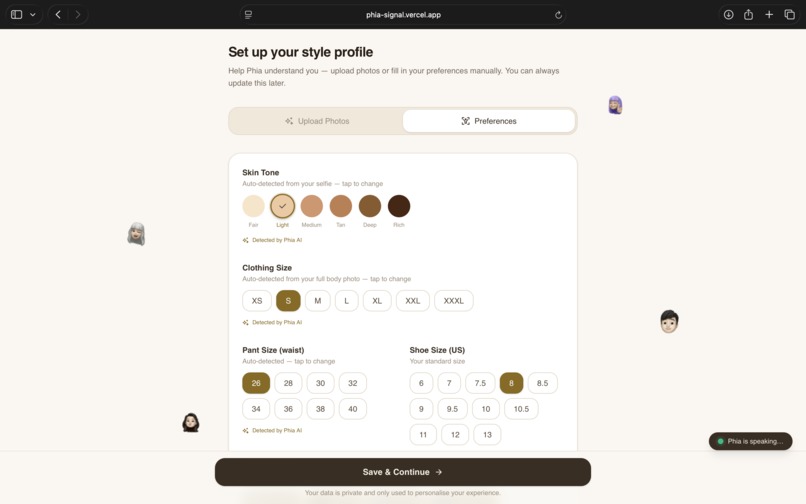
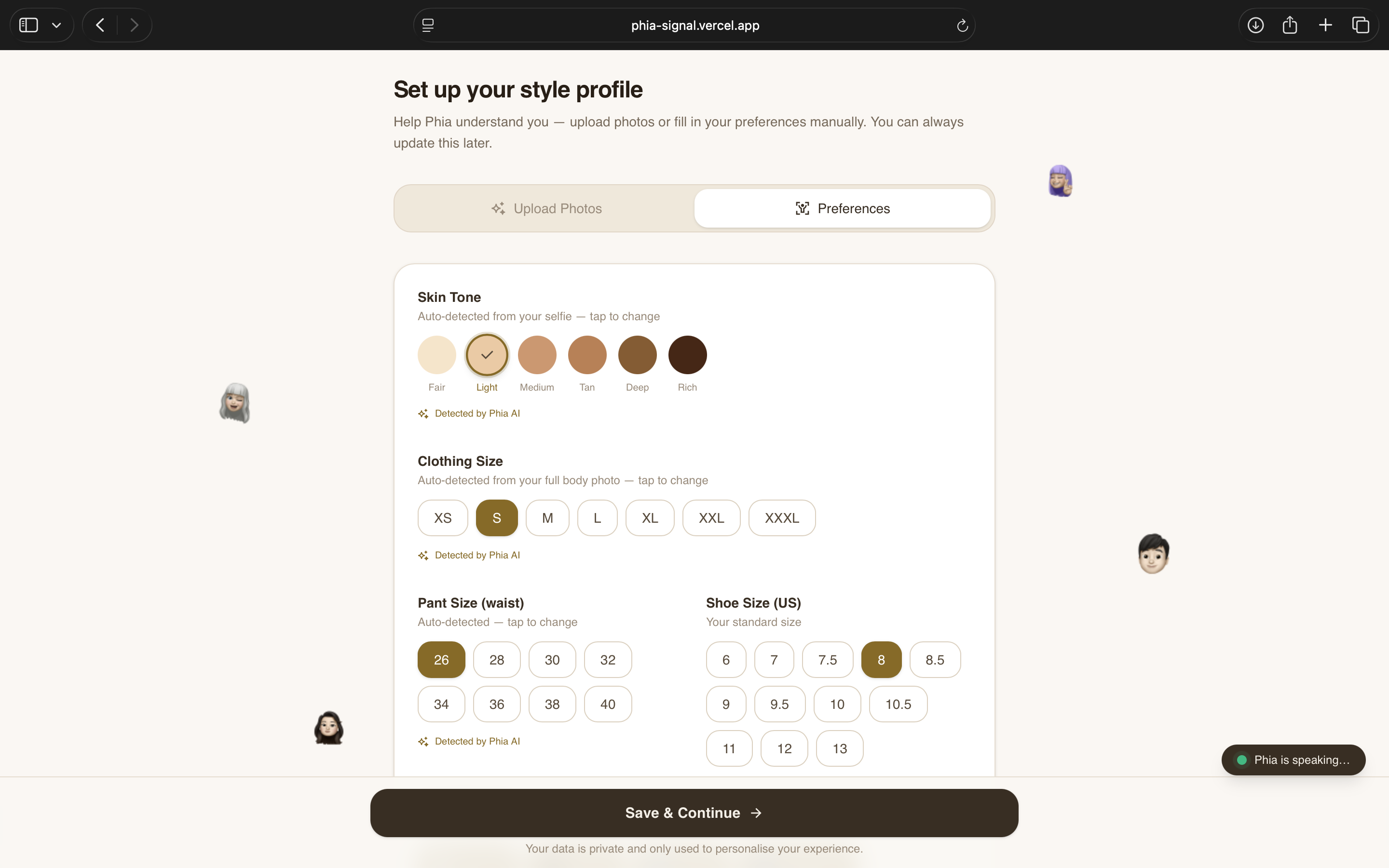
Preferences (AI-Detected)
- Skin Tone: Auto-detected from selfie photos via Claude Opus vision API. Six categories (Fair → Rich) with manual override.
- Clothing Size: Auto-detected from full body photos via Claude Opus. XS → XXXL with AI badge.
- Pant Size: Auto-detected alongside clothing size. 26" → 40" waist.
- Style Vibes: Auto-detected from outfit photos via Claude Opus. 10 predefined + custom AI-detected vibes (e.g., "business casual", "dark academia"). Multi-select pills.
- Favorite Colors: Auto-detected from outfit analysis. 16-color palette with swatch selection.
- Patterns to Avoid: Visual grid of 12 patterns (Floral, Stripes, Animal Print, etc.) with emoji icons. Multi-select with red "Avoiding" state.
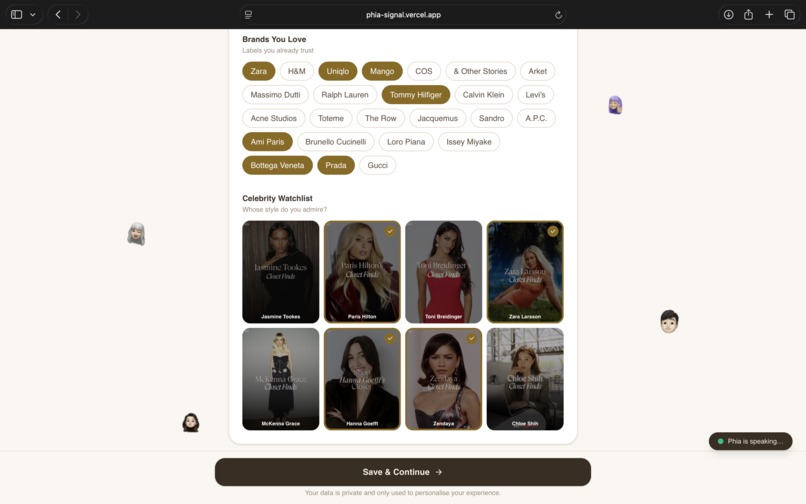
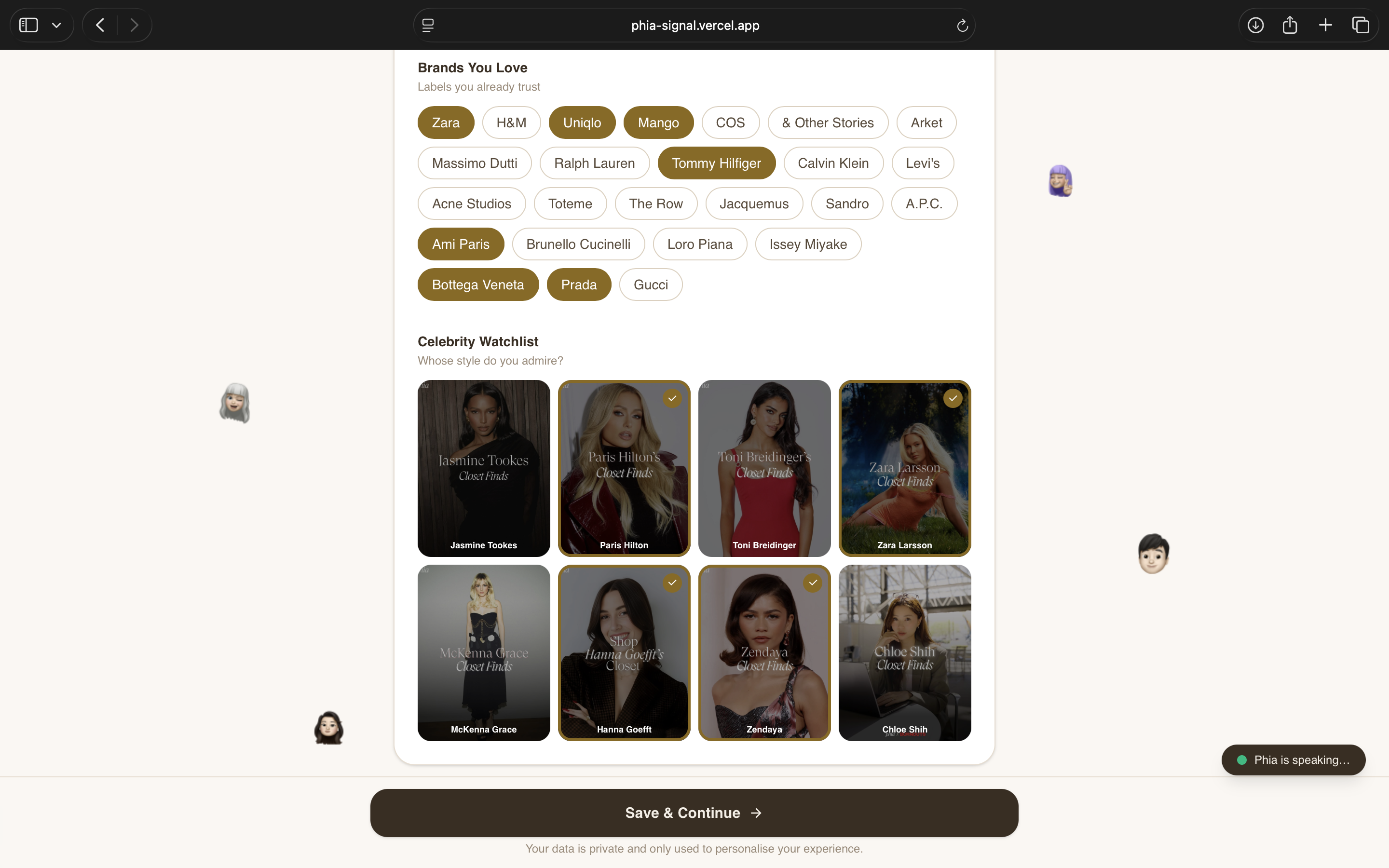
- Celebrity Watchlist: 9 celebrities (Jasmine Tookes, Zendaya, Paris Hilton, etc.) in a 4-column image grid with gold checkmark selection.
- Brands You Love: 25 curated fashion brands as toggleable chips.
All three AI analysis calls (skin tone, body size, outfit style) run in parallel when transitioning from Upload to Preferences.
3. Phia Signal — Agent Orchestrator
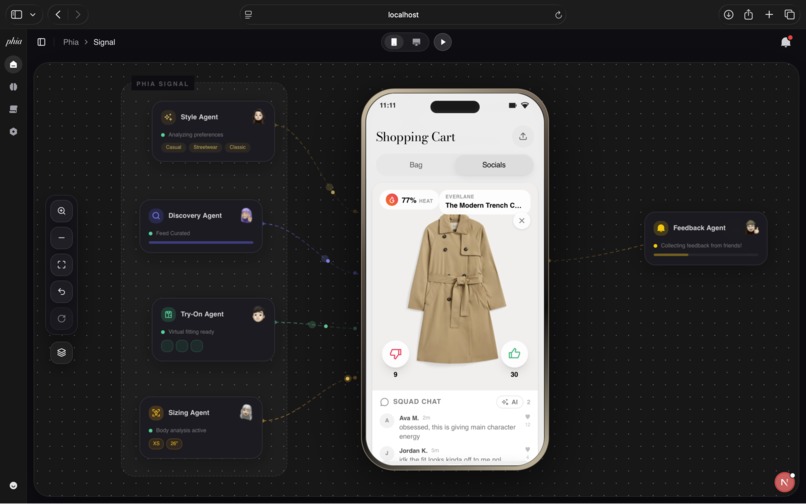
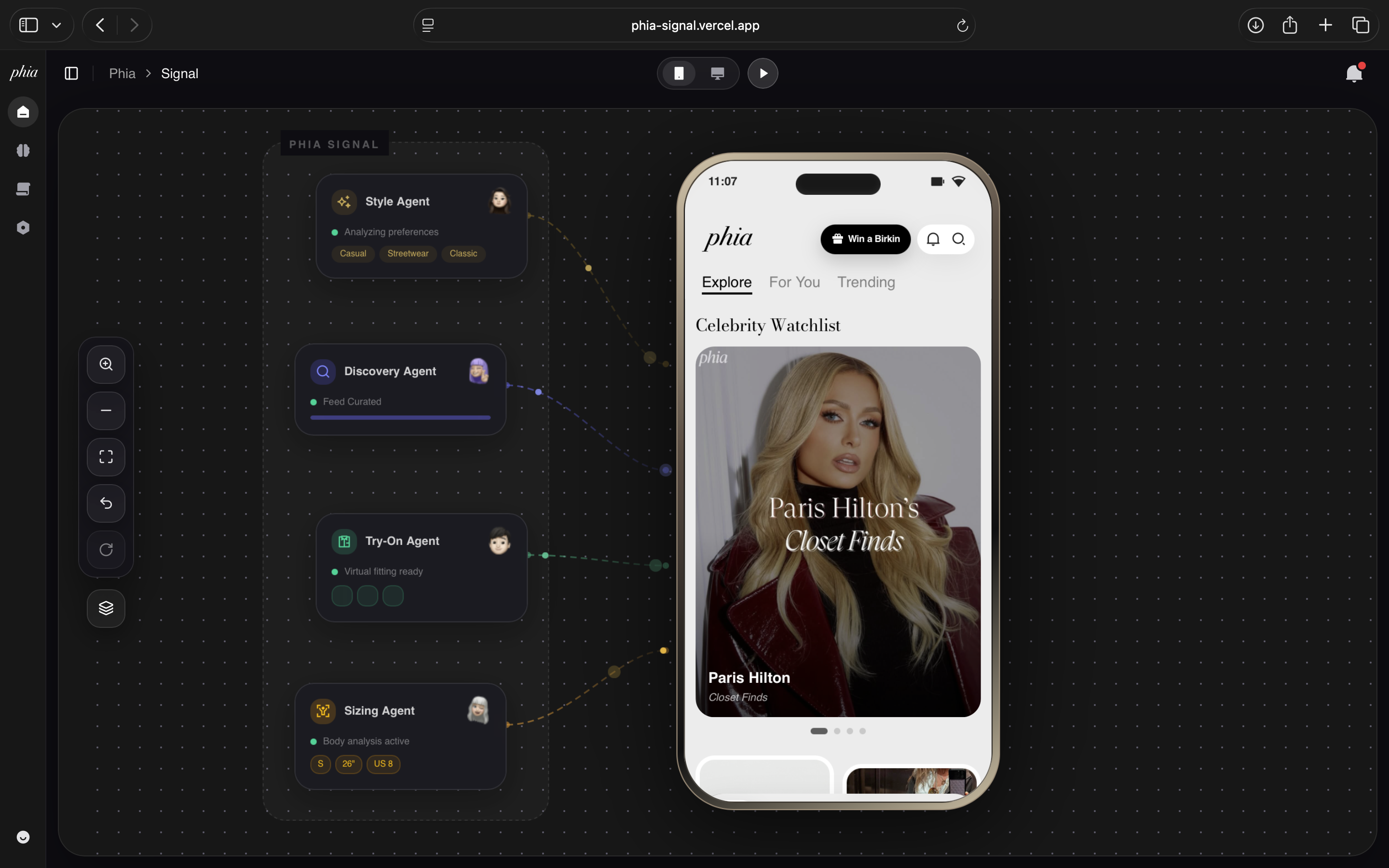
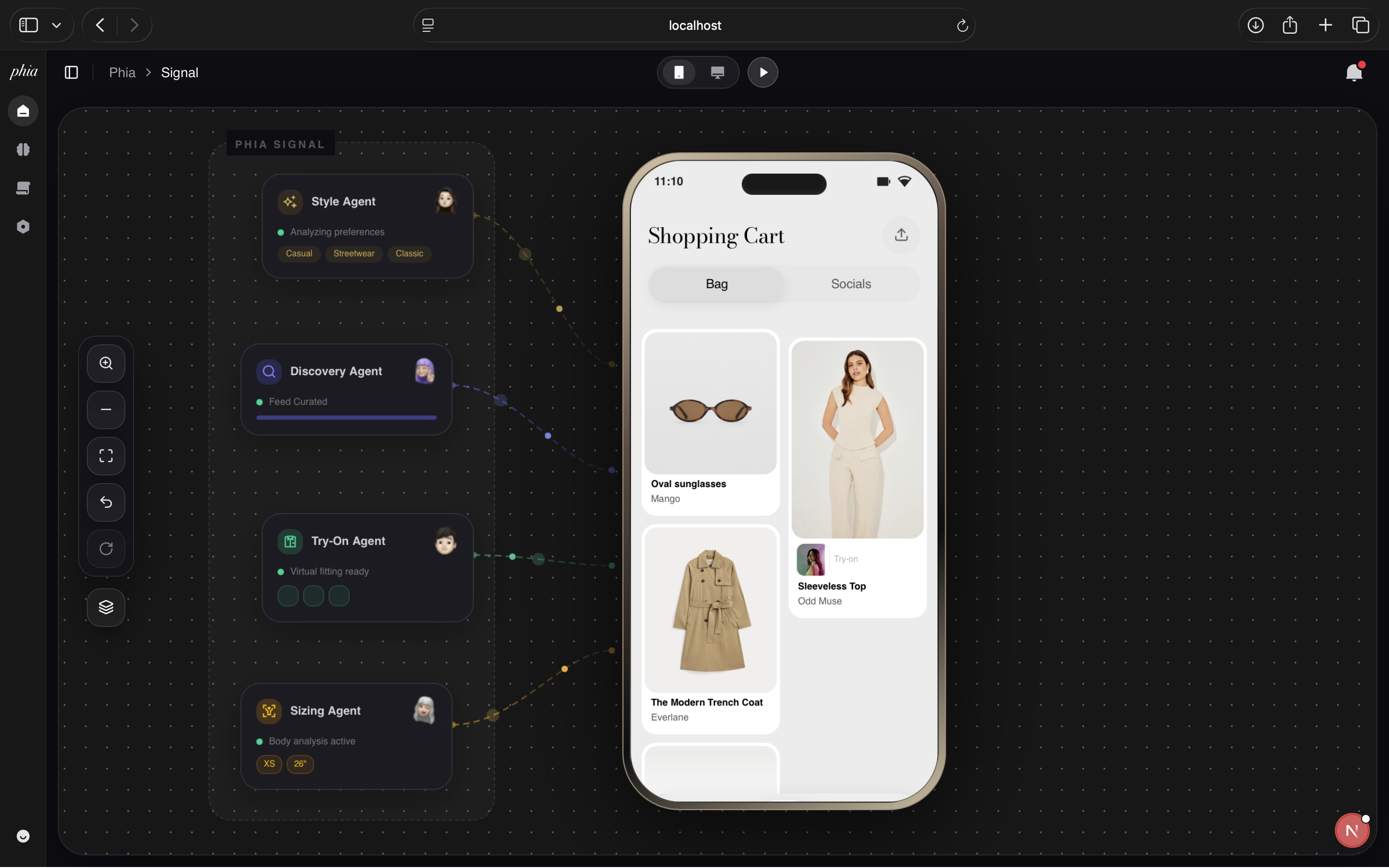
When the app launches at /phia, the Phia Signal Agent Orchestrator powers up with four specialized AI agents visualized on a pannable, zoomable canvas:
| Agent | Icon | Role | Voice-Enabled |
|---|---|---|---|
| Style Agent | Rectangle.svg | Analyzes style preferences, vibes, and color palette | Yes — click icon to start voice conversation |
| Discovery Agent | Rectangle1.svg | Curates personalized product feed from signals | No |
| Try-On Agent | k_pop_guru.svg | Generates virtual try-on images | No |
| Sizing Agent | yoga.svg | Tracks body measurements and recommends sizes | Yes — click icon to start voice conversation |
Agent Visualization:
- Agents are rendered as draggable glass-morphism cards on the workspace canvas
- Enclosed in a dashed "PHIA SIGNAL" border with subtle grey background
- Each agent connects to the phone preview via animated SVG bezier curves with flowing particle animations
- Toggle visibility with the Layers3 button
- Available in both phone and tablet device views
Voice-Enabled Agents (ElevenLabs):
- Sizing Agent: Click the yoga.svg icon → connects to ElevenLabs agent, opens microphone, two-way conversation. Speak sizing updates ("change my pant size to 32", "make it large"). On disconnect, transcript is analyzed and preferences are automatically updated.
- Style Agent: Click the Rectangle.svg icon → connects to a separate ElevenLabs agent with current style context injected. Speak style updates ("add streetwear", "remove classic", "more navy"). Transcript analysis updates style vibes and favorite colors.
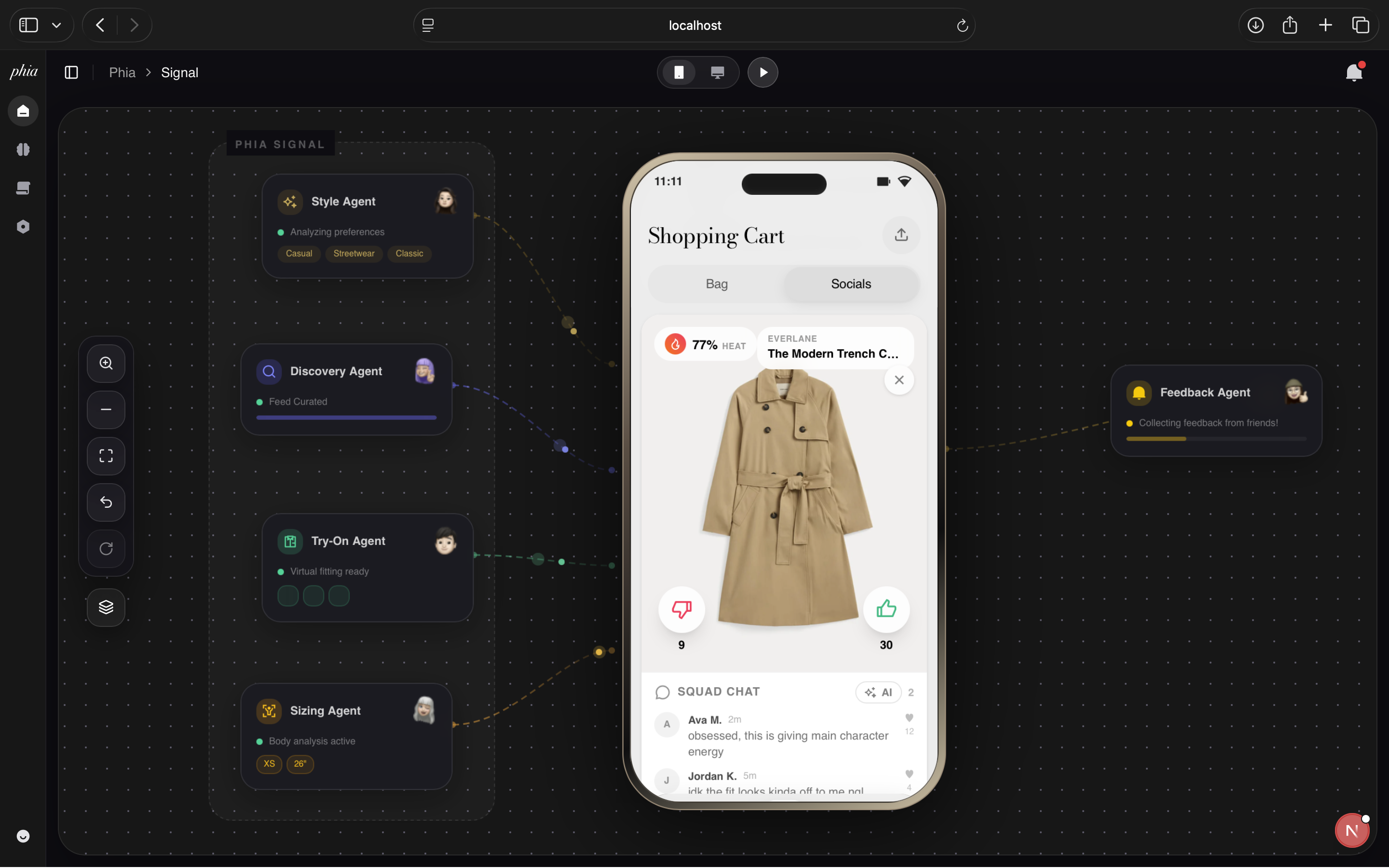
Feedback Agent appears on the right side when the shopping cart is shared, with reverse-flowing particles indicating feedback collection from friends.
4. Personalized Feed
The phone preview displays a fully interactive mobile shopping experience with three tabs:
Explore Tab
- Celebrity Watchlist horizontal carousel at the top (from onboarding selections)
- Masonry grid of curated products filtered through the user's style profile
- Every item is clickable → opens product detail overlay
For You Tab
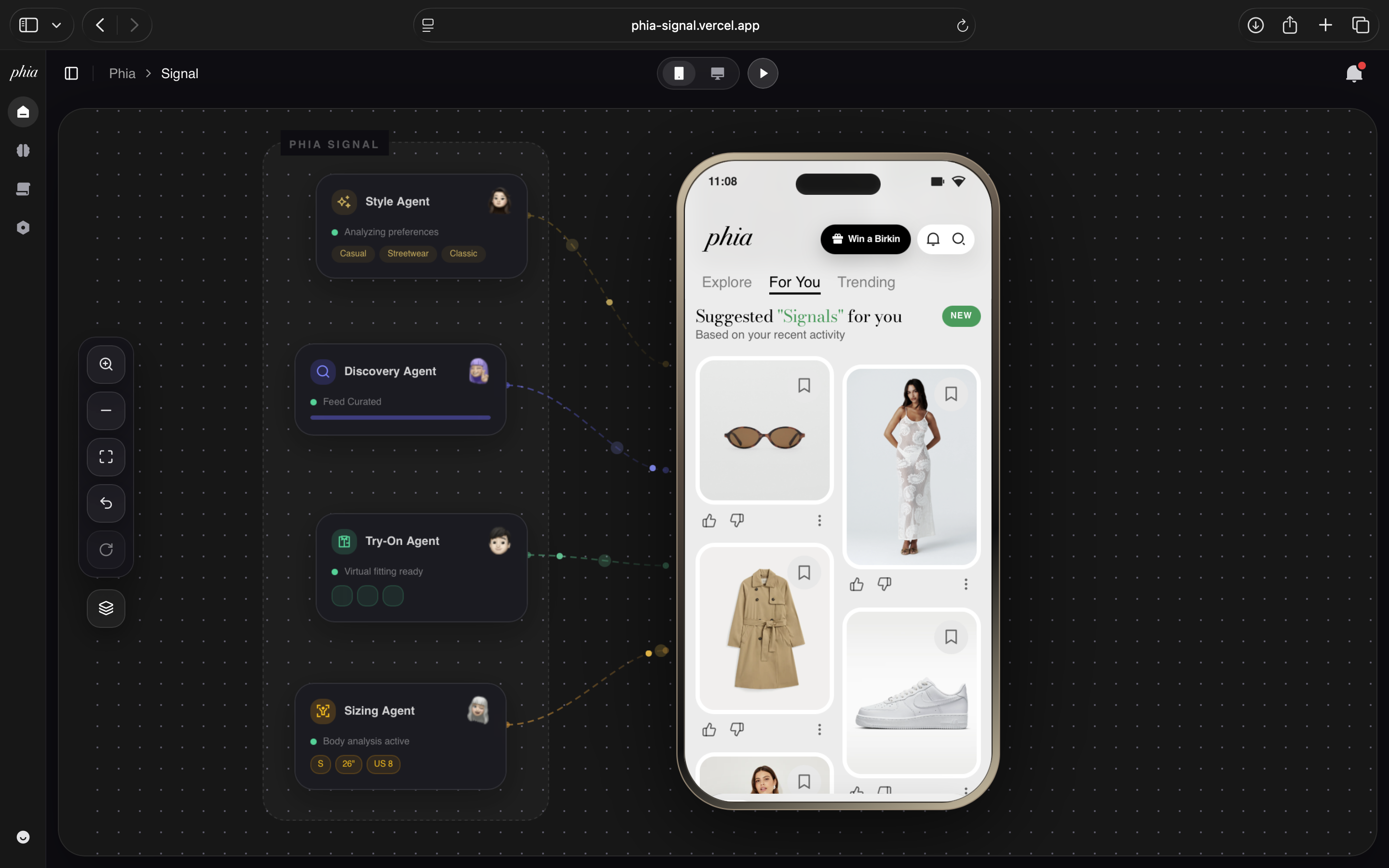
- Browse Styles: curated style categories in horizontally scrollable pill-shaped cards
- Search by Look: editorial-style look cards
- Trending brands with visit counts and rankings
- "Suggested signals" product grid with like/dislike/more actions
Trending Tab
- Trending collections carousel with editorial imagery
- "Trending with Phia" horizontal product cards with view counts
5. Product Detail & Virtual Try-On
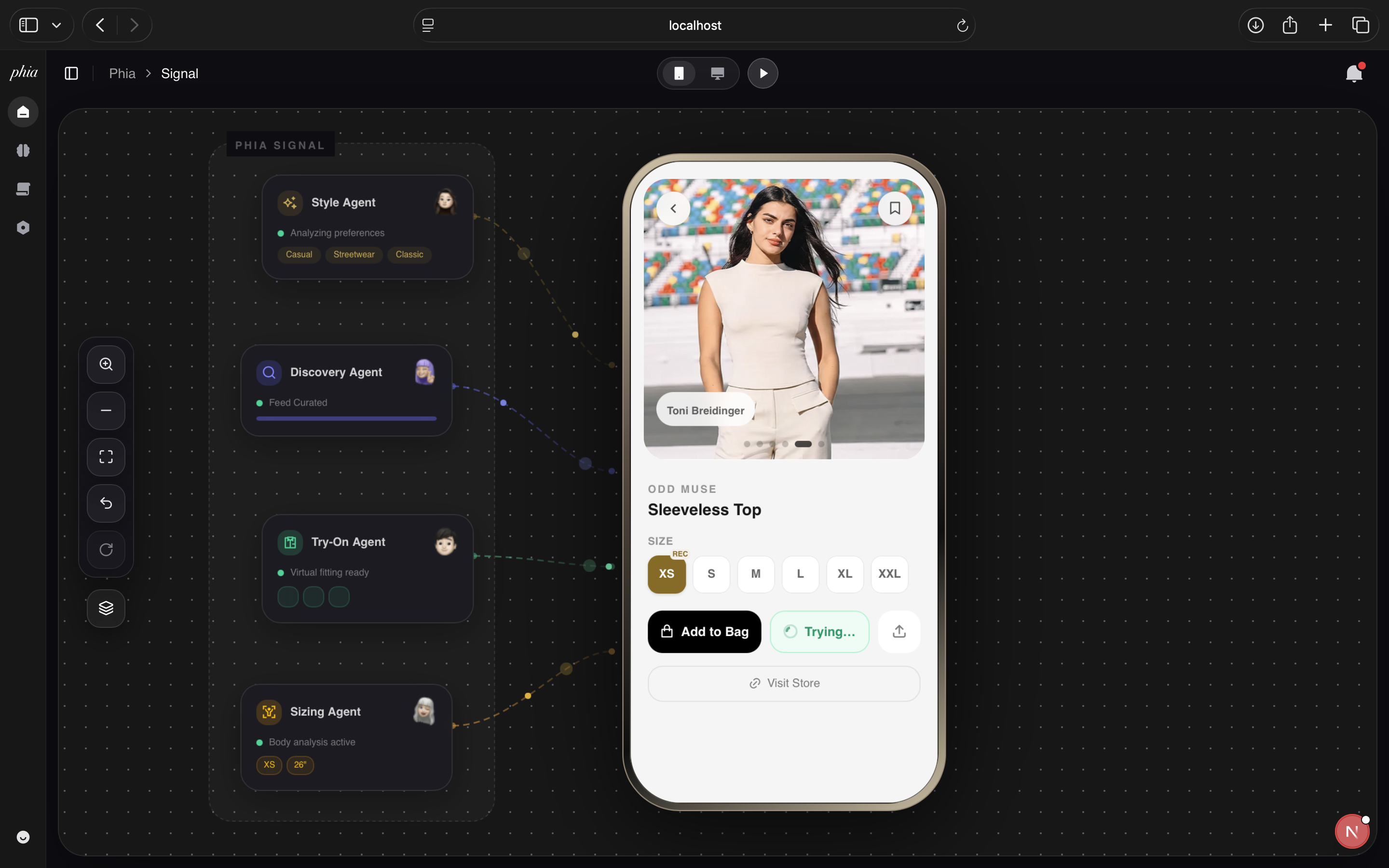
Tapping any product opens a full-screen detail overlay within the phone:
- Product image in a padded card with 1:1 aspect ratio
- Back/Bookmark floating buttons
- Price badge on the image
- Brand, name, description with detail pills (Price, Brand, Source, Color)
- Context-aware sizing: Dress sizes (XS–XXL) shown for clothing, Shoe sizes (US 6–13) for footwear. User's recommended size highlighted with gold "REC" badge.
- Add to Bag button with cart state tracking
- Try On button — generates virtual try-on images:
- Calls
/api/virtual-tryonin parallel for the user (4.png) and each selected celebrity - Results appear as a swipeable carousel with dot indicators and slide labels
- All generated images are cached in a persisted Zustand store (
phia-tryon-cache) — reopening the same product loads instantly
- Calls
- Share button with clipboard link generation
- Visit Store link to external retailer
- Enlarge — tap any carousel image for full-screen dark overlay view
6. Shopping Cart — Bag & Socials
The cart has two tabs accessed via the bottom navigation's shopping bag icon:
Bag Tab
- Masonry grid of added items with try-on thumbnails (if cached)
- Tap to reopen product detail
Socials Tab (Social Fitting Room)
- Every cart item becomes a social review card inspired by the Social Fitting Room pattern:
- Heat Level — real-time percentage badge (cop votes / total votes)
- Cop/Drop voting — thumbs up (green) / thumbs down (rose) with live counters in black text
- Image carousel — product photo + all cached try-on images with swipeable dots
- Delete button — X button to remove from cart and reviews
- Squad Chat — threaded comments with avatar, name, timestamp, like count
- AI Summary — one-tap Gen-Z style summary of squad feedback ("bestie the squad is split on this fit fr fr...")
- Comment input — type and send to join the discussion
- Swipe left to remove — Framer Motion drag gesture with red "Remove" background reveal
Share Cart:
- Share button toggles a panel with: Copy Link, iMessage, Telegram, Gmail
- Copy Link generates
phia-signal.vercel.app/cart/{uid}and publishes cart to shared Zustand store - Triggers the Feedback Agent to appear on the canvas
7. Shared Cart Page (/cart/[id])
When a friend opens the shared cart link, they see a standalone page with:
- Mobile phone frame — gold bezel matching the workspace aesthetic
- Phia Signal header with "Shared cart" label
- Same review card UI per item: product image, heat level, cop/drop voting, squad chat
- Friend comments tagged with indigo "FRIEND" badge
- Cross-tab sync — votes and comments persist to shared Zustand store in localStorage, readable by the main app's Socials tab
8. Analytics Dashboard
The /analytics page visualizes everything Phia has learned:
Face Mesh Analysis
- User's selfie (or fallback) with MediaPipe FaceLandmarker overlay
- Sparse 20-node face mesh + cheek scaffold + 5-row hair mesh
- Color sampling: skin tone, lip color, hair color with labeled hex values and color names
- Labels rendered as dark glass pills:
[swatch] SKIN · Peach (#C79A7B)
Brain Node Graph (Phia's Mind Map)
- 115 procedurally generated nodes in a brain-shaped ellipse formation
- Learnings mapped to nodes with category-colored dots (Complexion, Sizing, Style, Color, Fabric, Brand, Visual)
- Interactive hover tooltips showing learning details
- Legend with category colors
What Phia Learned About You
- Categorized pill sections: Complexion, Sizing, Style, Colors, Fabrics & Textures, Brands, Visual Analysis
- Each learning as a colored pill with category dot, label, and value
- Synced status indicator
9. Learning Loop
Every interaction teaches Phia and updates the brain visualization:
- Photo upload → AI detects skin tone, body size, style vibes, colors, fabrics
- Like/dislike a product → style profile weights adjust
- Add to cart → purchase intent signal
- Try on an item → silhouette preference learning
- Voice conversation → direct preference updates via transcript analysis
- Friend feedback → social signal integration via shared cart
API Routes
| Route | Method | Purpose |
|---|---|---|
/api/analyze-skin |
POST | Skin tone detection from selfie (Claude Opus) |
/api/analyze-size |
POST | Clothing + pant size estimation from full body (Claude Opus) |
/api/analyze-outfit |
POST | Style vibes, colors, textures from outfit photos (Claude Opus) |
/api/extract-headshot |
POST | Face bounding box detection for headshot crop (Gemini) |
/api/virtual-tryon |
POST | Virtual try-on via Vertex AI + aesthetic background via Gemini |
/api/elevenlabs-signed-url |
GET | Signed WebSocket URL for ElevenLabs agent |
Environment Variables
NEXT_PUBLIC_SUPABASE_URL=
NEXT_PUBLIC_SUPABASE_PUBLISHABLE_KEY=
ANTHROPIC_API_KEY=
GEMINI_API_KEY=
ELEVENLABS_API_KEY=
NEXT_PUBLIC_ELEVENLABS_AGENT_ID=
Getting Started
# Install dependencies
npm install

# Set up environment variables
cp .env.example .env.local

# Run development server
npm run dev

# Build for production
npm run build
Project Structure
phia-hq/
├── app/
│   ├── page.tsx                    # Landing page with GSAP animations
│   ├── onboarding/page.tsx         # AI-powered style profiling
│   ├── phia/page.tsx               # Main workspace
│   ├── analytics/page.tsx          # Analytics dashboard
│   ├── cart/[id]/page.tsx          # Shared cart page
│   └── api/
│       ├── analyze-skin/           # Skin tone detection
│       ├── analyze-size/           # Body size estimation
│       ├── analyze-outfit/         # Outfit style analysis
│       ├── extract-headshot/       # Face crop via Gemini
│       ├── virtual-tryon/          # Virtual try-on pipeline
│       └── elevenlabs-signed-url/  # ElevenLabs auth
├── components/
│   ├── phia/
│   │   ├── phia-workspace.tsx      # Main workspace (agents, canvas, phone preview)
│   │   └── reviews-feed.tsx        # Social fitting room UI
│   ├── BrainNodesGraph.tsx         # Neural visualization
│   ├── FaceGrid.jsx                # MediaPipe face mesh
│   ├── FaceMeshOverlay.jsx         # Face analysis wrapper
│   └── LearningsPills.tsx          # Analytics learnings display
├── lib/
│   ├── store.ts                    # Profile store + try-on cache
│   ├── shared-cart.ts              # Cross-tab shared cart store
│   └── supabase.ts                 # Supabase client
├── db/                             # JSON data (products, brands, trends)
└── public/
    ├── celebrities/                # Celebrity reference images
    │   └── tryon/                  # Pre-generated try-on images
    └── *.svg                       # Agent icons and decorative assets
License
MIT
Built with Phia Signal — Philosophy of discovering your signature style as insignia.
Built With
- elevenlabs
- fast-api
- google-gemini
- next-js
- supabase-db
- upstash-redis
- vercel

Log in or sign up for Devpost to join the conversation.