-
-
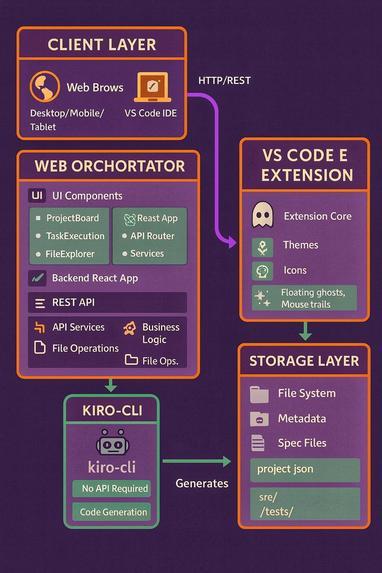
Architecture Diagram
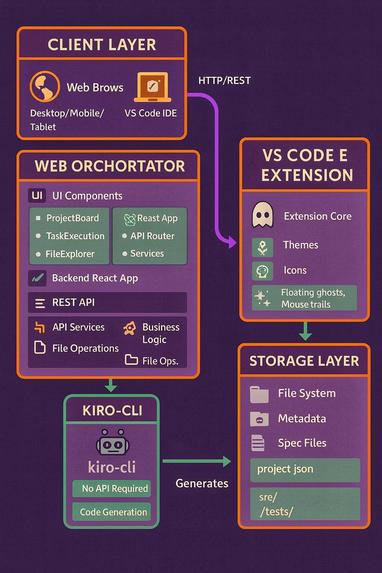
🎃 Phantom IDE - WebApp
Phantom IDE - WebApp is a Halloween-themed, AI-powered development ecosystem that breaks the traditional desktop-only IDE barrier. It allows users to create, design, and execute AI-assisted software projects directly from a web browser, including on mobile phones, while also offering a spooky VS Code extension for desktop power users. This project reimagines the IDE as something portable, accessible, and device-agnostic—an IDE that follows you everywhere.
💡 What Inspired Me
The idea came from a simple frustration. One night, while lying in bed, I thought of a project idea and grabbed my phone to prototype it quickly. That’s when I realized how much friction existed just to start coding: get out of bed, boot the laptop, open the IDE, wait for everything to load, and finally start working.
I asked myself: Why should AI-powered development be locked behind desktop applications? The Halloween hackathon theme gave me the perfect narrative: “The spirit of the IDE, unleashed from its desktop chains.” That’s how Phantom IDE was born—an IDE that haunts you across devices: start on your phone while commuting, continue on a tablet during lunch, finish on your desktop at night.
To support all users, I created two supernatural paths:
🌐 Web Orchestrator — mobile-first, zero installation
🦇 VS Code Extension — spooky power tools for desktop users
🎓 What I Learned
This project pushed me far beyond my expectations.
- Mobile-First Is Not Just Responsive: Designing mobile-first is completely different from resizing desktop layouts. Touch targets must be at least 44px. Typography needs fluid scaling using
clamp(). Real devices reveal issues emulators never catch. - Real-Time Streaming Is Hard: Streaming logs required async generators and careful state handling. Managing reconnects and partial output was challenging. Real-time feedback dramatically improves UX.
- Monaco Editor Integration: Monaco is powerful but heavy. Lazy loading is critical for performance. Mobile touch handling required custom logic. Memory cleanup is essential.
- VS Code Extension Development: Theme creation requires understanding token scopes. Icon themes need precise file associations. Webview security constraints force creative solutions.
- AI Integration Without an API: Using kiro-cli via subprocess was unconventional. Required deep async/await understanding. Process cleanup and error handling were critical.
- Accessibility Matters: WCAG 2.1 AA color contrast improves clarity. Keyboard navigation is essential. Semantic HTML benefits all users.
- The Power of Theming: Halloween aesthetics must enhance—not distract. Consistent theming made the project memorable. Fun and professionalism can coexist.
🛠️ How I Built It
🧱 Architecture (Monorepo)
backend/         → FastAPI orchestration engine
frontend/        → React + TypeScript web IDE
kiro-extension/  → VS Code Halloween extension
👻 Backend — Python + FastAPI
Why FastAPI?
- Native async support
- Automatic API documentation
- Strong validation with Pydantic
Responsibilities
- Project lifecycle management
- CLI execution via kiro-cli
- Real-time task log streaming
- Secure file system browsing
🎃 Frontend — React + TypeScript
Why These Choices
- React 19 for modern patterns
- TypeScript for safety and maintainability
- Tailwind CSS for rapid mobile-first UI
- Monaco Editor for familiar IDE experience
- Framer Motion for smooth animations
Features
- Mobile-first UI
- AI-generated requirements, design, and tasks
- Real-time execution logs
- File explorer with syntax highlighting
- Keyboard shortcuts (Ctrl+K, Ctrl+Enter)
🦇 VS Code Extension
Includes
- Halloween Dark & Light themes (WCAG AA compliant)
- 15+ spooky file icons
- Optional haunted visual effects
- Customizable intensity and toggles
🔧 Key Technical Challenges
📱 Mobile Touch Targets
// Before
<button className="p-2">Click</button>

// After
<button className="p-3 min-h-[44px] min-w-[44px]">Click</button>
🔤 Fluid Typography
font-size: clamp(0.875rem, 0.8rem + 0.375vw, 1rem);
⚡ Real-Time Log Streaming
async def stream_output(process):
    while True:
        line = await process.stdout.readline()
        if not line:
            break
        yield line.decode().strip()
🧠 Monaco Lazy Loading
const MonacoEditor = lazy(() => import('@monaco-editor/react'));
😅 Challenges I Faced
- Desktop-perfect UI breaking on mobile
- Logs appearing all at once instead of streaming
- Monaco editor memory leaks
- Touch targets too small for real users
- CLI subprocess output capture issues
- Color contrast failing accessibility checks
- File tree performance on large projects
- Keyboard shortcut conflicts with browsers
- Binary files crashing the editor
- Balancing spooky fun with professionalism
Each challenge required iteration—and made the product stronger.
"Why install an IDE when the IDE can haunt you instead?"

Log in or sign up for Devpost to join the conversation.