-
-
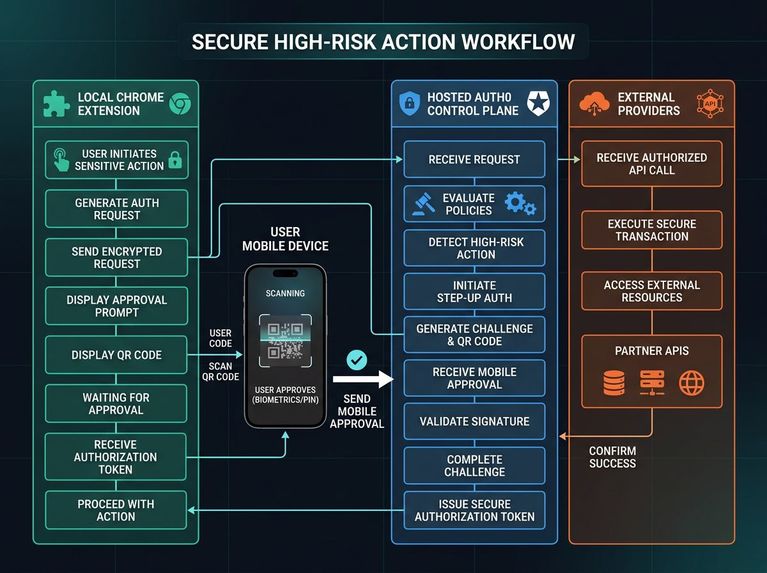
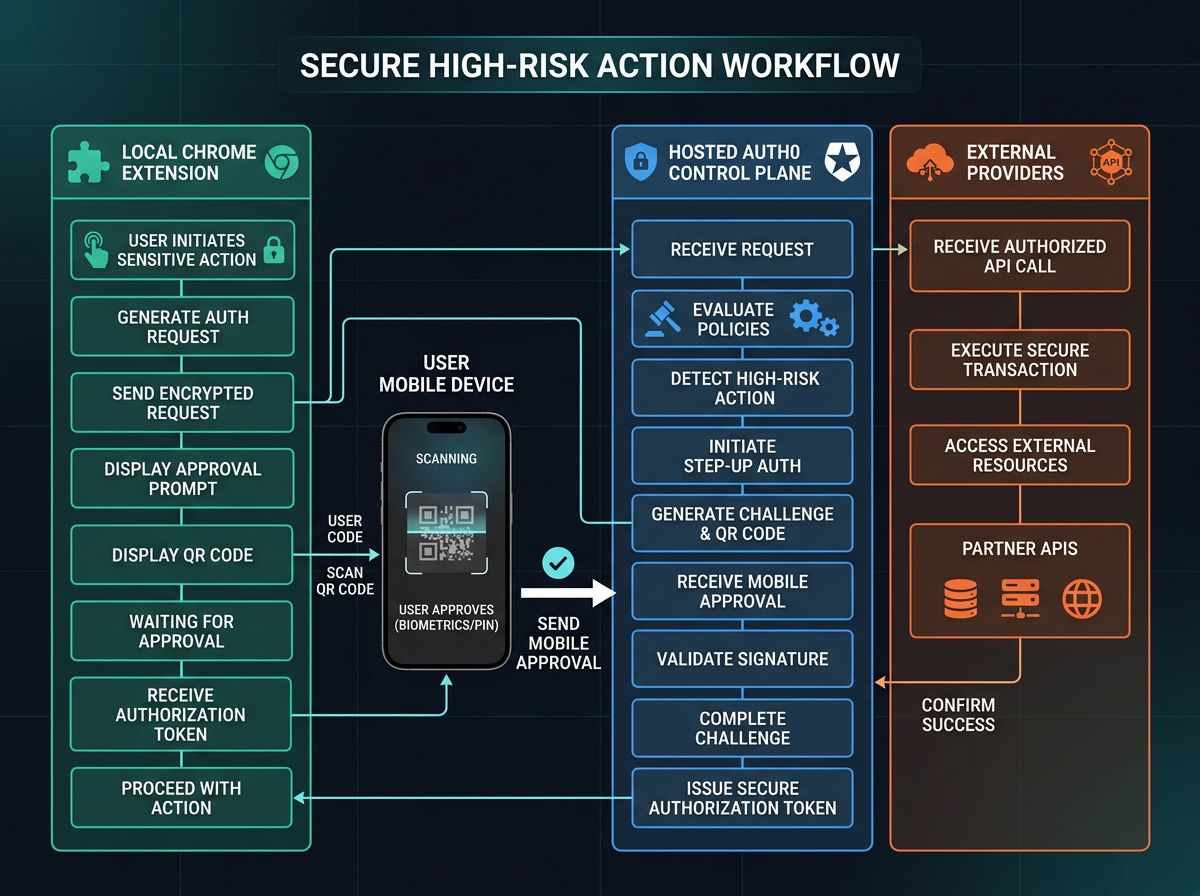
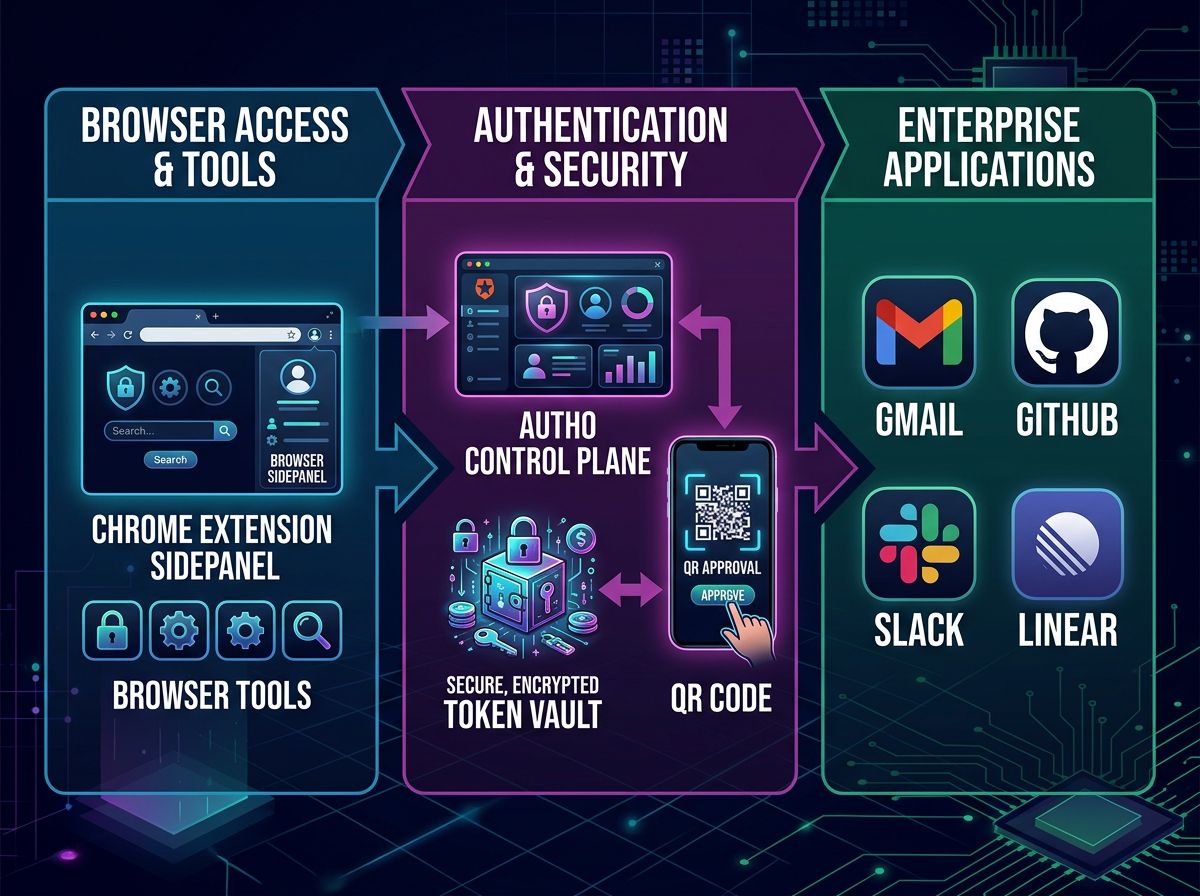
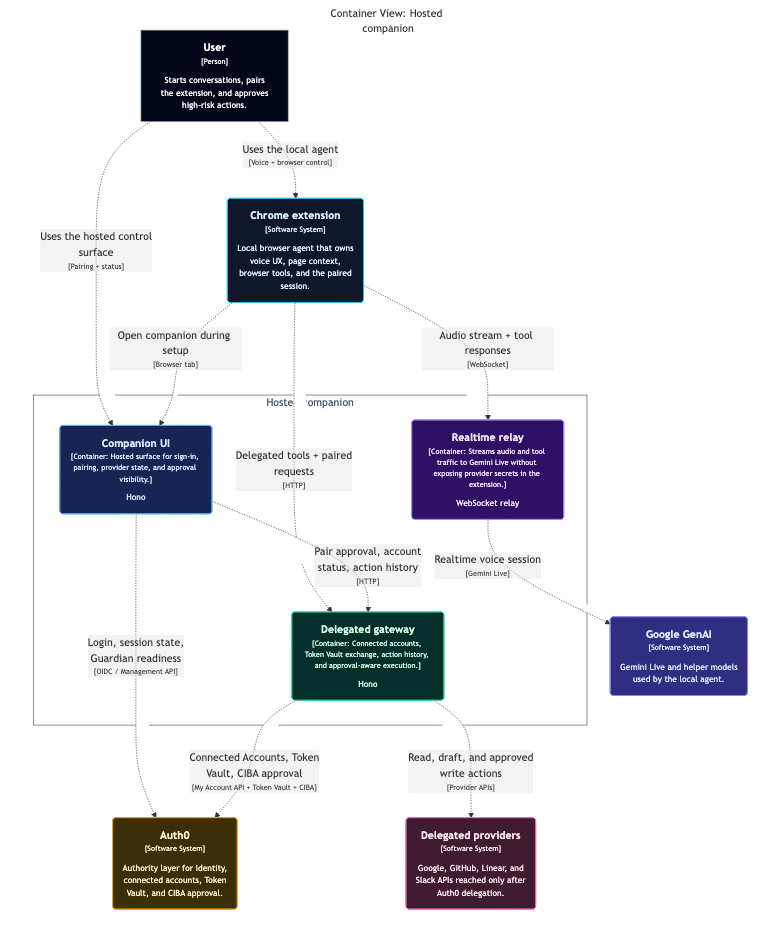
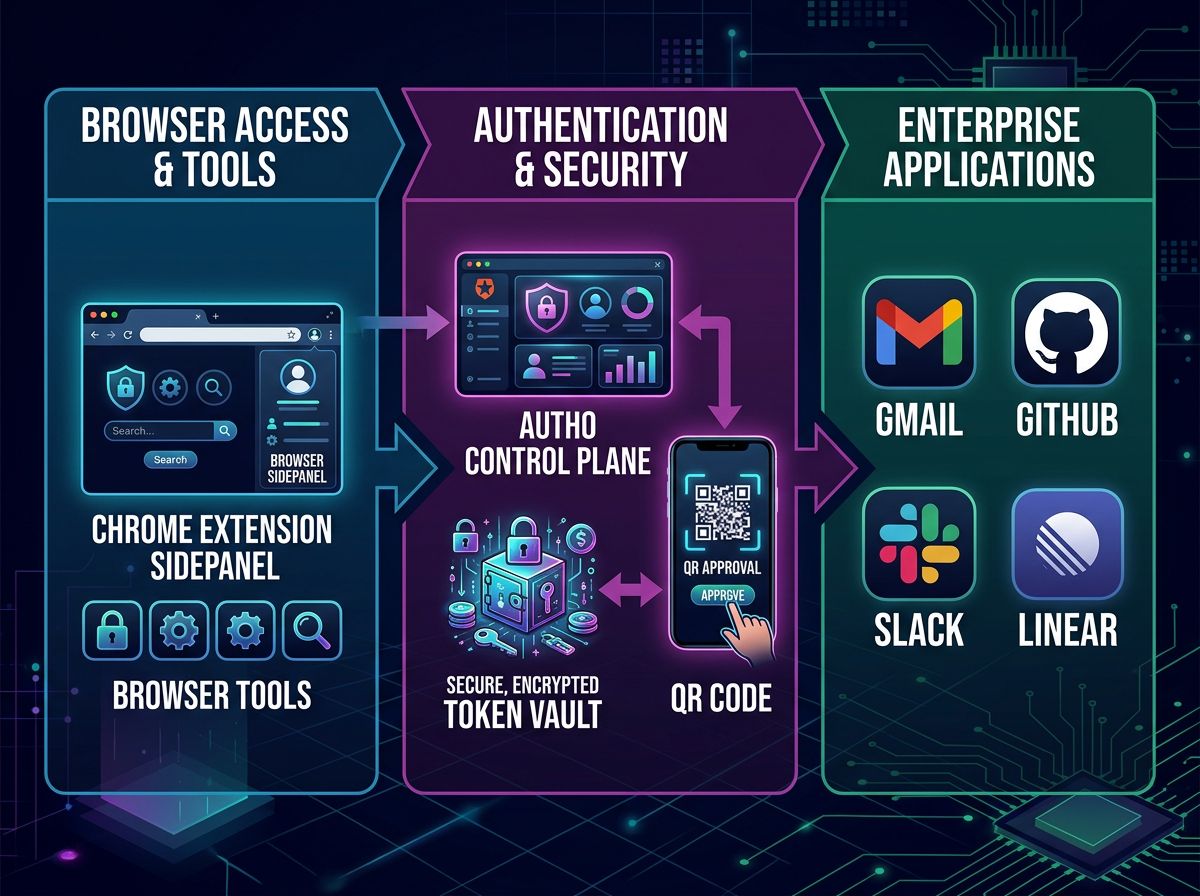
Architecture Diagram
-
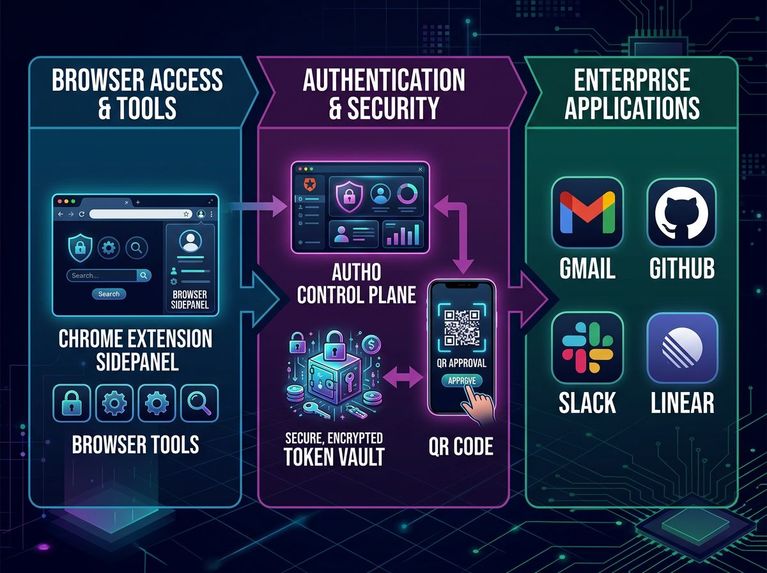
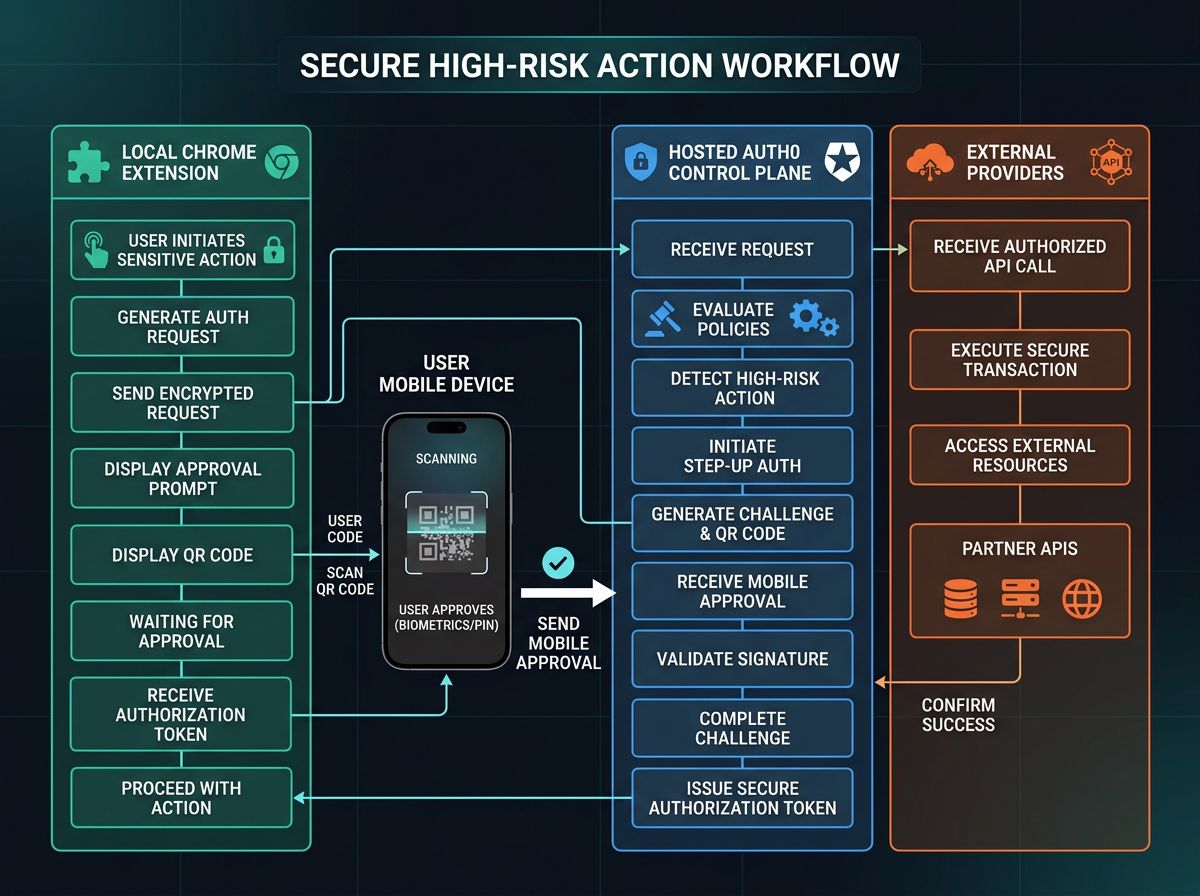
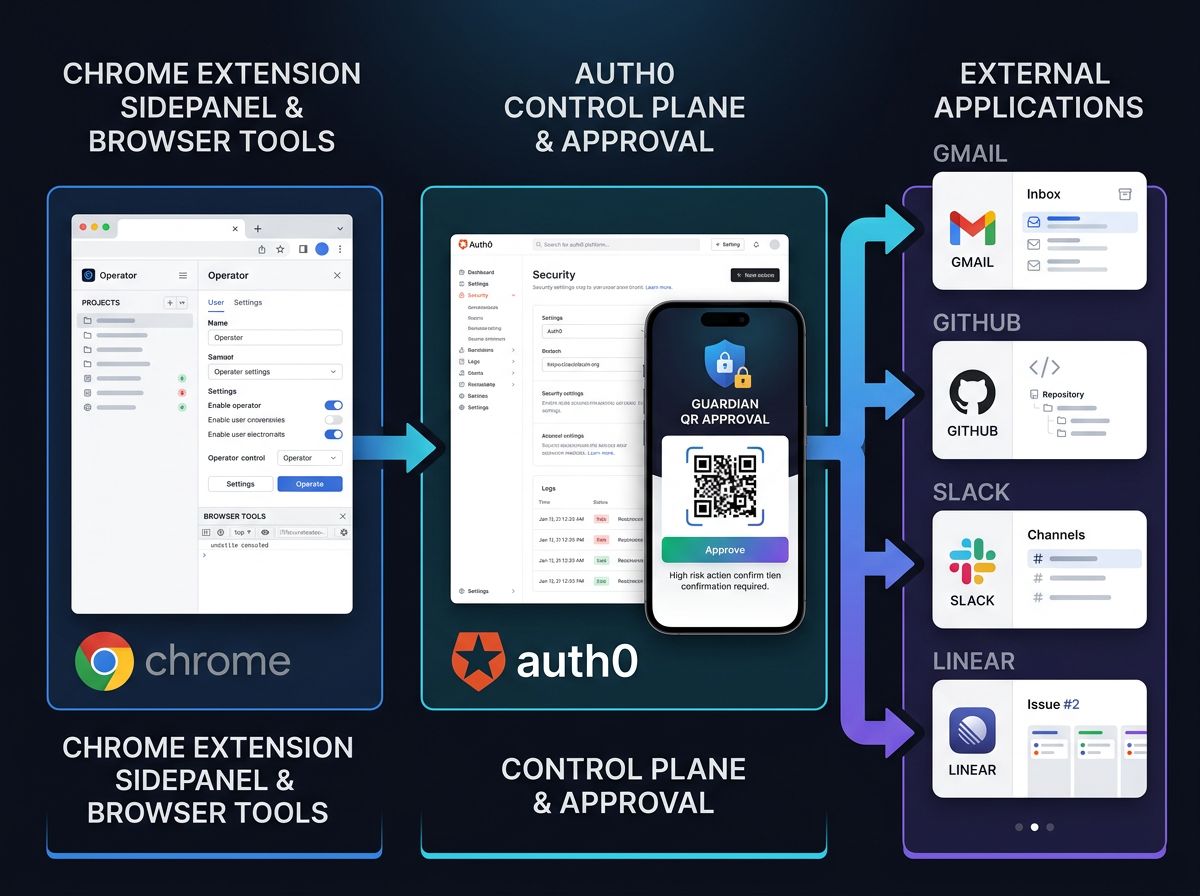
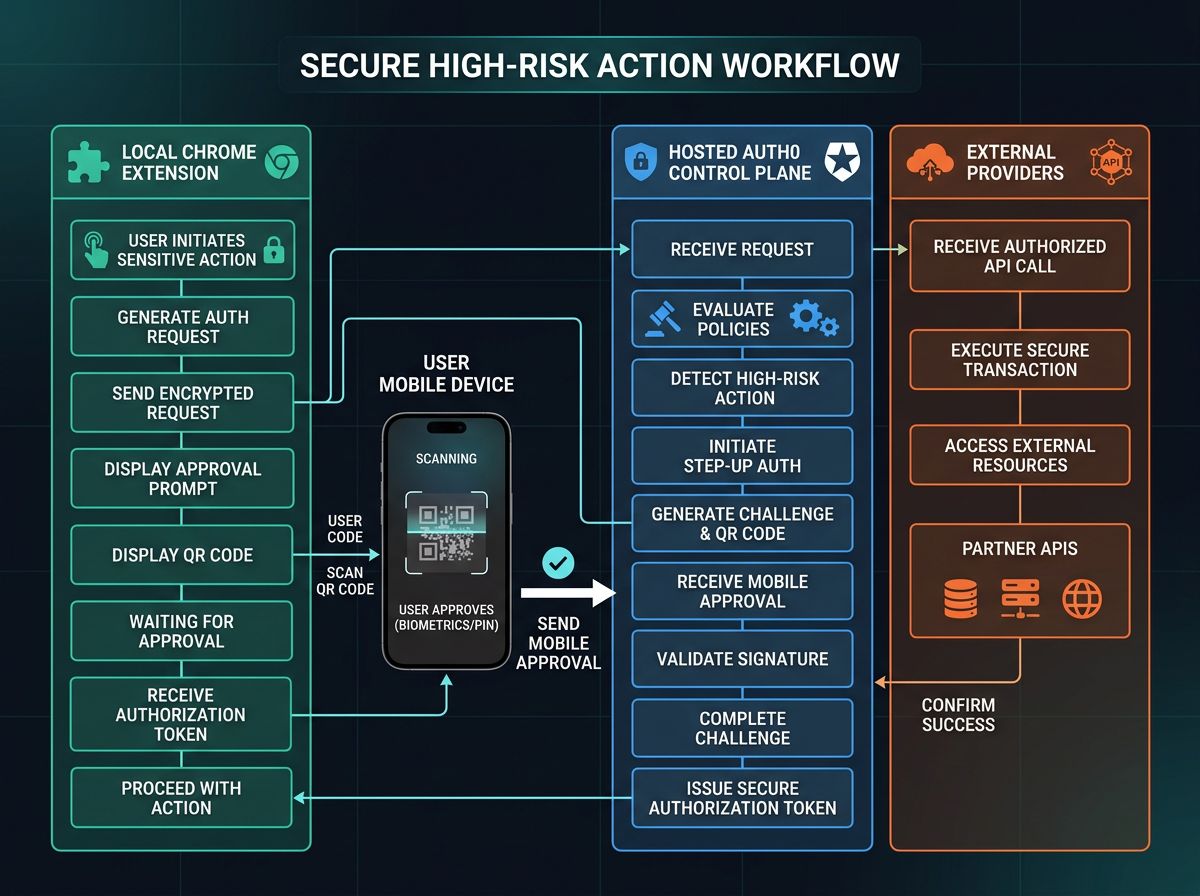
Flow Diagram
-
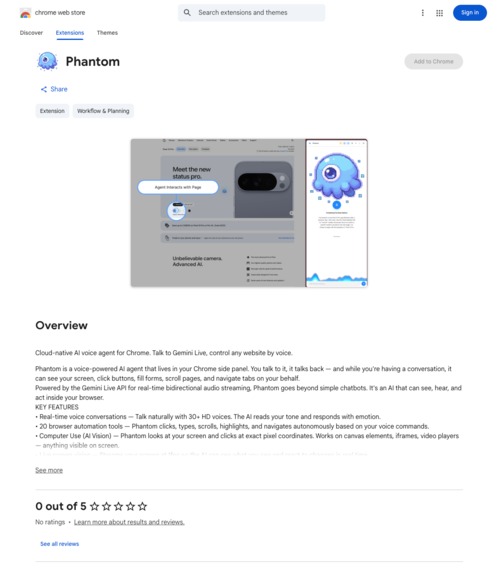
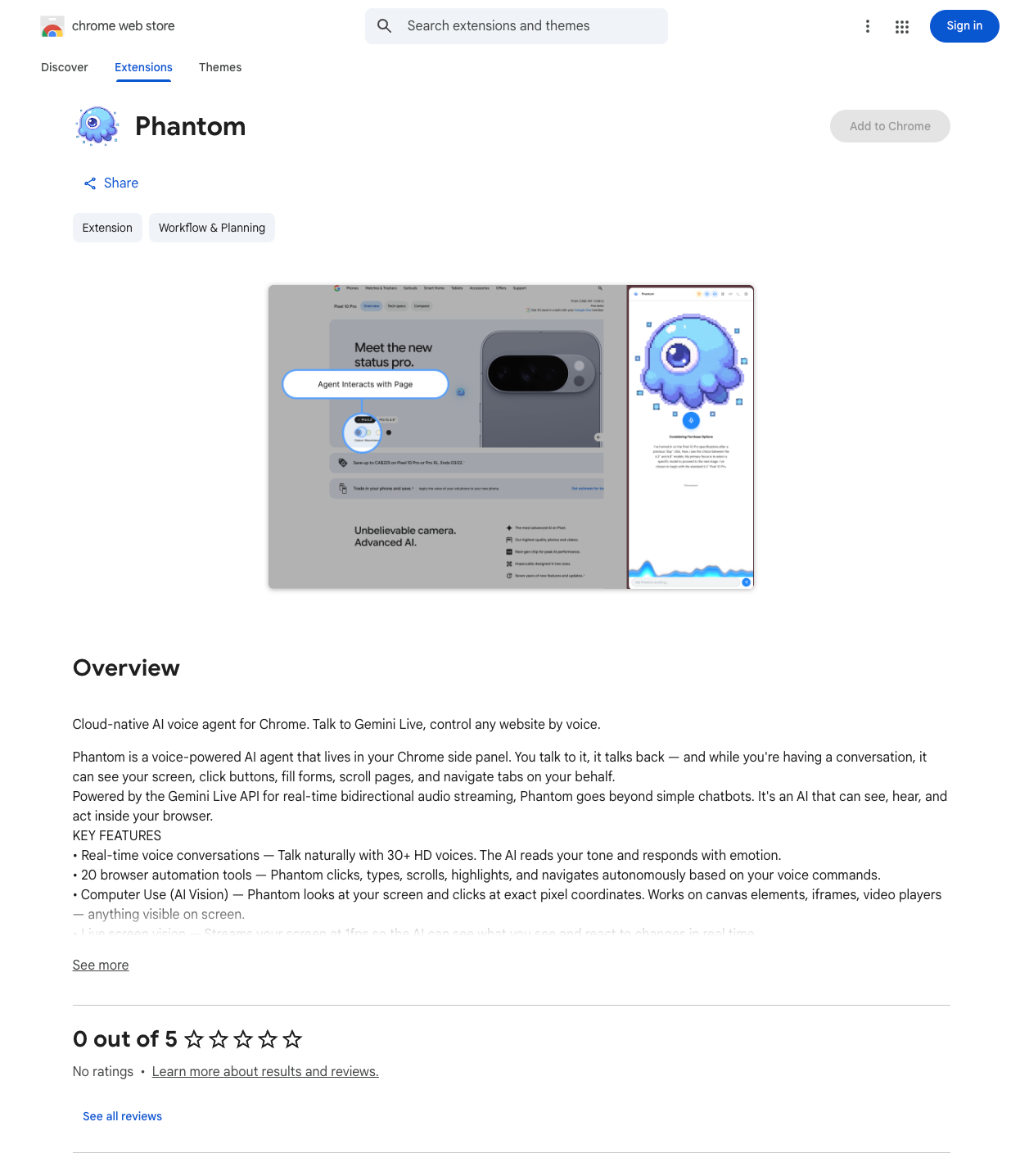
Chrome Web Store
Inspiration
AI agents are getting better at understanding context and acting on behalf of users, but the authorization layer is still weak in most projects.
Too many “agent integrations” are still built like this:
| Common pattern | Why it breaks trust |
|---|---|
Provider API keys in .env |
No user-level consent boundary |
| Long-lived tokens hidden in app logic | Hard to inspect, revoke, or explain |
| No distinction between read vs write actions | High-risk actions feel invisible |
| No user-facing approval surface | Users cannot tell what the agent is allowed to do |
Phantom was already strong as a local browser agent. It could stay close to the user, operate in the browser, and avoid shipping all context to a remote service. But for the Auth0 for AI Agents hackathon, that was not enough.
We wanted to answer a harder question:
How should a local agent securely act across a user’s external apps without becoming a credential hoarder?
That led to Phantom Auth0: a version of Phantom that keeps the agent local and restricted, while moving cross-app identity, delegation, connected accounts, and approval into Auth0.
The idea behind the project is simple:
- keep execution local
- make authority visible
- delegate safely
- require approval when actions become high stakes
What it does
Phantom Auth0 is a restricted local browser agent paired with a hosted Auth0 companion app.
The extension remains the local client. It handles browser context, page-aware behavior, voice interaction, and tool execution. When the agent needs to act outside the browser, it goes through the companion app and Auth0 instead of directly holding third-party provider credentials.
Current core capabilities
| Capability | Where it happens | Why it matters |
|---|---|---|
| Local browser interaction | Chrome extension | Keeps execution close to the user |
| Auth0 login | Hosted companion | Gives the session a real identity layer |
| Connected Accounts | Auth0 | Lets users explicitly attach external providers |
| Delegated actions | Hosted gateway | Moves provider access out of the extension |
| Approval for sensitive actions | Auth0 Guardian / approval flow | Creates a real step-up boundary |
| Action history | Companion app | Makes outcomes visible after execution |
Today’s strongest implemented demo path
The cleanest path today is Google + Linear.
Users can:
- sign in with Auth0
- pair the local extension with the hosted companion
- connect Google and Linear through Connected Accounts
- see which accounts are connected
- review delegated action history
- distinguish low-risk and high-risk actions
- require approval before state-changing actions execute
Demoed delegated actions
| Provider | Actions demonstrated |
|---|---|
| Google Calendar | Check availability |
| Gmail | Draft email, send email behind approval |
| Google Sheets / Tasks | Integrated into the system design and delegated action model |
| Linear | List teams, prepare issues, create issues behind approval |
The key architectural behavior is the point of the project:
The extension does not manually manage provider secrets. Auth0 becomes the authority layer for identity, connected accounts, token exchange, and approval-aware delegation.
How we built it
We built Phantom Auth0 as an isolated, Auth0-first derivative of Phantom.
System layout
| Layer | Responsibility |
|---|---|
| Chrome extension | Local runtime, browser context, page tools, voice interaction, Auth0 status display |
| Hosted companion app | Login surface, pairing, connected-account status, action history, approval visibility |
| Hosted action gateway | Delegated action orchestration and provider calls |
| Auth0 | Universal Login, Connected Accounts, Token Vault, My Account API, approval-related identity flows |
| Providers | Google and Linear, accessed through delegated flows rather than raw extension-owned secrets |
Auth0 features used
- Universal Login for authentication
- Refresh tokens with rotation
- My Account API for connected-account management
- Connected Accounts
- Token Vault for delegated provider access
- Approval-aware action flow for high-risk operations
Why this is not just “login added to an extension”
Auth0 is on the runtime path, not just the login page.
Actions like:
- checking connected accounts
- listing Linear teams
- checking calendar availability
- drafting and sending Gmail
- preparing and creating Linear issues
all route through the companion/gateway layer, where Auth0-backed identity and delegation matter.
That means Auth0 is part of the actual execution model of the agent.
Security model and user control
This is the part of the project we care about most.
Security model
| Principle | How Phantom Auth0 applies it |
|---|---|
| Least authority in the extension | The extension stays local and does not directly own cross-app provider credentials |
| Explicit provider connection | External apps are attached through Auth0 Connected Accounts |
| Delegated access instead of hidden secrets | Provider access is mediated through Auth0 Token Vault |
| Separation of low-risk vs high-risk actions | Reads can remain lightweight; writes can require approval |
| Visible trust surface | The companion app shows connected accounts, approvals, and delegated action history |
User control
Users can answer the questions that matter:
- What apps is this agent connected to?
- What is it allowed to do?
- Which actions are safe to automate?
- Which actions require approval?
- Where do I inspect what just happened?
That is the core product insight: agent UX and authorization UX cannot be separated.
Approval boundary
High-risk actions are not treated like silent tool calls. They are visible, attributable, and reviewable.
Challenges we ran into
The biggest challenge was making the Auth0 layer real rather than cosmetic.
Technical challenges
- My Account API access required the right user client-grant configuration
- refresh token rotation required persisting rotated refresh tokens correctly server-side
- Connected Accounts callback handling had to be wired carefully end to end
- provider behavior differs depending on connection type and tenant configuration
- async approval flows are powerful, but reliability depends heavily on correct tenant setup and runtime state handling
- deploying the hosted surface introduced callback/base-URL consistency issues that had to be corrected to keep login and connected-account flows stable
Product challenge
The deeper challenge was design, not just plumbing:
How do you keep the agent local and useful while making authorization visible and understandable?
We had to decide:
- what belongs in the extension
- what belongs in the companion
- what should be silent
- what should be surfaced
- when the system should ask for approval
- how to make those boundaries legible to judges and users quickly
Accomplishments that we're proud of
We are proud that Phantom Auth0 is not just “Phantom plus login.”
What we are most proud of
- turning a local browser agent into a true delegated-action architecture
- using Auth0 Token Vault as a core runtime dependency
- keeping the agent local while moving cross-app authority into a visible trust layer
- implementing Connected Accounts in a way that matches the hackathon theme directly
- building explicit approval boundaries for high-risk actions
- surfacing Auth0 state in both the extension UI and the hosted companion
- producing a clean, understandable Google + Linear judging path
- isolating the repo, deployment, docs, and architecture story so the project is easy to evaluate
Why that matters
The strongest conceptual pattern behind the project is:
- local agency
- hosted consent
- delegated access
- visible control boundaries
That feels like a more durable direction for agent software than “just give the model more credentials.”
What we learned
We learned that a technically impressive agent is still incomplete if users cannot answer basic authorization questions.
Product lessons
| Lesson | What it changed |
|---|---|
| Agent UX and authorization UX are inseparable | We treated the companion as part of the product, not support UI |
| Visibility matters as much as capability | Action history and account state became first-class surfaces |
| Approval must feel structural, not ornamental | High-risk actions needed a real step-up boundary |
Implementation lessons
- refresh-token exchange and rotation details matter a lot
- tenant configuration can make or break the end-to-end experience
- provider-specific differences show up quickly in real delegated flows
- trust boundaries are not something to bolt on later
- Auth0 for AI Agents becomes most compelling when it shapes product architecture, not just auth screens
What's next for Phantom Auth0: Secure Delegated Actions for AI Agents
The next step is to harden the system beyond hackathon scope.
Near-term roadmap
- fully harden and validate the async approval path end to end
- improve persistence for delegated action history and session state
- continue refining Google and Linear delegated workflows
- simplify and clarify the companion UI even further
- tighten the installation, onboarding, and review path for broader testing
Longer-term direction
The long-term goal is for Phantom Auth0 to demonstrate a reusable pattern:
Agents should not be trusted because they are smart.
They should be trusted because their authority is visible, scoped, delegated, and interruptible.
Bonus Blog Post
Phantom already knew how to listen, see the browser, and act. The real challenge was turning that local agent into a system that could use connected accounts, delegate safely, and expose authority instead of hiding it.
By Younes Laaroussi
Phantom started as a browser-native agent. You talk, it reacts, and the extension takes care of the visible work: reading the page, clicking, scrolling, opening tabs, and moving through the browser with almost no friction. That part was already compelling. What was missing was a trustworthy answer to a more serious question:
What gives it the right to act for the user outside the tab?
That question changes the architecture immediately. A browser extension can hold state, but it is the wrong place to improvise long-lived authority. As soon as Phantom started reaching into Gmail, Calendar, Docs, Sheets, Tasks, and Linear, “the extension has access” stopped sounding clever and started sounding irresponsible.
The project became more interesting when I stopped treating authorization as a detail. Instead of asking how to cram more power into the local agent, I asked how to split the system so the local part remained fast and intimate while the authority layer became visible, scoped, and reviewable.
That is where Auth0 changed the direction of the product. Phantom did not stop being a local browser companion. It stopped pretending that local execution should also be the source of truth for identity, connected accounts, provider access, and approval.
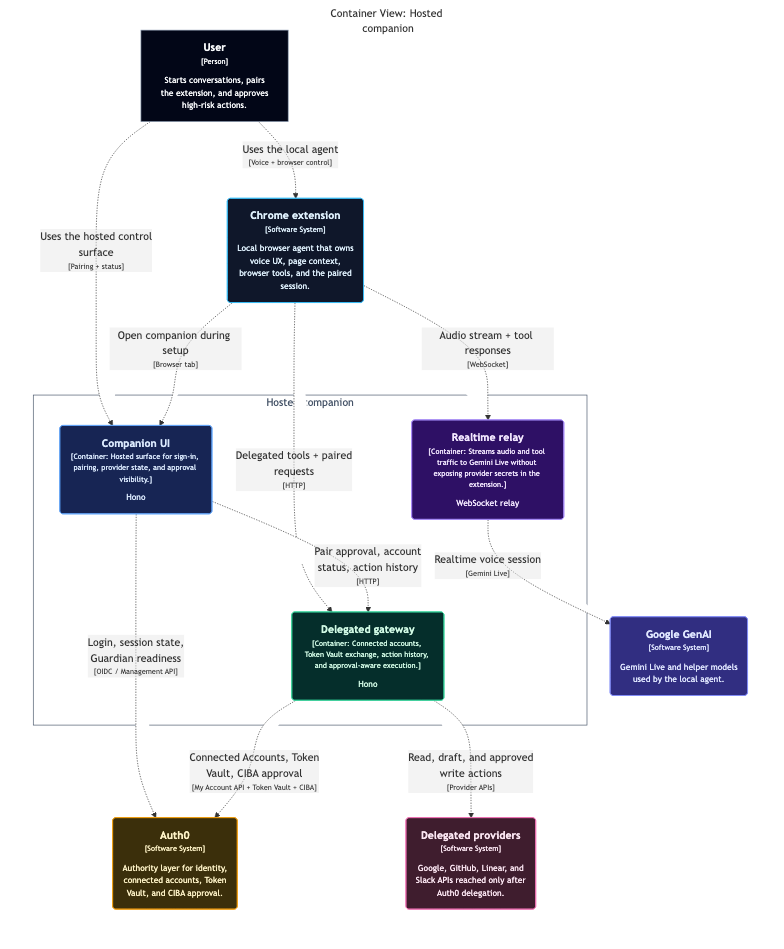
Runtime split. The extension stays local. The hosted companion and gateway become the authority surface. Auth0 owns connected accounts, delegated access, and approval. Providers stay downstream instead of being smuggled into browser state.
Auth0 turned Phantom into a delegated system instead of a clever extension
The first concrete shift was connected accounts. Provider login should not be a side effect of whatever tab the user happens to have open. With Auth0 Token Vault, Phantom can connect Google and Linear through a proper authority layer, which means the browser extension no longer needs to own raw provider credentials or fake its way through session cookies and copied tokens.
The second shift was visibility. The companion is not there just to look nice. It is the surface that tells the truth about the system: which accounts are connected, which actions are pending, which high-risk operations need approval, and what has already happened. That interface matters because it translates invisible authorization state into something a user can actually inspect.
The third shift was approval. Reads can stay lightweight. Mutating actions should not. Creating calendar events, sending mail, and opening real work in external systems should step up into explicit approval instead of feeling like silent model behavior. Auth0 Guardian gives that moment a real boundary.
The product got better when it became less magical and more legible.
Here’s the core of what changed:
Token Vault
Provider authority moved out of the extension.
Google and Linear now sit behind Auth0’s connected-account flow instead of leaking into the browser runtime as an implementation shortcut.
Companion
The system exposes status instead of hiding it in prompts.
Connected accounts, pending approvals, and delegated action history are all visible in one place, which makes the app easier to trust and easier to demo honestly.
Guardian
High-risk actions gained a real consent boundary.
Approval is no longer a narrative flourish. It is an actual gate in the runtime, tied to the user and reflected in the system’s action state.
The interesting part is not that Phantom can act. It is how those actions travel.
Once the agent asks to do something meaningful, the request moves through a chain that makes sense. The extension initiates the action. The gateway performs provider-specific work. Auth0 sits in the middle as the authority layer. The companion shows the resulting action record. If approval is required, that request becomes visible before the mutating step can finish.
That gives Phantom a much stronger operating model than “the AI did something in my browser.” It becomes possible to say exactly what happened, where it happened, and why the system was allowed to proceed.
Delegated action flow. The browser agent initiates work locally. The hosted gateway handles provider calls. Results return as action records rather than disappearing into conversational state.
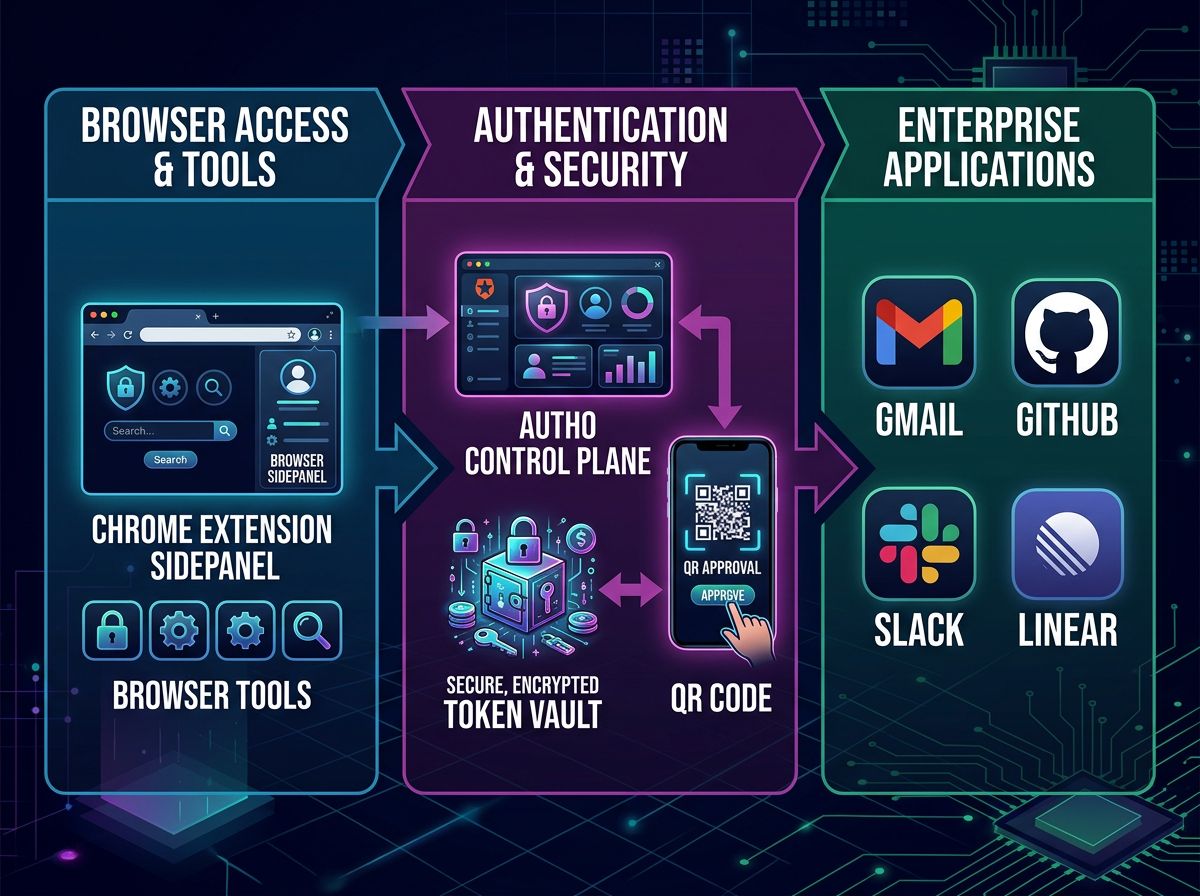
Authority lanes. Phantom remains the local interface, but Auth0 becomes the durable authority layer between the agent and downstream providers.
Step-up approval is what makes the product feel responsible
A useful agent should not force the same friction on every action, but it should absolutely create friction when the user’s behalf is being asserted in a consequential way. That is the point where Auth0 stops being a backend convenience and becomes product substance.
The approval loop matters because it is easy to explain:
- The user asks for an action.
- Phantom prepares it.
- Auth0 requests approval.
- The user approves on their own device.
- The action completes.
- The companion records the outcome.
That sequence is a lot less flashy than an unconstrained agent, but it is much closer to something people could actually live with.
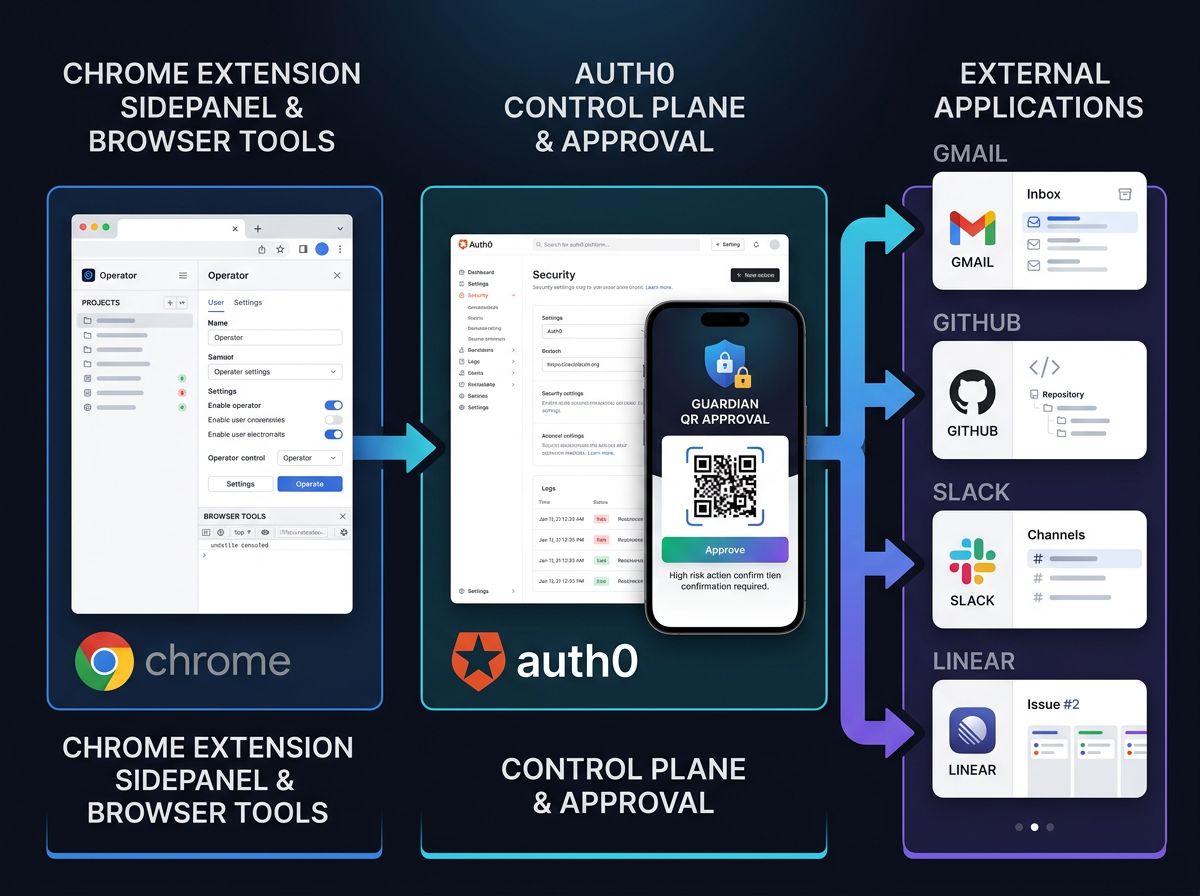
Approval loop. The system becomes more trustworthy when the approval step is visible, attributable, and tied to the final action record instead of being treated like invisible middleware.
Why this architecture feels right
What I like most about the final shape is that it keeps both halves of the idea intact. Phantom still feels like a local companion. It speaks, watches, and acts in the browser without turning into a remote dashboard. But the authority behind it is no longer improvised. Identity, connected accounts, delegated access, and approval now live in the right place.
That split is the real product.
Local execution gives the system immediacy. Auth0 gives it discipline. One without the other would either feel weak or unsafe. Together they make a browser agent that can do real work without pretending that permission is somebody else’s problem.
Phantom is still the same spirit at the edge of the browser. The difference is that now it has a visible authority model behind it. That is what turned it from a neat interaction demo into a system I can explain with a straight face.
- Published app article: https://phantom-auth0-server-pio3n3nsna-uc.a.run.app/blog
- Dev.to version: https://dev.to/youneslaaroussi/augmenting-phantom-with-auth0-authority-360a


Log in or sign up for Devpost to join the conversation.