-
-
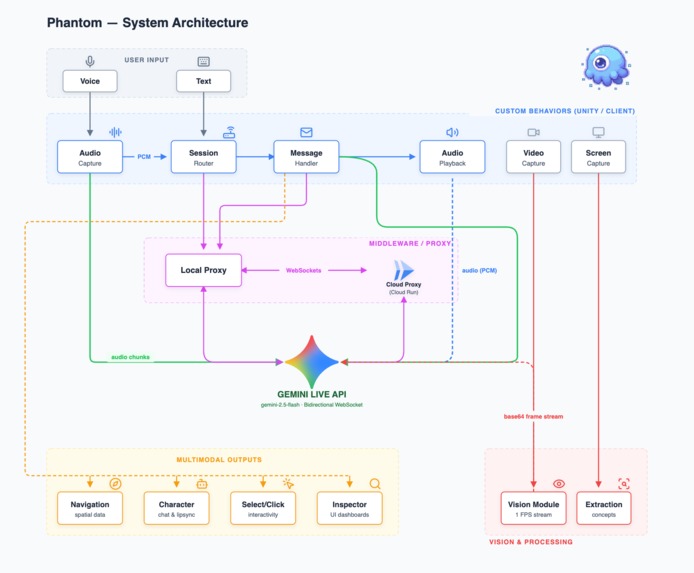
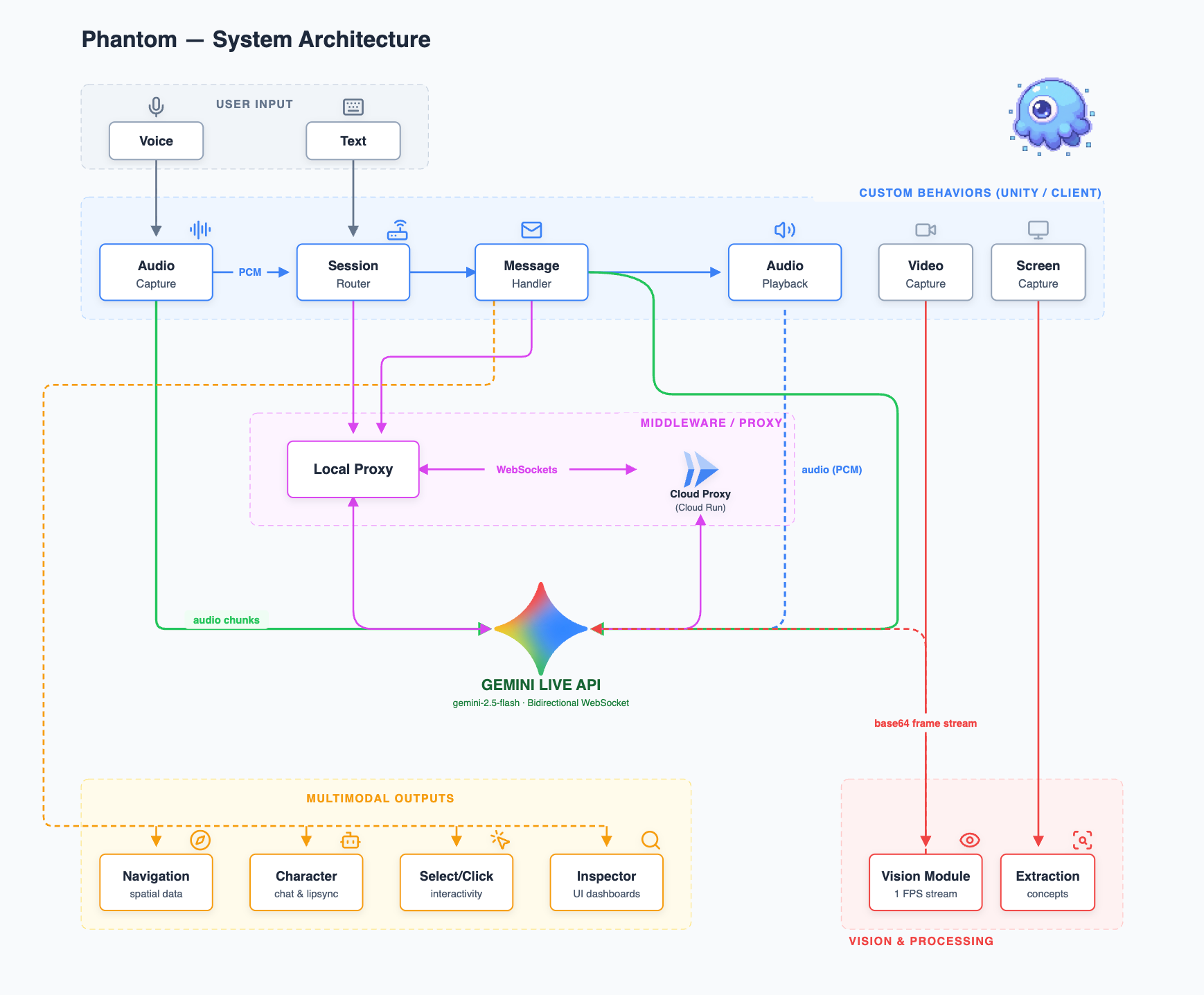
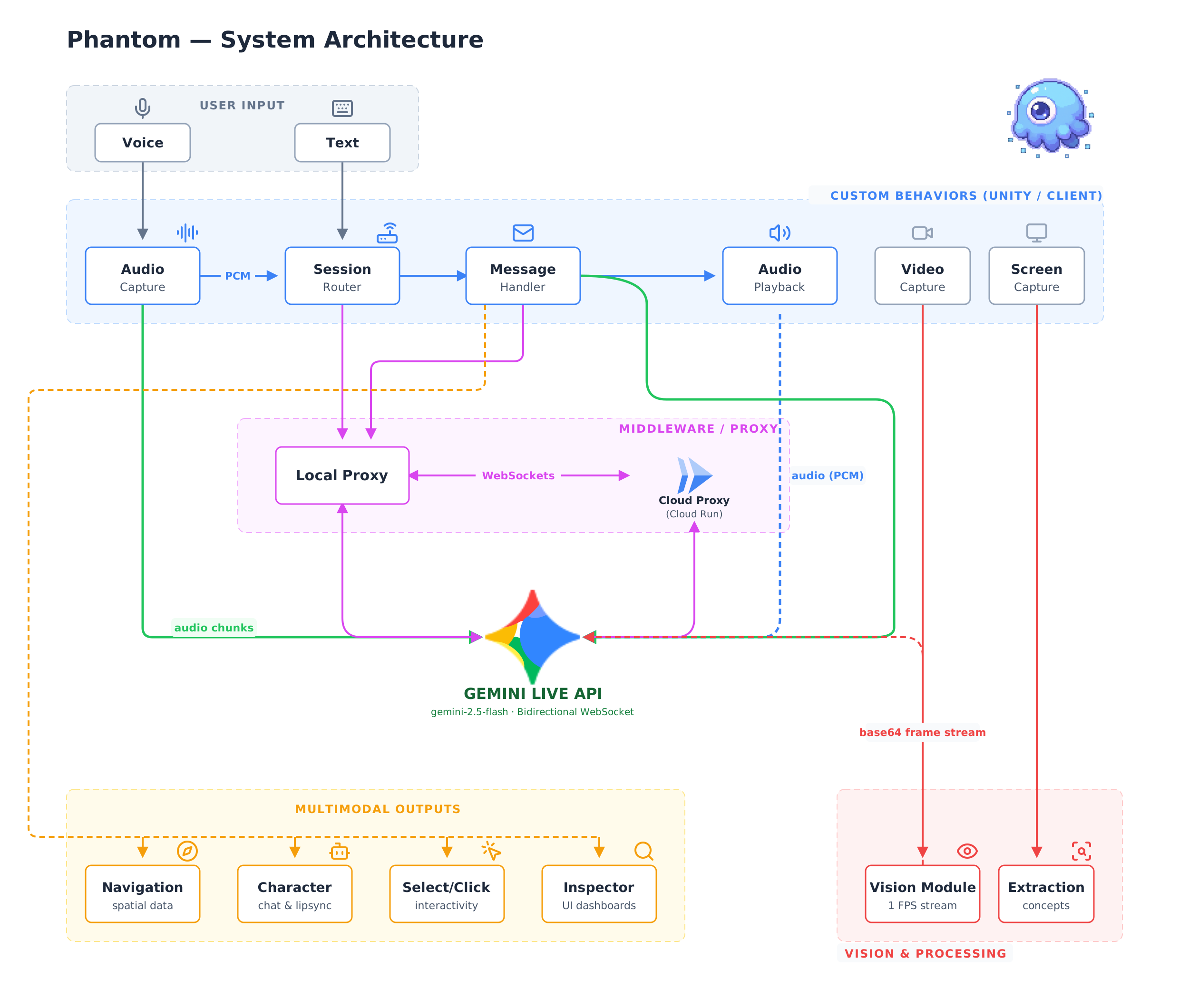
Architecture Diagram
-
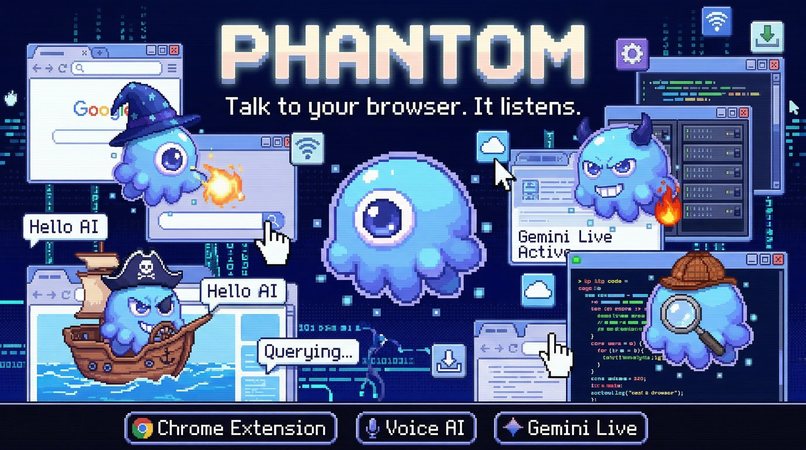
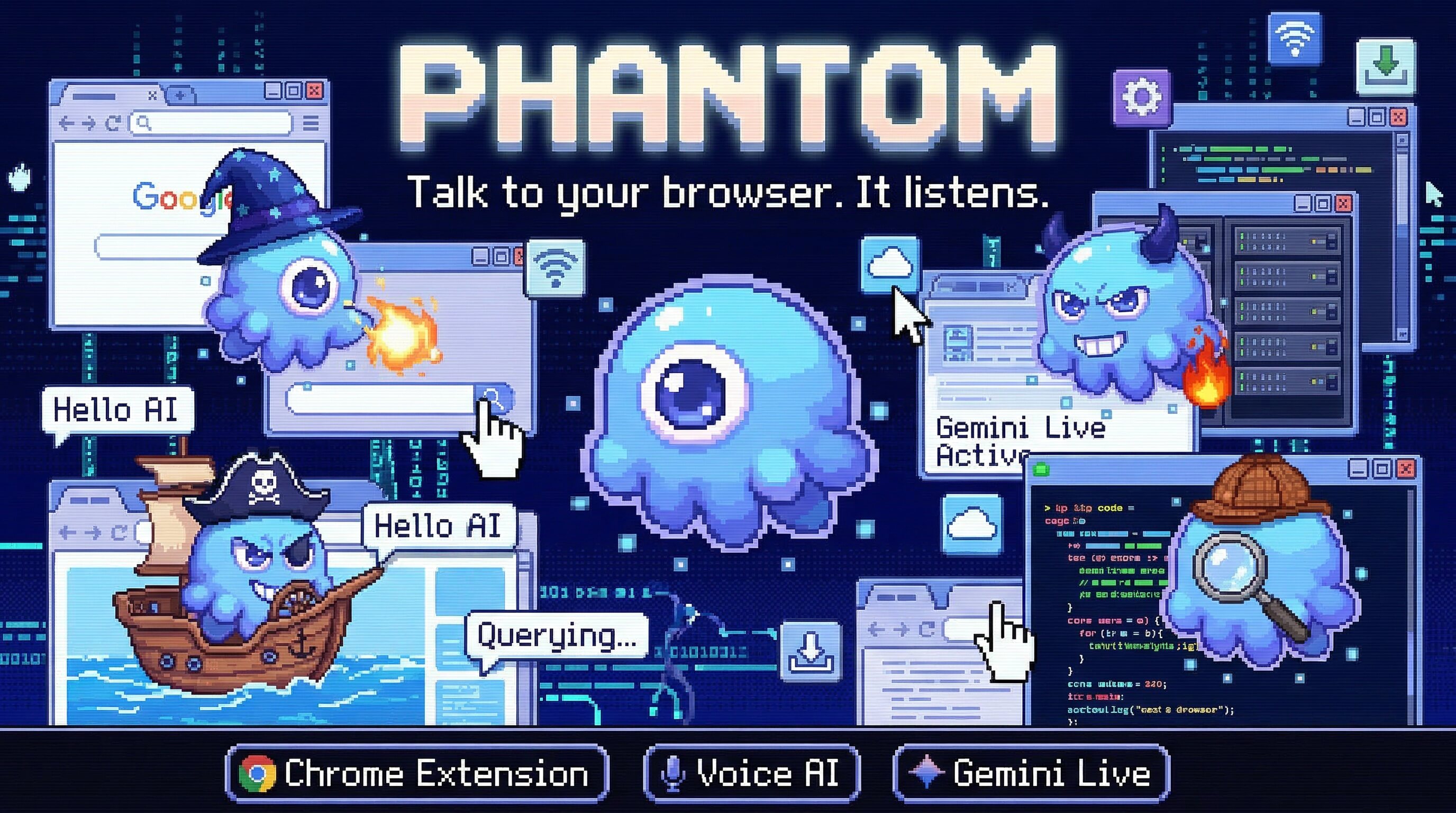
Banner Image
-
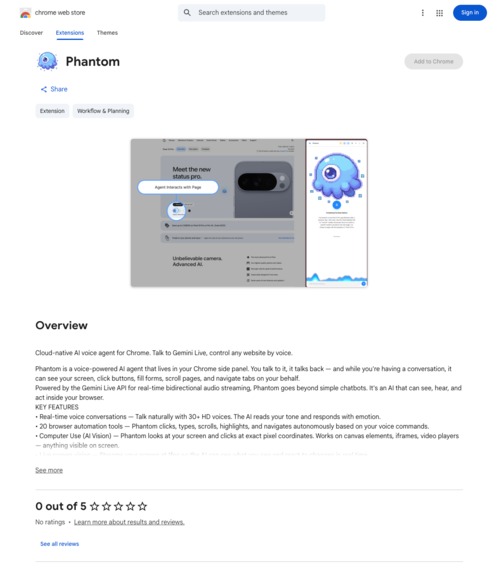
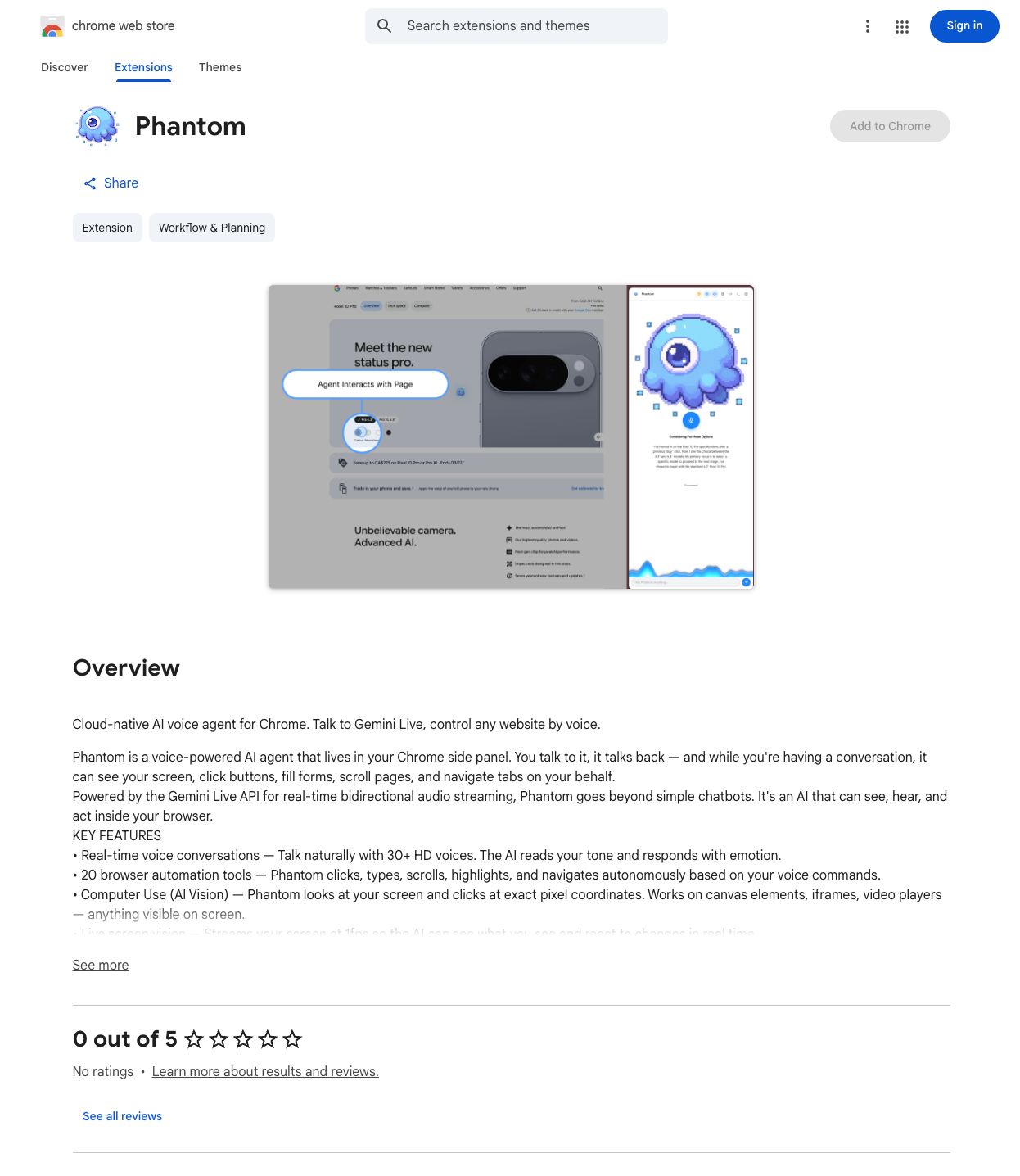
Live on Chrome Web Store
-
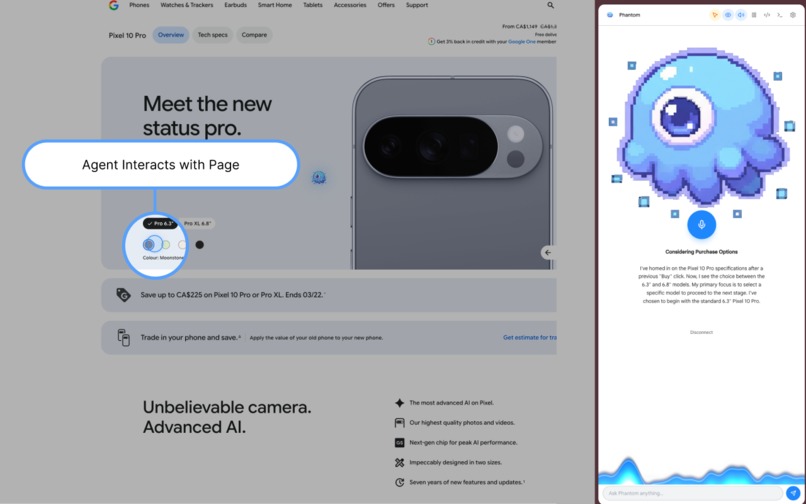
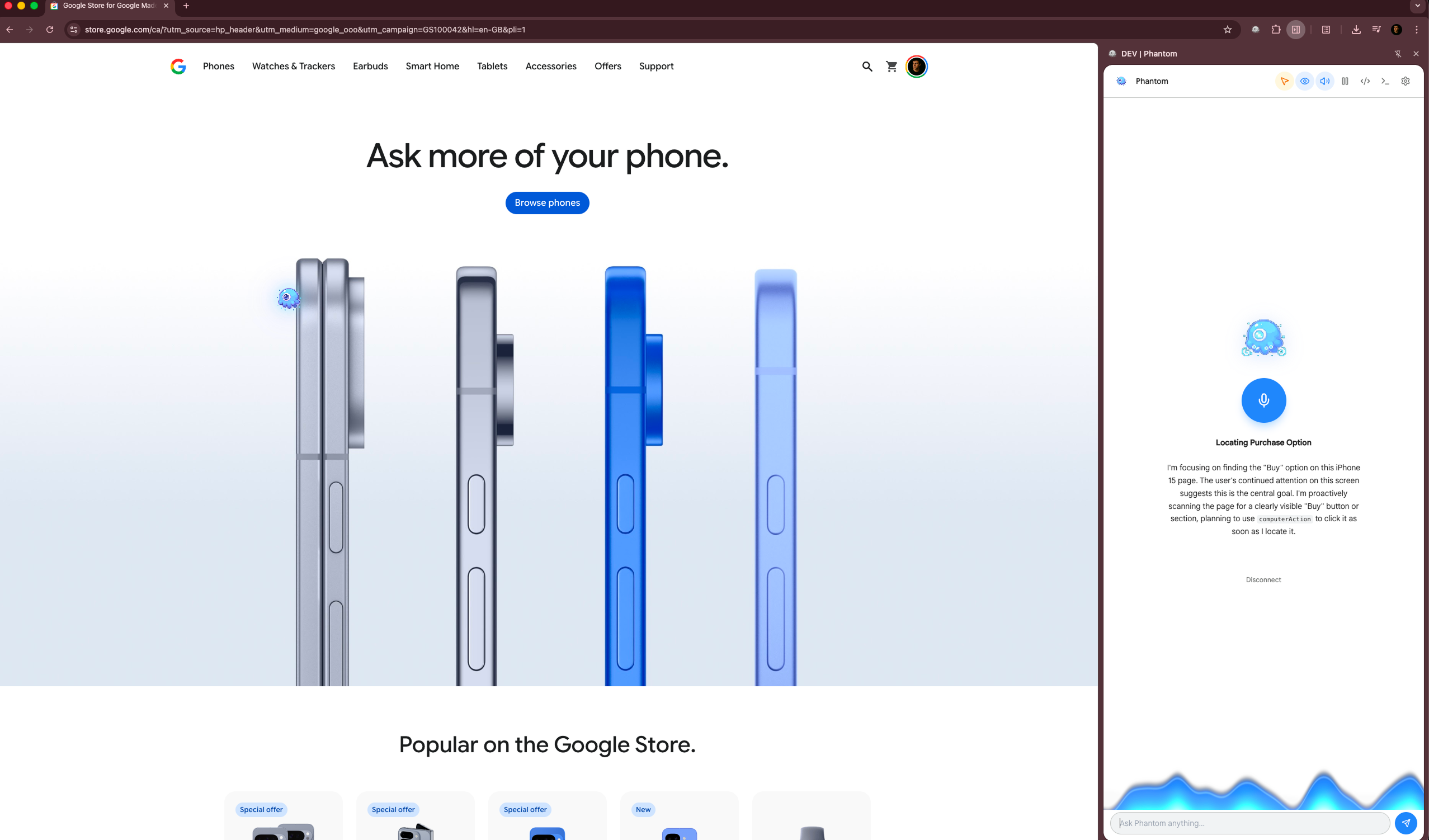
Cursor Highlight
-
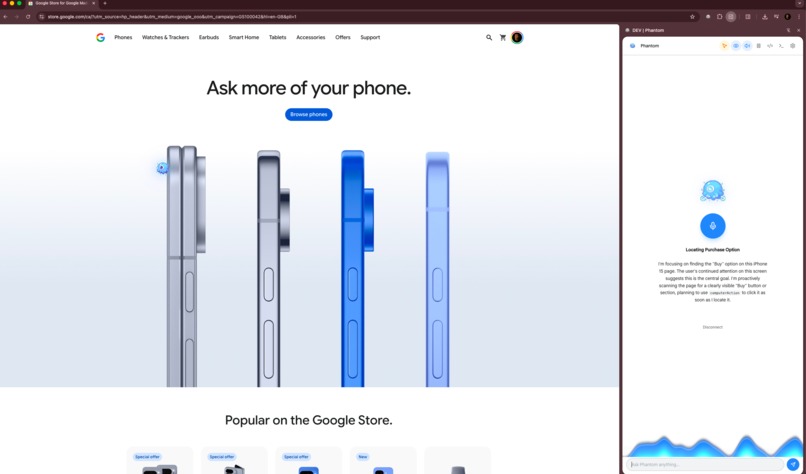
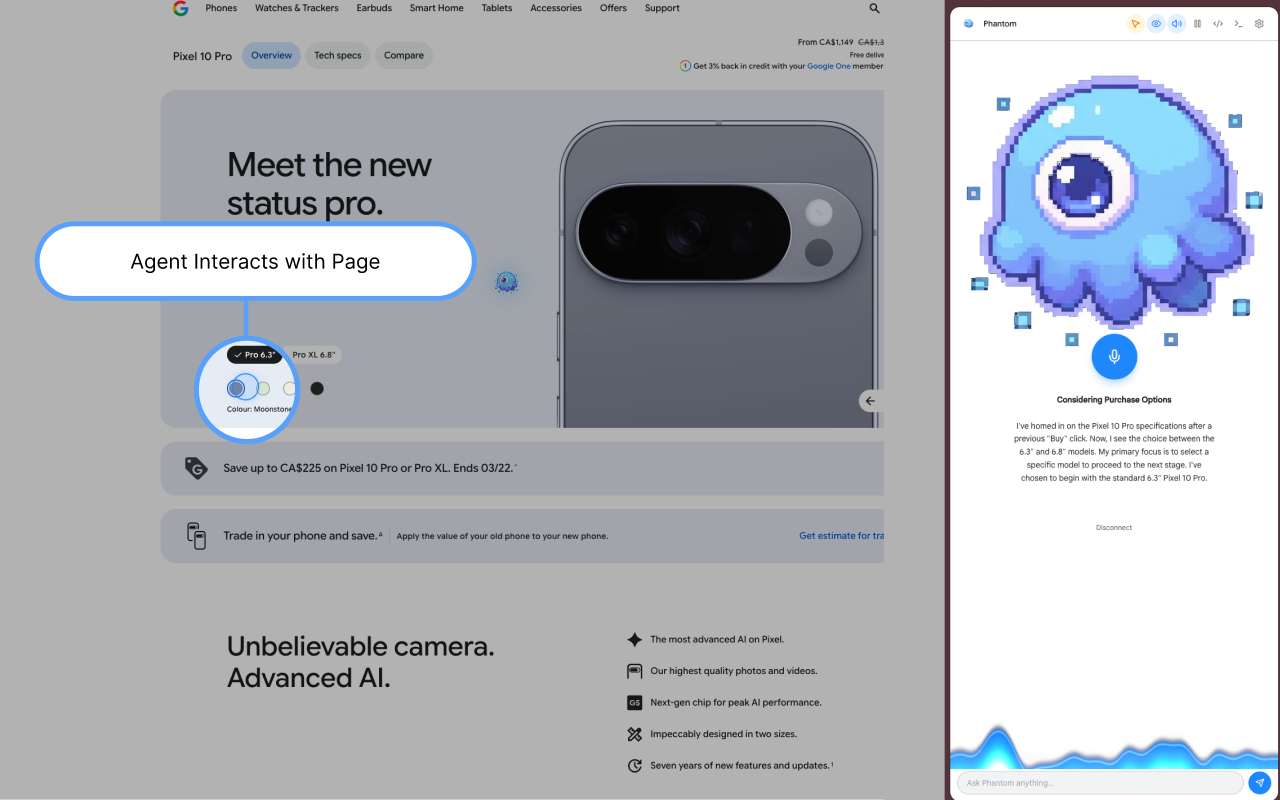
Multimodality Preview
Inspiration
We were tired of the "text box." Every AI tool today follows the same pattern — type a prompt, wait, read a wall of text, repeat. But that's not how humans interact with the world. We talk. We point. We glance. We interrupt.
We wanted an AI that works the way we do — one that can see what we see, hear what we hear, and act on our behalf, all through natural voice conversation. When we saw the Gemini Live API with native audio and vision capabilities, we knew we could build something that breaks the chatbot paradigm entirely: an AI agent that lives inside your browser.
Phantom is now live on the Chrome Web Store — install and start talking.
What it does
Phantom is a Chrome extension that turns your browser into a voice-controlled, vision-enabled AI workspace. You open the side panel, start talking, and Phantom does the rest. No typing. No switching apps. No text box.
It fits squarely in two hackathon categories: Live Agent (real-time voice with barge-in, affective dialog, proactive audio) and UI Navigator (screen vision, 20 browser tools, AI computer use clicking).
| Capability | Description |
|---|---|
| Screen Vision | Streams your active tab at 1fps to Gemini, so it understands exactly what you're looking at |
| Tab Audio | Captures tab audio so it can listen to videos, music, or meetings alongside you |
| Browser Control | 20 tools let it click buttons, fill forms, type text, scroll, navigate tabs, search elements, and read page content — all autonomously |
| Computer Use | When DOM selectors fail (canvas, iframes, video players), falls back to Gemini 3 Flash Preview's native Computer Use API for pixel-level mouse and keyboard control, with Gemini 2.5 Flash as a vision-based fallback |
| Memory | Two-layer system with a persistent user profile and session memories indexed by vector embeddings — context carries across conversations |
| Privacy Shield | Auto-detects and blurs passwords, credit card numbers, SSNs, API keys, and bearer tokens before any screenshot reaches the model |
| Personas | 8 unique characters (Phantom, Sleuth, Regent, Byte, Captain, Vibe, Arcane, Gremlin), each with a distinct voice, personality, animated sprite, and sound design |
| Natural Conversation | Full interruption handling (barge-in) with improved noise robustness, Affective Dialog that reads and adapts to your emotional tone, and Proactive Audio so the agent only responds when addressed — not to background conversation |
Technologies Used
Gemini models: gemini-2.5-flash-native-audio-preview-12-2025 (Live API — voice, vision, tool calling), gemini-3-flash-preview (Computer Use), gemini-2.5-flash (vision fallback + session summarization), gemini-2.5-flash-lite (content actions)
Google Cloud: Cloud Run (WebSocket proxy + AI sidecar endpoints), Cloud Build (container builds), Artifact Registry (image hosting), Secret Manager (API key storage), GitHub Actions CI/CD (auto-deploy on push to main)
GCP Deployment proof: YouTube — Cloud Run console walkthrough · connection-mode.ts — hardcoded Cloud Run WSS endpoint
Extension: Plasmo (MV3), React 19, TypeScript, Tailwind CSS, WebGL/GLSL (waveform visualizer), Chrome DevTools Protocol
AI/ML: Transformers.js + all-MiniLM-L6-v2 WASM (in-browser vector embeddings), IndexedDB (vector store), cosine similarity search
Server: Hono (WebSocket proxy), Google GenAI SDK (@google/genai), Docker, Cloud Run
Quick Start
Fastest — no setup needed:
- Install from the Chrome Web Store
- Get a free Gemini API key from Google AI Studio
- Open the side panel, pick a persona, tap the mic
Self-hosted / local dev:
# 1. Clone
git clone https://github.com/youneslaaroussi/Phantom.git && cd Phantom

# 2. Install dependencies
cd extension && npm install
cd ../server && npm install

# 3. Configure
cp server/.env.example server/.env
# Add your GEMINI_API_KEY to server/.env

# 4. Run the server
cd server && npm run dev   # starts on ws://localhost:3000

# 5. Build the extension
cd extension && npm run dev   # Plasmo dev build with hot reload

# 6. Load in Chrome
# chrome://extensions → Enable Developer mode → Load unpacked → select extension/build/chrome-mv3-dev
Deploy to Cloud Run:
# Single command — builds, pushes to Artifact Registry, deploys to Cloud Run
chmod +x deploy.sh && ./deploy.sh
Full instructions in the README.
Architecture
How we built it
Client — Chrome Extension
Built with Plasmo (Manifest V3), React 19, TypeScript, and Tailwind CSS. The side panel handles mic capture via ScriptProcessorNode, screen streaming via chrome.tabCapture, and audio playback through a custom PCM pipeline. A WebGL + GLSL shader powers the audio waveform visualizer. Vision frames are captured, compressed to JPEG, and privacy-shielded before streaming.
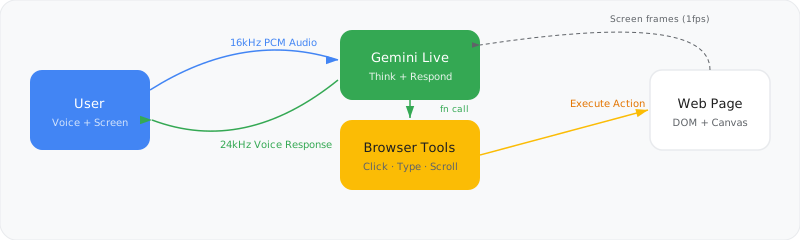
Server — WebSocket Proxy on Cloud Run
A Hono-based WebSocket server on Google Cloud Run acts as a relay between the extension and Gemini's Live API. It manages session lifecycle, handles function call responses, and exposes endpoints for:
- Computer Use — coordinate-level clicking via Gemini 3 Flash Preview, with Gemini 2.5 Flash as a vision-based fallback
- Content Actions — summarize, rewrite, explain, translate, simplify via Gemini 2.5 Flash Lite
- Session Summarization — generates memory summaries on disconnect
Tool Execution
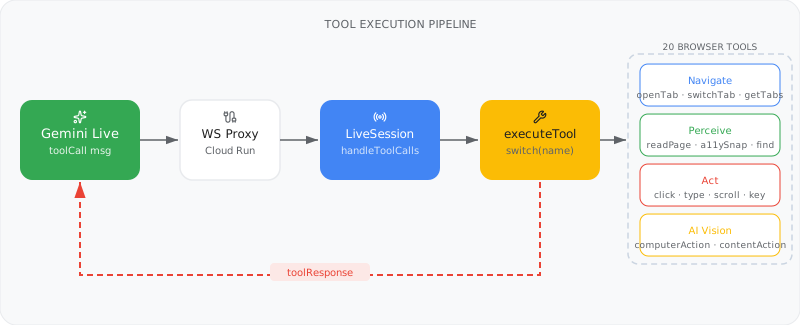
20 browser tools registered as Gemini function declarations. The extension's content scripts execute actions in the page via chrome.scripting.executeScript() and return results back through the tool call loop.
| Category | Tools |
|---|---|
| Navigate | openTab, switchTab, getTabs, getPageTitle |
| Perceive | readPageContent, getAccessibilitySnapshot, findOnPage |
| Act | clickOn, typeInto, pressKey, scrollDown, scrollUp, scrollTo, highlight |
| AI Vision | computerAction, contentAction |
| Memory | rememberThis, recallMemory, updateUserProfile |
Computer Use
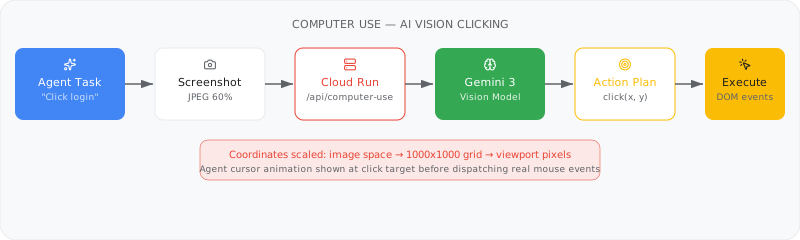
When DOM selectors fail on complex UIs, Phantom falls back to AI-powered vision clicking. A screenshot is sent to Gemini 3 Flash Preview, which returns pixel coordinates on a normalized 0–999 grid that are scaled to the viewport and dispatched as trusted mouse events via CDP. If native computer use is unavailable, Gemini 2.5 Flash handles coordinate prediction from the screenshot directly.
Privacy Shield
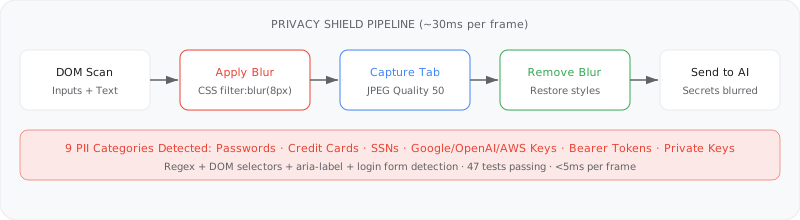
Every screenshot passes through a client-side privacy pipeline before it ever leaves the browser. 9 PII categories are detected via regex patterns and DOM selectors, blurred with CSS, captured, then restored — all in under 30ms per frame.
Memory System
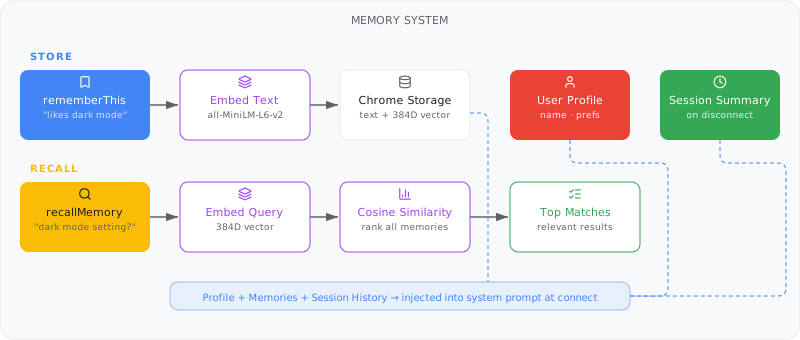
Transformers.js runs the all-MiniLM-L6-v2 embedding model entirely in-browser via WASM, producing 384-dimensional vectors stored in IndexedDB. On each session start, relevant memories are retrieved via cosine similarity search and injected into context.
Native Audio — Gemini Live API
Phantom uses gemini-2.5-flash-native-audio-preview-12-2025 with three native audio capabilities enabled: Affective Dialog (enable_affective_dialog: true) so responses adapt to the user's emotional tone, Proactive Audio (proactive_audio: true) so Phantom stays silent during background conversation and only responds when directly addressed, and VAD barge-in for natural mid-sentence interruption. The model's native audio output drives all 8 persona voices — no external TTS service involved.
Deployment
| Component | Service |
|---|---|
| Container builds | Google Cloud Build |
| Image registry | Google Artifact Registry |
| Server hosting | Google Cloud Run (0–10 instances, session affinity) |
| API key storage | Google Secret Manager |
| CI/CD | GitHub Actions (auto-deploy on push) |
Challenges we ran into
Tab audio capture without MV3 support. Manifest V3 removed tabCapture.capture() — the API that used to hand you a MediaStream directly. The MV3 replacement only gives you a stream ID. We bridge this with an undocumented getUserMedia constraint (chromeMediaSource: "tab" + chromeMediaSourceId) consumed from a content script, then poll the captured PCM buffer back to the service worker via chrome.scripting.executeScript on a 500ms interval — because MV3 service workers can't hold persistent stream connections. Mic and tab audio are then mixed sample-by-sample with clipping into a single PCM stream before being sent to Gemini Live, so the model hears exactly what the user hears.
Trusted click events without a modified Chrome. Standard element.click() and synthetic dispatchEvent calls are untrusted — sites like Google Search, banking apps, and React portals with event delegation silently ignore them. To dispatch genuinely trusted mouse events, we route all clicks through the Chrome DevTools Protocol (chrome.debugger + Input.dispatchMouseEvent), which requires the "debugger" permission and shows a yellow infobar — a trade-off we accepted to avoid shipping a modified browser. On top of this, CSS selectors that work on one site break on another, so we built a uniqueness-guaranteed selector generator that filters Tailwind utility classes, validates every candidate with querySelectorAll(...).length === 1, and falls back through aria attributes → semantic classes → DOM path walking → accessibility tree search → Computer Use coordinate clicking when all else fails.
Audio latency. Getting bidirectional audio streaming to feel real-time over WebSockets required careful buffering. Too much and it feels laggy; too little and you get choppy audio. We tuned the PCM pipeline and chunk sizes extensively.
Screen vision + privacy. Streaming screenshots to an AI model is powerful but dangerous. Building a privacy shield that reliably catches passwords, card numbers, and keys across arbitrary websites — without destroying performance at 1fps — was a major engineering challenge.
Session persistence. Gemini Live API sessions have limits. We implemented session resumption via resumption handle tokens and sliding-window context compression for sessions exceeding 15 minutes.
Interruption handling. Natural conversation means the user can interrupt the AI mid-sentence. Coordinating audio playback cancellation, WebSocket message handling, and UI state during barge-in required careful state machine design.
Accomplishments that we're proud of
- A fully functional voice-controlled browser agent that genuinely breaks the text box paradigm — no typing required
- Tab audio capture and trusted click dispatch on stock Chrome, with no modified browser and no native app — pure extension, pure MV3
- Privacy-first architecture where PII is caught and blurred before it ever leaves the device
- 8 fully realized personas with unique voices, animated sprites, sound design, and personalities — all driven by Gemini's native audio, no TTS bolt-on
- Local vector memory with semantic search running entirely in-browser via WASM — no external embedding API needed
- Computer Use fallback that handles complex UIs where traditional DOM-based automation fails
- The whole system ships as a lightweight Chrome extension, now publicly available on the Chrome Web Store — no desktop app, no Electron, just install and talk
What we learned
- The Gemini Live API's native audio model unlocks features impossible with bolted-on TTS — Affective Dialog, Proactive Audio, and natural barge-in made persona design feel alive rather than scripted
- Building reliable browser automation on stock Chrome is hard — synthetic events are untrusted, MV3 kills persistent streams, and every site is different. CDP + undocumented constraints + a strict selector fallback chain is what it takes
- Privacy and AI don't have to be at odds — with the right client-side filtering, you can give an AI full screen access without exposing sensitive data
- Vector embeddings in the browser via WASM are production-viable — Transformers.js made it possible to run a real embedding model with no server round-trip
- Sound design and character personality transform a tool into an experience — the personas make people want to use Phantom, not just need to
What's next for Phantom
- Multi-tab orchestration — work across multiple tabs simultaneously, coordinating complex workflows
- Workflow recording and replay — record voice-driven actions and replay them as automated macros
- Collaborative agents — multiple personas working together on a task, each handling a different aspect
- On-device model fallback — use Chrome's built-in AI APIs for offline-capable basic interactions
- Deeper grounding — integrate Google Search grounding more tightly for real-time fact-checking during conversations


Log in or sign up for Devpost to join the conversation.