-
-
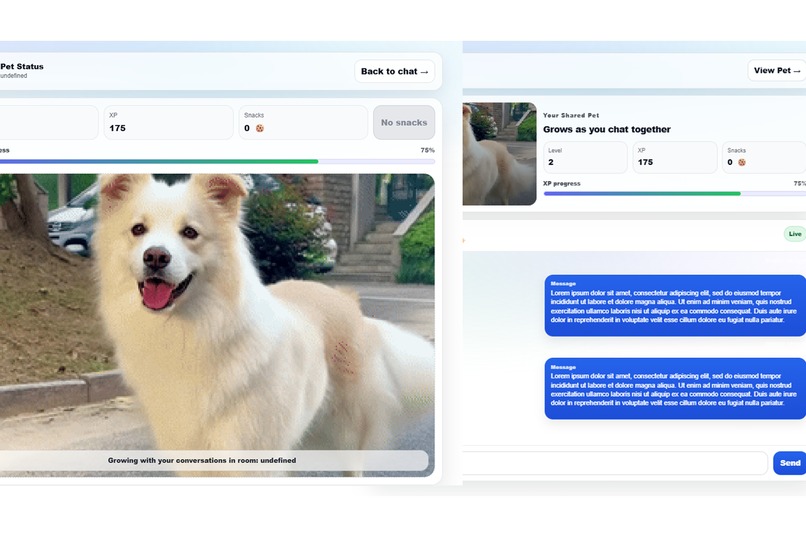
Pet Together User Interface
GitHub Repository: https://github.com/Kev66666/wic_hackathon_2026
About the Project — Pet Together 🐾
Inspiration
The inspiration for Pet Together came from a simple question:
How can we make long-distance friendships and relationships feel more alive through everyday conversation?
Messaging apps like iMessage or WhatsApp are great for communication, but they don’t always encourage consistent interaction. We wanted to create something playful — a shared space where chatting isn’t just exchanging words, but also building something together.
That idea became a virtual pet that grows based on how often two people communicate.
What We Built
Pet Together is a messaging platform where any two users can:
- Log into their own accounts
- Start a private chat room
- Share a unique virtual pet tied to their relationship
- Help the pet grow through frequent interaction
Every conversation becomes meaningful because it directly impacts the pet’s evolution.
How It Works
Each pair of users has a pet with a progression system:
- Sending messages rewards snacks
- Feeding snacks increases growth
- Higher XP leads to leveling up
Tech Stack & Development
We built the project using a modern full-stack architecture:
Frontend
- Next.js (React + TypeScript)
- Modular UI components
- Real-time polling for pet synchronization
- Modern glassmorphism-inspired design
Backend
- FastAPI (Python)
- RESTful endpoints for pet state updates
- Shared relationship-based pet data model
Key Features Implemented
- Chat interface similar to iMessage
- Shared pet dashboard with animated pixel GIF
- Real-time pet growth synced across pages
Challenges We Faced
1. Synchronizing Shared Pet State
One major challenge was ensuring that two users viewing the same pet would always see consistent growth.
We solved this by implementing:
- Backend state storage
- Frontend polling every second
- Immediate refresh after message sending
2. UI Consistency Across Pages
We wanted the pet page and chat page to feel like one cohesive experience.
That required:
- Matching layout ratios
- Shared design system (cards, glow backgrounds, typography)
- Correct handling of GIF scaling and cropping
3. Handling Media Display Correctly
Pixel pets needed to:
- Stay sharp (no blurry scaling)
- Fit inside the stage properly
- Scale smoothly as the pet grows
We learned how important CSS properties like:
object-fitimage-rendering: pixelated- responsive containers
really are in UI design.
What We Learned
Through building Pet Together, we learned:
- How to connect a React frontend with a Python backend
- How to design shared state experiences between users
- How UI details can strongly affect user motivation
- How gamification can turn simple actions into emotional engagement
Future Vision
This is only the beginning. Next steps include:
- Full authentication + user accounts
- More advanced pet evolution algorithms
- Real-time WebSocket messaging
- Multiple pet skins, animations, and achievements
Ultimately, we want Pet Together to make communication feel warm, rewarding, and fun — especially for people far apart.
✨ Pet Together is not just a chat app — it’s a shared journey powered by conversation.
Built With
- css-modules
- fastapi-(python)
- gif
- github
- local-in-memory-store
- next.js
- next.js-(app-router)
- react
- rest-apis
- typescript
- uvicorn
- vscode


Log in or sign up for Devpost to join the conversation.