Pet Finder
Inspiration
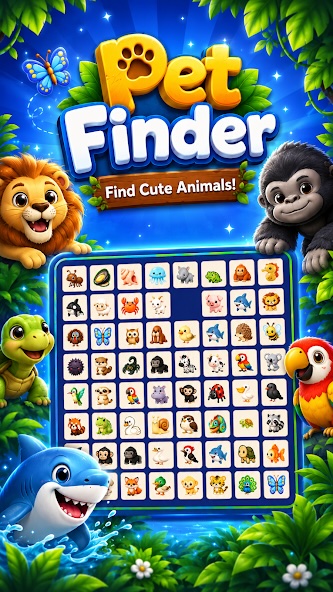
Pet Finder was inspired by a simple observation: people naturally enjoy discovering cute animals, but many casual puzzle games quickly become repetitive or visually overwhelming.
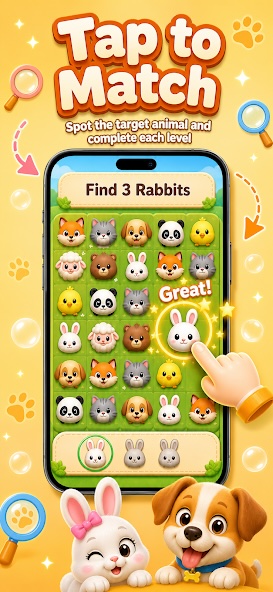
I wanted to create a relaxing animal-themed game that could be understood within seconds while still offering satisfying challenges. Instead of relying on only one puzzle mechanic, Pet Finder combines several lightweight gameplay ideas, including:
- Finding matching animals
- Flipping and eliminating animal cards
- Spot-the-difference challenges
- Animal-themed bubble-shooter levels
- Goal-based collection missions
The main goal was to build a game that feels friendly, colorful, and accessible to players of different ages.
What I Learned
Building Pet Finder taught me that a casual game is not necessarily a simple project.
The rules may be easy to understand, but the overall experience depends on many small details:
- Clear visual feedback
- Consistent asset sizes
- Smooth animations
- Balanced level difficulty
- Responsive touch controls
- Short and understandable tutorials
- Appropriate sound and particle effects
I also learned how important it is to guide the player without adding too much text. A successful casual game should communicate most actions visually.
For example, the player should immediately understand:
- Which animal can be selected
- What the current objective is
- Whether an action was correct
- How much progress remains
- When a level has been completed
I used a simple difficulty model while designing levels:
[ D = \alpha N + \beta V + \gamma T - \delta H ]
Where:
- (D) represents the estimated level difficulty
- (N) is the number of animals or interactive objects
- (V) is the number of visually similar animals
- (T) represents time pressure
- (H) represents available hints
- (\alpha, \beta, \gamma, \delta) are balancing weights
This helped me think about difficulty as a combination of several factors instead of simply adding more objects to each level.
How I Built the Project
Pet Finder was built as a 2D mobile game using Cocos Creator.
The project was designed primarily for vertical mobile screens with a 9:16 aspect ratio. I separated the game into reusable systems so that new puzzle modes and levels could be added more efficiently.
Core Systems
The project includes several main modules:
- Game State Manager
Controls level loading, pause states, success conditions, failure conditions, and transitions between scenes.
- Animal Asset System
Manages animal icons from different categories, including land animals, sea animals, and flying animals.
- Level Configuration System
Stores level objectives, animal combinations, timers, difficulty settings, and reward values as configurable data.
- Interaction System
Handles taps, card flipping, object selection, matching, highlighting, and touch feedback.
- Progress System
Records unlocked levels, scores, achievements, rewards, and completed objectives.
- UI System
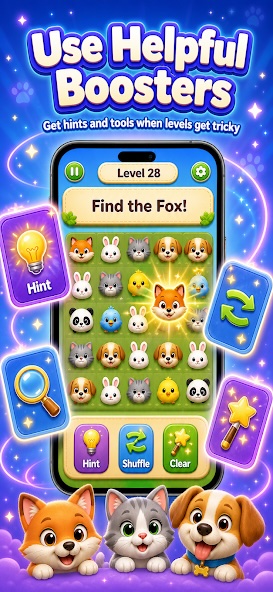
Displays the current level, remaining targets, hint buttons, progress indicators, settings, and result panels.
Visual Design
The visual style was designed to feel soft and friendly. Animal portraits were processed with:
- Transparent backgrounds
- Consistent dimensions
- Clean edges
- Unified framing
- Clear silhouettes
- Readable expressions
I also created particle effects and short animations for successful matches, level completion, rewards, and incorrect selections.
The interface follows a simple hierarchy:
[ \text{Current Goal} \rightarrow \text{Main Play Area} \rightarrow \text{Player Controls} ]
This structure keeps the objective visible while giving most of the screen to the actual gameplay.
Audio and Feedback
Short sound effects were used to make interactions feel more responsive. Successful actions use light and positive sounds, while incorrect actions use subtle feedback without making the player feel punished.
Animations were intentionally kept short because excessive effects can slow down the pace of a casual game.
Challenges I Faced
1. Creating Consistent Animal Assets
One of the biggest challenges was preparing a large collection of animal images.
The source images had different proportions, backgrounds, lighting, and visual styles. I had to remove backgrounds, clean the edges, normalize dimensions, and make sure every animal remained recognizable on a small mobile screen.
Even a small white or dark border around an image could become obvious when displayed inside the game.
2. Designing for Different Screen Sizes
The game was designed around a vertical layout, but Android devices have many different resolutions and safe-area requirements.
I needed to make sure that:
- Important buttons were not covered
- Animal cards remained large enough to tap
- The main gameplay area did not feel crowded
- UI elements remained readable
- The layout adapted without stretching the artwork
3. Balancing Difficulty
When too many similar animals appeared together, levels became frustrating. When the differences were too obvious, the game became repetitive.
I adjusted several variables during testing:
- Number of animals
- Similarity between animal designs
- Time limits
- Number of objectives
- Available hints
- Object spacing
- Movement speed
The goal was to create a smooth difficulty curve instead of sudden difficulty spikes.
4. Supporting Multiple Gameplay Modes
Each gameplay mode required different interaction logic, but I did not want to duplicate the entire project structure.
I solved this by separating shared systems—such as scoring, level loading, sound, rewards, and progress—from mode-specific gameplay code.
This made the project easier to maintain and allowed new modes to reuse the same foundation.
5. Keeping the Experience Simple
It was tempting to add more buttons, currencies, menus, and effects. However, every additional feature increased the learning cost for the player.
One of the most important design decisions was deciding what to remove.
Pet Finder focuses on a clear loop:
[ \text{Observe} \rightarrow \text{Select} \rightarrow \text{Receive Feedback} \rightarrow \text{Complete the Goal} ]
Keeping this loop understandable helped the game remain accessible.
Final Result
Pet Finder became more than a single matching game. It developed into a reusable animal-puzzle framework that can support different levels, themes, objectives, and gameplay modes.
The project helped me improve my skills in:
- Mobile game architecture
- Cocos Creator development
- Touch interaction design
- Responsive UI design
- Asset processing
- Level balancing
- Animation and particle effects
- Mobile performance optimization
- Google Play release preparation
Most importantly, I learned that a polished casual game is created through many small improvements. Clear feedback, consistent visuals, responsive controls, and thoughtful level design can have a greater impact than adding more complicated features.
Pet Finder represents my attempt to turn a simple love of animals into a playful, relaxing, and expandable mobile experience.
Built With
- 2d
- android
- animal
- casual
- cocos
- creator
- finder
- game
- javascript
- mobile
- pet
- puzzle
- typescript


Log in or sign up for Devpost to join the conversation.