Inspiration
Low contrast text shows up on almost 84% of the top million home pages. That's not a niche problem, that's most of the internet. We kept running into two sides of it. Developers usually aren't trying to exclude anyone. They just never see their page the way someone with colorblindness or cataracts does, and accessibility reports are a wall of numbers that don't point at anything real. Meanwhile the people who actually struggle to read these sites can't wait for every company to fix their CSS.
So we wanted one tool that works for both: help developers fix the problem at the source, and help users get around it today.
What it does
Perspective is a Chrome extension with two modes.
User mode
User mode is for anyone browsing the web. Flip one switch called Easier reading and Perspective finds the hard-to-read text on the page you're on and fixes it right there. It keeps working as new content loads, like infinite scroll or live prices, and tells you how many things it improved. One click puts the page back exactly how it was. Nothing gets saved or sent anywhere.
Developer mode
Developer mode has three tools that work together on any live page.
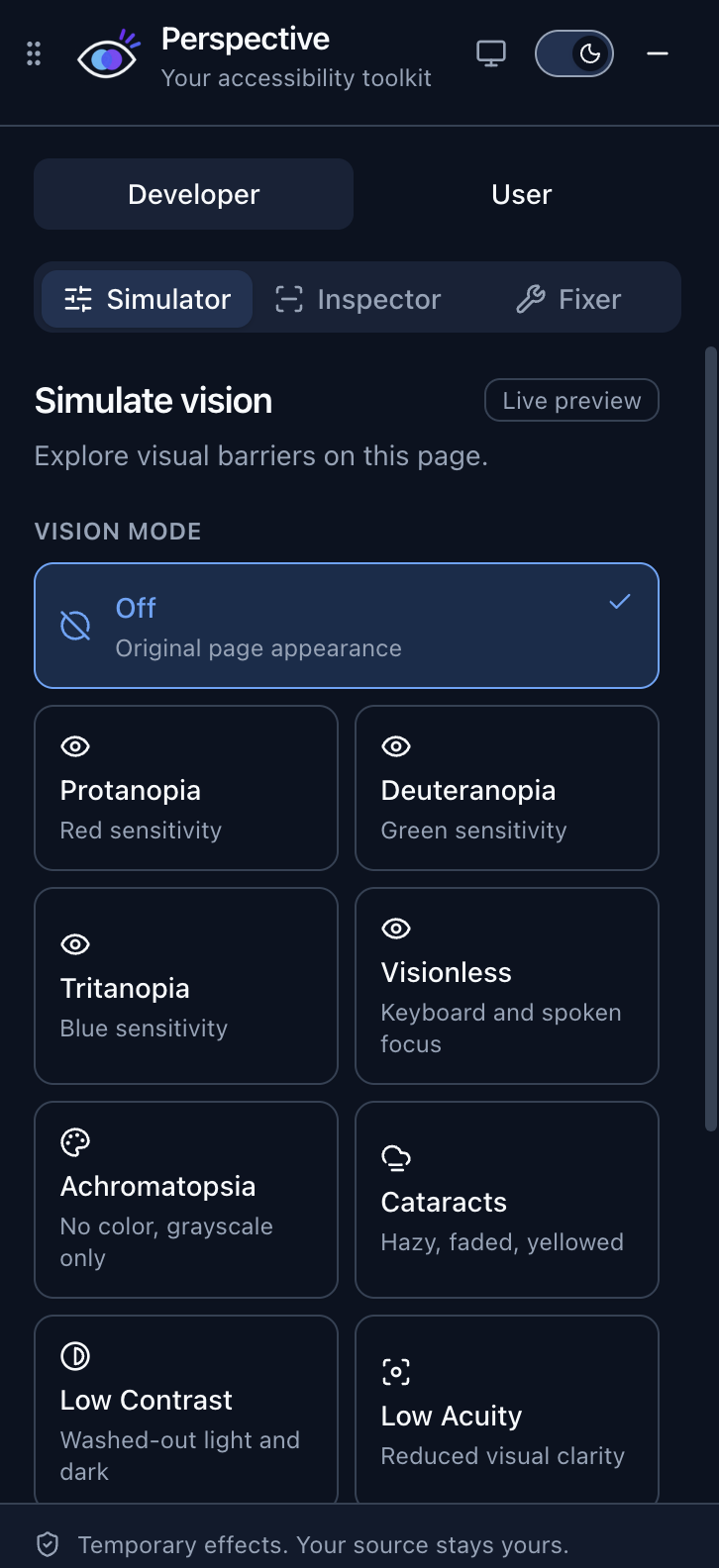
- Simulator: shows your page through approximate vision conditions: protanopia, deuteranopia, tritanopia, achromatopsia, cataracts, low contrast sensitivity and blur. There's also a visionless mode that blacks out the screen and reads focus out loud, so you can try your own site with just a keyboard.
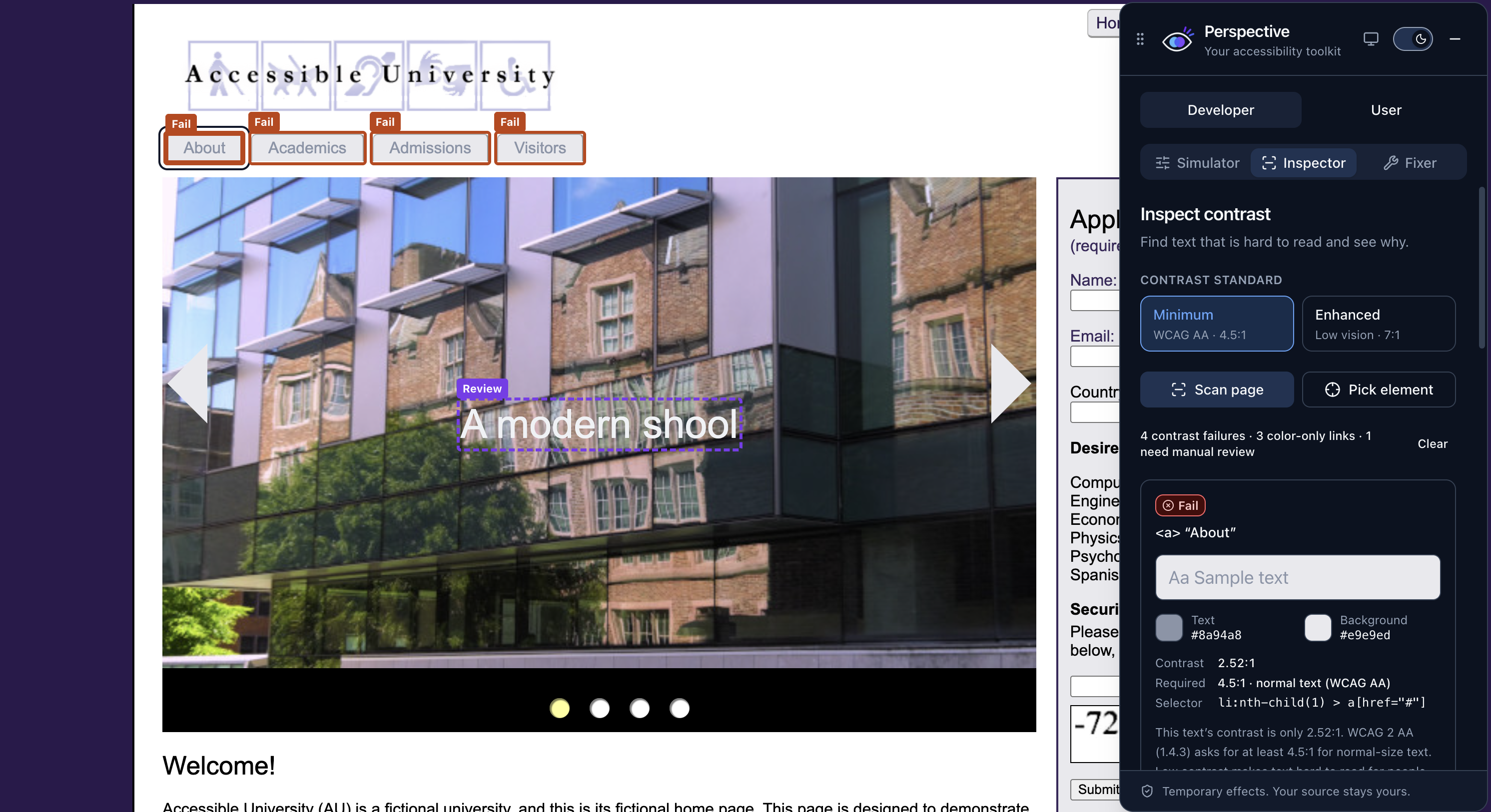
- Inspector: scans the page and outlines every piece of text that fails WCAG contrast, with the colors, the ratio and the rule it breaks. It also catches links that only stand out by color and images with no alt text. If it can't measure something reliably, like text on a gradient, it says "needs review" instead of guessing.
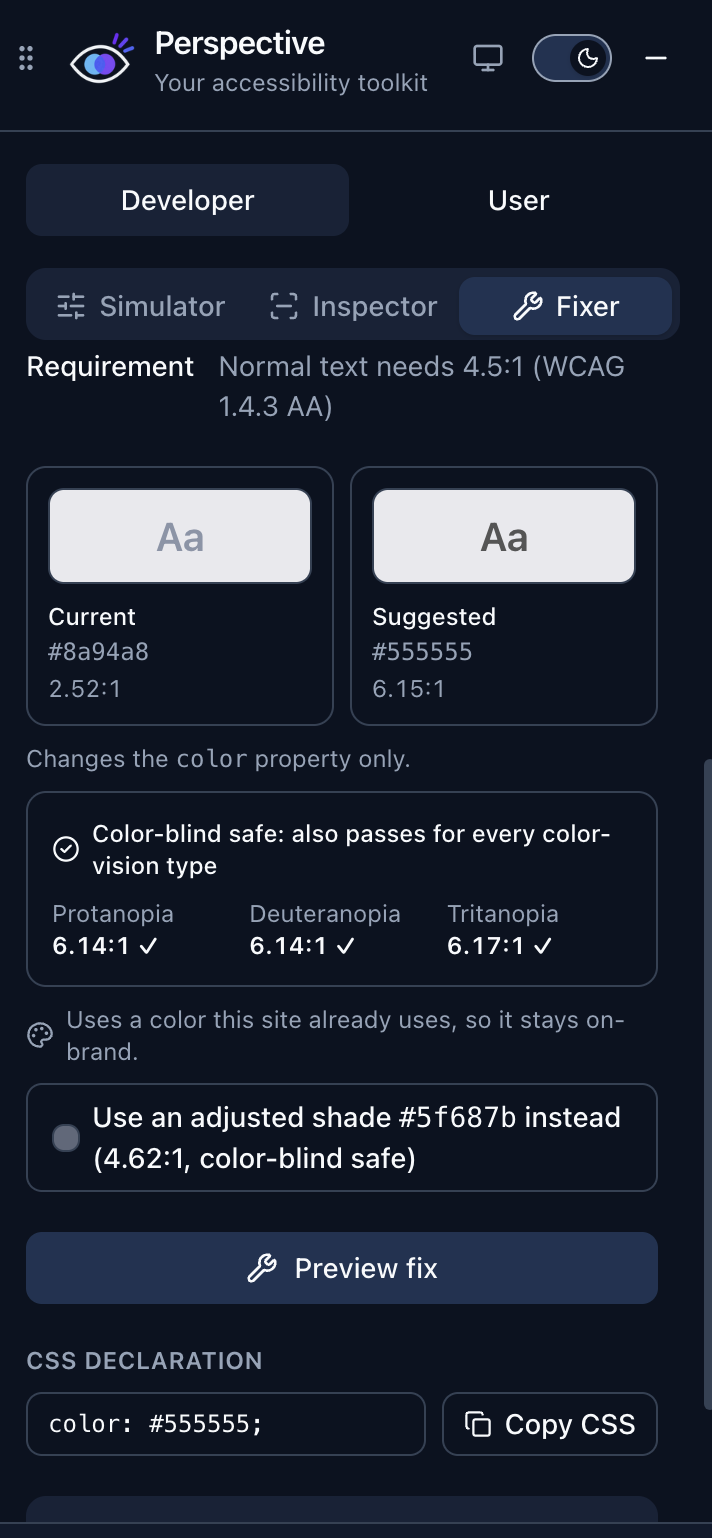
- Fixer: suggests the smallest color change that passes, preferring colors your site already uses. You can preview one fix or all of them at once, flip between before and after (even with a simulation on), and copy the CSS. For missing alt text, you type a description and preview it.
For AI coding agents
We also built a plugin for AI coding agents. It runs the same checks in a headless browser and hands the agent about 4 KB of JSON with selectors and CSS fixes, instead of screenshots. Your agent can check its own UI work and burn way fewer tokens doing it.
How we built it
The extension uses WXT, React, TypeScript and Tailwind. The panel lives in a shadow DOM so the page and our UI can't mess with each other's styles.
The color blindness filters are SVG color matrices based on the Machado et al. 2009 model, and the other modes are CSS filters. The Inspector runs axe-core and maps its results into our own issue format.
Everything comes back to one formula. WCAG defines contrast using the relative luminance of the lighter color $L_1$ and the darker color $L_2$:
$$\text{contrast ratio} = \frac{L_1 + 0.05}{L_2 + 0.05}$$
Normal text needs at least $4.5:1$, large text needs $3:1$, and the stricter AAA level asks for $7:1$. The Fixer uses Culori to search for a color that clears that bar in a perceptual color space, so a fix still looks like your original color, just readable.
User mode and developer mode share the same scanner and the same fixing engine, so a user gets the exact fixes a developer would see. User mode watches the page with a MutationObserver and only rescans the parts that changed, instead of rescanning everything every second.
The agent plugin is an MCP server with zero dependencies. It drives Chrome through the DevTools Protocol and reuses the same Inspector and Fixer code, so the extension and the agent always agree.
Challenges we ran into
- Real websites fought back. Applying filters broke a lot of layouts. Sticky headers jumped around and popups ended up in the wrong place, so we had to simulate the page in sections instead of all at once.
- User mode was harder than it sounds. Changing colors on a page you don't own means the page can change them right back, add new content, or swap things out entirely. We had to make sure every change could be undone exactly, and that our own fixes didn't trigger endless rescans.
- Merge conflicts. Four people pushing to the same files at 2am. At one point the Fixer was being edited on three branches at the same time.
- A sneaky axe-core quirk. Its strict AAA rule silently skips text below $4.5:1$, because it assumes you're running the normal rule too. So our "stricter" mode was hiding the worst failures until our tests caught it.
- An agent that got confused. When we tested the plugin with a real coding agent, it misread one of our JSON fields and confidently reported a problem that didn't exist. We renamed the field and it got it right after that.
Accomplishments that we're proud of
The developer loop works end to end. You can turn on a simulation, watch a link disappear into its sentence, find it with the Inspector, and fix it with one click. User mode turns that same engine into something anyone can use with one switch, on any site.
We're also proud that the tool is honest. It says when it doesn't know, and it never claims a page is "accessible" just because a scan came back clean. And the agent plugin went from an idea to something a real agent used successfully in one night.
What we learned
Automated checks only catch part of the problem. A scan can't tell you whether your alt text actually makes sense or whether your site works with a keyboard. We learned way more about color than we expected: contrast ratios, how transparency changes them, and why "just make it darker" doesn't always work. Building for users taught us that changing someone else's page safely is mostly about being able to undo it perfectly. And watching an AI agent use our tool taught us that how you name your data matters as much as the data itself.
What's next for Perspective
- More for users: bigger text, clearer focus outlines and better spacing, all with the same one switch.
- More checks for developers: unlabeled buttons and form fields, so every simulation leads to a fix.
- Chrome Web Store, and running the agent plugin in CI so pull requests get checked automatically.
- New simulations: tunnel vision and central vision loss.
- Real user testing. Most of all, we want to test it with people who actually live with these conditions, because they'll know better than any filter we can write.
Built With
- axe-core
- chrome
- css
- culori
- html
- javascript
- lucide
- manifest-v3
- node.js
- radix-ui
- shadcn-ui
- svg
- tailwindcss
- typescript
- vite
- wxt


