-
-
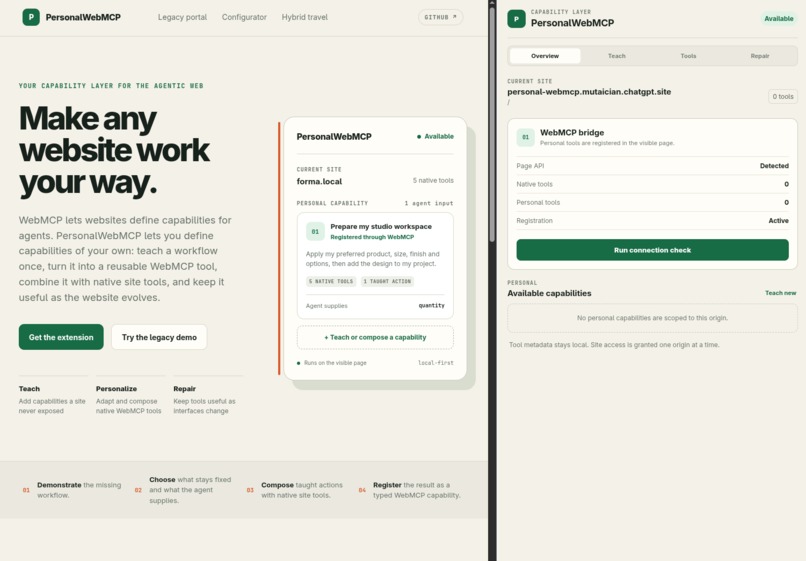
extension overview
-
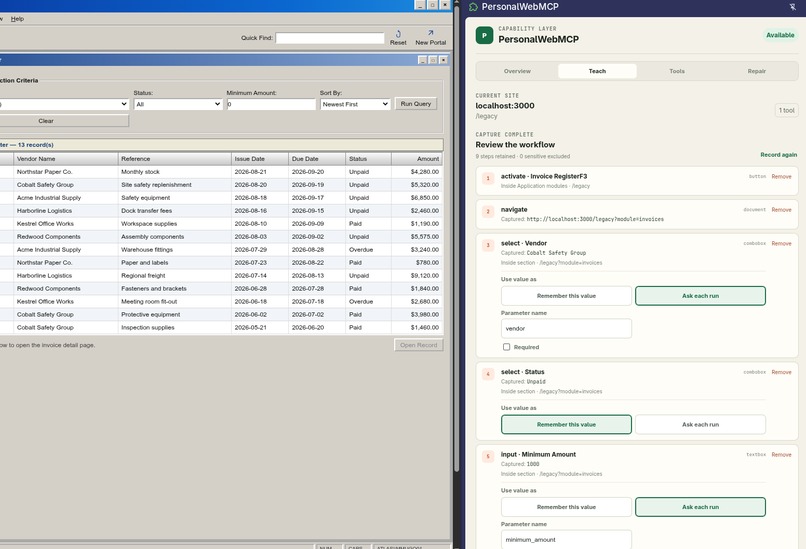
Teaching workflow
-
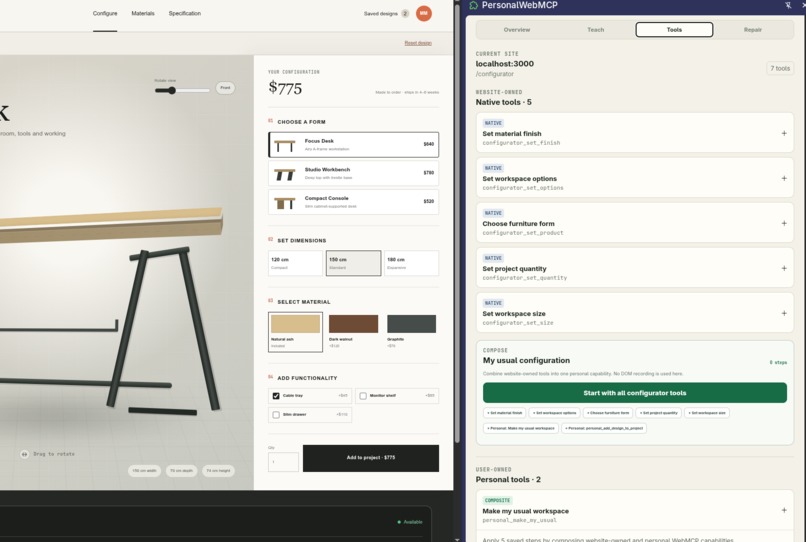
Tools overview
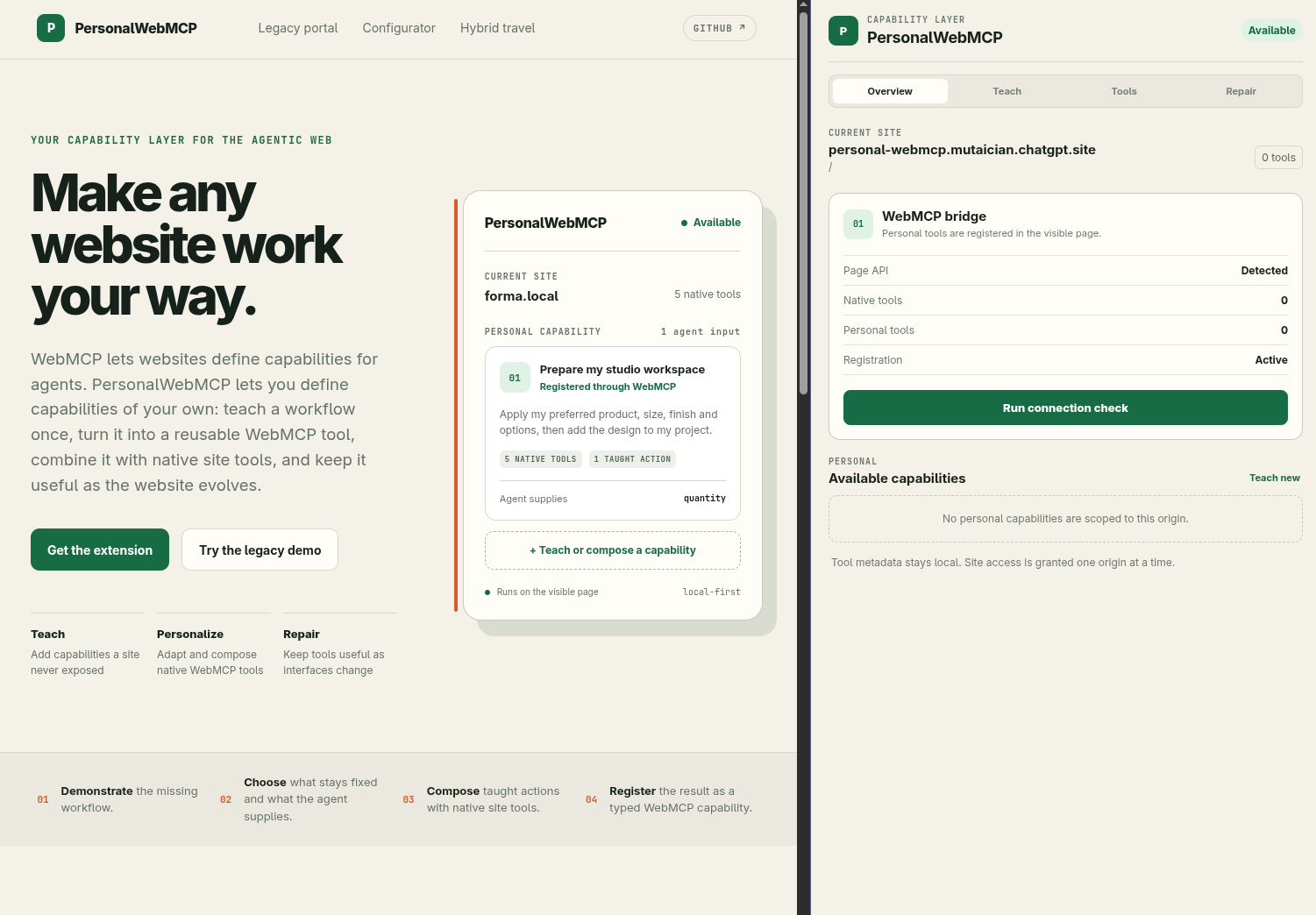
Project Story
Inspiration
WebMCP gives websites a reliable way to expose named, typed capabilities to agents. But the web will not become fully agent-ready at once. Many sites expose no tools, some expose only part of what a user needs, and even a well-designed site cannot anticipate every personal routine or preference.
That led me to a simple question: why should only website developers be able to define capabilities for agents?
I wanted to explore a user-owned layer for WebMCP. Instead of repeatedly asking an agent to rediscover the same buttons and fields, a person could demonstrate a workflow once, decide what should vary, and save the result as a semantic tool. On a WebMCP-enabled site, that same layer could personalize and combine the site's native tools rather than replacing them.
What it does
PersonalWebMCP is a Chromium extension that lets users create their own WebMCP tools on the websites they use.
The extension works in three main ways:
- Teach a missing capability. The user performs a normal browser workflow, reviews the captured actions, and chooses which values become typed agent inputs and which remain remembered preferences.
- Personalize and compose existing capabilities. PersonalWebMCP discovers tools already exposed by the website and can combine them with taught actions as one higher-level personal tool.
- Keep capabilities understandable and repairable. Every saved tool has a name, description, JSON Schema input contract, origin and path scope, provenance, workflow graph, health state, and revision history.
The saved capability is registered into the visible page through document.modelContext.registerTool(). A compatible agent discovers it beside the website's native tools and invokes it with structured input.
The two central demonstrations show both sides of the idea:
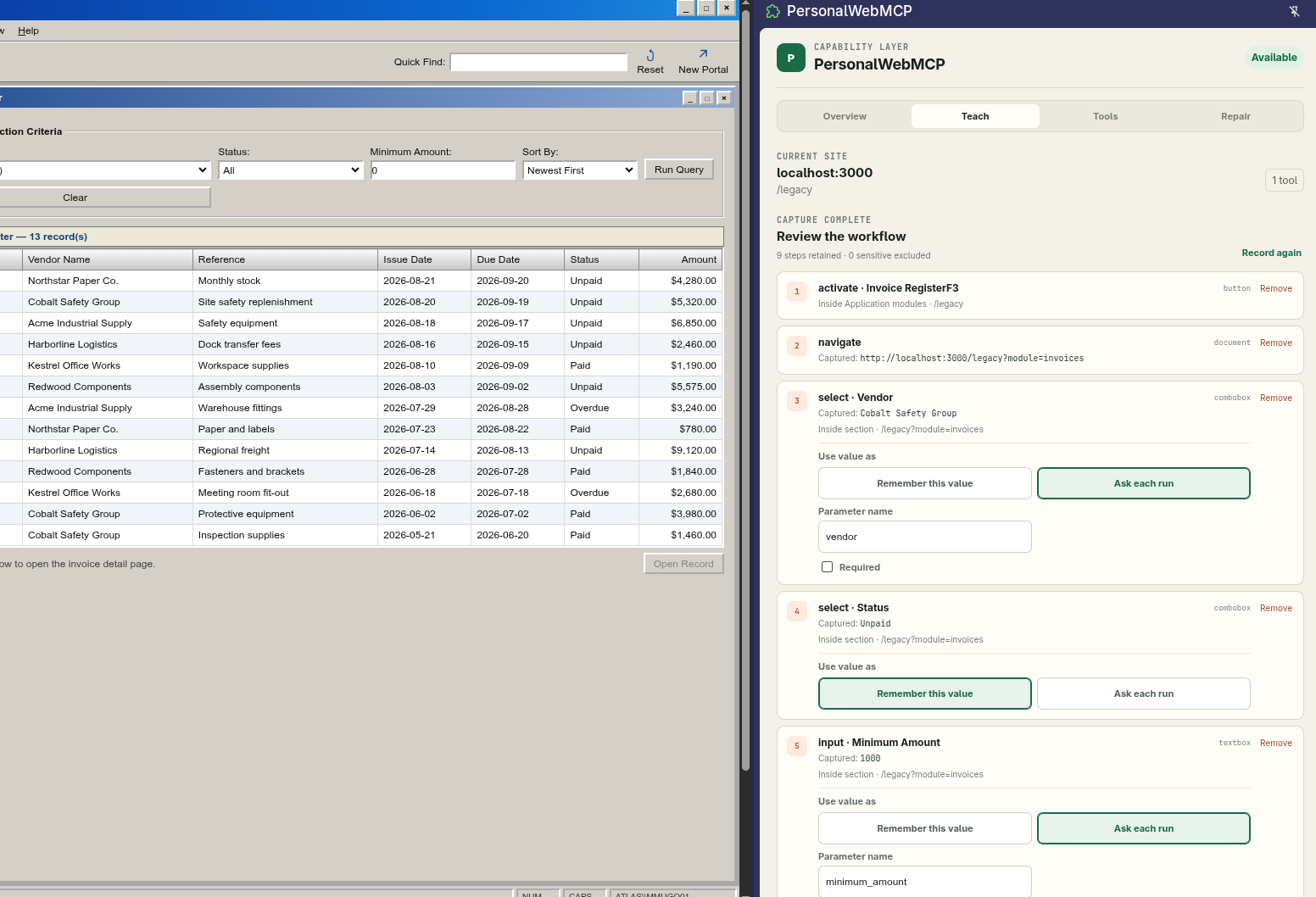
- A legacy supplier portal exposes zero WebMCP tools. I teach an invoice-search workflow, expose
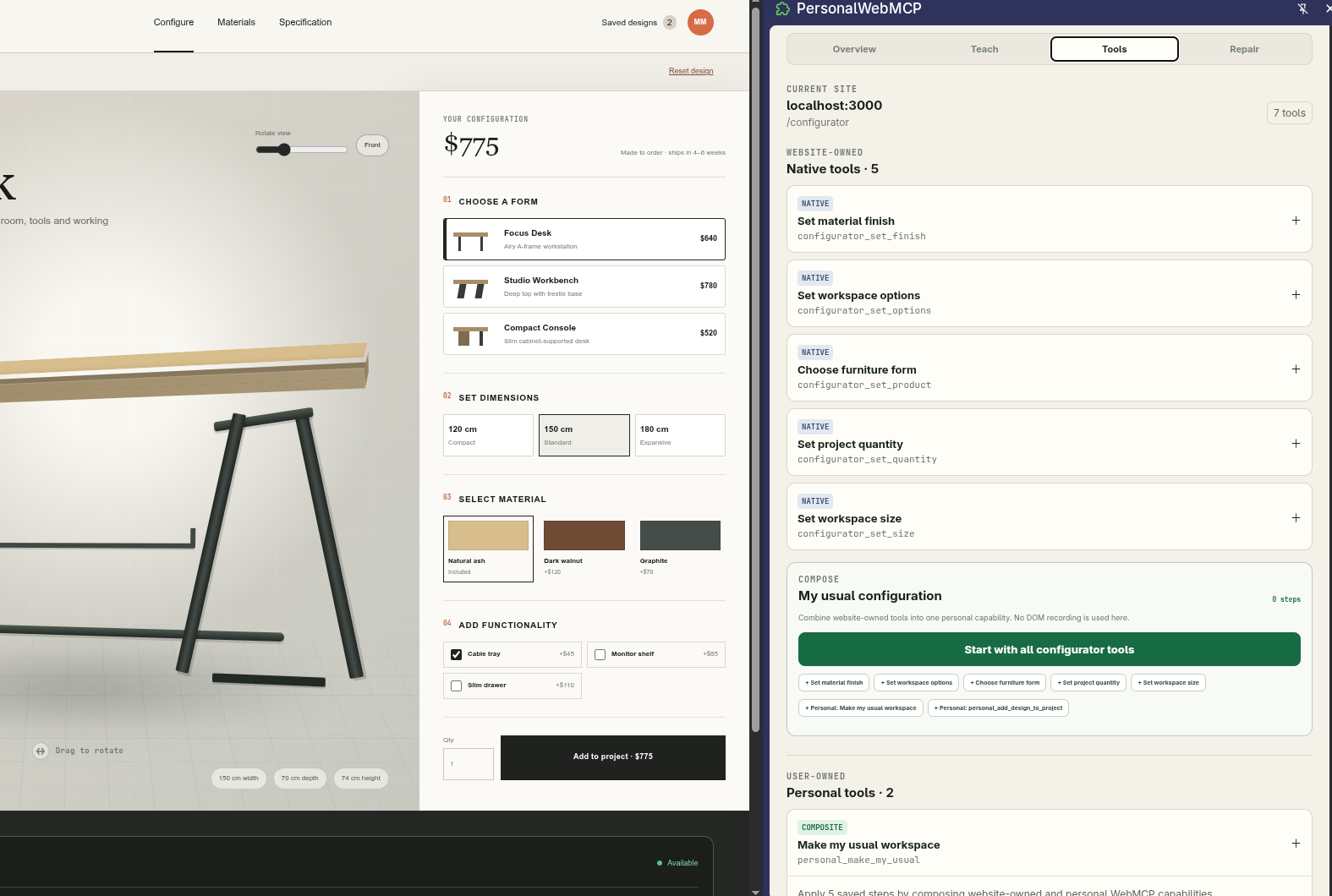
vendorandmin_amountas inputs, and an agent later invokespersonal_open_latest_unpaid_invoicefrom another section of the portal. - A furniture configurator already exposes five native WebMCP tools, but it lacks an Add to project action. I teach only that missing action, combine it with the native tools, remember my preferred configuration, and expose only
quantityto the agent throughpersonal_prepare_my_studio_workspace.
How we built it
I built PersonalWebMCP as a TypeScript and pnpm monorepo. The product is a WXT Manifest V3 extension with a React side panel, a service worker, an isolated content script, and a small MAIN-world runtime.
That separation matters because WebMCP is page-scoped: document.modelContext belongs to the webpage, while extension content scripts normally run in an isolated JavaScript world. The MAIN-world runtime performs WebMCP discovery, registration, invocation, and tool lifecycle management. The content script carries validated messages across the page boundary, while the service worker owns compilation, execution, local persistence, scope, receipts, confirmation state, and repair history.
The extension uses the WebMCP API directly:
document.modelContext.getTools()discovers website-owned and registered personal tools.document.modelContext.registerTool()registerspersonal_pingand every saved personal capability.document.modelContext.executeTool()invokes native dependencies inside composite tools.- abort signals and tool-change events manage registration and invocation lifetimes.
The compiler converts a raw interaction trace into a reusable capability contract and workflow graph. It retains semantic evidence such as accessible names, roles, labels, landmarks, routes, and form relationships while excluding sensitive controls. Personal tools are stored locally and registered only when their origin, path, health, and prerequisites match the visible page.
The companion demo site is built with Next.js and React. It supplies deterministic environments for testing a site with no WebMCP, a site with native tools, and a hybrid workflow. The extension remains the product; the hosted pages are controlled evaluation surfaces.
Challenges we ran into
The first challenge was the browser execution boundary. Registering a tool from an extension is not the same as registering one in ordinary page code, because the service worker and isolated content script cannot directly use the page's document.modelContext. Building a small, validated bridge between those worlds was necessary for genuine WebMCP registration.
The second challenge was ensuring the result was more than a macro recorder. A literal recording tends to preserve unstable details such as a result row, changing price, or generated record ID. The compiler had to separate task intent from recorded outcome, let the user choose parameters versus preferences, restore the correct starting context, and expose a typed semantic contract to the agent.
Navigation and lifecycle behavior were also difficult. Personal tools must appear on the correct origin and path, follow the active browser tab, refresh after saving, and withdraw or re-register as the page changes. Experimental browser behavior made real Chrome testing essential; a successful TypeScript build alone could not prove the WebMCP lifecycle.
Finally, repair requires restraint. Automatically selecting a vaguely similar element may be worse than stopping. The implementation uses semantic evidence, visible outcome checks, versioned revisions, and guided approval when a replacement is ambiguous.
Accomplishments that we're proud of
- A user-created tool is genuinely registered through WebMCP, discovered by an agent, invoked with structured arguments, and produces a visible result.
- The legacy demonstration goes from zero native tools to a reusable personal capability without requiring the user to write JavaScript or JSON Schema.
- The configurator demonstrates that PersonalWebMCP remains useful after WebMCP adoption: it combines five website-owned tools with one user-taught action as a single personalized capability.
- Personal tools retain provenance, local scope, typed contracts, execution receipts, health, and repair history instead of becoming opaque browser scripts.
- The same extension interface supports inspection, teaching, composition, execution, and repair while keeping the agent's actions visible to the user.
What we learned
The most important lesson was that WebMCP is not merely a cleaner way to automate clicks. Its value is the contract between a page and an agent: a stable name, a useful description, typed inputs, execution semantics, and a meaningful result.
I also learned that native and personal capabilities are complementary. Website developers are best positioned to expose safe, general primitives. Users are best positioned to describe the higher-level routines and preferences that matter specifically to them. A personal capability layer can connect those two levels.
Building the extension also made the WebMCP lifecycle very concrete. Registration context, abort signals, navigation, tool discovery, schema quality, scope, and error messages all directly affect whether an agent can use a capability reliably.
What's next for PersonalWebMCP
The next priority is making the compiler and semantic execution engine reliable across a broader range of real websites, beyond the controlled fixtures. I would also like to add intent-first teaching, where the user describes the desired capability before demonstrating it, and PersonalWebMCP asks only for the missing actions or choices.
Other directions include portable tool export and synchronization, richer repair learning, multi-site compositions, stronger review controls for consequential actions, and support for more WebMCP-compatible browsers and agents. Longer term, frequently created personal tools could also help website teams understand which native capabilities their users actually want.
Built With
- ai-agents
- chrome
- pnpm
- typescript
- webmcp
- wxt

Log in or sign up for Devpost to join the conversation.