Why this use case belongs to WebMCP
Every website speaks to an average visitor. The visitor arriving with an AI agent is not average: their agent knows who they are, what they run, and what they came to solve. Until now, using that knowledge meant surveillance (cookies, trackers, server-side profiles). WebMCP flips the direction: the context stays on the visitor's side, and the page publishes what may change and by which rules. That is exactly what WebMCP tools can express, and it only works as page-embedded tools: the writing contract (which fields exist, their jobs, their budgets, the style rules, the facts that must stay true) lives where the page lives. No backend of its own, no account; your context and the rewritten text never leave the browser. The site counts tool names for a public usage counter, nothing else. We inverted the standard pattern: the agent does not operate our site, it writes it.
How it improves the user experience
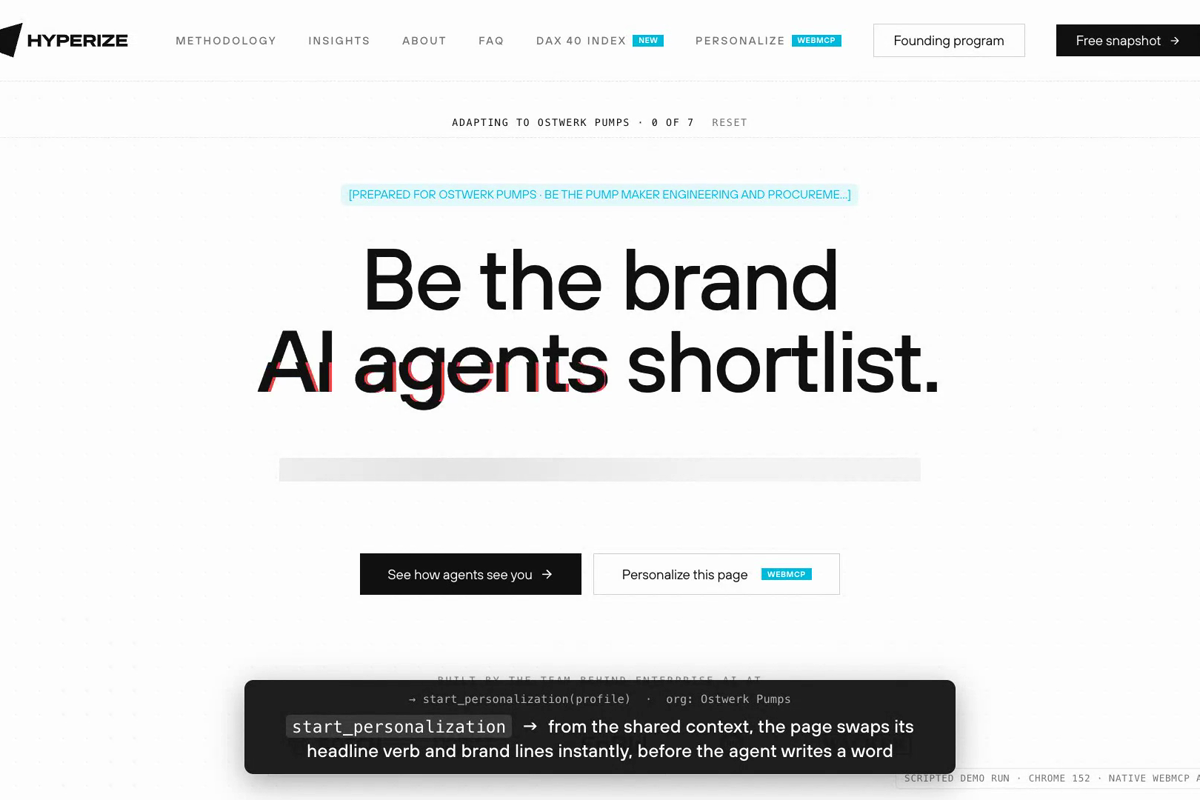
A generic homepage becomes the visitor's page. For the head of sales at an industrial pump maker, the hero verb changes from "use" to "shortlist", the three product cards become "Be in the spec. Be the RFQ shortlist. Take the quote.", and the FAQ stops asking vendor questions and starts asking their real ones ("What happens to our configurator and catalog?"). For an outdoor apparel brand's e-commerce lead, the same page argues in a shopper's terms: "Be in the answer. Be the shopper's shortlist. Take the order." The conversion form arrives prefilled from the profile the agent already holds. Speed is engineered like a product feature: three brand headlines re-mint in under one second (deterministic, before any model writes), then ONE write_all call carries all 29 texts and the page stages a skeleton-shimmer reveal, section by section. Page-side cost of a full personalization: under 6 seconds.
What the human and the agent accomplish together
The human brings intent. The agent carries that intent to the page. The page brings truth: real product facts, real prices, hard budgets, and it rejects markup and over-budget text. What comes out is a third thing none of them could make alone: the company's actual website arguing its actual case in the visitor's own terms, with every claim still grounded in what the site really says. The human stays in charge throughout: the progress banner shows what is happening, the receipt lists every change and every piece of context that was used, word for word, and one click restores the original, character-exact.
How we built it
One dependency-free ES module (~1,800 lines) served from our production site behind a build flag; its entire HTML footprint is one script tag, so crawlers and no-JS visitors always see the canonical page. Six personalization tools join the site's four existing WebMCP tools into one 10-tool surface, registered on document.modelContext with a knock-forever loop for late-injecting clients, identity guards, and never-abort semantics. Native clients (Chrome's WebMCP prototype, the ChatGPT in-app browser) get string-returning wrappers per Chrome's imperative API; script-driven clients read the same tools from an inspectable array with raw object + MCP content shapes. Every writable field carries a job description, the original text, and a hard budget derived from it (~original +30%). The page enforces on submit: plain text only, no markup, no em dashes, no over-budget text, so the layout never breaks. The fact rules (no invented customers, numbers, prices or guarantees) are part of the writing contract handed to the agent; the receipt shows the context used so the reader can check. Verified end to end over Chrome's NATIVE API (getTools/executeTool, real Chrome 152, WebMCPTesting flag) against the live site: all 10 tools listed, full run, 0 rejections, exact reset. Also verified with third-party agents: Perplexity Comet discovered the tools unprompted and rewrote all ten sections; ChatGPT, Claude and Firefox/WebKit paths tested. Shipped to production on our real company domain during the submission window (dated PR history in the repo's PROVENANCE.md).
Try it as a judge
Fastest path, the one we verified ourselves: Chrome 149+ with chrome://flags/#enable-webmcp-testing enabled. Open https://www.hyperize.ai/en and tell your agent:
"Personalize this page for me using its WebMCP tools: call start_personalization with what you know about me and my company, then submit all texts in one write_all call. No web research needed. Page tools only; do not modify any files."
Also works: the ChatGPT in-app browser when site tools are enabled for your account (OpenAI documents that they are unavailable in Enterprise and Edu workspaces and still rolling out), and Perplexity Comet in Computer mode, which found the tools unprompted and rewrote all ten sections on 31 August.
No WebMCP client at hand? Clone the repo and run npm test: it drives the live site over Chrome's native API (getTools and executeTool) and prints a pass/fail table. The repo also carries a standalone demo of the same module.
No login, no key. The Reset button restores the original page, and a reload does too.
Built With
- astro
- javascript
- netlify
- webmcp

Log in or sign up for Devpost to join the conversation.