-
-
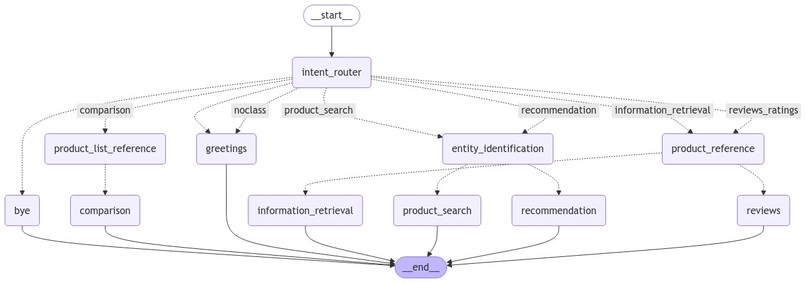
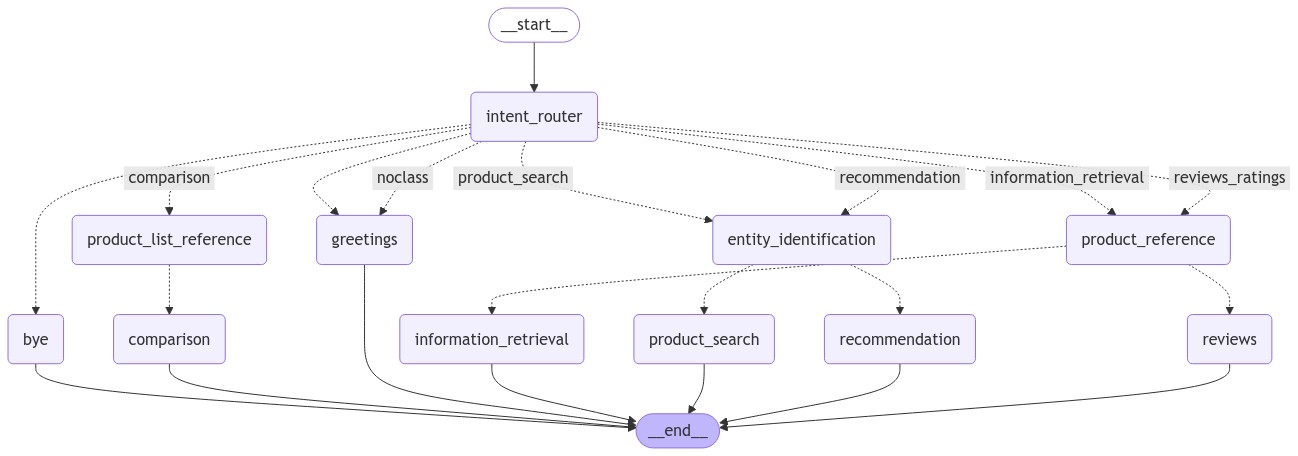
agents graph
-
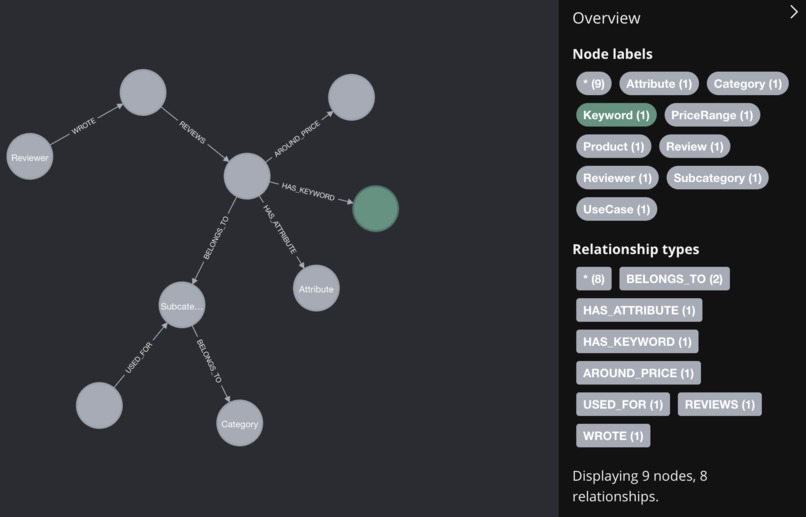
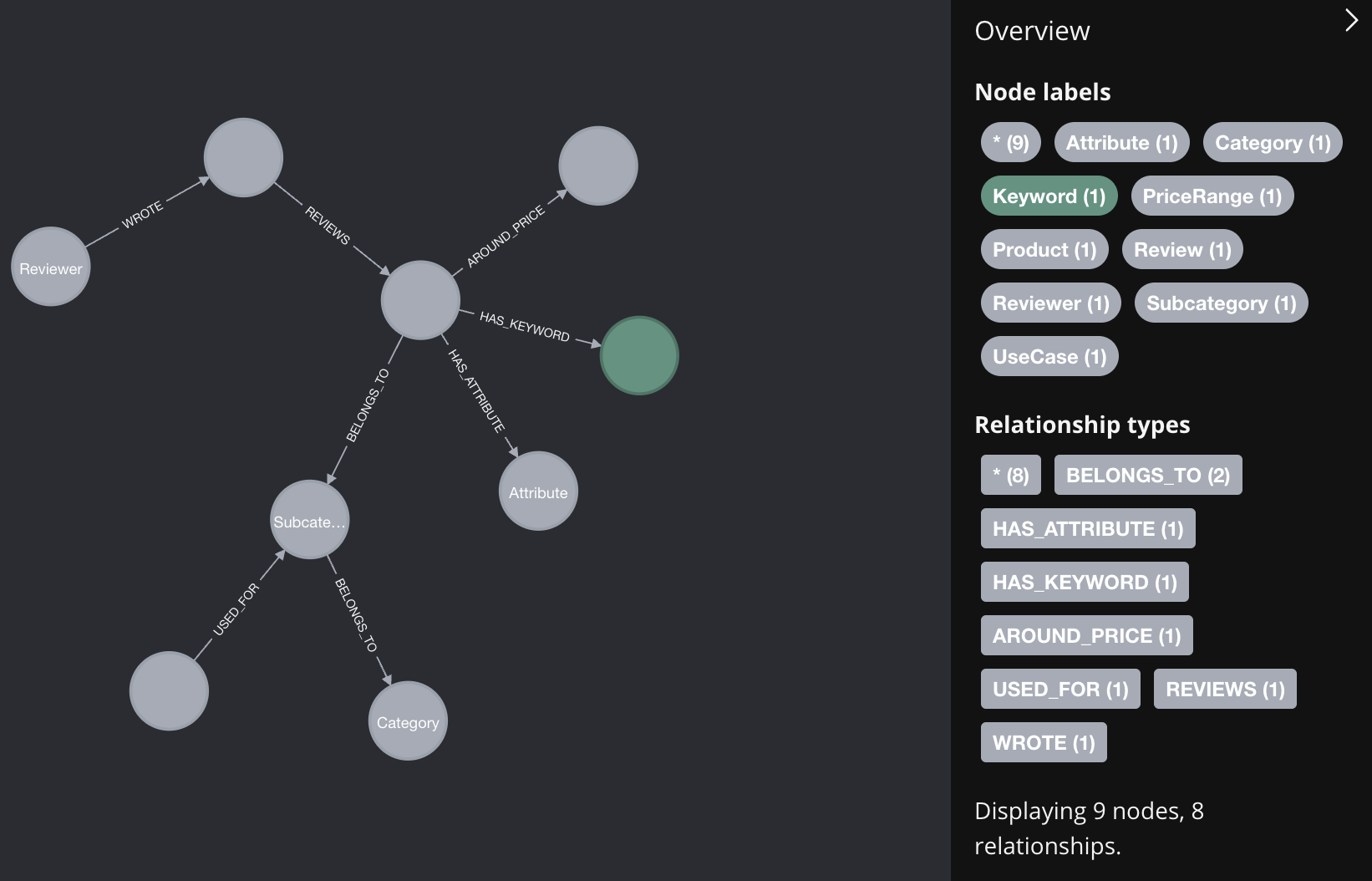
knowledge graph schema
Personalization Aware eCommerce Shopping Assistant (PASA)
Inspiration
Traditional e-commerce platforms don’t offer many ways for users to interact, often requiring them to clearly state what they want using specific keywords. This can be mentally tiring. On top of that, the way products are recommended or ranked isn’t always clear, leaving users confused about why certain items show up. This can create a frustrating experience and reduce trust in the platform.
Today, a successful personalized recommendation system depends on two main things: content and user experience (UX). Content helps users find products more easily, while UX makes it easier to interact with personalized recommendations and conversations. Large Language Models (LLMs) are great for both because they can connect different ideas and objects based on their built-in knowledge.
How I built It
Dataset Preparation
The first step was acquiring the dataset. I downloaded the Amazon Reviews'23 dataset by McAuley Lab that contained a wide range of products and reviews. For this hackathon, I focused solely on the beauty and personal care category, so I filtered the dataset to include products from this category only. Next, I sampled from the products dataset to include around 958 products only. From the reviews dataset, I included all of the reviews for the remaining products.
Creating a Knowledge Graph
Next, I started building a knowledge graph from the product and review data. The graph consisted of nodes and relationships representing various aspects of the dataset, such as products, users, reviews, and ratings. I used Neo4j to store and query the knowledge graph.
Initially, I used the data directly from the dataset to form the basic structure, but I wanted to enrich it further. For this, I turned to a Large Language Model (LLM). The LLM was used to extract additional metadata, including:
- Product Keywords: Key terms and features associated with each product.
- Attributes: Properties like brand, color, price range, ingredients, etc.
- Use-Cases: Recommended situations or needs the products were suited for.
- Product Summaries: Short descriptions generated from reviews.
Since generating this metadata required a significant number of LLM calls, I used the Mistral-Nemo model with Ollama to handle the task locally. The GPUs that I used were Mac M3 GPUs for accelerating inference.
Building a Vector Database
Once I had my enriched data, the next step was to build a vector database to support efficient search and retrieval. I chose Qdrant as my vector database, which allowed me to store both sparse and dense vector collections, so that I could perform Hybrid Search with reciprocal rank fusion, which is a combination of keyword-based search with vector-based search to improve accuracy and relevance.
Here’s what I stored in the vector database:
- Product Keywords
- Summaries
- Subcategories of Products
- Use Cases
To further optimize the retrieval process, I added a reranker using the Jina AI API. The reranker takes the results from the hybrid search and refines them to improve the final output by ordering the most relevant products at the top.
Creating a Graph of AI Agents
To manage user queries and interact with the data, I created a network of AI agents using the LangGraph framework. Each agent had a specific role in handling different aspects of the search process.
The key components were:
- User Intent Identification: I used GPT-4o to understand what the user was looking for.
- Query Entity Extraction: GPT-4o also helped in identifying the important entities (e.g., product name, attribute, or use-case) from the user's query.
- Dynamic Generation of Cypher Queries: GPT-4o generated Cypher queries on the fly based on the extracted entities to interact with the Neo4j database.
The combination of these AI agents allowed for a dynamic and conversational interaction with the knowledge graph.
Building the Streamlit App
Finally, I showcased the project in a user-friendly interface. The app allows users to enter queries and explore beauty and personal care products, retrieving results based on the enriched knowledge graph and vector-based search system.
NVIDIA AI Workbench
Using NVIDIA AI Workbench in My Project
Basic Python Image
I have a MacBook, which doesn’t have NVIDIA GPUs, so I didn’t need CUDA installed in my environment. Instead, I used the basic Python image that didn’t include CUDA support. Since I mostly worked with APIs throughout the project, this setup worked perfectly for my needs. The only exception was the knowledge graph generation, which required many LLM calls. I used Ollama for local LLM calls. I was easily able to install it in workbench just by adding one line in the postBuild.bash script that adds additional software to your container that are not simply installed using pip or apt. It uses the GPUs in my Macbook, based on the Metal Performance Shaders (MPS) backend for inference acceleration. I provided the container with 4GB of RAM so that Ollama could handle relatively longer prompts.
Defining Environment Requirements
In the Workbench, I started by listing all the required packages and dependencies in the environment section. This ensured that every time the container was run, all necessary libraries were installed automatically in the environment. As mentioned before, I used postBuild.bash to install Ollama. Additionally, since I was using some embedding models for vector-based retrieval, I added a python command to this script that downloads these models while the container is being built. This saved me time on repeated manual installations.
Mounting Cache Directory
I used dense and sparse embeddings models from HuggingFace to perform hybrid search. These are large models that take a few minutes to download every time the container starts. Therefore, to avoid waiting every time, I added a Host Mount where I saved the data in /home/workbench/.cache/ to my local storage.
Managing API Secrets
My project required access to multiple APIs for tasks like querying databases and reranking results. To manage these securely, I used the secrets section in the Workbench. By storing my API keys and other sensitive information in this section, I didn’t have to create or manage a separate .env file. The secrets were injected directly into the environment when needed, making the workflow smoother and more secure.
Serving the Streamlit App
One of the features I found really useful in NVIDIA AI Workbench was the ability to easily serve my Streamlit app. I created an app configuration in the Workbench, which allowed me to start the web server with just the click of a button. This made it simple to run and share the application, as I didn’t need to set up separate scripts to launch the app manually.
Easy Reproducibility
Workbench’s environment configuration, postBuild scripts, secrets management, and app-serving capabilities, makes my project highly reproducible. Anyone can reproduce my setup by simply cloning the repository URL. Workbench also has Git built instead it and tracks all of the changes you make to your environment, scripts, secrets, variables, and code.
An all-in-one interface for these tools ensures that the project is easy to share, with all the necessary components included and readily available.
Logging
In the Output tab, AI Workbench provides logs for the build process, the system APIs, and the applications that are running. For my project, I was logging responses from Streamlit, so I could see the application logs of the Chatbot application for debugging purposes.
Overall, NVIDIA AI Workbench provided a streamlined environment to handle all aspects of my project, from managing dependencies and secrets to serving the final app, making it an essential tool for ensuring efficiency and reproducibility.
Challenges
- I spent the least time on the frontend, so the UI still needs some work to be done. For example, it has to stream tokens from the LLM, rather than show it only once it is completely generated. Since I only want to show formatted and structured output from the LLM, I didn't find a resource to help me accomplish this.
Future Work
- Add support for streaming
- Improve presentation of the UI
- Add support for additional categories e.g., electronics, home appliances, etc.

Log in or sign up for Devpost to join the conversation.