Inspiration
I struggle with self-control around how I use the internet. I can block every distracting website I know, but there is always another website or another search term I can use.
I made Personal Keyword Blocker because I genuinely needed something that could help me manage my internet use, reduce intentional bypass loops, and create meaningful friction around distracting searches.
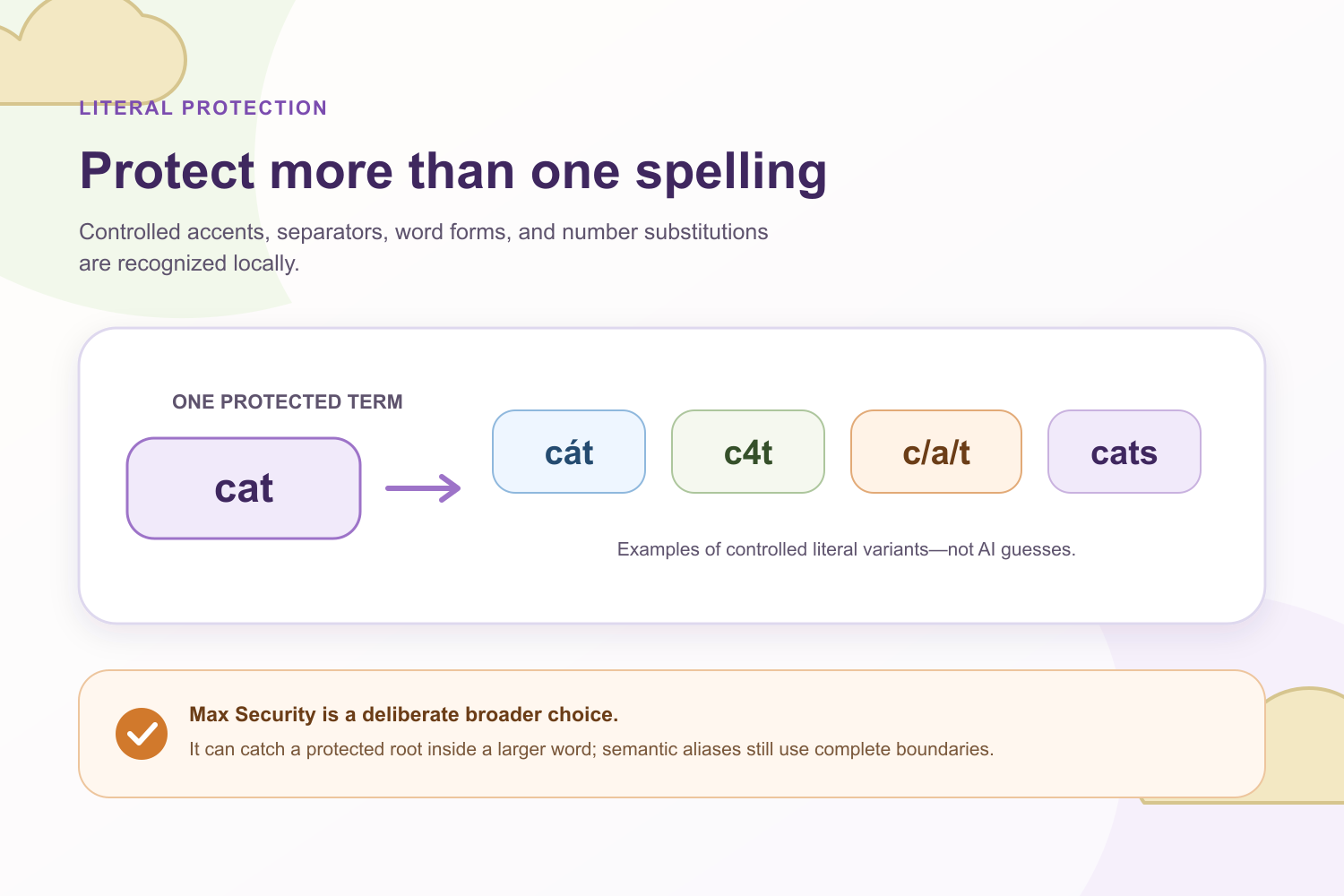
I wanted a blocker that I could not easily bypass through small spelling changes. For example, if I blocked the word cat, searching for cát, c4t, or c/a/t should not be an easy way around it.
I also wanted a privacy-focused blocker that could suggest synonyms. Otherwise, I could simply think of another word with a similar meaning and continue searching. At the same time, I did not want my searches or blocked terms to be sent to an AI service or an external dictionary API.
Finally, I wanted something that could give me time to cool off if I started trying to bypass my own settings. That is why I added Break Search Loop, an optional feature that can pause supported search-result pages for one hour after a protected search is detected.
What it does
Personal Keyword Blocker allows users to save words and phrases they want to block.
The extension can scan structured URLs, searches, page titles, and optional visible page text. It can also recognize controlled variations such as:
- accented characters;
- numbers substituted for letters;
- separators between letters;
- plural and possessive forms;
- selected word and action forms.
For example, a user could block the word videogame, and the extension could recognize variations of that term in a search or URL instead of relying only on one exact spelling.
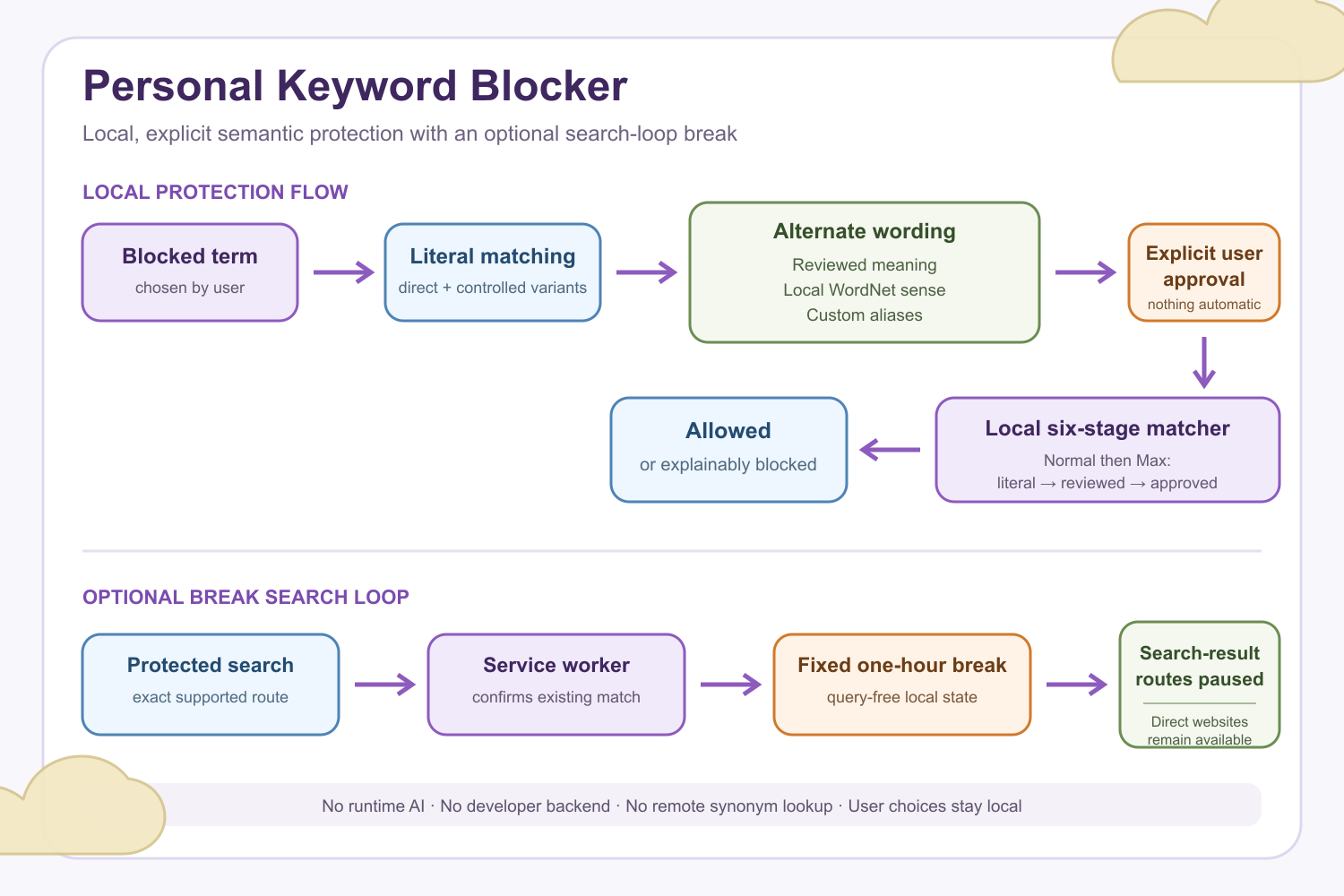
The extension also provides semantic protection. Users can review suggested meanings and synonyms for a blocked term, choose the meaning they actually intend, and explicitly approve the aliases they want protected. Nothing is automatically activated.
When a reviewed suggestion is not available, the extension can show separate meanings from a packaged local copy of Open English WordNet. Users can also create their own custom synonym groups for language that is specific to their habits.
My favorite feature is Break Search Loop. When a user turns it on and searches for a protected term on a supported search route, the extension can start a fixed one-hour break from supported search-result pages.
During that hour, direct website navigation remains available. This creates time to cool off without disabling the entire internet. The feature is optional and activates only after the user enables it and performs a protected search.
How I built it
Personal Keyword Blocker is a Chrome Manifest V3 extension. Its matching, synonym review, storage, and search-protection logic run locally inside the browser.
During OpenAI Build Week, I used Codex with GPT-5.6 as an engineering partner. It helped me inspect the existing extension, design new systems, implement features, expand tests, and identify edge cases.
The biggest Build Week addition was turning my early synonym prototype into a more controlled semantic protection system.
Instead of sending searches to an external AI model or dictionary API, I built a local approach using:
- reviewed vocabulary packs;
- a packaged Open English WordNet 2025 Core index;
- explicit meaning and alias approval;
- user-created custom synonym groups;
- local, deterministic matching.
The extension uses a fixed six-stage matching order:
- Normal literal matching.
- Max Security literal matching.
- Normal reviewed-synonym matching.
- Max Security reviewed-synonym matching.
- Normal user-approved WordNet or custom matching.
- Max Security user-approved WordNet or custom matching.
In simpler terms, it checks the original blocked words first, then reviewed synonyms, and finally the WordNet or custom aliases that the user personally approved.
Keeping the order fixed makes the results more predictable and explainable. Every semantic alias also uses strict word boundaries, even when its original term belongs to the broader Max Security list.
I also built Break Search Loop as a service-worker-controlled local state system. When an enabled protected search is confirmed, it creates one fixed one-hour break. Later searches do not restart or extend the timer.
The cooldown record contains timing information, but it does not store the search query, blocked term, synonym, search engine, or match details.
Codex helped me:
- audit the extension architecture before making changes;
- reason through storage and locking behavior;
- identify race conditions involving browser navigation;
- handle restored tabs and duplicate browser events;
- create and expand regression tests;
- review privacy boundaries;
- refine the documentation.
GPT-5.6 helped me reason through the architecture and compare different approaches. I still made the main product decisions, especially keeping everything local, requiring explicit synonym approval, rejecting runtime AI, and making Break Search Loop optional.
The final product combines deterministic browser protection, user-controlled semantic expansion, and privacy-focused design without requiring a backend, an external AI API, or the transmission of browsing data to the developer.
Challenges I ran into
One of the biggest challenges was designing the synonym editor in a way that was useful without creating too many false positives.
My first idea was to use an AI API because I thought it could solve the problem of having a limited synonym bank. However, that would weaken one of the most important parts of the product: privacy. It could require users' searches or blocked terms to leave the browser, which I did not want.
My second idea was to keep adding more dictionaries and larger collections of synonyms. I already used packaged WordNet data, but simply creating a massive bank of words would not solve the root problem. It could also introduce broad or unrelated meanings and block innocent pages.
I eventually made two important decisions.
First, I gave users control over semantic protection. They choose the intended meaning, approve the aliases they want, and can add their own custom synonyms. This makes the system more personal and explainable.
Second, I added Break Search Loop. Instead of trying to predict every possible alternate phrase someone might search, it creates a pause after the first protected supported search. This gives the user time to cool off and interrupts the cycle of repeatedly looking for a new way around the blocker.
Another challenge was making the search break reliable inside a Manifest V3 extension. I had to account for service-worker restarts, restored tabs, duplicate navigation events, rapidly changing search routes, and the short delay before the browser worker makes its decision.
I worked through those problems one at a time with Codex, adding tests and tightening the behavior after each iteration.
Accomplishments that I’m proud of
I am proud that I built a semantic protection system that goes beyond literal keyword matching while remaining deterministic, explainable, and privacy-focused.
This was something I deeply needed for myself.
I am especially proud that the extension can suggest reviewed meanings, use packaged local WordNet data, and support custom aliases without requiring an AI API or an online thesaurus. A user's searches and blocked terms do not need to be sent to a developer-operated server.
I am also proud of Break Search Loop. It pauses supported search-result pages for one hour while still allowing direct navigation to websites. That feature has personally helped me when I started trying to game my own settings by searching for different words.
The extension does not claim to be impossible to bypass, but it creates much more meaningful friction than a simple list of blocked websites or exact words.
What I learned
I learned that an external API is not always the best solution, even when it seems like the easiest one.
I was tempted to use an AI API for the synonym system, but I realized that privacy needed to shape the architecture from the beginning. That decision led me toward reviewed vocabulary, packaged local lexical data, explicit user approval, and custom aliases.
I also learned that building a useful feature takes more than one iteration. It took many detailed prompts, audits, tests, and revisions before these features became reliable enough to help me in real life.
Each iteration made the product stronger, similar to how a blacksmith repeatedly shapes and sharpens a blade.
I also learned to break large problems into smaller, manageable pieces. If I had tried to implement the entire semantic system, storage model, user interface, locking behavior, and search loop in one step, I would have struggled to understand and refine each part.
Building one layer at a time made it easier to test the behavior, notice weaknesses, and improve the product.
What’s next for Personal Keyword Blocker
I hope Personal Keyword Blocker can help more people, not just me. It has genuinely helped me manage my internet use, and I still use it in my daily life.
Next, I plan to:
- improve the onboarding experience;
- continue expanding vocabulary coverage carefully;
- improve explanations of why a page was blocked;
- complete broader Chrome and Edge testing;
- promote the extension so more people can discover it;
- keep the extension free;
- preserve its local and privacy-focused design.
My goal is to turn Personal Keyword Blocker into a widely used Chrome extension for people who want stronger, more intentional boundaries around how they search and browse online.
Built With
- chrome
- chrome-alarms-api
- chrome-scripting-api
- chrome-storage-api
- css
- gpt-5.6
- html
- javascript
- manifest-v3
- node.js
- open-english-wordnet
- openai-codex
- regular-expressions
- web-crypto-api

Log in or sign up for Devpost to join the conversation.