Inspiration
As students, we know very well the struggle of getting enough sleep. Falling asleep in particular can be very hard especially when anxiety strikes during exam periods, you have big upcoming life events, or if you're someone who has your existential crises at night. Therefore, to combat this and help everyone sleep better we had the idea to create a "Perfect Storm".
What it does
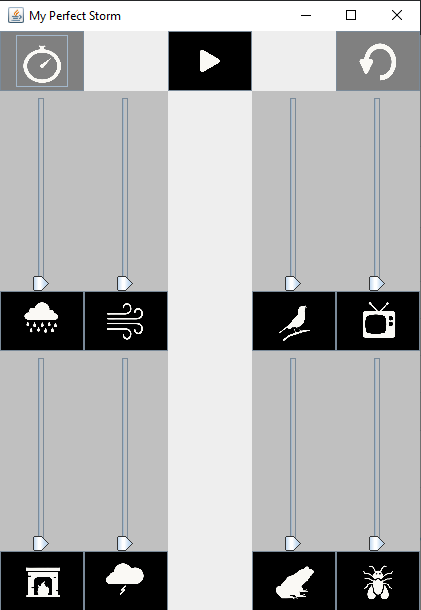
Perfect Storm is a web application that allows users to create a custom mix of relaxing, sleep-friendly sounds. Users are able to choose which sounds they want to combine and set the volume of each sound. A timer is provided so users can drift off to sleep as the sounds continue to play.
How we built it
1) Brainstormed what kinds of sounds we would include and decided to use sounds that could be layered together to create the coziness of being inside during a storm
2) We found free downloads of the sounds we wanted and used Adobe Spark to make a logo for the application and the icons for each sound
3) For the application, a GUI was created that had multiple volume sliders corresponding to each of the different ambient sounds. A global play button was implemented that allowed for the simultaneous playing of all sounds, after which the volume could be adjusted. Also, there are individual mute buttons for each of the sounds, which if clicked when the sound was already muted, would set the volume level of that sound back to its original level. Finally, there is a global mute button that upon use, would set all sounds to volume 0.
4) For the webpage, we focused on the sliders to adjust the volume button and the interface of the website. Each volume slider has a corresponding icon that plays a specific ambient sound and adjustS how loud you want the volume to be. Clicking the play/pause button at the top right stops every sound.
Challenges we ran into
1) Finding sound downloads that were both free and not too big
2) Removing the background of logo/icons
3) There were several issues with adjusting volume in the application using a JSlider
4) For the webpage, we had some issues with aligning the icons together and playing sounds when the button is pressed. The icons were not evenly spaced out and the sounds would not overlap with each other when we tried playing them together
Accomplishments that we're proud of
Communication: We made sure to discuss with each other frequently how are tasks we're going and promptly answering each other's questions. This ensured that everyone remained aware of plan changes and work that still needed to be done.
What we learned
We learned about websites that provide free sounds, can be used for logo and icon design as well as websites that can remove backgrounds from images.
How to properly use JavaFx to create a working GUI
What's next for Perfect Storm
Implementing the timer feature into the application, so that a set time can be chosen after which all sounds will stop playing and the application will close itself.


Log in or sign up for Devpost to join the conversation.