Inspiration
All three of us are passionate about cybersecurity, so we wanted to build a tool a security professional could actually use. We’re relatively new to the field, and we wanted a project that was both practical and a way to learn how logs and threat-intelligence dashboards work in real environments.
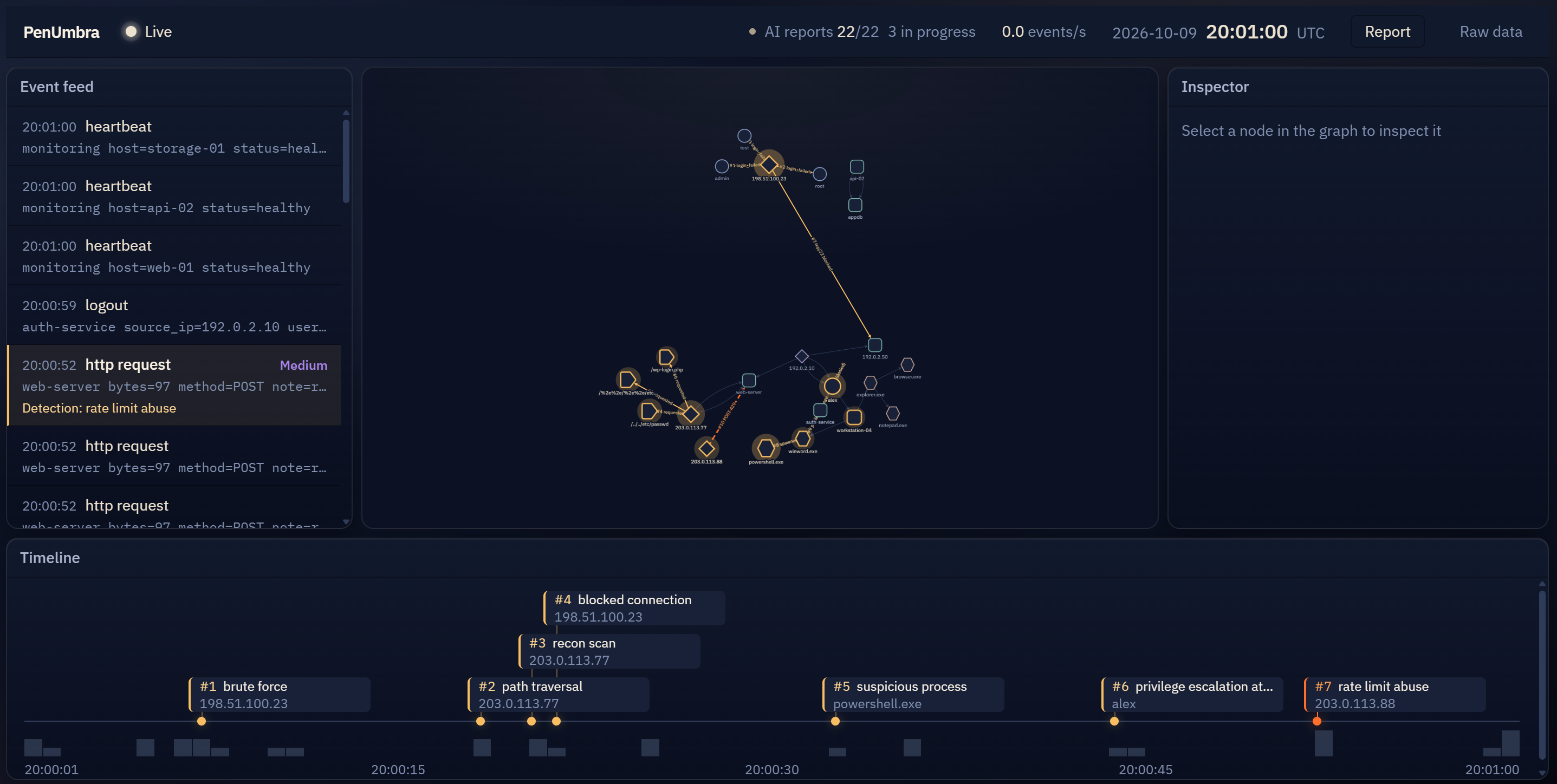
As beginners, many professional tools felt intimidating. Some have complex UIs because of age, like Windows Defender, and others have to be complex so professionals can find exactly what they need, like Wireshark. PenUmbra instead relies on visual language to convey important information, like suspicious activity and the order events happened in. That became our threat graph, the feature that makes PenUmbra unique.
What it does
- Ingests a .log file line-by-line in order to simulate events happening in real time.
- As new events come in, the program grabs key info like timestamps, IP addresses, and alerts before moving forward.
- Creates a live graph through a visual map of nodes and lines, turning IPs and accounts into connected dots that light up and show you how an attack spread across the timeline.
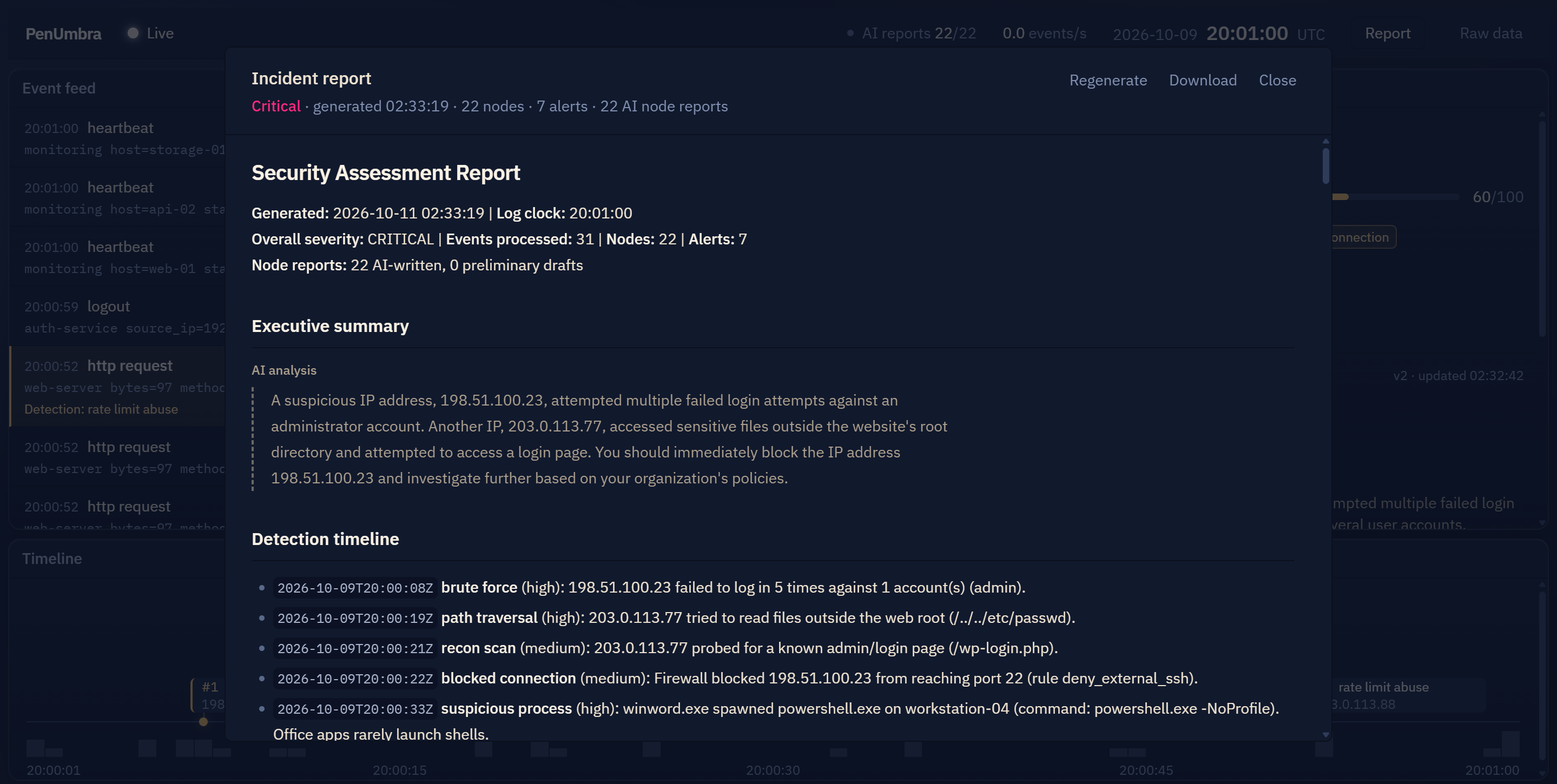
- Using Hugging Face, the program sends each node data over to a Gemma AI to read, interpret, and generate an individual node report summary, then sends it back to the program for. It can also send all nodes to create a full report.
How we built it
Front End
- Built using React , TypeScript, and Vite to provide a live header, event feed, threat graph, inspector, reports, and detection timeline, all updating together as the replay runs.
- Zustand keeps all of the app's live data in one shared place. The app checks the backend twice per second and updates that shared data for every panel.
- Cytoscape.js renders the threat graph using the positions assigned by the backend. Entity types are distinguished by shape and node size.
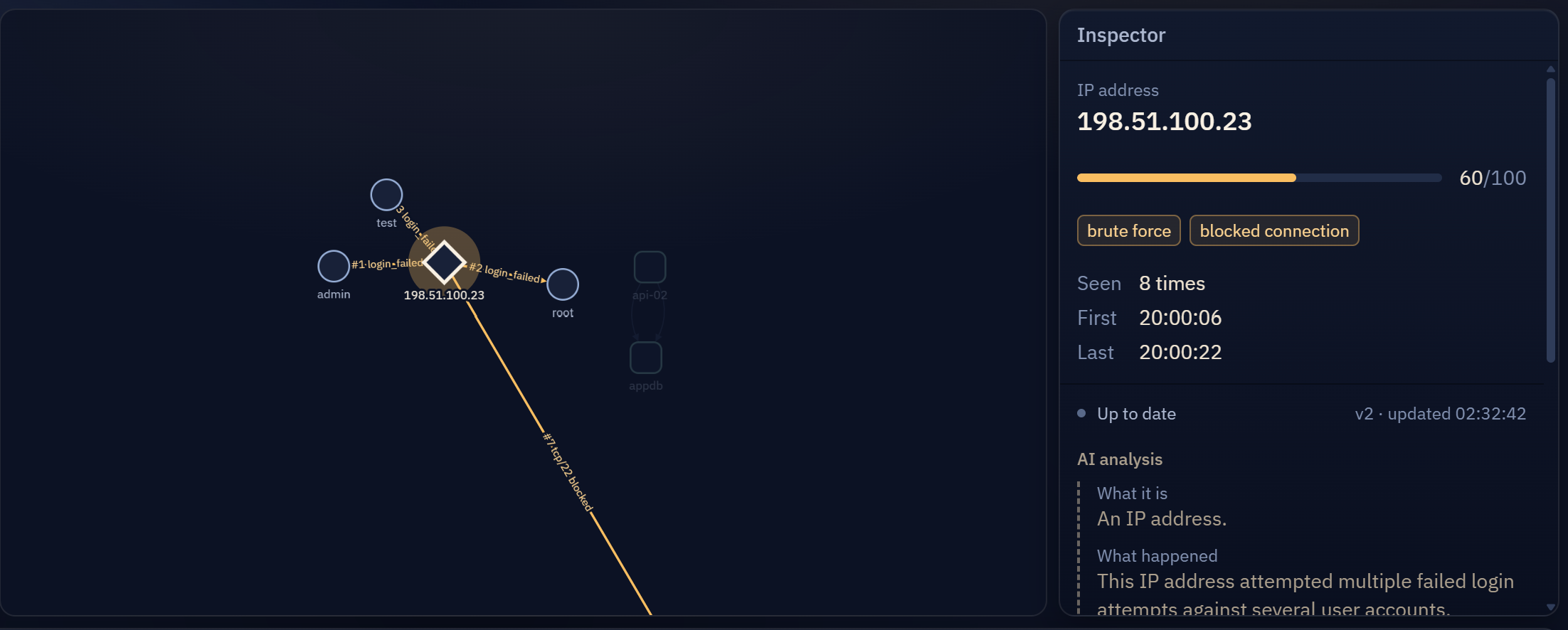
- Inspector shows the selected entity's risk score, detections, and connections, and its per-node report with live status.
- Tailwind CSS handles all styling throughout the front end, with a slowly drifting animated background behind rounded panels.
Back End
- Flask (Python) is the core of the backend. It exposes the API, the front end polls twice a second, serves the reports, and accepts live log lines.
- Python threading runs a background replay of the log file with its original timing, and a separate worker that generates reports without blocking the API.
- NetworkX models the graph of users, hosts, IPs, processes, and files, and its spring layout assigns the node positions that the front end draws.
- A rule-based detection engine written in plain Python raises alerts and risk scores for brute force logins, path traversal, scanning, and suspicious processes.
- The report manager keeps one report per node and queues them for Gemma, with risky nodes first. A node that changes while waiting is merged into a single request with the latest data.
- The requests library sends each prompt to the Gemma server, and the program adds the exact risk score, detections, and connections under the model's explanation. If the server can't be reached, a rules-based report is shown instead.
VPN and Local Model
- Hugging Face was used to download the gemma-2-2b-it model, which was used to process information that could be sent back to the program to populate the graph and generate the reports. This allowed for immediate understanding and action in case of a major security issue. The Gemma AI allowed for constant data processing without dealing with usage bottlenecks that could lead to major security vulnerabilities.
- Tailscale is a VPN that allows multiple machines to access the same server from any distance, so that we could generate reports and catch security breaches as they were occurring. Tailscale was useful for seamless integration of new computers so that they could detect and help resolve breaches as they occurred.
Project Structure
┌────────────────────────────────────────────────────────────────────────┐
│                        Frontend (React + Vite)                         │
│ ┌──────────────┐  ┌──────────────┐  ┌──────────────┐  ┌──────────────┐ │
│ │ React        │  │ Cytoscape.js │  │ TypeScript   │  │ Tailwind CSS │ │
│ │ Components   │  │ Threat graph │  │ + Zustand    │  │ + shadcn/ui  │ │
│ └──────────────┘  └──────────────┘  └──────────────┘  └──────────────┘ │
└────────────────────────────────────────────────────────────────────────┘
                                     │
                                     ▼
┌────────────────────────────────────────────────────────────────────────┐
│                          Backend API (Python)                          │
│ ┌──────────────┐  ┌──────────────┐  ┌──────────────┐  ┌──────────────┐ │
│ │ Flask        │  │ Converter    │  │ NetworkX     │  │ Report queue │ │
│ │ REST API     │  │ convert.py   │  │ Graph, rules │  │ 1 per node   │ │
│ └──────────────┘  └──────────────┘  └──────────────┘  └──────────────┘ │
└────────────────────────────────────────────────────────────────────────┘
                                     │
                                     ▼
┌────────────────────────────────────────────────────────────────────────┐
│                          AI & Services Layer                           │
│ ┌──────────────┐  ┌──────────────┐  ┌──────────────┐  ┌──────────────┐ │
│ │ Gemma 2B     │  │ Tailscale    │  │ Rules backup │  │ Token auth   │ │
│ │ Node reports │  │ VPN link     │  │ Offline mode │  │ Access guard │ │
│ └──────────────┘  └──────────────┘  └──────────────┘  └──────────────┘ │
└────────────────────────────────────────────────────────────────────────┘
Challenges we ran into
- After running into some issues with usage limits on the Gemini AI, we decided to run an AI locally on a PC so that we could circumvent these issues. After implementing Gemma, we used Tailscale so we could connect multiple computers to the same VPN. This allowed us to run the web app on multiple machines, so we could process multiple logs at once and do it at any distance away from the main server.
- Combining different elements was also a challenge, as everyone was focused on different tasks (front-end, API set-up and log management, AI-report). We ended up with different implementations and had to make sure that features could work on the API.
Accomplishments that we're proud of
- Setting up a local AI model with a VPN to use it remotely for the first time. None of us had done anything like this before and now that we know how it's something we can implement into future projects.
- Making such a useful tool for cyber analysts. We are all interested in cybersecurity, but before today, we had never made any cybersecurity projects or applied the concepts that we had learned. Being able to successfully complete this project has made the idea of a career in cybersecurity into an actual possibility.
What we learned
- How to run a model locally. This is the first time any of the 3 of us downloaded a model from HuggingFace and got it running locally. Now that we know how to do this we won’t have to worry about AI usage limits for future projects.
- How to connect to a remote server running on a local PC using a VPN. We did this using Tailscale. This is another useful thing to know as a developer as we can utilize the resources of a much more powerful PC while developing on laptops remotely.
- How to build a graph on a React Web App. To do this we used the Cytoscape.js library to render graphs, and then also relied on styling to have different events be represented by different node shapes, color effects, and connecting lines to make an attack path easy to follow visually.
What's next for PenUmbra SOC Auditor™️
- We would like to make it work with logs that are currently being generated. So in real-time attacks, a response with our program could become immediate.
- Moving the model onto a dedicated server. Right now the AI runs on a single local PC, which limits how many logs it can process at once. A dedicated server would give us the power to run more AI generation, so PenUmbra can keep up with larger and busier environments.
- Real-time AI responses. We want the AI to generate its analysis and reports as events arrive, instead of after the fact, so analysts get explanations and recommended actions the moment suspicious activity appears on the threat graph.
Built With
- css3
- flask
- gemma
- python
- react
- tailscale
- typescript



Log in or sign up for Devpost to join the conversation.