-
-
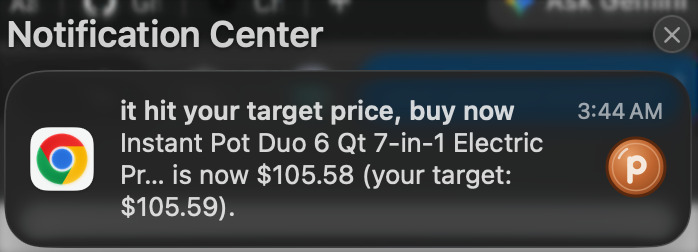
penny’s price-drop alert. macOS hides notifications while screen recording, so it’s missing from the video.
Inspiration
We're college students on tight budgets with hectic schedules. We've both bought something, just for it to go on sale in a day, or we would save something to buy later just to miss the price drop. Existing price trackers show you what the price was. We want something that can estimate what it will be, how sure it is, and what to do about it: all on page, no spreadsheets and no burden to remember things.
What it does
penny is a Chrome extension that sits in a side panel next to the Amazon page you're shopping on and answers one question: buy now, or wait? It reads the product and its current price, then shows buy now or wait, adds leaning when the forecast is uncertain.
- Personalization.
See how three factors change the forecast:
- when you want it by
- how much you want to save
- how sure penny should be before telling you to wait
- Honest odds. For example: "62% chance you'll save $115+ (10%) by nov 27," plus the predicted lowest price and the day it's most likely to happen.
- Wait & watch. penny remembers your target and notifies you when the price drops, or reminds you before your deadline so waiting never backfires.
- Transparent. Every forecast explains why, shows how reliable it is, and clearly says when it's based on simulated rather than real price history.
- Seasons you can see. The panel's colors shift with the season of your deadline (Halloween, Black Friday, the holidays, New Year), because sales follow the seasons.
How we built it
- Chrome extension (Manifest V3):
- a side panel in HTML, CSS and JavaScript
- a content script with a site-specific Amazon extractor, plus a fallback that reads standard schema.org product data
- a background service worker for watch checks and notifications
- Backend: Python with FastAPI. A
POST /predictendpoint takes the product, price and user preferences and returns the verdict, drop probability, predicted lowest price, best day, explanation, and data provenance. - Data: Two main parts -- Apify, Tiger Data
Apify:
We needed years of Amazon price history, and scraping it ourselves was a huge task, so we turned to Apify instead, to get the data that already exists.
Two actors for two jobs: radeance/keepa-scraper with include_price_history for multi-year history, and Apify’s official e-commerce scraper for today’s price, which the watchlist needs because the user isn’t on the product page when their alarm fires.
Two engineering details we’re glad we handled. Series selection: Keepa returns up to 17 price series per product. new is the lowest price across all sellers and sits below the page price; buybox is what a shopper actually sees. We pick automatically — longest time span, and among those within 80% of the longest, the densest. For the Keurig that chose amazon_price_history with 2,069 points over 3,888 days. Glitch filtering: the AirPods series had 17 points at $99.99 on a ~$264 item. Read naively each is a 62% crash. We filter by duration rather than depth, so a 20-minute flicker goes and a genuine half-price week stays.
Fetches run in the background: a product we’ve never seen gets an answer immediately, labeled as simulated, and real history arrives within a minute. One run per product.
Tiger Data:
Price history is time-series data, so it belongs in a time-series database. Every observation lives in a TimescaleDB hypertable — ours currently has 15,875 rows reaching back to 2011. When penny meets a product it hasn’t seen, the background fetch writes that product’s whole history straight into Tiger Data, so it’s there permanently and the next visit is instant. Writes are append-only with ON CONFLICT DO NOTHING, so re-running a fetch never duplicates or loses anything, and the store only ever grows as people browse.
We also made the database non-fatal. If it’s unreachable the API serves from a local copy, and after one failure it skips the database for 60 seconds instead of paying a connection timeout on every request, a hostname resolving to six addresses means six timeouts. This ensured that our instance did go unreachable mid-build and the demo kept working.
Tiger Data is also what makes our accuracy testing possible. Nine years of history across six products, queried per product, produced our backtest.
- Our Forecasting Algorithm: for a target saving s and window of N days, we estimate the drop probability as the share of comparable past days d where the lowest price in the following N days was at least s below that day's price: $$ p_{\text{drop}} = \frac{1}{|D|} \sum_{d \in D} \mathbf{1}\left[\min_{t \in [d+1,\, d+N]} P_t \le (1-s)\,P_d\right] $$ adjusted for time of year, and for day of week only when the deadline is under a week, but with each adjustment: penny validates it against that product’s own history and discards it if it doesn’t reduce error. That’s why identical code reports high confidence on some products and medium on others. The likely price range is the 10th–90th percentile of the lowest price you’d pay within your window, capped at today’s price, since buying now is always an option. We backtested walk-forward on held-out history: across six products penny beat a naive baseline on three, and when it said wait at 65% confidence on eg. Crest Whitestrips the price actually dropped 73% of the time.
- Decision layer: The forecast measures history and reports a probability; it never sees how certain you need to be. A separate layer turns that into a verdict using your confidence threshold, so the odds stay identical whether you’re cautious or bold — only the advice changes.
- Design: prototyped in Figma, then rebuilt as a lightweight side panel.
Challenges we ran into
- Real price history is hard to get. Some product's don't have a long price history to forecast, so we built clear labeling for real, mixed and simulated data that our product uses to always return a verdict, and the UI says so whenever an estimate isn't based on completely real history.
- Amazon's pages vary a lot. We wrote several price-extraction strategies with fallbacks, skipping struck-through list prices and per-unit prices.
- Keeping it honest. Separating "how reliable is this forecast?" from "how sure do you need to be?" took a few iterations, and it became a core design decision, so no matter what chance you take you see our reliability.
- Balancing the trade-offs of waiting. We first assumed waiting had no downside, but prices can rise or items can sell out while you wait. Since our model predicts drops but not rises yet, we capped the confidence slider at a 50% minimum, so penny only says “wait” when a drop is more likely than not.
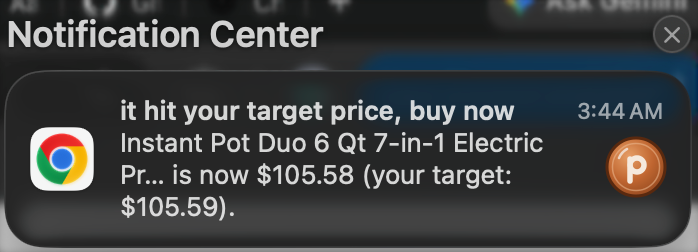
- Demo. When recording the demo video, the notification did not show up in the screen recording, so we attached the image of the notification that was sent when we recorded the video.
Accomplishments that we're proud of
- An end-to-end product: real Amazon page → backend forecast → live verdict that updates as you drag the sliders.
- Forecasts that state their own uncertainty instead of faking confidence.
- A design that feels calm and fun, and a little seasonal. plus a penny you can flip :)
- Real price-drop alerts, using scheduled Apify runs to check watched items.
What we learned
- How to build Manifest V3 extensions, side panels and background workers.
- That communicating uncertainty is a design problem as much as a math problem.
- That a backtest is worth more than a better model. Ours found a bug that had quietly flattened every prediction, and then told us which products we can actually forecast (everyday consumables with regular - promo cycles) and which we we have to improve in the future (electronics). That time-series databases need tuning, not just using. Fifteen years of price history gave us 582 Timescale chunks and nine-second queries; retuning the chunk interval to a year took it under three.
What's next for penny
- More retailers beyond Amazon.
- Improving forecast to include contextual signals, which will make it usable for more cyclical products such as electronics.
- Comparing prices across stores (Target, Walmart, Best Buy) to answer "buy here or there?"

Log in or sign up for Devpost to join the conversation.