-
-
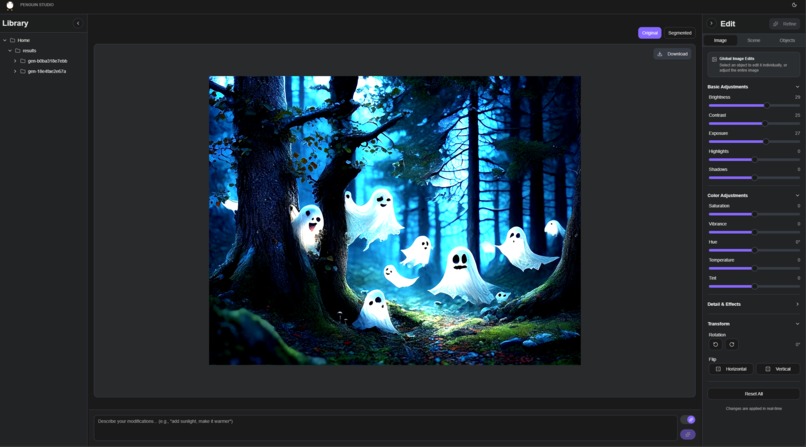
Penguin Studio interface
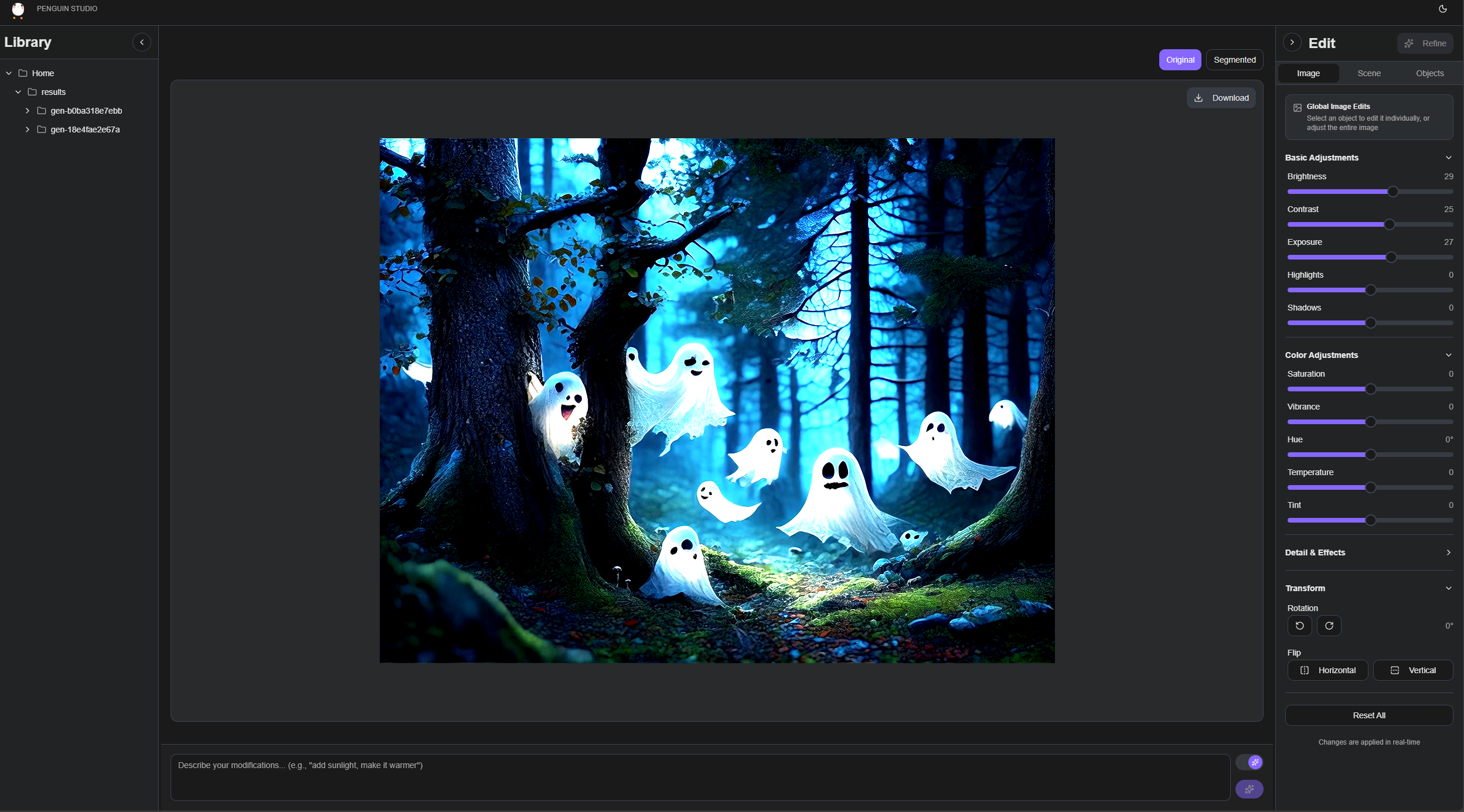
Penguin Studio
Inspiration
Most of us have tried to coax an AI image generator into making something very specific, only to get stuck in an endless loop of prompt tweaks. You nudge the lighting, and suddenly the character changes. You move a person “slightly left,” and the whole scene reimagines itself. It’s a fragile workflow—one wrong adjective and everything collapses.
The deeper frustration isn’t the model; it’s the interface. We’re forced to describe inherently visual ideas in purely textual instructions. It’s like shouting through a wall and hoping the echo comes back as the image I imagined.
I started asking a simple question: Why can’t editing AI-generated images feel as direct and visual as using Photoshop, Figma, or Procreate?
That question became Penguin Studio.
What it does
Penguin Studio exposes the hidden structure that image models use internally—objects, lighting, camera, style—and turns them into controls you can actually manipulate.
Start with a single prompt. You write your initial idea once. The model generates an image and simultaneously produces a structured breakdown of the scene.
See the scene decomposed. Objects, people, props, background elements, lighting sources—everything is turned into identifiable, clickable components. You can select the “warrior,” the “lantern,” the “sunset,” or the “smoke” as if they were layers. These layers can be edited independently and blended together to achieve HDR results.
Edit visually, not verbally. Want warmer lighting? Drag a lighting widget. Want the character bigger? Grab and scale it. Want the camera lower? Pick a new angle from a dropdown. Shadows, mood, style intensity—handled through sliders, not syntax.
Then refine. When you hit “Refine,” the system converts your visual changes into concise, model-ready language. The result: the image regenerates with your adjustments while keeping everything else stable.
How I built it
The system has two main parts that talk to each other:
Users face a web app that looks like a simplified photo editor. There's a library of your previous generations on the left, your image in the middle, and control panels on the right. I built it to feel familiar—if you've used any creative software, you'll recognize the layout.
In the backend, the system handles the AI heavy lifting. When you generate an image, it goes through an image generation service that produces both the picture and a detailed breakdown of what's in it. Then I run an object detection model to find and outline every distinct thing in the image, creating those clickable layers.
When you drag a slider or move an object, I am not just storing coordinates—I am building up a sentence. "Change lighting to studio" plus "move the cat to the right" plus "make it more vintage" becomes a modification instruction that the AI can understand and execute while keeping the rest of your image stable. I also built a matching system that converts the descriptions (like "soft, diffused natural lighting from the upper left") into our slider positions. This lets us pre-fill the controls with the current state of your image, so you know where you're starting from.
Challenges I ran into
A recurring issue was the vocabulary gap between the generator and the segmenter. Bria gives us rich descriptions like “a fierce demon warrior in intricate armor,” while SAM3 is far more reliable with short, concrete phrases such as “warrior” or “person.” Passing the full description often produced either no mask or a noisy one. I ended up building a small ladder of prompts per object, from specific to generic, and simply choosing the first variant that yielded a confident, reasonably sized mask.
Refinement stability was another early problem. In the first prototypes, a small change—moving a sword slightly, softening the light—often resulted in what felt like a completely new image. The fix was to treat Bria’s structured prompt as a persistent scene state and to reuse the same seed for all refinements of that scene. Once I applied edits as small deltas to that state, rather than rebuilding everything from scratch, refinements started behaving like actual edits instead of new generations.
I also spent time on the controls themselves. Lighting direction expressed as angles or dropdowns was technically clear but opaque to users. The simple “light on a small stage” widget, where you drag a light icon around a frame, turned out to be a much better compromise: people immediately understand what it does, and I can still translate its position into a phrase and parameters the model can use. Translating visual edits into language needed similar care; a 50-pixel drag only becomes meaningful once you classify it as “slight move,” “move to a new region,” and so on, and that required some tuning on real examples.
Accomplishments that I am proud of
The most important outcome is that Penguin Studio is now usable as an everyday creative tool. Many adjustments that used to require a string of prompt edits—moving a character, changing the lighting mood, pushing the camera a bit lower—can be done by direct manipulation and a small refinement step. The loop of adjust, inspect, refine feels familiar to people coming from design or illustration tools rather than from prompt engineering.
Automatic object detection is reliable enough for typical model outputs. Combining Bria’s structured object descriptions with the prompt ladder for SAM3 yields masks that are usually good enough for interaction without per-image tuning. The lighting widget is a small but telling success: we saw a clear textual summary of what it meant, and observed the refined images behave in line with that summary.
I also managed to keep language in the loop without forcing users to start there. The system generates modification text from the sequence of edits, but that text is always visible and editable. Users who care about wording can adjust it or add nuances; users who do not can ignore it and work purely through the scene. That balance—automatic support with an escape hatch—has turned out to be more robust than either hiding the text entirely or asking users to write everything themselves.
What I learned
Across different tests, I consistently interacted in terms of objects rather than pixels or tokens. Their first instinct was to click on “the character” or “the lamp,” not to edit a prompt or think about image coordinates. This confirmed that the scene representation—objects, background, lighting, camera, style—should be the primary interface, and that prompts and pipelines are better treated as internal details.
Exposing the structured prompt from Bria was more than a convenience; it became the shared vocabulary between user intent and system behaviour. Once that intermediate representation is visible, it is much easier to reason about why a refinement turned out the way it did and how to make targeted changes.
More broadly, the most productive interactions were those where the system made reasonable inferences but did not insist on them. Automatically turning edits into short descriptions removes a lot of friction, but the interaction only feels right because those descriptions are transparent and can be overridden. That mix of suggestion and control is what makes the tool feel collaborative rather than prescriptive.
What's next for Penguin Studio
The most immediate extension is localised editing. We already have object masks; the natural next step is to constrain regeneration to those regions so that a user can, for example, change a character’s outfit or expression without disturbing the rest of the scene. Another direction is to allow users to create their own masks and edit the descritions of these masks so that the scene becomes more editable.
Beyond that, we want to move from independent edits to explicit relationships and create a more agentic workflow. Constraints such as “this character stays in front of that one”, “change lighting to studio for a portrait" should survive across refinements rather than being rediscovered each time. In the longer term, we are interested in carrying character identity and style across multiple images, building an human-agentic workflow to achieve easy and collaborative interfaces for image generation and edition.
Built With
- bria
- fastapi
- python
- pytorch
- radix
- react
- sam3
- shadcn
- tailwind
- typescript
- vite
- zustand

Log in or sign up for Devpost to join the conversation.