Inspiration
Two winters ago, one of our teammates visited his grandfather in India. His grandfather has a tremor, and his hands shake enough that typing and moving a mouse are hard for him. He wanted to surprise his grandson by putting on a movie on Netflix, and he couldn't get it started on his own. Our teammate had to help him, which gave away the surprise: it was one of his favorite movies. That same visit, he wanted to look up his grandsons online because they had told him they were "internet famous," and he couldn't do that either.
We built Peek for people with upper-limb motor impairments who can still speak clearly. We started with essential tremor, and the same problem shows up for people with cervical spinal cord injuries, arthritis, RSI, and early limb-onset ALS. According to Pew Research Center, people with physical disabilities are three times less likely to go online. A 2025 study found that among people with spinal cord injuries, computer accessibility tools are abandoned more than any other assistive technology, and that is what pushed us to build this.
Most AI agents we looked at take a chore off your plate. We wanted his grandfather to be able to use his own computer himself, for the things he actually opens it for: a movie, a YouTube video, a message to his grandsons.
What it does
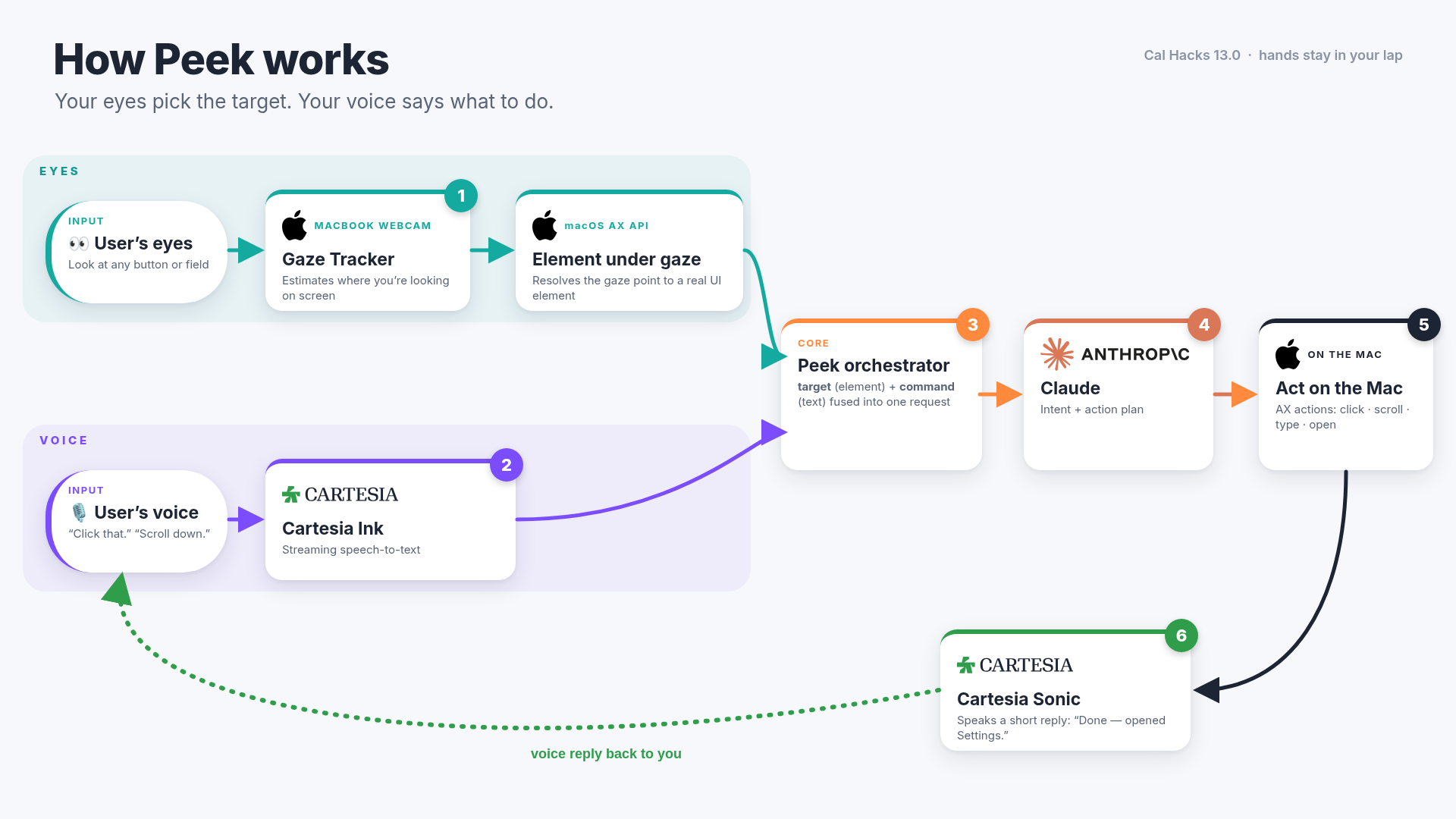
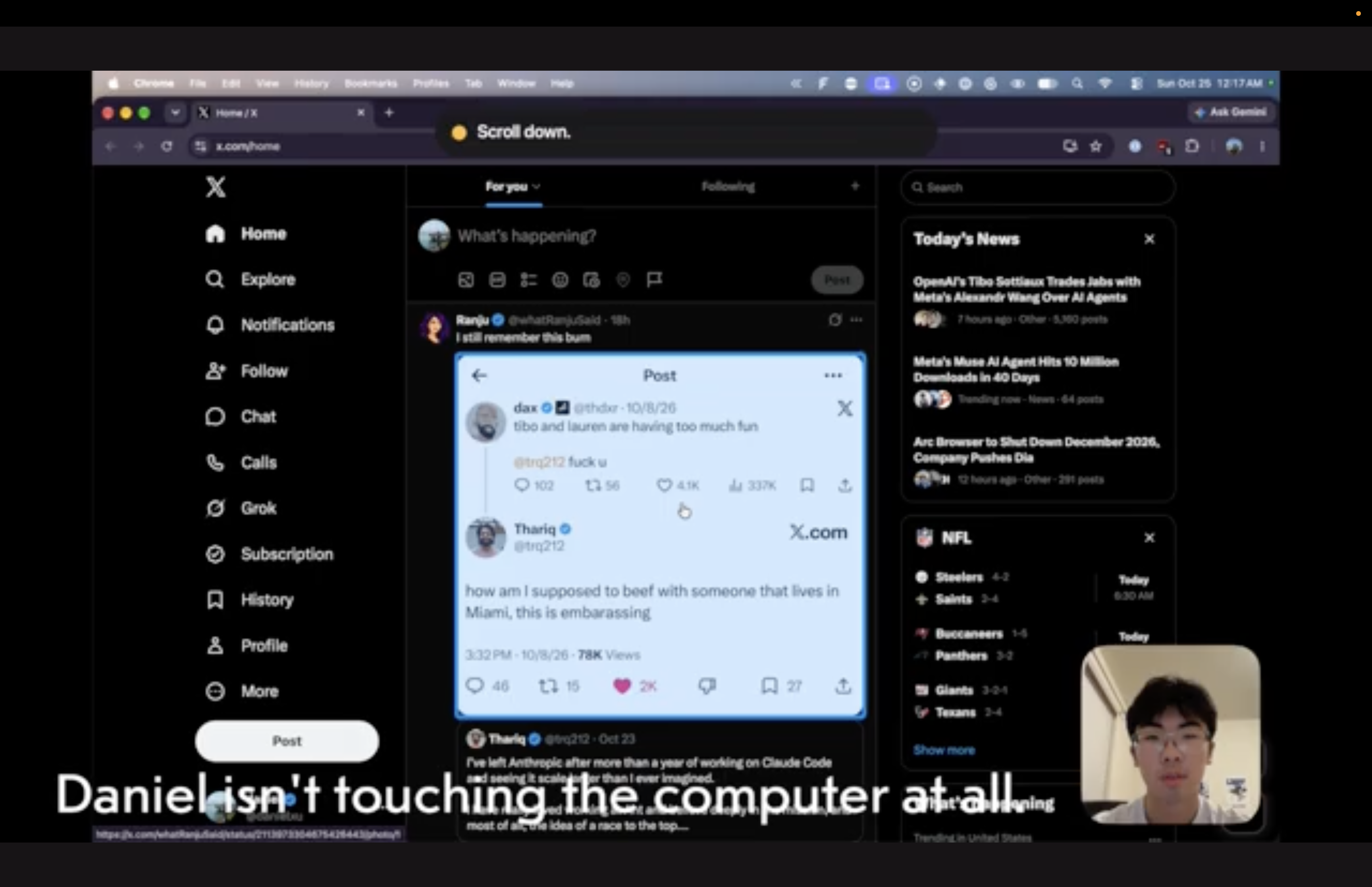
Peek is a Mac menu bar app. You look at something on the screen, say "Peek," and tell it what you want. A blue outline follows your eyes and settles on the button, link, text box, or window you're looking at, and that's what "this" and "that" mean when you talk to it.
- "Peek, make this full screen." (looking at a window)
- "Peek, put this on the left and that on the right." (looking at one window, then the other)
- "Peek, write 'running ten minutes late' here." (looking at a text box)
- "Peek, what does this say?"
- "Peek, scroll down," "open Safari," "go to sleep," "re-center"
After you say "Peek" once, you're in a conversation for about 15 seconds after each exchange, so you can say "now the other one" or "undo that" without the wake word. You can talk over Peek to interrupt it, and "stop" or "never mind" cancels what it's doing. When it needs something, it asks ("Close it without saving?") and waits for your answer. Winking one eye clicks whatever is outlined. If someone already uses a head mouse or a hardware eye tracker, Peek can use the pointer instead of the webcam.
How we built it
Vedant and Shardul did the research and design. They studied the problem and the people it affects, compared Peek against Apple Voice Control, Talon, Tobii, and head pointers, made our design files, and tested every build by hand, since a lot of Peek can only be checked by a person looking at a screen and talking. Daniel wrote the app, integrated Cartesia and Claude, and hardened it so it keeps running when a permission is missing or a call fails. We all decided on the edits together.
- Eye tracking: The webcam feeds MediaPipe Face Landmarker, which gives us iris position, eyelid blendshapes, and head pose. A 25-dot calibration, plus 9 more dots after you shift your head, fits a ridge regression, and a One Euro filter smooths the result.
- Context: The macOS Accessibility API gives us the window and element under your gaze, the interactive elements near it, the other places you looked while you were talking, and the list of open windows. Peek can also attach a screenshot crop with your gaze point marked.
- Listening and speaking: Cartesia handles both. Ink-2 streams speech-to-text with built-in turn detection, so nobody has to hold a button. Sonic 3.6 streams Peek's replies back, and macOS
sayis the fallback. - Acting: Claude (
claude-sonnet-5-5by default) gets that context and a set of tools for windows, typing, clicking, keys, scrolling, and opening apps and links. - Stack: Python 3.12 with uv, PyObjC for Accessibility, Quartz, and Cocoa, OpenCV, sounddevice, and pytest for gaze, wink, wake word, echo, and conversation tests.
Cartesia features used: Ink-2 real-time speech-to-text with turn detection, and Sonic 3.6 streaming text-to-speech. We keep the mic open while Peek talks so you can interrupt it, and we remove Peek's own voice from the mic before it reaches Ink-2.
Where Claude can go wrong, and how we guard it: Webcam gaze is usually 100 to 200 pixels off, so Claude can pick the wrong button or window. Speech-to-text can mishear a word, so Claude can type the wrong thing. Claude can also take an action that loses work, like closing a window without saving. To guard against this, the outline locks onto its target when you say "Peek," so you can see what Claude will act on before it acts. Claude gets the nearby elements and asks "the left or the right?" when it can't tell. It asks before anything that loses work, and you can say "stop," "never mind," or "undo that" at any point.
Challenges we ran into
When we tested, the gaze often didn't land where we were actually looking. We first treated it like a mouse, and it kept missing small buttons. So we changed what gaze does: it tells Claude where to look, along with the elements near that point and everywhere else you looked while you talked, and Claude decides which one you meant. After that change, our hand testing showed commands landing on the thing we meant much more often.
Clicking was the next problem. We added wink to click, and in testing a normal wink often didn't register. A longer wink or a repeated one worked more reliably, so we're still tuning that threshold.
We also wanted people to know how far off their tracking is. At the end of calibration, Peek reads out its accuracy in pixels, and "Peek, re-center" fixes a steady offset with a single dot when you've moved your chair or the light has changed.
Accomplishments that we're proud of
We're proud of how well Peek works once it's calibrated. A person can put on a movie on a Mac using only their eyes and their voice, with no keyboard and no mouse. Another hacker at Cal Hacks who tried it told us, "It just felt like navigating a browser without my hands. I didn't feel any strain on my eyes or anything. It just felt natural." We're also proud that a real person shaped what we worked on. Our teammate's grandfather asked for tracking that handles head movement and a voice that feels like someone is in the room, and we spent the weekend on both.
What we learned
We learned that webcam eye tracking is good enough to tell Claude roughly where you're looking, and that the rest has to come from the screen itself. We also learned that you can't test accessibility software with unit tests alone. We only found problems like missed winks and gaze landing next to the target by sitting in front of the laptop and using Peek ourselves.
What's next for Peek
Our teammate's grandfather speaks Hindi and Marathi and only some English. Peek only understands and speaks English right now, and adding Hindi and Marathi is the first thing we're building next. After that, we want setup simple enough that he or the relative who lives with him can turn it on without us, better accuracy when his head moves, and testing with more people who have tremor and other upper-limb impairments.

Log in or sign up for Devpost to join the conversation.