Pebble
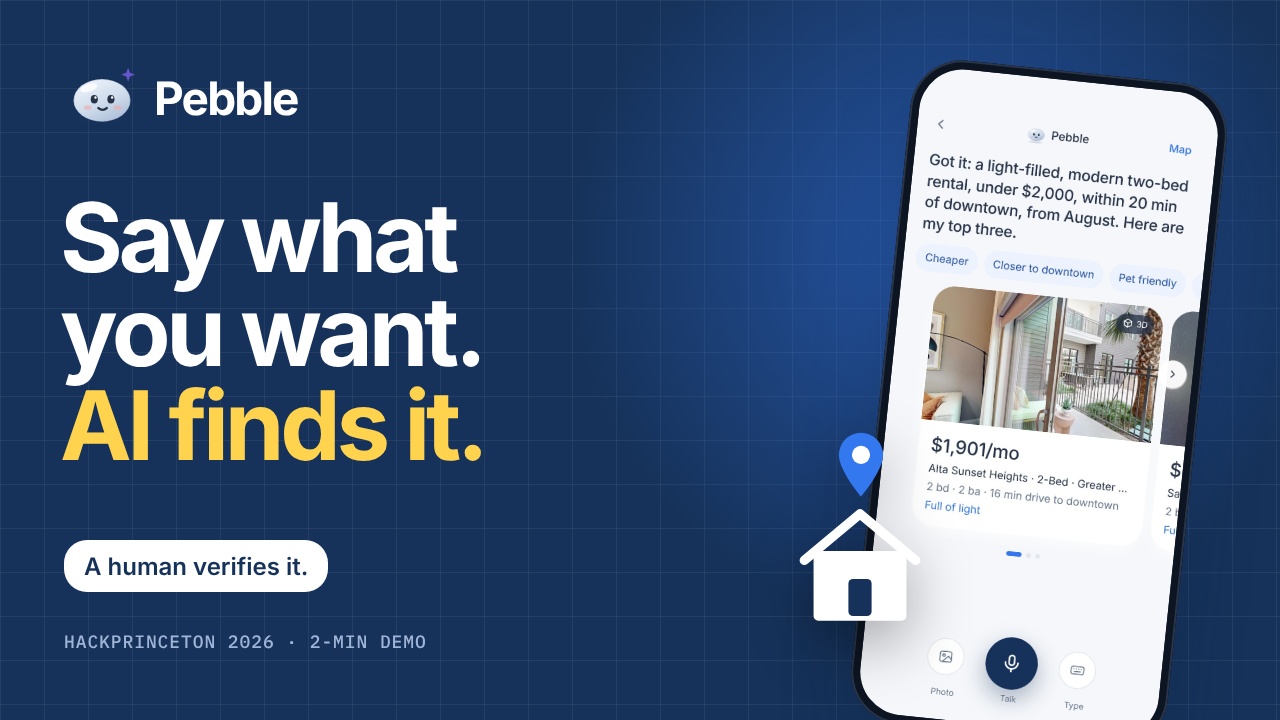
"Describe the house. Find your home."
Pebble is your brokerage’s agentic concierge: it listens to your clients, then briefs your real estate agents. Clients describe the house they want in their own words and language; licensed agents verify, connect, and close the deal. AI follow-ups rescue stalled deals, and a dashboard shows what’s working, where deals stall, and what to do next. Our promise on every screen: AI suggests, a human verifies.
Others built AI search. We built everything after it, and gave it to the brokerage.
Built for HackPrinceton 2026, Business & Enterprise track.
The problem
Picture it from both sides. The person searching moves to a new city, scrolls through hundreds of listings, and still isn't sure which house is the one. The real estate agent on the other side watches that client hesitate, stop replying, and drift away. That's not bad luck. That's revenue walking out the door.
Three numbers:
| Finding | Source | |
|---|---|---|
| 56% | of buyers say the hardest part of buying a home is simply finding the right property | National Association of Realtors, 2025 Profile of Home Buyers and Sellers |
| ~7× vs 42 hours | firms that reply within an hour are nearly 7 times more likely to qualify a lead, yet the average reply took 42 hours | Harvard Business Review, "The Short Life of Online Sales Leads" (2011) |
| 1 in 5 | people in the US speaks a language other than English at home. Most property tools act like they don't exist | US Census Bureau, American Community Survey 2018–2022 |
The solution: one journey
Listen → understand → verify → close.
- Listen. A client taps once and just talks, rambling is fine. Pebble keeps listening, then answers in one spoken sentence with three houses. For the 1 in 5 who speak another language at home, Pebble notices, asks in English and in their language before switching, and the agent still reads English.
- Understand. Pebble pulls out budget, bedrooms, timing, pets, and the feeling. Vibe search reads every listing photo for style, materials, colors and light, so "more artsy, with lots of light" just works. Say "cheaper" or "closer" and it refines within the conversation instead of starting over.
- Verify. The client taps Interested! A licensed agent gets the lead instantly with an AI recap (needs, budget, timeline, must-haves) and checks availability, price, fit, and fair housing before anything is confirmed. AI suggests, a human verifies.
- Close. If either side goes quiet, Pebble's follow-up agent investigates the deal and drafts a check-in; the agent sends it with one tap, all the way to the signed papers. That's the moment a house becomes a home.
Wording rule used across the product: it's a house while the client is searching, and a home only once they've bought it or signed for it.
Three surfaces
| Surface | Who uses it | What it does |
|---|---|---|
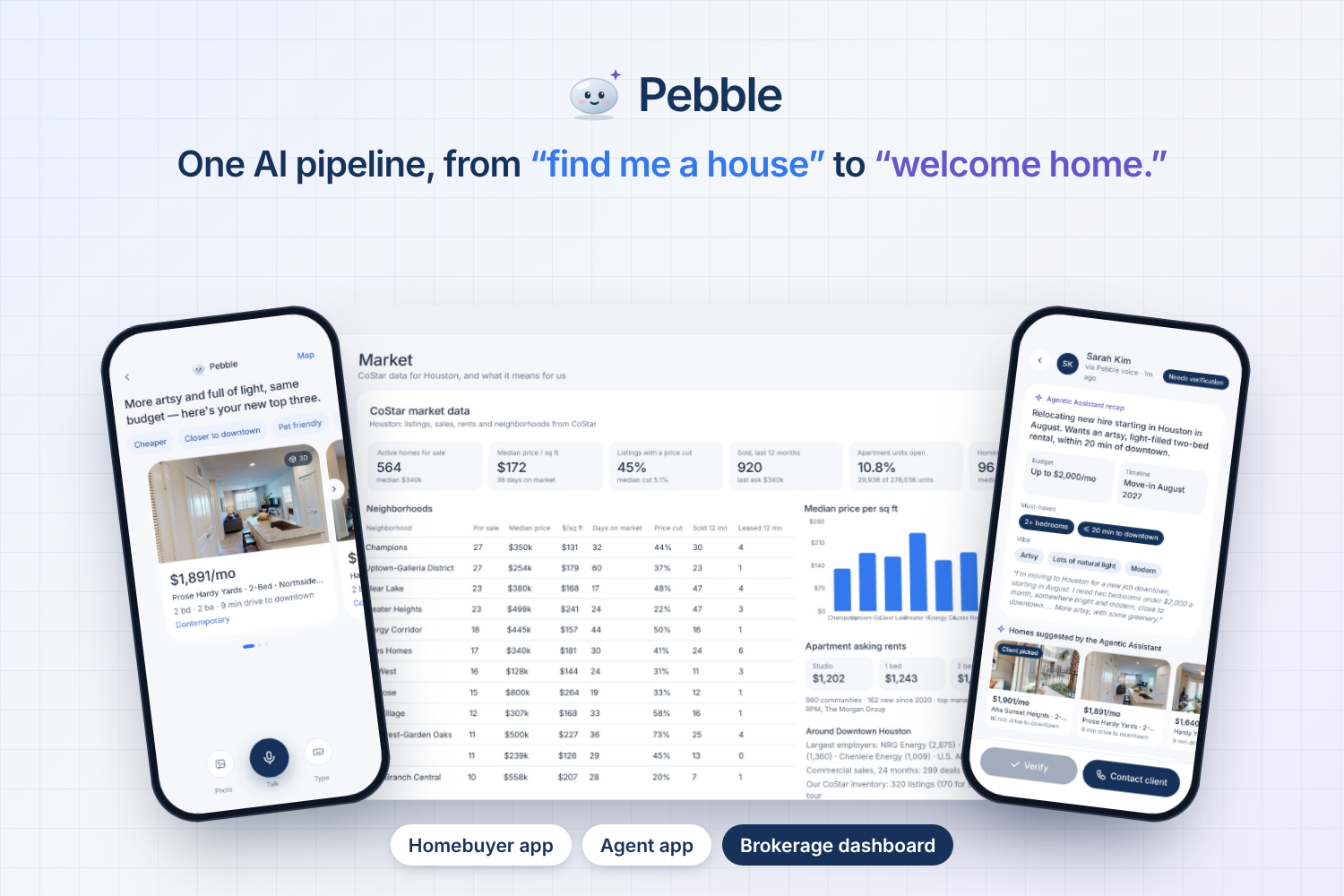
| Client app (mobile-based) | Home seekers | One-tap voice, typed or photo search, three houses with a reason each, map, 3D tour, Interested!, deal status |
| Agent app (mobile-based) | Licensed real estate agents | New-lead alerts, AI recap, AI-suggested houses, verification checklist, AI-drafted messages, follow-up agent, pipeline (cancelled deals archived), listing upload with automatic photo tagging |
| Brokerage dashboard (web-based) | Owners and managers | Revenue, deals closed, response time, qualified vs verified leads, deals rescued by follow-ups, AI forecast, funnel, top agents, AI strategy ideas a manager approves |
Who it's for
The brokerage is our customer.
- Brokerage Owners get one dashboard: revenue, response time, a forecast, and strategy ideas they approve or dismiss. The clients, the data and the relationship stay with the brokerage, not a lead marketplace.
- Real Estate Agents get pre-qualified leads with a recap, instant replies to clients around the clock and in their language, and follow-ups that rescue stalled deals.
- People looking for a house to buy, lease or rent just describe it, by voice, text or photo, in their own language, and get matches with a reason each. They will be guided by an agentic concierge and a human real estate agent for verification and closing the deal.
Where we start
The working prototype focuses on Houston and Los Angeles, starting with the listing data we have today. The engine reads listings through adapters, so any market's feed plugs in the same way: from these two cities, to the rest of the US, to global.
Respecting client data
Trust is part of the product, not an add-on.
- Pebble never asks about or uses race, religion, national origin, sex, disability or familial status (fair housing), and the AI prompts say so explicitly.
- A client's request reaches an agent only after the client taps Interested!
- The AI key and AI calls stay on the server; the browser never sees the key.
- Built: client sign-up and log-in, with a plain-language privacy notice and a separate switch for each purpose (activity, contact, sharing with owners). From their profile, clients can change consent, download their data, or delete their account.
- Next build: sign-in for real estate agents and managers, accounts backed by a database, and a consent prompt before the first use of the microphone, photos or location. Voice recordings are not kept, only the text. Built with California's CCPA/CPRA and Texas's Data Privacy and Security Act in mind.
Tracks
💫 For Main Track: Business & Enterprise
Pebble is built for the brokerage, not the home seeker. The brokerage is the paying customer, at a planned $49 per agent per month. That fits the track’s focus on tools that streamline business management, dashboards, analytics, and privacy. A brokerage loses revenue in two places: clients who get overwhelmed by hundreds of listings and drift away, and leads that go cold because replies take too long. Pebble attacks both. The client app turns a spoken request into a structured brief, and the agent app delivers it instantly as a lead with an AI recap, a verification checklist, and a fair-housing check. Pebble’s promise, “AI suggests, a human verifies,” keeps licensed real estate agents in control of every commitment.
The brokerage dashboard is the clearest enterprise piece. It gives owners and managers revenue, deals closed, response time, qualified versus verified leads, deals rescued by follow-ups, an AI forecast, a funnel, and top agents. Gemini also proposes strategy ideas from the month’s numbers, and a manager approves or dismisses each one. The ROI is easy to explain: one extra closed deal covers a seat for years. The brokerage also keeps its clients, data, and relationships rather than renting them from a lead marketplace. On privacy, the AI key and all AI calls stay on the server, fair-housing rules are written into every prompt, and a client’s request reaches an agent only after they tap Interested!. Client sign-up with per-purpose consent and data download/delete is in the prototype; agent and manager sign-in comes next, designed around CCPA/CPRA and the Texas Data Privacy and Security Act.
💫 For Inside and Out: AI for the Built World (CoStar Group)
Pebble uses all three layers on the same addresses and gets something out of the combination, which is the heart of this track. CoStar supplies the market layer: 460 live Houston and Los Angeles listings, plus market intelligence covering sold and leased stats, apartment rents and availability, commercial sale comps, and nearby employers. Matterport supplies the inside, with a 3D tour embedded for every listing, and for 53 listings an exterior Gaussian-splat view built from drone-trained scans. Vexcel supplies the view from above: an aerial map layer, a bird’s-eye oblique, a top-down ortho with the parcel outlined, and AI-derived property attributes such as roof material, roof discoloration, pool, and tree cover.
The layers work together rather than sitting side by side as decoration. The dashboard scores listings into opportunities using CoStar signals like below-median price per square foot, price cuts, and days on market, and Gemini receives Vexcel’s roof and tree-cover attributes alongside them. That lets it make a point like “use the 63% roof discoloration in negotiation,” a conclusion that needs two layers at once. Real estate agents can do a remote aerial check before verifying a lead. Clients can search by vibe, because the system reads listing photos for style, materials, color, and light.
The product is agentic. A follow-up agent reads a deal’s history, re-checks the listing, searches for similar houses, and drafts a check-in for the agent to send. It is useful on Monday for brokers, who get pre-qualified leads and rescued deals, and for owners, who get a market-aware dashboard. The demo ties all of this together on one screen: a spoken request in the client app reaches the agent app and the dashboard in real time.
💫 For Best Practical AI Innovation (Amazon)
Amazon asks for AI that reasons, plans, acts, and adapts, and that real users would want every day. Pebble’s target user is clear: home seekers who are unsure which house is right, and the licensed real estate agents who lose revenue when those clients go quiet. It is practical in the sense the track describes. A client taps once and rambles, and Pebble answers in one spoken sentence with three houses and a reason for each. It extracts budget, bedrooms, timing, pets, and the feeling behind the request, and when the client says “cheaper” or “closer” it refines within the conversation instead of starting over. This is the adaptive behavior the track names.
On the agentic side, the follow-up agent plans across several steps using tool calls. It reads the deal, re-checks the listing, looks for alternatives, and submits a draft that a human reviews. On user experience, one-tap voice, photo search, and vibe search make a powerful system feel simple. Pebble also notices when a client speaks another language, transcribes them in the language they actually spoke, asks in English and in their language before switching, and translates the whole interface, which serves the one in five US residents who speak another language at home. Every AI step has an on-device fallback, and the Gemini layer rotates across models when a quota runs out, so the prototype stays reliable under real conditions. The project includes a working prototype, a defined target user, documentation, and a pitch built around one story: listen, understand, verify, close.
💫 For Forward Deployed Challenge (Peri)
Pebble was shaped by direct conversations with the people who work in this industry. During HackPrinceton, we spoke with a number of CoStar representatives, walked them through the project, and bounced ideas off them. Their feedback was valuable throughout, but one conversation changed our direction. Near the end of the weekend, we walked a CoStar UI/UX designer through the whole product, and they asked a simple question we had overlooked: how are we connecting the customer to the business owner?
That question made us look at the product the way a brokerage would. A client can speak a request and get three great houses, but if that request never reaches the right agent and owner in a form they can act on, the brokerage gains nothing. It gave our team a clear focus for finishing: the handoff from client to agent to owner. This is why the Interested! tap creates an instant lead with an AI recap, why the agent app carries a verification checklist and drafted replies, and why the dashboard shows response time, qualified versus verified leads, and deals rescued by follow-ups. We knew we were close but not done, and that advice showed us how to get the project across the finish line.
The result is built around a real workflow: a client browses, an agent replies late, the lead goes cold, and revenue is lost. Each feature answers a break in that workflow. The brokerage could adopt it immediately, with per-seat pricing, listings read through adapters (MLS/RESO, brokerage feeds, agent uploads), and all client data staying with the brokerage. Execution is end to end, with a client app, agent app, and dashboard linked in one live demo.
💫 For Best Use of Gemini API (MLH)
transcribing voice in whatever language was spoken," before "understanding requests
Gemini is the engine of the whole product, not a bolt-on. It runs across every stage of the journey: understanding spoken requests in any language and merging refinements, re-ranking shortlists by fit and vibe, writing the one-sentence spoken reply, detecting the client’s language and writing the bilingual “switch language?” question, and translating the entire interface for languages without a built-in dictionary. It also tags listing and client photos for style, materials, colors, and light, which powers vibe search. On the agent side, it writes the AI recap from the client’s own words and drafts the first message with a client-language translation. On the dashboard, it explains market opportunities and proposes strategy ideas for a manager to approve.
It also covers several of Gemini’s capabilities in one product: multilingual understanding, multimodal image analysis, structured output, and function calling for the follow-up agent. Beyond the features, the engineering shows careful use of the API. There is a model fallback chain with per-model quota memory, a response cache so repeated requests replay instantly, an /api/ai/status endpoint showing which models are ready, and a pre-demo warm-up script. The key stays on the server, and fair-housing constraints are written into the prompts.
AI: Gemini API
Pebble's AI runs on the Gemini API (default model gemini-3.8-flash).
| Step | What Gemini does | Route |
|---|---|---|
| Listen | Understands the request in any language, merges refinements, detects the language and writes the bilingual "switch language?" question | /api/ai/parse |
| Understand | Re-ranks the shortlist by fit and vibe, writes a "why it fits" line per house and the one-sentence spoken reply in English and the client's language | /api/ai/parse |
| Understand | Vibe model: tags listing photos and client photos (style, materials, colors, light) | /api/ai/vibe |
| Listen | Translates the whole interface into languages without a built-in dictionary | /api/ai/translate |
| Verify | Writes the agent's AI recap from the client's own words | /api/ai/recap |
| Verify | Drafts the agent's first message, with a translation for the client | /api/ai/draft |
| Close | Follow-up agent (Gemini function calling): reads the deal history, re-checks the listing, looks for similar houses, then submits a draft that the agent reviews and sends | /api/ai/followup |
| Dashboard | Strategy ideas from the month's numbers, approved or dismissed by a manager | /api/ai/strategy |
Every AI step has an on-device fallback, so a live demo keeps working if the network drops.
CoStar data
Listings and market numbers come from the CoStar data kit (Houston + Los Angeles). The demo focuses on Greater Heights, Houston; commute times are to Downtown Houston (Downtown LA for LA).
# COSTAR_DUMP_PATH in .env.local points at the kit (…/costar-hackathon-kit)
npm run costar   # rebuilds data/listings.json + data/market.json (~5 s)
scripts/ingest-costar.mjsjoins residential listings + listing features, apartment listings + commercial property records, andcommercial-properties.csv(Matterport model ids). Vibe tags (style, materials, light) are derived from CoStar remarks, feature lines and photo alt text.data/market.jsonlayers: active/sold/leased residential stats per city and neighborhood, apartment asking rents by bedroom and availability, commercial sale comps (24 months), and the largest employers near downtown (tenancies + company records).lib/market.tsscores listings into opportunities (below-median $/sq ft or rent, price cuts, days on market, open units, fit with open leads); Gemini picks and explains them on the dashboard, with an on-device fallback.- 3D tours embed each listing's Matterport scan (
components/MatterportTour.tsx); photos use the Matterport scan thumbnail first, then CoStar photos. - Texas does not disclose sale prices, so Houston "sold" stats use the last asking price.
Demo-proof AI (Gemini quotas)
Free-tier Gemini keys have small daily limits per model (e.g. 500 requests/day for gemini-3.5-flash-lite, 20 for gemini-3.8-flash). lib/gemini.ts keeps the app working when one runs out:
- Fallback chain:
GEMINI_MODEL, thenGEMINI_FALLBACK_MODELS. Each model has its own quota. - Quota memory: a model that answers 429 is skipped until its quota resets, so requests go straight to one that works.
- Response cache: identical requests are answered from
.cache/gemini(instant, no quota). - Follow-up agent: picks a working model on its first step and stays on it.
GET /api/ai/statusshows which models are ready right now.
Before a demo (with the app running):
BASE=http://localhost:3001 npm run ai:check -- --warm # quota per model + pre-caches the scripted demo lines
Then rehearse the demo once: every AI answer it produces is cached and replays instantly on stage. Run only one dev server (several servers reloading pages burn quota fast).
Maps: 2D / 3D, terrain and exterior 3D
- Layers: every map has a Map / Aerial / Terrain switch. Terrain is OpenTopoMap shaded relief + contours in 2D; in 3D it is real relief from AWS Terrain Tiles (exaggerated ×4 so Houston's gentle bayou relief reads at street scale).
- 2D / 3D (agent full-screen map): 3D is MapLibre GL over OpenFreeMap's vector style with OpenStreetMap buildings extruded to height (
components/MapView3D.tsx). - Exterior 3D: 232 Matterport models have a drone-trained Gaussian splat of the outside.
npm run exteriorsjoinsmodels_index.csvto the listings and writesdata/exteriors.json(53 listings today)./api/exterior/{sid}streams the first ~96 MB of the 200–550 MBsplat.ply(Gaussians are stored in random order, so that is a fair sample), keeps what is within 32 m of the house, packs it into the 32-byte.splatlayout (~4–5 MB) and caches it in.cache/exterior/.components/ExteriorView.tsxrenders it with@mkkellogg/gaussian-splats-3d. - CoStar facts on the agent's map card: days on market, price per sqft, change vs. original list price, HOA, units open and vacancy.
Vexcel aerial imagery
The key stays on the server; every call goes through /api/vexcel/* (lib/vexcel.ts) and is cached on disk in .cache/vexcel/.
- Aerial map layer: every map has a Map / Aerial switch. Tiles come from Vexcel
ortho/extractvia/api/vexcel/tile/{z}/{x}/{y}(zoom 11+, Houston and LA). The dashboard map opens in aerial. - Per-listing aerial view (
components/AerialView.tsx): a bird's-eye oblique and a top-down ortho with the parcel outlined in gold. Shown on the client listing page, the agent's lead screen (remote check before verifying) and the dashboard. - Property attributes from Vexcel's imagery AI: footprint, roof material/shape, roof discoloration, pool, tree cover, capture date. Gemini receives them with the dashboard suggestions, so it can say things like "use the 63% roof discoloration in negotiation".
- Warm the cache before a demo (with the app running):
BASE=http://localhost:3000 npm run vexcel:warm(about 580 requests, around 1 minute).
Run it
npm install
cp .env.example .env.local   # paste your key after GEMINI_API_KEY=
npm run dev                  # http://localhost:3000
The home page shows whether Gemini is connected. To deploy, use any Node host that runs Next.js (for example Vercel) and set GEMINI_API_KEY in its environment variables. Voice uses the Web Speech API, which works best in Chrome; without it, type instead or tap "Try an example".
Pages:
/home/appclient app ·/agentagent app ·/dashboardbrokerage dashboard/demoall three live side by side: a request spoken in the client app reaches the agent and the dashboard in real time/gallerythe listing catalog with the vibe tags search uses
Current build status
| Area | Status |
|---|---|
| Gemini AI across client, agent and dashboard | Built; tested end to end against a local stand-in for the API. First run with a live key still to do. |
| Listings | Live CoStar data: 460 Houston + LA listings (Homes.com MLS for sale/rent + Apartments.com communities), each with a Matterport 3D tour (lib/adapters/costar.ts) |
| Market intelligence | Live CoStar data layered from residential listings & sales, apartment rents/availability, commercial sale comps and tenant employers (data/market.json); Gemini writes the dashboard recap and suggestions (/api/ai/market) |
| Sign-in and consent screen | Next build (see "Respecting client data") |
| Dashboard computed only from real activity recorded by the apps (leads, searches, listing views). No mock records. Until a partner brokerage onboards, the brokerage name and agent profiles are placeholders. |
Architecture
voice / text / photo
   │  lib/speech.ts (Web Speech API, continuous)      lib/i18n.ts (language: detect, ask, translate)
   ▼
lib/ai.ts ──── Gemini (/api/ai/*) ─┐  understands the request, picks the top 3, writes a reason for each
lib/parse.ts ── rules (offline fallback) ┴─► Criteria { intent, beds, budget, commute, pets, vibes, move-in, neighborhoods }
   ▼
lib/search.ts  hard filters + vibe scoring ◄── listings from lib/adapters/*
   ▼                                              costar.ts       (live CoStar listings: Homes.com + Apartments.com, Matterport tours)
3 houses + one-sentence reply                     agentUploads.ts (agent uploads, auto-tagged)
   ▼                                              reso.ts         (MLS / RESO Web API, ready to connect)
"Interested!" → lead + AI recap                   brokerageApi.ts (brokerage or data-partner feed, ready to connect)
   ▼                                              lib/vibe.ts     analyzePhotos(images) -> tags (Gemini vision, on-device fallback)
lib/store.ts  shared lead records (browser storage in the demo; brokerage CRM / backend in production)
   ▼                    ▼                          ▼
agent app          client status          dashboard ◄── lib/brokerage.ts (real app activity only)
                                                    ◄── lib/market.ts (data/market.json: live CoStar market data)
Stack: Next.js 15 + TypeScript + Tailwind, Gemini API (server routes), Web Speech API, Leaflet + OpenStreetMap, three.js for the 3D tour, Recharts.
Roadmap
- Live Houston and LA listings, then more US markets and international
- Sign-in, consent controls, and a "My data" page (download / delete)
- Home sales, land and short stays as first-class flows (the engine already handles them)
- Long-term preference memory across sessions, with the client's consent
- More languages; agent messages delivered in the client's language
- Scheduling, e-signature hand-off, and commission tracking in the dashboard


