-
-
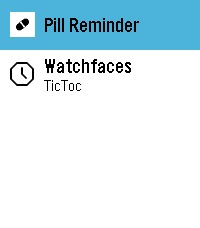
App Launcher on watch emulator (Also GPT-5.6-Sol codex built)
-
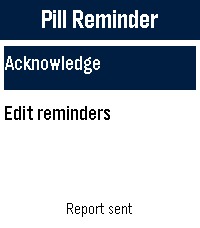
Main screen
-
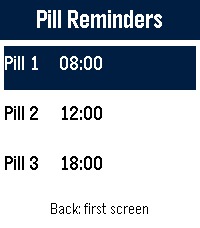
Reminder options
-
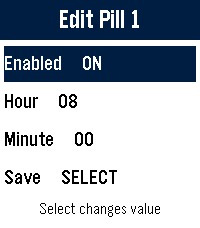
Reminder Editor


Pill Reminder for Pebble Time 2

Inspiration
Medication reminders are easy to dismiss and hard to reconstruct later. A phone notification can disappear into a busy notification list, while a watch is already on the wrist and can ask for a clear answer at the right moment.
I wanted to build a reminder that stays useful without pretending to be a medical system: it should buzz reliably, let the wearer explicitly choose Taken or Skipped, preserve No response as a distinct outcome, and provide a private report on the paired phone.
Pebble Time 2 was a natural fit. Its always-available physical buttons make the core workflow usable without touch, even while walking or when the phone is out of reach.
What it does
Pill Reminder supports up to four daily reminder times. The watch keeps the interface deliberately small:
- The first screen offers Acknowledge and Edit reminders.
- Acknowledge opens Taken and Skipped choices for the latest unanswered reminder that day.
- Edit reminders opens the standard scrolling list for adding, enabling, disabling, or changing reminder times.
- An active reminder vibrates every 30 seconds for five minutes.
- If it remains unanswered, the watch gives single follow-up reminders after 60, 90, and 120 minutes.
- Choosing Taken or Skipped cancels remaining follow-ups for that event.
- The paired phone displays today, 7-day, and 30-day history reports.
All history stays on the watch and paired phone. There is no medication account, analytics service, or health-data backend. Outcomes are self-reported and are not medical advice or a dosage record.
How I built it
The watch app is written in C against the Pebble SDK and targets the Pebble Time 2 emery platform. Pebble wakeups schedule the next daily alarm or unanswered follow-up while the app is closed. Persistent storage keeps reminder configuration, event sequence numbers, and a rolling history of the newest 128 events.
The phone side uses PebbleKit JS and TypeScript. Watch events are transferred through AppMessage, decoded and validated on the phone, then deduplicated by watch installation and event sequence. A local configuration page turns that data into simple today, 7-day, and 30-day summaries.
The project also includes automated model, report-page, release-metadata, and timezone-sensitive scheduler tests. A GitHub Actions release workflow validates the version, builds the PBW package, publishes it to the rePebble app store, and creates the matching GitHub release.
Challenges
The hardest part was working within watch-sized constraints rather than treating the watch like a small phone.
Pebble allows only a limited number of scheduled wakeups, so the app maintains one rolling wakeup for whichever daily reminder or follow-up comes next. Follow-ups also need to refer to the original history event, survive restarts, avoid duplicate records, and disappear immediately after an answer.
Persistence and sync required similar care. Watch storage has tight value-size limits, AppMessage payloads need explicit buffer capacity, and history can be evicted as it fills. Stable sequence identifiers became essential: array positions can move, but an acknowledgement must still update the correct reminder.
The interface was another constraint. Three visible rows, four reminder slots, a compact 228-pixel display, and physical buttons had to cover navigation, editing, alarms, acknowledgements, and manual sync without hidden gestures. Keeping Taken, Skipped, and No response separate also mattered; collapsing them would make the report misleading.
Finally, time is surprisingly complicated. Tests needed to use local wall time and cover non-UTC timezones and daylight-saving transitions so a reminder configured for a particular hour remains a reminder for that local hour.
What I learned
I learned that dependable reminder software is mostly about state transitions and recovery. The vibration is simple; preserving the meaning of an event across wakeups, restarts, time changes, storage limits, and phone sync is the real work.
I also learned that constrained hardware can improve a product. Physical buttons forced each action to be explicit. A rolling scheduler reduced background complexity. Local-only reporting kept privacy boundaries understandable. The result is intentionally narrow, but every visible outcome has a precise meaning.
What's next
Next steps include more testing on physical Pebble Time 2 hardware, clearer on-watch status for the next follow-up, and export options that preserve the same local-first privacy model.
Built With
- 5.6
- gpt
- sol

Log in or sign up for Devpost to join the conversation.