-
-
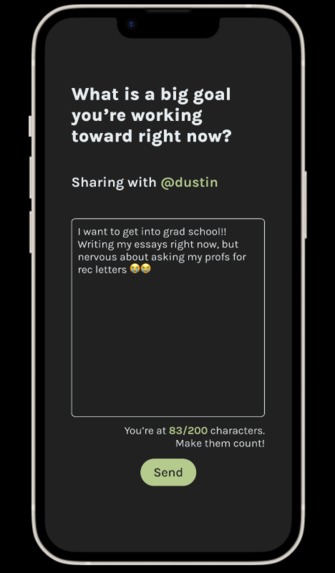
Write a meaningful response to questions made to deepen your connections.
-
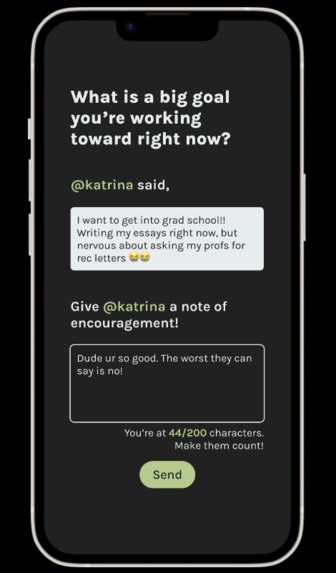
Respond to your friend's answers, showing them your support and sharing your thoughts.
Team Name
Bad Beaches
Inspiration
We were inspired by the spontaneity of apps like BeReal, and the deep conversation starters from games like We're Not Really Strangers.
What it does
Pear encourages friends to share more - in less time. Every day at a random time, users get to answer a question (specially curated to spark deep, vulnerable conversations), and their answer is shared with one randomly-picked user from their friend list. The friend that receives the answer gets a chance to respond with a message of their own, showing encouragement and support. Additional features include:
- Home Page: Where you can see all the notes that you've written or responded to.
- Profile Page: View all the friends you've been pear-ed with, add new friends, and view achievements.
- Look Back on Answers: See all the notes that have been shared between you and a specific friend! Maybe you'll be surprised by how much you've learned about them.
- Continue Over Text: Was your conversation really interesting? Continue the topic over text message!
- Achievements: Be proud of how far your friendships have come! Get different achievements by using the app frequently, sharing, and building deeper connections.
How we built it
This app was built in Figma. Our Process:
- User Survey: Collected 140+ responses over Instagram stories to questions about friendships and the hardships that come with maintaining/building them.
- Converting Results to a Problem Statement: People have trouble developing 1-on-1 friendships because they don't have the time for deep conversations.
- Prototyping, Getting Feedback, and More Prototyping: We continuously asked for thoughts about the application and what could make it better. Some of our respondents said things like, "What if I want to continue a really interesting conversation?" which led to our "Continue Over Text" feature. Another respondent asked, "What if a question triggers a trauma response?" which led to our "Pick a Question" feature.
Challenges we ran into
Throughout the challenge, we spent a lot of time hashing out:
- What is the ideal sequence of information/pages? We decided on following common user flows for social networking apps like BeReal and Instagram for our onboarding process, and took inspiration from apps with few main categories of pages for the remaining flows.
- How do we create common understanding for our UI elements? Originally, there wasn't a lot of consistency around what buttons, tappable objects, and user inputs looked like. We eventually decided that it would be confusing for users, so we needed to create standard "looks" for the various categories of interactive elements.
- How do we keep our audience engaged and committed to daily usage of the app? We decided that pear-ings would only last one day to maintain the feeling of novelty for users. We also decided that notifications would use lead-ins rather than explicitly stating who users were pear-ed with, letting curiosity drive them toward the app.
- What kind of questions do we ask? We decided to use questions similar to the game We're Not Really Strangers and 36 Questions That Lead to Love from the New York Times. These games are popular for fostering meaningful and deep connections - which is what we wanted!
Accomplishments that we're proud of
We're proud of:
- Learning how to use Figma!
- Incorporating results from user surveys and usability tests to shape the application.
- The outcome of our user interface - visual design, organization, and pathways for user flow.
What we learned
From this experience, we got to learn about the flow of information presented in various types of applications, and how to facilitate engagement whilst achieving the app's main function.
What's next for Pear
We want to diversify the ways to create deeper connections between individuals other than text-based questions, such as guided picture topics and chat conversation starters based on the questions already answered. We are also planning on how to engage new users who want to create new meaningful relationships instead of only developing existing ones.
DEMO NOTES
We have three user flows in the Figma Prototype:
- Onboarding: Shows the sign-up process. Once sign-up is concluded, you will be taken to the app's home page and will be able to navigate the rest of the app.
- Answer Question: Shows the process of tapping on a notification and answering a question. Once this is concluded, you will be taken to the app's home page and will be able to navigate the rest of the app.
- Respond to a Friend: Shows the process of tapping on a notification and responding to a friend's answer. Once this is concluded, you will be taken to the app's home page and will be able to navigate the rest of the app.
Built With
- figma


Log in or sign up for Devpost to join the conversation.