-
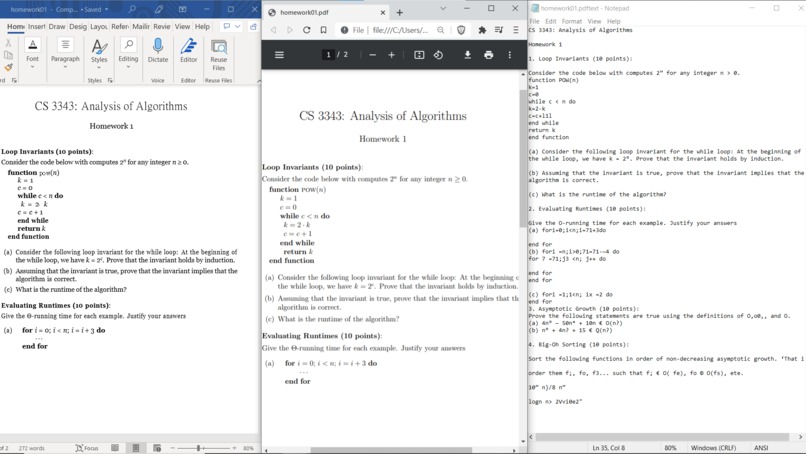
Comparison with Adobe for pure text conversion. Adobe is clearly better but Tesseract is still relatively clean.
-
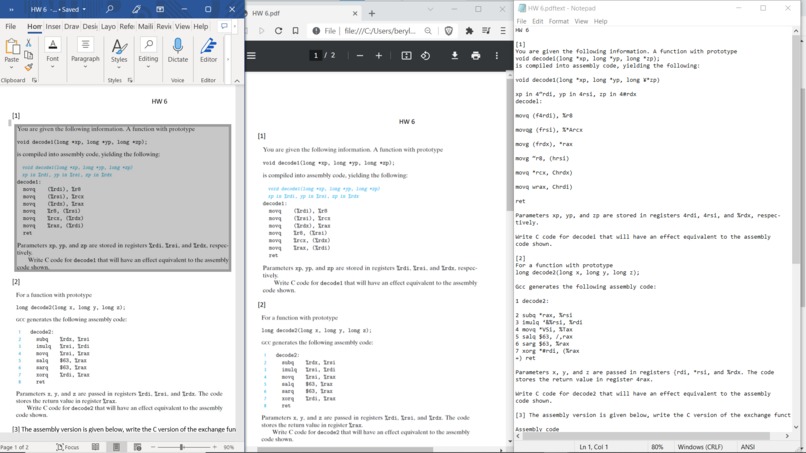
Comparison for an image-embedded pdf. Adobe's looks better but doesn't actually isolate text. Mine looks worse but has copyable text.


Inspiration
A lot of my homework involves converting pdfs into word etc., and being interested in AI I thought it'd be a cool opportunity to gain experience in OCR as well as be able to have my own personal converter.
What it does
Takes a pdf, converts each page into images and then use an OCR algorithm on those images to extract the text from the original PDF files.
How we built it
Finding out how to do all the individual parts like converting from a pdf to an image, how to extract text from an image, and then combining them together.
Challenges we ran into
A lot of hours of error when trying to originally do this in Ubuntu, poor documentation by Tesseract, a lot of outdated answers and depreciated download/info links.
Accomplishments that we're proud of
Being able to actually finish it. There is definitely a lot of room for improvement based on how much time I want to spend training the model, but it's cool to have been able to create a product that to me is more helpful than an Adobe Product. Adobe's Online pdf converter doesn't convert image-embedded pdfs to text, unlike mine. Obviously theirs is a lot more polished, but I still find it cool that I was able to add an extra functionality that theirs don't have.
What we learned
That AI is a lot more accessible (but also a lot more pain) than I thought it was. I'll be cool to explore Tesseract and/or other OCR algorithms more when I get time.
What's next for PDF to Text converter
A lot, lot of training as it currently has a lot of difficulty recognizing % signs, for example. I'm not really interested in trying to support a lot of different types of conversions, as all I'm really interested in is being able to convert a PDF into pure text that I can then copy paste and create a PDF with LaTeX, as I don't really use Word or such. However, I really want to figure out how to implement this in Linux and eventually just be able to run the program from anywhere with a simple convert [source] [destination] command.


Log in or sign up for Devpost to join the conversation.