-
-
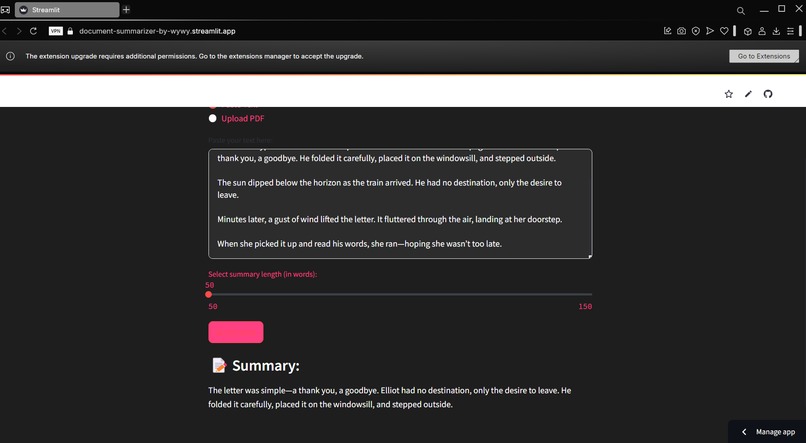
User Interface of the Summarizer
Inspiration
The inspiration for PDF Summarizer by RyRy came from the overwhelming amount of information packed into lengthy PDF documents. We wanted to create a solution that would help users quickly extract the key insights and main points from large PDFs, saving them valuable time and effort.
What it does
PDF Summarizer by RyRy is designed to efficiently summarize long PDF documents into concise, easy-to-read versions. By extracting essential information, it helps users understand the core content without needing to sift through pages of text. Whether for research, business reports, or study materials, this app turns lengthy PDFs into digestible summaries.
How we built it
We built PDF Summarizer by RyRy using Streamlit to create an intuitive and interactive web interface. The core functionality relies on Hugging Face’s transformers to access the powerful pre-trained summarization model facebook/bart-large-cnn, which is known for generating high-quality summaries. For PDF text extraction, we used PyPDF2 to read the contents of uploaded PDF files, allowing users to upload their documents directly for summarization.
- Streamlit provides an easy-to-use interface, with a clean design incorporating custom CSS for a professional, sleek look in pink and black tones.
- Summarization Model: We used the Hugging Face pipeline to load the BART model, which specializes in summarizing lengthy texts. The app uses this model to extract key information from the input text and generate a concise summary.
- Input Handling: The app offers two input methods: users can either paste the text into a text box or upload a PDF. If a PDF is uploaded, PyPDF2 extracts the text from the file, which is then processed by the summarizer.
- Summary Generation: Once the user provides their text, the app processes the input and generates a summary based on the user's desired summary length using a slider.
- Error Handling and Memory Management: We implemented error handling for cases such as too-long input text or file extraction issues. Additionally, we use Python’s garbage collection (gc.collect()) to free up memory after processing, ensuring efficient app performance.
Challenges we ran into
One challenge was ensuring that the app’s summaries were both accurate and concise while maintaining the context of the original document. PDFs can vary widely in format, and parsing their content correctly to extract meaningful information was a tricky task. We also faced challenges in dealing with complex technical terms and jargon that required fine-tuning the NLP models for better comprehension.
Accomplishments that we're proud of
We’re proud of creating a tool that simplifies reading and research by generating reliable and effective summaries. The app’s ability to process and summarize different types of PDF documents quickly and accurately is something we’re particularly proud of. Users can now save time and still gain the insights they need with just a few clicks.
What we learned
This project taught us a great deal about text summarization, document parsing, and working with NLP tools. We learned how to fine-tune models for better performance, as well as how to handle different document structures. It also gave us a deeper understanding of the importance of context in summarization and how to ensure the key points are preserved in the final summary.
What's next for PDF Summarizer by RyRy
Next, we plan to enhance the app’s ability to summarize even more complex documents, like legal and technical PDFs. We’re also exploring options for integrating multi-language support, making it accessible to a global audience. Additionally, we’re considering adding a feature for users to customize the length and detail of their summaries to suit their specific needs.
Built With
- hugging-face-pipeline
- python
- streamlit

Log in or sign up for Devpost to join the conversation.