-
-
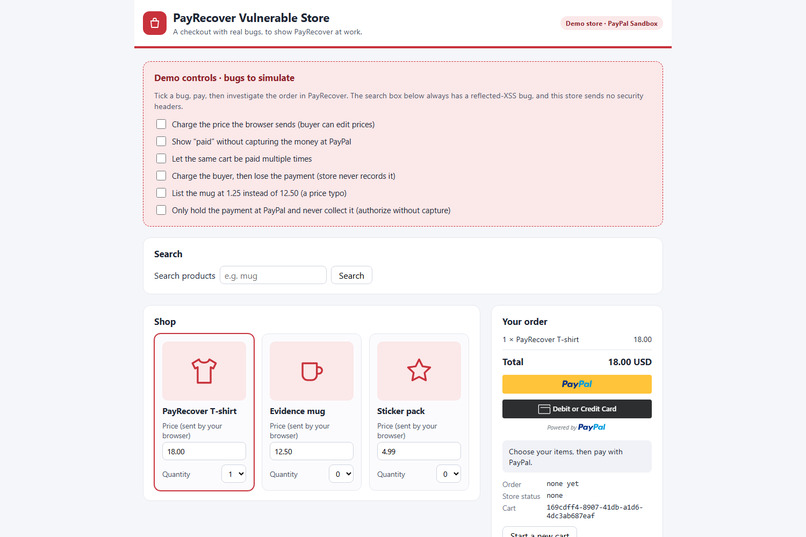
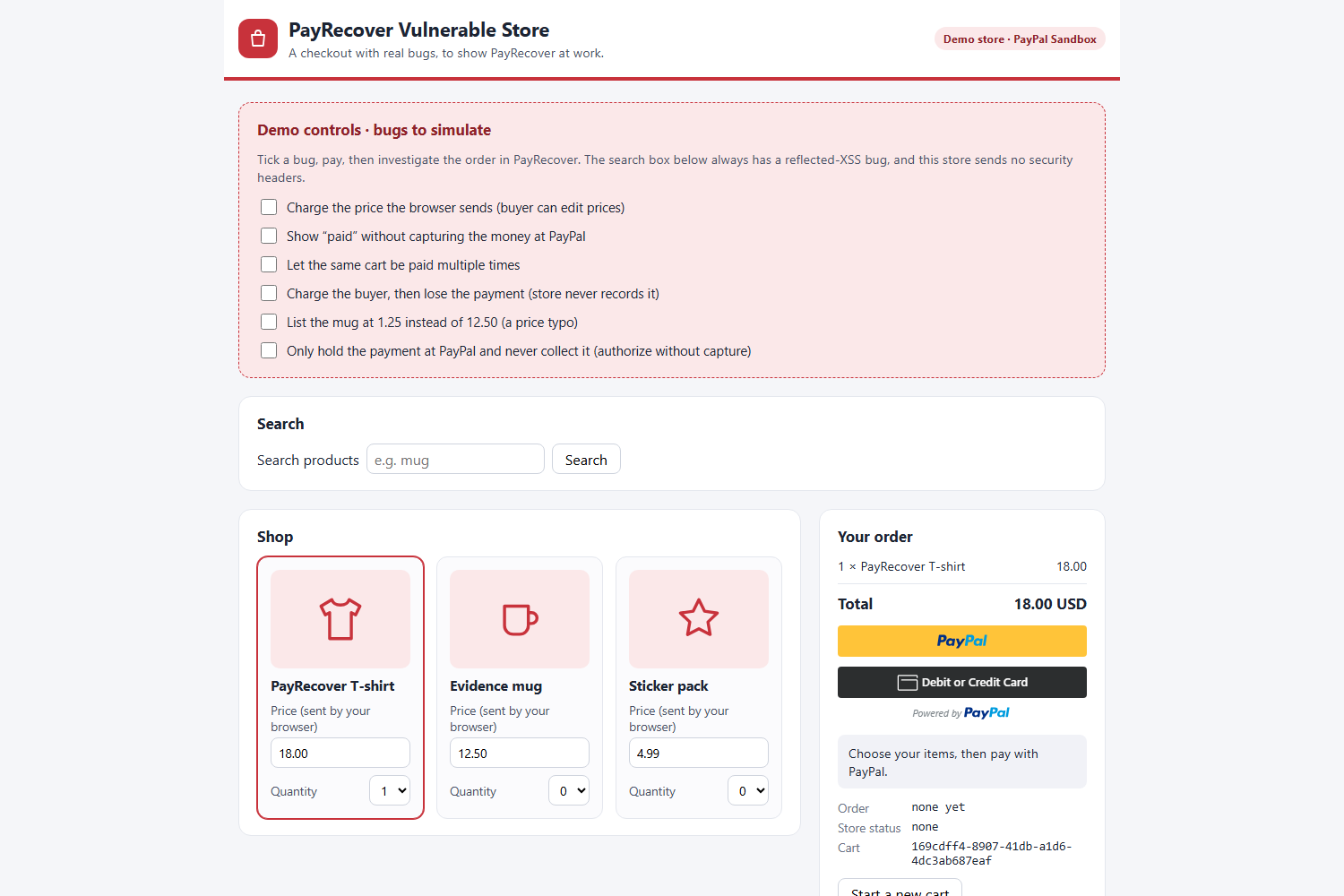
The Vulnerable demo store: tick a real payment bug, pay with a PayPal Sandbox buyer, then scan it in PayRecover to catch the leak.
-
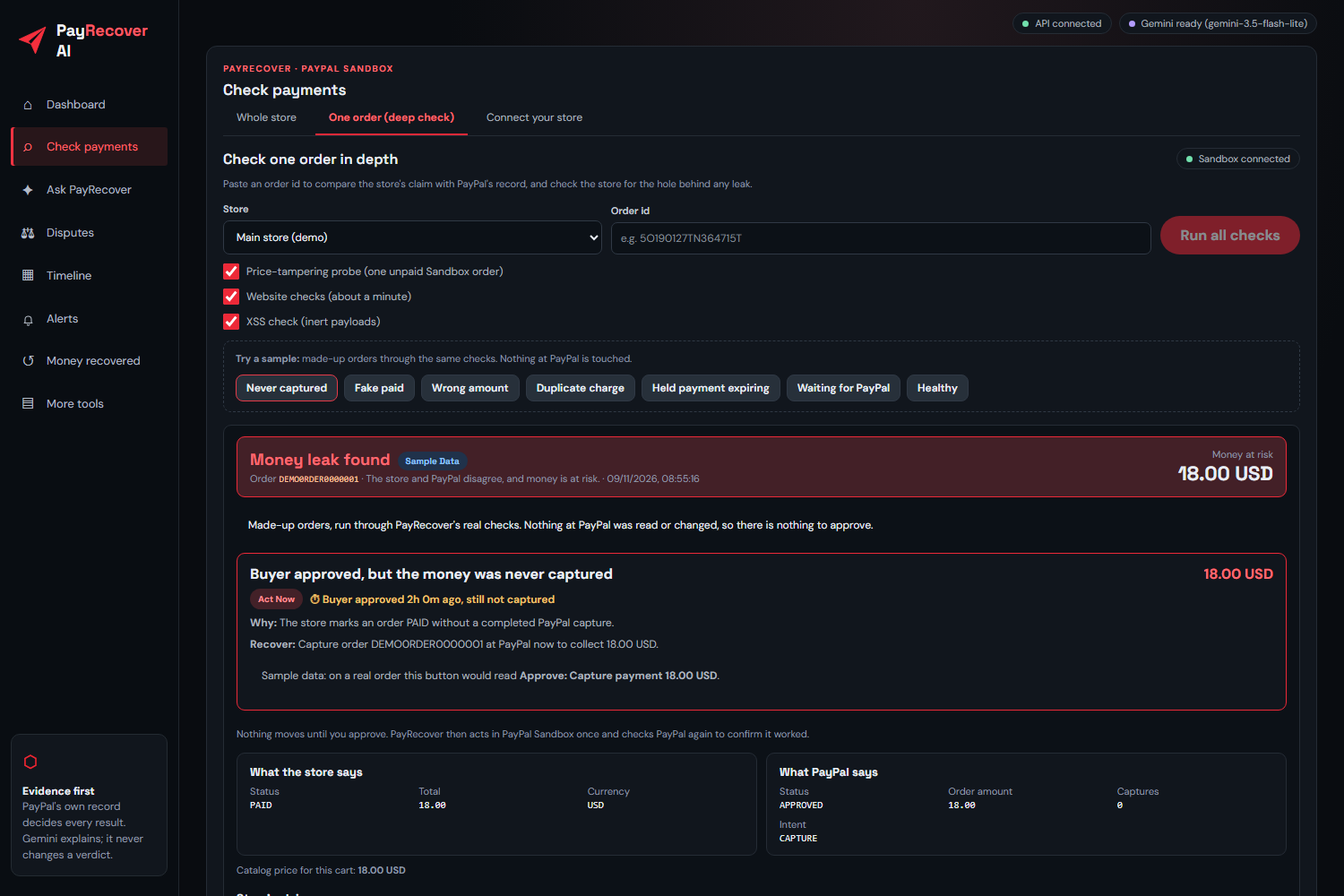
A leak caught: the store says PAID, but PayPal never captured the money. 18.00 USD at risk, with both records side by side.
-
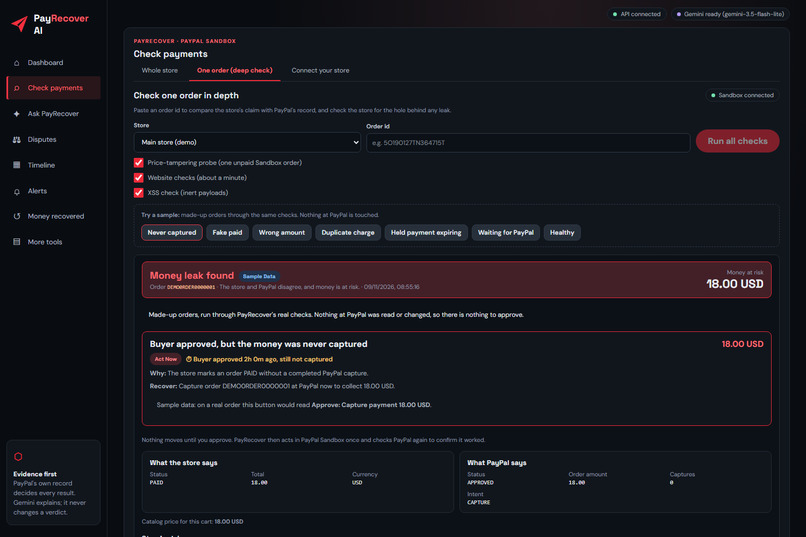
A leak caught: the store says PAID, but PayPal never captured the money. 18.00 USD at risk, with both records side by side.
Inspiration A store's "Payment complete" page is only the store's opinion. Behind it, small bugs quietly turn into lost money: a PayPal payment the buyer approved but the store never captured, an order marked paid that PayPal never charged, a price the browser was allowed to change, or one cart charged twice. None of these crash anything. The store keeps running, the dashboard looks healthy, and the merchant only finds out weeks later, when a buyer opens a dispute or the month's numbers don't add up. Small merchants are hit hardest. They don't have a payments team reconciling every order, and most tools only show what the store believes happened. We wanted an agent that checks every claim against the one record that can't be wrong, PayPal's, and then helps the merchant get the money back without ever taking the decision out of their hands.
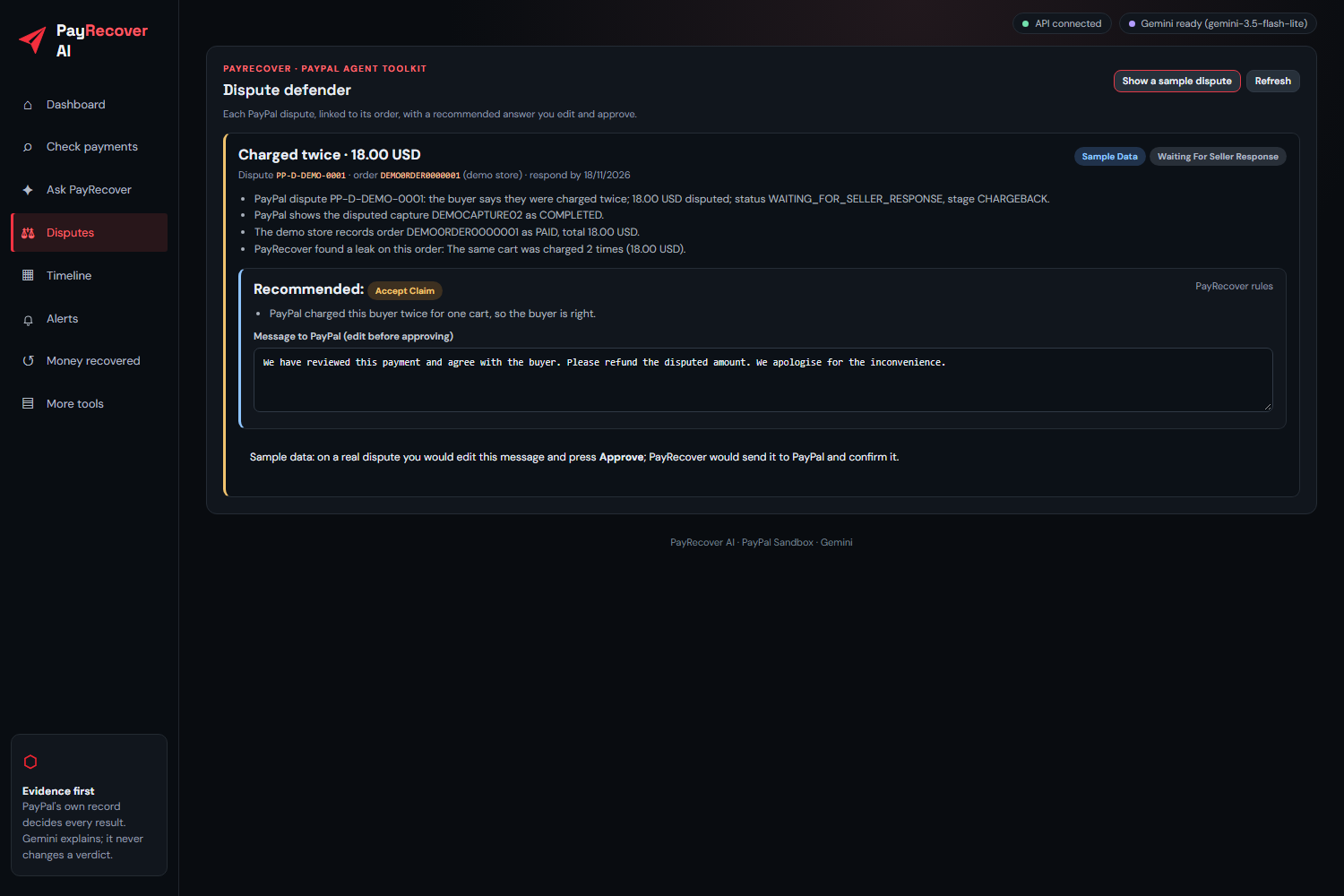
What it does PayRecover AI scans a store's recent paid orders and compares each one with PayPal's own record. It catches payments that were approved but never captured, orders marked paid that PayPal never charged, carts charged less than the catalog price, duplicate charges, and payments that were only held and never collected. It also works the other way round: it reads PayPal's transaction list and finds payments PayPal took that the store never recorded, which is exactly how many disputes begin. Every leak is ranked by urgency, so a payment that is about to slip away comes first, with a live clock showing how long it has been waiting. Each one comes with an evidence pack: a printable page with the store's record next to PayPal's, every check that ran, and a SHA-256 fingerprint, ready to attach to a dispute. When the merchant presses Approve, PayRecover recovers the money through PayPal. It captures the missed payment, refunds the duplicate, or sends the buyer an invoice for the shortfall. It then reads PayPal again and only counts the recovery once PayPal confirms the money really moved. The Ask PayRecover assistant lets the merchant simply ask, "How much am I losing and what should I fix first?" Gemini plans the steps and calls the tools itself: PayRecover's own checks and PayPal's Agent Toolkit for orders, disputes, transactions and invoices. Every tool call is listed under the answer, so nothing is hidden. The assistant can only propose a recovery, which appears as an Approve button. The AI never decides a result and never moves money. The dispute defender reads PayPal disputes, links each one to its store order, re-checks that order, and recommends whether to send evidence or accept the claim, with a draft message the merchant can edit before approving. PayRecover also checks the store itself for the holes that cause leaks, such as price tampering, cross-site scripting and missing security headers, and compares the store's prices with the wider market through Channel3 to catch typos like a mug listed at 1.25 instead of 12.50. Alerts arrive on the dashboard, by email and through Zapier the moment money leaks or a dispute opens, each with a signed one-tap approve link. Auto-scan keeps checking every store on a timer, even with the dashboard closed. Three demo stores show every outcome side by side: a clean store that comes back all clear, a risky store whose payments are fine but whose website is vulnerable, and a vulnerable store where real payment bugs can be switched on.
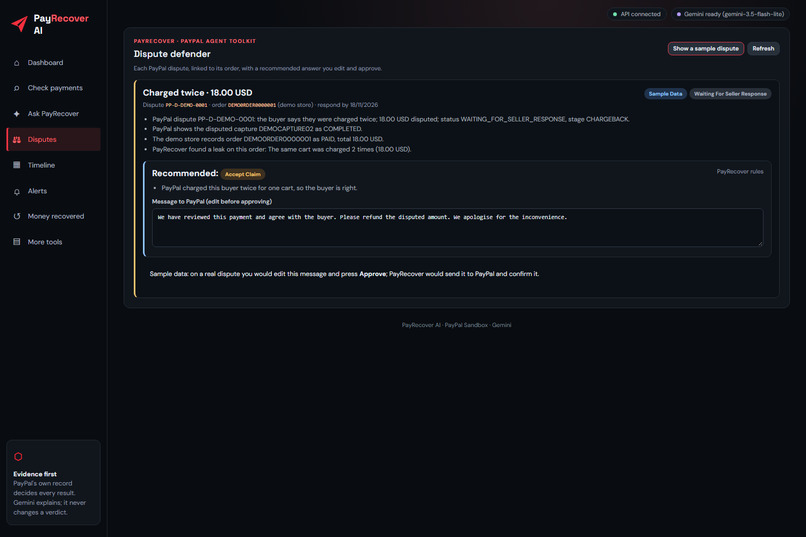
How to test it Use the "Try it out" links below. The demo runs on free hosting, so the first load can take about a minute. The quickest test needs no account: open the dashboard, go to Check payments → One order, and press any sample button (Never captured, Duplicate charge, and so on) to see how a leak is caught and explained. Disputes → Show a sample dispute shows the dispute defender. To see a real leak, open the Vulnerable store, tick a bug, pay with a PayPal Sandbox buyer account, then scan the Vulnerable store from the dashboard and press Approve to recover the money. The Main store is the same checkout built correctly, so its scan comes back all clear. Everything runs in the PayPal Sandbox, so no real money moves.
How we built it The backend is Python and FastAPI. It reads PayPal through the official PayPal Server SDK, generated by APIMatic, for orders, captures and refunds, and through PayPal's Agent Toolkit for disputes, transactions and invoices. It also uses PayPal's Invoicing, Disputes and Transaction Search APIs, and receives PayPal webhooks, verifying each one's signature before reading it. Gemini handles planning, explanations and drafts through function calling, with fallback models if one is busy. An MCP server opens the same tools to any AI assistant, such as Claude, under the same rule: an outside assistant can propose, but only the merchant can approve. The dashboard is React and Vite, with AG Grid for the scan results and the money recovered log, and a Bryntum Scheduler timeline that shows every scan, recovery and dispute deadline per store. The API description passes APIMatic validation with zero errors, so SDKs and an API portal can be generated from it. Alerts go out through Zapier and Brevo, the whole app ships as a Docker image, and the live demo runs on Render. More than 350 automated tests run in GitHub Actions on every push. We designed everything around one rule: the AI explains, plans and proposes, but never decides or moves money. Leaks come only from deterministic checks against PayPal. Every money movement needs the merchant's approval, is recalculated from PayPal at that moment, carries an idempotency key so a retry never charges or refunds twice, and is confirmed by a fresh read of PayPal.
Challenges The hardest part was reading PayPal correctly. A refunded capture first looked exactly like a missed one, and so did a payment PayPal holds while a dispute is open. We had to model PayPal's capture, refund and dispute states precisely before the checks could be trusted. Disputes were another puzzle, because PayPal names the capture rather than the order, so we follow each capture back to its order and tag every store's payments so disputes, transactions and webhooks land on the right store. Some problems were practical. Invoicing kept failing even after we enabled it, because the cached access token predated the change, so we now retry once with a fresh token. Models sometimes stalled or returned overlong answers, so we added timeouts, fallback models and strict output schemas. And our Sandbox account, registered in India, couldn't run the US checkout flows, so we set up a US Sandbox business app.
What we learned PayPal's record is a powerful source of truth, but only if you understand its states: approved, captured, held, partially refunded and disputed all mean different things. We also learned where AI belongs in payments. It is best placed between the facts and the merchant, explaining, planning and drafting, with deterministic checks on one side and human approval on the other. That balance is what lets a merchant trust an agent near their money.
What's next We want to bring PayRecover to real merchants through Shopify and WooCommerce apps and PayPal Partner onboarding, so a merchant can connect their store and grant access on PayPal's own page. After that comes a daily summary email and, once PayPal has reviewed it, live mode. Today PayRecover is locked to the PayPal Sandbox on purpose.

