-
-
cover
-
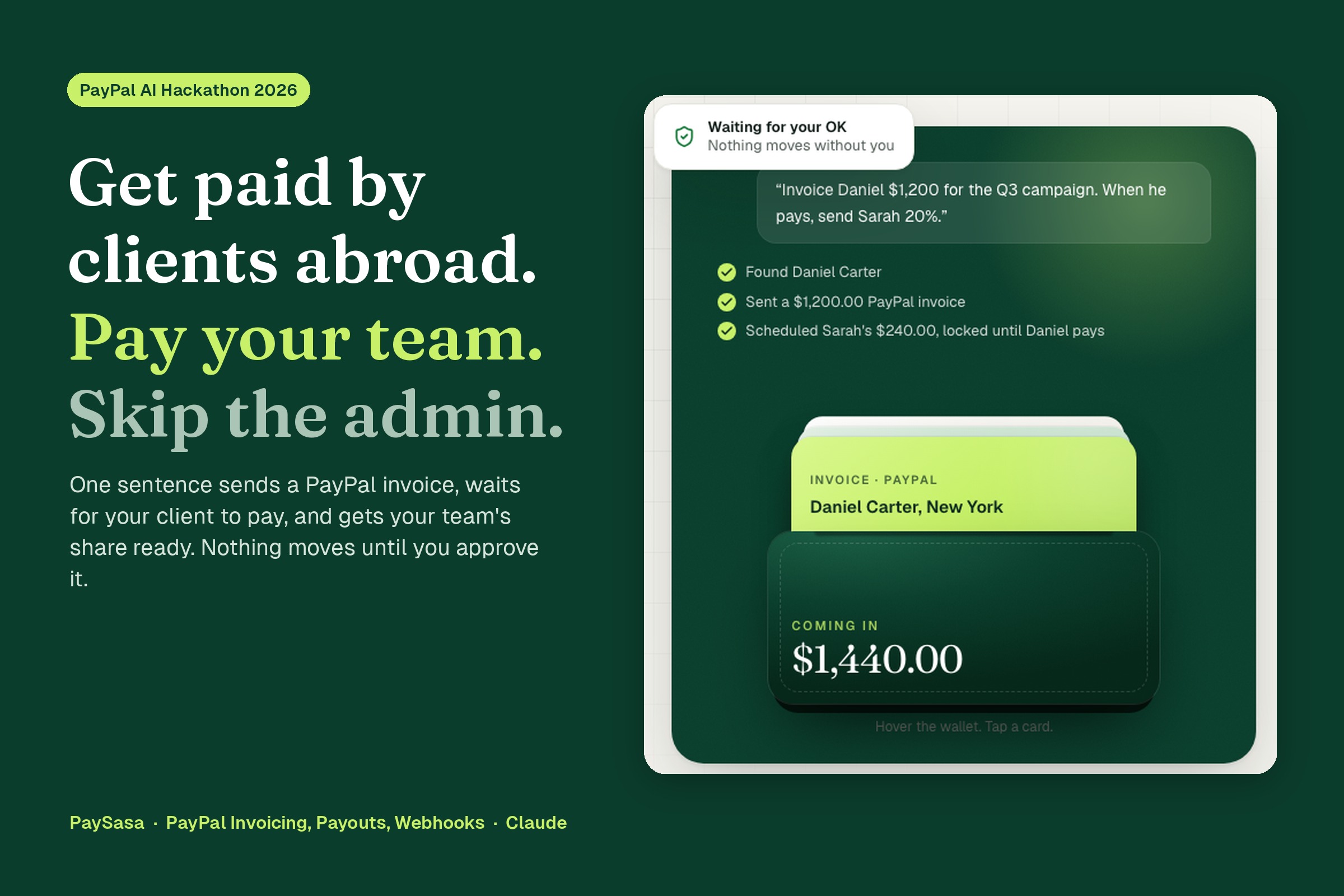
assistant
-
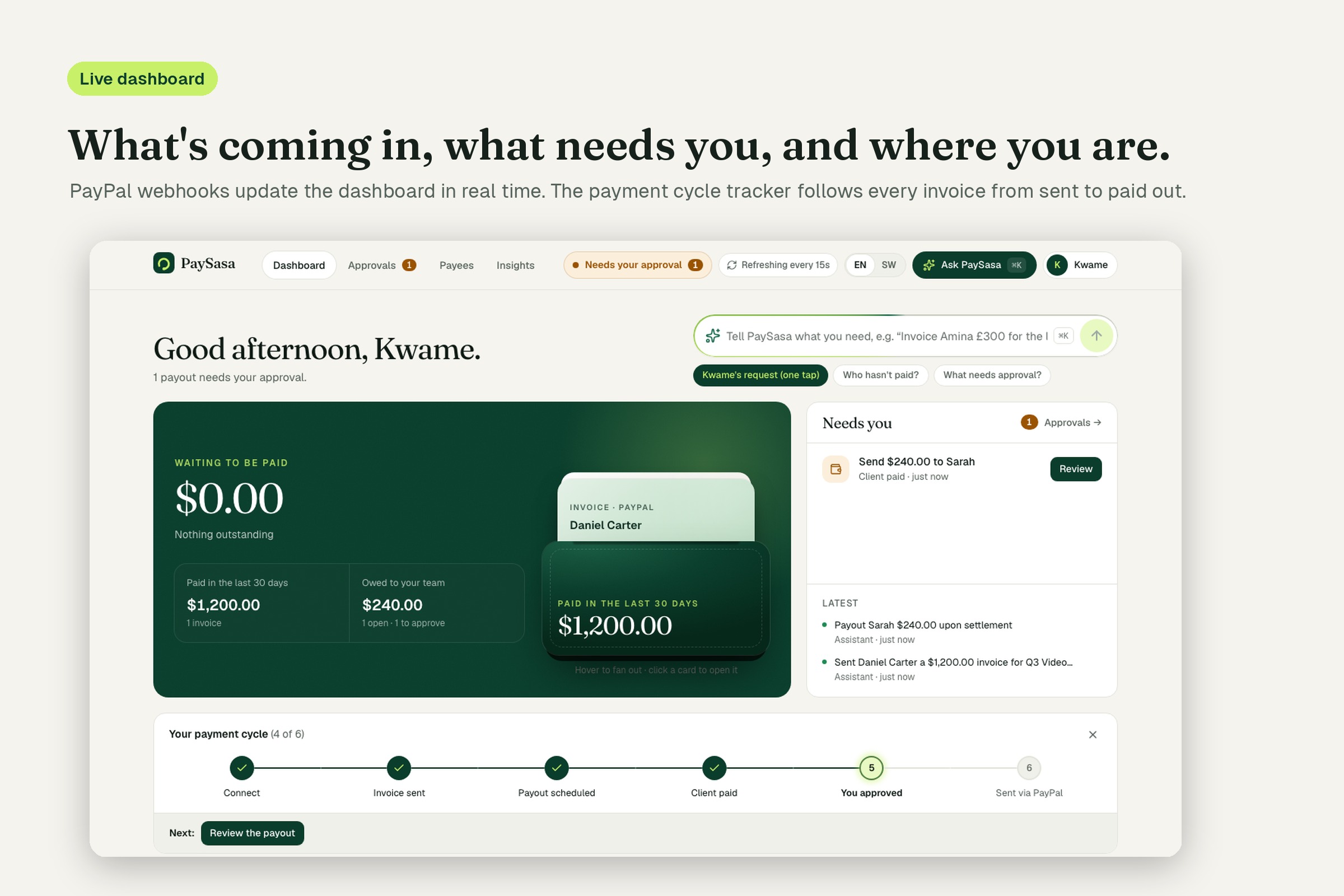
dashboard
-
approval
-
how -it-works
-
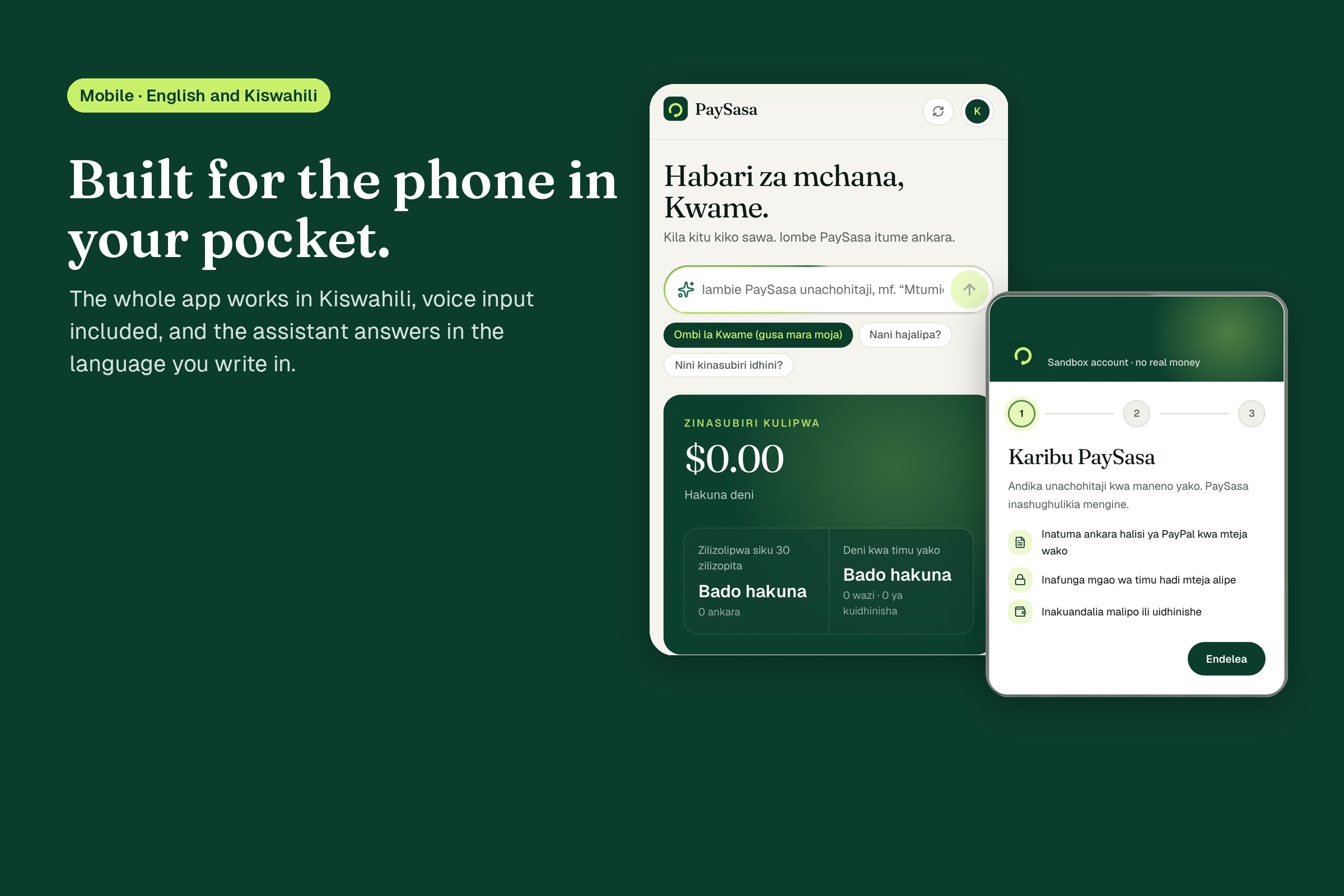
mobile-kiswahili
-
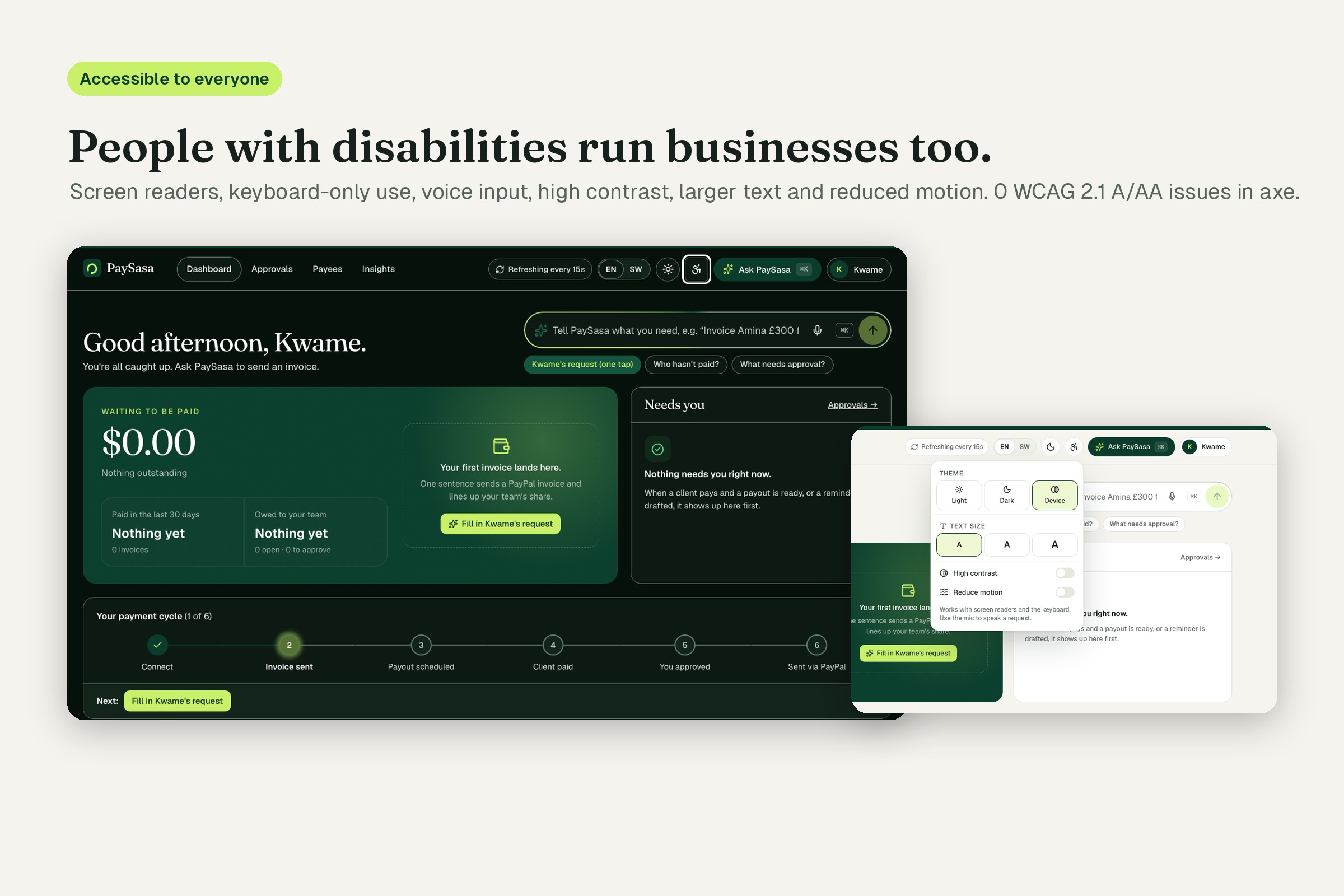
accessibility
Inspiration
Meet Kwame, a freelance video editor in Nairobi with clients in New York, London and Johannesburg. After every job the same admin starts: make the invoice in one tool, email it from another, open PayPal every morning to see if the client has paid, write the awkward "just following up" email, then work out his collaborator's cut on a calculator and type the payout in by hand, hoping the email address is right.
None of it is hard. It's just constant, easy to forget, and the last step moves real money. Most freelancers like this run their business out of a phone, a spreadsheet and their inbox. We wanted to see if an AI assistant could take that whole loop off their hands without ever being trusted with the money itself.
What it does
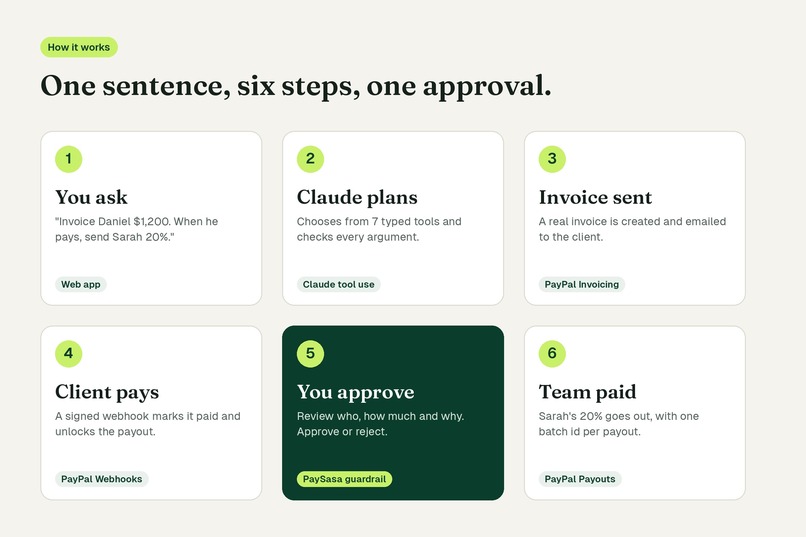
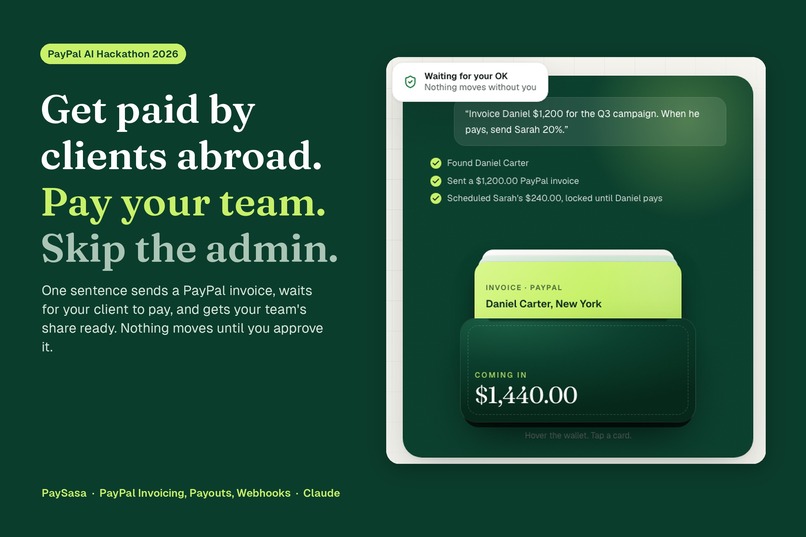
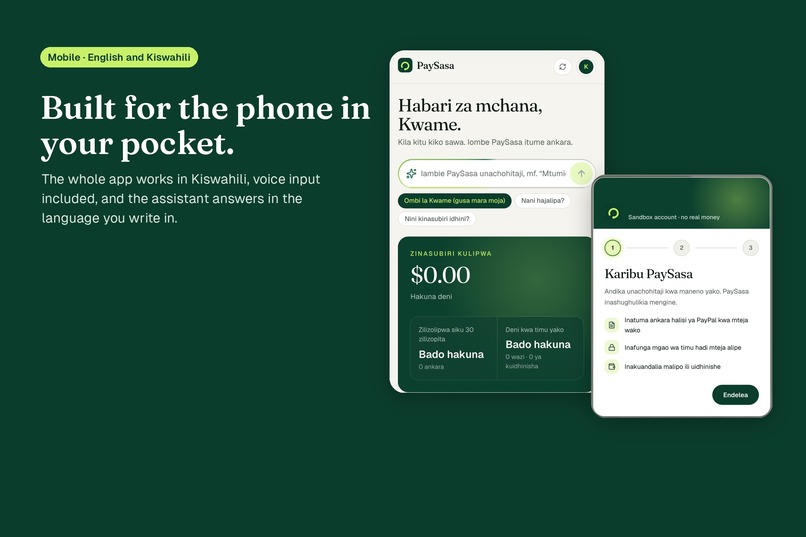
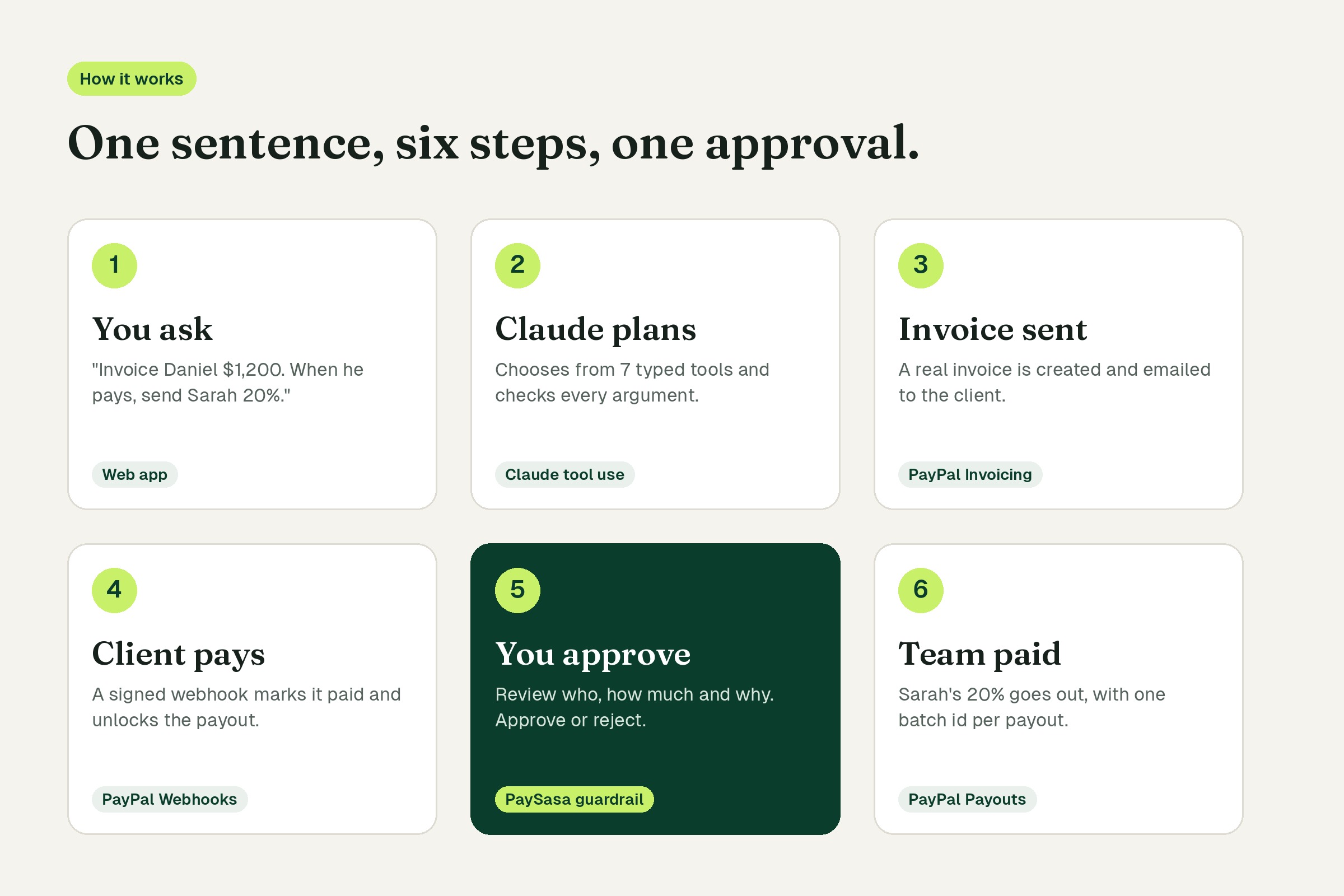
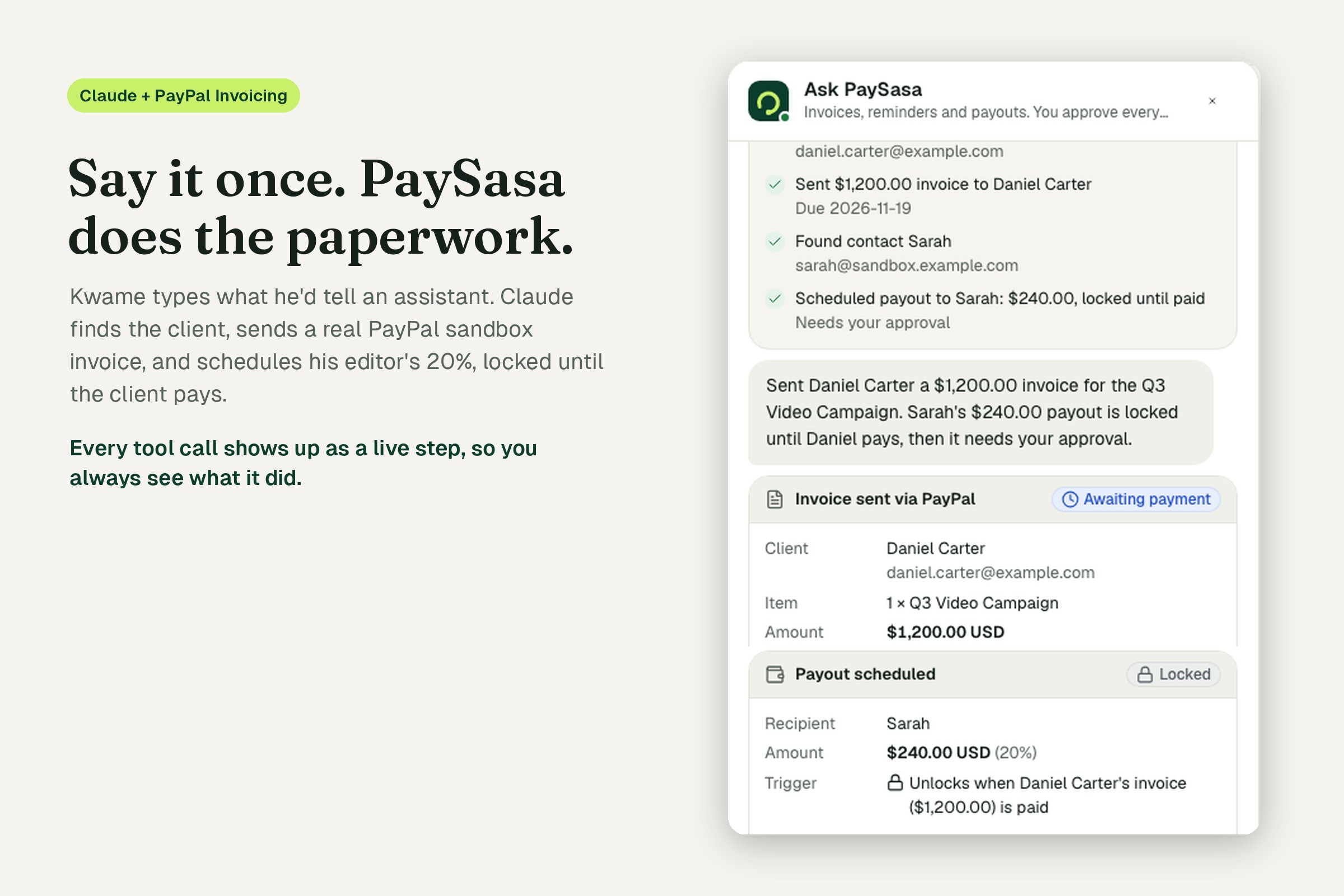
You tell PaySasa what you need in one sentence, the way you'd say it to an assistant:
"Invoice Daniel Carter for the Q3 video campaign. Once he pays, send Priya her share."
PaySasa then:
- Finds Daniel in your contacts (or asks for his email if he's new).
- Sends a real PayPal invoice through the PayPal Invoicing API.
- Works out Priya's share and schedules her payout, locked to that invoice. It cannot unlock until PayPal says the invoice is paid.
- Waits for PayPal. When Daniel pays on PayPal's own invoice page, a signed PayPal webhook marks the invoice paid and the dashboard updates live, without a reload.
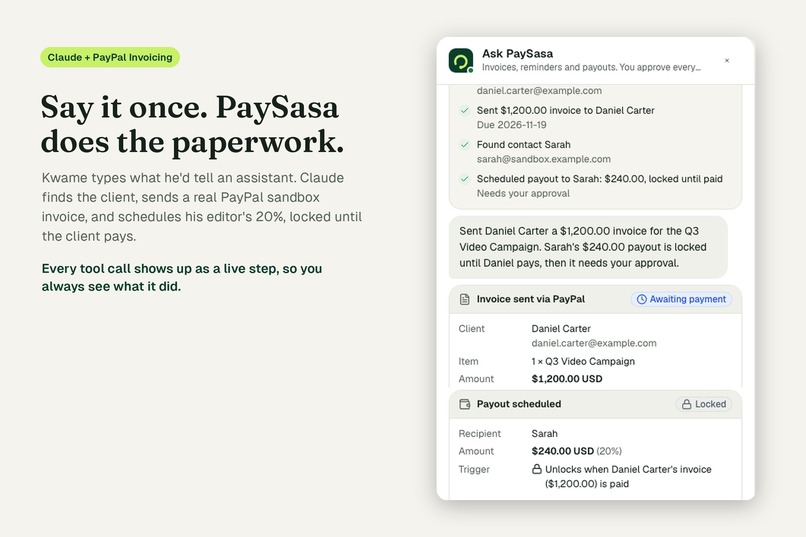
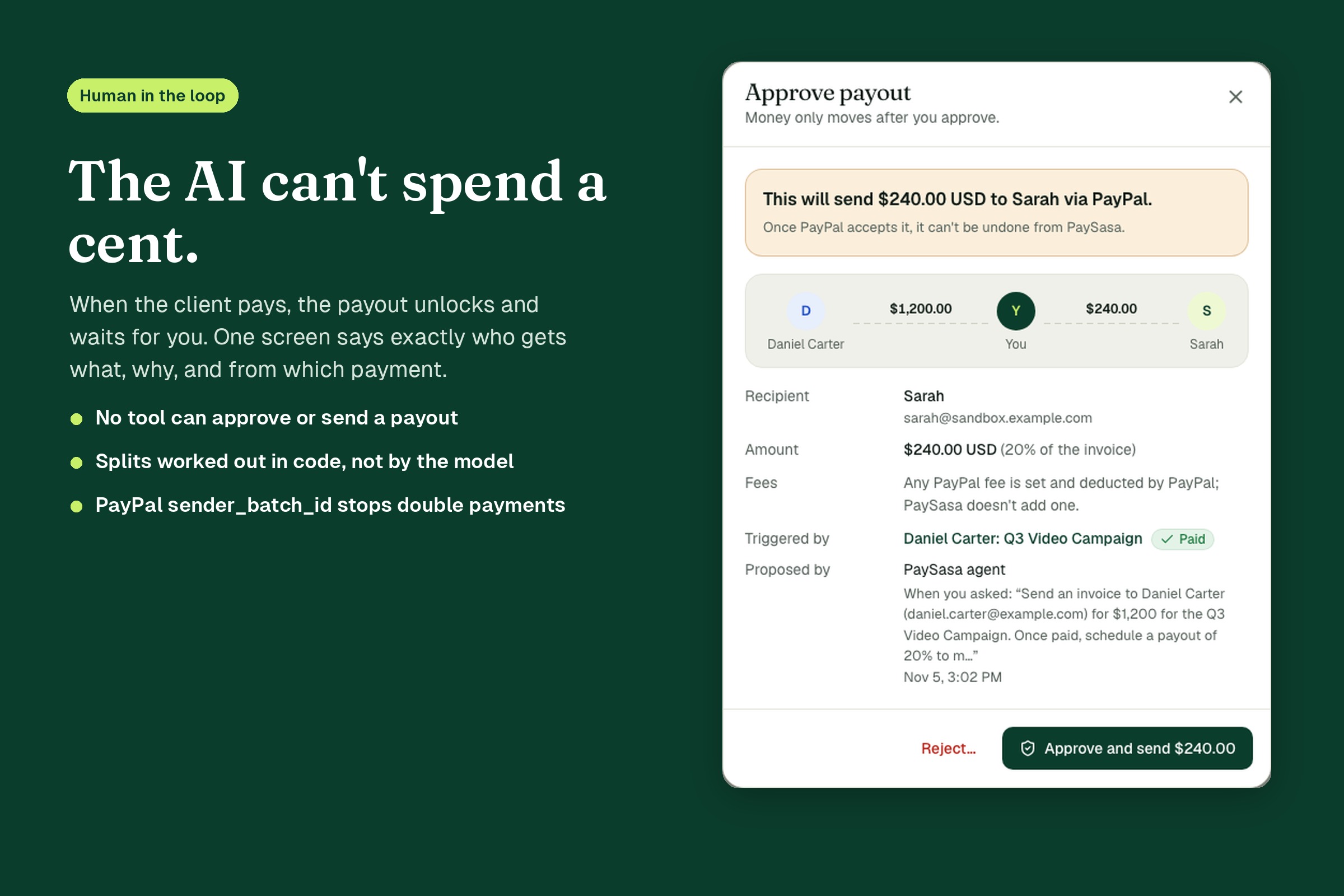
- Asks you. The payout moves to "Needs your approval". If you ask the assistant to approve it, it refuses: only you can. One screen shows who gets what, why, which payment triggered it and which request created it.
- Pays your team through the PayPal Payouts API once you click Approve, then shows "Paid out" only after PayPal confirms it.
It also chases late payers: a daily job finds overdue invoices and drafts a polite reminder, which you edit and approve before PayPal sends it. You can ask "who hasn't paid?" and get a straight answer. It works in English and Kiswahili, on a phone, by voice or by keyboard.
How we built it
PayPal (sandbox). All PayPal calls go through one adapter (backend/server/app/paypal/adapter.py) written against the REST APIs with httpx:
- Invoicing v2: create a draft, send it, read its status and send reminders. We store PayPal's payer-view link so you can open the real invoice from the dashboard.
- Payouts v1: create a batch payout and check its status. We use our own action id as the
sender_batch_id, so a retry or double-click can never pay someone twice. - Webhooks:
INVOICING.INVOICE.PAID,CANCELLEDandREFUNDED, plus the payout batch and payout item events, drive every state change. Each event is checked with PayPal'sverify-webhook-signatureendpoint before we trust it. Unsigned or unverifiable events are rejected.
There's also a mock adapter with the same interface and the same webhook payloads, so the 86 backend tests run without touching PayPal.
AI: Claude with tool use. The agent is a multi-turn loop on Anthropic's Messages API (Claude Sonnet) with seven typed tools: find_contact, create_contact, send_invoice, schedule_payout, draft_reminder, list_invoices and list_pending_actions. Every argument is validated with Pydantic before anything runs. The system prompt carries the user's contacts and nicknames ("my editor"), their currency and today's date. When the amount, currency or person is unclear, the model asks one short question instead of guessing. Claude also writes the reminder drafts, and we check each draft mentions the right amount and has no links before a human sees it.
Guardrails live in code, not in the prompt. We assumed the model will sometimes be wrong, so:
- There is no tool that approves or sends a payout. The model can only propose one.
- A payout is created
lockedand only a PayPal webhook can unlock it. - Percentage splits are calculated by the backend in integer cents, not by the model.
- A new contact can only be created with an email the user actually typed, so the model can't invent a payee.
- Amounts are capped, and a payout can't be bigger than the invoice it depends on.
- Payouts follow a strict state machine (
locked → awaiting_approval → executing → submitted → succeeded). Money is stored as integer minor units, never floats.
Frontend. React 19, TypeScript and Vite. Reads come straight from Supabase (Postgres with row-level security) and Realtime pushes changes to the screen. Writes only go through our FastAPI backend. The dashboards are AG Grid Enterprise: grouped by status, with totals per currency so dollars and pounds never get added together, and live updates with cell flash. The Insights page is built on AG Studio, with our own theme, a three-page default report, and two custom widgets: a live approval queue that opens the real approval dialog, and a payout guardrail pipeline.
Hosting. Everything runs on Render: a static site for the app, a web service for the API, and a cron job that runs the reminder check every morning at 9:00 Nairobi time.
Design
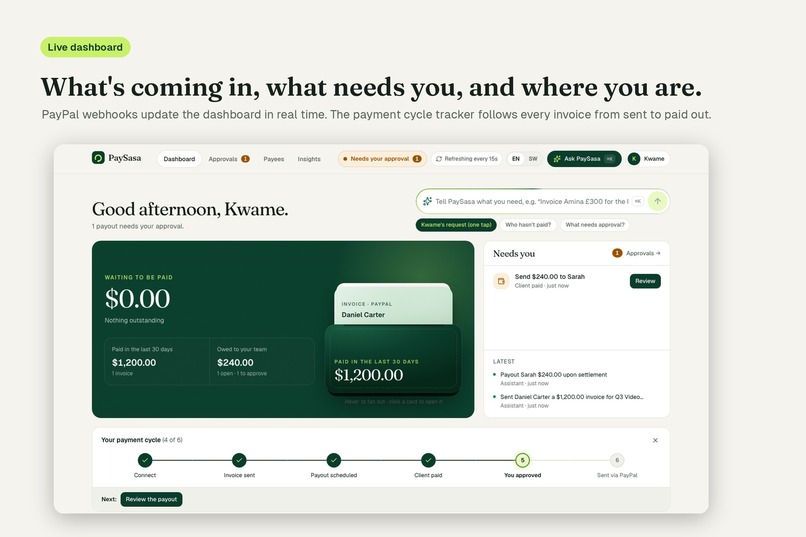
We designed it for someone who's busy and doesn't want to learn a finance tool. The dashboard answers four questions in order: what's coming in, what needs me, where am I in the payment cycle, and who pays me. The assistant shows every tool call as a step while it works, then turns its result into live cards that follow the real PayPal status. The approval screen is written in plain words: it says exactly how much goes to whom through PayPal, and which payment triggered it.
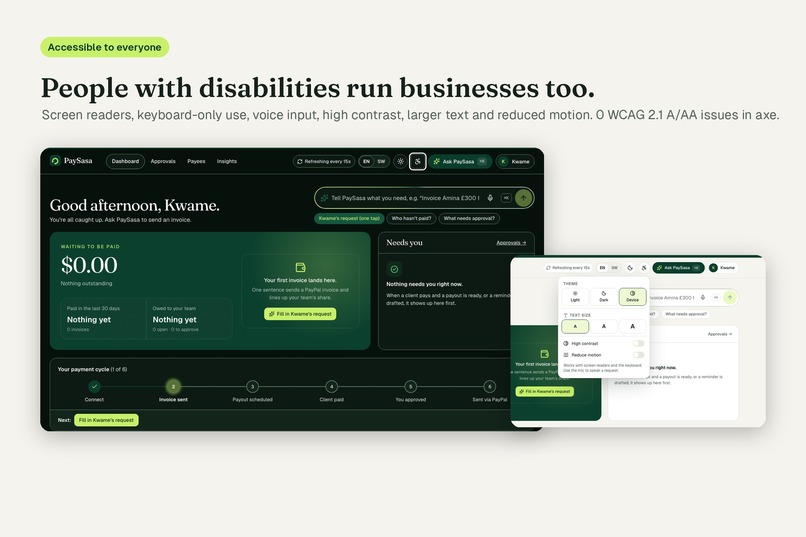
We also built it for people who are usually left out of fintech:
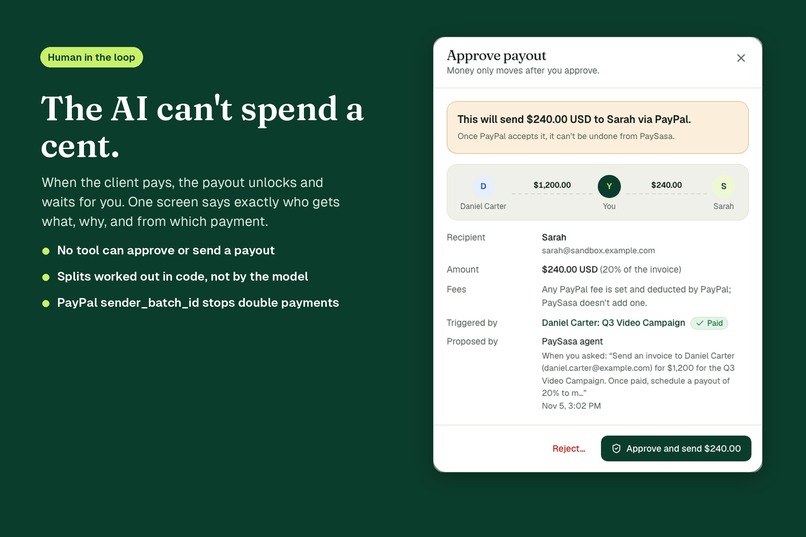
- The whole interface works in Kiswahili, including voice input (
sw-KE), and the assistant replies in the language you write in. - It works with screen readers, keyboard only, high contrast, larger text and reduced motion.
- Automated axe checks report 0 WCAG 2.1 A/AA issues in light, dark and high-contrast modes.
- It works on a 360px phone screen with no sideways scrolling.
A first-login tour walks new users through it.
Challenges we ran into
- PayPal can't invoice in Kenyan shillings. Our users think in KES, but PayPal bills in USD, GBP, EUR and a few others. We bill in a supported currency and show amounts in KES at indicative rates, while making sure the original currency is what goes to PayPal.
- Webhooks are where it gets real. Invoicing events put the invoice under
resource.invoice, notresource, which broke our first webhook handler. The sandbox simulator's test events can't pass signature verification, so we tested with real sandbox payments instead. - Deciding how far to trust the model. A language model can get a percentage wrong or fill in an email nobody gave it, and with money that's not acceptable even once. So we moved every money rule out of the prompt and into code, and wrote tests for each one.
- Double payments. Retries, double-clicks and webhooks arriving twice all had to be safe, which is why we use idempotency keys and a strict state machine.
Accomplishments we're proud of
- The full loop runs end to end on real PayPal sandbox objects: invoice sent, paid by a sandbox buyer, webhook verified, payout approved and confirmed.
- An AI agent that does real work but structurally cannot spend money.
- A product that works in Kiswahili and passes accessibility checks, not just a demo that works for us.
What we learned
The model is the easy part. The real work was deciding what the AI should not be allowed to do, and enforcing that in code. We also learned how much a payments product depends on the boring details: webhook payload shapes, currency support, idempotency and never showing "sent" when you don't actually know yet.
What's next
- Mobile money: send a collaborator's share to M-Pesa as well as PayPal.
- Editing and cancelling invoices from the chat.
- Recurring invoices for retainer clients.
- Going live: PayPal production approval for Payouts.
Built With
- ag-grid
- ag-studio
- anthropic
- axe-core
- claude
- fastapi
- httpx
- paypal-invoicing-api
- paypal-payouts-api
- paypal-sandbox
- paypal-webhooks
- playwright
- postgresql
- pydantic
- pytest
- python
- react
- render
- supabase
- tailwindcss
- tanstack-query
- typescript
- vite
- vitest
