-
-
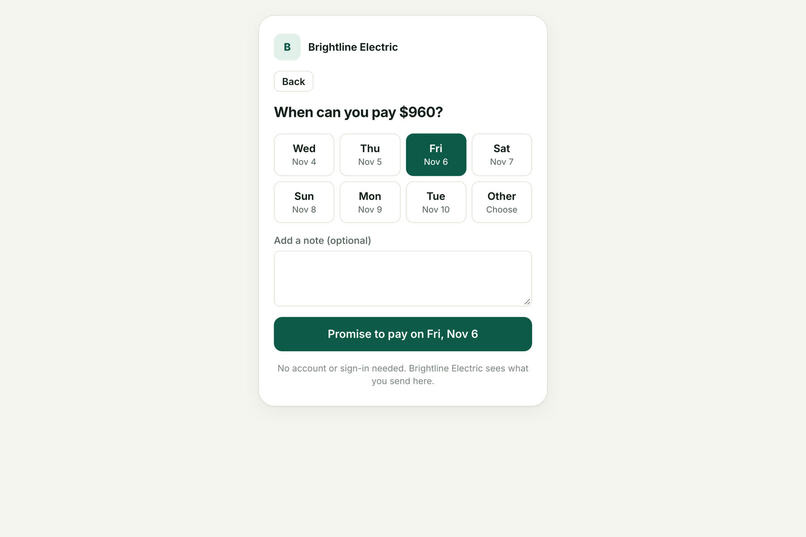
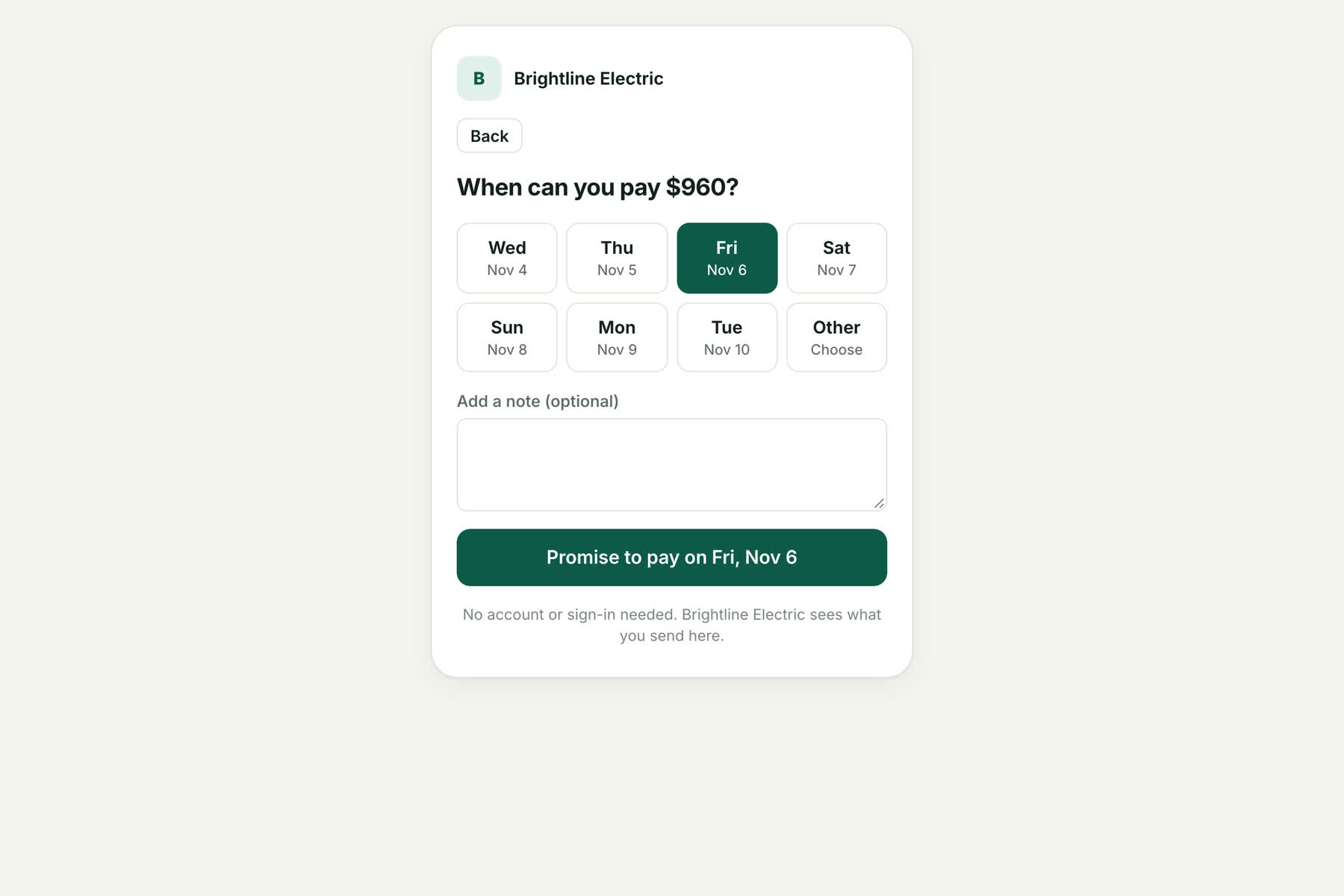
Customer link: no account needed. The customer picks a payment date, so no AI guessing is required.
-
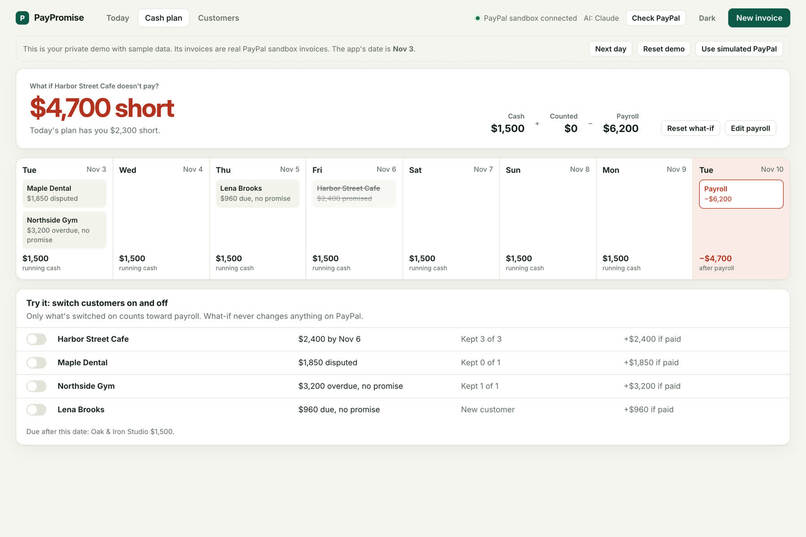
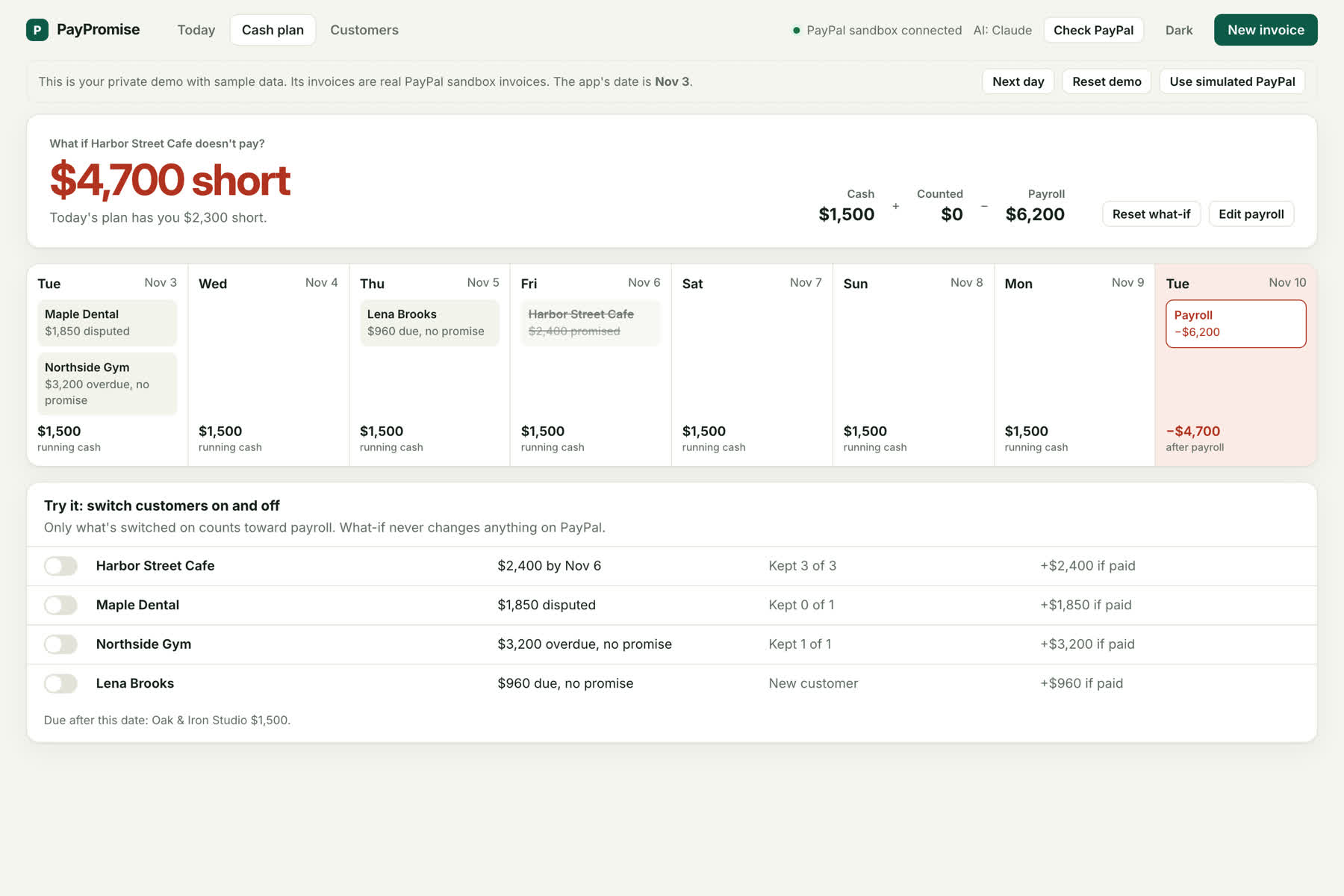
Cash plan: switch a customer off to see what happens to payroll. What-if never changes anything on PayPal.
-
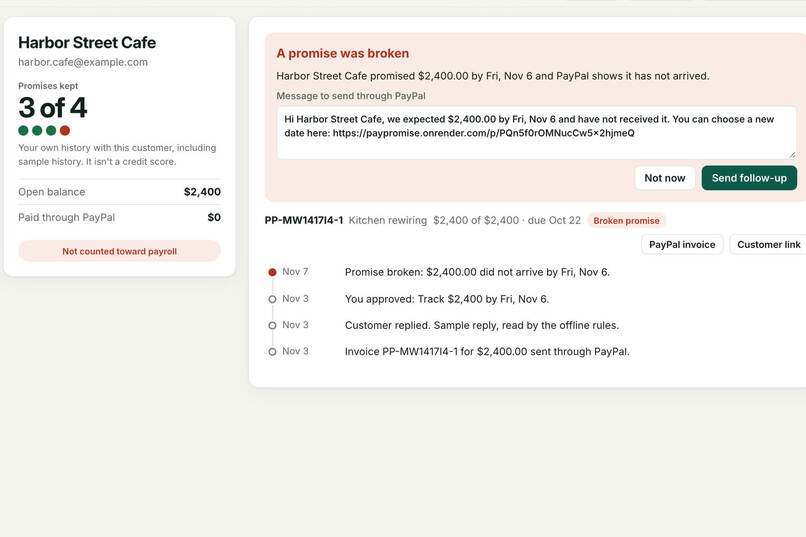
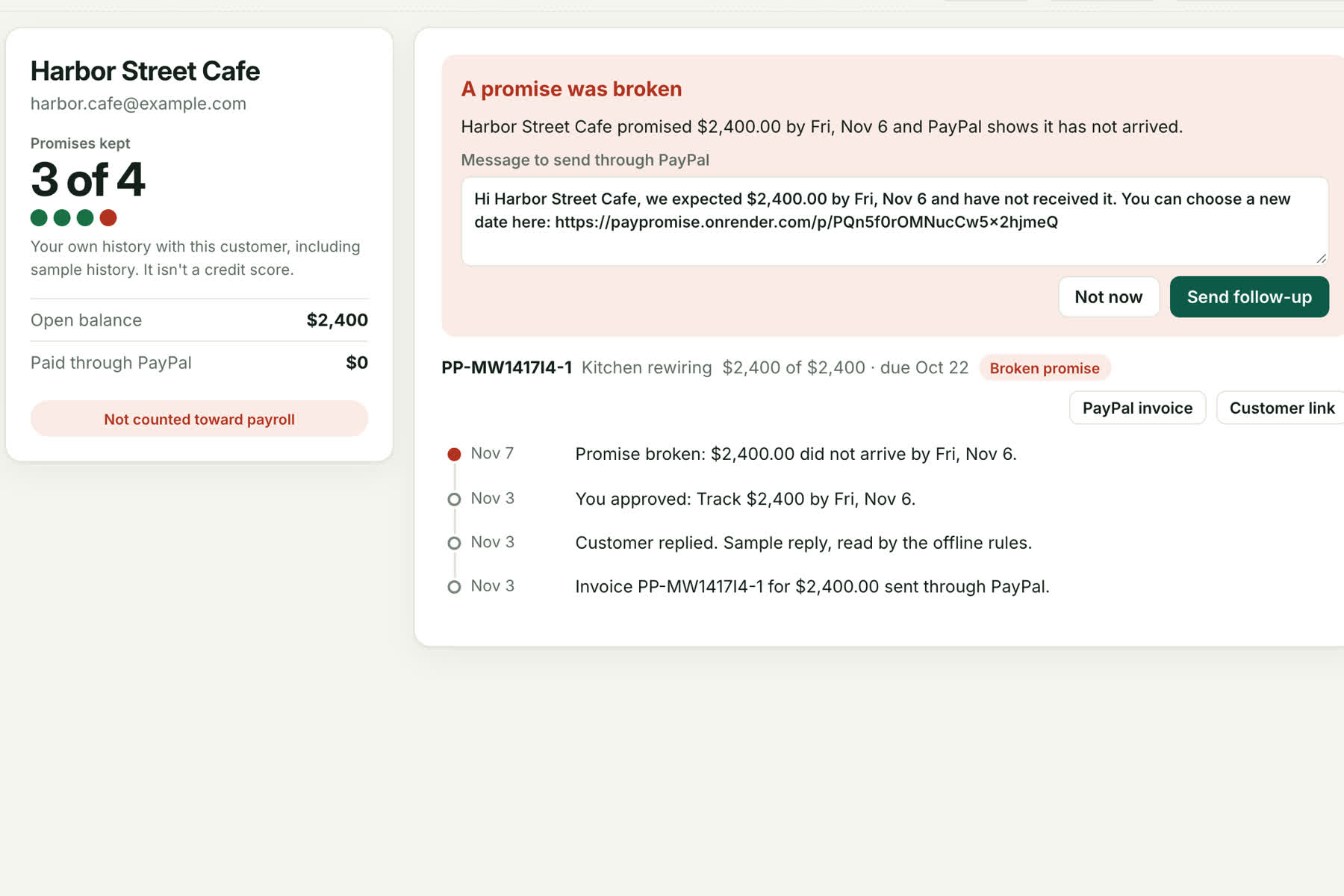
PayPal shows no payment, so the promise is marked broken and a follow-up waits for the owner's approval.
-
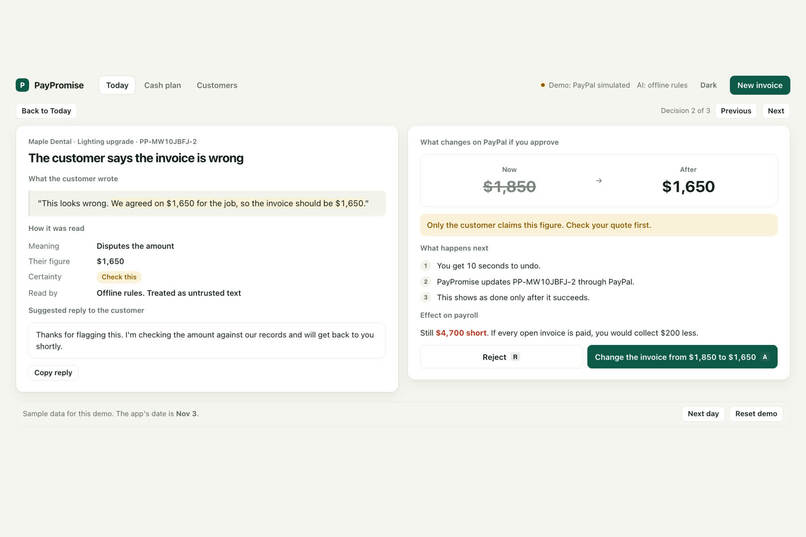
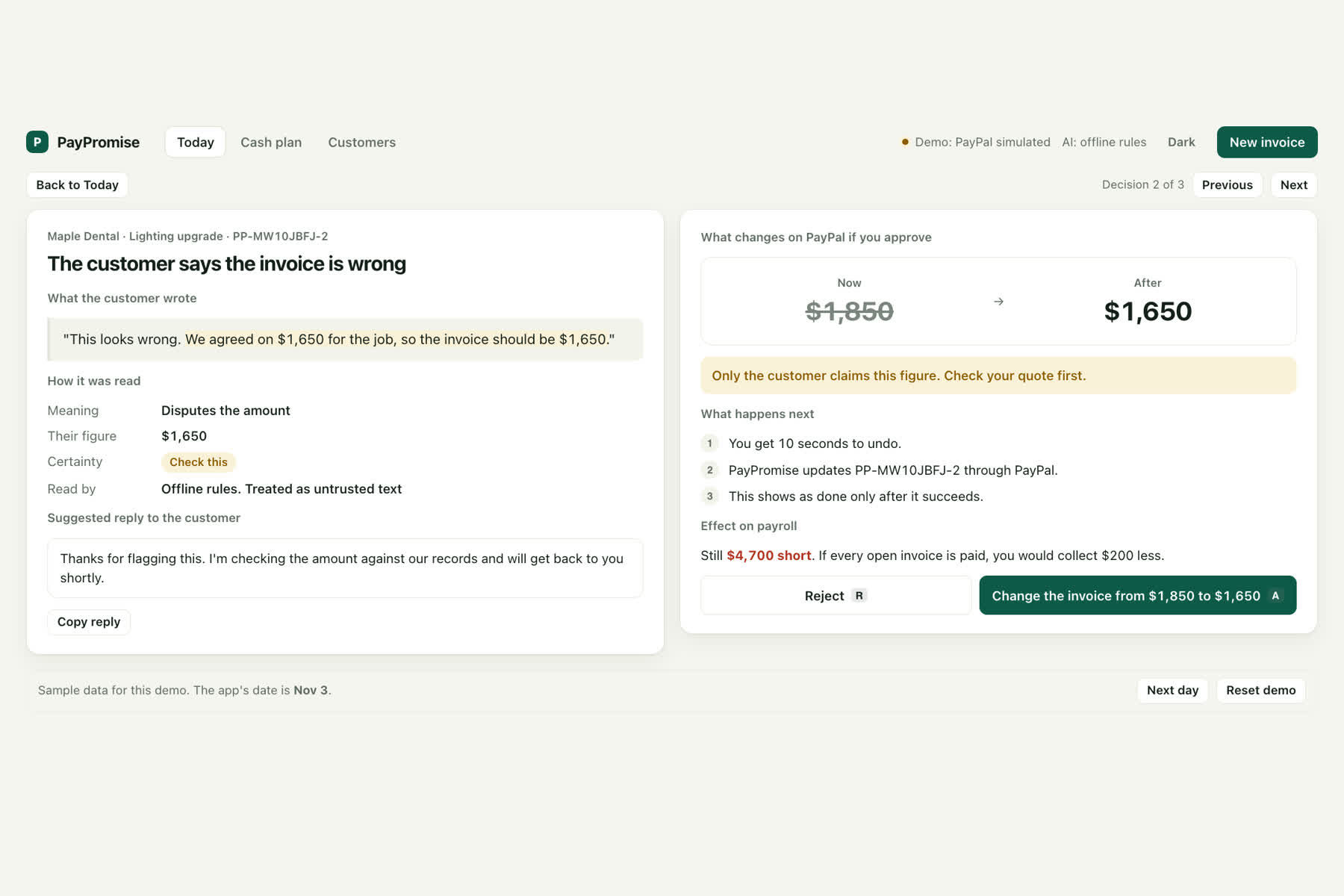
Review: the customer's words, the exact PayPal change and a warning before correcting an invoice from $1,850 to $1,650.
-
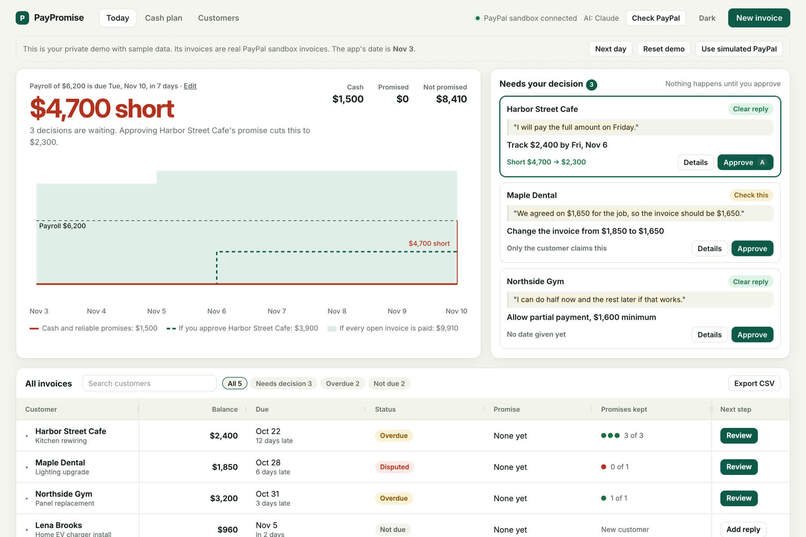
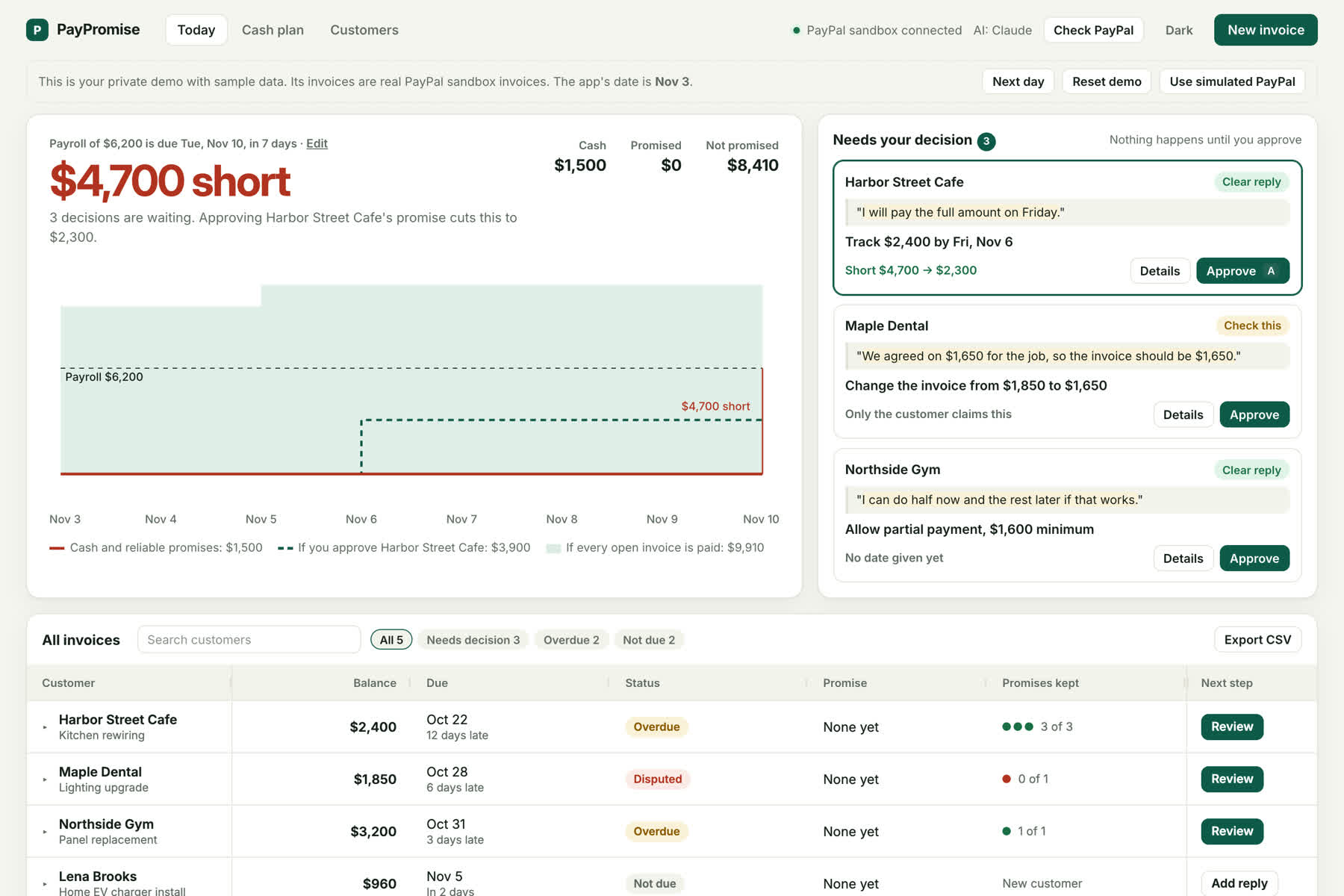
Today: will payroll be covered? $4,700 short, with three customer replies waiting for the owner's decision.
-
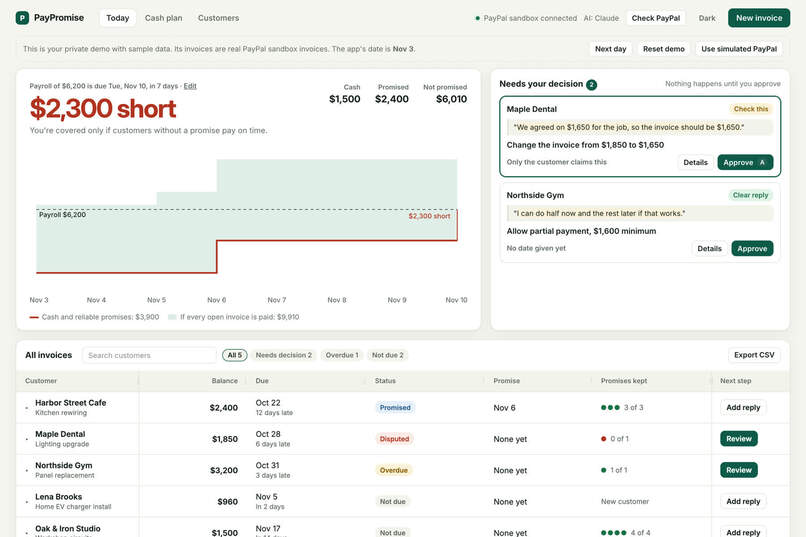
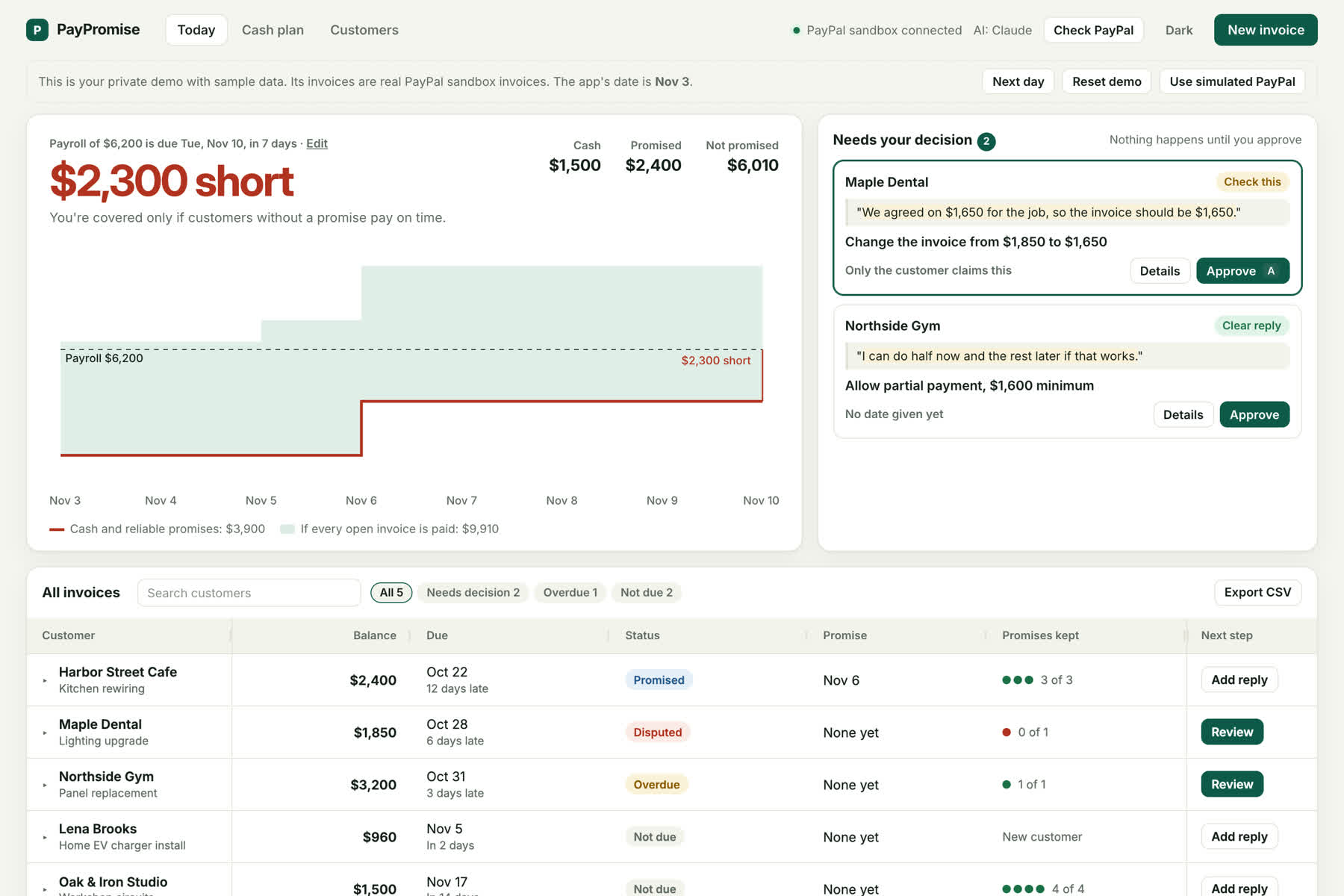
After approving Harbor Street Cafe's promise to pay Friday, the payroll gap drops from $4,700 to $2,300.
Inspiration
When a customer owes you money, sending a reminder is the easy part. The hard part is what comes back: "I'll pay Friday." "The amount is wrong." "I can only pay half." Those replies get buried in email, and the owner has to remember every one of them.
It matters most just before payroll. In QuickBooks' 2026 Small Business Late Payments Report, nearly 2 in 5 owners said one late payment made payroll or bills hard to cover.
Larger accounts-receivable tools already read payment promises from email, but they are built for finance teams and sit on top of accounting software. PayPromise is for the freelancer or small business that invoices through PayPal and has no accounting system.
What it does
PayPromise turns a customer's reply to an unpaid PayPal invoice into one proposed step. The owner approves or rejects it, and PayPal data decides whether the promise was kept.
- "I'll pay Friday" → track the promise. PayPromise checks PayPal after that date.
- "It should be $1,650" → correct the invoice. After approval, the PayPal invoice amount is updated.
- "I can do half now" → allow partial payment. After approval, partial payment is enabled on PayPal with a minimum.
- "We already paid" → verify the payment. PayPromise reads PayPal's record, not the customer's claim.
The app has five parts:
- Today: the main question, "Will the cash be there on payroll day?", with a forecast chart, a decision inbox and a live invoice console.
- Review: the customer's words with the evidence highlighted, the exact PayPal change, its effect on payroll, and 10 seconds to undo.
- Customer link: with no account, a customer can pay, pick a date, ask to pay in parts, question the invoice or say it's paid. Their answer becomes a proposal, and a date picked on a form needs no AI guess.
- Cash plan: a day-by-day view with customer switches, for questions like "What if Harbor Street Cafe doesn't pay?" It never changes PayPal.
- Customers: promises kept and broken per customer, from the owner's own PayPal history.
When a date passes and PayPal shows no payment, the promise is marked broken and a follow-up waits for the owner's approval. A date moved before it was due counts as a reschedule.
The AI proposes; the owner decides. Nothing changes on PayPal until the owner approves it.
How we built it
- PayPal Invoicing API v2 (sandbox): create and send invoices, reminders, amount corrections and partial payment, plus payment status.
- PayPal webhooks: signature-verified
INVOICING.INVOICE.*events. The server re-reads the invoice from PayPal and counts only money actually received, then pushes the change to open pages with Server-Sent Events. - Claude Opus 5.5 (Anthropic API): reads each reply into structured output: intent, date, amount, a word-for-word evidence quote, confidence and a draft reply in the customer's language.
- Safety in code, not the prompt: customer text is passed as untrusted data, the model has no PayPal tools, invoice IDs come only from the database, and amount and date limits are enforced in code. Before acting on an older proposal, PayPromise asks PayPal for the current state.
- AG Grid Community: the live invoice console, with custom cell renderers, change flashing when a payment arrives, full-width evidence rows, a pinned totals row, quick search and CSV export.
- Private demos: each visitor gets their own workspace, so one judge's clicks never change what another sees. One button creates that visitor's own real PayPal sandbox invoices.
- React, Vite, Tailwind CSS, Radix, Recharts, Motion, Express and SQLite (
node:sqlite), hosted on Render.
Measuring the AI
We wrote 54 labelled replies, including Armenian and Spanish text and 5 prompt-injection attempts, and scored Claude Opus 5.5 on them:
- Meaning of the reply: 53 of 54
- Promised date: 20 of 20
- Promised amount: 3 of 4
- Corrected total: 10 of 10
- Injection attempts read correctly: 5 of 5
This is a small set written for this project, not a measure of real customer mail. The test set and runner are in tests/eval. There are also 52 automated tests for the business rules.
Challenges we ran into
- A payment isn't always the end of a promise. A tester asked what happens when a customer pays part of an invoice and then moves the date. That case marked the promise broken and dropped the rest from the forecast. It now counts as a reschedule, and an old unsent follow-up closes when the customer replies.
- Webhooks can be late. A stale proposal once tried to send a reminder for an invoice that was already paid. PayPromise now checks PayPal before every action and closes proposals once an invoice is paid or their date passes.
- One demo for many judges. A shared demo let any visitor change the data and the date for everyone, so each visitor now gets a private workspace.
Accomplishments that we're proud of
- A real sandbox payment updates an open page within seconds, without a refresh.
- Every step that touches PayPal waits for the owner, with an undo window.
- The customer link removes guessing: the customer picks the date themselves.
What we learned
Detecting a promise is the easy part. The value is in what follows: checking it against real payment data, handling partial payments and reschedules, and showing the owner what it means for payroll before payroll day.
What's next for PayPromise
- Talk to PayPal invoicers to see whether this solves a problem they would pay to fix.
- Read replies from a forwarding email address instead of pasting.
- Add more currencies and languages.
- Move from sandbox to live PayPal with sign-in and per-account data.
Built during the hackathon
PayPromise was created from scratch during the Submission Period. The first commit is dated November 3, 2026.
AI tools used
- In the product: Claude Opus 5.5, through the Anthropic API, reads customer replies and proposes one next step.
- While building it: I used Claude Code as a coding assistant. I chose the problem and the product, made the product and design decisions, tested it with the PayPal sandbox, and directed and reviewed the changes.
Testing instructions
- Open https://paypromise.onrender.com. On the free plan it can take about a minute to wake up.
- Each visitor gets a private demo with sample invoices and simulated PayPal. Try Approve, Details, Next day and Reset demo at the top.
- To test real PayPal sandbox payments, choose Use real PayPal sandbox at the top and wait about 20 seconds. This creates your own sandbox invoices.
- In the All invoices grid, open a row with ▸, then choose PayPal invoice. Open it in a private window and pay with this sandbox buyer account: Sandbox buyer login details are in the judges-only testing instructions.
- Return to the dashboard without refreshing. Within a few seconds the invoice shows as paid. If it doesn't, choose Check PayPal.
To run it locally, follow the README in the repository. Without keys it runs with simulated PayPal and offline rules.
Built With
- ag-grid
- anthropic-api
- claude
- express.js
- node.js
- paypal
- paypal-invoicing-api
- paypal-webhooks
- radix-ui
- react
- recharts
- sqlite
- tailwindcss
- typescript
- vite
