-
-
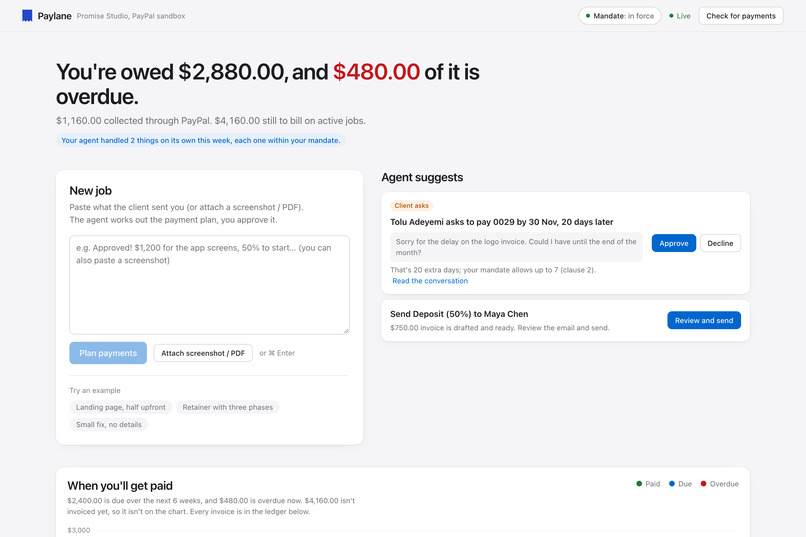
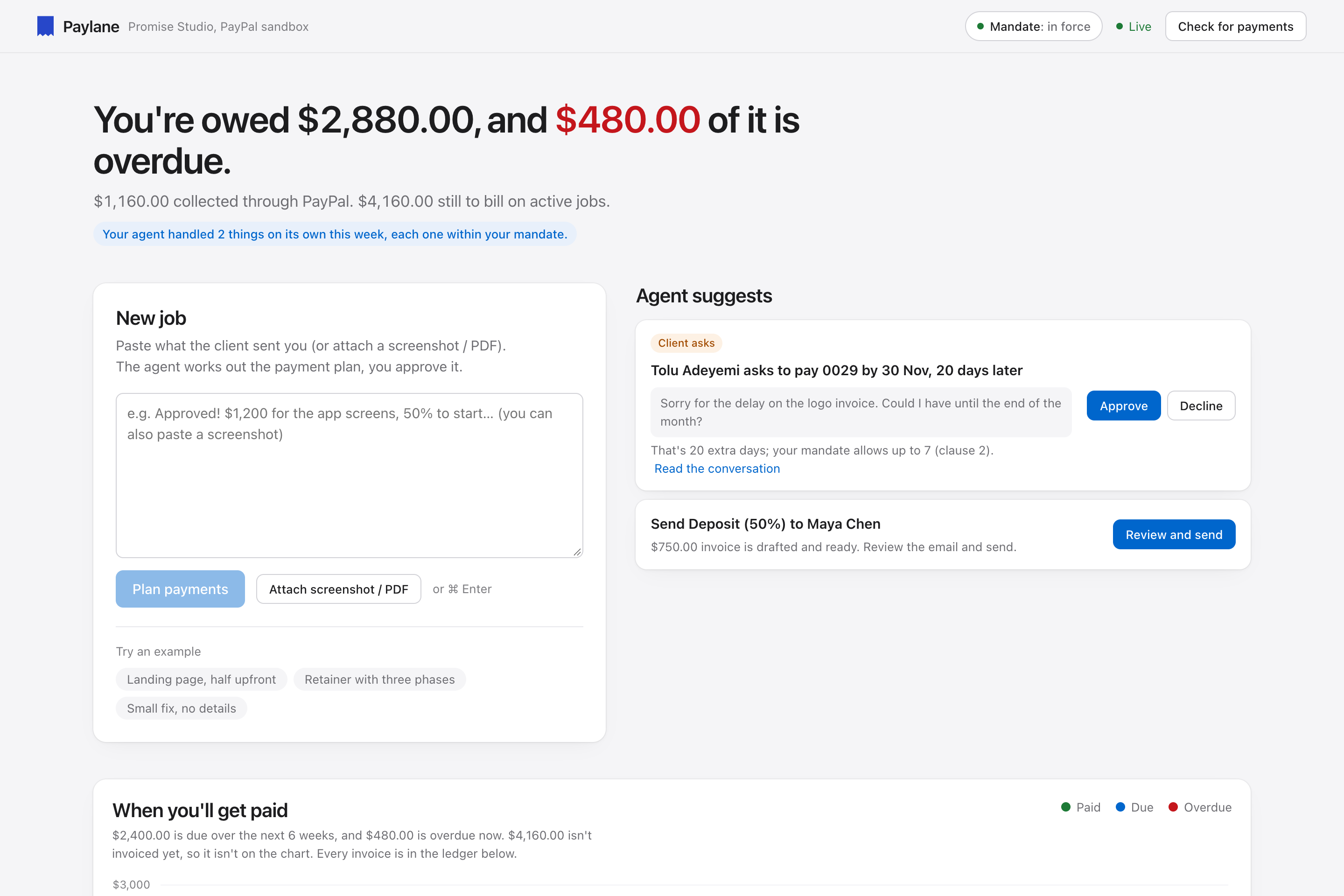
Your dashboard: what you're owed, what's overdue, and what needs you, like a client asking for more time than your mandate allows.
-
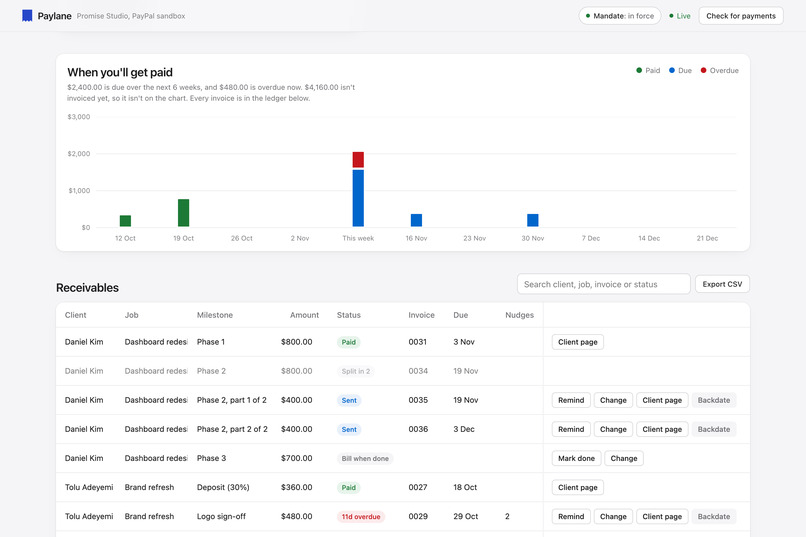
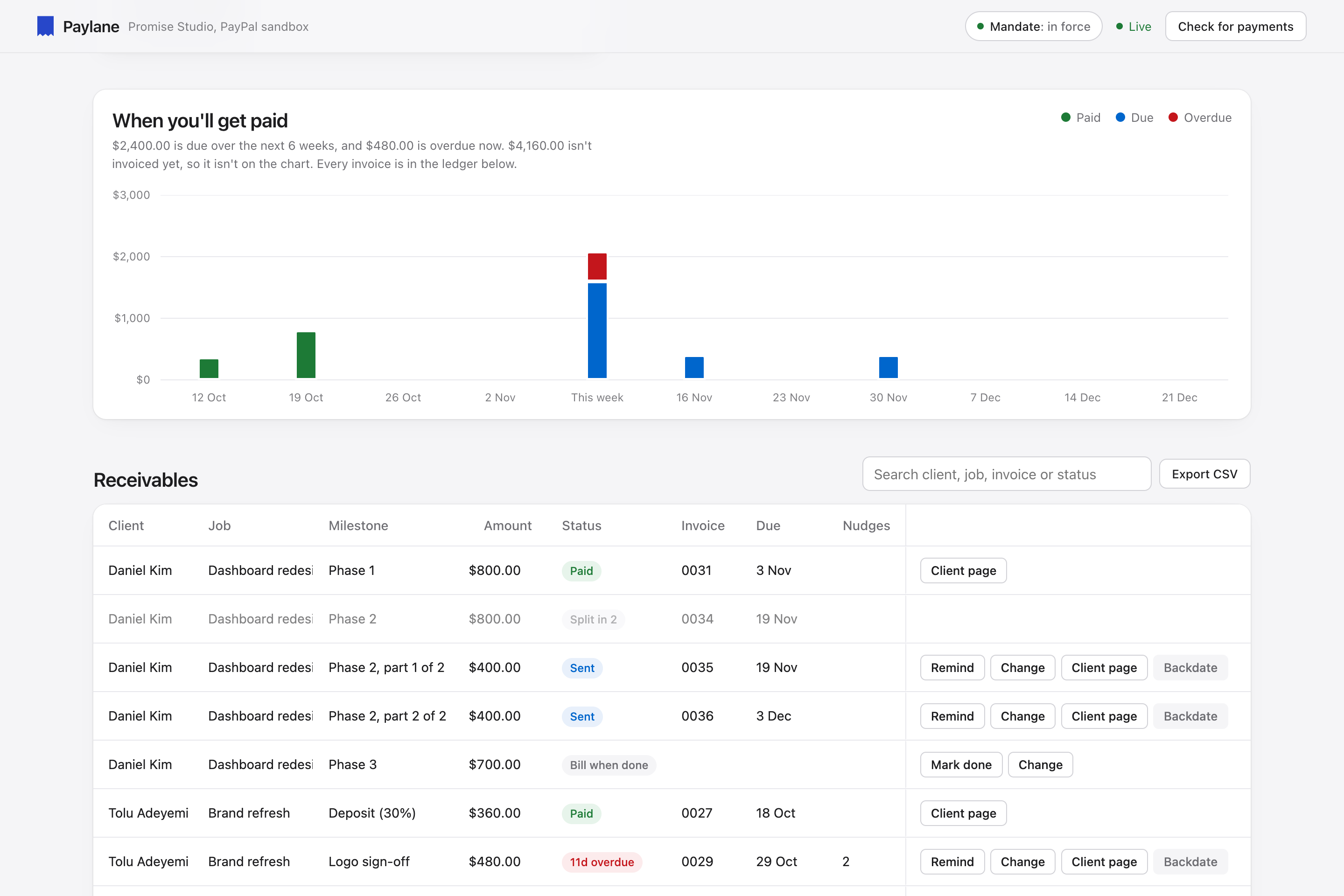
When you'll get paid, week by week (AG Charts), above an AG Grid ledger of every payment that updates live as PayPal reports them.
-
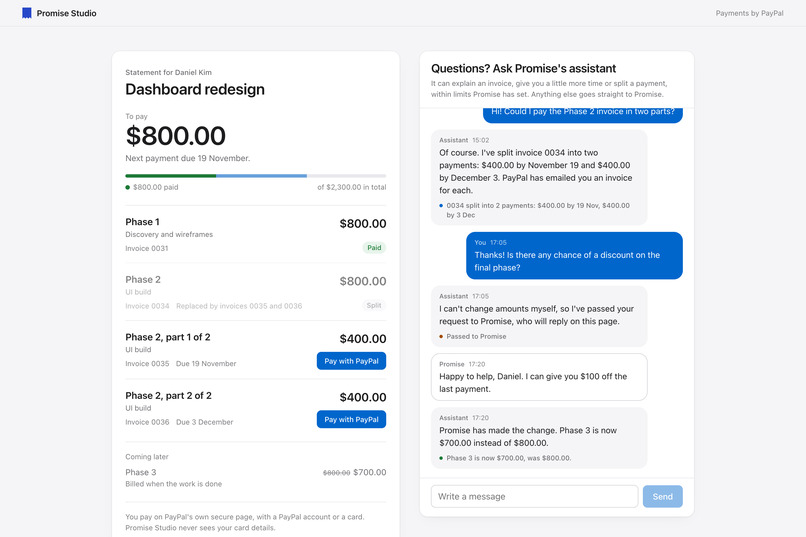
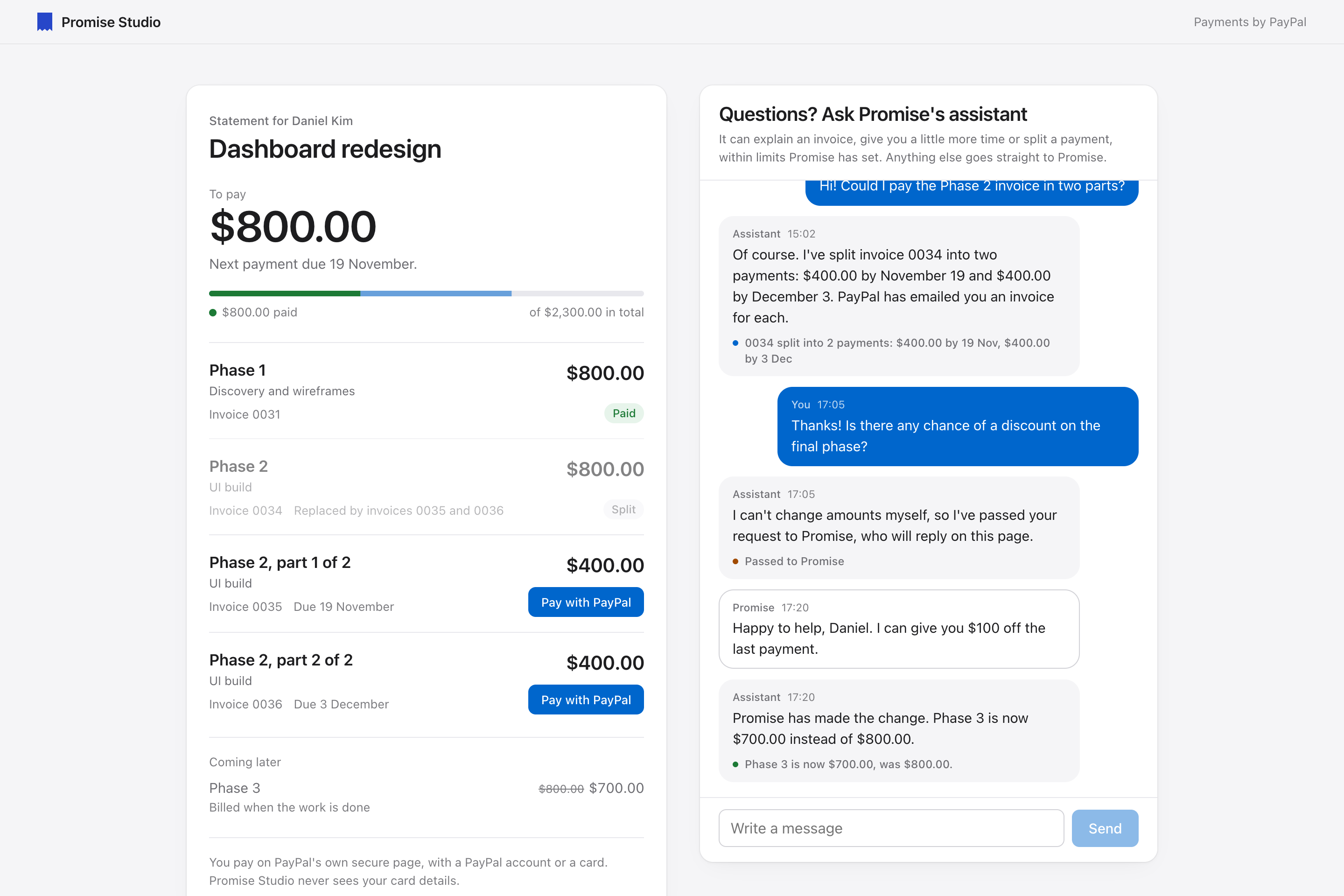
The client's page: their invoices with a Pay with PayPal button on each, and your agent, which split an invoice in two on the spot.
-
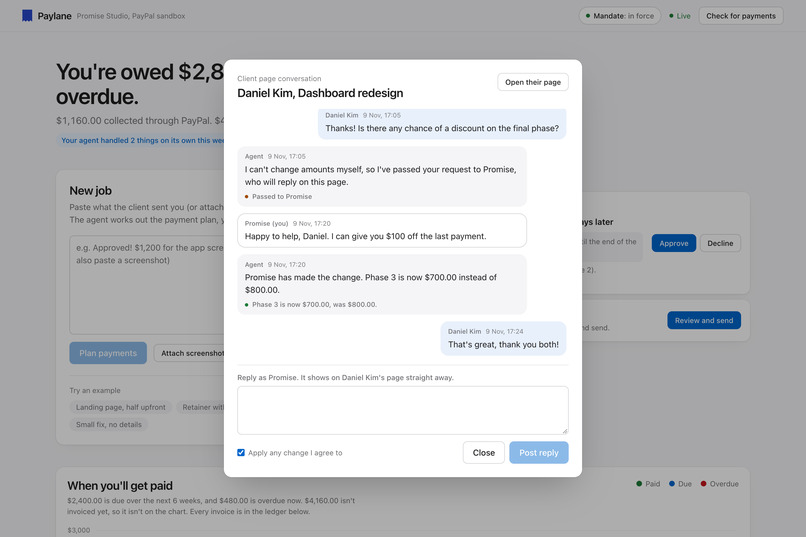
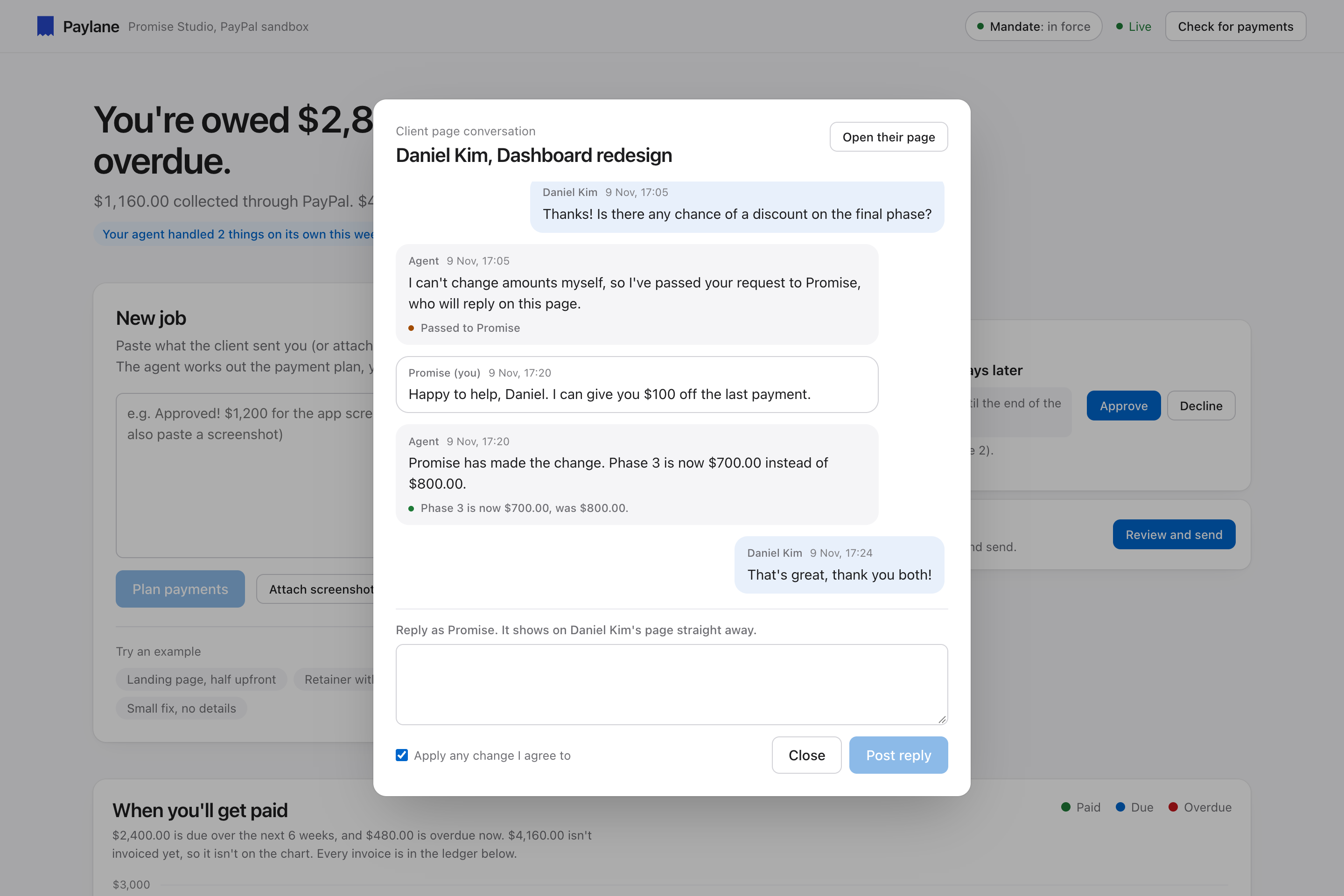
A client asks for a discount and the agent can't give one. You reply "$100 off the last payment", and the agent applies it on PayPal.
-
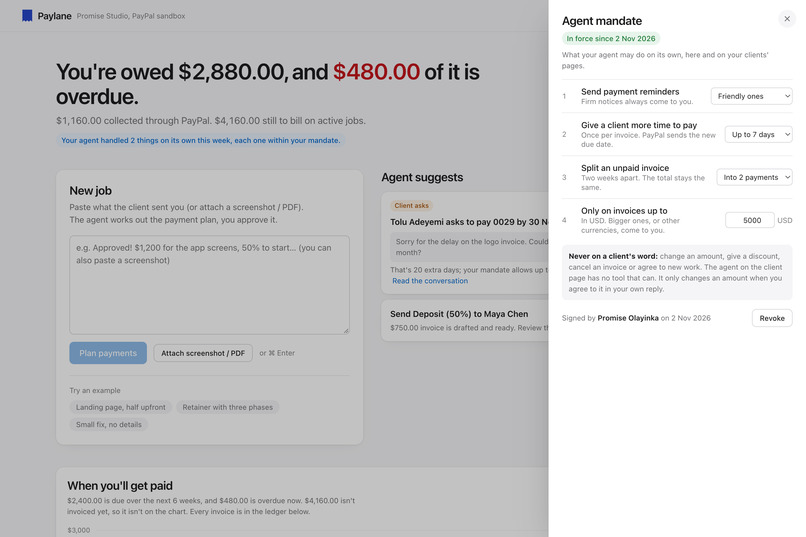
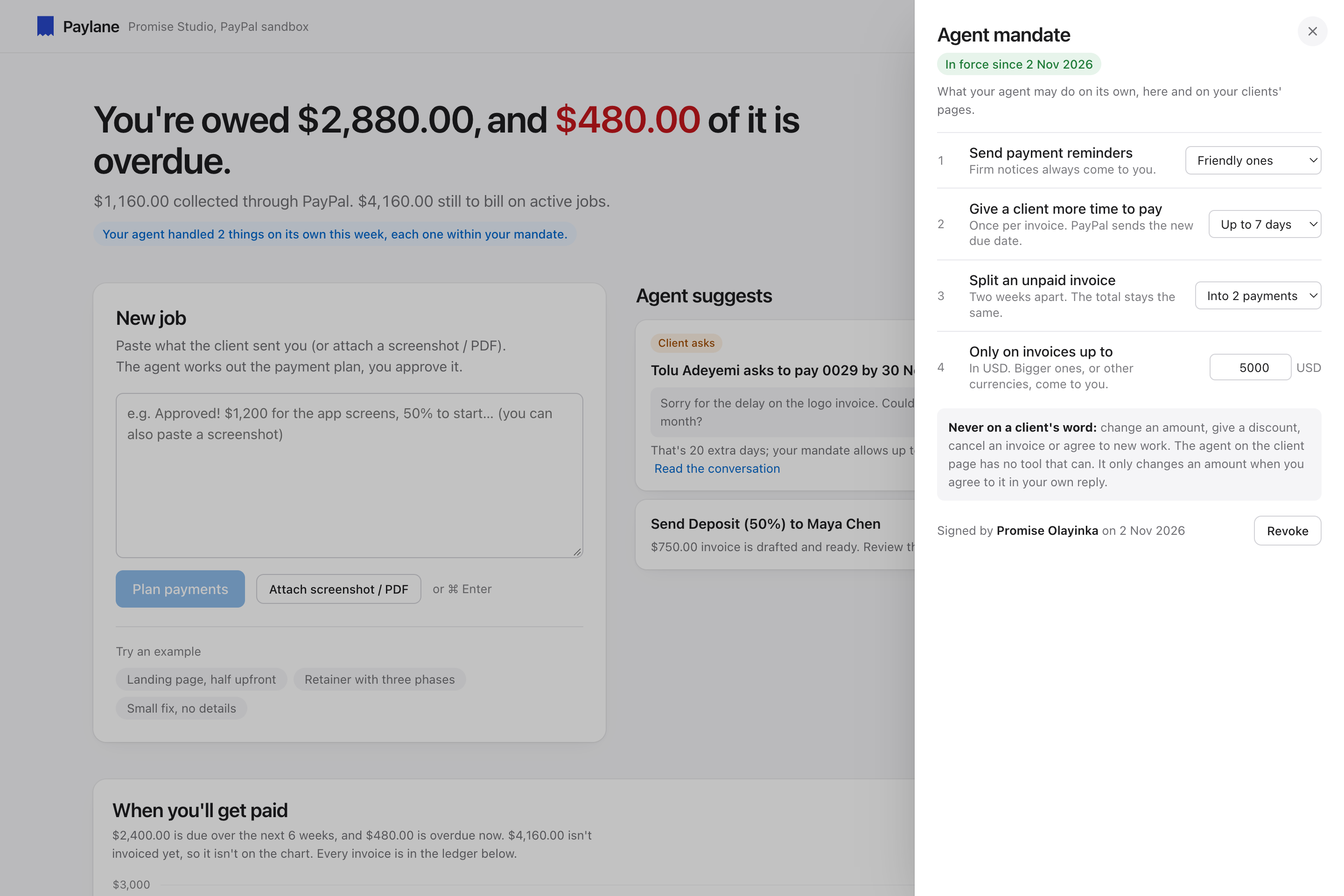
The mandate you sign: what the agent may do on its own. It can never change an amount or give a discount on a client's word.
-
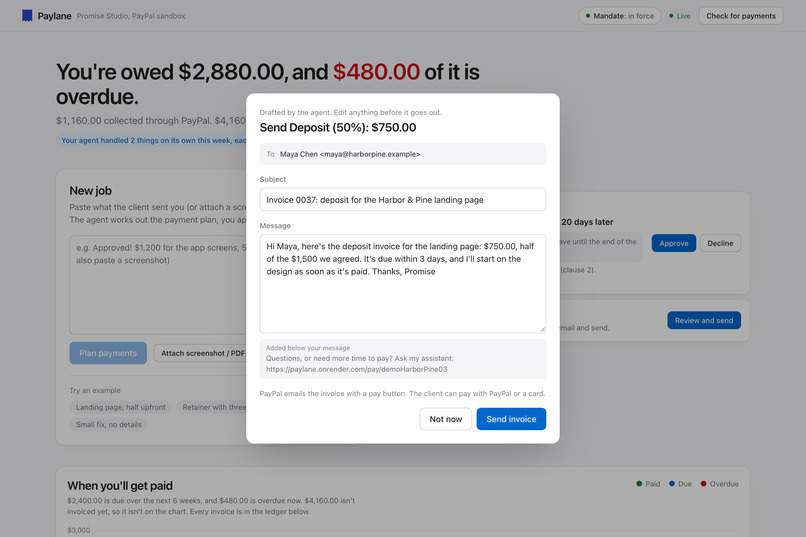
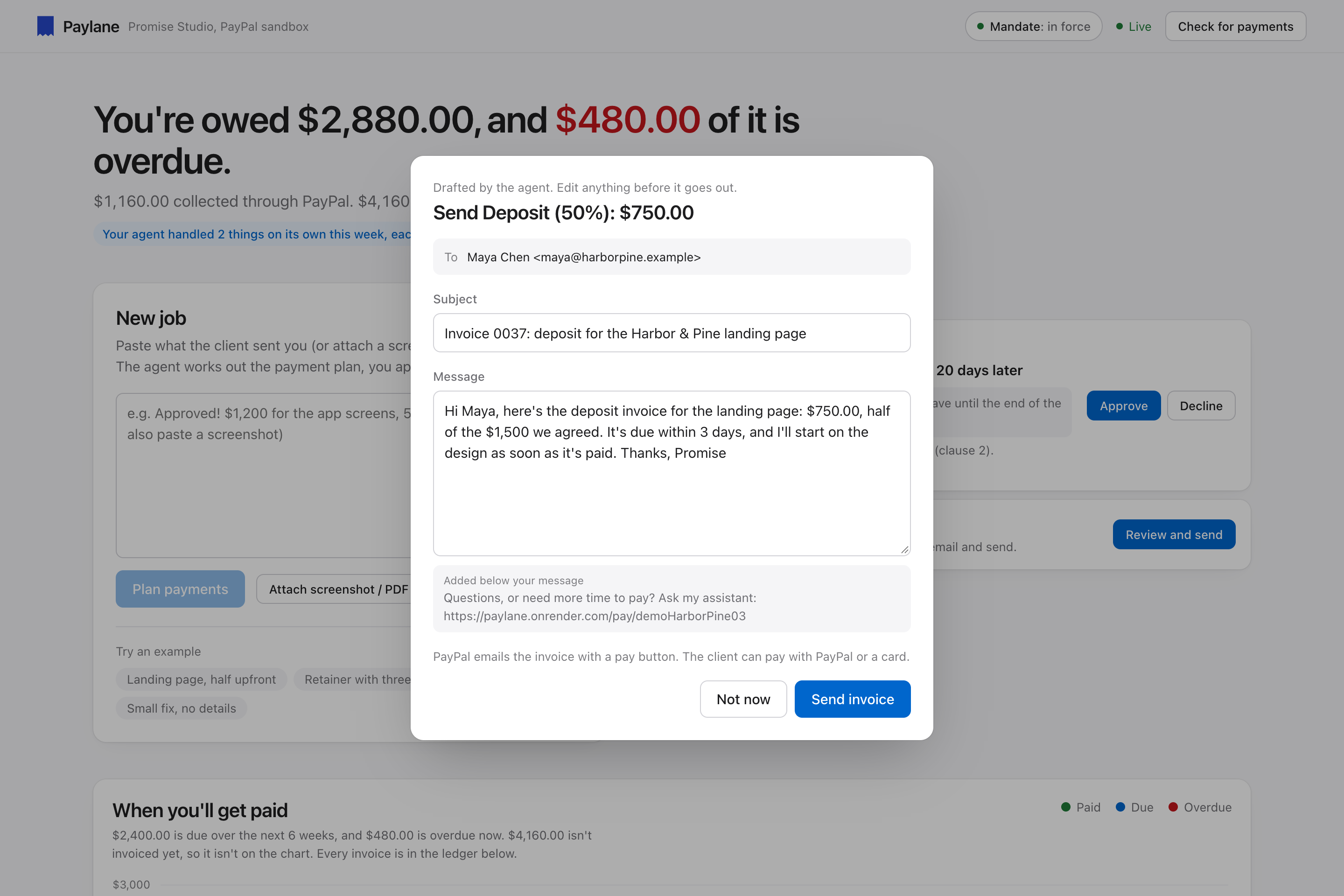
Every invoice waits for you: the agent drafts the PayPal invoice and its email, and you edit them and press Send.
Inspiration
A while ago I closed a deal with a client. We agreed on how the payment would be sent, but we never agreed on a date. I said yes, and then I waited. I wasn't going to start the work until the first payment came in, so the project just sat there.
Time went by. I wanted to follow up, but every message I drafted sounded desperate, and I didn't want to risk the relationship before the work had even started. So I said nothing and kept waiting, with the work on hold the whole time.
Looking back, the problem wasn't the client. It was that nothing in our deal turned into anything concrete: no invoice, no due date, nobody whose job it was to send a polite nudge. Every follow-up had to come from me, and every one of them felt personal.
That's what Paylane is for. It turns the deal you agree in a chat into real PayPal invoices with real due dates, and it does the follow-up for you in the right tone, so asking to be paid stops feeling like begging. And when a client asks for more time or to pay in parts, an agent handles it on PayPal, within limits you've signed, instead of you having to negotiate every detail yourself.
What it does
Paylane reads the deal. Paste a client message (or a screenshot or PDF). The agent proposes a payment plan: client, currency, total and milestones, and asks about anything it couldn't work out, like a missing email. You edit and approve it.
It drafts, you send. For each milestone it creates a PayPal draft invoice and writes the email. Nothing reaches the client until you review it and press Send.
It tracks every payment. An AG Grid ledger shows every milestone across every job, updating live as PayPal reports payments. An AG Charts cash-flow chart shows what lands each week. You can search the ledger, see totals for what you searched, and export it as CSV for your accountant.
It chases late payments in the right tone. Reminders get firmer as an invoice gets later: a friendly nudge at 2 days, a clear restatement at 10, a request for a payment date at 20.
It gives every client a page. Each invoice email links to a page with the job's invoices, a Pay with PayPal button on each, and the agent to talk to.
It negotiates within a mandate you sign. The mandate is like a spending limit on a company card, but for what the agent may agree to with clients: reminders up to a tone, up to N extra days to pay, splitting an invoice into up to N payments, and only on invoices up to a set amount. When a client asks for more time or to pay in parts, the agent checks the mandate in code and, if it's allowed, changes the real PayPal invoices on the spot. If not, the request comes to you with the exact change ready, and approving is one click.
It follows through on your word. When you reply to a client yourself and agree to something ("I can give you $100 off the last payment"), the agent reads your reply, makes that exact change on PayPal and tells the client. It skips conditional offers ("10% off if you pay this week") and only reads your own replies, never the client's. You can also change any payment by hand from the ledger.
The guardrail is code, not a prompt. The agent on the client page has no tool that can lower an amount, give a discount or cancel an invoice, so no message from a client can talk it into one. Every action is in an activity log tagged Agent, You, Client or PayPal, and anything the agent did on its own names the mandate clause that allowed it.
How I built it
- PayPal Invoicing v2 (sandbox) for the whole invoice lifecycle: generate invoice numbers, create drafts, send, remind, update (due date and amount, with PayPal emailing the client the updated invoice), cancel, and delete drafts to roll back a half-finished split. PayPal Webhooks (
INVOICING.INVOICE.PAID, verified with PayPal before use) mark payments as they happen. - AI through the Vercel AI SDK, with Google Gemini by default and Claude or OpenAI as options. Every call returns structured output validated with Zod. The client page agent is a multi-step tool-calling loop with five tools (extend a due date, split into installments, record a payment promise, check a payment with PayPal, pass something to the freelancer). Each tool checks the mandate itself before touching PayPal.
- AG Grid Community for the receivables ledger: themed to the app, custom cell renderers, pinned totals rows per currency that follow the search, CSV export of the rows shown, and live cell flashes when PayPal or the agent changes something. AG Charts Community for the weekly cash-flow chart.
- Nuxt 4, Vue 3 and TypeScript, with server-sent events so the dashboard and client pages update live.
- Render for hosting, with Render Key Value (Redis) for data. Locally it runs with no database (JSON files).
Challenges I ran into
- Finding a free AI model that could do the job. I wanted anyone to be able to run Paylane without paying for an AI key, but most capable models need a paid plan, and free tiers run out quickly. I settled on Google Gemini, whose free tier works with no card, and moved to Flash-Lite because its free daily quota is much larger than Flash's. To avoid being locked in, I built the agent on the Vercel AI SDK, so switching to Claude or OpenAI is a single setting.
- PayPal permission errors in the sandbox. Creating my first invoice failed with
NOT_AUTHORIZED: Authorization failed due to insufficient permissions, and the message didn't say which permission was missing. I had to work backwards from the API call to the app's settings to find the cause: the sandbox app didn't have the Invoicing feature turned on. Then invoices sent fine but payments failed withPAYEE_ACCOUNT_LOCKED_OR_CLOSED, because the sandbox business account had been created in a country that can't receive payments. A US business account fixed it. Both are now in the README's setup steps and troubleshooting table, so judges and anyone else running it won't hit them. - Letting an AI change real money without trusting the model. The answer was to keep every decision in code: the model calls a tool, the tool asks the mandate, and a "no" becomes a request for the freelancer. The model never decides whether something is allowed.
- Splitting an invoice safely. A split creates and sends new PayPal invoices before cancelling the original. If anything fails halfway, Paylane undoes what reached PayPal, so a client never sees half a split. Installments are split in cents so they always add up to the original.
- Reading the freelancer's replies without over-reaching. Early versions applied a discount from a conditional offer, or re-applied one mentioned earlier in the chat. Now the model must quote the exact words from the new reply, conditional offers are flagged and skipped, and code checks every number against the job before anything changes.
Accomplishments that I'm proud of
- A client can ask "can I pay in two parts?" and, within seconds, receive two real PayPal invoices, with the original cancelled and the dashboard updating live.
- The mandate makes it clear exactly what the agent is allowed to do, in the freelancer's own terms, and that's enforced in code.
- It's a complete product: plan, invoice, track, remind, negotiate, change and audit, not just a demo of one API call.
What I learned
- A deal isn't real until it has a date. My stuck project didn't need a tougher conversation; it needed an invoice with a due date. That's why Paylane never lets a milestone go out without one.
- Follow-ups feel less personal when they come from a process. A reminder from an assistant on a clear schedule reads as routine. The same words in a personal message can read as desperate. Taking the freelancer out of the chasing protects the relationship.
- An AI shouldn't make financial decisions on its own. This shaped the whole design. The model proposes and writes; code decides. Nothing new is sent without the freelancer pressing Send. The agent only acts alone within a mandate the freelancer signs, and that check runs in code right before PayPal is touched, never in the prompt. For things it must never do (lower an amount, give a discount, cancel an invoice) it simply has no tool. Messages that claim to come from the freelancer or PayPal are treated as ordinary client messages. Every action is logged with who did it and why. People will trust an AI with money only if they can see its limits.
- How to use the PayPal sandbox efficiently. One sandbox business account receives payments and a separate personal account plays the client and pays. The business account needs to be in a country that can receive payments, and each app needs the Invoicing feature turned on. Locally I check payments by asking PayPal directly, so I don't need a public URL for webhooks. And a sandbox-only demo mode moves an invoice's due date back, so I could test late-payment reminders in seconds instead of waiting days.
- PayPal Invoicing is a strong foundation for an agent. Every change is visible to both sides, because PayPal emails the client the updated invoice. Nothing the agent does is hidden.
- Render and Redis. A Render Blueprint (
render.yaml) sets up the whole deployment, the web app and a Key Value (Redis) store, from the repo, with secrets kept out of the code. Locally Paylane stores JSON files; on Render it uses Redis so data survives redeploys. I also learned the free tier's limits: the service sleeps when idle, and a free Key Value store doesn't save to disk. - AG Grid and AG Charts Community. The Community editions go a long way: the Theming API, custom cell renderers, pinned totals rows, CSV export and live cell flashes in the grid, and stacked columns with custom tooltips in the chart. I also learned where they stop: animated chart transitions need the Enterprise AnimationModule, and deprecated chart options only show up as console warnings, so it pays to read the console.
- The most useful AI features were the narrow, checkable ones: structured output, tools that each do one thing, and code that has the final say.
What's next for Paylane
- Sign-in and multiple freelancers (today it's one freelancer per deployment).
- Recurring retainers and subscriptions.
- More payment options on the client page, such as Venmo.
- A weekly summary email of what the agent did on its own.
Built With
- ag
- ag-charts
- ag-grid
- gemini
- node.js
- nuxt
- paypal
- paypal-sandbox
- paypal-webhooks
- redis
- render
- server-sent-events
- typescript
- vercel-ai-sdk
- vue
- zod
