-
-
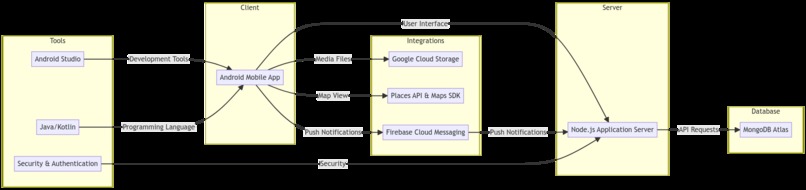
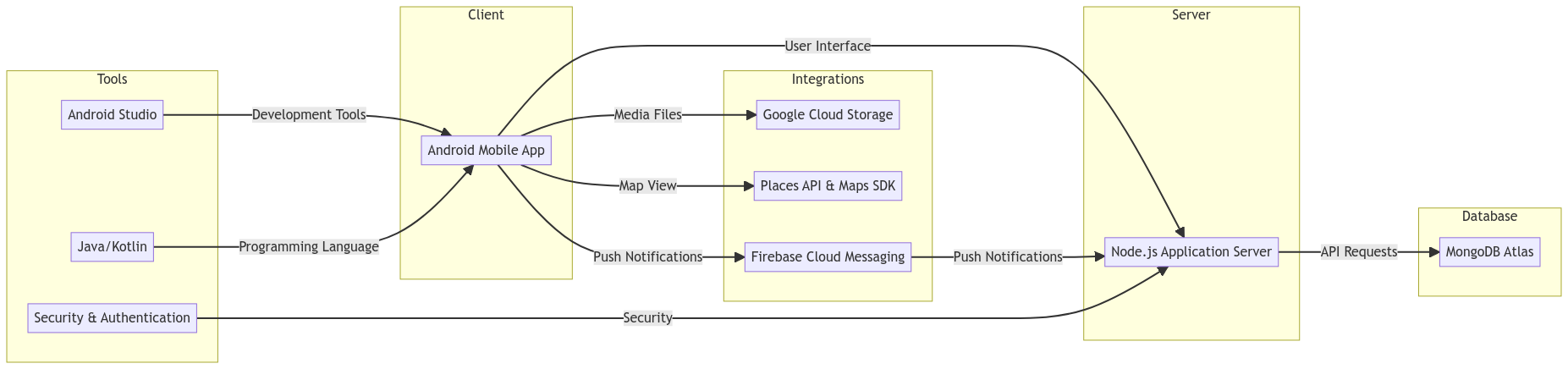
architecture diagram
Inspiration
As a passionate pet lover and advocate, I am thrilled to share my journey with the community through the development of PawCare, a mobile app designed specifically for Android devices. PawCare is a pet sitting application that connects pet owners with trusted and reliable pet sitters, offering both care and convenience in one user-friendly platform. Inspiration struck me when I realized the challenges faced by pet owners in finding reliable sitters for their furry friends. Traditional pet sitting services often lacked transparency, leaving pet owners unsure about the care their pets would receive while they were away. I saw an opportunity to bridge this gap by leveraging the power of technology to create a platform that prioritizes the well-being of pets and brings peace of mind to their owners. I can give an example: I’m from Portugal, I have pets, and I’ve always had difficulties finding someone I can trust to stay with my animals when I go on vocation, for example. And that’s also why this idea came up, because nowadays everyone has at least one pet, and people may need someone to take care of their pet.
What it does
PawCare serves as a comprehensive solution for pet owners, providing them with a pool of pre-screened and qualified pet sitters in their local area. The app allows pet owners to browse through profiles, read reviews, and connect with sitters who meet their specific requirements and preferences. The app incorporates several features to enhance the pet sitters experience. It includes a build-in chat system that enables seamless communication between pet owners and sitters, allowing them to discuss important details, share updates, and even send adorable pictures of their pets during absence. Additionally, the app provides a convenient booking system, ensuring that pet owners can easily schedule and manage their pet sitting appointments.
Email Validation: During the registration process, when a user enters their email address, PawCare will send an email to that address to validate it. The email will contain a unique verification code that the user needs to enter in the app to confirm their email address. If the code matches, the user's email address will be marked as verified in the database, indicating that the email has been successfully validated. With a verified email, the user now can login and access all features and functionalities of the PawCare app.
Phone Number Verification: During the pet sitter application process, when the user enters their phone number, PawCare will send a verification message to that number. The verification message will contain a unique verification code that the user needs to enter in the app to validate their phone number. If the verification code is correct, the user's phone number will be marked as verified in the database. With the verified phone number, the user can proceed with their pet sitter application.
Edit Profile: Users have the ability to edit their profile information such as their name, profile picture and any other relevant information. Users can access the profile editing functionality through the Profile page. When users make changes to their profile, the updated information is saved in the database. This feature allows users to keep their profile information up to date and accurate.
Delete Account: If a user decides to delete their PawCare account, they can do so through the Profile page. To ensure the user's intention and protect against accidental deletions, PawCare may prompt the user to confirm their decision. After successful deletion, the user will no longer have access to their PawCare account.
Forgot password and Password Reset: In case a user forgets their password, PawCare provides a "Forgot Password" feature to help them regain access to their account. The user can initiate the password reset process by selecting the "Forgot Password" option on the login screen. PawCare will prompt the user to enter their registered email address, and after it will be sent a verification code to that email. The user can enter the verification code within the app to verify their email address and proceed with the password reset process. After verification, will allow the user to set a new password for their account. Once the password is successfully reset, the user can login to their PawCare account using the new password.
Find and filter pet sitters: The app allows pet owners to easily search for pet sitters based on their location. Users can filter the search results based on specific criteria such as service type, price range and rating. This feature ensures that pet owners can find sitters who meet their individual needs and preferences.
Map View of pet sitters: In addition to a traditional list view, PawCare provides a map view that displays the locations of available pet sitters. This feature enables pet owners to visually identify sitters in their vicinity, making it convenient to choose someone who is geographically close to them.
Active and Completed Bookings: The app includes a dedicated section where users can view their active and completed pet sitting reservations. Pet owners can easily keep track of their upcoming bookings, ensuring they have a clear overview of their pet’s care schedule. This feature also allows users to review and rate their experience with the pet sitter after the completion of the reservation.
Booking Status and Notifications: PawCare keeps pet owners informed about the status of their bookings. Users can see whether their booking request has been accepted, pending or declined by the selected sitter. The app also sends notifications to users to update them on any updates related to their reservations, ensuring they stay informed throughout the process.
Messaging System: The built-in chat system in PawCare enables seamless communication between pet owners and sitters. Users can send and receive messages, allowing them to discuss important details, ask questions, and share specific instructions regarding their pets’ care. This feature promotes a direct and personalized channel of commutation, fostering trust and ensuring clarity between pet owners and sitters.
Pet Profiles: PawCare allows pet owners to create profiles for their beloved animals. Users can add information such as their pet’s name, breed, date of birth, gender and some additional information’s. This feature ensures that pet sitters have a comprehensive understanding of the pet’s needs, allowing them to provide tailored and attentive care.
Saving Favourite Pet Sitters: Pet owners can mark specific pet sitters as Favourites within the app. This allows them to easily identify and access sitters they trust and prefer to care for their pets. By favouriting pet sitters, pet owners can create a curated list of sitters they have positive experiences with in the past. This feature helps build trust and strengths the relationship between the pet owner and the sitter. Once a pet sitter is marked as a favourite, the pet owner can easily view and access their profile in the dedicated favourites section of the app. This sabes time and effort by eliminating the need to search for trusted sitters repeatedly.
Become a Sitter: The app also offers opportunity for pet lovers to become pet sitters themselves. Users can fill out a comprehensive questionnaire to provide information about their experience, qualifications. This feature allows passionate individuals to join the Pawcare community as trusted sitters, providing a valuable service to pet owners in need.
The features collectively make PawCare a comprehensive and user-friendly app, proving pet owners with the tools they need to find reliable pet sitters and ensuring that sitters have access to potential clients who align with their services and availability. The app’s focus on personalized profiles, direct communication, and easy booking management makes it a go-to platform for pet owners and sitters seeking care, convenience, and peace of mind.
PawCare also offers a robust dashboard specifically designed for pet sitters, providing them with essential tools to manage their bookings and track their income. Here’s a close look at this feature:
Booking Calendar: The pet sitter dashboard includes a calendar view that displays all their upcoming bookings and appointments. This visual representation allows sitters to have a clear overview of their schedule, making it easier to plan and manage their time effectively. By having a centralized calendar, sitters can avoid double bookings and ensure they are available when pet owners need their service.
Booking Details: Pet sitters can access detailed information about each booking. They can view the pet owner’s details, the specific services requested and any special instructions provided. This comprehensive view ensures that sitters have all the necessary information to provide the best possible care to the pets they are responsible for.
Income Tracking: PawCare’s dashboard also includes a dedicated section for tracking income. Sitters can view a summary of their earning, including the total amount earned and the amount made for each type of service. You can also see how many reservations are active, finalized and cancelled. This feature allows sitters to monitor their financial progress and gain insights into their income patterns, which can be useful for budgeting and planning purposes.
Communication Center: Just like pet owners, sitters also have access to the messaging system within the app. The dashboard provides a centralized hub for sitters to communicate with pet owners, facilitating seamless and direct communication. Sitters can receive and respond to messages, ask clarifying questions, and provide updates, ensuring effective and transparent communication throughout the pet sitting process.
The pet sitter dashboard empowers sitters by providing them with a comprehensive toolset to mange their bookings, track their income, and streamline their interactions with pet owners. This feature enhances the overall experience for sitters, allowing them to focus on delivering exceptional care to the pets entrusted to hem while maintaining control over their schedules and financial management.
How we built it
In terms of technology, PawCare utilizes MongoDB Atlas, a fully-managed cloud database service, to store and manage its data. MongoDB Atlas provides a scalable and reliable platform for storing user profiles, pet information, booking details, and other relevant data. This ensures that the app operates smoothly and securely with efficient data management. Additionally, PawCare integrates with various Google Cloud products to enhance its functionality. The app utilizes Google Cloud Storage for storing and managing media files, such as pet photos and profile pictures. The Places API and Maps SDK are integrated to provide the map view feature, allowing pet owners to easily locate and choose pet sitters based on their proximity. This integration enhances the user experience by providing visual information and convenience in selecting the right pet sitter.
Challenges we ran into
Throughout the development process, I encountered various challenges. Some of these included designing and implementing complex APIs to ensure seamless communication between different components of the app, managing and securing user data, and integrating third-party services effectively. However, by using my technical skills and problem-solving abilities, I was able to overcome these challenges and deliver a high-quality product.
Accomplishments that I’m proud of
I am incredibly proud of several accomplishments achieved with PawCare. Developing all the APIs from scratch allows me to tailor the app’s functionalities to specific requirements, ensuring optimal performance and a seamless user experience. I successfully implement robust features such as the booking system, map view, and messaging system, enhancing the convenience and reliability of the app. Additionally, integrating MongoDB Atlas and Google Cloud products provided a scalable and secure foundation for data storage and advanced functionalities.
What I learned
Throughout the development process of PawCare, I gained valuable insights and learned new skills. Developing the app and its associated APIs allowed me to deepen my understanding of mobile app development, API design, and integration of cloud services. I also gained experience in managing and securing user data effectively. This project provided me with a valuable opportunity for growth and learning.
What's next for PawCare
Currently, PawCare is in its prototype stage, but I am excited to take this app further and continue its development. The feedback and response from users will be crucial in shaping the future of PawCare. I plan to gather valuable insights from users and iterate on the app's features and functionality to make it even more intuitive and user-friendly. In the next phase of development, I aim to refine the user experience based on user feedback, conduct usability testing to identify areas for improvement, and implement enhancements to ensure a seamless and delightful experience for both pet owners and sitters. This may involve further optimizing the search and filtering capabilities, improving the messaging system, and enhancing the booking process. Moreover, I have ambitious plans to expand the reach of PawCare. I will actively work on growing the user base and onboarding more trusted and reliable pet sitters to provide a wider range of options for pet owners. Collaborations with local pet businesses, such as veterinarians and pet supply stores, can further enhance the app's ecosystem, offering additional services and resources to users. Additionally, I will explore potential partnerships and integrations with other platforms or technologies that align with PawCare's mission. By leveraging the power of data and emerging technologies, such as machine learning and artificial intelligence, I aim to provide personalized recommendations, improve matching algorithms, and enhance the overall pet sitting experience. To make PawCare a sustainable and successful platform, I will also focus on implementing a robust monetization strategy. This may involve offering premium features, such as enhanced search filters or priority bookings, as well as exploring partnerships with local businesses or pet-related brands for promotional opportunities. In summary, while PawCare is currently a prototype, I am committed to taking it further and transforming it into a fully-fledged and widely-used pet sitting app. With continuous improvements, strategic partnerships, and a user-centric approach, PawCare has the potential to become a go-to platform for pet owners and sitters, revolutionizing the way pets are cared for when their owners are away.
App GIT Repo
https://github.com/pcmiguel1/pawcare
APIs GIT Repo
https://github.com/pcmiguel1/api_pawcare
Testing Instructions
To be able to test the application, I'll leave two accounts already created below. One of them is a pet owner account and the other is also a pet owner account and is also already approved as a pet sitter. The account that has already been approved for pet sitter to change to pet sitter you have to go to profile -> switch to sitter
Pet Owner account: email: [email protected] password: Teste1a@
Account already approved as Pet Sitter: email: [email protected] password: Teste1a@
Built With
- apis
- google-cloud
- google-storage
- javascript
- kotlin
- maps-sdk
- mongodb
- node.js
- places-api

Log in or sign up for Devpost to join the conversation.