

Inspiration
Our inspiration came from a close friend we lovingly refer to as the “Serial Stalker.” He has a quirky habit of tracking our location on Apple’s Find My and giving us live, unsolicited virtual tours. When one of us landed in San Francisco for the first time, he immediately texted, “On your right, you’ll see the Roblox HQ!” followed by a rapid-fire stream of 10–20 more real-time facts and landmarks as we made our way through the Bay Area. That moment sparked the idea: what if we could build an AI-powered travel guide that uses your live location to narrate interesting facts and landmarks as you pass by, just like our friend.
What it does
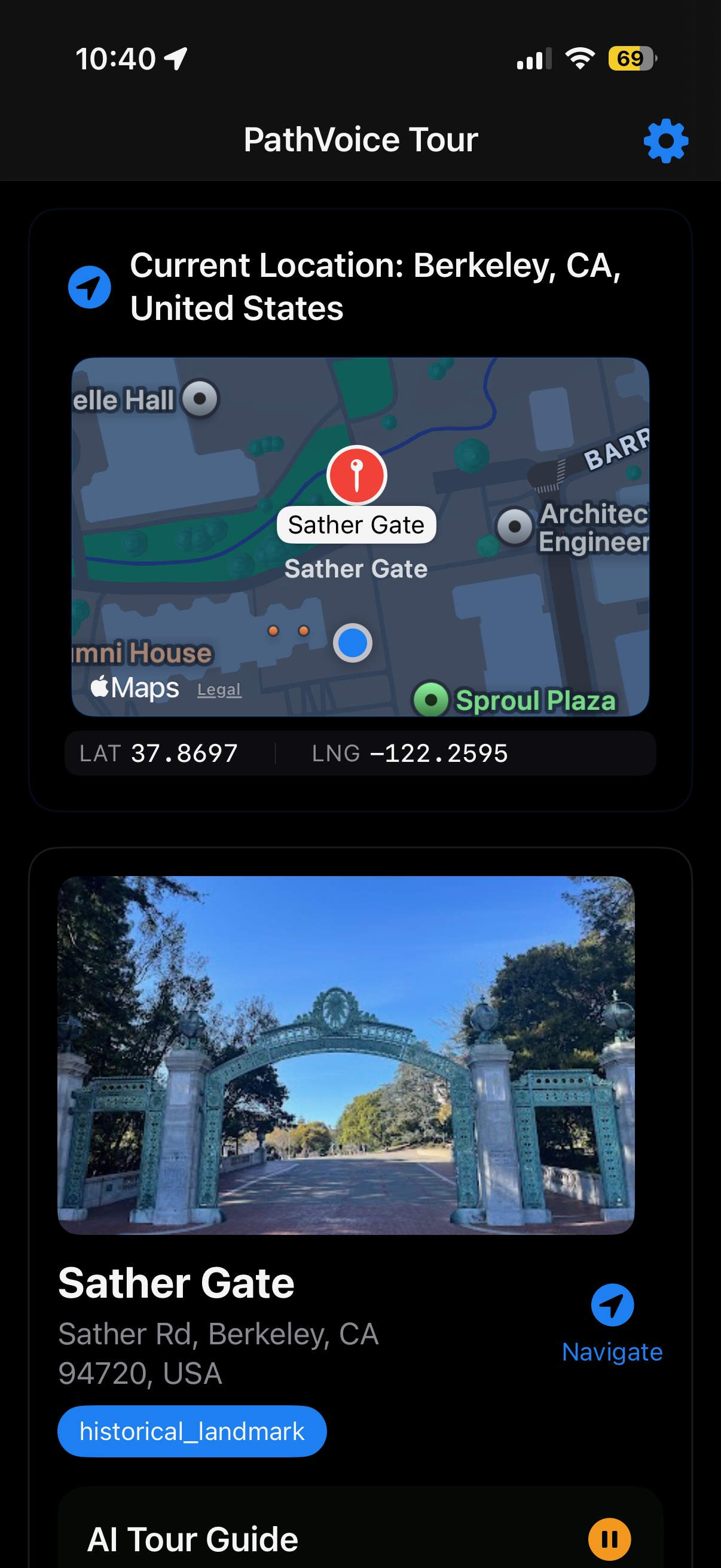
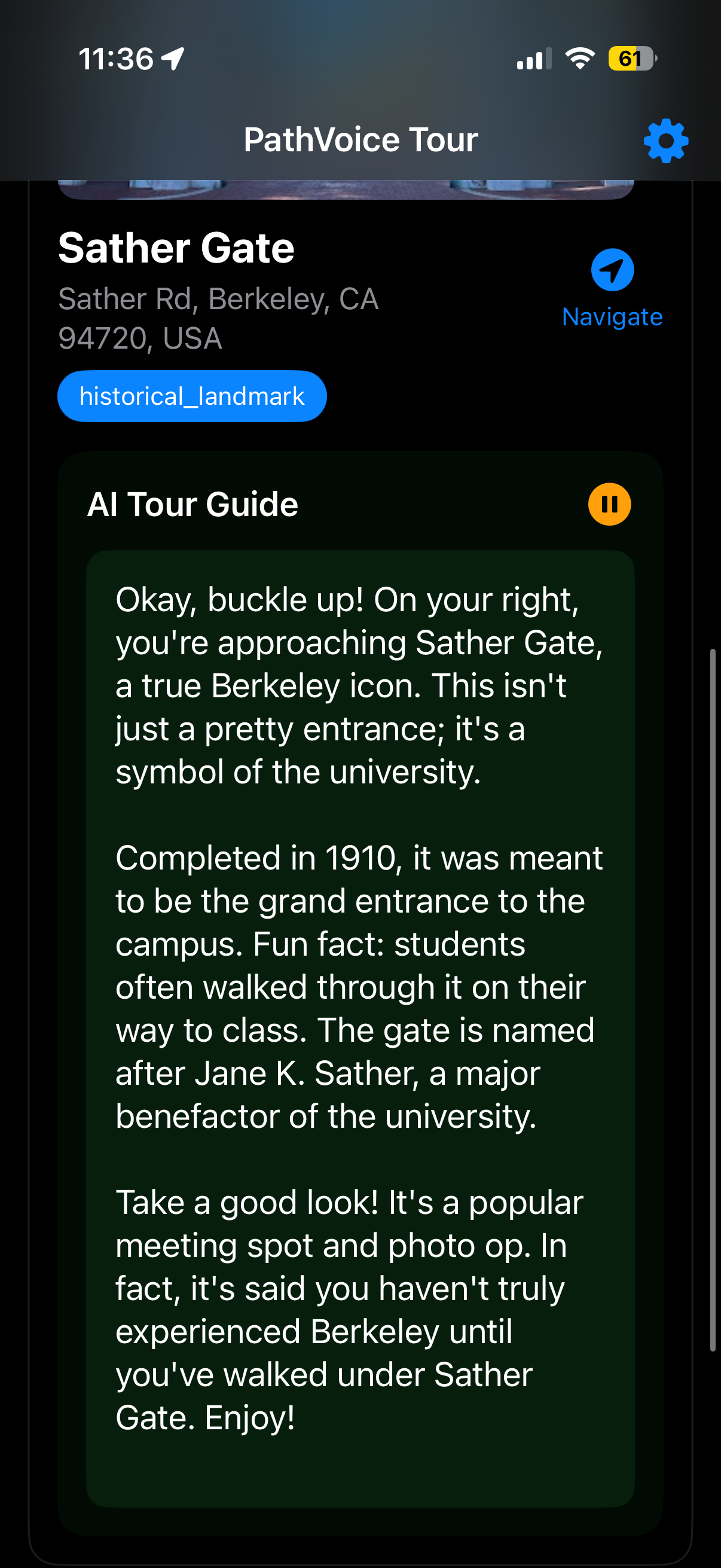
PathVoice is an AI-powered mobile tour guide that narrates your surroundings in real time based on your location. As you drive/walk, the app uses your GPS coordinates to pull nearby points of interest (like historical landmarks, museums, and hidden gems) using the Google Maps Places API. That information is then passed into an LLM (Gemini in our case), which generates an engaging spoken narration as if you're walking around the city with a personal guide!
How we built it
CoreLocation (iOS Framework) We use CoreLocation to access real-time GPS coordinates directly from the user's device. This allows the app to continuously track the user’s movement with high accuracy while preserving battery life. It forms the foundation of the experience by triggering updates as the user approaches new landmarks.
Google Maps Places API To discover nearby points of interest, we use the Google Maps Places API. Based on the user’s current coordinates and a defined radius, the API returns detailed information about attractions, landmarks, and venues in the surrounding area. This raw location data is then passed to the language model for contextualization.
Gemini (gemini-2.0-flash) We use Gemini to transform structured place data into conversational narration. The model is prompted to describe nearby locations in a friendly, informative tone, tailored to the user’s movement.
LMNT/Vapi API Once the narration is generated, it’s delivered using real-time text-to-speech through the LMNT/Vapi API.
SwiftUI Used for the frontend and UI/UX (map view, narration controls, etc.)
Challenges we ran into
One of the biggest issues we ran into was the delay from TTS as it can take 10 to 20 seconds to generate an MP3, which means the user could drive past a landmark before the audio is ready. We worked around this by pre-generating the narration and storing it until the user actually approaches the location. Another challenge was figuring out how to handle different use cases, like people walking vs. people driving. To fix that, we let users tweak how often we poll for nearby places (e.g. every 30 seconds for driving, every 2 minutes for walking), and they can also adjust the detection radius.
Accomplishments that we're proud of
We're definitely proud of building a functioning app and taking a 3-hour round trip to SF to test it out on a bus ride and while walking through the city all within the span of 20 hours. We're also proud of how quickly we were able to stitch together multiple APIs and frameworks to create a smooth, real-time experience.
What we learned
We learned how to build an app that leverages real-time location data to deliver context-aware experiences. We figured out how to analyze GPS coordinates on the fly and connect them with meaningful nearby information. Most importantly, we learned how to turn that raw data into something genuinely useful and engaging for users.
What's next for PathVoice
We want to make PathVoice smarter by using the phone’s speed to automatically adjust how often it checks for new landmarks. For example, if you're walking at 1 mph, it should poll every 5 minutes, but if you're driving at 70 mph, it should poll every 20 seconds. We also plan to use the phone’s heading and orientation to figure out what landmarks are in front of, behind, or to the side of the user. This would allow us to make the narration feel even more directional and immersive.
Built With
- core-location
- gemini
- google-maps
- lmnt
- swiftui
- vapi


Log in or sign up for Devpost to join the conversation.