Cortex
💡Inspiration
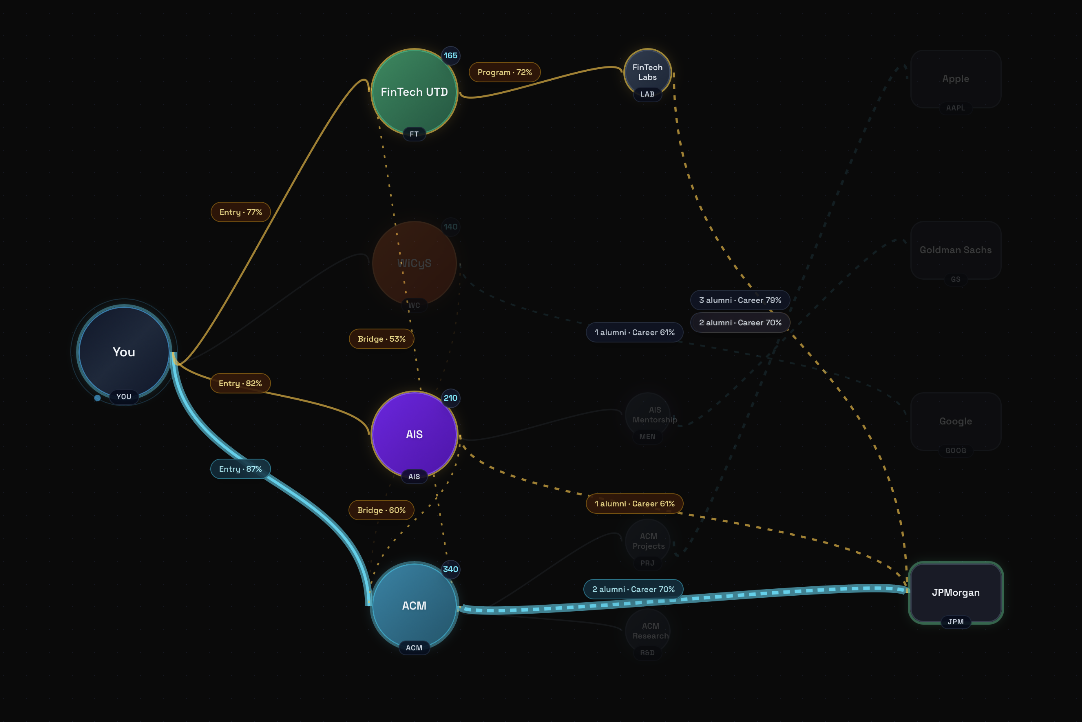
Every semester, thousands of UTD students make decisions that shape their entire career — which classes to take, which clubs to join, which events to attend — and they make most of these decisions blind. The information exists in fragments: club pipelines passed down through word of mouth, alumni connections found only through heavy LinkedIn networking, and career advice that surfaces too late. A freshman has no idea that joining ACM projects often creates a direct pipeline to JPMorgan until they're a junior. By the time students figure out these patterns, they've already lost semesters.
We built Cortex because we believe campus data shouldn't just be accessible — it should be predictive. We wanted to take real UTD student organization data and alumni outcomes to turn it into something that doesn't just tell you what exists, but shows you where you're headed and how to get where you want to go.
⚙️ What it does
Cortex is a career pathfinding engine that builds a personalized, branching decision tree for every student based on their goals, timeline, and current progress.
A student enters:
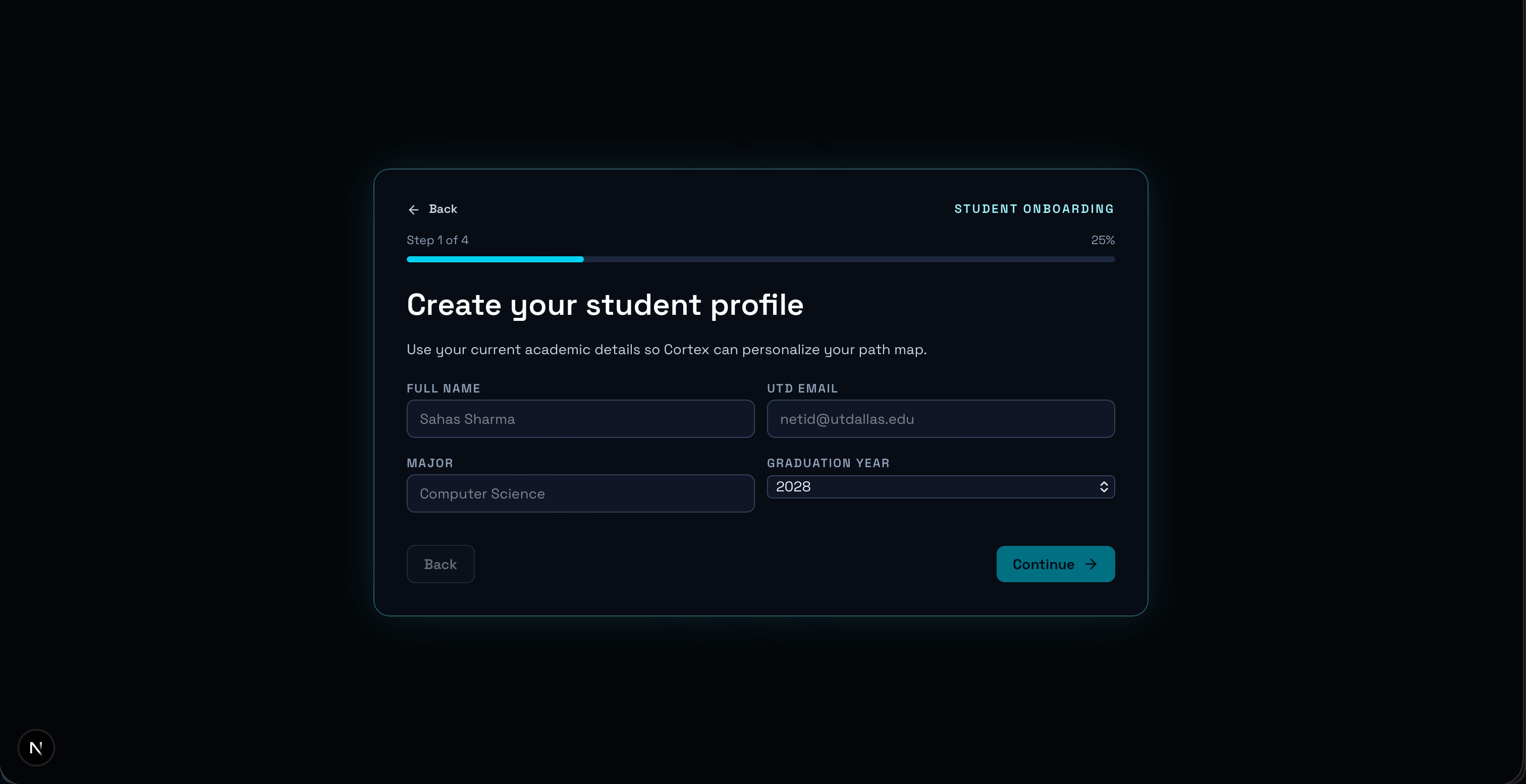
- Their target companies or career goals
- Expected graduation timeline
- What they've already completed (courses, clubs, research, extracurriculars)
- Their risk tolerance for exploring unconventional paths
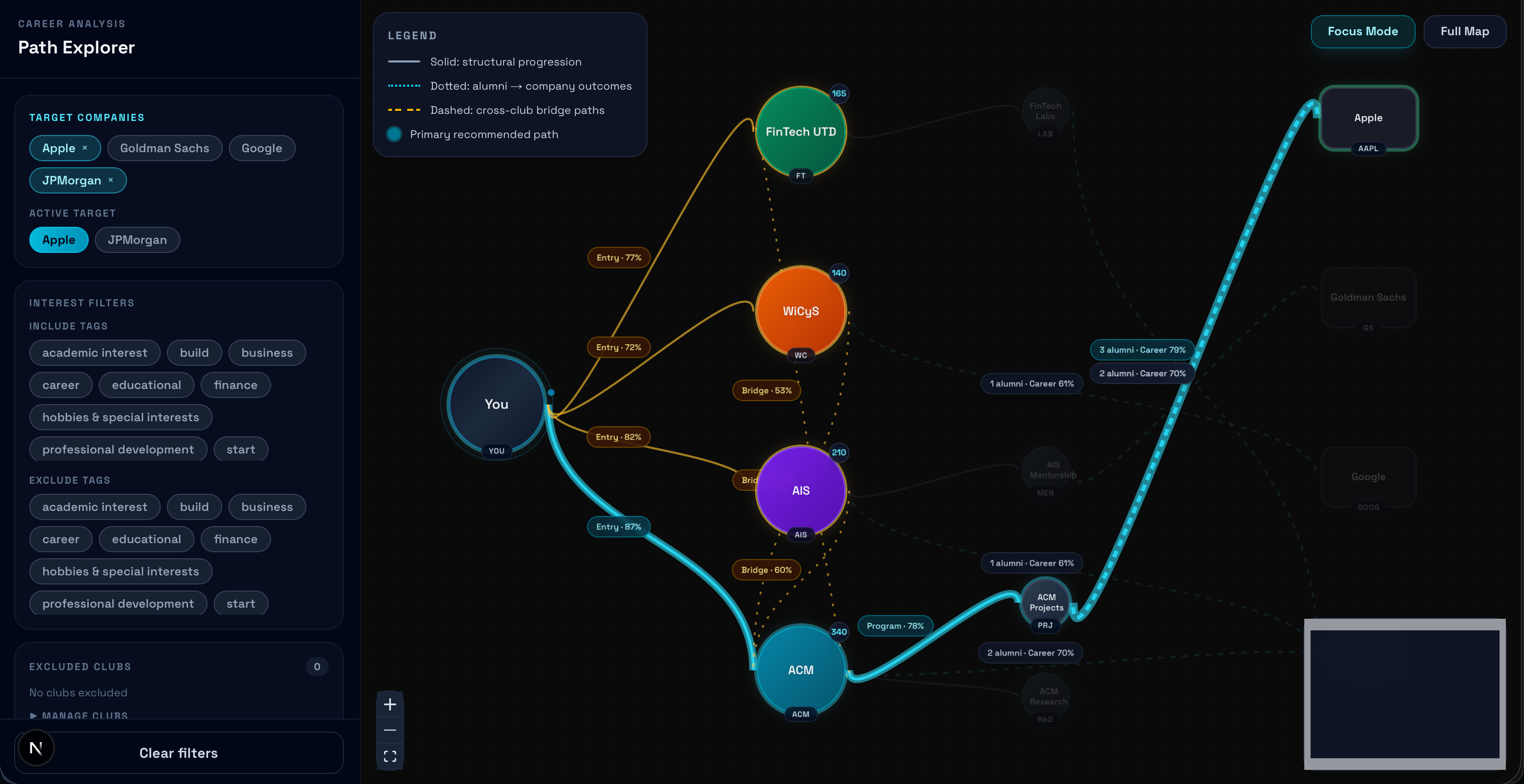
Cortex then generates an interactive tree of possibilities, where each branch represents a different path toward their career goal. Every node in the tree — whether it's an engineering club, a research lab, or a specific mentorship track — is backed by scraped alumni data showing historical career placements.
The tree isn't static. As you progress through college and close off certain pathways, Cortex adapts in real time, recalculating new optimal routes that still converge on your target company. What makes Cortex different from a recommendation engine is the branching visualization itself. Students can literally see their future forking in front of them, compare parallel paths side by side, and understand the tradeoffs of joining one organization versus another.
🛠️ How we built it
We built Cortex as a full-stack application leveraging a modern web stack, dynamic data pipelines, and a reinforcement learning backend.
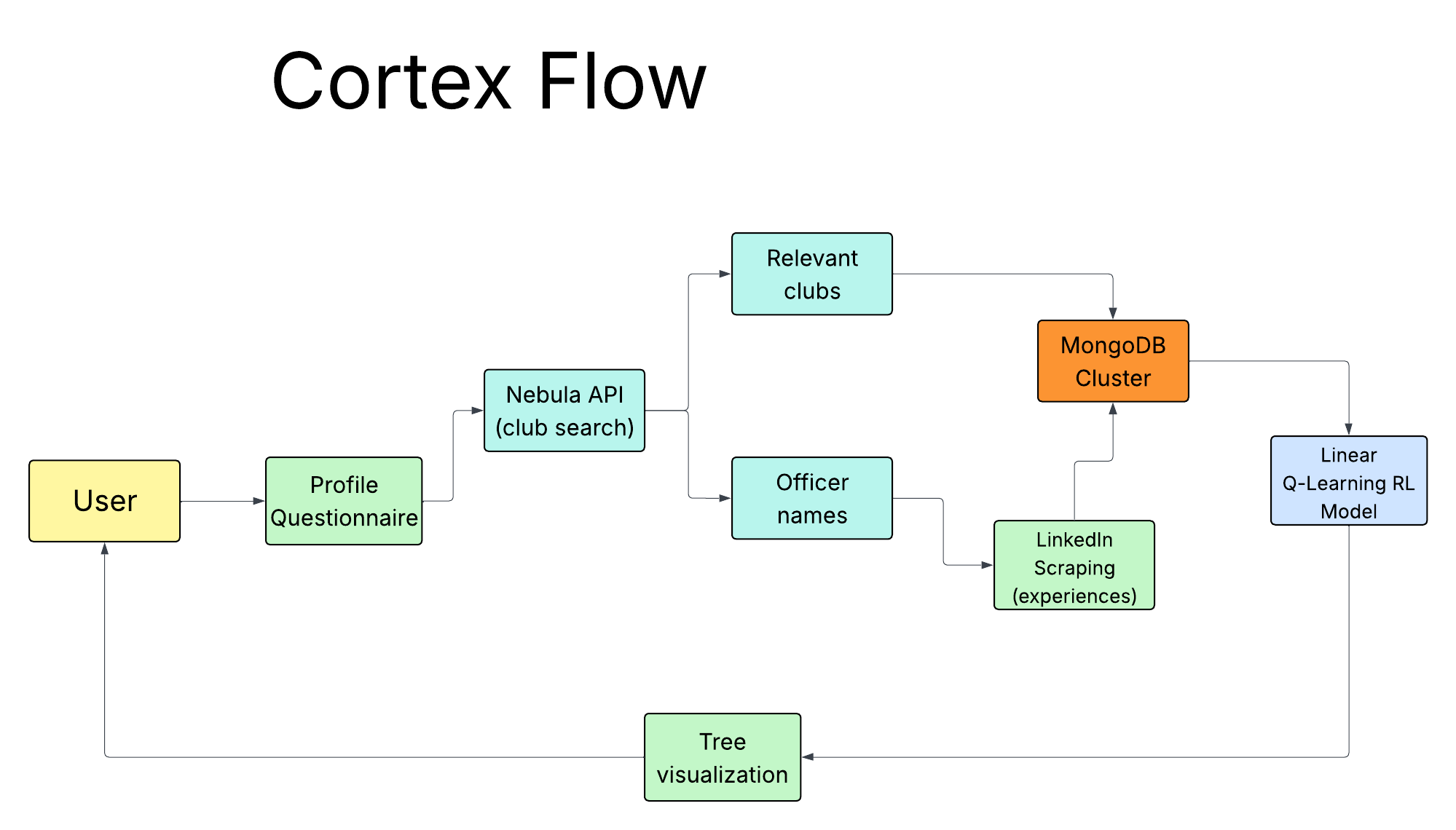
Data Pipeline: We built an automated pipeline utilizing Selenium inside a Flask backend. Cortex dynamically searches LinkedIn profiles for organization officers by taking data from UTD's Nebula API (club/search endpoint), automatically logs in, handles pagination, and scrapes their entire job experience history. This data is structured and stored in a MongoDB Atlas cluster to build a network of "club-to-company" pipelines.
Why Reinforcement Learning over GANs or Graph Algorithms?: ** This is the frontier we researched about that Anthropic and OpenAI are currently chasing. ** When approaching the pathfinding problem, it was tempting to just throw users' profiles into a massive Language Model (like GPT-4) and ask for a career path. However, LLMs are known to hallucinate, providing answers that sound confident but aren't mathematically grounded in real data. We realized that modeling the university ecosystem is fundamentally a Markov Decision Process (MDP)—a graph of interconnected states (clubs) and actions (joining a subprogram or transitioning to a company). To provide deterministic, explainable, and optimal paths, we needed an algorithm that could learn the "value" of each state transition based on actual alumni evidence, which led us strictly to customized Reinforcement Learning. Reinforcement Learning Engine: Instead of traditional machine learning, we built a Reinforcement Learning (Q-Learning) engine in Python to solve this pathfinding problem.
- We modeled the university ecosystem as a graph where clubs are nodes and alumni pipelines are weighted edges.
- Our custom
TraversableGraphpolicy evaluates thousands of possible multi-semester paths using a linear approximation of the Q-function: $$ Q(s,a) = \mathbf{w}^T \mathbf{\phi}(s,a) + b $$ Where the feature vectorφ(s,a)encodes engineered features like edge confidence, shortest-hop distance, semantic tag overlap, and the user's risk profile. - The model learns the optimal path sequencing via the Bellman Equation: $$ Q(s, a) \leftarrow Q(s, a) + \alpha \left[ R(s, a) + \gamma \max_{a'} Q(s', a') - Q(s, a) \right] $$ It actively penalizes "dead-end" subprograms (negative rewards) while providing terminal success bonuses for historically proven transitions. This allows us to generate probability-weighted decision trees that represent mathematically backed paths rather than text generations!
Tree Visualization: The core algorithm feeds a Next.js (React) frontend that dynamically renders the branching visualization in real time. We built an animated tree where students can explore branches, compare paths, and drill into any node to see underlying data—like alumni success rates and project crossovers.
🚧 Challenges we ran into
The biggest challenge was building a meaningful dataset. Ground-truth data connecting specific UTD student activity combinations to career placements doesn't exist in a single clean dataset.
- We addressed this by building a dedicated Selenium scraper that navigates LinkedIn's complex DOM structures and rate limits to extract real alumni career jumps.
- Paginating through profiles without hammering endpoints required careful engineering—we built async pipelines with backoff logic and automated headless browsing handling.
The pathfinding engine was also highly complex. Rendering a dynamic, weighted, branching tree that updates in real time based on node completion is a difficult graph traversal problem. Moving away from brute-force path generation to our Reinforcement Learning policy allowed the system to intelligently punish "dead-end" subprograms and prioritize multi-club bridges with high historical transition success.
🏆 Accomplishments that we're proud of
- Reinforcement Learning: We built a genuine AI pipeline—not just an API wrapper around OpenAI. Our custom Q-Learning reinforcement engine models the university ecosystem as a graph, discovering the most optimal club-to-career pathways and quantifying cross-club bridge transitions in an entirely data-driven way.
- Overcoming API Deprecations with Custom Scraping: Because all official LinkedIn APIs were deprecated or paywalled, we built our own resilient Selenium scraper. It handles authentication, navigates profile rate limits, and elegantly cleans the unstructured HTML text into a pristine MongoDB dataset of real alumni outcomes.
The Tree Engine: Creating the visualization was an incredible technical hurdle. Seeing your entire college career branch out in front of you, watching it shift as you interact with the UI — feels like a genuinely new way to approach academic planning. It's the kind of thing that makes people say "I wish I had this as a freshman."
📚 What we learned
Heuristics Over Hype: We learned that thoughtful, domain-informed features combined with a well-configured Q-Learning policy significantly outperformed trying to brute-force a massive LLM to hallucinate career paths. Creating simple features like "prerequisite chain depth" and "cross-club hop penalties" guided our model cleanly toward realistic outcomes.
Visualization is the Product: Early prototypes that showed the same predictions as a ranked list felt flat and forgettable. The moment we switched to the branching tree, the data became dramatically more compelling. How you show the insight matters as much as the insight itself.
The Value of Scraping: Building an end-to-end Selenium scraper deepened our appreciation for how much institutional knowledge is locked up online. Being able to extract structured JSON timelines from unstructured DOMs unlocked the exact dataset we needed to make our algorithm actually work.
Figma Features Used
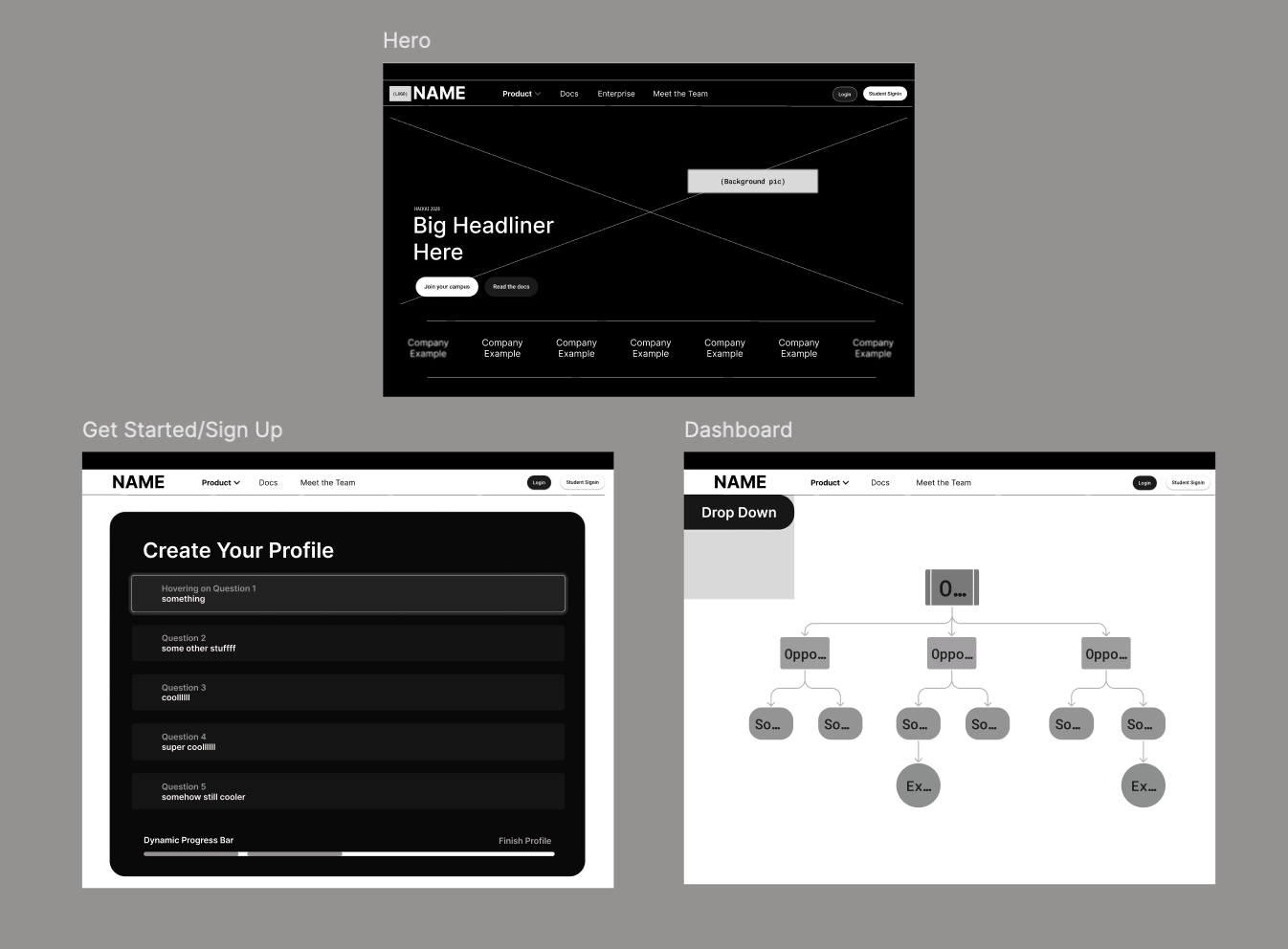
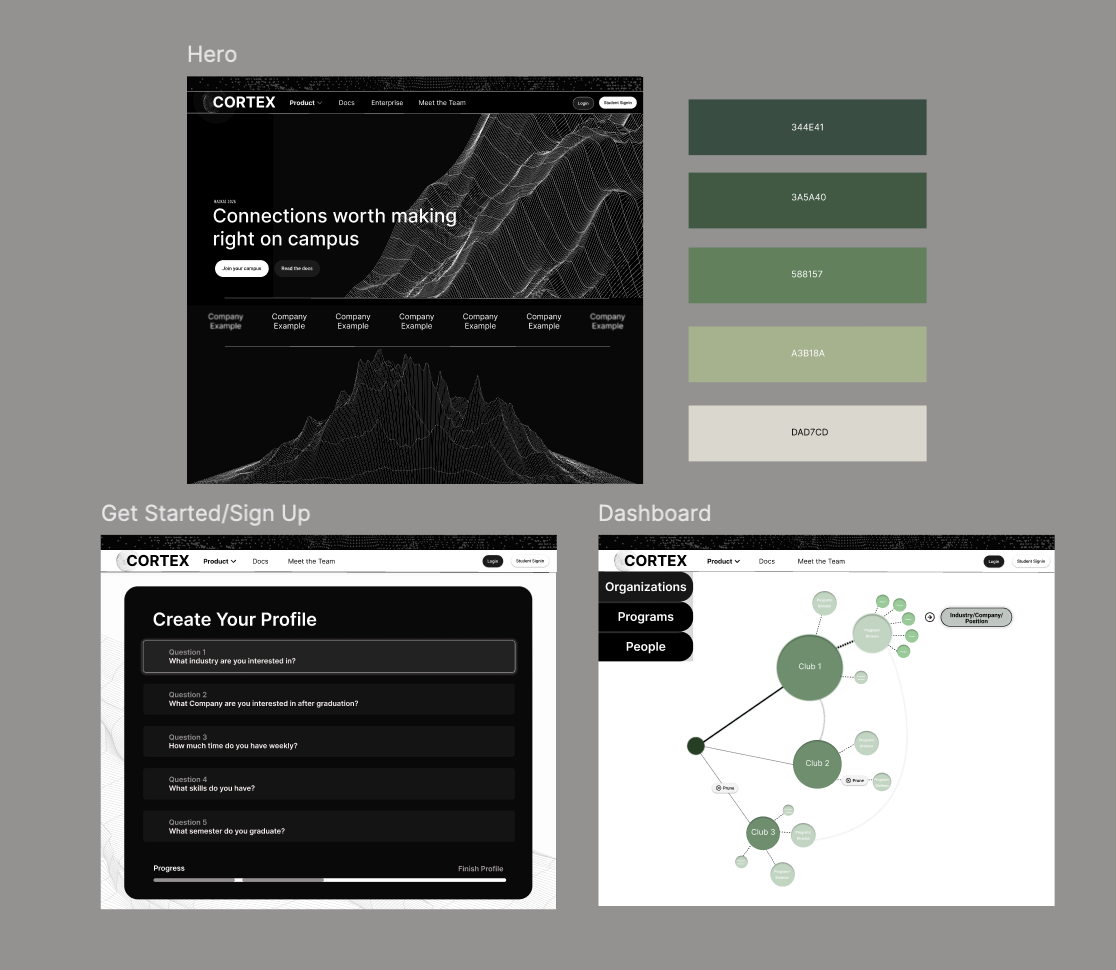
Core: Auto Layout, Components & Variants (node states: active/greyed/highlighted/eliminated), Variables & Design Tokens (dark-mode theming), Interactive Prototyping (clickable path selection flows), Dev Mode (annotated handoff specs)
New/Recent: Figma Make (AI prompt-to-prototype for rapid layout exploration), MCP Server (design-to-code context in Cursor/VS Code), Slots (dynamic node children without detaching), Code Connect UI (GitHub-linked component sync), Grid Auto Layout (responsive sidebar + canvas), Figma Draw (custom vector node icons, dynamic/variable-width strokes for weighted edges), Progressive Blur (depth separation on greyed paths), Color Variable Binding (global dark-mode token switching)
Collaboration: Multiplayer editing, Annotations (implementation notes on hover cards + animation states), Figma Slides (pitch deck built alongside product designs)
Google AntiGravity
- Agentic Full-Stack Integration — Works across frontend and backend within a single context window, automatically propagating changes in one layer (e.g., API endpoints) to the other (e.g., frontend fetch requests and JSON schemas).
- Multi-Model Switching — Switch between LLMs (Claude, Gemini, GPT-OSS) depending on task complexity — e.g., Claude for backend logic, Gemini for integration work.
- Built-In Browser Sub-Agent — Agents can launch Chrome, interact with your app's UI, and visually verify that features work end-to-end — not just write code, but test it.
- Manager Surface (Multi-Agent Orchestration) — Spawn and monitor multiple agents working in parallel across different workspaces from a centralized dashboard.
- Plan Mode vs. Fast Mode — Plan mode creates a detailed implementation plan before acting; Fast mode executes instantly for quick fixes.
- Artifact Generation — Agents produce tangible deliverables (task lists, screenshots, browser recordings, diffs) so you can review progress without reading raw logs.
- Google Docs-Style Artifact Feedback — Leave inline comments on any Artifact to guide the agent, just like reviewing a shared doc.
- Autonomous Terminal Access — Diagnoses port conflicts, resolves dependency issues, and runs shell commands (curl, pip, npm) autonomously in a remote terminal.
- Persistent Knowledge Base — Agents save useful context and code snippets to improve on future tasks, getting smarter about your project over time.
- Custom Skills & Rules — Codify your team's conventions (license headers, commit formats, code review guidelines) so the agent follows them by default.
- Granular Permission System — Fine-grained control over agent autonomy via terminal execution policies, allow/deny lists, and development mode options (Autopilot, Review-driven, Assisted).
- 1M Token Context Window — Powered by Gemini 3 Pro, it can ingest an entire large monorepo without truncation for full codebase awareness.
- Cross-Platform & Free — Available on Mac, Windows, and Linux at no cost during public preview with generous rate limits.
🚀 What's next for Cortex
- Richer Outcome Data: Expanding the scraper pipeline to continuously harvest LinkedIn profiles across more universities, creating the largest open repository of student-organization-to-career mappings.
- Collaborative Intelligence: Letting students anonymously contribute their own outcomes back into the app, creating a feedback loop that makes Cortex smarter with every graduating class.
- Academic API Integration: Connecting Cortex directly to course registration endpoints to map out specific class enrollments, not just clubs and organizations.
Built With
- ai
- analysis
- api
- data
- flask
- gemini
- javascript
- ml
- mongodb
- python
- typescript




Log in or sign up for Devpost to join the conversation.